

A
licenseA
qualityD
maintenanceA flexible Model Context Protocol server that makes documentation or codebases searchable by AI assistants, allowing users to chat with code or docs by simply pointing to a git repository or folder.
1
17 npm
91
MIT


Un servidor de Protocolo de Contexto de Modelo (MCP) que proporciona herramientas para consultar las contribuciones de Erick Wendel en diferentes plataformas. Consulta charlas, entradas de blog y vídeos en lenguaje natural mediante Claude, Cursor o similares. Este proyecto se desarrolló utilizando Cursor IDE con el agente predeterminado (versión de prueba).
Este servidor MCP también está disponible en Smithery para integración directa.
Este servidor MCP proporciona las siguientes herramientas para interactuar con la API:
get-talks : recupera una lista paginada de conversaciones con filtrado opcional
Admite filtrado por ID, título, idioma, ciudad, país y año.
Puede devolver recuentos agrupados por idioma, país o ciudad.
get-posts : obtiene publicaciones con filtrado y paginación opcionales
Admite filtrado por ID, título, idioma y portal.
get-videos : recupera vídeos con filtrado y paginación opcionales
Admite filtrado por ID, título e idioma.
check-status : verifica si la API está activa y responde
Related MCP server: MCP TabNews Integration
Puede inspeccionar las capacidades de este servidor MCP usando Smithery:
npx -y @smithery/cli@latest inspect @ErickWendel/erickwendel-contributions-mcpEsto le mostrará todas las herramientas disponibles, sus parámetros y cómo usarlas.
Asegúrate de estar usando Node.js v23+
node -v
#v23.9.0
Clonar este repositorio:
git clone https://github.com/erickwendel/erickwendel-contributions-mcp.git
cd erickwendel-contributions-mcp
Restaurar dependencias:
npm ciAbrir configuración del cursor
Navegar a la sección MCP
Haga clic en "Agregar nuevo servidor MCP"
Configurar el servidor:
Name = erickwendel-contributions
Type = command
Command = node ABSOLUTE_PATH_TO_PROJECT/src/index.ts
o si prefieres ejecutarlo desde Smithery
Name = erickwendel-contributions
Type = command
Command = npm exec -- @smithery/cli@latest run @ErickWendel/erickwendel-contributions-mcp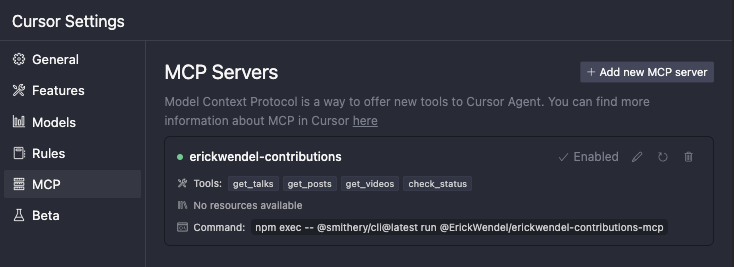
o configure directamente desde el archivo MCP global del Cursor ubicado en ~/.cursor/mcp.json y agregue lo siguiente:
{
  "mcpServers": {
    "erickwendel-contributions": {
      "command": "node",
      "args": ["ABSOLUTE_PATH_TO_PROJECT/src/index.ts"]
    }
  }
}
o si prefieres ejecutarlo desde Smithery
{
  "mcpServers": {
    "erickwendel-contributions": {
      "command": "npm",
      "args": [
        "exec",
        "--",
        "@smithery/cli@latest",
        "run",
        "@ErickWendel/erickwendel-contributions-mcp"
      ]
    }
  }
}
Asegúrese de que el chat del cursor esté en modo Agente seleccionando "Agente" en el menú desplegable de la parte inferior izquierda
Ve al chat y pregunta "¿cuántos vídeos se publicaron sobre JavaScript en 2024?"

Para instalar Erick Wendel Contributions para Claude Desktop automáticamente a través de Smithery :
npx -y @smithery/cli install @ErickWendel/erickwendel-contributions-mcp --client claudeNota : La instalación de Smithery CLI para Claude presenta problemas. Utilice el método de instalación manual a continuación hasta que se resuelva.
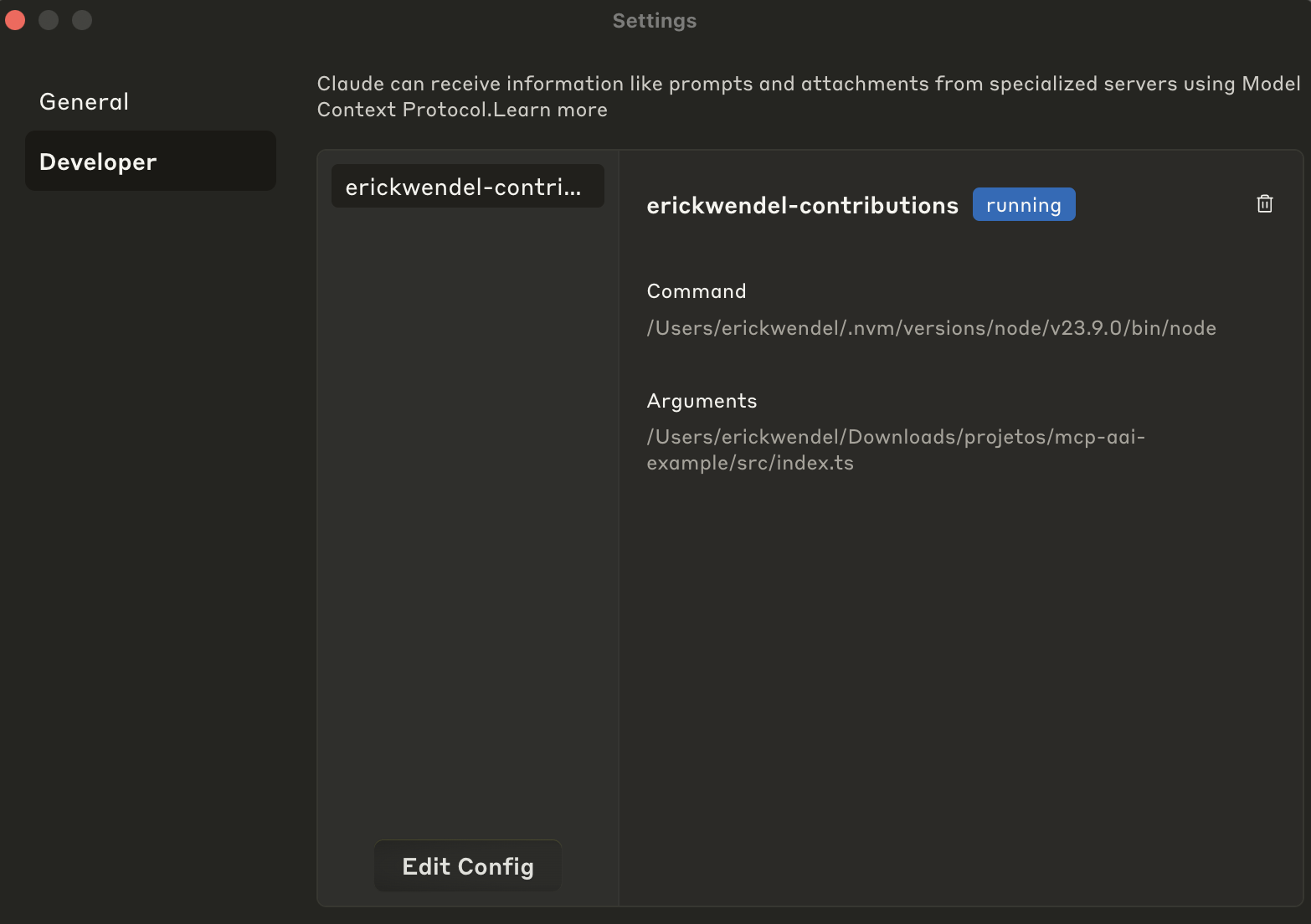
Ir a la configuración de Claude
Haga clic en la pestaña Desarrollador
Haga clic en editar configuración
Abra la configuración en un editor de código
Agregue la siguiente configuración a su configuración de Claude Desktop:
{
  "mcpServers": {
    "erickwendel-contributions": {
      "command": "node",
      "args": ["ABSOLUTE_PATH_TO_PROJECT/src/index.ts"]
    }
  }
}
o si prefieres ejecutarlo desde Smithery
{
  "mcpServers": {
    "erickwendel-contributions": {
      "command": "npm",
      "args": [
        "exec",
        "--",
        "@smithery/cli@latest",
        "run",
        "@ErickWendel/erickwendel-contributions-mcp"
      ]
    }
  }
}
Guardar archivo y reiniciar Claude Desktop
Abra nuevamente la pestaña Desarrollador y verifique si está en estado "en ejecución" de la siguiente manera:
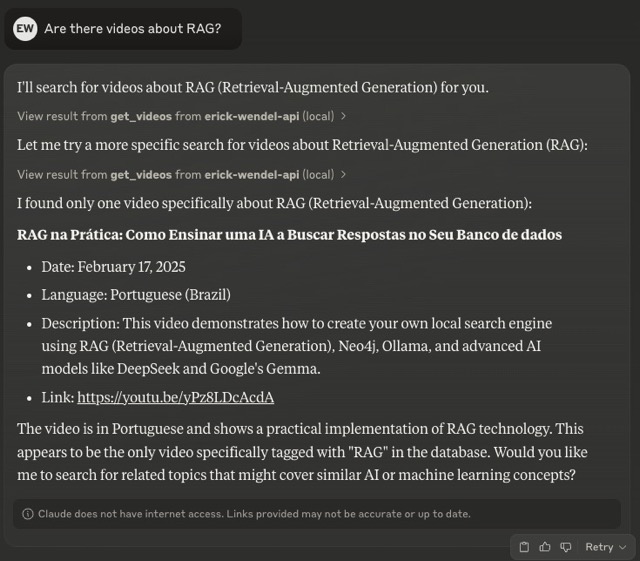
Ve al chat y pregunta "¿Hay videos sobre RAG?"
Si no tiene acceso a Claude Desktop ni a Cursor, puede usar MCPHost con Ollama como alternativa gratuita. MCPHost es una herramienta CLI que permite que los modelos de lenguaje grandes interactúen con servidores MCP.
Instalar MCPHost:
go install github.com/mark3labs/mcphost@latestCree un archivo de configuración (por ejemplo , ./mcp.jsonc ):
{
  "mcpServers": {
    "erickwendel-contributions": {
      "command": "node",
      "args": ["ABSOLUTE_PATH_TO_PROJECT/src/index.ts"]
    }
  }
}
o si prefieres ejecutarlo desde Smithery
{
  "mcpServers": {
    "erickwendel-contributions": {
      "command": "npm",
      "args": [
        "exec",
        "--",
        "@smithery/cli@latest",
        "run",
        "@ErickWendel/erickwendel-contributions-mcp"
      ]
    }
  }
}
Ejecute MCPHost con su modelo Ollama preferido:
ollama pull MODEL_NAME
mcphost --config ./mcp.jsonc -m ollama:MODEL_NAMEA continuación se muestran algunos ejemplos de consultas que puedes realizar a Claude, Cursor o cualquier cliente MCP:
¿Cuántas charlas se dieron en 2023?
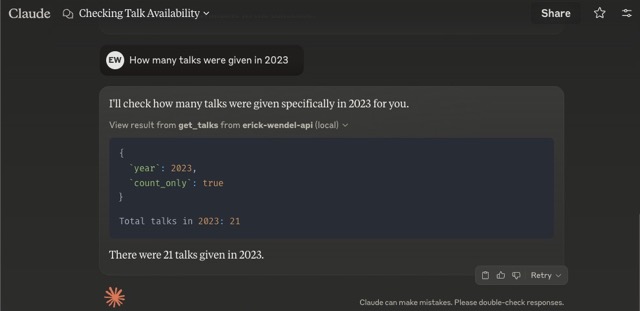
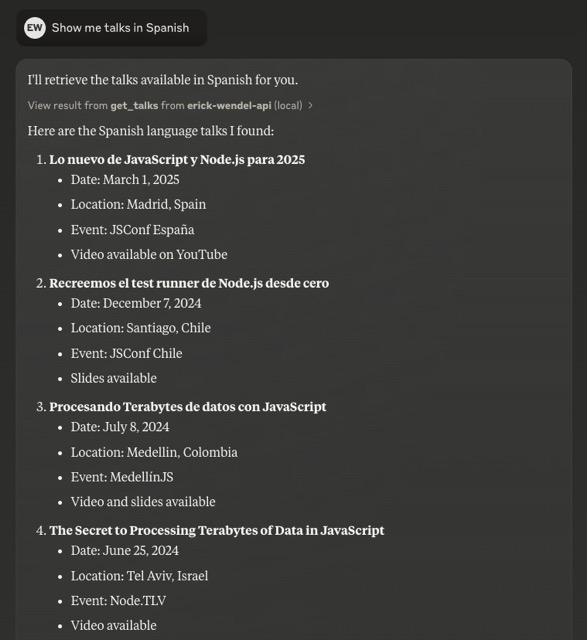
"Muéstrame charlas en español"
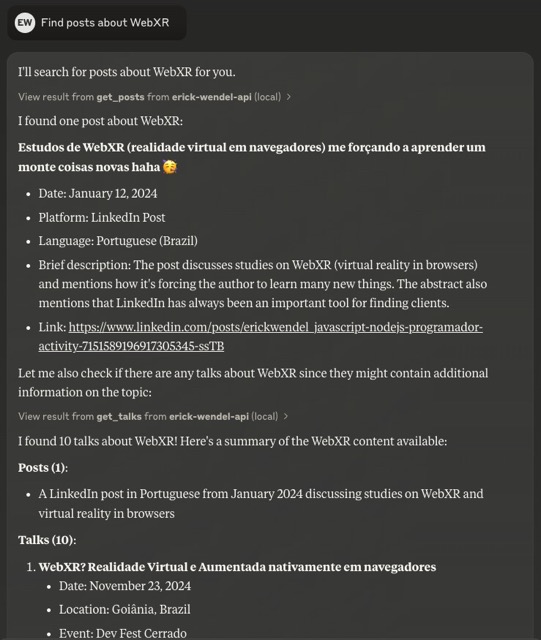
"Buscar publicaciones sobre WebXR"
Construido con el Protocolo de Contexto de Modelo (MCP)
Seguridad de tipos con validación de esquemas TypeScript y Zod
Compatibilidad nativa con TypeScript en Node.js sin transpilación
SDK generado mediante GenQL
Arquitectura modular con separación de preocupaciones
Transporte de E/S estándar para una fácil integración
Manejo estructurado de errores
Compatible con Claude Desktop, Cursor y MCPHost (alternativa gratuita)
Nota: Este proyecto requiere Node.js v23+ ya que utiliza el soporte nativo de TypeScript agregado el año pasado.
El código base sigue una estructura modular:
src/
  ├── config/      # Configuration settings
  ├── types/       # TypeScript interfaces and types
  ├── tools/       # MCP tool implementations
  ├── utils/       # Utility functions
  ├── services/    # API service layer
└── index.ts # Main entry pointPara ejecutar el conjunto de pruebas:
npm testPara el modo de desarrollo con reloj:
npm run test:dev¡Agradecemos sus contribuciones! No dude en enviar una solicitud de incorporación de cambios.
Este proyecto está licenciado bajo la licencia MIT: consulte el archivo de LICENCIA para obtener más detalles.
Check if the API is alive and responding.
| Name | Required | Description | Default |
|---|---|---|---|
No parameters | |||
Does the description disclose side effects, auth requirements, rate limits, or destructive behavior?
No annotations are provided, so the description carries the full burden. It states the tool performs a liveness check, implying a read-only operation, but it does not disclose what response to expect, error behavior, or whether any side effects occur. This is adequate for a zero-parameter tool but lacks depth.
Agents need to know what a tool does to the world before calling it. Descriptions should go beyond structured annotations to explain consequences.
Is the description appropriately sized, front-loaded, and free of redundancy?
The description is a single sentence, perfectly concise and front-loaded. It conveys the tool's purpose without any extraneous information or repetition of the tool name.
Shorter descriptions cost fewer tokens and are easier for agents to parse. Every sentence should earn its place.
Given the tool's complexity, does the description cover enough for an agent to succeed on first attempt?
Given the tool's simplicity (zero parameters, no output schema, no annotations), the description adequately conveys the core purpose. It could be improved by mentioning the expected return value or how to interpret 'responding,' but for a basic health check, the description is sufficiently complete.
Complex tools with many parameters or behaviors need more documentation. Simple tools need less. This dimension scales expectations accordingly.
Does the description clarify parameter syntax, constraints, interactions, or defaults beyond what the schema provides?
The tool has zero parameters, so the input schema fully covers any parameter semantics. The description adds no parameter details because none are necessary. Per the rubric, 0 parameters warrants a baseline score of 4.
Input schemas describe structure but not intent. Descriptions should explain non-obvious parameter relationships and valid value ranges.
Does the description clearly state what the tool does and how it differs from similar tools?
The description uses a specific verb 'check' and clearly identifies the resource ('the API'), making the tool's purpose unambiguous. It is distinctly different from sibling tools like get_talks, get_posts, and get_videos, which retrieve content rather than verify API health.
Agents choose between tools based on descriptions. A clear purpose with a specific verb and resource helps agents select the right tool.
Does the description explain when to use this tool, when not to, or what alternatives exist?
The description implies usage: if you need to verify the API is alive, use this tool. However, there is no explicit guidance on when to use it versus alternatives, nor any mention of prerequisites or exclusions. The context of sibling get_* tools suggests a read-only health check, but this is not stated.
Agents often have multiple tools that could apply. Explicit usage guidance like "use X instead of Y when Z" prevents misuse.
Get a list of posts with optional filtering and pagination.
| Name | Required | Description | Default |
|---|---|---|---|
| id | No | Filter posts by ID | |
| title | No | Filter posts by title | |
| language | No | Filter posts by language | |
| portal | No | Filter posts by portal | |
| skip | No | Number of posts to skip | |
| limit | No | Maximum number of posts to return |
Does the description disclose side effects, auth requirements, rate limits, or destructive behavior?
With no annotations provided, the description carries the full burden of behavioral disclosure. It states the tool retrieves a list with filtering and pagination but doesn't cover critical aspects like whether it's read-only, rate limits, authentication needs, error handling, or what the return format looks like (e.g., JSON structure). This leaves significant gaps for an agent to understand the tool's behavior.
Agents need to know what a tool does to the world before calling it. Descriptions should go beyond structured annotations to explain consequences.
Is the description appropriately sized, front-loaded, and free of redundancy?
The description is a single, efficient sentence that front-loads the core purpose ('Get a list of posts') and adds essential qualifiers ('with optional filtering and pagination') without any wasted words. It's appropriately sized for the tool's complexity.
Shorter descriptions cost fewer tokens and are easier for agents to parse. Every sentence should earn its place.
Given the tool's complexity, does the description cover enough for an agent to succeed on first attempt?
Given the tool's moderate complexity (6 parameters, no output schema, no annotations), the description is adequate but incomplete. It covers the basic purpose and hints at parameter usage but lacks details on behavioral traits, return values, and sibling differentiation, making it minimally viable but with clear gaps.
Complex tools with many parameters or behaviors need more documentation. Simple tools need less. This dimension scales expectations accordingly.
Does the description clarify parameter syntax, constraints, interactions, or defaults beyond what the schema provides?
The description mentions 'optional filtering and pagination,' which aligns with parameters like 'id', 'title', 'skip', and 'limit' in the schema. However, with 100% schema description coverage, the schema already fully documents all 6 parameters, so the description adds minimal value beyond reinforcing the general purpose of filtering and pagination.
Input schemas describe structure but not intent. Descriptions should explain non-obvious parameter relationships and valid value ranges.
Does the description clearly state what the tool does and how it differs from similar tools?
The description clearly states the verb ('Get') and resource ('list of posts'), making the purpose unambiguous. However, it doesn't differentiate from sibling tools like 'get_talks' or 'get_videos' beyond mentioning posts specifically, so it lacks explicit sibling distinction.
Agents choose between tools based on descriptions. A clear purpose with a specific verb and resource helps agents select the right tool.
Does the description explain when to use this tool, when not to, or what alternatives exist?
The description mentions 'optional filtering and pagination' but provides no guidance on when to use this tool versus alternatives like 'get_talks' or 'get_videos', nor does it specify any prerequisites or exclusions for usage.
Agents often have multiple tools that could apply. Explicit usage guidance like "use X instead of Y when Z" prevents misuse.
Get a list of talks with optional filtering and pagination.
| Name | Required | Description | Default |
|---|---|---|---|
| id | No | Filter talks by ID | |
| title | No | Filter talks by title | |
| language | No | Filter talks by language (e.g., 'spanish', 'english', 'portuguese' or direct codes like 'es', 'en', 'pt-br') | |
| city | No | Filter talks by city | |
| country | No | Filter talks by country | |
| year | No | Filter talks by year | |
| skip | No | Number of talks to skip | |
| limit | No | Maximum number of talks to return | |
| count_only | No | If true, returns only the count without talk details | |
| group_by | No | Group counts by a specific field (language, country, city) |
Does the description disclose side effects, auth requirements, rate limits, or destructive behavior?
No annotations are provided, so the description carries the full burden. It mentions 'optional filtering and pagination' but lacks critical behavioral details: what the return format looks like (e.g., list structure, fields included), whether it's a safe read operation (implied by 'Get' but not explicit), error handling, rate limits, or authentication requirements. For a tool with 10 parameters and no annotation coverage, this is insufficient.
Agents need to know what a tool does to the world before calling it. Descriptions should go beyond structured annotations to explain consequences.
Is the description appropriately sized, front-loaded, and free of redundancy?
The description is a single, efficient sentence: 'Get a list of talks with optional filtering and pagination.' It's front-loaded with the core purpose and wastes no words. Every part of the sentence earns its place by highlighting key features.
Shorter descriptions cost fewer tokens and are easier for agents to parse. Every sentence should earn its place.
Given the tool's complexity, does the description cover enough for an agent to succeed on first attempt?
Given the tool's complexity (10 parameters, no annotations, no output schema), the description is incomplete. It lacks details on return values, error conditions, behavioral traits (e.g., whether it's idempotent or safe), and usage context relative to siblings. For a list-retrieval tool with rich filtering options, more guidance is needed to help an agent use it effectively.
Complex tools with many parameters or behaviors need more documentation. Simple tools need less. This dimension scales expectations accordingly.
Does the description clarify parameter syntax, constraints, interactions, or defaults beyond what the schema provides?
Schema description coverage is 100%, so the schema fully documents all 10 parameters. The description adds minimal value beyond the schema—it mentions 'optional filtering and pagination,' which aligns with parameters like 'skip,' 'limit,' and filtering fields, but doesn't provide additional syntax, format details, or usage examples. Baseline 3 is appropriate when the schema does the heavy lifting.
Input schemas describe structure but not intent. Descriptions should explain non-obvious parameter relationships and valid value ranges.
Does the description clearly state what the tool does and how it differs from similar tools?
The description clearly states the tool's purpose: 'Get a list of talks with optional filtering and pagination.' It specifies the verb ('Get') and resource ('talks'), and mentions key capabilities (filtering, pagination). However, it doesn't explicitly differentiate from sibling tools like 'get_posts' or 'get_videos' beyond the resource type.
Agents choose between tools based on descriptions. A clear purpose with a specific verb and resource helps agents select the right tool.
Does the description explain when to use this tool, when not to, or what alternatives exist?
The description provides no guidance on when to use this tool versus alternatives. It mentions 'optional filtering and pagination' but doesn't specify scenarios, prerequisites, or exclusions. With sibling tools like 'get_posts' and 'get_videos' available, there's no indication of when to choose talks over posts or videos.
Agents often have multiple tools that could apply. Explicit usage guidance like "use X instead of Y when Z" prevents misuse.
Get a list of videos with optional filtering and pagination.
| Name | Required | Description | Default |
|---|---|---|---|
| id | No | Filter videos by ID | |
| title | No | Filter videos by title | |
| language | No | Filter videos by language | |
| skip | No | Number of videos to skip | |
| limit | No | Maximum number of videos to return |
Does the description disclose side effects, auth requirements, rate limits, or destructive behavior?
With no annotations provided, the description carries the full burden of behavioral disclosure. It mentions filtering and pagination but fails to describe critical behaviors like whether this is a read-only operation, what permissions are needed, rate limits, error handling, or the format of returned data. For a tool with 5 parameters and no annotations, this is inadequate.
Agents need to know what a tool does to the world before calling it. Descriptions should go beyond structured annotations to explain consequences.
Is the description appropriately sized, front-loaded, and free of redundancy?
The description is a single, efficient sentence that front-loads the core purpose ('Get a list of videos') and adds key features ('with optional filtering and pagination') without any wasted words. It's appropriately sized for the tool's complexity.
Shorter descriptions cost fewer tokens and are easier for agents to parse. Every sentence should earn its place.
Given the tool's complexity, does the description cover enough for an agent to succeed on first attempt?
Given the tool's moderate complexity (5 parameters, no annotations, no output schema), the description is insufficient. It lacks details on behavioral traits, output format, error conditions, and differentiation from siblings. While the schema covers parameters well, the description doesn't compensate for missing annotations and output schema, leaving the agent with incomplete context.
Complex tools with many parameters or behaviors need more documentation. Simple tools need less. This dimension scales expectations accordingly.
Does the description clarify parameter syntax, constraints, interactions, or defaults beyond what the schema provides?
The description adds minimal value beyond the input schema, which has 100% coverage with clear parameter descriptions. It mentions 'optional filtering and pagination' which aligns with parameters like 'id', 'title', 'language', 'skip', and 'limit', but doesn't provide additional semantic context or usage examples. Baseline 3 is appropriate given the schema's thoroughness.
Input schemas describe structure but not intent. Descriptions should explain non-obvious parameter relationships and valid value ranges.
Does the description clearly state what the tool does and how it differs from similar tools?
The description clearly states the action ('Get a list of videos') and resource ('videos'), making the purpose understandable. However, it doesn't distinguish this tool from potential siblings like 'get_posts' or 'get_talks' beyond the resource type, which prevents a perfect score.
Agents choose between tools based on descriptions. A clear purpose with a specific verb and resource helps agents select the right tool.
Does the description explain when to use this tool, when not to, or what alternatives exist?
The description mentions 'optional filtering and pagination' which implies some usage context, but provides no explicit guidance on when to use this tool versus alternatives like 'get_posts' or 'get_talks', nor any prerequisites or exclusions. This leaves significant gaps in usage direction.
Agents often have multiple tools that could apply. Explicit usage guidance like "use X instead of Y when Z" prevents misuse.
Recent tool additions, removals, and schema changes observed during successful MCP inspections.
v1.0.0check_statusget_postsget_talksget_videoscheck_statusget_postsget_talksget_videoscheck_statusget_postsget_talksget_videosScored across 4 tools
Each tool has a clearly distinct purpose targeting different resource types: API status, posts, talks, and videos. There is no overlap in functionality, making it easy for an agent to select the correct tool without confusion.
All tool names follow a consistent verb_noun pattern (check_status, get_posts, get_talks, get_videos), using snake_case throughout. This predictability enhances readability and usability for agents.
With 4 tools, the count is reasonable for a contributions-focused server, covering status and three content types. It feels slightly thin but well-scoped, as each tool serves a distinct purpose without unnecessary bloat.
The toolset provides read-only access to posts, talks, and videos with filtering and pagination, which is adequate for retrieval. However, there are notable gaps: no create, update, or delete operations, limiting full lifecycle management of contributions in the domain.
A comprehensive Model Context Protocol (MCP) server that enables AI assistants to interact with yo…
A Model Context Protocol server for Wix AI tools
The Mercado Pago MCP Server implements the Model Context Protocol to provide AI agents and LLMs with access to Mercado Pago's APIs and tools within compatible development environments. It acts as an intermediary that translates Mercado Pago resources into executable functions (tools) that AI applications can invoke to perform actions and automate flows. The server simplifies integration, enables using documentation to implement or improve code, and optimizes operations through natural language interactions without manual implementations.
The Telnyx MCP server is an official implementation of the Model Context Protocol that enables AI clients (like Claude Desktop, Cursor, and OpenAI Agents) to interact with Telnyx's telephony, messaging, and AI assistant APIs. It provides comprehensive capabilities including making and managing phone calls, sending SMS/MMS messages, purchasing and configuring phone numbers, creating AI assistants with custom instructions, managing cloud storage buckets, scraping and embedding website content, and handling integration secrets. The server exists as both a local implementation and a remotely hosted version, allowing developers to integrate real-world communication infrastructure directly into AI applications.
