

F
licenseNot graded
qualityD
maintenanceA Model Context Protocol server that enables controlling Spotify playback through natural language commands in MCP clients like Cursor or Claude for Desktop.
1
-

Una herramienta FastMCP para Spotify.
Enlace: https://drive.google.com/file/d/1jGGQBzeXSKSJijeUwFZLdvrKPmPuogGd/
Related MCP server: Spotify MCP Server
Clonar este repositorio
Crea un archivo .env en la raíz del repositorio y agrega tus credenciales de API de Spotify (cópialas desde .env.example )
Puedes obtener tus credenciales yendo al Panel de desarrolladores de Spotify y creando una aplicación.
Vaya a Configuración del cursor > Características > Servidores MCP > + Agregar nuevo servidor MCP
Nombre: Spotify, Tipo: comando, Comando: uv --directory <ruta-al-repositorio/mcp-spotify> run main.py
Debería ver la herramienta instalada ahora.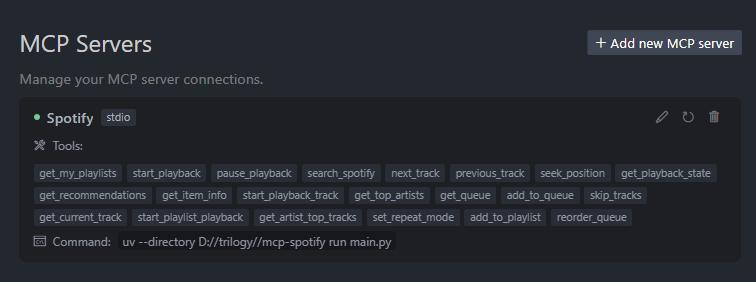
Abre Composer en modo "agente" y listo, podrás controlar con el cursor tu reproductor de Spotify. (Asegúrate de tener Spotify abierto en un dispositivo activo).
A continuación se muestra un ejemplo de conversación que muestra cómo puedes interactuar con la herramienta Spotify MCP a través de Cursor Composer:
Usuario: "Muéstrame mis listas de reproducción".
Respuesta: "Aquí están tus listas de reproducción: Chill Vibes, Workout Mix, Top Hits".
Usuario: "Reproduce mi lista de reproducción 'Chill Vibes'".
Usuario: "Pausar canción."
Respuesta: "Reproducción en pausa".
Usuario: "Reanudar canción."
Respuesta: "Reanudando reproducción..."
Usuario: "¿Qué canción es esta?"
Respuesta: "Estás escuchando 'Faded' de Alan Walker".
Usuario: "Cuéntame sobre este artista y muéstrame algunas canciones populares".
Respuesta: "Información del artista: Alan Walker".
Usuario: "Muéstrame mis mejores artistas de los últimos 6 meses".
Respuesta: "Aquí están tus artistas más escuchados..."
Usuario: "Buscar Coldplay."
Respuesta: "Artista encontrado: Coldplay. Aquí están sus canciones favoritas..."
Usuario: "Reproducir canción 'Fix You'."
Respuesta: "Iniciando la reproducción de 'Fix You'..."
Usuario: "Muéstrame mi cola".
Respuesta: "Cola actual: Pista 1, Pista 2, Pista 3..."
Usuario: "Añadir 'Paraíso' a mi cola."
Respuesta: "Añadí 'Paradise' de Coldplay a tu cola".
Usuario: "Mover 'Paraíso' hacia arriba en la cola".
Usuario: "Configúrelo para que se repita".
Usuario: "Me gusta esta canción. Recomienda algunas pistas similares".
Respuesta: "Aquí hay algunas recomendaciones basadas en esta pista..."
Usuario: "Agrega esta pista a mi lista de reproducción 'Chill Vibes'".
Funciones adicionales disponibles:
Busca una posición específica en la pista
Ver el estado de reproducción detallado
Saltar varias pistas a la vez
Si quieres que se admitan más funciones, ¡no dudes en plantear un problema!
Add tracks to a playlist
Args:
    playlist_id: Spotify playlist ID
    track_ids: List of track IDs to add
Inputs: playlist_id (required), track_ids (required).
Add a track to the queue
Args:
    track_id: Spotify track ID to add
Inputs: track_id (required).
Get top tracks for an artist
Args:
    artist_id: Spotify artist ID
Inputs: artist_id (required).
Get information about the currently playing track
Inputs: no named parameters.
Get detailed information about a Spotify item
Args:
    item_id: Spotify ID
    type: One of 'track', 'album', 'artist', 'playlist'
Inputs: item_id (required), type.
FastMCP tool to get user playlists using SpotifyClient.
Inputs: no named parameters.
Get current playback information
Inputs: no named parameters.
Get the current queue of tracks
Inputs: no named parameters.
Get Spotify recommendations based on seeds
Args:
    seed_artists: Comma-separated artist IDs
    seed_tracks: Comma-separated track IDs
    seed_genres: Comma-separated genres
    limit: Number of recommendations
Inputs: seed_artists, seed_tracks, seed_genres, limit.
Get user's top artists from Spotify
Args:
    limit: Number of artists (max 50)
    time_range: One of 'short_term' (4 weeks), 'medium_term' (6 months), 'long_term' (all time)
Inputs: limit, time_range.
Skip to next track in queue
Inputs: no named parameters.
FastMCP tool to pause playback on spotify.
Inputs: no named parameters.
Go back to previous track
Inputs: no named parameters.
Reorder tracks in queue by moving a track to a different position
Args:
    range_start: Position of track to move
    insert_before: Position to insert the track
Inputs: range_start (required), insert_before (required).
Search Spotify for tracks, artists, albums, or playlists.
Args:
    query: Search term
    type: One of 'track', 'artist', 'album', 'playlist'
    limit: Max number of results
Inputs: query (required), type, limit.
Seek to position in current track
Args:
    position_ms: Position in milliseconds
Inputs: position_ms (required).
Set repeat mode for playback
Args:
    state: One of 'track', 'context', or 'off'
Inputs: state (required).
Skip multiple tracks at once
Args:
    num_skips: Number of tracks to skip (default: 1)
Inputs: num_skips.
FastMCP tool to resume playback on the currently active Spotify device.
Inputs: no named parameters.
Start playback of a specific track on Spotify
Args:
    track_uri: Spotify URI of the track (e.g. 'spotify:track:1234...')
    device_id: Optional device to play on
Inputs: track_uri (required), device_id.
Start playback of a specific playlist
Args:
    playlist_id: Spotify playlist ID
    device_id: Optional device to play on
Inputs: playlist_id (required), device_id.
Recent tool additions, removals, and schema changes observed during successful MCP inspections.
Loading tool schema changelog…
Scored across 21 tools
Most tools have distinct purposes targeting specific Spotify resources and actions, with clear boundaries between playback control, queue management, and content retrieval. However, some overlap exists between 'skip_tracks' and 'next_track'/'previous_track', and 'start_playback' vs 'start_playback_track'/'start_playlist_playback' could cause confusion about which to use for resuming vs starting specific content.
The server maintains strong consistency with snake_case naming throughout and mostly follows verb_noun patterns (e.g., 'get_current_track', 'add_to_queue', 'search_spotify'). Minor deviations include 'get_item_info' (noun_verb) and some tools using 'playback' while others use 'track'/'playlist' in similar contexts, but the overall pattern remains clear and predictable.
With 21 tools, this feels borderline heavy for a music streaming interface. While Spotify's API is feature-rich, the tool set includes some redundancy (e.g., multiple skip/playback variants) that could potentially be consolidated. The count is manageable but approaches the upper limit of what feels well-scoped for this domain.
The tool surface provides comprehensive coverage of Spotify's core functionality including playback control (play/pause/skip/seek/repeat), queue management, content retrieval (tracks/artists/playlists/recommendations), search capabilities, and user data access. There are no obvious gaps for typical agent workflows, with CRUD-like operations well-represented across the music streaming domain.
Spotify MCP server for ChatGPT, Claude and any AI agent: search songs and artists, list playlists, read playlist songs, create playlist, add songs to playlist, remove songs from playlist, set playlist public or private and save to Liked Songs in your own Spotify account. Cotlet works in the account through your Cloud Browser, a real Chrome where you sign in to Spotify yourself; Cotlet does not store your password and you need no Spotify API key. About the official Spotify API: Spotify has a full Web API and, since 23 Apr 2026, an official connector for Claude (checked 5 Nov 2026). The API needs an app you register, and in development mode the app owner must have Premium and the app allows 5 users; unlimited users need a registered business with at least 250,000 monthly users. Setup and FAQ: https://cotlet.dev/integrations/spotify-api-mcp-server
Generate AI music via the Lacuna Music API from MCP clients like Claude Desktop & Code.
Spotify MCP — Web API via client_credentials OAuth
ScoreStarling is an all-in-one AI sheet music assistant. Ask for anything to do with sheet music: transcribe a song from audio, video or a link, read a PDF or photo, add chords, change the key, make it easier, turn it into guitar TAB or jianpu, or arrange it for another instrument. Every change lands on a real score you can hear, fix and download (PDF, MIDI, MusicXML, guitar TAB, jianpu, audio). Hosted remote server with OAuth sign-in. Free accounts get monthly credits and free previews; prices are at scorestarling.com/pricing. Setup: https://scorestarling.com/mcp