Canvas MCP - College and High School Courses
Allows AI agents to interact with Canvas LMS by finding relevant resources, retrieving course information, accessing modules and module items, getting file URLs, with planned features for calendar events, assignments, and various analysis capabilities.
Integrates with Google's Gemini API for AI-powered features, specifically for finding relevant resources in Canvas LMS based on natural language queries.
This server does not currently have a deployable release on Glama. Follow the repository's setup instructions to install and configure it for your MCP client, including any required credentials and local dependencies.
Canvas MCP
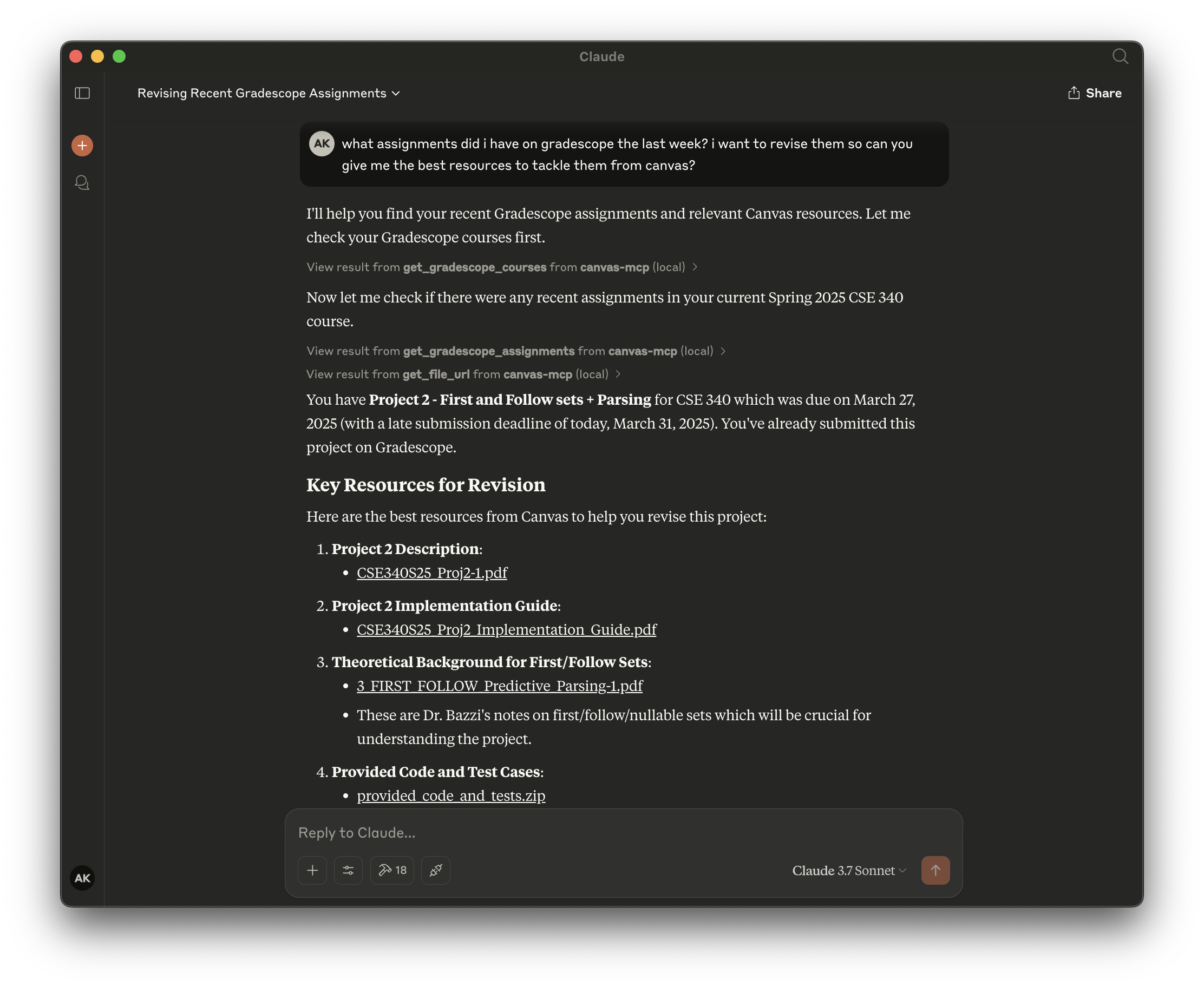
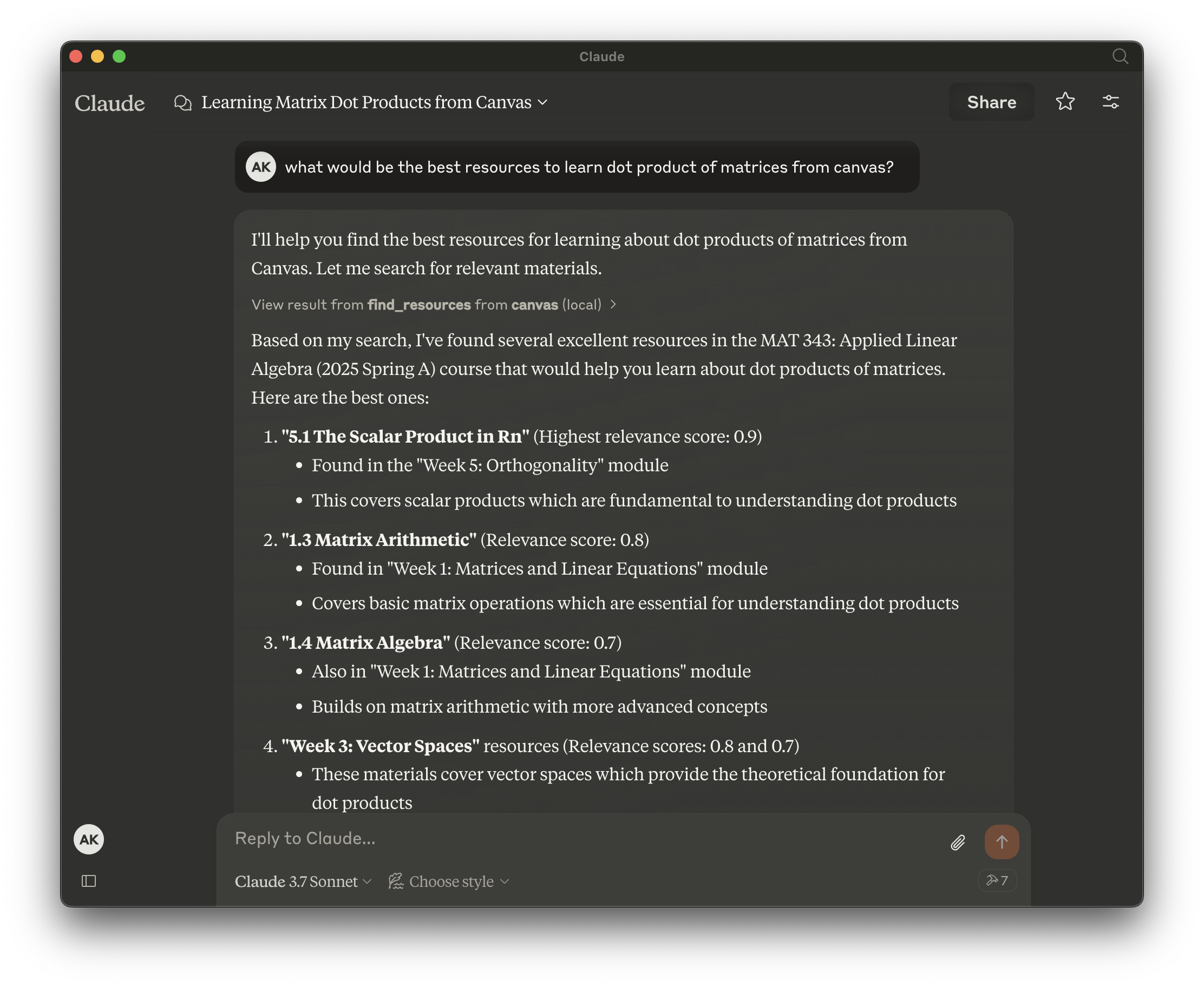
Canvas MCP is a set of tools that allows your AI agents to interact with Canvas LMS and Gradescope.


Features
Find relevant resources - Ability to find relevant resources for a given query in natural language!
Query upcoming assignments - Not only fetch upcoming assignments, but also provide its breakdown for a given course.
Get courses and assignments from Gradescope - Query your Gradescope courses and assignments with natural language, get submission status, and more!
Get courses
Get modules
Get module items
Get file url
Get calendar events
Get assignments
and so much more...
Related MCP server: Canvas Assignment Assistant
Usage
Note down the following beforehand:
Canvas API Key from
Canvas > Account > Settings > Approved Integrations > New Access TokenGradescope Email and Password https://www.gradescope.com/
Installing via Smithery (Preferred)
To install Canvas MCP for Claude Code via Smithery:
npx -y @smithery/cli@latest mcp add aryankeluskar/canvas-mcp --client claude-codeOr, for Cursor IDE to use canvas-mcp with other models:
npx -y @smithery/cli install aryankeluskar/canvas-mcp --client cursorOr, for ChatGPT:
Enable Developer Mode in settings, if not already enabled
Go to
ChatGPT Settings > Connectorsand click Create to add this server URL:https://canvas-mcp--aryankeluskar.run.tools
Manual Configuration (ONLY for local instances)
Create a .env file in the root directory with the following environment variables:
SNITHERY_API_KEY=your_snithery_api_keyAdd the following to your mcp.json or claude_desktop_config.json file:
{
"mcpServers": {
"canvas": {
"command": "npx",
"args": [
"-y",
"@smithery/cli",
"run",
"@aryankeluskar/canvas-mcp"
]
}
}
}Built by Aryan Keluskar :)
This server cannot be deployed
Maintenance
Related MCP Connectors
AI-powered LMS course builder: 89 tools, 17 skills, SCORM/xAPI export, agentic UI
Agent tools for discovery, payment safety, data extraction, and DeFi.
Travel tools for AI agents: plan and edit real trips, search stays and tours, import travel videos.
Web data for agents. Extract web pages, crawl websites, discover URLs, and search the web.
Related MCP Servers
- AlicenseNot gradedqualityDmaintenanceEnables AI assistants to interact with Canvas LMS through 25 comprehensive tools. Supports course management, assignments, grades, messaging, calendar events, and file access through natural language.3,092 npm14MIT
- FlicenseAqualityNot gradedmaintenanceEnables interaction with Canvas LMS courses and assignments directly from your LLM, allowing you to retrieve, search, and summarize course information, check due dates, and access assignment details without leaving your AI assistant.43,092 npm-
- AlicenseNot gradedqualityDmaintenanceEnables AI agents to interact with Canvas LMS and Gradescope, allowing users to query courses, assignments, modules, calendar events, and find relevant resources using natural language.9 npmISC
- AlicenseAqualityCmaintenanceEnables AI systems to interact with Canvas Learning Management System data, allowing users to access courses, assignments, quizzes, planner items, files, and syllabi through natural language queries.2235 PyPI7MIT