
A
licenseNot graded
qualityC
maintenanceA minimal server/client application implementation utilizing the Model Context Protocol (MCP) and Azure OpenAI.
35
MIT

此代码库包含一个用于教学目的的模型上下文协议 (MCP) 服务器实现。此代码演示了如何构建一个可与各种 LLM 客户端集成的功能性 MCP 服务器。
要遵循完整的教程,请参阅YouTube 视频教程。
MCP(模型上下文协议)是一种开放协议,它规范了应用程序向 LLM 提供上下文的方式。MCP 就像 AI 应用程序的 USB-C 端口一样,它提供了一种标准化的方式,将 AI 模型连接到不同的数据源和工具。
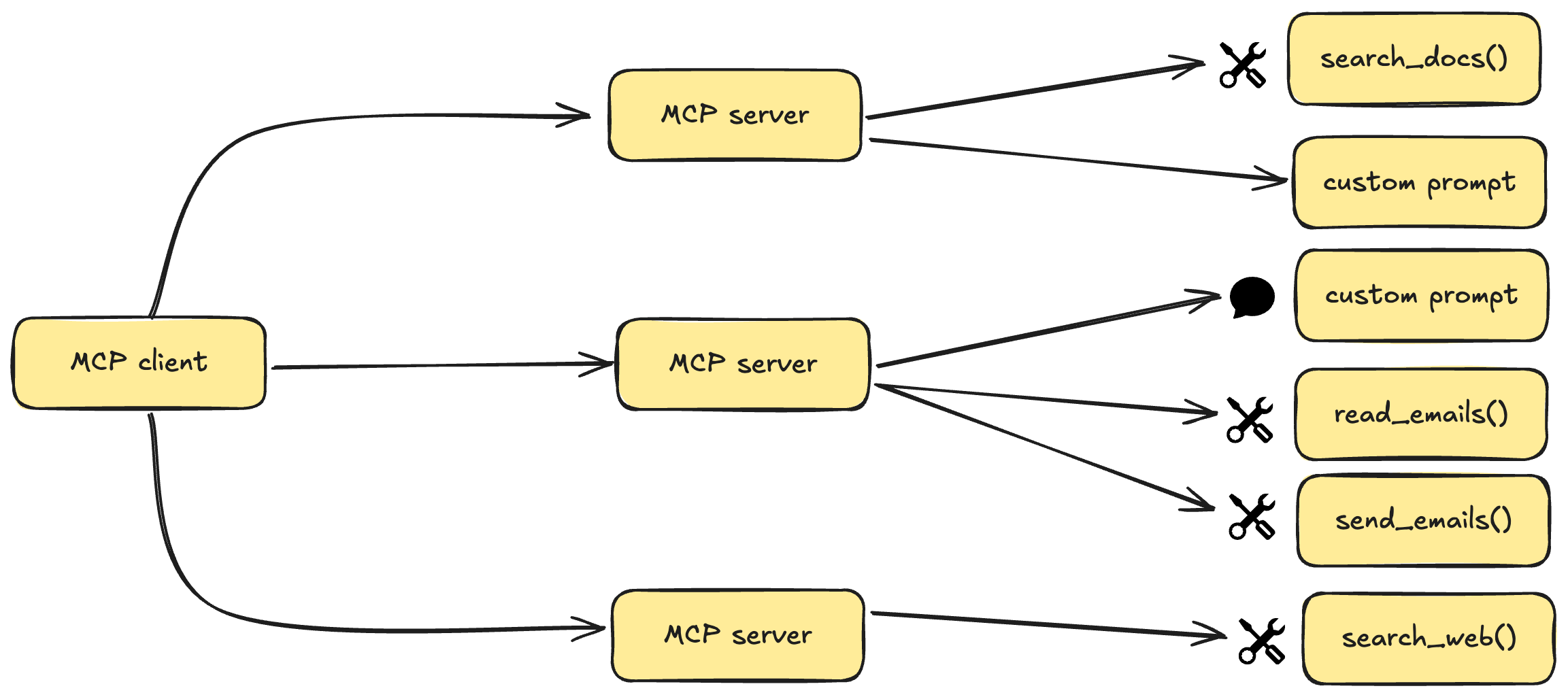
越来越多的预建集成可供您的 LLM 直接插入
灵活地在 LLM 提供商和供应商之间切换
保护基础架构内数据的最佳实践
Related MCP server: Optimized Memory MCP Server V2
MCP 遵循客户端-服务器架构,其中主机应用程序可以连接到多个服务器:
MCP 主机:像 Claude Desktop、IDE 或 AI 工具这样的程序,需要通过 MCP 访问数据
MCP 客户端:与服务器保持 1:1 连接的协议客户端
MCP 服务器:通过标准化模型上下文协议公开特定功能的轻量级程序
数据源:MCP 服务器可以访问的本地(文件、数据库)和远程服务(API)
MCP 服务器可以提供三种主要类型的功能:
资源:客户端可以读取的类似文件的数据(例如 API 响应或文件内容)
工具:可由 LLM 调用的函数(经用户批准)
提示:预先编写的模板,帮助用户完成特定任务
Python 3.10 或更高版本
MCP SDK 1.2.0 或更高版本
uv包管理器
在 MacOS/Linux 上:
curl -LsSf https://astral.sh/uv/install.sh | sh之后请确保重新启动终端以确保uv命令被接收。
创建并初始化项目:
# Create a new directory for our project
uv init mcp-server
cd mcp-server

# Create virtual environment and activate it
uv venv
source .venv/bin/activate  # On Windows use: .venv\Scripts\activate

# Install dependencies
uv add "mcp[cli]" httpx
创建服务器实现文件:
touch main.py启动 MCP 服务器:
uv run main.py服务器将启动并准备接受连接
从官方网站安装Claude Desktop
配置 Claude Desktop 以使用您的 MCP 服务器:
编辑~/Library/Application Support/Claude/claude_desktop_config.json :
{
    "mcpServers": {
        "mcp-server": {
            "command": "uv",  # It's better to use the absolute path to the uv command
            "args": [
                "--directory",
                "/ABSOLUTE/PATH/TO/YOUR/mcp-server",
                "run",
                "main.py"
            ]
        }
    }
}
重启Claude桌面
如果您的服务器未被 Claude Desktop 接收:
检查配置文件路径和权限
验证配置中的绝对路径是否正确
确保 uv 已正确安装并可访问
检查 Claude Desktop 日志中是否有任何错误消息
本项目遵循 MIT 许可证。详情请参阅LICENSE文件。
Search the latest docs for a given query and library. Supports langchain, openai, and llama-index.
Args: query: The query to search for (e.g. "Chroma DB") library: The library to search in (e.g. "langchain")
Returns: Text from the docs
Inputs: query (required), library (required).
Recent tool additions, removals, and schema changes observed during successful MCP inspections.
Loading tool schema changelog…
Scored across 1 tool
With only one tool, there is no possibility of ambiguity or overlap between tools. The tool has a single, clear purpose of searching documentation for specific libraries.
The single tool name 'get_docs' follows a clear verb_noun pattern. Since there is only one tool, consistency is inherently perfect with no deviations to evaluate.
A single tool is too few for most server purposes, as it severely limits functionality and scope. This feels thin and incomplete for a documentation search server, which might benefit from additional tools like browsing documentation structure or getting library lists.
The tool surface is severely incomplete for a documentation search domain. It only supports searching text, with no tools for browsing, listing available libraries, or accessing documentation metadata, creating significant gaps that will hinder agent workflows.
A comprehensive Model Context Protocol (MCP) server that enables AI assistants to interact with yo…
A Model Context Protocol server for Wix AI tools
Model Context Protocol server for the Apideck Unified API. Connect any MCP-compatible agent framework to 100+ accounting systems, HRIS platforms, file storage providers, and more through one integration. More information https://www.apideck.com/mcp-server
An MCP server that provides an API to LLMs to manage their JumpCloud resources.