
A
licenseNot graded
qualityD
maintenanceA minimal server/client application implementation utilizing the Model Context Protocol (MCP) and Azure OpenAI.
35
MIT

Este repositorio contiene la implementación de un servidor de Protocolo de Contexto de Modelo (MCP) con fines educativos. Este código demuestra cómo construir un servidor MCP funcional que se integra con varios clientes LLM.
Para seguir el tutorial completo, consulte el videotutorial de YouTube .
MCP (Protocolo de Contexto de Modelo) es un protocolo abierto que estandariza cómo las aplicaciones proporcionan contexto a los LLM. Piense en MCP como un puerto USB-C para aplicaciones de IA: proporciona una forma estandarizada de conectar los modelos de IA a diferentes fuentes de datos y herramientas.
Una lista creciente de integraciones prediseñadas a las que su LLM puede conectarse directamente
Flexibilidad para cambiar entre proveedores y vendedores de LLM
Mejores prácticas para proteger sus datos dentro de su infraestructura
Related MCP server: Optimized Memory MCP Server V2
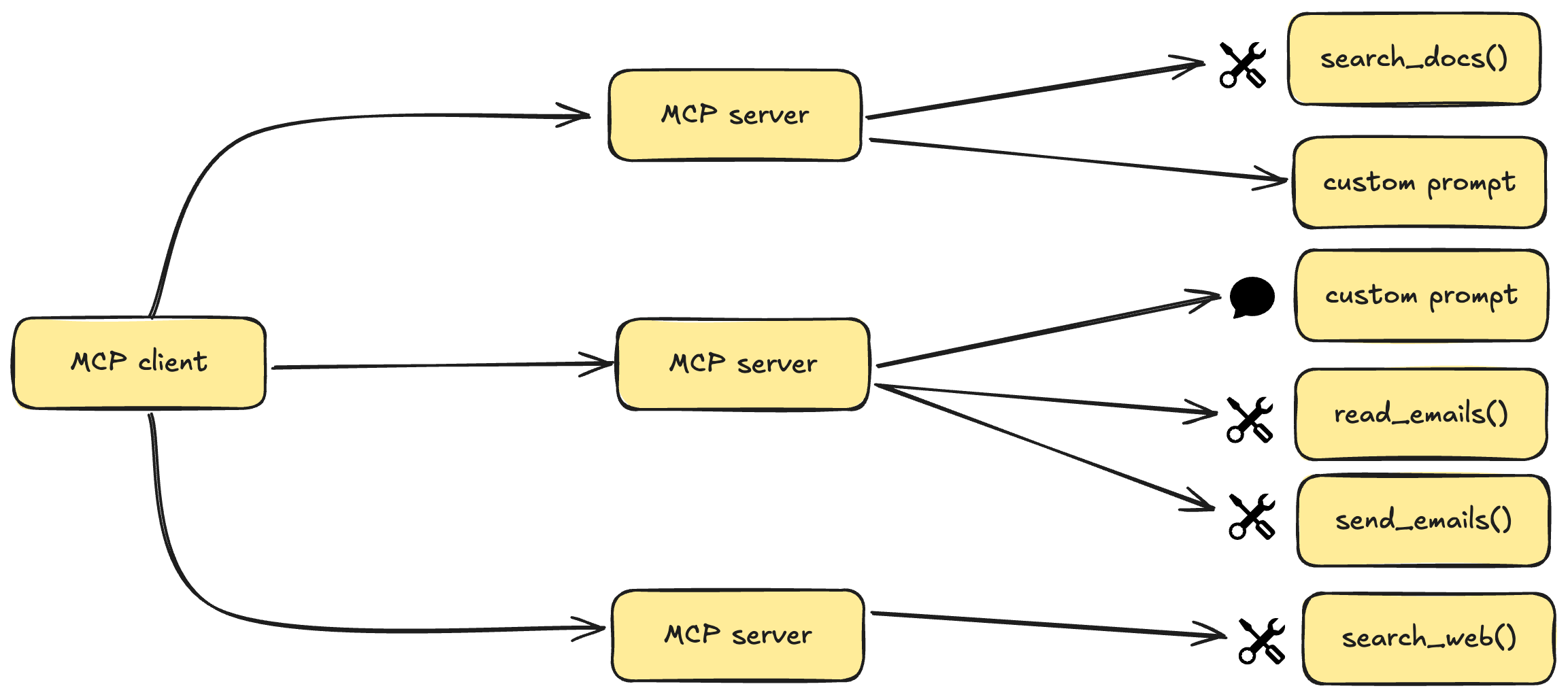
MCP sigue una arquitectura cliente-servidor donde una aplicación host puede conectarse a múltiples servidores:
Hosts MCP : programas como Claude Desktop, IDE o herramientas de IA que desean acceder a datos a través de MCP
Clientes MCP : clientes de protocolo que mantienen conexiones 1:1 con servidores
Servidores MCP : programas livianos que exponen capacidades específicas a través del Protocolo de Contexto de Modelo estandarizado
Fuentes de datos : tanto locales (archivos, bases de datos) como servicios remotos (API) a los que pueden acceder los servidores MCP
Los servidores MCP pueden proporcionar tres tipos principales de capacidades:
Recursos : datos similares a archivos que los clientes pueden leer (como respuestas de API o contenido de archivos)
Herramientas : Funciones que puede llamar el LLM (con aprobación del usuario)
Indicaciones : Plantillas preescritas que ayudan a los usuarios a realizar tareas específicas
Python 3.10 o superior
MCP SDK 1.2.0 o superior
administrador de paquetes uv
En MacOS/Linux:
curl -LsSf https://astral.sh/uv/install.sh | shAsegúrese de reiniciar su terminal luego para garantizar que se detecte el comando uv .
Crear e inicializar el proyecto:
# Create a new directory for our project
uv init mcp-server
cd mcp-server

# Create virtual environment and activate it
uv venv
source .venv/bin/activate  # On Windows use: .venv\Scripts\activate

# Install dependencies
uv add "mcp[cli]" httpx
Cree el archivo de implementación del servidor:
touch main.pyInicie el servidor MCP:
uv run main.pyEl servidor se iniciará y estará listo para aceptar conexiones.
Instalar Claude Desktop desde el sitio web oficial
Configure Claude Desktop para utilizar su servidor MCP:
Editar ~/Library/Application Support/Claude/claude_desktop_config.json :
{
    "mcpServers": {
        "mcp-server": {
            "command": "uv",  # It's better to use the absolute path to the uv command
            "args": [
                "--directory",
                "/ABSOLUTE/PATH/TO/YOUR/mcp-server",
                "run",
                "main.py"
            ]
        }
    }
}
Reiniciar Claude Desktop
Si Claude Desktop no detecta su servidor:
Verifique la ruta y los permisos del archivo de configuración
Verifique que la ruta absoluta en la configuración sea correcta
Asegúrese de que el sistema UV esté correctamente instalado y accesible.
Consulte los registros de Claude Desktop para ver si hay mensajes de error
Este proyecto está licenciado bajo la Licencia MIT. Consulte el archivo de LICENCIA para más detalles.
Search the latest docs for a given query and library. Supports langchain, openai, and llama-index.
Args: query: The query to search for (e.g. "Chroma DB") library: The library to search in (e.g. "langchain")
Returns: Text from the docs
| Name | Required | Description | Default |
|---|---|---|---|
| query | Yes | ||
| library | Yes |
Does the description disclose side effects, auth requirements, rate limits, or destructive behavior?
With no annotations provided, the description carries the full burden for behavioral disclosure. It notes that the tool searches 'latest docs' and returns text, implying a read-only operation, but does not mention potential network dependency, error cases, or any side effects. This is adequate but not rich.
Agents need to know what a tool does to the world before calling it. Descriptions should go beyond structured annotations to explain consequences.
Is the description appropriately sized, front-loaded, and free of redundancy?
The description is concise and well-structured: a one-sentence purpose statement followed by clear Args/Returns sections. Every sentence adds value, and information is front-loaded.
Shorter descriptions cost fewer tokens and are easier for agents to parse. Every sentence should earn its place.
Given the tool's complexity, does the description cover enough for an agent to succeed on first attempt?
For a 2-parameter tool with no output schema, the description provides sufficient context: purpose, supported libraries, parameter guidance, and return type. It lacks explicit error handling or formatting details, but these are not critical for this simple search tool.
Complex tools with many parameters or behaviors need more documentation. Simple tools need less. This dimension scales expectations accordingly.
Does the description clarify parameter syntax, constraints, interactions, or defaults beyond what the schema provides?
Schema description coverage is 0%, so the description must fully explain the parameters. It does so effectively with an Args section providing both meaning and examples for 'query' and 'library', plus listing supported library values in the main description.
Input schemas describe structure but not intent. Descriptions should explain non-obvious parameter relationships and valid value ranges.
Does the description clearly state what the tool does and how it differs from similar tools?
The description clearly states the tool's function: 'Search the latest docs for a given query and library.' It specifies the resource (docs), the verb (search), and scope (latest), and distinguishes from sibling Chroma DB tools by focusing on doc search for specific libraries.
Agents choose between tools based on descriptions. A clear purpose with a specific verb and resource helps agents select the right tool.
Does the description explain when to use this tool, when not to, or what alternatives exist?
The description indicates when to use the tool (when searching docs for langchain, openai, or llama-index) through the list of supported libraries. However, it lacks explicit exclusions or alternative tool references, so it doesn't fully meet the 'when-not/alternatives' criterion.
Agents often have multiple tools that could apply. Explicit usage guidance like "use X instead of Y when Z" prevents misuse.
Recent tool additions, removals, and schema changes observed during successful MCP inspections.
get_docsScored across 1 tool
With only one tool, there is no possibility of ambiguity or overlap between tools. The tool has a single, clear purpose of searching documentation for specific libraries.
The single tool name 'get_docs' follows a clear verb_noun pattern. Since there is only one tool, consistency is inherently perfect with no deviations to evaluate.
A single tool is too few for most server purposes, as it severely limits functionality and scope. This feels thin and incomplete for a documentation search server, which might benefit from additional tools like browsing documentation structure or getting library lists.
The tool surface is severely incomplete for a documentation search domain. It only supports searching text, with no tools for browsing, listing available libraries, or accessing documentation metadata, creating significant gaps that will hinder agent workflows.
A comprehensive Model Context Protocol (MCP) server that enables AI assistants to interact with yo…
A Model Context Protocol server for Wix AI tools
Model Context Protocol server for the Apideck Unified API. Connect any MCP-compatible agent framework to 100+ accounting systems, HRIS platforms, file storage providers, and more through one integration. More information https://www.apideck.com/mcp-server
An MCP server that provides an API to LLMs to manage their JumpCloud resources.