
A
licenseNot graded
qualityD
maintenanceA minimal server/client application implementation utilizing the Model Context Protocol (MCP) and Azure OpenAI.
35
MIT

This MCP server provides a tool named get_docs that allows you to search the latest documentation for popular AI libraries.
Supported Libraries: Search documentation for langchain, openai, and llama-index
Input Parameters: Takes a query string (e.g., "Chroma DB") and a target library name
Returns: Relevant text extracted from the documentation based on your query
References a tutorial video that demonstrates how to build and configure the MCP server.
Click on "Deploy Server".
Wait a few minutes for the server to deploy. Once ready, it will show a "Started" state.
In the chat, type @ followed by the MCP server name and your instructions, e.g., "@MCP Server Example explain how MCP servers connect to Claude Desktop"
That's it! The server will respond to your query, and you can continue using it as needed.
Here is a step-by-step guide with screenshots.
This repository contains an implementation of a Model Context Protocol (MCP) server for educational purposes. This code demonstrates how to build a functional MCP server that can integrate with various LLM clients.
To follow the complete tutorial, please refer to the YouTube video tutorial.
MCP (Model Context Protocol) is an open protocol that standardizes how applications provide context to LLMs. Think of MCP like a USB-C port for AI applications - it provides a standardized way to connect AI models to different data sources and tools.
A growing list of pre-built integrations that your LLM can directly plug into
Flexibility to switch between LLM providers and vendors
Best practices for securing your data within your infrastructure
Related MCP server: Optimized Memory MCP Server V2
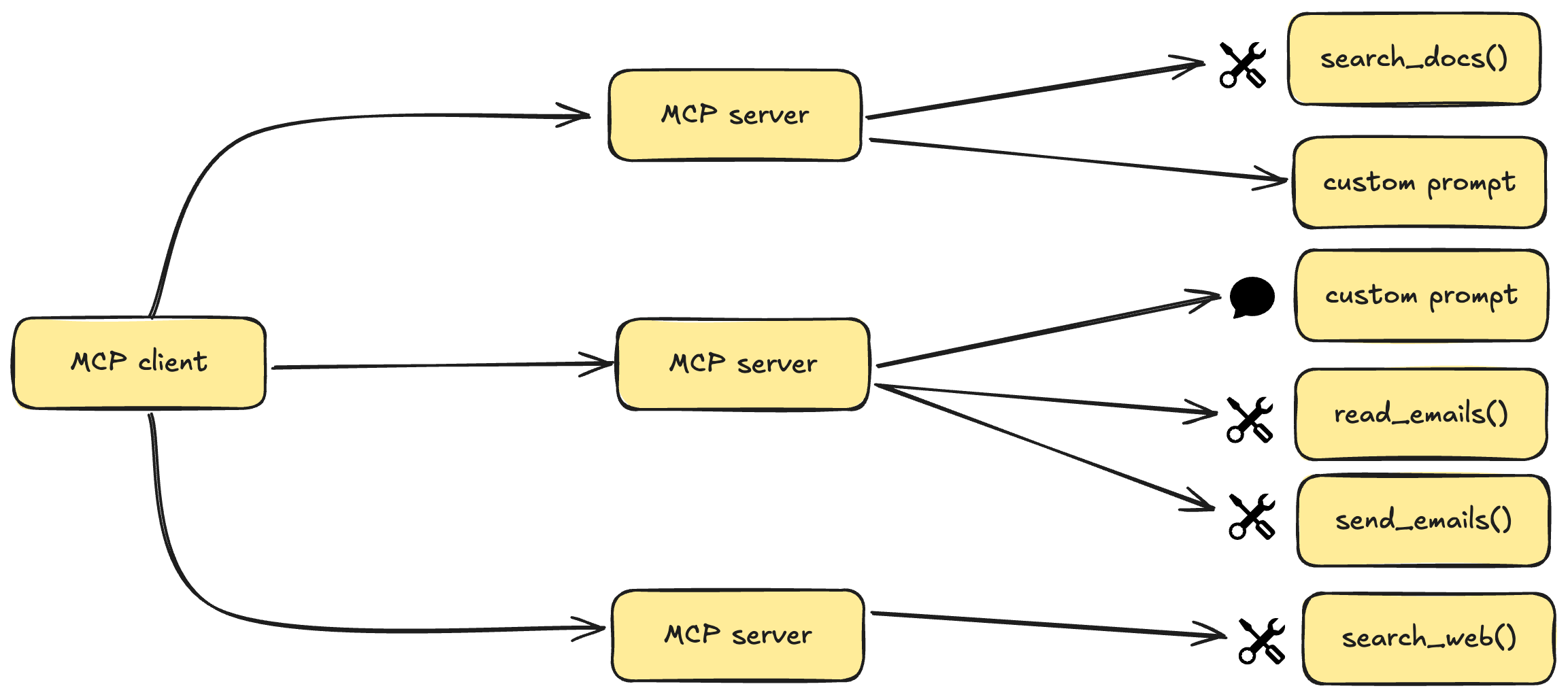
MCP follows a client-server architecture where a host application can connect to multiple servers:
MCP Hosts: Programs like Claude Desktop, IDEs, or AI tools that want to access data through MCP
MCP Clients: Protocol clients that maintain 1:1 connections with servers
MCP Servers: Lightweight programs that expose specific capabilities through the standardized Model Context Protocol
Data Sources: Both local (files, databases) and remote services (APIs) that MCP servers can access
MCP servers can provide three main types of capabilities:
Resources: File-like data that can be read by clients (like API responses or file contents)
Tools: Functions that can be called by the LLM (with user approval)
Prompts: Pre-written templates that help users accomplish specific tasks
Python 3.10 or higher
MCP SDK 1.2.0 or higher
uv package manager
On MacOS/Linux:
curl -LsSf https://astral.sh/uv/install.sh | shMake sure to restart your terminal afterwards to ensure that the uv command gets picked up.
Create and initialize the project:
# Create a new directory for our project
uv init mcp-server
cd mcp-server

# Create virtual environment and activate it
uv venv
source .venv/bin/activate  # On Windows use: .venv\Scripts\activate

# Install dependencies
uv add "mcp[cli]" httpx
Create the server implementation file:
touch main.pyStart the MCP server:
uv run main.pyThe server will start and be ready to accept connections
Install Claude Desktop from the official website
Configure Claude Desktop to use your MCP server:
Edit ~/Library/Application Support/Claude/claude_desktop_config.json:
{
    "mcpServers": {
        "mcp-server": {
            "command": "uv",  # It's better to use the absolute path to the uv command
            "args": [
                "--directory",
                "/ABSOLUTE/PATH/TO/YOUR/mcp-server",
                "run",
                "main.py"
            ]
        }
    }
}
Restart Claude Desktop
If your server isn't being picked up by Claude Desktop:
Check the configuration file path and permissions
Verify the absolute path in the configuration is correct
Ensure uv is properly installed and accessible
Check Claude Desktop logs for any error messages
This project is licensed under the MIT License. See the LICENSE file for details.
Search the latest docs for a given query and library. Supports langchain, openai, and llama-index.
Args: query: The query to search for (e.g. "Chroma DB") library: The library to search in (e.g. "langchain")
Returns: Text from the docs
| Name | Required | Description | Default |
|---|---|---|---|
| query | Yes | ||
| library | Yes |
Does the description disclose side effects, auth requirements, rate limits, or destructive behavior?
With no annotations provided, the description carries the full burden for behavioral disclosure. It notes that the tool searches 'latest docs' and returns text, implying a read-only operation, but does not mention potential network dependency, error cases, or any side effects. This is adequate but not rich.
Agents need to know what a tool does to the world before calling it. Descriptions should go beyond structured annotations to explain consequences.
Is the description appropriately sized, front-loaded, and free of redundancy?
The description is concise and well-structured: a one-sentence purpose statement followed by clear Args/Returns sections. Every sentence adds value, and information is front-loaded.
Shorter descriptions cost fewer tokens and are easier for agents to parse. Every sentence should earn its place.
Given the tool's complexity, does the description cover enough for an agent to succeed on first attempt?
For a 2-parameter tool with no output schema, the description provides sufficient context: purpose, supported libraries, parameter guidance, and return type. It lacks explicit error handling or formatting details, but these are not critical for this simple search tool.
Complex tools with many parameters or behaviors need more documentation. Simple tools need less. This dimension scales expectations accordingly.
Does the description clarify parameter syntax, constraints, interactions, or defaults beyond what the schema provides?
Schema description coverage is 0%, so the description must fully explain the parameters. It does so effectively with an Args section providing both meaning and examples for 'query' and 'library', plus listing supported library values in the main description.
Input schemas describe structure but not intent. Descriptions should explain non-obvious parameter relationships and valid value ranges.
Does the description clearly state what the tool does and how it differs from similar tools?
The description clearly states the tool's function: 'Search the latest docs for a given query and library.' It specifies the resource (docs), the verb (search), and scope (latest), and distinguishes from sibling Chroma DB tools by focusing on doc search for specific libraries.
Agents choose between tools based on descriptions. A clear purpose with a specific verb and resource helps agents select the right tool.
Does the description explain when to use this tool, when not to, or what alternatives exist?
The description indicates when to use the tool (when searching docs for langchain, openai, or llama-index) through the list of supported libraries. However, it lacks explicit exclusions or alternative tool references, so it doesn't fully meet the 'when-not/alternatives' criterion.
Agents often have multiple tools that could apply. Explicit usage guidance like "use X instead of Y when Z" prevents misuse.
Recent tool additions, removals, and schema changes observed during successful MCP inspections.
get_docsScored across 1 tool
With only one tool, there is no possibility of ambiguity or overlap between tools. The tool has a single, clear purpose of searching documentation for specific libraries.
The single tool name 'get_docs' follows a clear verb_noun pattern. Since there is only one tool, consistency is inherently perfect with no deviations to evaluate.
A single tool is too few for most server purposes, as it severely limits functionality and scope. This feels thin and incomplete for a documentation search server, which might benefit from additional tools like browsing documentation structure or getting library lists.
The tool surface is severely incomplete for a documentation search domain. It only supports searching text, with no tools for browsing, listing available libraries, or accessing documentation metadata, creating significant gaps that will hinder agent workflows.
A comprehensive Model Context Protocol (MCP) server that enables AI assistants to interact with yo…
A Model Context Protocol server for Wix AI tools
Model Context Protocol server for the Apideck Unified API. Connect any MCP-compatible agent framework to 100+ accounting systems, HRIS platforms, file storage providers, and more through one integration. More information https://www.apideck.com/mcp-server
An MCP server that provides an API to LLMs to manage their JumpCloud resources.