A
licenseNot graded
qualityD
maintenanceA Model Context Protocol server that enables Claude to execute SQL queries on Snowflake databases with automatic connection lifecycle management.
45
MIT

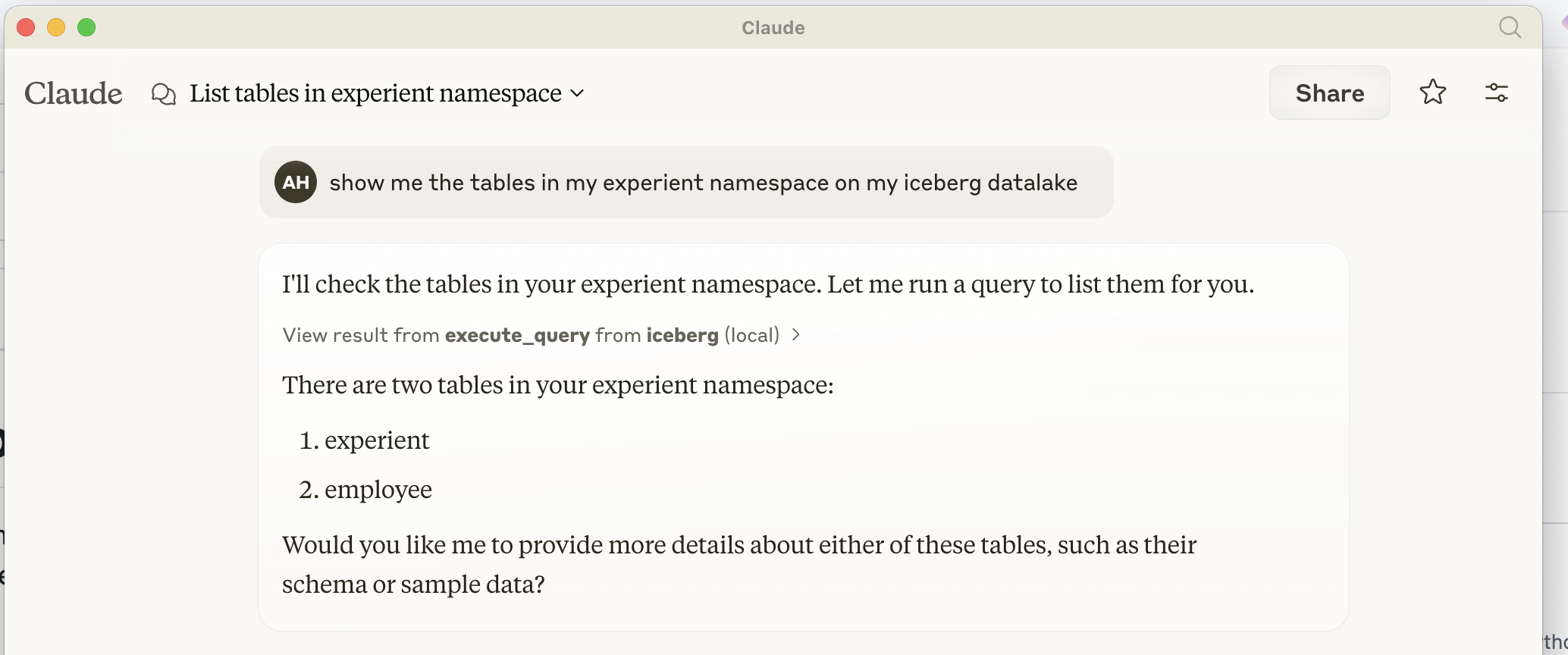
Implementación de un servidor MCP (Protocolo de Contexto de Modelo) para interactuar con Apache Iceberg. Este servidor proporciona una interfaz SQL para consultar y gestionar tablas de Iceberg a través del escritorio Claude.
Related MCP server: Databricks MCP Server
Para instalar MCP Iceberg Catalog para Claude Desktop automáticamente a través de Smithery :
npx -y @smithery/cli install @ahodroj/mcp-iceberg-service --client claudePrerrequisitos
Python 3.10 o superior
Instalador de paquetes UV (recomendado) o pip
Acceso a un catálogo REST de Iceberg y almacenamiento compatible con S3
Cómo instalar en Claude Desktop Agregue la siguiente configuración a claude_desktop_config.json :
{
  "mcpServers": {
    "iceberg": {
      "command": "uv",
      "args": [
        "--directory",
        "PATH_TO_/mcp-iceberg-service",
        "run",
        "mcp-server-iceberg"
      ],
      "env": {
        "ICEBERG_CATALOG_URI" : "http://localhost:8181",
        "ICEBERG_WAREHOUSE" : "YOUR ICEBERG WAREHOUSE NAME",
        "S3_ENDPOINT" : "OPTIONAL IF USING S3",
        "AWS_ACCESS_KEY_ID" : "YOUR S3 ACCESS KEY",
        "AWS_SECRET_ACCESS_KEY" : "YOUR S3 SECRET KEY"
      }
    }
  }
}El servidor MCP se basa en tres componentes principales:
Manejador de protocolo MCP
Implementa el Protocolo de Contexto Modelo para la comunicación con Claude
Maneja ciclos de solicitud/respuesta a través de stdio
Gestiona el ciclo de vida y la inicialización del servidor.
Procesador de consultas
Analiza consultas SQL usando sqlparse
Apoya operaciones:
LISTA DE TABLAS
DESCRIBIR TABLA
SELECCIONAR
INSERTAR
Integración de Iceberg
Utiliza pyiceberg para operaciones de tabla
Se integra con PyArrow para un manejo eficiente de datos.
Administra las conexiones del catálogo y las operaciones de tabla.
El servidor utiliza PyIceberg de varias maneras:
Gestión de catálogos
Se conecta a catálogos REST
Administra los metadatos de la tabla
Maneja operaciones de espacio de nombres
Operaciones de datos
Convierte entre tipos PyIceberg y PyArrow
Maneja la inserción de datos a través de tablas de PyArrow
Administra esquemas de tablas y tipos de campos
Ejecución de consultas
Traduce SQL a operaciones de PyIceberg
Maneja el escaneo y filtrado de datos
Gestiona la conversión del conjunto de resultados
Operaciones de consulta
[ ] Implementar operaciones UPDATE
[ ] Agregar soporte para ELIMINAR
[ ] Soporte para CREATE TABLE con definición de esquema
[ ] Agregar operaciones ALTER TABLE
[ ] Implementar soporte para particionamiento de tablas
Tipos de datos
[ ] Soporte para tipos complejos (matrices, mapas, estructuras)
[ ] Agregar marca de tiempo con manejo de zona horaria
[ ] Soporte para tipos decimales
[ ] Agregar soporte para campos anidados
Mejoras de rendimiento
[ ] Implementar inserciones por lotes
[ ] Agregar optimización de consultas
[ ] Soporte para escaneos paralelos
[ ] Agregar capa de almacenamiento en caché para datos a los que se accede con frecuencia
Características de seguridad
[ ] Agregar mecanismos de autenticación
[ ] Implementar control de acceso basado en roles
[ ] Agregar seguridad a nivel de fila
[ ] Soporte para conexiones cifradas
Monitoreo y gestión
[ ] Agregar colección de métricas
[ ] Implementar el registro de consultas
[ ] Agregar supervisión del rendimiento
[ ] Soporte para operaciones de mantenimiento de tablas
Manejo de errores
[ ] Mejorar los mensajes de error
[ ] Agregar mecanismos de reintento para fallas transitorias
[ ] Implementar soporte para transacciones
[ ] Agregar validación de datos
Execute a query on Iceberg tables
| Name | Required | Description | Default |
|---|---|---|---|
| query | Yes | Query to execute (supports: LIST TABLES, DESCRIBE TABLE, SELECT, CREATE TABLE) |
Does the description disclose side effects, auth requirements, rate limits, or destructive behavior?
With no annotations provided, the description carries the full burden of behavioral disclosure but offers minimal information. It mentions the query types supported (LIST TABLES, DESCRIBE TABLE, SELECT, CREATE TABLE), which adds some context, but fails to address critical aspects like permissions needed, whether it's read-only or mutating, error handling, or output format expectations.
Agents need to know what a tool does to the world before calling it. Descriptions should go beyond structured annotations to explain consequences.
Is the description appropriately sized, front-loaded, and free of redundancy?
The description is a single, efficient sentence that directly states the tool's purpose without unnecessary words. It is appropriately sized and front-loaded, making it easy to understand at a glance.
Shorter descriptions cost fewer tokens and are easier for agents to parse. Every sentence should earn its place.
Given the tool's complexity, does the description cover enough for an agent to succeed on first attempt?
Given the complexity of a query execution tool with no annotations and no output schema, the description is insufficient. It lacks details on behavioral traits, error handling, permissions, or what to expect from results, leaving significant gaps for an AI agent to operate effectively.
Complex tools with many parameters or behaviors need more documentation. Simple tools need less. This dimension scales expectations accordingly.
Does the description clarify parameter syntax, constraints, interactions, or defaults beyond what the schema provides?
The input schema has 100% description coverage, explicitly documenting the 'query' parameter with supported query types. The description does not add any additional semantic details beyond what the schema already provides, so it meets the baseline for adequate but unremarkable coverage.
Input schemas describe structure but not intent. Descriptions should explain non-obvious parameter relationships and valid value ranges.
Does the description clearly state what the tool does and how it differs from similar tools?
The description clearly states the action ('Execute a query') and target resource ('on Iceberg tables'), providing a specific verb+resource combination. However, with no sibling tools mentioned, it cannot demonstrate differentiation from alternatives, so it falls short of a perfect score.
Agents choose between tools based on descriptions. A clear purpose with a specific verb and resource helps agents select the right tool.
Does the description explain when to use this tool, when not to, or what alternatives exist?
The description provides no guidance on when to use this tool versus alternatives, prerequisites, or contextual constraints. It merely states what the tool does without indicating appropriate scenarios or limitations.
Agents often have multiple tools that could apply. Explicit usage guidance like "use X instead of Y when Z" prevents misuse.
Recent tool additions, removals, and schema changes observed during successful MCP inspections.
v1.0.0execute_queryScored across 1 tool
With only one tool, there is no possibility of ambiguity or overlap between tools, as there are no other tools to confuse it with. The tool's purpose is clearly defined and distinct by default.
Since there is only one tool, naming consistency is inherently perfect with no deviations or mixed conventions to evaluate. The tool name follows a clear verb_noun pattern (execute_query).
A single tool is too few for a catalog server, which typically requires operations like list_tables, get_table, create_table, or update_metadata to be useful. This minimal set severely limits functionality and scope.
The tool set is severely incomplete for an Iceberg catalog domain, lacking basic CRUD operations such as listing, creating, or managing tables. With only a query execution tool, agents cannot perform essential catalog tasks, leading to dead ends.
The BigQuery remote MCP server is a fully managed service that uses the Model Context Protocol to connect AI applications and LLMs to BigQuery data sources. It provides secure, standardized tools for AI agents to list datasets and tables, retrieve schemas, generate and execute SQL queries through natural language, and analyze data—enabling direct access to enterprise analytics data without requiring manual SQL coding.
Query your warehouse or a CSV with Claude/ChatGPT over MCP, governed by table-level ACL + audit.
Hosted BigQuery MCP server for Claude, ChatGPT and Cursor, with each action switched per account.
Hosted SQL Server MCP server for Claude, ChatGPT and Cursor, with each action switched per account.