Finance Tools MCP
finance-tools-mcp: сервер MCP для финансового анализа
Обзор
Finance-tools-mcp — это сервер Model Context Protocol (MCP), разработанный для предоставления всесторонних финансовых знаний и возможностей анализа для больших языковых моделей (LLM). Модифицированный из investor-agent , он интегрируется с различными источниками данных и аналитическими библиотеками, чтобы предложить набор инструментов для детального финансового исследования и анализа.
Related MCP server: Trading MCP Server
Предлагаемые инструменты
Сервер предоставляет различные инструменты через MCP, позволяя подключенным клиентам (например, LLM) получать доступ к определенным финансовым данным и выполнять анализ:
Инструменты данных тикера:
get_ticker_data: предоставляет полный отчет по заданному тикеру, включая обзор, новости, ключевые показатели, производительность, даты, рекомендации аналитиков и обновления/понижения.get_options: извлекает данные опционов с самым высоким открытым интересом для тикера с параметрами фильтрации по диапазону дат, цене исполнения и типу опциона (коллы/путы).get_price_history: извлекает исторический дайджест данных о ценах за указанный период, включая образцы OHLCV, технические индикаторы, показатели риска и другой количественный анализ.get_financial_statements: Доступ к финансовым отчетам (доход, баланс, движение денежных средств) по тикеру, доступным ежеквартально или ежегодно.get_institutional_holders: выводит список основных институциональных держателей и держателей паевых инвестиционных фондов для тикера.get_earnings_history: Предоставляет историю доходов с оценками и сюрпризами для тикера.get_insider_trades: извлекает недавнюю информацию об инсайдерской торговле для тикера.get_ticker_news_tool: Получает последние новости Yahoo Finance для определенного тикера.
Инструменты индекса страха и жадности:
get_current_fng_tool: Получает текущий балл и рейтинг индекса страха и жадности CNN.get_historical_fng_tool: Извлекает исторические данные индекса страха и жадности CNN за указанное количество дней.analyze_fng_trend: Анализирует тенденции индекса страха и жадности CNN за указанный период.
Инструменты расчета:
calculate: вычисляет математические выражения, используя синтаксис Python и NumPy.
Инструменты макроданных:
get_current_time: Предоставляет текущее время.get_fred_series: извлекает данные для определенного идентификатора серии FRED.search_fred_series: Поиск популярных серий FRED по ключевому слову.cnbc_news_feed: Получает последние мировые новости от CNBC, BBC и SCMP.
Обработка и оптимизация временных рядов данных
Сервер использует yfinance для получения исторических данных о ценах (OHLCV - Open, High, Low, Close, Volume) для тикеров. Эти необработанные данные подвергаются значительной обработке и анализу для предоставления ценных сведений, в частности оптимизированных для потребления LLM.
Ключевые аспекты обработки данных временных рядов включают в себя:
Комплексный анализ: данные анализируются с использованием библиотек, таких как
ta-lib-pythonдля расчета широкого спектра технических индикаторов. Кроме того, пользовательские функции вычисляют базовую статистику, показатели риска, распознают общие графические модели и вычисляют уровни коррекции Фибоначчи.Структурированный дайджест: результаты этого анализа компилируются в формат структурированного дайджеста (
generate_time_series_digest_for_LLM), который легко анализируется и понимается LLM, включая разделы для статистики, сводки, технических индикаторов, показателей риска, закономерностей, уровней Фибоначчи и выборки данных.Умная выборка для LLM: Чтобы предоставить LLM репрезентативное представление исторических данных без перегрузки контекстного окна, применяется стратегия «умной выборки» (
get_latest_data_sample). Этот метод выбирает данные с различным разрешением:Высокое разрешение: последние данные добавляются ежедневно.
Среднее разрешение: промежуточные точки данных отбираются еженедельно.
Низкое разрешение: более старые точки данных отбираются ежемесячно. Этот гибридный подход гарантирует, что LLM получает подробную информацию о недавних движениях цен, при этом сохраняя контекст о более долгосрочных тенденциях, и все это в пределах управляемого количества точек данных.
Оптимизированная обработка и представление данных временных рядов позволяет магистрам права быстро улавливать ключевые тенденции, показатели и закономерности, способствуя более обоснованному финансовому анализу.
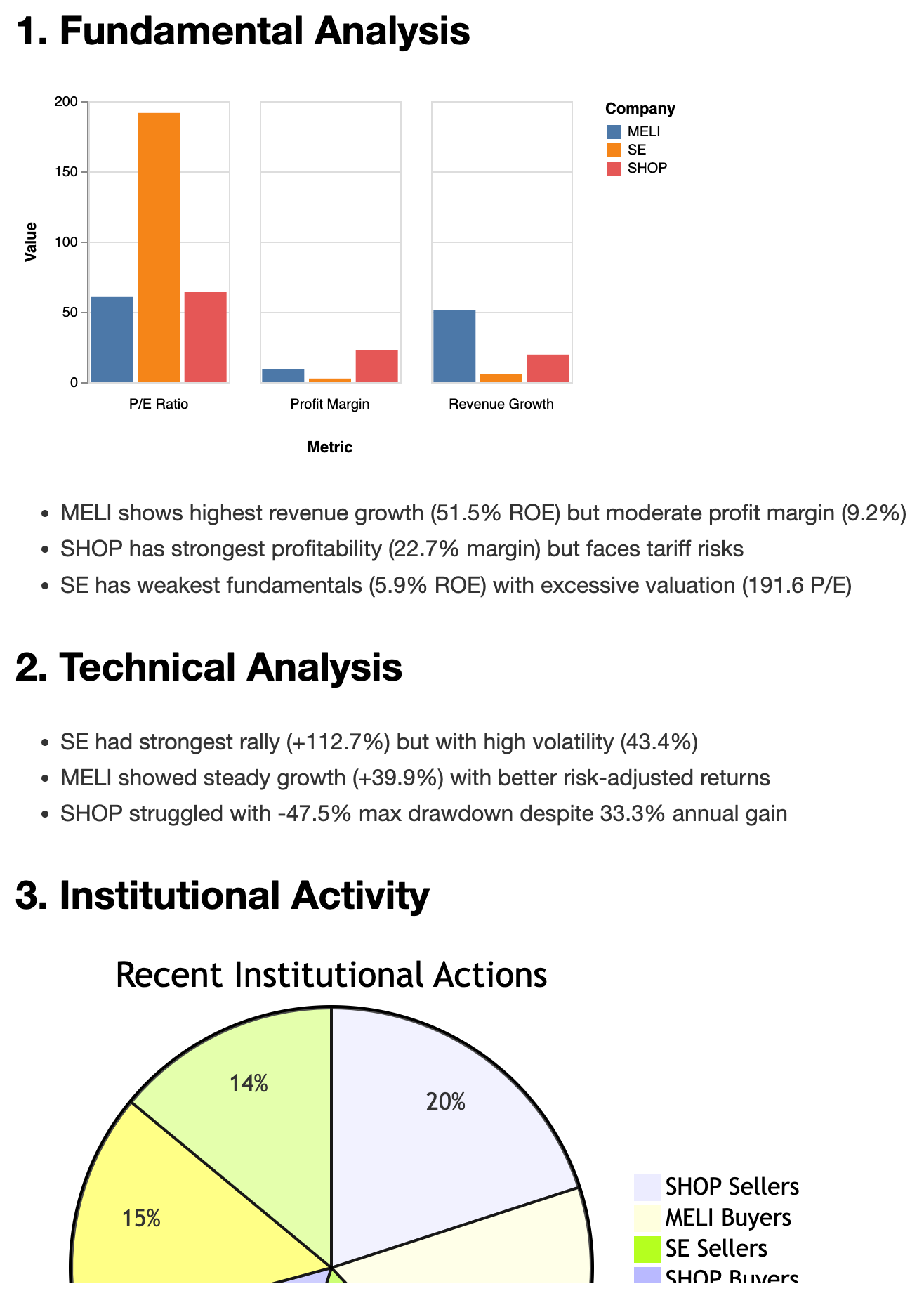
Образец отчета
Предпосылки
Python: 3.10 или выше
Менеджер пакетов: uv
Установка
Сначала установите uv, если вы этого еще не сделали:
curl -LsSf https://astral.sh/uv/install.sh | shЗатем вы можете запустить MCP-сервер finance-tools-mcp с помощью uvx :
uvx finance-tools-mcpЕсли вы хотите использовать свой собственный ключ API FRED, вы можете установить его как переменную среды:
FRED_API_KEY=YOUR_API_KEY uvx finance-tools-mcpВы также можете запустить сервер с использованием транспорта Server-Sent Events (SSE):
uvx finance-tools-mcp --transport sseИли с помощью ключа API FRED и транспорта SSE:
FRED_API_KEY=YOUR_API_KEY uvx finance-tools-mcp --transport sseИспользование с клиентами MCP
Чтобы интегрировать finance-tools-mcp с клиентом MCP (например, Claude Desktop), добавьте следующую конфигурацию в ваш claude_desktop_config.json :
{
"mcpServers": {
"investor": {
"command": "path/to/uvx/command/uvx",
"args": ["finance-tools-mcp"],
}
}
}Отладка
Вы можете использовать инспектор MCP для отладки сервера:
npx @modelcontextprotocol/inspector uvx finance-tools-mcpили
npx @modelcontextprotocol/inspector uv --directory ./ run finance-tools-mcpДля мониторинга журналов проверьте следующие каталоги:
macOS:
~/Library/Logs/Claude/mcp*.logWindows:
%APPDATA%\Claude\logs\mcp*.log
Разработка
Для локальной разработки и тестирования:
Используйте инспектор MCP, как описано в разделе «Отладка» .
Протестируйте Claude Desktop со следующей конфигурацией:
{
"mcpServers": {
"investor": {
"command": "path/to/uv/command/uv",
"args": ["--directory", "path/to/finance-tools-mcp", "run", "finance-tools-mcp"],
}
}
}Лицензия
Этот сервер MCP лицензирован по лицензии MIT. Подробности см. в файле LICENSE .
Образцы
Тодо
[ ] Добавить уровни поддержки и сопротивления для акций
[x] Добавить уровни коррекции Фибоначчи для акций
[ ] Добавить уровни слияния скользящих средних для акций
[ ] Добавить модель для прогнозирования
[ ] Добавить прогностическую модель, используя финансовые листы и другие функции
Источники данных
fintel.com
investing.com
yahoo.com
fred.stlouisfed.org
cnn cnbc и reddit
Available Tools
17 toolsanalyze_fng_trendA
Analyze trends in CNN Fear & Greed Index over specified days.
Parameters:
days (int): Number of days to analyze (limited by available data).
Returns:
str: A string containing the analysis results, including latest value,
average value, trend direction, and number of data points analyzed.
Inputs: days (required).
calculateB
Calculate the result of a mathematical expression. Support python math syntax and numpy. > calculate("2 * 3 + 4") {'result': 10} > calculate("sin(pi/2)") {'result': 1.0} > calculate("sqrt(16)") {'result': 4.0} > calculate("np.mean([1, 2, 3])") {'result': 2.0}
Inputs: expression (required).
cnbc_news_feedB
Get the latest breaking world news from CNBC, BBC, and SCMP. Useful to have an overview for the day. Include the Fed rate prediction from Fed watch and key macro indicators.
Inputs: no named parameters.
get_current_timeA
Get the current time in ISO 8601 format.
Inputs: no named parameters.
get_earnings_historyC
Get earnings history with estimates and surprises.
Inputs: ticker (required).
get_financial_statementsC
Get financial statements. Types: income, balance, cash. Frequency: quarterly, annual.
Inputs: ticker (required), frequency, statement_type.
get_fred_seriesB
Get a FRED series by its ID. However the data is not always the latest, so use with caution!!!
Inputs: series_id (required).
get_historical_fng_toolB
Get historical CNN Fear & Greed Index data for a specified number of days.
Parameters:
days (int): Number of days of historical data to retrieve (limited by the API).
Returns:
str: Historical Fear & Greed Index values for the specified period.
Inputs: days (required).
get_insider_tradesC
Get recent insider trading activity.
Inputs: ticker (required).
get_overall_sentiment_toolB
Get comprehensive market sentiment indicators including:
- CNN Fear & Greed Index (score and rating)
- Market RSI (Relative Strength Index)
- VIX (Volatility Index)
Returns:
str: Formatted string containing all three indicators with their current values
Inputs: no named parameters.
get_price_historyA
Get historical price data digest for specified period. There're two kinds of response mode: 1. The period mode. It will generate a digest for LLM consumption. Usually get at least 3 months, 6 months or more. The response includes OCHLCV samples, Technical Indicators (by ta-lib) , Risk Metrics, and other quantitative analysis. 2. The start_date and end_date mode. Once the start_date (yyyy-mm-dd) and end_date (yyyy-mm-dd) are specified, it will generate a raw OCHLCV data in the slot. And no digest will be generated in this mode. Useful for checking the price history of a specific short date range.
Inputs: ticker (required), end_date, period, start_date.
get_ticker_dataB
Get comprehensive report for ticker: overview, news, metrics, sector / industry valuation, performance, dates, analyst recommendations, and upgrades/downgrades.
Inputs: ticker (required).
get_ticker_news_toolB
For getting yahoo financial news of a ticker. Useful for getting latest news, especially for doing deep research.
Inputs: ticker (required).
get_top25_holdersC
Get top 25 institutional holders and their changes for a given stock ticker.
Inputs: ticker (required).
search_fred_seriesC
Search for the most popular FRED series by keyword. Useful for finding key data by name. Like GDP, CPI, etc. However the data is not always the latest.
Inputs: query (required).
super_option_toolB
Analyzes and summarizes option data for a given ticker.
This function retrieves option indicators and Greeks for the specified ticker,
generates a digest summarizing key metrics, and formats a table of key option
data including last trade date, strike, option type, open interest, volume,
and implied volatility.
Args:
ticker: Stock ticker symbol.Inputs: ticker (required).
Tool Schema Changelog
Recent tool additions, removals, and schema changes observed during successful MCP inspections.
Loading tool schema changelog…
TDQS
Scored across 17 tools
Most tools have distinct purposes, but there is some overlap that could cause confusion. For example, get_historical_fng_tool and analyze_fng_trend both deal with Fear & Greed Index data, and get_ticker_data includes news while get_ticker_news_tool is specifically for news. However, descriptions help clarify differences, such as analyze_fng_trend focusing on trend analysis versus get_historical_fng_tool for raw data retrieval.
The naming follows a consistent snake_case pattern with a verb_noun structure for most tools, like get_price_history and search_fred_series. There are minor deviations, such as calculate being a single verb and cnbc_news_feed using a noun_verb_noun pattern, but overall, the naming is predictable and readable.
With 17 tools, the count is slightly high but reasonable for a finance domain that covers diverse areas like market data, news, sentiment, and analysis. It provides comprehensive coverage without being overwhelmingly large, though it borders on the heavy side for typical MCP server scopes.
The tool set offers broad coverage for financial analysis, including data retrieval (e.g., price history, financial statements), sentiment indicators, news feeds, and specialized tools like options analysis. Minor gaps exist, such as no explicit tools for portfolio management or trading actions, but agents can work around this with the available tools for core financial workflows.
Maintenance
Related MCP Connectors
Official Intrinio MCP server. US stock prices, options and fundamentals for AI agents.
MCP server for Financial Modeling Prep API with 250+ financial data tools
Official Score VI MCP server: intrinsic value, fundamentals, and a stock screener.
101The Octagon MCP server provides specialized AI-powered financial research and analysis by integrating with the Octagon Market Intelligence API. It enables users to analyze public market data (SEC filings, earnings transcripts, financial metrics, and stock data for 8000+ companies), private market data (3M+ companies, 500k+ funding rounds, 2M+ M&A/IPO transactions), and conduct deep research including web scraping capabilities. The server also features autonomous research agents that search hundreds of sources and return fully cited reports in approximately one minute.
Related MCP Servers
- AlicenseBqualityDmaintenanceAn MCP server that provides comprehensive access to real-time stock quotes, financial statements, analyst estimates, and technical indicators via the Financial Modeling Prep API. It enables users to conduct in-depth financial analysis and track market performance through specialized tools, resources, and prompt templates.2647 npm1MIT
- AlicenseAqualityDmaintenanceA comprehensive MCP server for stock analysis and trading insights, including stock screening, fundamental analysis, insider trading, options analysis, social media research, and news analysis.1075MIT
- AlicenseAqualityCmaintenanceComprehensive MCP server for real-time stock, cryptocurrency, options, and fundamental analysis, including SEC filings and insider trading data.269 npmMIT
- AlicenseAqualityDmaintenanceAn advanced MCP server for real-time worldwide stock market data, technical indicators, financials, news, and Python sandboxing with AI models, supporting US and Indian markets.291MIT
social_media_feedA
Get most discussed stocks and investments opinions from reddit. Useful to know what investors are talking about. keywords is optional. Set keywords to match the specific topic you are interested in, by 'OR' operator, e.g. ['tsla', 'tesla'], ['tesla', 'spacex'], ['AAPL', 'apple', 'tim cook', 'cook'] No keywords will return the most discussed stocks and investments.
Inputs: keywords.