Finance Tools MCP
finance-tools-mcp: Ein MCP-Server für Finanzanalysen
Überblick
Der finance-tools-mcp ist ein Model Context Protocol (MCP)-Server, der Large Language Models (LLMs) umfassende Finanzinformationen und Analysefunktionen bietet. Er wurde von investor-agent modifiziert und integriert verschiedene Datenquellen und Analysebibliotheken, um eine Reihe von Tools für detaillierte Finanzrecherche und -analysen bereitzustellen.
Related MCP server: Trading MCP Server
Angebotene Tools
Der Server stellt über das MCP eine Vielzahl von Tools bereit, die es verbundenen Clients (wie LLMs) ermöglichen, auf bestimmte Finanzdaten zuzugreifen und Analysen durchzuführen:
Tickerdaten-Tools:
get_ticker_data: Bietet einen umfassenden Bericht für einen bestimmten Ticker, einschließlich Übersicht, Neuigkeiten, Schlüsselmetriken, Leistung, Daten, Analystenempfehlungen und Upgrades/Downgrades.get_options: Ruft Optionsdaten mit dem höchsten offenen Interesse für einen Ticker ab, mit Filteroptionen für Datumsbereich, Ausübungspreis und Optionstyp (Calls/Puts).get_price_history: Ruft eine Zusammenfassung historischer Preisdaten für einen bestimmten Zeitraum ab, einschließlich OHLCV-Beispielen, technischen Indikatoren, Risikometriken und anderen quantitativen Analysen.get_financial_statements: Greift auf Finanzberichte (Einnahmen, Bilanz, Cashflow) für einen Ticker zu, verfügbar vierteljährlich oder jährlich.get_institutional_holders: Listet die wichtigsten institutionellen und Investmentfondsinhaber für ein Tickersymbol auf.get_earnings_history: Bietet eine Gewinnhistorie mit Schätzungen und Überraschungen für einen Ticker.get_insider_trades: Ruft die aktuelle Insiderhandelsaktivität für einen Ticker ab.get_ticker_news_tool: Ruft die neuesten Yahoo Finance-Nachrichten für einen bestimmten Ticker ab.
Angst- und Gier-Index-Tools:
get_current_fng_tool: Ruft den aktuellen Wert und die Bewertung des CNN Fear & Greed Index ab.get_historical_fng_tool: Ruft historische CNN Fear & Greed Index-Daten für eine angegebene Anzahl von Tagen ab.analyze_fng_trend: Analysiert Trends im CNN Fear & Greed Index über einen bestimmten Zeitraum.
Berechnungstools:
calculate: Bewertet mathematische Ausdrücke mithilfe der mathematischen Syntax von Python und NumPy.
Makrodaten-Tools:
get_current_time: Liefert die aktuelle Uhrzeit.get_fred_series: Ruft Daten für eine bestimmte FRED-Serien-ID ab.search_fred_series: Sucht nach beliebten FRED-Serien anhand von Schlüsselwörtern.cnbc_news_feed: Ruft die aktuellsten Weltnachrichten von CNBC, BBC und SCMP ab.
Verarbeitung und Optimierung von Zeitreihendaten
Der Server nutzt yfinance , um historische Kursdaten (OHLCV – Open, High, Low, Close, Volume) für Ticker abzurufen. Diese Rohdaten werden umfassend verarbeitet und analysiert, um wertvolle Erkenntnisse zu liefern, die insbesondere für die Nutzung durch LLMs optimiert sind.
Zu den wichtigsten Aspekten der Verarbeitung von Zeitreihendaten gehören:
Umfassende Analyse: Die Daten werden mithilfe von Bibliotheken wie
ta-lib-pythonanalysiert, um eine breite Palette technischer Indikatoren zu berechnen. Zusätzlich berechnen benutzerdefinierte Funktionen grundlegende Statistiken, Risikometriken, erkennen gängige Chartmuster und berechnen Fibonacci-Retracement-Levels.Strukturierte Zusammenfassung: Die Ergebnisse dieser Analyse werden in einem strukturierten Digest-Format (
generate_time_series_digest_for_LLM) zusammengestellt, das für LLMs leicht zu analysieren und zu verstehen ist und Abschnitte für Statistiken, Zusammenfassungen, technische Indikatoren, Risikometriken, Muster, Fibonacci-Niveaus und eine Datenprobe enthält.Smart Sampling für LLMs: Um LLMs eine repräsentative Ansicht historischer Daten zu bieten, ohne das Kontextfenster zu überlasten, wird eine „Smart Sampling“-Strategie (
get_latest_data_sample) eingesetzt. Diese Methode sampelt die Daten mit unterschiedlichen Auflösungen:Hohe Auflösung: Täglich werden aktuelle Datenpunkte einbezogen.
Mittlere Auflösung: Zwischendatenpunkte werden wöchentlich abgetastet.
Niedrige Auflösung: Ältere Datenpunkte werden monatlich abgetastet. Dieser hybride Ansatz stellt sicher, dass der LLM detaillierte Informationen über aktuelle Preisbewegungen erhält und gleichzeitig den Kontext längerfristiger Trends kennt – und das alles innerhalb einer überschaubaren Anzahl von Datenpunkten.
Diese optimierte Verarbeitung und Präsentation von Zeitreihendaten ermöglicht es LLMs, wichtige Trends, Indikatoren und Muster schnell zu erfassen und so eine fundiertere Finanzanalyse zu ermöglichen.
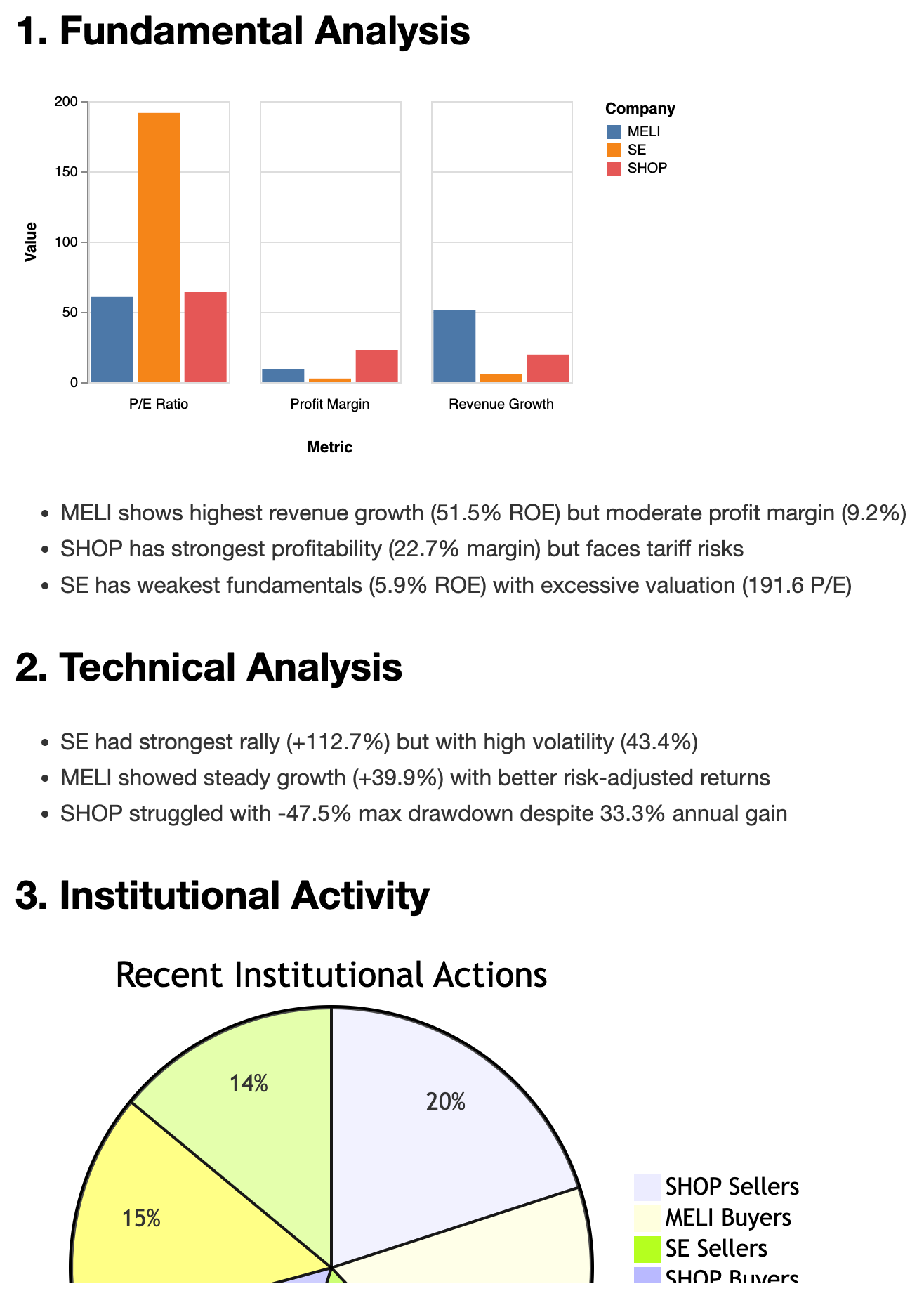
Beispielbericht
Voraussetzungen
Python: 3.10 oder höher
Paketmanager: uv
Installation
Installieren Sie zunächst uv , falls Sie dies noch nicht getan haben:
curl -LsSf https://astral.sh/uv/install.sh | shAnschließend können Sie den MCP-Server finance-tools-mcp mit uvx ausführen:
uvx finance-tools-mcpWenn Sie Ihren eigenen FRED-API-Schlüssel verwenden möchten, können Sie ihn als Umgebungsvariable festlegen:
FRED_API_KEY=YOUR_API_KEY uvx finance-tools-mcpSie können den Server auch mithilfe des Server-Sent Events (SSE)-Transports ausführen:
uvx finance-tools-mcp --transport sseOder mit dem FRED-API-Schlüssel und SSE-Transport:
FRED_API_KEY=YOUR_API_KEY uvx finance-tools-mcp --transport sseVerwendung mit MCP-Clients
Um finance-tools-mcp in einen MCP-Client (z. B. Claude Desktop) zu integrieren, fügen Sie Ihrer claude_desktop_config.json die folgende Konfiguration hinzu:
{
"mcpServers": {
"investor": {
"command": "path/to/uvx/command/uvx",
"args": ["finance-tools-mcp"],
}
}
}Debuggen
Sie können den MCP-Inspektor zum Debuggen des Servers nutzen:
npx @modelcontextprotocol/inspector uvx finance-tools-mcpoder
npx @modelcontextprotocol/inspector uv --directory ./ run finance-tools-mcpÜberprüfen Sie zur Protokollüberwachung die folgenden Verzeichnisse:
macOS:
~/Library/Logs/Claude/mcp*.logWindows:
%APPDATA%\Claude\logs\mcp*.log
Entwicklung
Für lokale Entwicklung und Tests:
Verwenden Sie den MCP-Inspektor wie im Abschnitt „Debuggen“ beschrieben.
Testen Sie mit Claude Desktop mit dieser Konfiguration:
{
"mcpServers": {
"investor": {
"command": "path/to/uv/command/uv",
"args": ["--directory", "path/to/finance-tools-mcp", "run", "finance-tools-mcp"],
}
}
}Lizenz
Dieser MCP-Server ist unter der MIT-Lizenz lizenziert. Weitere Informationen finden Sie in der Datei LICENSE .
Proben
Aufgaben
[ ] Unterstützungs- und Widerstandsniveaus für Aktien hinzufügen
[x] Fibonacci-Retracement-Levels für Aktien hinzufügen
[ ] Fügen Sie gleitende Durchschnittskonfluenzniveaus für Aktien hinzu
[ ] Optionsmodell zur Vorhersage hinzufügen
[ ] Fügen Sie ein Vorhersagemodell hinzu, indem Sie Finanzblätter und andere Funktionen verwenden
Datenquellen
fintel.com
investing.com
yahoo.com
fred.stlouisfed.org
CNN CNBC und Reddit
Available Tools
17 toolsanalyze_fng_trendA
Analyze trends in CNN Fear & Greed Index over specified days.
Parameters:
days (int): Number of days to analyze (limited by available data).
Returns:
str: A string containing the analysis results, including latest value,
average value, trend direction, and number of data points analyzed.
Inputs: days (required).
calculateB
Calculate the result of a mathematical expression. Support python math syntax and numpy. > calculate("2 * 3 + 4") {'result': 10} > calculate("sin(pi/2)") {'result': 1.0} > calculate("sqrt(16)") {'result': 4.0} > calculate("np.mean([1, 2, 3])") {'result': 2.0}
Inputs: expression (required).
cnbc_news_feedB
Get the latest breaking world news from CNBC, BBC, and SCMP. Useful to have an overview for the day. Include the Fed rate prediction from Fed watch and key macro indicators.
Inputs: no named parameters.
get_current_timeA
Get the current time in ISO 8601 format.
Inputs: no named parameters.
get_earnings_historyC
Get earnings history with estimates and surprises.
Inputs: ticker (required).
get_financial_statementsC
Get financial statements. Types: income, balance, cash. Frequency: quarterly, annual.
Inputs: ticker (required), frequency, statement_type.
get_fred_seriesB
Get a FRED series by its ID. However the data is not always the latest, so use with caution!!!
Inputs: series_id (required).
get_historical_fng_toolB
Get historical CNN Fear & Greed Index data for a specified number of days.
Parameters:
days (int): Number of days of historical data to retrieve (limited by the API).
Returns:
str: Historical Fear & Greed Index values for the specified period.
Inputs: days (required).
get_insider_tradesC
Get recent insider trading activity.
Inputs: ticker (required).
get_overall_sentiment_toolB
Get comprehensive market sentiment indicators including:
- CNN Fear & Greed Index (score and rating)
- Market RSI (Relative Strength Index)
- VIX (Volatility Index)
Returns:
str: Formatted string containing all three indicators with their current values
Inputs: no named parameters.
get_price_historyA
Get historical price data digest for specified period. There're two kinds of response mode: 1. The period mode. It will generate a digest for LLM consumption. Usually get at least 3 months, 6 months or more. The response includes OCHLCV samples, Technical Indicators (by ta-lib) , Risk Metrics, and other quantitative analysis. 2. The start_date and end_date mode. Once the start_date (yyyy-mm-dd) and end_date (yyyy-mm-dd) are specified, it will generate a raw OCHLCV data in the slot. And no digest will be generated in this mode. Useful for checking the price history of a specific short date range.
Inputs: ticker (required), end_date, period, start_date.
get_ticker_dataB
Get comprehensive report for ticker: overview, news, metrics, sector / industry valuation, performance, dates, analyst recommendations, and upgrades/downgrades.
Inputs: ticker (required).
get_ticker_news_toolB
For getting yahoo financial news of a ticker. Useful for getting latest news, especially for doing deep research.
Inputs: ticker (required).
get_top25_holdersC
Get top 25 institutional holders and their changes for a given stock ticker.
Inputs: ticker (required).
search_fred_seriesC
Search for the most popular FRED series by keyword. Useful for finding key data by name. Like GDP, CPI, etc. However the data is not always the latest.
Inputs: query (required).
super_option_toolB
Analyzes and summarizes option data for a given ticker.
This function retrieves option indicators and Greeks for the specified ticker,
generates a digest summarizing key metrics, and formats a table of key option
data including last trade date, strike, option type, open interest, volume,
and implied volatility.
Args:
ticker: Stock ticker symbol.Inputs: ticker (required).
Tool Schema Changelog
Recent tool additions, removals, and schema changes observed during successful MCP inspections.
Loading tool schema changelog…
TDQS
Scored across 17 tools
Most tools have distinct purposes, but there is some overlap that could cause confusion. For example, get_historical_fng_tool and analyze_fng_trend both deal with Fear & Greed Index data, and get_ticker_data includes news while get_ticker_news_tool is specifically for news. However, descriptions help clarify differences, such as analyze_fng_trend focusing on trend analysis versus get_historical_fng_tool for raw data retrieval.
The naming follows a consistent snake_case pattern with a verb_noun structure for most tools, like get_price_history and search_fred_series. There are minor deviations, such as calculate being a single verb and cnbc_news_feed using a noun_verb_noun pattern, but overall, the naming is predictable and readable.
With 17 tools, the count is slightly high but reasonable for a finance domain that covers diverse areas like market data, news, sentiment, and analysis. It provides comprehensive coverage without being overwhelmingly large, though it borders on the heavy side for typical MCP server scopes.
The tool set offers broad coverage for financial analysis, including data retrieval (e.g., price history, financial statements), sentiment indicators, news feeds, and specialized tools like options analysis. Minor gaps exist, such as no explicit tools for portfolio management or trading actions, but agents can work around this with the available tools for core financial workflows.
Maintenance
Related MCP Connectors
Official Intrinio MCP server. US stock prices, options and fundamentals for AI agents.
MCP server for Financial Modeling Prep API with 250+ financial data tools
Official Score VI MCP server: intrinsic value, fundamentals, and a stock screener.
101The Octagon MCP server provides specialized AI-powered financial research and analysis by integrating with the Octagon Market Intelligence API. It enables users to analyze public market data (SEC filings, earnings transcripts, financial metrics, and stock data for 8000+ companies), private market data (3M+ companies, 500k+ funding rounds, 2M+ M&A/IPO transactions), and conduct deep research including web scraping capabilities. The server also features autonomous research agents that search hundreds of sources and return fully cited reports in approximately one minute.
Related MCP Servers
- AlicenseBqualityDmaintenanceAn MCP server that provides comprehensive access to real-time stock quotes, financial statements, analyst estimates, and technical indicators via the Financial Modeling Prep API. It enables users to conduct in-depth financial analysis and track market performance through specialized tools, resources, and prompt templates.2647 npm1MIT
- AlicenseAqualityDmaintenanceA comprehensive MCP server for stock analysis and trading insights, including stock screening, fundamental analysis, insider trading, options analysis, social media research, and news analysis.1075MIT
- AlicenseAqualityCmaintenanceComprehensive MCP server for real-time stock, cryptocurrency, options, and fundamental analysis, including SEC filings and insider trading data.269 npmMIT
- AlicenseAqualityDmaintenanceAn advanced MCP server for real-time worldwide stock market data, technical indicators, financials, news, and Python sandboxing with AI models, supporting US and Indian markets.291MIT
social_media_feedA
Get most discussed stocks and investments opinions from reddit. Useful to know what investors are talking about. keywords is optional. Set keywords to match the specific topic you are interested in, by 'OR' operator, e.g. ['tsla', 'tesla'], ['tesla', 'spacex'], ['AAPL', 'apple', 'tim cook', 'cook'] No keywords will return the most discussed stocks and investments.
Inputs: keywords.