Glama
Finance Tools MCP

Finance Tools MCP

by VoxLink-org

finance-tools-mcp: 財務分析MCPサーバー

https://github.com/VoxLink-org/finance-tools-mcp

概要

finance-tools-mcp は、大規模言語モデル(LLM)に包括的な金融洞察と分析機能を提供するために設計されたモデルコンテキストプロトコル(MCP)サーバーです。 investor-agentを改良したもので、様々なデータソースや分析ライブラリと統合し、詳細な金融リサーチと分析のためのツールスイートを提供します。

Related MCP server: Trading MCP Server

提供されるツール

サーバーは MCP を介してさまざまなツールを公開し、接続されたクライアント (LLM など) が特定の財務データにアクセスして分析を実行できるようにします。

  • ティッカーデータツール:

    • get_ticker_data : 概要、ニュース、主要指標、パフォーマンス、日付、アナリストの推奨事項、アップグレード/ダウングレードなど、特定のティッカーに関する包括的なレポートを提供します。

    • get_options : 日付範囲、権利行使価格、オプションタイプ (コール/プット) のフィルタリング オプションを使用して、ティッカーの最も高い未決済建玉を持つオプション データを取得します。

    • get_price_history : OHLCV サンプル、テクニカル指標、リスクメトリック、その他の定量分析を含む、指定された期間の過去の価格データダイジェストを取得します。

    • get_financial_statements : 四半期ごとまたは年間で利用可能なティッカーの財務諸表 (収益、残高、キャッシュフロー) にアクセスします。

    • get_institutional_holders : ティッカーの主要な機関投資家および投資信託保有者を一覧表示します。

    • get_earnings_history : ティッカーの推定値とサプライズを含む収益履歴を提供します。

    • get_insider_trades : ティッカーの最近のインサイダー取引アクティビティを取得します。

    • get_ticker_news_tool : 特定のティッカーの最新の Yahoo Finance ニュースを取得します。

  • 恐怖と貪欲の指標ツール:

    • get_current_fng_tool : 現在の CNN Fear & Greed Index スコアと評価を取得します。

    • get_historical_fng_tool : 指定された日数の CNN Fear & Greed Index の履歴データを取得します。

    • analyze_fng_trend : 指定された期間の CNN Fear & Greed Index の傾向を分析します。

  • 計算ツール:

    • calculate : Python の数学構文と NumPy を使用して数式を評価します。

  • マクロ データ ツール:

    • get_current_time : 現在の時刻を提供します。

    • get_fred_series : 特定の FRED シリーズ ID のデータを取得します。

    • search_fred_series : キーワードで人気の FRED シリーズを検索します。

    • cnbc_news_feed : CNBC、BBC、SCMP から最新の世界ニュースを取得します。

時系列データの処理と最適化

サーバーはyfinanceを利用して、ティッカーの過去の価格データ(OHLCV - 始値、高値、安値、終値、出来高)を取得します。この生データは、LLMでの利用に最適化され、貴重な洞察を提供するために、高度な処理と分析を経て提供されます。

時系列データ処理の主な側面は次のとおりです。

  • **包括的な分析:**データはta-lib-pythonなどのライブラリを用いて分析され、幅広いテクニカル指標を計算します。さらに、カスタム関数は基本統計、リスク指標を計算し、一般的なチャートパターンを認識し、フィボナッチ・リトレースメント・レベルを計算します。

  • **構造化ダイジェスト:**この分析の結果は、統計、概要、技術指標、リスク メトリック、パターン、フィボナッチ レベル、およびデータ サンプルのセクションを含む、LLM が解析して理解しやすい構造化ダイジェスト形式 ( generate_time_series_digest_for_LLM ) にまとめられます。

  • **LLMのスマートサンプリング:**コンテキストウィンドウに過大な負荷をかけずにLLMに履歴データの代表的なビューを提供するために、「スマートサンプリング」戦略( get_latest_data_sample )が採用されています。このメソッドは、さまざまな解像度でデータをサンプリングします。

    • **高解像度:**最新のデータ ポイントが毎日含まれます。

    • **中解像度:**中間データ ポイントは毎週サンプリングされます。

    • **低解像度:**古いデータポイントは毎月サンプリングされます。このハイブリッドアプローチにより、LLMは管理可能な数のデータポイント内で、最近の価格変動に関する詳細な情報と長期的なトレンドに関するコンテキストの両方を取得できます。

時系列データの最適化された処理と表示により、LLM は主要な傾向、指標、パターンを迅速に把握し、より情報に基づいた財務分析を行うことができます。

サンプルレポート
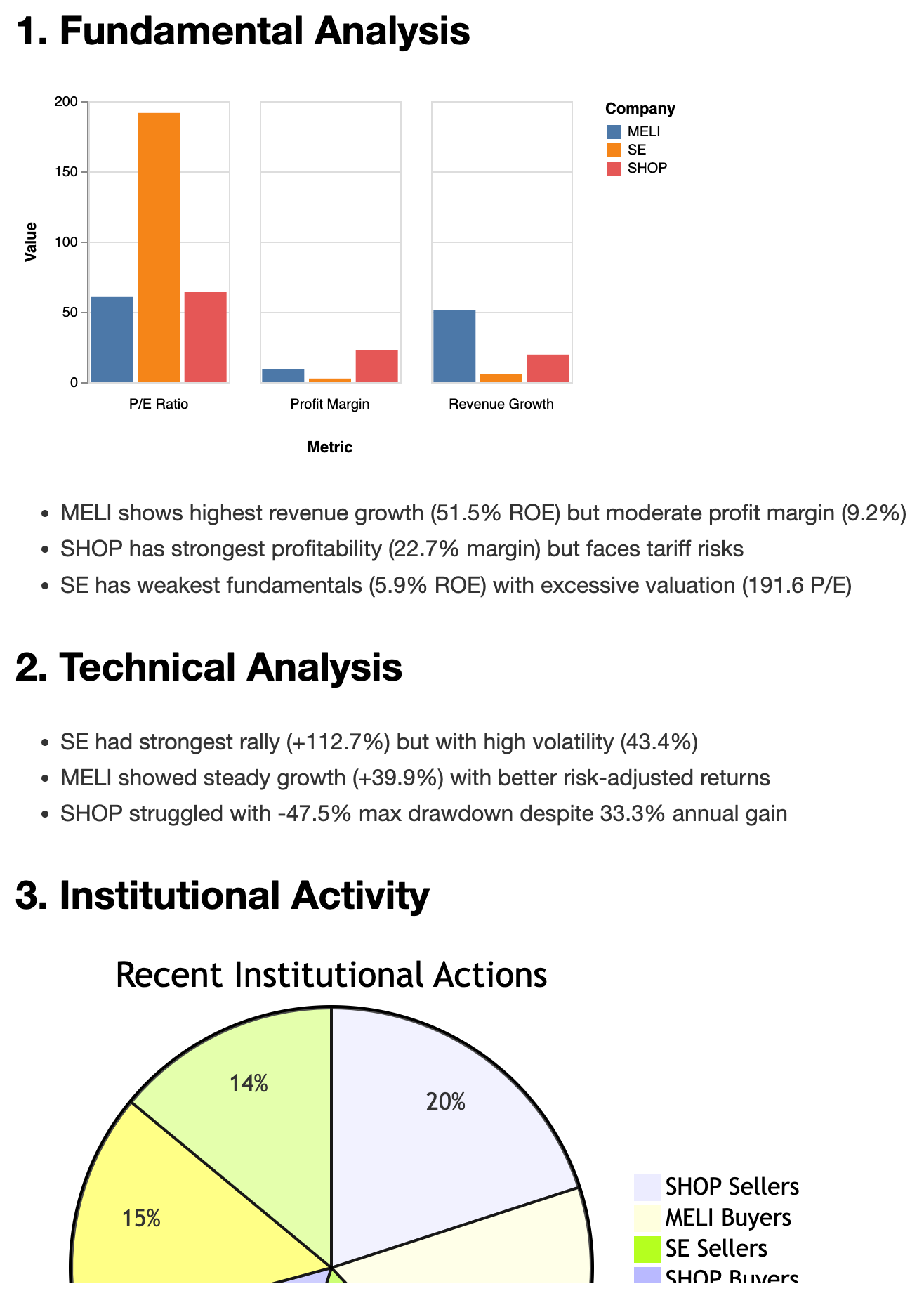
代替テキスト

前提条件

  • Python: 3.10以上

  • パッケージマネージャー: uv

インストール

まず、まだインストールしていない場合はuvをインストールします。

curl -LsSf https://astral.sh/uv/install.sh | sh

次に、 uvxを使用してfinance-tools-mcp MCP サーバーを実行できます。

uvx finance-tools-mcp

独自の FRED API キーを使用する場合は、それを環境変数として設定できます。

FRED_API_KEY=YOUR_API_KEY uvx finance-tools-mcp

Server-Sent Events (SSE) トランスポートを使用してサーバーを実行することもできます。

uvx finance-tools-mcp --transport sse

または、FRED API キーと SSE トランスポートを使用する場合:

FRED_API_KEY=YOUR_API_KEY uvx finance-tools-mcp --transport sse

MCPクライアントでの使用

finance-tools-mcp をMCP クライアント (たとえば、Claude Desktop) と統合するには、 claude_desktop_config.jsonに次の構成を追加します。

{
  "mcpServers": {
    "investor": {
        "command": "path/to/uvx/command/uvx",
        "args": ["finance-tools-mcp"],
    }
  }
}

デバッグ

MCP インスペクターを利用してサーバーをデバッグできます。

npx @modelcontextprotocol/inspector uvx finance-tools-mcp

または

npx @modelcontextprotocol/inspector uv --directory  ./ run finance-tools-mcp

ログ監視については、次のディレクトリを確認してください。

  • macOS: ~/Library/Logs/Claude/mcp*.log

  • Windows: %APPDATA%\Claude\logs\mcp*.log

発達

ローカル開発およびテストの場合:

  1. デバッグのセクションで説明されているように、MCP インスペクタを使用します。

  2. 次の構成で Claude Desktop を使用してテストします。

{
  "mcpServers": {
    "investor": {
      "command": "path/to/uv/command/uv",
      "args": ["--directory", "path/to/finance-tools-mcp", "run", "finance-tools-mcp"],
    }
  }
}

ライセンス

このMCPサーバーはMITライセンスに基づいてライセンスされています。詳細はLICENSEファイルをご覧ください。

サンプル

藤堂

  • [ ] 株式のサポートレベルとレジスタンスレベルを追加する

  • [x] 株式のフィボナッチリトレースメントレベルを追加する

  • [ ] 株式の移動平均合流レベルを追加する

  • [ ] 予測のためのオプションモデルを追加する

  • [ ] 財務シートやその他の機能を使用して予測モデルを追加する

データソース

  • フィンテル

  • 投資.com

  • ヤフー

  • fred.stlouisfed.org

  • CNN、CNBC、Reddit

Available Tools

17 tools
analyze_fng_trendA
Analyze trends in CNN Fear & Greed Index over specified days.

Parameters:
    days (int): Number of days to analyze (limited by available data).

Returns:
    str: A string containing the analysis results, including latest value,
         average value, trend direction, and number of data points analyzed.

Inputs: days (required).

calculateB

Calculate the result of a mathematical expression. Support python math syntax and numpy. > calculate("2 * 3 + 4") {'result': 10} > calculate("sin(pi/2)") {'result': 1.0} > calculate("sqrt(16)") {'result': 4.0} > calculate("np.mean([1, 2, 3])") {'result': 2.0}

Inputs: expression (required).

cnbc_news_feedB

Get the latest breaking world news from CNBC, BBC, and SCMP. Useful to have an overview for the day. Include the Fed rate prediction from Fed watch and key macro indicators.

Inputs: no named parameters.

get_current_timeA

Get the current time in ISO 8601 format.

Inputs: no named parameters.

get_earnings_historyC

Get earnings history with estimates and surprises.

Inputs: ticker (required).

get_financial_statementsC

Get financial statements. Types: income, balance, cash. Frequency: quarterly, annual.

Inputs: ticker (required), frequency, statement_type.

get_fred_seriesB

Get a FRED series by its ID. However the data is not always the latest, so use with caution!!!

Inputs: series_id (required).

get_historical_fng_toolB
Get historical CNN Fear & Greed Index data for a specified number of days.

Parameters:
    days (int): Number of days of historical data to retrieve (limited by the API).

Returns:
    str: Historical Fear & Greed Index values for the specified period.

Inputs: days (required).

get_insider_tradesC

Get recent insider trading activity.

Inputs: ticker (required).

get_overall_sentiment_toolB
Get comprehensive market sentiment indicators including:
- CNN Fear & Greed Index (score and rating)
- Market RSI (Relative Strength Index)
- VIX (Volatility Index)

Returns:
    str: Formatted string containing all three indicators with their current values

Inputs: no named parameters.

get_price_historyA

Get historical price data digest for specified period. There're two kinds of response mode: 1. The period mode. It will generate a digest for LLM consumption. Usually get at least 3 months, 6 months or more. The response includes OCHLCV samples, Technical Indicators (by ta-lib) , Risk Metrics, and other quantitative analysis. 2. The start_date and end_date mode. Once the start_date (yyyy-mm-dd) and end_date (yyyy-mm-dd) are specified, it will generate a raw OCHLCV data in the slot. And no digest will be generated in this mode. Useful for checking the price history of a specific short date range.

Inputs: ticker (required), end_date, period, start_date.

get_ticker_dataB

Get comprehensive report for ticker: overview, news, metrics, sector / industry valuation, performance, dates, analyst recommendations, and upgrades/downgrades.

Inputs: ticker (required).

get_ticker_news_toolB

For getting yahoo financial news of a ticker. Useful for getting latest news, especially for doing deep research.

Inputs: ticker (required).

get_top25_holdersC

Get top 25 institutional holders and their changes for a given stock ticker.

Inputs: ticker (required).

search_fred_seriesC

Search for the most popular FRED series by keyword. Useful for finding key data by name. Like GDP, CPI, etc. However the data is not always the latest.

Inputs: query (required).

social_media_feedA

Get most discussed stocks and investments opinions from reddit. Useful to know what investors are talking about. keywords is optional. Set keywords to match the specific topic you are interested in, by 'OR' operator, e.g. ['tsla', 'tesla'], ['tesla', 'spacex'], ['AAPL', 'apple', 'tim cook', 'cook'] No keywords will return the most discussed stocks and investments.

Inputs: keywords.

super_option_toolB
Analyzes and summarizes option data for a given ticker.

This function retrieves option indicators and Greeks for the specified ticker,
generates a digest summarizing key metrics, and formats a table of key option
data including last trade date, strike, option type, open interest, volume,
and implied volatility.

Args:
    ticker: Stock ticker symbol.

Inputs: ticker (required).

Tool Schema Changelog

Recent tool additions, removals, and schema changes observed during successful MCP inspections.

Loading tool schema changelog…

    TDQS

    B3.2/5.0

    Scored across 17 tools

    Disambiguation3/5

    Most tools have distinct purposes, but there is some overlap that could cause confusion. For example, get_historical_fng_tool and analyze_fng_trend both deal with Fear & Greed Index data, and get_ticker_data includes news while get_ticker_news_tool is specifically for news. However, descriptions help clarify differences, such as analyze_fng_trend focusing on trend analysis versus get_historical_fng_tool for raw data retrieval.

    Naming Consistency4/5

    The naming follows a consistent snake_case pattern with a verb_noun structure for most tools, like get_price_history and search_fred_series. There are minor deviations, such as calculate being a single verb and cnbc_news_feed using a noun_verb_noun pattern, but overall, the naming is predictable and readable.

    Tool Count4/5

    With 17 tools, the count is slightly high but reasonable for a finance domain that covers diverse areas like market data, news, sentiment, and analysis. It provides comprehensive coverage without being overwhelmingly large, though it borders on the heavy side for typical MCP server scopes.

    Completeness4/5

    The tool set offers broad coverage for financial analysis, including data retrieval (e.g., price history, financial statements), sentiment indicators, news feeds, and specialized tools like options analysis. Minor gaps exist, such as no explicit tools for portfolio management or trading actions, but agents can work around this with the available tools for core financial workflows.

    Maintenance

    ActivityInactive
    ResponsivenessNo recent community issues

    Related MCP Connectors

    Related MCP Servers

    • A
      license
      B
      quality
      D
      maintenance
      An MCP server that provides comprehensive access to real-time stock quotes, financial statements, analyst estimates, and technical indicators via the Financial Modeling Prep API. It enables users to conduct in-depth financial analysis and track market performance through specialized tools, resources, and prompt templates.
      26
      47 npm
      1
      MIT
    • A
      license
      A
      quality
      D
      maintenance
      A comprehensive MCP server for stock analysis and trading insights, including stock screening, fundamental analysis, insider trading, options analysis, social media research, and news analysis.
      10
      75
      MIT
    • A
      license
      A
      quality
      C
      maintenance
      Comprehensive MCP server for real-time stock, cryptocurrency, options, and fundamental analysis, including SEC filings and insider trading data.
      26
      9 npm
      MIT
    • A
      license
      A
      quality
      D
      maintenance
      An advanced MCP server for real-time worldwide stock market data, technical indicators, financials, news, and Python sandboxing with AI models, supporting US and Indian markets.
      29
      1
      MIT