
MIT

json-mcp-server
JSON 多协议
模型上下文协议 (MCP)服务器使LLM能够高效地与 JSON 文件交互。使用 JSON MCP,您可以根据定义的条件在 JSON 文件中拆分、合并、查找特定数据并进行验证。
🌟 主要特点
✅快速、轻量
✅ LLM 友好功能
Related MCP server: mcp-server-test
🎥 演示
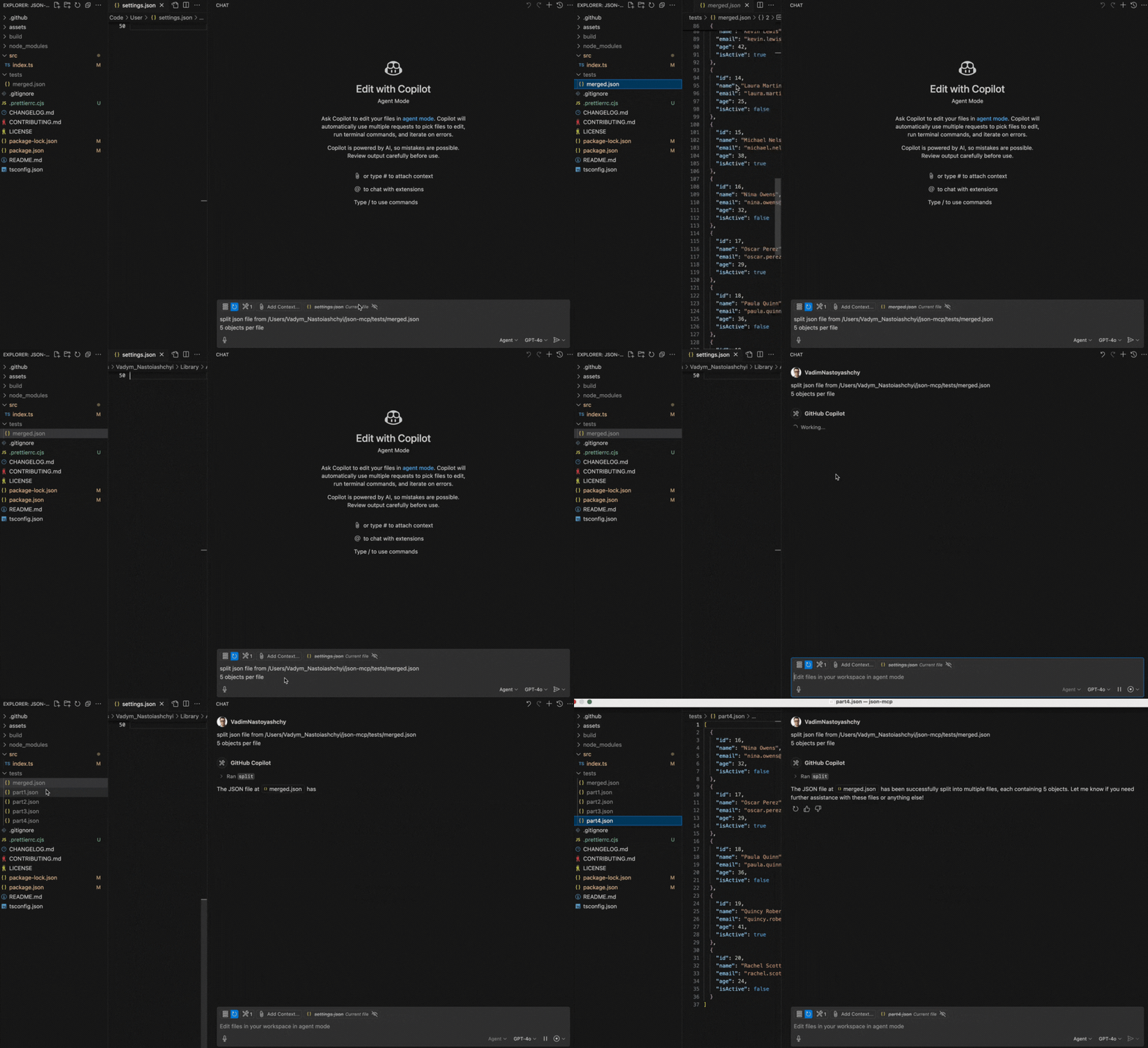
下面是展示split功能的演示:
🔧 用例(工具)
split
将 JSON 文件拆分为指定数量的对象。
**注意:**必须提供文件路径。
提示示例:
Split JSON file from /Users/json-mcp/tests/merged.json
5 objects per file
2. merge
将 JSON 文件合并为一个 JSON 文件
**注意:**需要提供文件夹路径
提示示例:
Merge json files from /Users/json-mcp/tests⚙️ 配置
VS Code 手动配置
要在 VS Code 中手动配置 JSON MCP 服务器,请更新**用户设置(JSON)**文件:
{
  "mcp": {
    "servers": {
      "json-mcp-server": {
        "command": "npx",
        "args": ["json-mcp-server@latest"]
      }
    }
  }
}
在 VS Code 中安装
您可以使用 VS Code CLI 安装 JSON MCP 服务器:
# For VS Code
code --add-mcp '{"name":"json-mcp-server","command":"npx","args": ["json-mcp-server@latest"]}'
安装后,JSON MCP 服务器将可与 VS Code 中的 GitHub Copilot 代理一起使用。
克劳德桌面
要通过Smithery自动为 Claude Desktop 安装 json-mcp:
npx -y @smithery/cli install @VadimNastoyashchy/json-mcp --client claude⚙️ 安装服务器
全局安装
npm install -g json-mcp-server@latest全局安装后运行
json-mcp-server使用最新版本的 npx(推荐)
npx json-mcp-server@latestAvailable Tools
2 toolsmergeC
Merge JSON files into a one JSON file
ParametersJSON Schema
| Name | Required | Description | Default |
|---|---|---|---|
| path | Yes |
TDQS
C2.6/5.0
Behavior2/5
Does the description disclose side effects, auth requirements, rate limits, or destructive behavior?
No annotations provided. The description only says 'merge', without disclosing critical behaviors like conflict resolution, merge strategy (shallow vs deep), output location, or whether it modifies input files.
Agents need to know what a tool does to the world before calling it. Descriptions should go beyond structured annotations to explain consequences.
Conciseness3/5
Is the description appropriately sized, front-loaded, and free of redundancy?
The description is a single short sentence, which is concise but sacrifices clarity. It is front-loaded but lacks necessary detail.
Shorter descriptions cost fewer tokens and are easier for agents to parse. Every sentence should earn its place.
Completeness2/5
Given the tool's complexity, does the description cover enough for an agent to succeed on first attempt?
Given one parameter, no output schema, and no annotations, the description is too incomplete. It does not explain merge behavior, input constraints, or output format, leaving significant gaps for an agent.
Complex tools with many parameters or behaviors need more documentation. Simple tools need less. This dimension scales expectations accordingly.
Parameters2/5
Does the description clarify parameter syntax, constraints, interactions, or defaults beyond what the schema provides?
The input schema has 0% description coverage for the 'path' parameter, and the description does not explain what 'path' represents. It could be a file path or directory; the ambiguity reduces usefulness.
Input schemas describe structure but not intent. Descriptions should explain non-obvious parameter relationships and valid value ranges.
Purpose4/5
Does the description clearly state what the tool does and how it differs from similar tools?
The description clearly states the tool merges JSON files into one, with a verb 'merge' and resource 'JSON files'. It distinguishes from the sibling 'split' by being the opposite operation. However, it lacks specificity about what 'path' refers to (a single file? a directory?)
Agents choose between tools based on descriptions. A clear purpose with a specific verb and resource helps agents select the right tool.
Usage Guidelines2/5
Does the description explain when to use this tool, when not to, or what alternatives exist?
No guidance on when to use this tool versus alternatives. The sibling 'split' suggests a complementary tool, but no explicit when-to-use or when-not-to-use is given.
Agents often have multiple tools that could apply. Explicit usage guidance like "use X instead of Y when Z" prevents misuse.
splitB
Split a JSON file into a specified number of objects
ParametersJSON Schema
| Name | Required | Description | Default |
|---|---|---|---|
| path | Yes | ||
| numObjects | Yes |
TDQS
B3.1/5.0
Behavior2/5
Does the description disclose side effects, auth requirements, rate limits, or destructive behavior?
The description does not disclose side effects (e.g., whether the original file is modified or a new file created), required permissions, or other behavioral traits. With no annotations, the description carries the full burden but provides minimal info.
Agents need to know what a tool does to the world before calling it. Descriptions should go beyond structured annotations to explain consequences.
Conciseness4/5
Is the description appropriately sized, front-loaded, and free of redundancy?
Single sentence, no unnecessary words. However, the description could benefit from additional structure to cover key behavioral aspects.
Shorter descriptions cost fewer tokens and are easier for agents to parse. Every sentence should earn its place.
Completeness3/5
Given the tool's complexity, does the description cover enough for an agent to succeed on first attempt?
For a simple tool with two parameters, the description is minimally adequate but leaves questions unanswered, such as output behavior and impact on input file. Missing details reduce completeness.
Complex tools with many parameters or behaviors need more documentation. Simple tools need less. This dimension scales expectations accordingly.
Parameters2/5
Does the description clarify parameter syntax, constraints, interactions, or defaults beyond what the schema provides?
Schema coverage is 0%, and the description adds no meaning beyond the schema. For example, 'path' and 'numObjects' are not detailed—no clarification on file format, location constraints, or how numObjects is applied.
Input schemas describe structure but not intent. Descriptions should explain non-obvious parameter relationships and valid value ranges.
Purpose5/5
Does the description clearly state what the tool does and how it differs from similar tools?
The description clearly states the action (split) and the resource (JSON file). It distinguishes from the sibling tool 'merge' by implying opposite functionality.
Agents choose between tools based on descriptions. A clear purpose with a specific verb and resource helps agents select the right tool.
Usage Guidelines2/5
Does the description explain when to use this tool, when not to, or what alternatives exist?
No guidance on when to use this tool versus alternatives (e.g., 'merge'). No context about prerequisites or exclusions.
Agents often have multiple tools that could apply. Explicit usage guidance like "use X instead of Y when Z" prevents misuse.
Tool Schema Changelog
Recent tool additions, removals, and schema changes observed during successful MCP inspections.
2 tool updates
v1.0.0- First observed
merge - First observed
split
TDQS
B3.3/5.0
Scored across 2 tools
Disambiguation5/5
Merge and split are clearly opposite operations. An agent can easily distinguish their purposes without ambiguity.
Naming Consistency5/5
Both tools use concise, single-word verbs (merge, split) following a consistent pattern.
Tool Count4/5
Two tools is slightly below the typical well-scoped range, but the server's narrow focus on merge/split operations justifies this minimal set.
Completeness4/5
The server covers the core merge and split operations for JSON files. Minor gaps like transform or validate exist, but the surface is complete for its stated purpose.
Maintenance
ActivityInactive
ResponsivenessNo issues
Related MCP Connectors
The official MCP Server for the Mux API
MCP server for progressive tool usage at any scale (see https://klavis.ai)
Related MCP Servers
- -
- AlicenseNot gradedqualityBmaintenanceJson AI - MCP server providing AI-powered tools and automation by MEOK AI Labs13 npm39 PyPIMIT
- AlicenseNot gradedqualityAmaintenanceMCP server for reading, querying, and filtering local JSON files with extended JSONPath syntax, supporting sorting, aggregations, and complex conditions.369 npm2MIT