
MIT

json-mcp-server
JSON MCP
El servidor del Protocolo de Contexto de Modelo (MCP) permite a los LLM interactuar eficientemente con archivos JSON. Con JSON MCP, puede dividir , fusionar , buscar datos específicos y validar dentro de archivos JSON según las condiciones definidas.
🌟 Características principales
✅ Rápido y ligero
✅ Funcionalidad compatible con LLM
Related MCP server: mcp-server-test
🎥 Demostración
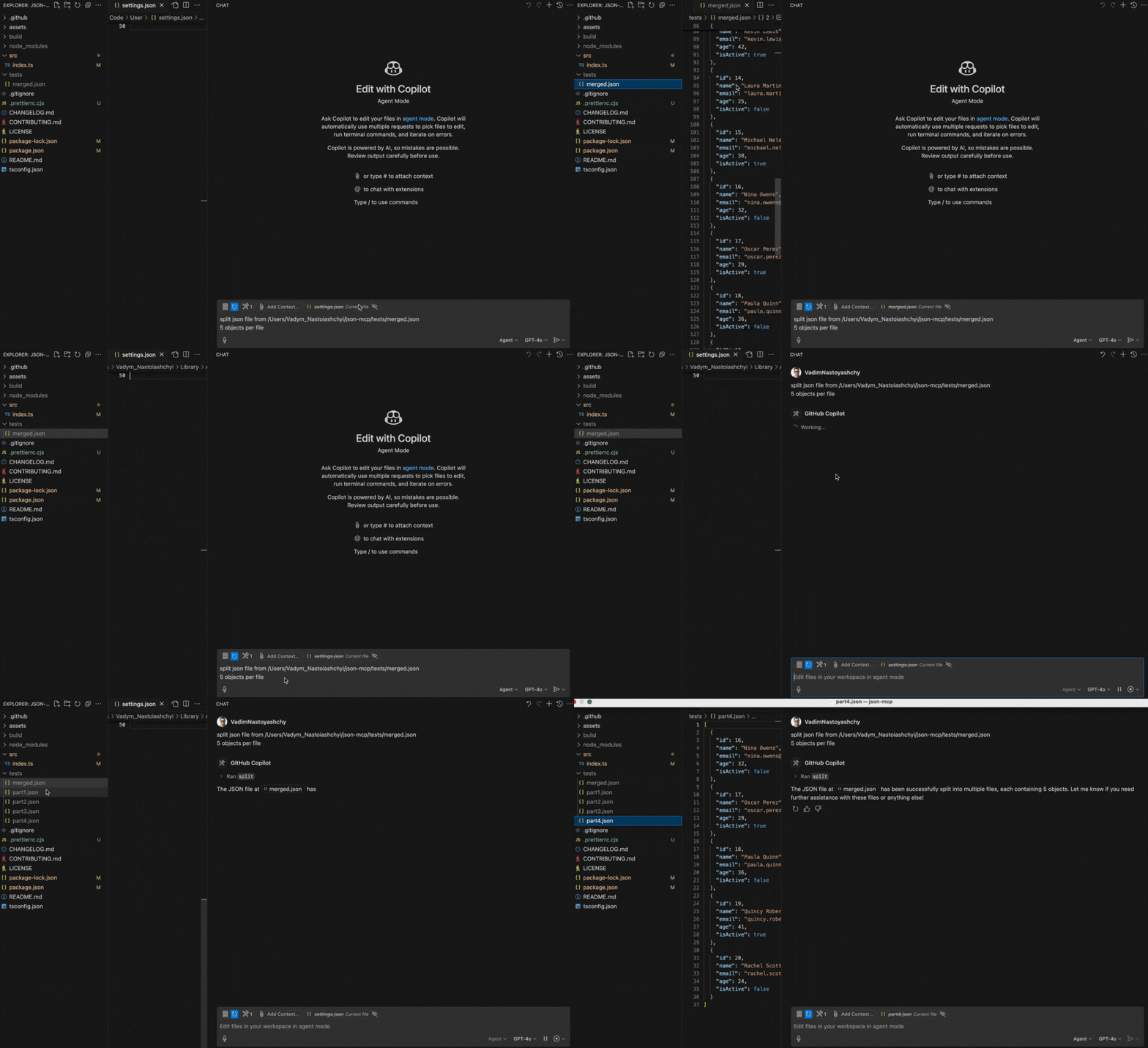
A continuación se muestra una demostración que muestra la funcionalidad split :
🔧 Casos de uso (herramientas)
1. split
Dividir un archivo JSON en una cantidad específica de objetos.
Nota: Se debe proporcionar la ruta del archivo.
Ejemplo de aviso:
Split JSON file from /Users/json-mcp/tests/merged.json
5 objects per file
2. merge
Fusionar archivos JSON en un solo archivo JSON
Nota: Se debe proporcionar la ruta de la carpeta
Ejemplo de aviso:
Merge json files from /Users/json-mcp/tests⚙️ Configuración
Configuración manual de VS Code
Para configurar manualmente el servidor JSON MCP en VS Code, actualice el archivo de configuración de usuario (JSON) :
{
  "mcp": {
    "servers": {
      "json-mcp-server": {
        "command": "npx",
        "args": ["json-mcp-server@latest"]
      }
    }
  }
}
Instalación en VS Code
Puede instalar el servidor JSON MCP mediante la CLI de VS Code:
# For VS Code
code --add-mcp '{"name":"json-mcp-server","command":"npx","args": ["json-mcp-server@latest"]}'
Después de la instalación, el servidor JSON MCP estará disponible para su uso con su agente GitHub Copilot en VS Code.
Escritorio de Claude
Para instalar json-mcp para Claude Desktop automáticamente a través de Smithery :
npx -y @smithery/cli install @VadimNastoyashchy/json-mcp --client claude⚙️ Servidor de instalación
Instalar globalmente
npm install -g json-mcp-server@latestEjecutar después de la instalación global
json-mcp-serverUsar npx con la última versión (recomendado)
npx json-mcp-server@latestAvailable Tools
2 toolsmergeC
Merge JSON files into a one JSON file
ParametersJSON Schema
| Name | Required | Description | Default |
|---|---|---|---|
| path | Yes |
TDQS
C2.6/5.0
Behavior2/5
Does the description disclose side effects, auth requirements, rate limits, or destructive behavior?
No annotations provided. The description only says 'merge', without disclosing critical behaviors like conflict resolution, merge strategy (shallow vs deep), output location, or whether it modifies input files.
Agents need to know what a tool does to the world before calling it. Descriptions should go beyond structured annotations to explain consequences.
Conciseness3/5
Is the description appropriately sized, front-loaded, and free of redundancy?
The description is a single short sentence, which is concise but sacrifices clarity. It is front-loaded but lacks necessary detail.
Shorter descriptions cost fewer tokens and are easier for agents to parse. Every sentence should earn its place.
Completeness2/5
Given the tool's complexity, does the description cover enough for an agent to succeed on first attempt?
Given one parameter, no output schema, and no annotations, the description is too incomplete. It does not explain merge behavior, input constraints, or output format, leaving significant gaps for an agent.
Complex tools with many parameters or behaviors need more documentation. Simple tools need less. This dimension scales expectations accordingly.
Parameters2/5
Does the description clarify parameter syntax, constraints, interactions, or defaults beyond what the schema provides?
The input schema has 0% description coverage for the 'path' parameter, and the description does not explain what 'path' represents. It could be a file path or directory; the ambiguity reduces usefulness.
Input schemas describe structure but not intent. Descriptions should explain non-obvious parameter relationships and valid value ranges.
Purpose4/5
Does the description clearly state what the tool does and how it differs from similar tools?
The description clearly states the tool merges JSON files into one, with a verb 'merge' and resource 'JSON files'. It distinguishes from the sibling 'split' by being the opposite operation. However, it lacks specificity about what 'path' refers to (a single file? a directory?)
Agents choose between tools based on descriptions. A clear purpose with a specific verb and resource helps agents select the right tool.
Usage Guidelines2/5
Does the description explain when to use this tool, when not to, or what alternatives exist?
No guidance on when to use this tool versus alternatives. The sibling 'split' suggests a complementary tool, but no explicit when-to-use or when-not-to-use is given.
Agents often have multiple tools that could apply. Explicit usage guidance like "use X instead of Y when Z" prevents misuse.
splitB
Split a JSON file into a specified number of objects
ParametersJSON Schema
| Name | Required | Description | Default |
|---|---|---|---|
| path | Yes | ||
| numObjects | Yes |
TDQS
B3.1/5.0
Behavior2/5
Does the description disclose side effects, auth requirements, rate limits, or destructive behavior?
The description does not disclose side effects (e.g., whether the original file is modified or a new file created), required permissions, or other behavioral traits. With no annotations, the description carries the full burden but provides minimal info.
Agents need to know what a tool does to the world before calling it. Descriptions should go beyond structured annotations to explain consequences.
Conciseness4/5
Is the description appropriately sized, front-loaded, and free of redundancy?
Single sentence, no unnecessary words. However, the description could benefit from additional structure to cover key behavioral aspects.
Shorter descriptions cost fewer tokens and are easier for agents to parse. Every sentence should earn its place.
Completeness3/5
Given the tool's complexity, does the description cover enough for an agent to succeed on first attempt?
For a simple tool with two parameters, the description is minimally adequate but leaves questions unanswered, such as output behavior and impact on input file. Missing details reduce completeness.
Complex tools with many parameters or behaviors need more documentation. Simple tools need less. This dimension scales expectations accordingly.
Parameters2/5
Does the description clarify parameter syntax, constraints, interactions, or defaults beyond what the schema provides?
Schema coverage is 0%, and the description adds no meaning beyond the schema. For example, 'path' and 'numObjects' are not detailed—no clarification on file format, location constraints, or how numObjects is applied.
Input schemas describe structure but not intent. Descriptions should explain non-obvious parameter relationships and valid value ranges.
Purpose5/5
Does the description clearly state what the tool does and how it differs from similar tools?
The description clearly states the action (split) and the resource (JSON file). It distinguishes from the sibling tool 'merge' by implying opposite functionality.
Agents choose between tools based on descriptions. A clear purpose with a specific verb and resource helps agents select the right tool.
Usage Guidelines2/5
Does the description explain when to use this tool, when not to, or what alternatives exist?
No guidance on when to use this tool versus alternatives (e.g., 'merge'). No context about prerequisites or exclusions.
Agents often have multiple tools that could apply. Explicit usage guidance like "use X instead of Y when Z" prevents misuse.
Tool Schema Changelog
Recent tool additions, removals, and schema changes observed during successful MCP inspections.
2 tool updates
v1.0.0- First observed
merge - First observed
split
TDQS
B3.3/5.0
Scored across 2 tools
Disambiguation5/5
Merge and split are clearly opposite operations. An agent can easily distinguish their purposes without ambiguity.
Naming Consistency5/5
Both tools use concise, single-word verbs (merge, split) following a consistent pattern.
Tool Count4/5
Two tools is slightly below the typical well-scoped range, but the server's narrow focus on merge/split operations justifies this minimal set.
Completeness4/5
The server covers the core merge and split operations for JSON files. Minor gaps like transform or validate exist, but the surface is complete for its stated purpose.
Maintenance
ActivityInactive
ResponsivenessNo issues
Related MCP Connectors
The official MCP Server for the Mux API
MCP server for progressive tool usage at any scale (see https://klavis.ai)
Related MCP Servers
- -
- AlicenseNot gradedqualityBmaintenanceJson AI - MCP server providing AI-powered tools and automation by MEOK AI Labs13 npm39 PyPIMIT
- AlicenseNot gradedqualityAmaintenanceMCP server for reading, querying, and filtering local JSON files with extended JSONPath syntax, supporting sorting, aggregations, and complex conditions.369 npm2MIT