A
licenseC
qualityD
maintenanceDetects AI-generated content and transforms robotic text into natural, human-like writing while improving grammar, readability, and preserving key terminology.
1
35 npm
4
MIT

AI生成コンテンツをより自然で人間らしい音声に仕上げる、強力なモデルコンテキストプロトコル(MCP)サーバー。高度なAI検出機能とテキスト強化機能を搭載しています。
text2goによって提供されています。
Related MCP server: Natural Voice MCP
🤖 AI検出- AI生成コンテンツを正確に識別
👤自然言語処理- ロボットの文章を人間のような自然な文章に変換します
⭐文法の完璧さ- 完璧な文法の正確さを保証します
📋読みやすさの最適化- テキストの流れと理解度を改善
📏長さのコントロール- 意味を保ちながらコンテンツの長さを調整
⚖️用語の保存- 特定の用語とキーフレーズを維持する
ノードバージョン >= 16
クロードデスクトップ最新バージョン
Claude デスクトップを設定します。
クロードデスクトップを開く
設定→開発者→設定の編集に移動します
次の構成を追加します。
{
  "mcpServers": {
    "ai-humanizer": {
      "command": "npx",
      "args": ["-y", "ai-humanizer-mcp-server"]
    }
  }
}
変更を適用するには、Claude Desktop を再起動してください。
このリポジトリをクローンする
依存関係をインストールする
npm installプロジェクトを構築する
npm run buildClaude デスクトップを設定します。
クロードデスクトップを開く
設定→開発者→設定の編集に移動します
次の構成を追加します。
{
  "mcpServers": {
    "ai-humanizer": {
      "command": "node",
      "args": ["<YOUR_PROJECT_PATH>/build/index.js"]
    }
  }
}
変更を適用するには、Claude Desktop を再起動してください。
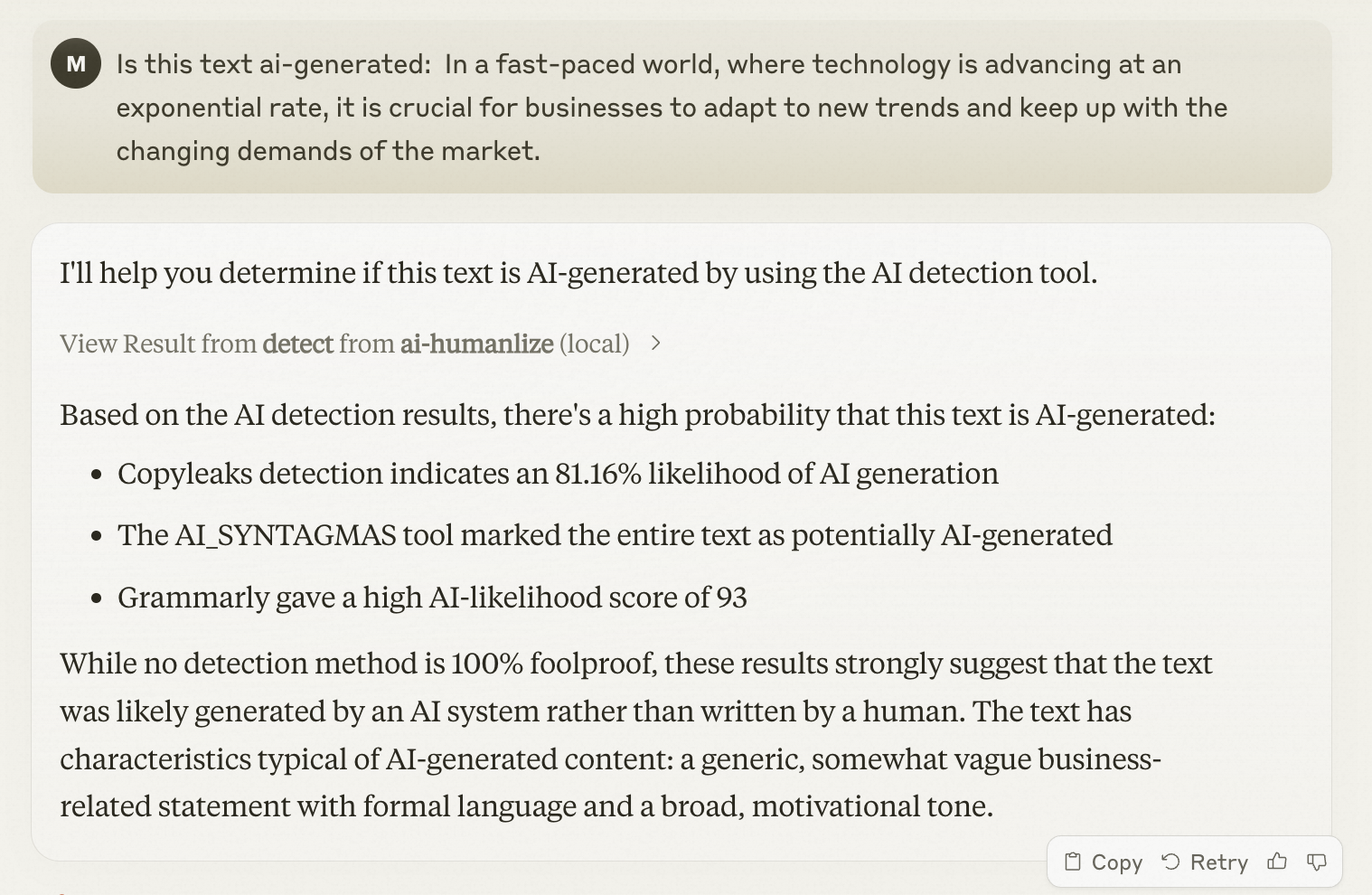
テキストが AI によって生成されたかどうかを確認するには、Claude に次のように質問します。
Is this text ai-generated: In a fast-paced world, where technology is advancing at an exponential rate, it is crucial for businesses to adapt to new trends and keep up with the changing demands of the market.Detect whether the text is AI-generated.Show to user the task detail url. Extract the taskId field, then concatenate the link in the following format: https://pre-www.text2go.ai/?utm_source=claude_mcp&taskId={taskId}
| Name | Required | Description | Default |
|---|---|---|---|
| detectionTypeList | Yes | ||
| text | Yes | ||
| type | Yes |
Does the description disclose side effects, auth requirements, rate limits, or destructive behavior?
With no annotations provided, the description carries full burden for behavioral disclosure. It mentions showing a task detail URL and extracting/concatenating a taskId, which suggests this tool performs both detection AND URL generation. However, it doesn't disclose what happens after detection (e.g., returns a score, classification, confidence), whether it makes external API calls, rate limits, or authentication requirements.
Agents need to know what a tool does to the world before calling it. Descriptions should go beyond structured annotations to explain consequences.
Is the description appropriately sized, front-loaded, and free of redundancy?
The description is poorly structured - it starts with the core purpose but immediately mixes in implementation details about URL formatting. The second sentence about extracting taskId and concatenating links feels like internal implementation instructions rather than a clear tool description. It's not front-loaded with essential information.
Shorter descriptions cost fewer tokens and are easier for agents to parse. Every sentence should earn its place.
Given the tool's complexity, does the description cover enough for an agent to succeed on first attempt?
For a 3-parameter detection tool with no annotations and no output schema, the description is incomplete. It doesn't explain what the tool returns (just mentions showing a URL), doesn't clarify the detection mechanism, and doesn't provide context about the detectionTypeList options (COPYLEAKS vs HEMINGWAY). The URL formatting details seem like implementation noise rather than helpful context.
Complex tools with many parameters or behaviors need more documentation. Simple tools need less. This dimension scales expectations accordingly.
Does the description clarify parameter syntax, constraints, interactions, or defaults beyond what the schema provides?
Schema description coverage is 0%, so the description must compensate for undocumented parameters. The description mentions 'text' but doesn't explain what kind of text or length limits. It doesn't mention 'detectionTypeList' or 'type' parameters at all, leaving three parameters essentially unexplained beyond their schema definitions.
Input schemas describe structure but not intent. Descriptions should explain non-obvious parameter relationships and valid value ranges.
Does the description clearly state what the tool does and how it differs from similar tools?
The description states 'Detect whether the text is AI-generated' which provides a basic purpose, but it's vague about the mechanism and immediately diverges into implementation details about URLs and task IDs. The title is null, and the description doesn't clearly distinguish this as a standalone detection tool versus part of a workflow.
Agents choose between tools based on descriptions. A clear purpose with a specific verb and resource helps agents select the right tool.
Does the description explain when to use this tool, when not to, or what alternatives exist?
No guidance on when to use this tool is provided. The description jumps straight to implementation details without explaining the context, prerequisites, or alternatives. There's no mention of when this detection would be appropriate versus other methods.
Agents often have multiple tools that could apply. Explicit usage guidance like "use X instead of Y when Z" prevents misuse.
Recent tool additions, removals, and schema changes observed during successful MCP inspections.
v1.0.0detectScored across 1 tool
With only one tool, there is no possibility of ambiguity or overlap between tools. The single tool 'detect' has a clearly defined purpose that cannot be confused with any other tool in this set.
A single tool inherently demonstrates perfect naming consistency as there are no other tools to compare against. The tool name 'detect' follows a clear verb-based pattern appropriate for its function.
A single tool is insufficient for most server purposes, creating a thin surface that limits agent capabilities. While the tool has a specific function, the server's scope appears to be AI text detection, which would typically benefit from additional related operations like analysis, comparison, or verification tools.
The server appears focused on AI text detection, but with only a detection tool, there are significant gaps in functionality. There's no way to analyze results, compare texts, verify human-written content, or perform related operations that would complete the AI-human text analysis domain.
Transform AI-generated text into natural, human-sounding content that bypasses AI detectors.
Rewrites AI text to read naturally. One tool: humanize(text, intensity). Free plan: 2,500 words/mo.
AI humanizer for MCP clients. Rewrites AI text so it reads naturally and sounds human.
Find AI-isms with evidence and fingerprint a writing voice from samples. 3 of 5 free.