A
licenseC
qualityD
maintenanceDetects AI-generated content and transforms robotic text into natural, human-like writing while improving grammar, readability, and preserving key terminology.
1
35 npm
4
MIT

Un potente servidor de Protocolo de Contexto de Modelo (MCP) que ayuda a refinar el contenido generado por IA para que suene más natural y humano. Desarrollado con capacidades avanzadas de detección de IA y mejora de texto.
Desarrollado por text2go .
Related MCP server: Natural Voice MCP
🤖 Detección de IA : identifique con precisión el contenido generado por IA
👤 Mejora del lenguaje natural : transforma el texto robótico en escritura natural similar a la humana
⭐ Perfección gramatical : garantiza una precisión gramatical impecable
📋 Optimización de la legibilidad : mejora el flujo y la comprensión del texto
📏 Control de longitud : ajuste la longitud del contenido conservando el significado
⚖️ Preservación de términos : mantenga la terminología específica y las frases clave
versión del nodo >= 16
Última versión de Claude Desktop
Configurar Claude Desktop:
Abra Claude Desktop
Vaya a Configuración → Desarrollador → Editar configuración
Agregue la siguiente configuración:
{
  "mcpServers": {
    "ai-humanizer": {
      "command": "npx",
      "args": ["-y", "ai-humanizer-mcp-server"]
    }
  }
}
Reinicie Claude Desktop para aplicar los cambios
Clonar este repositorio
Instalar dependencias
npm installConstruir el proyecto
npm run buildConfigurar Claude Desktop:
Abra Claude Desktop
Vaya a Configuración → Desarrollador → Editar configuración
Agregue la siguiente configuración:
{
  "mcpServers": {
    "ai-humanizer": {
      "command": "node",
      "args": ["<YOUR_PROJECT_PATH>/build/index.js"]
    }
  }
}
Reinicie Claude Desktop para aplicar los cambios
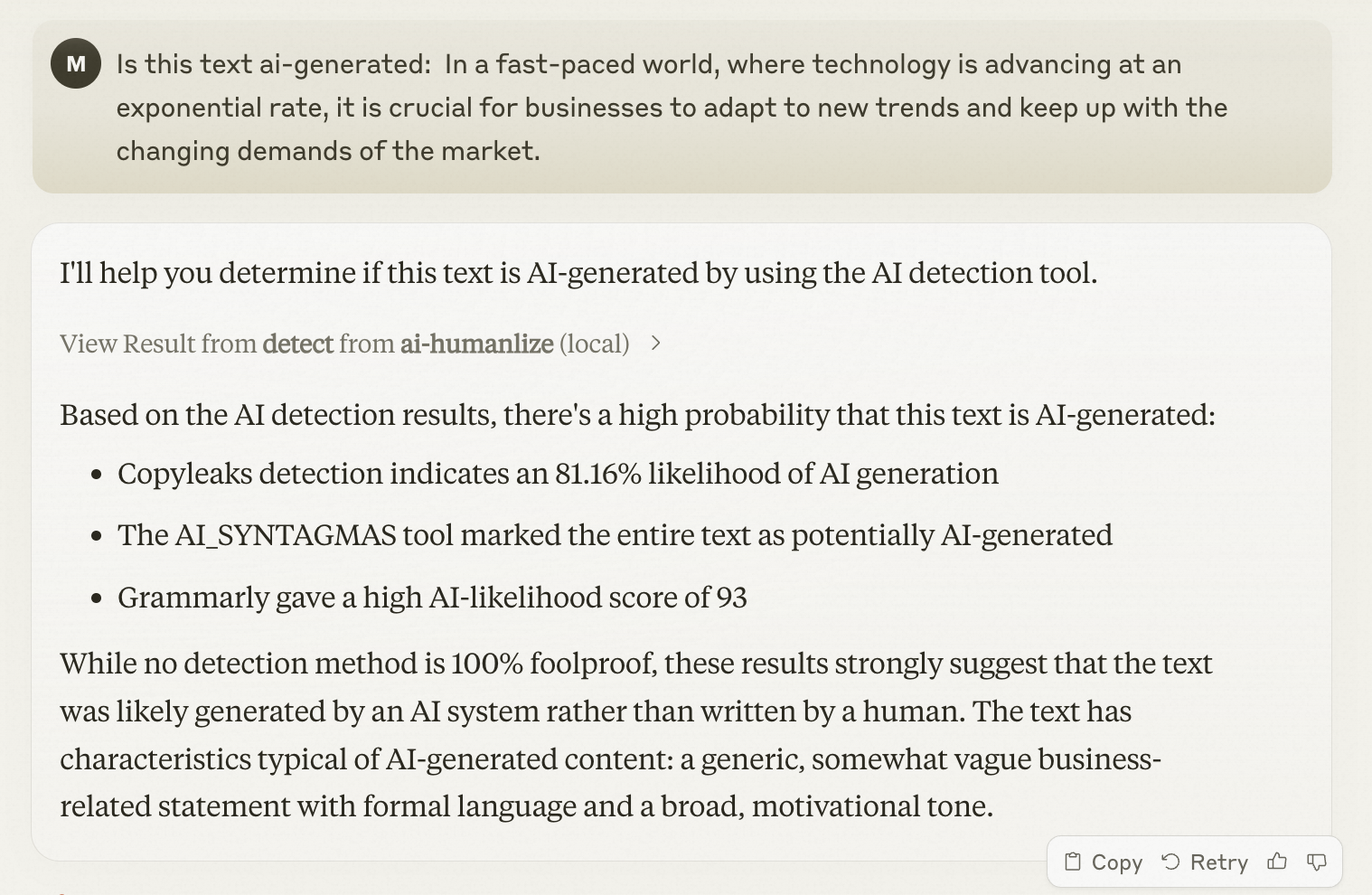
Para comprobar si el texto está generado por IA, simplemente pregúntele a Claude:
Is this text ai-generated: In a fast-paced world, where technology is advancing at an exponential rate, it is crucial for businesses to adapt to new trends and keep up with the changing demands of the market.Detect whether the text is AI-generated.Show to user the task detail url. Extract the taskId field, then concatenate the link in the following format: https://pre-www.text2go.ai/?utm_source=claude_mcp&taskId={taskId}
| Name | Required | Description | Default |
|---|---|---|---|
| detectionTypeList | Yes | ||
| text | Yes | ||
| type | Yes |
Does the description disclose side effects, auth requirements, rate limits, or destructive behavior?
With no annotations provided, the description carries full burden for behavioral disclosure. It mentions showing a task detail URL and extracting/concatenating a taskId, which suggests this tool performs both detection AND URL generation. However, it doesn't disclose what happens after detection (e.g., returns a score, classification, confidence), whether it makes external API calls, rate limits, or authentication requirements.
Agents need to know what a tool does to the world before calling it. Descriptions should go beyond structured annotations to explain consequences.
Is the description appropriately sized, front-loaded, and free of redundancy?
The description is poorly structured - it starts with the core purpose but immediately mixes in implementation details about URL formatting. The second sentence about extracting taskId and concatenating links feels like internal implementation instructions rather than a clear tool description. It's not front-loaded with essential information.
Shorter descriptions cost fewer tokens and are easier for agents to parse. Every sentence should earn its place.
Given the tool's complexity, does the description cover enough for an agent to succeed on first attempt?
For a 3-parameter detection tool with no annotations and no output schema, the description is incomplete. It doesn't explain what the tool returns (just mentions showing a URL), doesn't clarify the detection mechanism, and doesn't provide context about the detectionTypeList options (COPYLEAKS vs HEMINGWAY). The URL formatting details seem like implementation noise rather than helpful context.
Complex tools with many parameters or behaviors need more documentation. Simple tools need less. This dimension scales expectations accordingly.
Does the description clarify parameter syntax, constraints, interactions, or defaults beyond what the schema provides?
Schema description coverage is 0%, so the description must compensate for undocumented parameters. The description mentions 'text' but doesn't explain what kind of text or length limits. It doesn't mention 'detectionTypeList' or 'type' parameters at all, leaving three parameters essentially unexplained beyond their schema definitions.
Input schemas describe structure but not intent. Descriptions should explain non-obvious parameter relationships and valid value ranges.
Does the description clearly state what the tool does and how it differs from similar tools?
The description states 'Detect whether the text is AI-generated' which provides a basic purpose, but it's vague about the mechanism and immediately diverges into implementation details about URLs and task IDs. The title is null, and the description doesn't clearly distinguish this as a standalone detection tool versus part of a workflow.
Agents choose between tools based on descriptions. A clear purpose with a specific verb and resource helps agents select the right tool.
Does the description explain when to use this tool, when not to, or what alternatives exist?
No guidance on when to use this tool is provided. The description jumps straight to implementation details without explaining the context, prerequisites, or alternatives. There's no mention of when this detection would be appropriate versus other methods.
Agents often have multiple tools that could apply. Explicit usage guidance like "use X instead of Y when Z" prevents misuse.
Recent tool additions, removals, and schema changes observed during successful MCP inspections.
v1.0.0detectScored across 1 tool
With only one tool, there is no possibility of ambiguity or overlap between tools. The single tool 'detect' has a clearly defined purpose that cannot be confused with any other tool in this set.
A single tool inherently demonstrates perfect naming consistency as there are no other tools to compare against. The tool name 'detect' follows a clear verb-based pattern appropriate for its function.
A single tool is insufficient for most server purposes, creating a thin surface that limits agent capabilities. While the tool has a specific function, the server's scope appears to be AI text detection, which would typically benefit from additional related operations like analysis, comparison, or verification tools.
The server appears focused on AI text detection, but with only a detection tool, there are significant gaps in functionality. There's no way to analyze results, compare texts, verify human-written content, or perform related operations that would complete the AI-human text analysis domain.
Transform AI-generated text into natural, human-sounding content that bypasses AI detectors.
Rewrites AI text to read naturally. One tool: humanize(text, intensity). Free plan: 2,500 words/mo.
AI humanizer for MCP clients. Rewrites AI text so it reads naturally and sounds human.
Find AI-isms with evidence and fingerprint a writing voice from samples. 3 of 5 free.