A
licenseNot graded
qualityD
maintenanceMCP server for programmatically creating and editing Aseprite sprites, enabling AI agents to draw, manage layers and frames, and iterate until the desired result is achieved.
120 npm
MIT

This MCP server lets you control LibreSprite through prompt-assisted scripting by running JavaScript inside the application.
Execute JavaScript scripts inside LibreSprite via the run_script tool.
Receive console output from executed scripts.
Use MCP resources such as docs:reference and docs:examples to guide script creation.
Connect MCP clients like Claude Desktop or Cursor to LibreSprite using the provided mcp.js script.
Support prompt-assisted pixel-art editing, designing, and scripting in LibreSprite.
Enables downloading the required LibreSprite MCP script component from GitHub releases to complete the integration setup.
Click on "Deploy Server".
Wait a few minutes for the server to deploy. Once ready, it will show a "Started" state.
In the chat, type @ followed by the MCP server name and your instructions, e.g., "@LibreSprite MCP create a 32x32 pixel sprite of a smiling cat with green eyes"
That's it! The server will respond to your query, and you can continue using it as needed.
Here is a step-by-step guide with screenshots.

Prompt your way into LibreSprite
Model Context Protocol (MCP) server for prompt-assisted editing, designing, and scripting inside LibreSprite.
https://github.com/user-attachments/assets/71440bba-16a5-4ee2-af10-2c346978a290
uv is the recommended way to install and use this server. Here are quick one-liners to install it if you haven't:
Windows: (run as administrator)
powershell -ExecutionPolicy ByPass -c "irm https://astral.sh/uv/install.ps1 | iex"Unix:
curl -LsSf https://astral.sh/uv/install.sh | shMore on installing uv.
The package is published on PyPI, so feel free to consume it any other way you prefer (pipx, etc)
Related MCP server: aseprite-mcp
Add the MCP server with the following entrypoint command (or something else if you are not using uv) to your MCP client:
uvx libresprite-mcpClaude Desktop & Cursor
Edit Claude > Settings > Developer > Edit Config > claude_desktop_config.json or .cursor > mcp.json to include the server:
{
    "mcpServers": {
        // ...existing servers...
        "libresprite": {
            "type": "stdio",
            "command": "uvx",
            "args": [
                "libresprite-mcp"
            ]
        }
        // ...existing servers...
    }
}
You can also use this fancy badge to make it quick:

You will have to restart Claude Desktop to load the MCP Server.
Download the latest stable remote script mcp.js from releases and add it to LibreSprite's scripts folder:
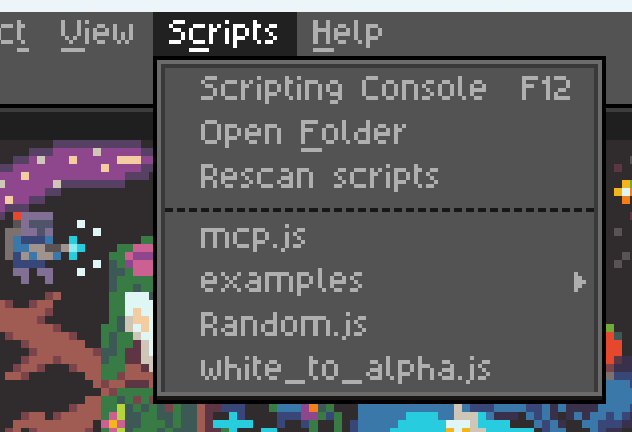
Run the mcp.js script (that you see in the screenshot above), and make sure your MCP server is running (Claude Desktop/Cursor is loaded and running). If all went well, you should see the following screen:

Click the "Connect" button and you can now start talking to Claude about your next big pixel-art project!
You can only run one instance of the MCP server at a time.
The server expects port 64823 to be free.
Running another script while connected disconnects mcp.js. Re-run mcp.js to reconnect.
The server has a hacky and brittle implementation (see ARCHITECTURE), and is not extensively tested.
The MCP resources are kinda low quality with unclear API reference and limited examples, leaving the LLM confused at times. If you're a LibreSprite expert, we need your help.
        Run a JavaScript script inside Libresprite.

        IMPORTANT: Make sure you are well versed with the documentation and examples provided in the resources `docs:reference` and `docs:examples`.

        Args:
            script: The script to execute

        Returns:
            Console output
| Name | Required | Description | Default |
|---|---|---|---|
| script | Yes |
| Name | Required | Description |
|---|---|---|
| result | Yes |
Does the description disclose side effects, auth requirements, rate limits, or destructive behavior?
No annotations are provided, so the description must disclose behavioral traits. It only mentions executing a script and returning console output, omitting critical details like potential data mutation, security risks, or error handling. For a tool that runs arbitrary code, this is insufficient.
Agents need to know what a tool does to the world before calling it. Descriptions should go beyond structured annotations to explain consequences.
Is the description appropriately sized, front-loaded, and free of redundancy?
The description is concise at 5 lines. It is front-loaded with the purpose, followed by an important warning, then parameter and return sections. Every part serves a purpose, though the warning could be shortened.
Shorter descriptions cost fewer tokens and are easier for agents to parse. Every sentence should earn its place.
Given the tool's complexity, does the description cover enough for an agent to succeed on first attempt?
Given the potential complexity of running scripts, the description lacks context on failure modes, timeouts, or permissions. The existence of an output schema reduces the need to explain return values, but behavioral gaps remain, making it incomplete.
Complex tools with many parameters or behaviors need more documentation. Simple tools need less. This dimension scales expectations accordingly.
Does the description clarify parameter syntax, constraints, interactions, or defaults beyond what the schema provides?
The input schema has 0% description coverage, so the parameter 'script' is clarified only in the description as 'The script to execute.' This adds meaning but is minimal and does not provide constraints or examples.
Input schemas describe structure but not intent. Descriptions should explain non-obvious parameter relationships and valid value ranges.
Does the description clearly state what the tool does and how it differs from similar tools?
The description clearly states 'Run a JavaScript script inside Libresprite,' which is a specific verb-resource combination. There are no sibling tools, so differentiation is not required.
Agents choose between tools based on descriptions. A clear purpose with a specific verb and resource helps agents select the right tool.
Does the description explain when to use this tool, when not to, or what alternatives exist?
The description includes an IMPORTANT note about consulting documentation, which implies a prerequisite but does not explicitly state when to use the tool or when to avoid it. No alternatives exist, so the guidance is minimal.
Agents often have multiple tools that could apply. Explicit usage guidance like "use X instead of Y when Z" prevents misuse.
Recent tool additions, removals, and schema changes observed during successful MCP inspections.
run_scriptScored across 1 tool
With only one tool, there is no possibility of ambiguity between tools. The singular tool has a clear and distinct purpose.
The single tool name 'run_script' follows a consistent verb_noun pattern. No inconsistencies exist due to the absence of other tools.
The server provides only one tool for a complex domain (LibreSprite pixel art editor). This is too few for typical workflows, which would require multiple tools for editing, layering, and exporting.
The server exposes only a generic script runner, lacking direct tools for common operations like creating, editing, or exporting sprites. While scripting can compensate, the surface is severely incomplete for the stated domain.
A comprehensive Model Context Protocol (MCP) server that enables AI assistants to interact with yo…
Generate authentic pixel art - sprites, animations, and tilesets - from any MCP client
Generate game-ready 3D models, textures, and audio from natural language, over MCP.
Generate, edit, style-match, turn, and animate game-ready pixel art at exact sizes.