
LibreSprite MCP
by Snehil-Shah
README.md
# LibreSprite-MCP
[](https://cursor.com/install-mcp?name=libresprite&config=JTdCJTIyY29tbWFuZCUyMiUzQSUyMnV2eCUyMGxpYnJlc3ByaXRlLW1jcCUyMiU3RA%3D%3D)
[](https://pypi.org/project/libresprite-mcp/)
> Prompt your way into LibreSprite
Model Context Protocol (MCP) server for prompt-assisted editing, designing, and scripting inside LibreSprite.
https://github.com/user-attachments/assets/71440bba-16a5-4ee2-af10-2c346978a290
## Prerequisites
[`uv`](https://docs.astral.sh/uv/) is the recommended way to install and use this server. Here are quick one-liners to install it if you haven't:
- **Windows**: (run as administrator)
```powershell
powershell -ExecutionPolicy ByPass -c "irm https://astral.sh/uv/install.ps1 | iex"
```
- **Unix**:
```bash
curl -LsSf https://astral.sh/uv/install.sh | sh
```
More on [installing `uv`](https://docs.astral.sh/uv/getting-started/installation/).
The package is published on [PyPI](https://pypi.org/project/librespsrite-mcp/), so feel free to consume it any other way you prefer (`pipx`, etc)
## Usage
### Step 1: Setting up the client
Add the MCP server with the following entrypoint command (or something else if you are not using `uv`) to your MCP client:
```bash
uvx libresprite-mcp
```
#### Examples:
- **Claude Desktop & Cursor**
Edit _Claude > Settings > Developer > Edit Config > claude_desktop_config.json_ or _.cursor > mcp.json_ to include the server:
```json
{
"mcpServers": {
// ...existing servers...
"libresprite": {
"type": "stdio",
"command": "uvx",
"args": [
"libresprite-mcp"
]
}
// ...existing servers...
}
}
```
You can also use this fancy badge to make it quick:
[](https://cursor.com/install-mcp?name=libresprite&config=JTdCJTIyY29tbWFuZCUyMiUzQSUyMnV2eCUyMGxpYnJlc3ByaXRlLW1jcCUyMiU3RA%3D%3D)
> [!NOTE]
> You will have to restart Claude Desktop to load the MCP Server.
### Step 2: Setting up LibreSprite
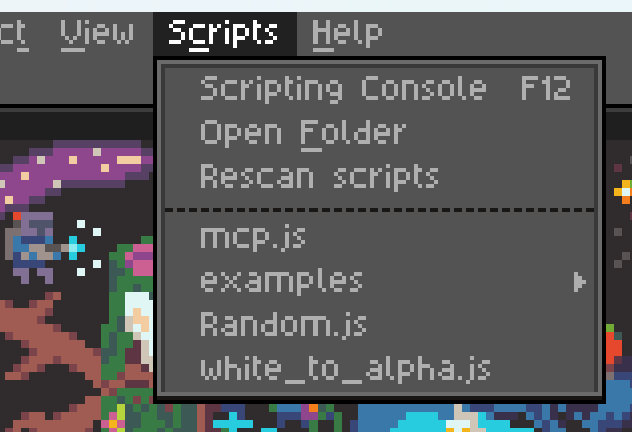
Download the latest stable remote script `mcp.js` from [releases](https://github.com/Snehil-Shah/libresprite-mcp/releases/latest) and add it to LibreSprite's scripts folder:
### Step 3: Connect and use
Run the `mcp.js` script (that you see in the screenshot above), and make sure your MCP server is running (Claude Desktop/Cursor is loaded and running). If all went well, you should see the following screen:

Click the "Connect" button and you can now start talking to Claude about your next big pixel-art project!
## Some pointers
- You can only run one instance of the MCP server at a time.
- The server expects port `64823` to be free.
- Running another script while connected disconnects `mcp.js`. Re-run `mcp.js` to reconnect.
- The server has a hacky and brittle implementation (see [ARCHITECTURE](https://github.com/Snehil-Shah/libresprite-mcp/blob/main/ARCHITECTURE.md)), and is not extensively tested.
- The MCP resources are kinda low quality with unclear API reference and limited examples, leaving the LLM confused at times. If you're a LibreSprite expert, we need your help.
***
TDQS
B3.4/5.0
Scored across 1 tool
Disambiguation5/5
With only one tool, there is no possibility of ambiguity between tools. The singular tool has a clear and distinct purpose.
Naming Consistency5/5
The single tool name 'run_script' follows a consistent verb_noun pattern. No inconsistencies exist due to the absence of other tools.
Tool Count2/5
The server provides only one tool for a complex domain (LibreSprite pixel art editor). This is too few for typical workflows, which would require multiple tools for editing, layering, and exporting.
Completeness2/5
The server exposes only a generic script runner, lacking direct tools for common operations like creating, editing, or exporting sprites. While scripting can compensate, the surface is severely incomplete for the stated domain.
Maintenance
ActivityMaintained
ResponsivenessUnresponsive