

F
licenseA
qualityF
maintenanceA Model Context Protocol server that enables Claude to display and interact with images from the local filesystem, allowing users to view images directly in conversations and retrieve image metadata.
3
5
-

이 가이드에서는 LetzAI MCP(모델 컨텍스트 프로토콜)를 설정하고 사용하여 이미지 생성을 하는 과정을 안내합니다.
시작하기 전에 다음 사항이 있는지 확인하세요.
시스템에 Node.js가 설치되어 있어야 합니다. Node.js 공식 사이트 에서 다운로드할 수 있습니다.
Claude 데스크톱 앱이 설치되어 있습니다. 설치되어 있지 않으면 Claude 데스크톱 앱 에서 다운로드하세요.
LetzAI API 키 . LetzAI API 페이지에서 받으실 수 있습니다.
Related MCP server: iRAG MCP Server
LetzAI MCP 프로젝트가 포함된 저장소를 다운로드하여 다운로드 폴더 외부에 저장하세요. 예:
지엑스피1
또는 git clone 사용하여 저장소를 복제할 수 있습니다.
git clone <repository-url> C:\\Users\\username\\desktop터미널이나 명령 프롬프트를 사용하여 프로젝트 폴더로 이동합니다.
cd C:\\Users\\username\\desktop다음 명령을 실행하여 필요한 모든 종속성을 설치하세요.
npm install종속성을 설치한 후 다음 명령을 사용하여 TypeScript 파일을 JavaScript로 컴파일합니다.
npx tsc이렇게 하면 build 폴더에 컴파일된 JavaScript 파일이 생성됩니다.
npx tsc 실행한 후에는 Claude Desktop App을 다시 시작 해야 업데이트된 MCP 구성과 컴파일된 파일을 인식할 수 있습니다.
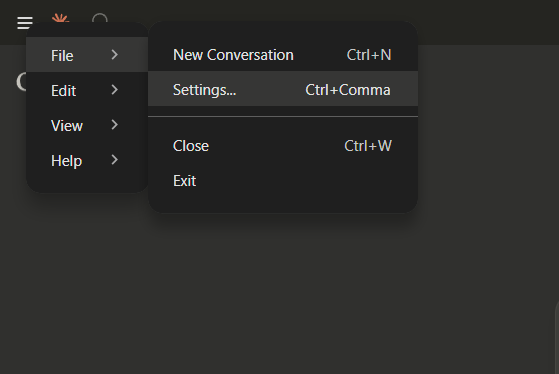
Claude 데스크톱 앱을 엽니다 .
왼쪽 상단 모서리에 있는 메뉴 아이콘을 클릭하세요 .
드롭다운에서 파일을 선택합니다.
설정 으로 이동합니다.
개발자 섹션에서 구성 편집 옵션을 볼 수 있습니다.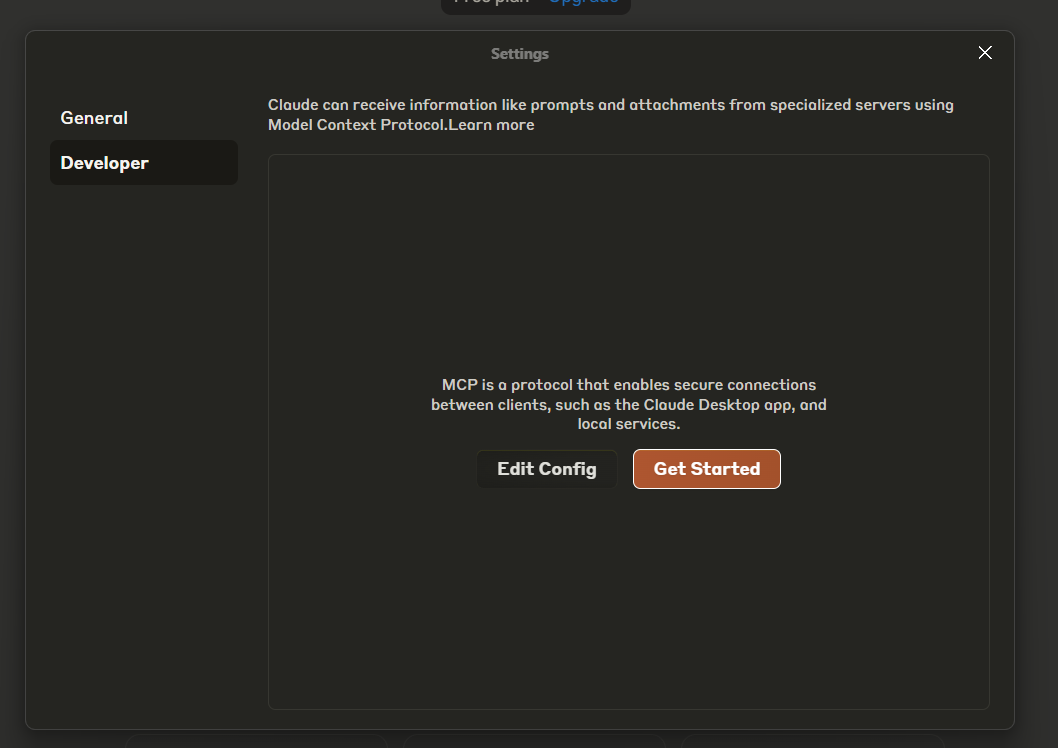
구성 편집을 클릭하면 구성 폴더가 열립니다.
claude_desktop_config.json 파일을 찾아 필요에 따라 편집합니다.
{
  "mcpServers": {
    "letzai": {
      "command": "node",
      "args": [
        "C:\\ABSOLUTE\\PATH\\TO\\PARENT\\FOLDER\\letzai-mcp\\build\\index.js"
      ],
      "env": {
        "LETZAI_API_KEY": "<Your LetzAI API Key>"
      }
    }
  }
}{
"mcpServers": {
"letzai": {
"command": "node",
"args": ["/ABSOLUTE/PATH/TO/PARENT/FOLDER/letzai-mcp/build/index.js"],
"env": {
"LETZAI_API_KEY": "<Your LetzAI API Key>"
}
}
}
}{
"mcpServers": {
"letzai": {
"command": "node",
"args": ["/ABSOLUTE/PATH/TO/PARENT/FOLDER/letzai-mcp/build/index.js"],
"env": {
"LETZAI_API_KEY": "<Your LetzAI API Key>"
}
}
}
}command : 애플리케이션을 실행하는 명령입니다. TypeScript에서 생성된 JavaScript 파일을 실행하려면 node 사용합니다.
args : 컴파일된 index.js 파일의 경로입니다. 컴파일 후 파일 위치에 따라 경로가 올바른지 확인하세요. 폴더를 C:\\Users\\username\\desktop\\letzai-mcp 에 배치한 경우 경로는 다음과 같습니다.
C:\\Users\\username\\desktop\\letzai-mcp\\build\\index.js
이제 모든 설정이 완료되었으므로 Claude Desktop App에서 LetzAI MCP를 사용할 수 있습니다. 앱이 올바른 API 키로 실행되고 환경에 등록되면 서버는 이미지 생성 작업을 수행할 준비가 됩니다.
중요: 구성을 변경한 후에는 Claude를 다시 시작해야 변경 사항이 적용됩니다.
 망치 아이콘을 클릭하면 설치된 MCP 도구를 볼 수 있습니다.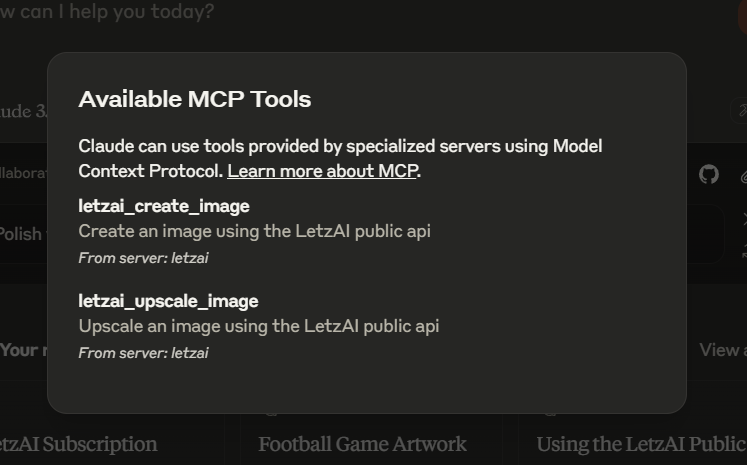
Claude Desktop App에서 MCP를 설정한 후 다음 프롬프트를 실행하여 테스트할 수 있습니다.
"@mischstrotz가 기사 복장을 하고 맥주를 마시는 사진"이라는 프롬프트를 사용하여 LetzAI로 이미지를 만듭니다.
그러면 제공된 프롬프트를 기반으로 LetzAI의 @mischstrotz 모델을 사용하여 이미지가 생성됩니다. Claude가 원하는 브라우저에서 이미지를 엽니다.
이 이미지를 강도 1로 확대하세요: https://letz.ai/image/d6a67077-f156-46d7-a1a2-1dc49e83dd91
이렇게 하면 강도 매개변수 1을 사용하여 이미지가 업스케일됩니다. 전체 URL을 전달하거나 LetzAI 이미지 ID만 전달할 수 있습니다(예: d6a67077-f156-46d7-a1a2-1dc49e83dd91).
Node.js를 찾을 수 없습니다 . Node.js가 설치되어 있고 시스템의 PATH 환경 변수에 추가되었는지 확인하세요.
잘못된 API 키 : Claude Desktop App 설정의 LETZAI_API_KEY 변수에 API 키를 올바르게 추가했는지 다시 한 번 확인하세요.
파일 경로 문제 : index.js 파일 경로가 올바른지 확인하세요. 경로가 확실하지 않으면 파일의 절대 경로를 사용하세요.
더 자세한 문서와 지원은 LetzAI Docs 에서 확인하세요.
Create an image using the LetzAI public api
| Name | Required | Description | Default |
|---|---|---|---|
| prompt | Yes | Image prompt to generate a new image. Can also include @tag to generate an image using a model from the LetzAi Platform | |
| width | No | Width of the image should be between 520 and 2160 max pixels. Default is 1600. | |
| height | No | Height of the image should be between 520 and 2160 max pixels. Default is 1600. | |
| quality | No | Defines how many steps the generation should take. Higher is slower, but generally better quality. Min: 1, Default: 2, Max: 5 | |
| creativity | No | Defines how strictly the prompt should be respected. Higher Creativity makes the images more artificial. Lower makes it more photorealistic. Min: 1, Default: 2, Max: 5 | |
| hasWatermark | No | Defines whether to set a watermark or not. Default is true | |
| systemVersion | No | Allowed values: 2, 3. UseLetzAI V2, or V3 (newest). | |
| mode | No | Select one of the different modes that offer different generation settings. Allowed values: default, sigma, turbo. Default is slow but high quality. Sigma is faster and great for close ups. Turbo is fastest, but lower quality. | turbo |
Does the description disclose side effects, auth requirements, rate limits, or destructive behavior?
With no annotations provided, the description carries the full burden of behavioral disclosure but only states the basic action. It doesn't cover authentication needs, rate limits, response format, error handling, or any side effects (e.g., whether creation is idempotent or has costs). This leaves significant gaps for an AI agent to understand operational behavior.
Agents need to know what a tool does to the world before calling it. Descriptions should go beyond structured annotations to explain consequences.
Is the description appropriately sized, front-loaded, and free of redundancy?
The description is a single, efficient sentence that directly states the tool's purpose without unnecessary words. It's appropriately sized and front-loaded, making it easy to parse while avoiding redundancy or fluff.
Shorter descriptions cost fewer tokens and are easier for agents to parse. Every sentence should earn its place.
Given the tool's complexity, does the description cover enough for an agent to succeed on first attempt?
Given the complexity of an 8-parameter image generation tool with no annotations and no output schema, the description is insufficient. It lacks details on return values, error conditions, usage constraints, and how it integrates with the sibling tool, leaving the agent with incomplete operational context.
Complex tools with many parameters or behaviors need more documentation. Simple tools need less. This dimension scales expectations accordingly.
Does the description clarify parameter syntax, constraints, interactions, or defaults beyond what the schema provides?
The schema description coverage is 100%, providing detailed documentation for all 8 parameters. The description adds no additional parameter semantics beyond what's already in the schema, so it meets the baseline score of 3 without compensating or enhancing parameter understanding.
Input schemas describe structure but not intent. Descriptions should explain non-obvious parameter relationships and valid value ranges.
Does the description clearly state what the tool does and how it differs from similar tools?
The description clearly states the action ('create an image') and the target resource ('using the LetzAI public api'), making the purpose immediately understandable. It distinguishes from the sibling tool 'letzai_upscale_image' by focusing on generation rather than enhancement, though it doesn't explicitly contrast them.
Agents choose between tools based on descriptions. A clear purpose with a specific verb and resource helps agents select the right tool.
Does the description explain when to use this tool, when not to, or what alternatives exist?
The description provides no guidance on when to use this tool versus alternatives or any contextual prerequisites. It mentions the LetzAI public API but doesn't specify use cases, limitations, or when to choose this over other image generation tools.
Agents often have multiple tools that could apply. Explicit usage guidance like "use X instead of Y when Z" prevents misuse.
Upscale an image using the LetzAI public api
| Name | Required | Description | Default |
|---|---|---|---|
| imageId | No | The unique identifier of the image to be upscaled. | |
| imageUrl | No | The URL of the image to be upscaled. Must be a publicly available URL. | |
| strength | Yes | The strength of the upscaling process. Min. 1, Max. 3. |
Does the description disclose side effects, auth requirements, rate limits, or destructive behavior?
With no annotations provided, the description carries full burden for behavioral disclosure. It mentions using a public API but doesn't disclose critical traits like authentication requirements, rate limits, cost implications, error handling, or what happens to the original image. For a tool that modifies content with no annotation coverage, this leaves significant gaps in understanding its behavior.
Agents need to know what a tool does to the world before calling it. Descriptions should go beyond structured annotations to explain consequences.
Is the description appropriately sized, front-loaded, and free of redundancy?
The description is a single, efficient sentence that states the core purpose without unnecessary words. It's appropriately sized for a straightforward tool and front-loads the essential information. Every word earns its place, making it maximally concise.
Shorter descriptions cost fewer tokens and are easier for agents to parse. Every sentence should earn its place.
Given the tool's complexity, does the description cover enough for an agent to succeed on first attempt?
Given the tool modifies images (implied mutation), has no annotations, and no output schema, the description is incomplete. It doesn't explain what 'upscale' means practically, what format/resolution results are expected, whether the operation is reversible, or what happens if both imageId and imageUrl are provided. For a 3-parameter tool with no structured safety or output information, more context is needed.
Complex tools with many parameters or behaviors need more documentation. Simple tools need less. This dimension scales expectations accordingly.
Does the description clarify parameter syntax, constraints, interactions, or defaults beyond what the schema provides?
Schema description coverage is 100%, so the schema already documents all three parameters thoroughly. The description adds no additional meaning about parameters beyond what's in the schema. It doesn't explain the relationship between imageId and imageUrl, or provide context about strength values. This meets the baseline for high schema coverage.
Input schemas describe structure but not intent. Descriptions should explain non-obvious parameter relationships and valid value ranges.
Does the description clearly state what the tool does and how it differs from similar tools?
The description clearly states the action ('Upscale') and resource ('an image') using the LetzAI public API. It distinguishes from the sibling tool 'letzai_create_image' by focusing on upscaling existing images rather than creating new ones. However, it doesn't specify the exact upscaling method or output characteristics, keeping it at a 4 rather than a 5.
Agents choose between tools based on descriptions. A clear purpose with a specific verb and resource helps agents select the right tool.
Does the description explain when to use this tool, when not to, or what alternatives exist?
The description provides no guidance on when to use this tool versus alternatives. It doesn't mention prerequisites, limitations, or comparison with the sibling 'letzai_create_image' tool. The agent must infer usage from the tool name and parameters alone, which is insufficient for clear decision-making.
Agents often have multiple tools that could apply. Explicit usage guidance like "use X instead of Y when Z" prevents misuse.
Recent tool additions, removals, and schema changes observed during successful MCP inspections.
letzai_create_imageletzai_upscale_imageScored across 2 tools
The two tools have completely distinct purposes: one creates images from scratch, while the other upscales existing images. There is no overlap in functionality, and an agent can easily differentiate between them based on their clear descriptions.
Both tools follow a consistent 'letzai_verb_noun' pattern with snake_case, using 'create_image' and 'upscale_image' as the core naming structure. This makes them predictable and easy to parse for an agent.
With only two tools, the server feels thin for an AI image generation domain. While create and upscale are core operations, notable gaps like editing, inpainting, or style transfer are missing, making the toolset under-scoped for typical image manipulation workflows.
The server covers basic image creation and upscaling but lacks essential operations for a complete image generation surface. There are no tools for editing, modifying, or deleting images, and advanced features like batch processing or style application are absent, leading to potential dead ends for agents.
Use AI models for chat, image, and video generation from Claude Code and other MCP hosts.
Generate images from Claude, ChatGPT, Cursor and Codex with 12 top AI image models. Up to 4 images per call, SVG vectorization, background removal, upscaling and image-to-video. Remote MCP with OAuth, no API keys.
Generate images from Claude, ChatGPT, Cursor and Codex with 12 top AI image models and 10 tools: up to 4 images per call, SVG vectorization, editing and more. Remote MCP with OAuth, no API keys. Pay per image, no subscription.
Generate and edit images and create short videos inside Claude. Prepaid credits, no subscription.