
A
licenseB
qualityD
maintenanceAn educational implementation of a Model Context Protocol server that demonstrates how to build a functional MCP server for integrating with various LLM clients like Claude Desktop.
1
162
MIT

Provides access to AMap's location-related services, allowing users to interact with mapping and geolocation features through the Model Context Protocol.
Click on "Deploy Server".
Wait a few minutes for the server to deploy. Once ready, it will show a "Started" state.
In the chat, type @ followed by the MCP server name and your instructions, e.g., "@AMap MCP Server find nearby coffee shops in Beijing"
That's it! The server will respond to your query, and you can continue using it as needed.
Here is a step-by-step guide with screenshots.
Non-official AMap Model Context Protocol (MCP) server that enables interaction with AMap powerful location related service. You can use in the following MCP clients like Cursor, Claude Desktop, Cline , Windsurf and other Client.
python 3.10+;
Get your AMAP_KEY from AMAP open platform.
Install uv (Python package manager), install with pip install uv or see the uv repo for additional install methods.
Related MCP server: MCP Python Server — API Wrapper
Go to Cursor -> Cursor Settings -> MCP, click Add new global MCP server, and mcp.json will open, paste the following config content:
"AMap": {
        "command": "uvx",
        "args": [
          "amap-mcp"
        ],
        "env": {
          "AMAP_KEY": "<insert-your-AMap-here>"
        },
},A demonstration video:
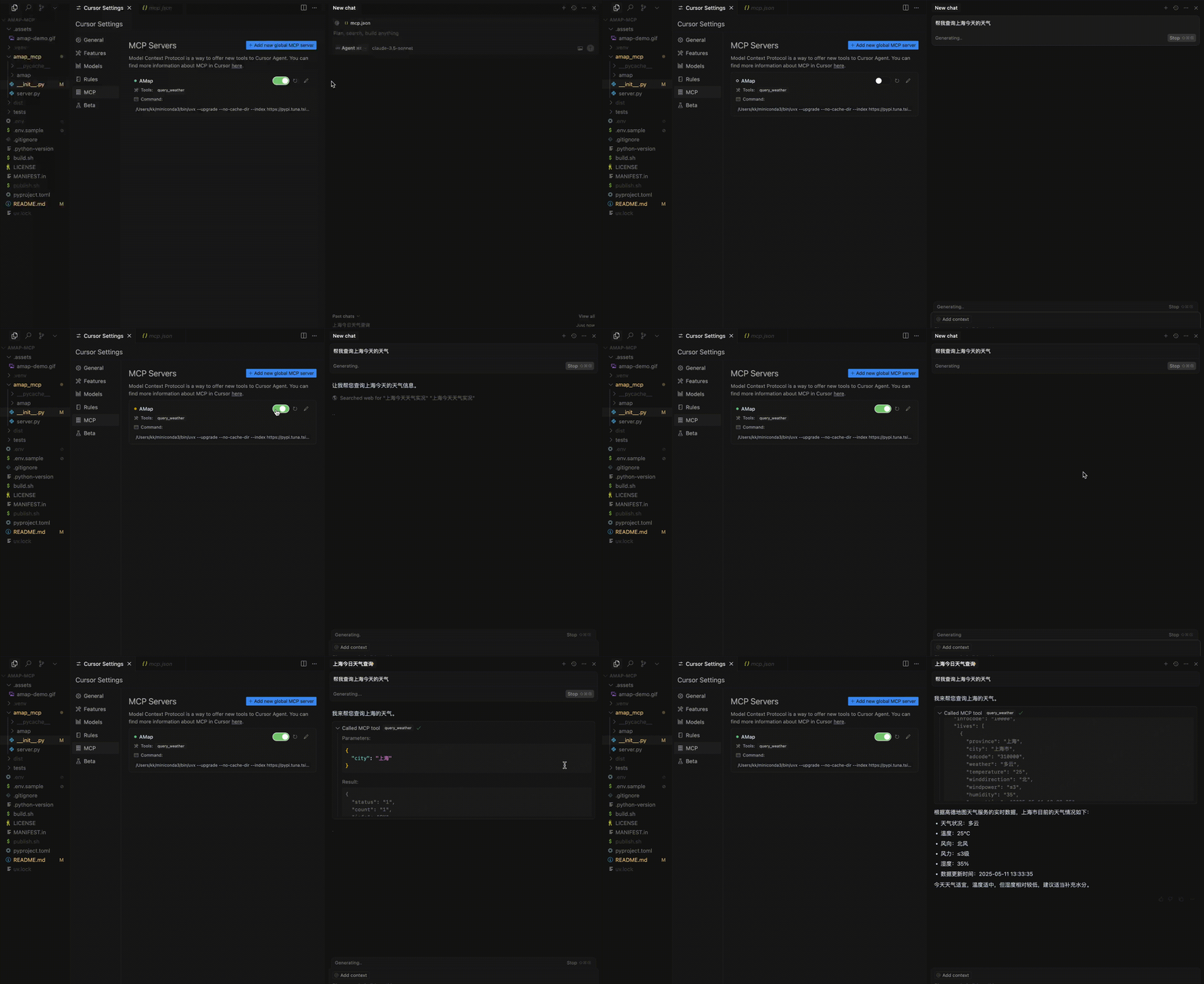
The weather service of Amap. Query the weather of a given city.
Args:
    city (str): The city to query the weather.
| Name | Required | Description | Default |
|---|---|---|---|
| city | Yes |
Does the description disclose side effects, auth requirements, rate limits, or destructive behavior?
No annotations are provided, so the description carries the full burden of behavioral disclosure. It mentions the service provider ('Amap') but fails to describe key traits such as rate limits, authentication needs, error handling, or what the response format looks like. For a query tool with zero annotation coverage, this is a significant gap in transparency.
Agents need to know what a tool does to the world before calling it. Descriptions should go beyond structured annotations to explain consequences.
Is the description appropriately sized, front-loaded, and free of redundancy?
The description is appropriately sized and front-loaded, with the core purpose stated first followed by parameter details. Both sentences earn their place by providing essential information without redundancy. The structure is clear and efficient for a simple tool.
Shorter descriptions cost fewer tokens and are easier for agents to parse. Every sentence should earn its place.
Given the tool's complexity, does the description cover enough for an agent to succeed on first attempt?
Given the tool's low complexity (one parameter, no output schema, no annotations), the description is minimally adequate but lacks completeness. It covers the basic purpose and parameter but omits details on response format, error cases, and service constraints. For a query tool, this leaves gaps in understanding how to interpret results.
Complex tools with many parameters or behaviors need more documentation. Simple tools need less. This dimension scales expectations accordingly.
Does the description clarify parameter syntax, constraints, interactions, or defaults beyond what the schema provides?
The description adds meaningful context for the single parameter 'city' by specifying it as 'The city to query the weather,' which clarifies its role beyond the schema's basic title. With 0% schema description coverage and only one parameter, this adequately compensates, though it could detail format expectations (e.g., city names, language).
Input schemas describe structure but not intent. Descriptions should explain non-obvious parameter relationships and valid value ranges.
Does the description clearly state what the tool does and how it differs from similar tools?
The description clearly states the tool's purpose as 'Query the weather of a given city,' specifying the verb 'query' and resource 'weather' with the target 'city.' It distinguishes the service provider as 'Amap,' but since there are no sibling tools, full differentiation isn't needed. However, it could be more specific about what weather data is returned.
Agents choose between tools based on descriptions. A clear purpose with a specific verb and resource helps agents select the right tool.
Does the description explain when to use this tool, when not to, or what alternatives exist?
The description provides no guidance on when to use this tool versus alternatives, prerequisites, or limitations. It only states the basic function without context about availability, accuracy, or when it might fail. With no sibling tools, explicit alternatives aren't required, but general usage context is missing.
Agents often have multiple tools that could apply. Explicit usage guidance like "use X instead of Y when Z" prevents misuse.
Recent tool additions, removals, and schema changes observed during successful MCP inspections.
query_weatherScored across 1 tool
With only one tool, there is no possibility of ambiguity or overlap between tools. The single tool has a clear, distinct purpose focused on weather queries.
The single tool name follows a clear verb_noun pattern (query_weather), and with only one tool, there is no inconsistency to evaluate. The naming is straightforward and descriptive.
One tool is too few for a server named 'AMap MCP Server', which suggests a broader mapping or location service domain. A single weather query tool feels thin and incomplete for this apparent scope.
The server is severely incomplete for a mapping service domain. There are obvious gaps such as geocoding, routing, place search, or map display tools. The single weather tool does not provide meaningful coverage of the expected functionality.
A comprehensive Model Context Protocol (MCP) server that enables AI assistants to interact with yo…
The official Model Context Protocol server for Ambee. It gives any MCP-compatible AI assistant — Claude, ChatGPT, Cursor, VS Code, Ollama, and more direct access to live air quality, pollen, and weather data. To get started, including information on signing up and obtaining your Ambee key, check out the Ambee documentation on https://docs.ambeedata.com
A Model Context Protocol server for Wix AI tools
MCP server for GLM chat completions using Zhipu AI models via AceDataCloud