

A
licenseB
qualityD
maintenanceA Model Context Protocol server that enables AI assistants to query Prometheus metrics, discover available data, and analyze system performance through natural language interactions.
5
93 npm
MIT

一个模型上下文协议 (MCP) 服务器,用于从 Prometheus 数据库检索数据。该 MCP 服务器支持大型语言模型 (LLM) 调用工具函数,这些函数可以通过预定义的路由检索和分析海量指标数据、搜索指标使用情况、执行复杂查询以及执行其他相关任务,并增强对使用情况的控制。
数据检索:从 Prometheus 获取特定指标或数据范围。
指标分析:对检索到的指标执行统计分析。
使用情况搜索:查找并探索指标使用模式。
复杂查询:执行高级 PromQL 查询以进行深入数据探索。
✅ 从 Prometheus 检索全面的指标信息,包括名称和描述
✅ 使用指标名称获取并分析特定指标数据
✅ 分析自定义时间范围内的指标数据
🚧 使用特定标签过滤和匹配数据(正在开发中)
⏳ 计划中的附加功能...
Related MCP server: Proms MCP Server
MCP 运行需要一个 python 虚拟环境(venv),所有包都应安装到此 venv 中,以便 MCP 服务器可以自动启动。
要通过Smithery自动为 Claude Desktop 安装 Prometheus MCP 服务器:
npx -y @smithery/cli install @CaesarYangs/prometheus_mcp_server --client claude准备python环境
cd ./src/prometheus_mcp_server
python3 -m venv .venv
# linux/macos:
source .venv/bin/activate
# windows:
.venv\Scripts\activate然后它就可以用作专用的 python 环境了。
安装所需的软件包
确保 pip 已正确安装。如果您的 venv 没有安装 pip,请使用以下命令手动安装:
wget https://bootstrap.pypa.io/get-pip.py
python3 get-pip.py
然后安装所有必需的软件包:
pip install -r requirements.txt准备更新依赖于更易于使用的Cursor环境。
在“光标设置”的 MCP 部分中进行设置:
uv --directory /path/to/prometheus_mcp_server run server.py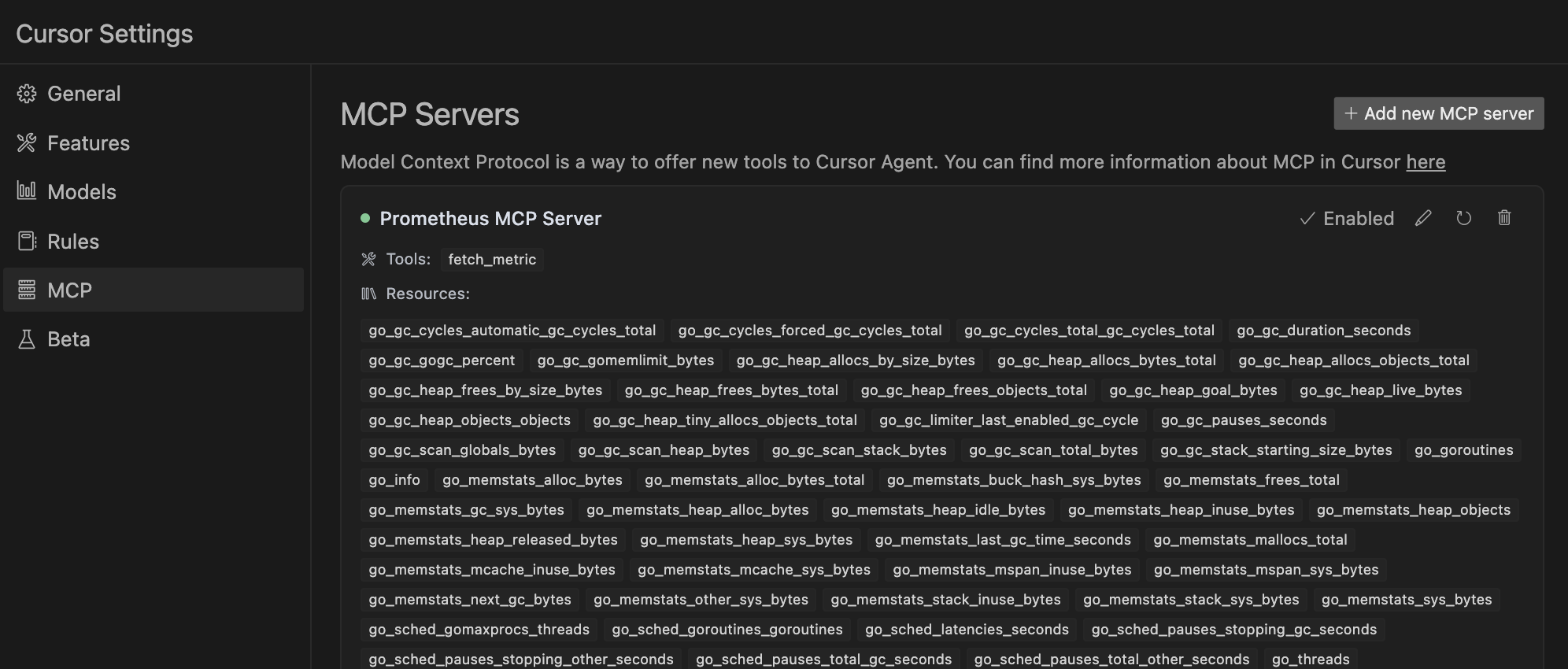
在~/Library/Application Support/Claude/claude_desktop_config.json (macos) 配置您的 Claude Desktop 应用程序的配置
{
    "mcpServers": {
        "prometheus": {
            "command": "uv",
            "args": [
                "--directory",
                "/path/to/prometheus_mcp_server",
                "run",
                "server.py"
            ],
            "env": {
                "PROMETHEUS_HOST": "http://localhost:9090"
            }
        }
    }
}单独启动此 MCP 服务器:
紫外线法
uv --directory /path/to/prometheus_mcp_server run server.py这也是一种确保此 MCP 服务器可以自动启动的方法,因为 Claude Desktop 使用这种 ux 脚本方式在应用程序启动时启动。
常规 Python 方法
python3 server.py欢迎贡献!以下是快速指南:
复制仓库
创建你的功能分支( git checkout -b feature/AmazingFeature )
提交您的更改( git commit -m 'Add some AmazingFeature' )
推送到分支( git push origin feature/AmazingFeature )
打开拉取请求
对于重大更改,请先打开一个问题来讨论您想要更改的内容。
感谢您的贡献!
MIT 许可证
该项目受到以下开源项目的启发或使用了以下开源项目的代码:
Prometheus API Client - 基于此库修改了Prometheus API调用代码
MySQL MCP 服务器- 类似面向数据库的 MCP 服务器实现
This server cannot be deployed
MCP server providing access to the Scorecard API to evaluate and optimize LLM systems.
MCP server for building and testing AI agents with multi-model experimentation and insights.
MCP server unifying ERPs, CRMs, APIs and knowledge base for Claude, ChatGPT and Gemini.
Hosted MCP server for LLM cost estimation, model comparison, and budget-aware routing.