NocturnusAI
NocturnusAI
AI 代理的上下文工程引擎:只发送变更内容。
之前 / 之后
# ❌ Without NocturnusAI — replay everything, every turn
messages = system_prompt + full_history + tool_outputs # ~1,259 tokens/turn
response = llm(messages) # $13,600/mo at scale
# ✅ With NocturnusAI — send only what changed
ctx = nocturnus.process_turns(raw_turns) # extract → infer → delta
messages = system_prompt + ctx.briefing_delta # ~221 tokens/turn
response = llm(messages) # $2,400/mo. Same accuracy.Related MCP server: RelayPlane
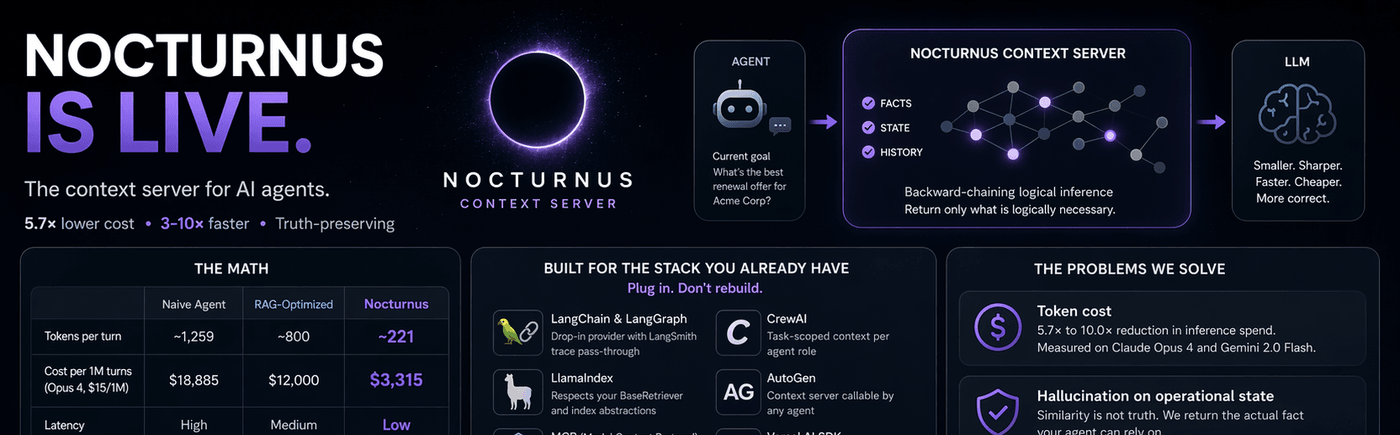
数据表现
基于实时 API 测量。15 轮产品支持对话。真实的 usage.input_tokens 计数。亲自运行测试。
原始重放 | RAG 优化 | NocturnusAI | |
每轮 Token 数 | ~1,259 | ~800 | ~221 |
每月成本 (1K 请求/小时, Opus 4, $15/1M) | $13,600 | $12,000 | $2,400 |
延迟 | 高 | 中 | 低 |
保持真实性 | 否 | 否 | 是 |
Claude Opus 4:5.7 倍 缩减。Gemini 2.0 Flash:10.0 倍。完整计算过程。
安装
pip install nocturnusai # Python
npm install nocturnusai-sdk # TypeScript
docker run -p 9300:9300 ghcr.io/auctalis/nocturnusai:latest # Docker或使用设置向导:
curl -fsSL https://raw.githubusercontent.com/Auctalis/nocturnusai/main/install.sh | bash为什么开发者为本项目点赞
可复现的 Token 缩减 — 仓库内包含基准测试,方法论已公开,可在您自己的工作负载上运行
确定性推理 — 相同的查询,每次都得到相同的结果。没有嵌入漂移,没有余弦相似度抽奖
真实性维护 — 撤回一个事实,所有派生结论自动撤回。没有陈旧的上下文,不会对操作状态产生幻觉
接入现有技术栈 — LangChain, LlamaIndex, CrewAI, AutoGen, MCP, Vercel AI SDK, OpenAI Agents SDK, Mastra
可与原始重放进行基准对比 — 数据源于计算,而非编造。每一项声明都可追溯到 Notebook 单元格
框架快速入门
框架 | 集成方式 | 链接 |
LangChain / LangGraph | 即插即用 | |
CrewAI | 针对代理角色的任务级上下文 | |
AutoGen | 可由任何代理调用的上下文服务器 | |
MCP | 兼容 Claude Desktop, Cursor, Continue 的规范服务器 | |
OpenAI Agents SDK | 上下文中间件,无需修改工具 | |
Vercel AI SDK | 适用于 Next.js, Nuxt, SvelteKit 的边缘兼容适配器 | |
Python SDK |
| |
TypeScript SDK |
|
工作原理
三步走。每一轮对话。
提取 — 原始对话轮次 → 通过 LLM 提取结构化事实
推理 — 反向链式逻辑推理,仅查找从代理当前目标可达的事实
返回增量 — 包含自上一轮以来所有变更的
briefingDelta
这不是向量搜索。也不是摘要。这是逻辑引擎上的确定性推理 — Hexastore 索引、反向链式推理 和 真实性维护。
工作循环
自然语言轮次需要 LLM。 下面的示例将原始文本轮次发送给 LLM 以提取结构化事实。如果您在没有 LLM 提供程序的情况下启动服务器,自然语言轮次将返回零事实。请参阅 快速入门 获取设置选项,或使用谓词语法(例如
"customer_tier(acme_corp, enterprise)"),这无需任何 LLM 即可工作。
1. 首次缩减:POST /context
curl -X POST http://localhost:9300/context \
-H 'Content-Type: application/json' \
-H 'X-Tenant-ID: default' \
-d '{
"turns": [
"user: Customer says they are enterprise and blocked on SLA credits.",
"tool: CRM says account is Acme Corp with a 2M ARR contract.",
"agent: Last week support promised to review SLA eligibility.",
"tool: Billing note says renewal is due next month."
],
"maxFacts": 12
}'2. 目标驱动传递:POST /memory/context
curl -X POST http://localhost:9300/memory/context \
-H 'Content-Type: application/json' \
-H 'X-Tenant-ID: default' \
-d '{
"goals": [{"predicate":"eligible_for_sla","args":["acme_corp"]}],
"maxFacts": 12,
"sessionId": "ticket-42"
}'3. 后续轮次:POST /context/diff
curl -X POST http://localhost:9300/context/diff \
-H 'Content-Type: application/json' \
-H 'X-Tenant-ID: default' \
-d '{"sessionId": "ticket-42", "maxFacts": 12}'仅返回快照之间 added(添加)和 removed(移除)的条目。
4. 线程结束:POST /context/session/clear
curl -X POST http://localhost:9300/context/session/clear \
-H 'Content-Type: application/json' \
-H 'X-Tenant-ID: default' \
-d '{"sessionId":"ticket-42"}'选择您的界面
from nocturnusai import SyncNocturnusAIClient
with SyncNocturnusAIClient("http://localhost:9300") as client:
ctx = client.process_turns(
turns=[
"user: Customer says they are enterprise and blocked on SLA credits.",
"tool: CRM says account is Acme Corp with a 2M ARR contract.",
],
scope="ticket-42",
session_id="ticket-42",
)
diff = client.diff_context(session_id="ticket-42", max_facts=12)
client.clear_context_session("ticket-42")
print(ctx.briefing_delta)import { NocturnusAIClient } from 'nocturnusai-sdk';
const client = new NocturnusAIClient({
baseUrl: 'http://localhost:9300',
tenantId: 'default',
});
const ctx = await client.processTurns({
turns: [
'user: Customer says they are enterprise and blocked on SLA credits.',
'tool: CRM says account is Acme Corp with a 2M ARR contract.',
],
scope: 'ticket-42',
sessionId: 'ticket-42',
});
const diff = await client.diffContext({ sessionId: 'ticket-42', maxFacts: 12 });
await client.clearContextSession('ticket-42');
console.log(ctx.briefingDelta);{
"mcpServers": {
"nocturnus": {
"url": "http://localhost:9300/mcp/sse",
"transport": "sse"
}
}
}每轮使用 context 工具获取按显著性排序的工作集。当您需要目标驱动的组装和差异对比时,请将 MCP 与 HTTP 上下文端点配对使用。
工作流背后的机制
当您确实需要后端机制时,NocturnusAI 提供了以下功能:
确定性的事实和规则存储
带有证明链的反向链式推理
真实性维护和矛盾处理
带有
ttl、validFrom和validUntil的时间事实通过
X-Database和X-Tenant-ID实现多租户支持在同一引擎上提供 MCP、REST、Python SDK、TypeScript SDK 和 CLI 界面
快速入门
Docker (最快)
docker run -d --name nocturnusai -p 9300:9300 \
--restart unless-stopped \
-v nocturnusai-data:/data \
ghcr.io/auctalis/nocturnusai:latestcurl http://localhost:9300/health # Verify it's running带有 Ollama 的 Docker (启用自然语言提取)
docker run -d --name nocturnusai -p 9300:9300 \
--add-host=host.docker.internal:host-gateway \
-e LLM_PROVIDER=ollama \
-e LLM_MODEL=granite3.3:8b \
-e LLM_BASE_URL=http://host.docker.internal:11434/v1 \
-e EXTRACTION_ENABLED=true \
ghcr.io/auctalis/nocturnusai:latest从本仓库构建
make up-ollama && make smokeCLI
nocturnusai # Interactive REPL
nocturnusai -e "context 10" # Salience-ranked working set
nocturnusai -e "compress" # POST /memory/compress
nocturnusai -e "cleanup 0.05" # POST /memory/cleanup文档
完整文档:nocturnus.ai
轮次缩减工作流 | |
原始轮次 → 优化 → 差异 → 清除 | |
REST 端点和响应格式 | |
Python 和 TypeScript 客户端方法 | |
LangChain, CrewAI, AutoGen, MCP 等 | |
实时 API 上的 Token 缩减测量 | |
每个数字的推导过程 | |
提取 → 推理 → 增量流水线 |
Docker Compose (高级)
git clone https://github.com/Auctalis/nocturnusai.git && cd nocturnusai
make up # Server using .env.example defaults
make up-ollama # + Ollama (reuses host or starts bundled)
make up-monitoring # + Prometheus + Grafana
make smoke # Verify health + context endpoint从源码构建
需要 JDK 17+。
./gradlew :nocturnusai-server:run # HTTP server on :9300
./gradlew :nocturnusai-cli:run # Interactive REPL (JVM)
./gradlew :nocturnusai-cli:nativeCompile # Build native binary
./gradlew test # Full test suite贡献
请参阅 CONTRIBUTING.md。标记为 good first issue 的问题是很好的切入点。
安全
请通过 GitHub 安全公告 私下报告漏洞。请参阅 SECURITY.md。
许可证
Business Source License 1.1 (SPDX: BUSL-1.1)。在您自己的组织内部免费使用(包括内部生产环境)。向第三方提供 NocturnusAI 或其核心功能作为产品/托管服务需要商业许可证 (licensing@nocturnus.ai)。将于 2030 年 2 月 19 日转换为 Apache 2.0。请参阅 LICENSE 和 DISCLAIMER.md。
法律与安全声明
NocturnusAI 是一个确定性推理引擎,但 其输出的可靠性仅取决于提供给它的事实。
无真实性保证。 “已验证”是指推理的逻辑一致性,而非现实世界声明的准确性。
不适用于自主高风险决策。 未经独立的人工验证步骤,请勿将此引擎用于无人监督的医疗、金融、法律或物理安全决策。
仅限逻辑层。 NocturnusAI 提供信息和推理;它不执行操作。
免责声明。 请参阅 DISCLAIMER.md 和 LICENSE。
Available Tools
16 toolsaggregateA
Compute aggregations over matching facts. Supports COUNT, SUM, MIN, MAX, and AVG over a numeric argument at a specified position. Example: COUNT all score(player, ?) facts, or AVG scores at argIndex=1. Side effects: none (read-only). Auth: requires X-Tenant-ID header; FACT_READ permission when auth is enabled. Rate-limited per principal. Errors: VALIDATION_ERROR on unknown operation or missing argIndex for numeric ops.
| Name | Required | Description | Default |
|---|---|---|---|
| predicate | Yes | The predicate to aggregate over | |
| args | Yes | Pattern arguments — use ?x as wildcards, concrete values to constrain | |
| operation | Yes | Aggregation operation: COUNT, SUM, MIN, MAX, or AVG | |
| argIndex | No | 0-based argument position to aggregate for SUM/MIN/MAX/AVG (ignored for COUNT) | |
| scope | No | Optional scope filter |
TDQS
Does the description disclose side effects, auth requirements, rate limits, or destructive behavior?
With no annotations, the description fully discloses behavioral traits: read-only (no side effects), auth needs, rate limiting, and error conditions (VALIDATION_ERROR). No contradictions.
Agents need to know what a tool does to the world before calling it. Descriptions should go beyond structured annotations to explain consequences.
Is the description appropriately sized, front-loaded, and free of redundancy?
The description is concise (three sentences), front-loaded with purpose, and includes key details (operations, example, side effects, auth, errors) without redundancy.
Shorter descriptions cost fewer tokens and are easier for agents to parse. Every sentence should earn its place.
Given the tool's complexity, does the description cover enough for an agent to succeed on first attempt?
Given the complexity of aggregation with multiple operations and argIndex, the description covers essential aspects. It lacks explicit output format, but the example implies a numeric result, which is sufficient.
Complex tools with many parameters or behaviors need more documentation. Simple tools need less. This dimension scales expectations accordingly.
Does the description clarify parameter syntax, constraints, interactions, or defaults beyond what the schema provides?
Schema coverage is 100%, and the description adds meaning beyond the schema: explains operation and argIndex interaction, gives an example. The example clarifies usage, providing extra context.
Input schemas describe structure but not intent. Descriptions should explain non-obvious parameter relationships and valid value ranges.
Does the description clearly state what the tool does and how it differs from similar tools?
The description clearly states the tool computes aggregations over facts, lists supported operations (COUNT, SUM, MIN, MAX, AVG), and gives an example. It is a specific verb+resource with no sibling ambiguity.
Agents choose between tools based on descriptions. A clear purpose with a specific verb and resource helps agents select the right tool.
Does the description explain when to use this tool, when not to, or what alternatives exist?
The description provides context on when to use (read-only aggregation), auth requirements (X-Tenant-ID, FACT_READ permission), rate limits, and error types. It lacks explicit when-not-to-use or alternatives, but no sibling tool overlaps.
Agents often have multiple tools that could apply. Explicit usage guidance like "use X instead of Y when Z" prevents misuse.
askA
Query the knowledge base using multi-step logical reasoning (backward chaining with unification). Finds all provable answers by applying rules and matching facts. Use ?-prefixed variables for unknowns; optionally returns full proof chains. Side effects: none (read-only). Auth: requires X-Tenant-ID header; FACT_READ permission when auth is enabled. Rate-limited per principal. Errors: VALIDATION_ERROR on bad args; result set bounded by INFERENCE_MAX_RESULTS (default 10,000) to prevent OOM.
| Name | Required | Description | Default |
|---|---|---|---|
| predicate | Yes | What you're asking about (e.g., 'grandparent', 'can_access') | |
| args | Yes | Use ?x, ?who for unknowns, concrete values to constrain (e.g., ['?who', 'charlie']) | |
| scope | No | Optional scope filter — omit to query all scopes | |
| withProof | No | If true, include the full reasoning chain showing how each answer was derived (fact matches and rule applications) | |
| minConfidence | No | Minimum confidence threshold 0.0–1.0. Filters out facts and derivations below this confidence. |
TDQS
Does the description disclose side effects, auth requirements, rate limits, or destructive behavior?
Exhaustively discloses side effects (none, read-only), auth requirements (X-Tenant-ID, FACT_READ permission), rate limits, error types (VALIDATION_ERROR), and result bounding (INFERENCE_MAX_RESULTS). Completely compensates for missing annotations.
Agents need to know what a tool does to the world before calling it. Descriptions should go beyond structured annotations to explain consequences.
Is the description appropriately sized, front-loaded, and free of redundancy?
Well-structured with front-loaded purpose followed by essential usage, side effects, and constraints. Every sentence adds value, though slightly verbose; could be trimmed slightly without losing meaning.
Shorter descriptions cost fewer tokens and are easier for agents to parse. Every sentence should earn its place.
Given the tool's complexity, does the description cover enough for an agent to succeed on first attempt?
Despite comprehensive behavioral info, the description lacks an explanation of the return format (e.g., JSON structure of results and proof chains). For a complex reasoning tool, this is a notable gap, especially with no output schema provided.
Complex tools with many parameters or behaviors need more documentation. Simple tools need less. This dimension scales expectations accordingly.
Does the description clarify parameter syntax, constraints, interactions, or defaults beyond what the schema provides?
With 100% schema coverage, the description adds marginal value by clarifying the use of ?-prefixed variables for unknowns and optional scopes. This extra context justifies a score above baseline 3.
Input schemas describe structure but not intent. Descriptions should explain non-obvious parameter relationships and valid value ranges.
Does the description clearly state what the tool does and how it differs from similar tools?
Clearly states the tool queries a knowledge base using multi-step logical reasoning, distinguishing it from sibling tools like 'context' or 'predicates'. Specific verb and resource, with explicit mention of backward chaining and unification.
Agents choose between tools based on descriptions. A clear purpose with a specific verb and resource helps agents select the right tool.
Does the description explain when to use this tool, when not to, or what alternatives exist?
Provides context for when to use the tool (querying with logical reasoning), includes instructions on ?-prefixed variables, optional proof chains, and result bounding. Lacks explicit comparisons to alternative siblings for simpler queries, but still offers practical usage notes.
Agents often have multiple tools that could apply. Explicit usage guidance like "use X instead of Y when Z" prevents misuse.
bulk_assertA
Assert multiple facts in a single call for efficiency. Non-transactional: each fact is attempted independently — contradictions are reported without aborting the batch. Returns counts of successful and failed assertions. Side effects: mutates state (additive) — partial successes persist even if other facts in the batch fail. Auth: requires X-Tenant-ID header; FACT_WRITE permission when auth is enabled. Rate-limited per principal. Errors: VALIDATION_ERROR on malformed input; per-fact failures returned in the response's errors array.
| Name | Required | Description | Default |
|---|---|---|---|
| facts | Yes | Array of fact objects to assert |
TDQS
Does the description disclose side effects, auth requirements, rate limits, or destructive behavior?
With no annotations, the description fully discloses all behavioral traits: non-transactional execution, partial persistence of successes, auth header and permission requirements, rate limiting, and per-fact error reporting. This is comprehensive and leaves no ambiguity.
Agents need to know what a tool does to the world before calling it. Descriptions should go beyond structured annotations to explain consequences.
Is the description appropriately sized, front-loaded, and free of redundancy?
Description is concise but thorough, front-loaded with purpose, then structured into clear paragraphs for behavioral details, auth, and errors. Every sentence adds value without redundancy.
Shorter descriptions cost fewer tokens and are easier for agents to parse. Every sentence should earn its place.
Given the tool's complexity, does the description cover enough for an agent to succeed on first attempt?
Despite no output schema, the description explains return counts and error arrays, covering all essential aspects: inputs, behavior, auth, errors, and side effects. An agent has enough information to use the tool correctly.
Complex tools with many parameters or behaviors need more documentation. Simple tools need less. This dimension scales expectations accordingly.
Does the description clarify parameter syntax, constraints, interactions, or defaults beyond what the schema provides?
Input schema has 100% description coverage for all sub-properties, so the description's role is reduced. However, it adds value by explaining the batch behavior and result reporting, which goes beyond what the schema provides. Baseline 3 is elevated due to the contextual clarity.
Input schemas describe structure but not intent. Descriptions should explain non-obvious parameter relationships and valid value ranges.
Does the description clearly state what the tool does and how it differs from similar tools?
Description clearly states the tool asserts multiple facts for efficiency, distinguishing it from single-fact alternatives. The verb 'assert' and resource 'facts' are specific, and the non-transactional nature differentiates it from siblings like 'teach' or 'tell'.
Agents choose between tools based on descriptions. A clear purpose with a specific verb and resource helps agents select the right tool.
Does the description explain when to use this tool, when not to, or what alternatives exist?
Explicitly describes when to use (batch efficiency), how partial failures are handled, auth requirements, rate limits, and error types. Provides clear context for an agent to decide when this tool is appropriate.
Agents often have multiple tools that could apply. Explicit usage guidance like "use X instead of Y when Z" prevents misuse.
cleanupA
Run memory decay and eviction. Expires facts past their TTL and evicts low-salience facts when memory exceeds capacity. Call periodically in long-running agent sessions to prevent unbounded growth. Side effects: DESTRUCTIVE — permanently removes evicted and expired facts (irreversible). Auth: requires X-Tenant-ID header; FACT_WRITE permission when auth is enabled. Rate-limited per principal. Errors: VALIDATION_ERROR on bad threshold.
| Name | Required | Description | Default |
|---|---|---|---|
| threshold | No | Salience threshold below which facts are evicted (default: 0.05). Higher values are more aggressive. |
TDQS
Does the description disclose side effects, auth requirements, rate limits, or destructive behavior?
With no annotations, the description fully discloses destructive side effects (irreversible removal), auth requirements, rate limiting, and errors. This is excellent transparency.
Agents need to know what a tool does to the world before calling it. Descriptions should go beyond structured annotations to explain consequences.
Is the description appropriately sized, front-loaded, and free of redundancy?
Efficiently packs multiple details (purpose, side effects, auth, rate limit, errors) in a structured form. Slightly long but justified by the information density.
Shorter descriptions cost fewer tokens and are easier for agents to parse. Every sentence should earn its place.
Given the tool's complexity, does the description cover enough for an agent to succeed on first attempt?
Covers essential aspects for a destructive tool: purpose, side effects, auth, errors. No output schema, so return values are omitted, but this is acceptable given the tool's nature.
Complex tools with many parameters or behaviors need more documentation. Simple tools need less. This dimension scales expectations accordingly.
Does the description clarify parameter syntax, constraints, interactions, or defaults beyond what the schema provides?
Schema description already covers the threshold parameter fully (including default). The tool description does not add additional semantics beyond the schema, so baseline 3 applies.
Input schemas describe structure but not intent. Descriptions should explain non-obvious parameter relationships and valid value ranges.
Does the description clearly state what the tool does and how it differs from similar tools?
The description clearly states the tool runs memory decay and eviction, specifically expiring facts past TTL and evicting low-salience facts when capacity is exceeded. It distinguishes from siblings like 'forget' by focusing on automatic cleanup.
Agents choose between tools based on descriptions. A clear purpose with a specific verb and resource helps agents select the right tool.
Does the description explain when to use this tool, when not to, or what alternatives exist?
Provides explicit guidance to call periodically in long-running sessions. Lacks explicit alternatives or when-not-to-use, but the context is clear.
Agents often have multiple tools that could apply. Explicit usage guidance like "use X instead of Y when Z" prevents misuse.
compressA
Run memory consolidation: detects repeated episodic patterns (e.g., 'user asked about X five times') and creates semantic summaries. Reduces memory footprint in long-running sessions while preserving essential knowledge. Side effects: mutates state (additive) — creates new summary facts; original facts remain intact. Auth: requires X-Tenant-ID header; FACT_WRITE permission when auth is enabled. Rate-limited per principal. Errors: VALIDATION_ERROR on bad args.
| Name | Required | Description | Default |
|---|---|---|---|
No parameters | |||
TDQS
Does the description disclose side effects, auth requirements, rate limits, or destructive behavior?
Since no annotations are provided, the description fully discloses behavioral traits: side effects (mutates state additively, creates new facts, original intact), authentication requirements (X-Tenant-ID header, FACT_WRITE permission), rate limiting, and error types (VALIDATION_ERROR). This is exhaustive and contradictory to no annotations.
Agents need to know what a tool does to the world before calling it. Descriptions should go beyond structured annotations to explain consequences.
Is the description appropriately sized, front-loaded, and free of redundancy?
The description is three sentences long, front-loaded with the main action, and each sentence adds critical information (purpose, effects, auth/errors). No wasted words.
Shorter descriptions cost fewer tokens and are easier for agents to parse. Every sentence should earn its place.
Given the tool's complexity, does the description cover enough for an agent to succeed on first attempt?
Given the tool has no output schema, the description covers all necessary aspects: side effects, authentication, rate limits, errors. It is complete for a mutation tool with zero parameters.
Complex tools with many parameters or behaviors need more documentation. Simple tools need less. This dimension scales expectations accordingly.
Does the description clarify parameter syntax, constraints, interactions, or defaults beyond what the schema provides?
There are zero parameters, and schema description coverage is trivially 100%. The description does not need to add parameter information, but it also does not provide any extra context about parameters. Baseline 4 is appropriate for no-param tools.
Input schemas describe structure but not intent. Descriptions should explain non-obvious parameter relationships and valid value ranges.
Does the description clearly state what the tool does and how it differs from similar tools?
The description clearly states the tool's purpose: 'Run memory consolidation' that detects repeated patterns and creates summaries. The verb 'compress' combined with the detailed description distinguishes it from sibling tools like 'cleanup' or 'forget', which have different functions.
Agents choose between tools based on descriptions. A clear purpose with a specific verb and resource helps agents select the right tool.
Does the description explain when to use this tool, when not to, or what alternatives exist?
The description explains when to use the tool ('reduces memory footprint in long-running sessions') but does not explicitly mention when not to use it or compare with alternatives like 'cleanup' or 'retract_pattern'. The context is clear though lacking direct exclusions.
Agents often have multiple tools that could apply. Explicit usage guidance like "use X instead of Y when Z" prevents misuse.
contextA
Get the most relevant knowledge for the current reasoning step, ranked by composite salience (recency × frequency × priority). Returns a token-optimized context window in 'predicate', 'natural', or 'structured' format. Pass goals for goal-driven selection, sessionId for incremental diffs across turns. Side effects: read-only for stored facts (salience access counters may update internally). Auth: requires X-Tenant-ID header; FACT_READ permission when auth is enabled. Rate-limited per principal. Errors: VALIDATION_ERROR on bad args.
| Name | Required | Description | Default |
|---|---|---|---|
| maxFacts | No | Maximum facts to return (default: 100) | |
| minSalience | No | Minimum salience score 0.0–1.0 (default: 0.0) | |
| predicates | No | Only include these relationship types | |
| scope | No | Optional scope filter | |
| format | No | Output format: 'predicate' (default, machine-readable), 'natural' (LLM-optimized natural language), or 'structured' (grouped with metadata) | |
| includeRules | No | Include reasoning rules in the context (default: true) | |
| goals | No | Goal atoms for goal-driven context selection, e.g. [{"predicate":"recommend","args":["?x"]}] | |
| sessionId | No | Session ID for incremental diffing — only returns facts changed since last call with this sessionId | |
| autoResolveContradictions | No | Auto-resolve contradictions by salience (default: true) | |
| maxFactsPerPredicate | No | Diversity cap — maximum facts per predicate type |
TDQS
Does the description disclose side effects, auth requirements, rate limits, or destructive behavior?
With no annotations provided, the description carries full burden. It discloses side effects (read-only for stored facts, internal salience access counter updates), auth requirements (X-Tenant-ID header, FACT_READ permission), rate-limiting per principal, and error types (VALIDATION_ERROR), offering comprehensive behavioral transparency.
Agents need to know what a tool does to the world before calling it. Descriptions should go beyond structured annotations to explain consequences.
Is the description appropriately sized, front-loaded, and free of redundancy?
The description is a single dense paragraph but is well-organized, front-loading the core purpose and then providing key usage guidance. While slightly lengthy, every sentence adds necessary detail with no fluff.
Shorter descriptions cost fewer tokens and are easier for agents to parse. Every sentence should earn its place.
Given the tool's complexity, does the description cover enough for an agent to succeed on first attempt?
Given the tool complexity (10 parameters, no output schema), the description adequately covers purpose, parameter semantics, behavioral notes, and return formats. It provides enough detail for correct invocation and result interpretation.
Complex tools with many parameters or behaviors need more documentation. Simple tools need less. This dimension scales expectations accordingly.
Does the description clarify parameter syntax, constraints, interactions, or defaults beyond what the schema provides?
Schema coverage is 100%, so baseline is 3. The description adds value by explaining the composite salience formula (recency × frequency × priority), providing examples for goals parameter, and detailing the format options (predicate, natural, structured) and sessionId behavior (incremental diffing).
Input schemas describe structure but not intent. Descriptions should explain non-obvious parameter relationships and valid value ranges.
Does the description clearly state what the tool does and how it differs from similar tools?
The description clearly states the tool retrieves the most relevant knowledge ranked by composite salience for the current reasoning step. It distinguishes itself from sibling tools like 'recall' or 'ask' by focusing on a ranked, token-optimized context window.
Agents choose between tools based on descriptions. A clear purpose with a specific verb and resource helps agents select the right tool.
Does the description explain when to use this tool, when not to, or what alternatives exist?
The description provides explicit guidance on optional parameters like goals for goal-driven selection and sessionId for incremental diffs. It does not explicitly state when not to use the tool or name alternatives, but the context is clear enough for correct usage.
Agents often have multiple tools that could apply. Explicit usage guidance like "use X instead of Y when Z" prevents misuse.
delete_scopeA
Delete a named scope and all facts within it. Use to clean up completed or abandoned hypothetical reasoning branches. Side effects: DESTRUCTIVE and IRREVERSIBLE — permanently removes all facts in the scope; cascades TMS retraction for any derived facts. Auth: requires X-Tenant-ID header; FACT_WRITE permission when auth is enabled. Rate-limited per principal. Errors: VALIDATION_ERROR if scope name is blank.
| Name | Required | Description | Default |
|---|---|---|---|
| scope | Yes | The scope name to delete |
TDQS
Does the description disclose side effects, auth requirements, rate limits, or destructive behavior?
The description explicitly lists side effects ('DESTRUCTIVE and IRREVERSIBLE', 'permanently removes all facts', 'cascades TMS retraction'), authentication requirements ('X-Tenant-ID header', 'FACT_WRITE permission'), rate limiting, and possible errors. Since no annotations are provided, the description fully bears the burden of behavioral disclosure and does so comprehensively.
Agents need to know what a tool does to the world before calling it. Descriptions should go beyond structured annotations to explain consequences.
Is the description appropriately sized, front-loaded, and free of redundancy?
The description is extremely concise—three sentences covering purpose, usage, and side effects/auth/errors. Each sentence earns its place with no redundancy. It is front-loaded with the main action and use case, making it easy for an agent to parse.
Shorter descriptions cost fewer tokens and are easier for agents to parse. Every sentence should earn its place.
Given the tool's complexity, does the description cover enough for an agent to succeed on first attempt?
For a single-parameter, destructive tool with no output schema, the description covers all necessary context: what it does, when to use, behavioral side effects, authentication needs, rate limits, and error conditions. Nothing essential is missing, making it fully complete for an agent to decide and invoke correctly.
Complex tools with many parameters or behaviors need more documentation. Simple tools need less. This dimension scales expectations accordingly.
Does the description clarify parameter syntax, constraints, interactions, or defaults beyond what the schema provides?
The input schema already provides a description for the 'scope' parameter ('The scope name to delete'), achieving 100% coverage. The description adds context that the scope is a 'named scope' and ties it to fact deletion, but does not add new semantic constraints or format details beyond what the schema provides. Thus, baseline score of 3 is appropriate.
Input schemas describe structure but not intent. Descriptions should explain non-obvious parameter relationships and valid value ranges.
Does the description clearly state what the tool does and how it differs from similar tools?
The description clearly states the verb 'Delete' and the resource 'named scope', and explains it removes all facts within the scope. It provides use case context ('clean up completed or abandoned hypothetical reasoning branches'). However, it does not explicitly differentiate from sibling tools like 'forget' or 'cleanup', so it loses a point for lacking sibling distinction.
Agents choose between tools based on descriptions. A clear purpose with a specific verb and resource helps agents select the right tool.
Does the description explain when to use this tool, when not to, or what alternatives exist?
The description includes a use case: 'Use to clean up completed or abandoned hypothetical reasoning branches.' This gives clear context for when to use the tool. However, it does not mention when not to use it or provide alternatives, so it lacks a complete usage guideline.
Agents often have multiple tools that could apply. Explicit usage guidance like "use X instead of Y when Z" prevents misuse.
forgetA
Retract a fact from the knowledge base. Inverse of 'tell'. Side effects: DESTRUCTIVE — triggers cascading retraction of any knowledge derived from this fact via the Truth Maintenance System (irreversible). Auth: requires X-Tenant-ID header; FACT_WRITE permission when auth is enabled. Rate-limited per principal. Errors: VALIDATION_ERROR on bad args (no error if the fact was not present).
| Name | Required | Description | Default |
|---|---|---|---|
| predicate | Yes | The relationship to forget | |
| args | Yes | The specific entities to forget about | |
| scope | No | Optional scope |
TDQS
Does the description disclose side effects, auth requirements, rate limits, or destructive behavior?
Despite no annotations, the description fully discloses destructive irreversible behavior (cascading retraction), auth requirements, rate limiting, and error handling, setting high transparency.
Agents need to know what a tool does to the world before calling it. Descriptions should go beyond structured annotations to explain consequences.
Is the description appropriately sized, front-loaded, and free of redundancy?
The description is concise and front-loaded with the core action, but could be structured with bullet points for easier scanning.
Shorter descriptions cost fewer tokens and are easier for agents to parse. Every sentence should earn its place.
Given the tool's complexity, does the description cover enough for an agent to succeed on first attempt?
Given no annotations and no output schema, the description covers side effects, auth, errors, and rate limiting completely for a destructive tool.
Complex tools with many parameters or behaviors need more documentation. Simple tools need less. This dimension scales expectations accordingly.
Does the description clarify parameter syntax, constraints, interactions, or defaults beyond what the schema provides?
Schema coverage is 100%, so baseline is 3. The description does not add extra meaning beyond the schema's parameter descriptions.
Input schemas describe structure but not intent. Descriptions should explain non-obvious parameter relationships and valid value ranges.
Does the description clearly state what the tool does and how it differs from similar tools?
The description clearly states the verb 'retract' and the resource 'fact from the knowledge base', and explicitly calls it the inverse of 'tell', distinguishing it from sibling tools.
Agents choose between tools based on descriptions. A clear purpose with a specific verb and resource helps agents select the right tool.
Does the description explain when to use this tool, when not to, or what alternatives exist?
It provides clear context: used to undo 'tell', with side effects and auth requirements. However, it does not explicitly mention when not to use or compare to other siblings like retract_pattern.
Agents often have multiple tools that could apply. Explicit usage guidance like "use X instead of Y when Z" prevents misuse.
fork_scopeA
Fork a knowledge base scope — creates an independent copy of all facts in the source scope under a new target scope name. Use for hypothetical reasoning ('What if Alice moves to London?') without modifying the main knowledge base. Similar to git branch for knowledge. Side effects: mutates state (additive) — creates a new scope with copied facts; source scope is unchanged. Auth: requires X-Tenant-ID header; FACT_WRITE permission when auth is enabled. Rate-limited per principal. Errors: VALIDATION_ERROR if targetScope is blank or already exists.
| Name | Required | Description | Default |
|---|---|---|---|
| sourceScope | No | Scope to copy from. Omit or pass null for the global (unscoped) partition. | |
| targetScope | Yes | New scope name to create with copied facts |
TDQS
Does the description disclose side effects, auth requirements, rate limits, or destructive behavior?
No annotations present, but the description thoroughly discloses side effects (additive state mutation, source unchanged), auth requirements, rate limiting, and possible errors, leaving no ambiguity about tool's behavior.
Agents need to know what a tool does to the world before calling it. Descriptions should go beyond structured annotations to explain consequences.
Is the description appropriately sized, front-loaded, and free of redundancy?
Three sentences cover purpose, usage scenario, and important side effects/auth/errors without any filler. Each sentence adds distinct value, and information is organized logically.
Shorter descriptions cost fewer tokens and are easier for agents to parse. Every sentence should earn its place.
Given the tool's complexity, does the description cover enough for an agent to succeed on first attempt?
Despite no output schema, the description covers all relevant aspects: purpose, usage guidelines, parameter details, side effects, auth, rate limiting, and errors. For a simple tool with 2 parameters, this is complete and eliminates ambiguity.
Complex tools with many parameters or behaviors need more documentation. Simple tools need less. This dimension scales expectations accordingly.
Does the description clarify parameter syntax, constraints, interactions, or defaults beyond what the schema provides?
Schema coverage is 100% with good parameter descriptions. The tool description adds extra context about using null for global scope in sourceScope, which goes beyond the schema. Baseline 3 plus added value gives 4.
Input schemas describe structure but not intent. Descriptions should explain non-obvious parameter relationships and valid value ranges.
Does the description clearly state what the tool does and how it differs from similar tools?
The description uses a specific verb 'fork' and resource 'knowledge base scope', and clearly distinguishes from sibling tools like merge_scope and delete_scope. The git branch analogy further clarifies unique purpose.
Agents choose between tools based on descriptions. A clear purpose with a specific verb and resource helps agents select the right tool.
Does the description explain when to use this tool, when not to, or what alternatives exist?
The description explicitly recommends using the tool for hypothetical reasoning without modifying the main KB, and the git branch analogy provides a clear mental model. It contrasts with other operations like merge or delete, and lists auth prerequisites.
Agents often have multiple tools that could apply. Explicit usage guidance like "use X instead of Y when Z" prevents misuse.
list_scopesA
List all named scopes in the knowledge base. Shows what hypothetical contexts or reasoning branches exist. The global (unscoped) partition is always present but not listed. Side effects: none (read-only). Auth: requires X-Tenant-ID header; FACT_READ permission when auth is enabled. Rate-limited per principal. Errors: none under normal operation.
| Name | Required | Description | Default |
|---|---|---|---|
No parameters | |||
TDQS
Does the description disclose side effects, auth requirements, rate limits, or destructive behavior?
With no annotations, the description fully discloses side effects (none, read-only), authentication requirements (X-Tenant-ID header, FACT_READ permission), rate limiting, and error conditions (none). This is comprehensive for a read-only listing tool.
Agents need to know what a tool does to the world before calling it. Descriptions should go beyond structured annotations to explain consequences.
Is the description appropriately sized, front-loaded, and free of redundancy?
The description is four sentences, each providing distinct information: listing action, content shown, side effects, and operational requirements. No redundant or unnecessary text.
Shorter descriptions cost fewer tokens and are easier for agents to parse. Every sentence should earn its place.
Given the tool's complexity, does the description cover enough for an agent to succeed on first attempt?
Given zero parameters, no output schema, and no annotations, the description covers all necessary aspects: purpose, scope inclusion/exclusion, safety profile, auth, rate limits, and errors. An agent can confidently invoke this tool.
Complex tools with many parameters or behaviors need more documentation. Simple tools need less. This dimension scales expectations accordingly.
Does the description clarify parameter syntax, constraints, interactions, or defaults beyond what the schema provides?
The input schema has zero parameters with 100% coverage, so the description does not need to explain parameters. However, it adds value by clarifying that the global scope is omitted from the listing, which is a useful behavioral detail beyond the schema.
Input schemas describe structure but not intent. Descriptions should explain non-obvious parameter relationships and valid value ranges.
Does the description clearly state what the tool does and how it differs from similar tools?
The description clearly states the tool lists all named scopes in the knowledge base, distinguishing it from mutation tools like delete_scope or merge_scope. It specifies what is shown (hypothetical contexts/reasoning branches) and what is not (global unscoped partition).
Agents choose between tools based on descriptions. A clear purpose with a specific verb and resource helps agents select the right tool.
Does the description explain when to use this tool, when not to, or what alternatives exist?
The description implies when to use this tool (to get an overview of scopes) and, through contrast with siblings, when not to (for modifying scopes). It does not explicitly mention alternatives, but the read-only nature makes exclusions clear.
Agents often have multiple tools that could apply. Explicit usage guidance like "use X instead of Y when Z" prevents misuse.
merge_scopeA
Merge facts from one scope into another (default: global). Use to commit hypothetical reasoning back into the main knowledge base. Strategy controls conflict handling: SOURCE_WINS overwrites, TARGET_WINS keeps existing, KEEP_BOTH retains both, REJECT aborts on conflict. Side effects: mutates the target scope; may overwrite existing facts depending on strategy (potentially destructive under SOURCE_WINS). Auth: requires X-Tenant-ID header; FACT_WRITE permission when auth is enabled. Rate-limited per principal. Errors: VALIDATION_ERROR on unknown strategy; CONFLICT_ERROR when strategy=REJECT and conflicts are found.
| Name | Required | Description | Default |
|---|---|---|---|
| sourceScope | Yes | Scope to merge facts from | |
| targetScope | No | Destination scope. Omit or pass null for the global partition. | |
| strategy | No | Conflict resolution: SOURCE_WINS (default) | TARGET_WINS | KEEP_BOTH | REJECT |
TDQS
Does the description disclose side effects, auth requirements, rate limits, or destructive behavior?
Discloses side effects (mutation, potential overwrite), authentication requirements (X-Tenant-ID, FACT_WRITE permission), rate limiting, and error types (VALIDATION_ERROR, CONFLICT_ERROR). This is comprehensive, especially with no annotations.
Agents need to know what a tool does to the world before calling it. Descriptions should go beyond structured annotations to explain consequences.
Is the description appropriately sized, front-loaded, and free of redundancy?
Every sentence is informative: purpose, usage, strategy explanation, side effects, auth, errors. No redundancy, well-organized.
Shorter descriptions cost fewer tokens and are easier for agents to parse. Every sentence should earn its place.
Given the tool's complexity, does the description cover enough for an agent to succeed on first attempt?
Covers all aspects: purpose, parameters (with additional context), behavior, auth, errors, rate limits. No output schema, but description is sufficient for correct invocation.
Complex tools with many parameters or behaviors need more documentation. Simple tools need less. This dimension scales expectations accordingly.
Does the description clarify parameter syntax, constraints, interactions, or defaults beyond what the schema provides?
While schema covers parameter descriptions, the description adds value by explaining the default strategy, when to omit targetScope (global partition), and the effect of each strategy beyond enum labels.
Input schemas describe structure but not intent. Descriptions should explain non-obvious parameter relationships and valid value ranges.
Does the description clearly state what the tool does and how it differs from similar tools?
Description clearly states the action ('merge facts from one scope into another') and the use case ('commit hypothetical reasoning back into the main knowledge base'), distinguishing it from sibling tools like fork_scope or delete_scope.
Agents choose between tools based on descriptions. A clear purpose with a specific verb and resource helps agents select the right tool.
Does the description explain when to use this tool, when not to, or what alternatives exist?
Explicitly states when to use ('to commit hypothetical reasoning...'), but does not mention when not to use or provide alternatives. Still, the context is clear.
Agents often have multiple tools that could apply. Explicit usage guidance like "use X instead of Y when Z" prevents misuse.
predicatesA
Discover the knowledge base schema. Lists all predicates currently stored with arity (argument count), fact count, and whether they have associated rules. Use this before querying to understand what knowledge is available. Side effects: none (read-only). Auth: requires X-Tenant-ID header; FACT_READ permission when auth is enabled. Rate-limited per principal. Errors: none under normal operation.
| Name | Required | Description | Default |
|---|---|---|---|
| scope | No | Optional scope filter |
TDQS
Does the description disclose side effects, auth requirements, rate limits, or destructive behavior?
Without annotations, the description fully discloses side effects (none, read-only), authentication needs (X-Tenant-ID header, FACT_READ permission), rate limiting, and error behavior (none under normal operation). Comprehensive.
Agents need to know what a tool does to the world before calling it. Descriptions should go beyond structured annotations to explain consequences.
Is the description appropriately sized, front-loaded, and free of redundancy?
Description is concise and front-loaded with the core purpose. Including auth and rate limit details adds some length but is justified given no annotations. Slightly verbose but well-structured.
Shorter descriptions cost fewer tokens and are easier for agents to parse. Every sentence should earn its place.
Given the tool's complexity, does the description cover enough for an agent to succeed on first attempt?
Covers purpose, parameters, behavior, auth, and errors. Lacks explicit return format, but describes what data is returned (arity, fact count, rules). Adequate for a discovery tool with no output schema.
Complex tools with many parameters or behaviors need more documentation. Simple tools need less. This dimension scales expectations accordingly.
Does the description clarify parameter syntax, constraints, interactions, or defaults beyond what the schema provides?
Only one parameter 'scope' is described in the input schema with 100% coverage. The description does not add extra meaning beyond the schema, but implies unfiltered listing by default. Baseline 3 applies.
Input schemas describe structure but not intent. Descriptions should explain non-obvious parameter relationships and valid value ranges.
Does the description clearly state what the tool does and how it differs from similar tools?
Clearly states it lists all predicates with arity, fact count, and rules. Distinguishes from sibling query tools like ask and recall by explicitly noting its use for schema discovery before querying.
Agents choose between tools based on descriptions. A clear purpose with a specific verb and resource helps agents select the right tool.
Does the description explain when to use this tool, when not to, or what alternatives exist?
Explicitly advises to use this tool before querying to understand available knowledge. Mentions read-only nature, auth requirements, and rate limits, providing clear context for appropriate usage.
Agents often have multiple tools that could apply. Explicit usage guidance like "use X instead of Y when Z" prevents misuse.
recallA
Time-travel query: recall what was known at a specific point in time. Returns facts valid at the given timestamp, respecting temporal bounds (validFrom, validUntil, ttl). Useful for debugging agent behavior or reconstructing past state. Side effects: none (read-only). Auth: requires X-Tenant-ID header; FACT_READ permission when auth is enabled. Rate-limited per principal. Errors: VALIDATION_ERROR on bad args or missing timestamp.
| Name | Required | Description | Default |
|---|---|---|---|
| predicate | Yes | What to recall | |
| args | Yes | Arguments (use ?-prefix for unknowns) | |
| timestamp | Yes | Epoch milliseconds — the moment in time to recall (e.g., Date.now() - 3600000 for one hour ago) | |
| scope | No | Optional scope filter |
TDQS
Does the description disclose side effects, auth requirements, rate limits, or destructive behavior?
Explicitly states side effects (none, read-only), auth requirements (X-Tenant-ID header, FACT_READ permission), rate limiting, and error types (VALIDATION_ERROR). Annotations absent, so description fully compensates.
Agents need to know what a tool does to the world before calling it. Descriptions should go beyond structured annotations to explain consequences.
Is the description appropriately sized, front-loaded, and free of redundancy?
Description is concise (7 sentences), front-loaded with key phrase, and logically structured. Minor redundancy in error statement but overall efficient.
Shorter descriptions cost fewer tokens and are easier for agents to parse. Every sentence should earn its place.
Given the tool's complexity, does the description cover enough for an agent to succeed on first attempt?
No output schema, yet description only vaguely says 'returns facts' without format, pagination, or empty result behavior. Needs more detail for full completeness given sibling complexity.
Complex tools with many parameters or behaviors need more documentation. Simple tools need less. This dimension scales expectations accordingly.
Does the description clarify parameter syntax, constraints, interactions, or defaults beyond what the schema provides?
Schema coverage is 100%, so baseline is 3. Description adds no new parameter-specific semantics beyond schema descriptions; it only provides high-level context.
Input schemas describe structure but not intent. Descriptions should explain non-obvious parameter relationships and valid value ranges.
Does the description clearly state what the tool does and how it differs from similar tools?
Description clearly defines tool as a 'time-travel query' for recalling past facts, with verb and resource explicitly stated. Distinguishes from siblings like 'ask' by temporal focus.
Agents choose between tools based on descriptions. A clear purpose with a specific verb and resource helps agents select the right tool.
Does the description explain when to use this tool, when not to, or what alternatives exist?
Specifies it is 'useful for debugging agent behavior or reconstructing past state', providing context. Does not explicitly exclude alternatives but implication is clear.
Agents often have multiple tools that could apply. Explicit usage guidance like "use X instead of Y when Z" prevents misuse.
retract_patternA
Retract all facts matching a pattern in a single call. Use ?-prefixed variables as wildcards to retract multiple facts at once. Returns the count and list of retracted facts. Side effects: DESTRUCTIVE — removes multiple facts and cascades TMS retraction for each removed fact (irreversible). Auth: requires X-Tenant-ID header; FACT_WRITE permission when auth is enabled. Rate-limited per principal. Errors: VALIDATION_ERROR on bad args.
| Name | Required | Description | Default |
|---|---|---|---|
| predicate | Yes | The predicate pattern to match for retraction | |
| args | Yes | Arguments — use ?x as wildcards to match multiple facts | |
| scope | No | Optional scope filter |
TDQS
Does the description disclose side effects, auth requirements, rate limits, or destructive behavior?
Despite no annotations, the description thoroughly discloses destructive side effects (irreversible removal with TMS cascading), authentication requirements (X-Tenant-ID and FACT_WRITE permission), rate limiting, and potential errors (VALIDATION_ERROR).
Agents need to know what a tool does to the world before calling it. Descriptions should go beyond structured annotations to explain consequences.
Is the description appropriately sized, front-loaded, and free of redundancy?
The description is concise at four sentences, front-loading the main purpose, then providing structured details on usage, side effects, auth, and errors. Every sentence adds critical information without redundancy.
Shorter descriptions cost fewer tokens and are easier for agents to parse. Every sentence should earn its place.
Given the tool's complexity, does the description cover enough for an agent to succeed on first attempt?
Given no output schema and no annotations, the description covers all key aspects: behavior (destructive), return values (count and list), authentication, rate limiting, and error handling. It is fully informative for agent use.
Complex tools with many parameters or behaviors need more documentation. Simple tools need less. This dimension scales expectations accordingly.
Does the description clarify parameter syntax, constraints, interactions, or defaults beyond what the schema provides?
Schema coverage is 100%, with each parameter already described. The description adds value by explaining the wildcard convention and pattern matching, but does not significantly extend beyond schema details.
Input schemas describe structure but not intent. Descriptions should explain non-obvious parameter relationships and valid value ranges.
Does the description clearly state what the tool does and how it differs from similar tools?
The description clearly states the verb 'Retract' and the resource 'facts matching a pattern', with specific mention of using ?-prefixed wildcards. It distinguishes from sibling tools by emphasizing pattern-based retraction in a single call.
Agents choose between tools based on descriptions. A clear purpose with a specific verb and resource helps agents select the right tool.
Does the description explain when to use this tool, when not to, or what alternatives exist?
The description explains when to use (to retract multiple facts with wildcards) and how, but does not explicitly mention when not to use or provide comparisons to siblings like 'forget'. It gives clear context on wildcard usage.
Agents often have multiple tools that could apply. Explicit usage guidance like "use X instead of Y when Z" prevents misuse.
teachA
Define a logical rule for automatic reasoning. When body conditions hold, head becomes derivable via backward chaining. Use ?-prefixed variables; supports Negation-as-Failure. Example: 'If ?x is human AND NOT god(?x), THEN ?x is mortal'. Side effects: mutates state (additive) — rules remain active until explicitly removed. Auth: requires X-Tenant-ID header; RULE_WRITE permission when auth is enabled. Rate-limited per principal. Errors: VALIDATION_ERROR on malformed rules.
| Name | Required | Description | Default |
|---|---|---|---|
| head | Yes | The conclusion — what becomes true when all body conditions hold | |
| body | Yes | Conditions that must all hold. Each object has 'predicate', 'args', optional 'negated' (explicit negation) and 'naf' (closed-world negation-as-failure) | |
| scope | No | Optional scope |
TDQS
Does the description disclose side effects, auth requirements, rate limits, or destructive behavior?
Despite no annotations, the description fully discloses side effects (additive mutation, persistence until removed), auth requirements, rate limiting, and error types.
Agents need to know what a tool does to the world before calling it. Descriptions should go beyond structured annotations to explain consequences.
Is the description appropriately sized, front-loaded, and free of redundancy?
The description is concise and informative, though a slightly more structured format could improve readability.
Shorter descriptions cost fewer tokens and are easier for agents to parse. Every sentence should earn its place.
Given the tool's complexity, does the description cover enough for an agent to succeed on first attempt?
Given the complexity of rule definition, the description covers all essential aspects: purpose, usage, parameters, side effects, auth, errors, and output indication.
Complex tools with many parameters or behaviors need more documentation. Simple tools need less. This dimension scales expectations accordingly.
Does the description clarify parameter syntax, constraints, interactions, or defaults beyond what the schema provides?
With 100% schema coverage, the description adds value by explaining variables, negation-as-failure, and the reasoning semantics beyond the raw schema.
Input schemas describe structure but not intent. Descriptions should explain non-obvious parameter relationships and valid value ranges.
Does the description clearly state what the tool does and how it differs from similar tools?
The description specifies 'Define a logical rule for automatic reasoning' and explains backward chaining, clearly distinguishing this tool from siblings like 'tell' or 'bulk_assert'.
Agents choose between tools based on descriptions. A clear purpose with a specific verb and resource helps agents select the right tool.
Does the description explain when to use this tool, when not to, or what alternatives exist?
Describes when to use (defining rules) with a concrete example, but does not explicitly compare to alternatives or state when not to use.
Agents often have multiple tools that could apply. Explicit usage guidance like "use X instead of Y when Z" prevents misuse.
tellA
Assert a fact into the knowledge base. Stores knowledge queryable via logical reasoning. Supports TTL expiration, confidence scoring, and configurable conflict resolution. Side effects: mutates state (additive) — stored facts persist until retracted or expired. Auth: requires X-Tenant-ID header for tenant isolation; FACT_WRITE permission when auth is enabled. Rate-limited per principal. Errors: VALIDATION_ERROR on bad args, CONFLICT_ERROR on contradictions when conflictStrategy=REJECT.
| Name | Required | Description | Default |
|---|---|---|---|
| predicate | Yes | The relationship or property name (e.g., 'parent', 'likes', 'located_in') | |
| args | Yes | The entities involved (e.g., ['alice', 'bob'] for 'alice is parent of bob') | |
| scope | No | Optional isolation scope for partitioned reasoning (e.g., 'session_123', 'hypothesis_a') | |
| negated | No | Set true to store the explicit negation of this fact (distinct from NAF) | |
| ttl | No | Auto-expire after this many milliseconds | |
| validUntil | No | Epoch ms when this fact stops being valid | |
| confidence | No | Confidence score 0.0–1.0 (e.g., 0.9 = high confidence from LLM extraction) | |
| conflictStrategy | No | How to handle contradictions: REJECT (default — error on duplicate), NEWEST_WINS, CONFIDENCE (highest wins), KEEP_BOTH |
TDQS
Does the description disclose side effects, auth requirements, rate limits, or destructive behavior?
Discloses side effects (mutation, persistence), auth requirements (X-Tenant-ID, FACT_WRITE permission), rate limiting, and error conditions (VALIDATION_ERROR, CONFLICT_ERROR). No annotations provided, so description carries full burden and does well.
Agents need to know what a tool does to the world before calling it. Descriptions should go beyond structured annotations to explain consequences.
Is the description appropriately sized, front-loaded, and free of redundancy?
Concise at 6 sentences, front-loaded with main purpose. Each sentence adds value with no redundancy.
Shorter descriptions cost fewer tokens and are easier for agents to parse. Every sentence should earn its place.
Given the tool's complexity, does the description cover enough for an agent to succeed on first attempt?
Covers purpose, side effects, auth, rate limiting, errors, but lacks description of return values (e.g., success signal or fact ID) despite no output schema. Could be more complete.
Complex tools with many parameters or behaviors need more documentation. Simple tools need less. This dimension scales expectations accordingly.
Does the description clarify parameter syntax, constraints, interactions, or defaults beyond what the schema provides?
Schema coverage is 100%, so baseline is 3. Description mentions TTL, confidence, conflict resolution at a high level but does not add significant detail beyond the schema.
Input schemas describe structure but not intent. Descriptions should explain non-obvious parameter relationships and valid value ranges.
Does the description clearly state what the tool does and how it differs from similar tools?
Description clearly states the tool asserts facts into a knowledge base for logical reasoning. It uses specific verb 'Assert' and resource 'fact', and distinguishes from siblings like 'ask', 'recall', 'forget'.
Agents choose between tools based on descriptions. A clear purpose with a specific verb and resource helps agents select the right tool.
Does the description explain when to use this tool, when not to, or what alternatives exist?
Describes when to use (to store knowledge) but lacks explicit guidance on when not to use or alternatives, especially given siblings like 'bulk_assert' for batch operations.
Agents often have multiple tools that could apply. Explicit usage guidance like "use X instead of Y when Z" prevents misuse.
Tool Schema Changelog
Recent tool additions, removals, and schema changes observed during successful MCP inspections.
1 tool update
v0.1.22- Added
context
1 tool update
v0.3.11- Removed
context
1 tool update
- Added
context
1 tool update
v0.1.3- Removed
context
1 tool update
v0.1.19- Added
context
TDQS
Scored across 16 tools
Each tool targets a distinct operation: tell/forget/retract_pattern for facts, teach for rules, ask/aggregate/context/recall for queries, scope management tools, and memory maintenance tools. No two tools have overlapping purposes; clear boundaries between them.
Naming is mixed: some tools use verb_noun (bulk_assert, delete_scope), others are single verbs (ask, forget), and one is a noun (context). While each name is individually clear, the lack of a consistent pattern reduces predictability.
16 tools is slightly above the typical range but justified by the complexity of the knowledge base domain (fact management, rules, queries, scopes, memory). Each tool serves a clear purpose.
The surface covers core CRUD for facts, queries, scopes, schema discovery, and memory management. A minor gap is the absence of a tool to list or remove defined rules, but the overall coverage is strong.
Maintenance
Related MCP Connectors
SaaS intelligence for AI agents. 5 unified tools cover 1,000+ services with 91-96% token savings.
Universal memory for AI agents and tools. Save, organize and search context anywhere.
Memory that reasons: continual learning for stateful agents. Better context, fewer tokens.
Persistent memory for AI agents. EU-hosted, privacy-first, hybrid recall, contradiction detection.
Related MCP Servers
- AlicenseAqualityDmaintenanceAn implementation of persistent memory for Claude using a local knowledge graph, allowing the AI to remember information about users across conversations with customizable storage location.11891 npm61JavaScriptMIT

RelayPlaneofficial
AlicenseAqualityFmaintenanceEnables efficient AI workflow orchestration by chaining multi-step LLM operations while keeping intermediate results out of the context window, reducing token usage by 90%+ and supporting multiple AI providers.727 npm1MIT- FlicenseNot gradedqualityDmaintenanceA production-ready reasoning engine that integrates Claude AI with specialized MCP tools for knowledge retrieval, schema validation, and domain-specific rubric evaluation. It enables structured RAG-based analysis across legal, health, and science domains via a RESTful API.-
- AlicenseAqualityDmaintenanceProvides versioned, structured memory for AI agents, allowing them to store facts, detect conflicts, and track knowledge history via a hosted SaaS platform. It enables efficient hierarchical information retrieval and semantic search while keeping token usage constant as memory scales.715 npm8Apache 2.0