Glama

MCP Salesforce Server

CI

OAuth認証を使用してSalesforceとのシームレスな統合を提供するModel Context Protocol (MCP) サーバーです。このサーバーにより、ClaudeのようなAIアシスタントが、安全で汎用的なインターフェースを通じてあらゆるSalesforce組織と対話できるようになります。

✨ 特徴

  • 🎯 シームレスな認証 - Claudeは認証が必要なタイミングを自動的に検出し、透過的に処理します

  • 🚀 手動設定不要 - ターミナルコマンドの実行や手動のOAuthフローは不要です

  • 🔐 OAuth専用認証 - 自動トークン更新機能を備えた安全なブラウザベースの設定

  • 🌐 ユニバーサルなSalesforce統合 - カスタムオブジェクトやフィールドを含む、あらゆるSalesforce組織で動作します

  • 🧠 スマートインストール学習 - Salesforceのセットアップ全体を分析し、インテリジェントな支援を提供します

  • 🔍 動的スキーマ検出 - Salesforceの構成に自動的に適応します

  • 🔒 安全なトークンストレージ - 本番環境グレードのセキュリティを実現する厳格な権限設定を備えたファイルベースのストレージ

  • 🏠 クロスプラットフォームのホームディレクトリ保存 - 資格情報とキャッシュをユーザーのホームディレクトリに保存

  • 📝 完全なCRUD操作 - Salesforceレコードのクエリ、作成、更新、削除が可能

  • 📊 スキーマ検査 - オブジェクトとフィールドの詳細情報を取得

  • 💡 コンテキストを認識した提案 - フィールド名やオブジェクト名のインテリジェントな提案を提供

  • 💾 包括的なバックアップシステム - すべてのSalesforceファイルシステムをサポートする完全なデータおよびファイルバックアップ

  • ⏰ タイムマシン機能 - 特定時点へのデータ復旧と履歴分析

  • 📁 マルチフォーマットファイルサポート - 適切なメタデータとともにContentVersion、添付ファイル、ドキュメントをバックアップ

Related MCP server: Salesforce MCP Server

🚀 クイックスタート

前提条件

  • Node.js 18+

  • macOS (安全な資格情報ストレージに必要)

  • OAuthが設定されたSalesforce接続アプリケーション

インストールオプション

🎯 推奨: NPXの使用 (インストール不要)

NPXを使用して、永続的なインストールなしでMCPサーバーを実行します:

{
  "mcpServers": {
    "salesforce": {
      "command": "npx",
      "args": ["@aiondadotcom/mcp-salesforce"]
    }
  }
}

✅ NPX使用のメリット:

  • 🔄 常に最新: 公開されている最新バージョンを自動的に使用

  • 💾 ディスク容量不要: 永続的なインストールは不要

  • 🛡️ 競合なし: グローバルパッケージの競合が発生しない

  • 簡単なアップデート: 再起動するだけで自動的に最新バージョンを取得

  • 📋 シンプルな設定: コピー&ペーストですぐに使えるMCP設定

NPXコマンドラインの使用:

# Get version
npx -p @aiondadotcom/mcp-salesforce mcp-salesforce --version

# Get help
npx -p @aiondadotcom/mcp-salesforce mcp-salesforce --help

# Run OAuth setup
npx -p @aiondadotcom/mcp-salesforce mcp-salesforce setup

🔧 代替案: 開発環境のセットアップ

開発やカスタマイズを行う場合:

  1. クローンして依存関係をインストール:

    git clone https://github.com/AiondaDotCom/mcp-salesforce.git
    cd mcp-salesforce
    npm install
  2. 資格情報の設定: プロンプトが表示されたら salesforce_setup ツールを使用して資格情報を設定します

  3. Claude Desktopに追加: ローカルパスを使用します(以下の設定を参照)

🎯 使用開始

以上です!Claudeは、Salesforceツールを初めて使用する際に、セットアップと認証を自動的に処理します。

✨ インタラクティブなセットアッププロセス!

  • salesforce_setup ツールを使用して資格情報を設定します

  • ClaudeがSalesforce接続アプリケーションの詳細を尋ねます

  • 資格情報はホームディレクトリに安全に保存されます

  • Claude Desktopから直接シームレスなOAuthフローを実行

🧠 スマート学習システム

  • salesforce_learn を使用してSalesforceのインストール全体を分析します

  • Claudeがすべてのカスタムオブジェクト、フィールド、リレーションシップを学習します

  • 特定のセットアップに基づいたインテリジェントな提案を提供します

  • 複雑なSalesforce環境に対するコンテキストを認識した支援

📦 NPMパッケージのステータス

パッケージの公開に成功しました!

パッケージ @aiondadotcom/mcp-salesforce は現在 NPMで公開中 であり、すぐに使用可能です。

公開済みパッケージの使用

すべてのユーザーがNPXを使用可能です:

# Test the published package
npx -p @aiondadotcom/mcp-salesforce mcp-salesforce --version
npx -p @aiondadotcom/mcp-salesforce mcp-salesforce --help

# Run OAuth setup
npx -p @aiondadotcom/mcp-salesforce mcp-salesforce setup

公開の詳細

  • パッケージ名: @aiondadotcom/mcp-salesforce

  • バージョン: 1.0.7 (最新)

  • レジストリ: NPMパブリックレジストリ

  • 組織: @aiondadotcom

  • アクセス: 公開

ステータス:

  • ✅ NPMへのパッケージ公開完了

  • ✅ NPX互換性検証済み

  • ✅ バイナリラッパー実装済み

  • ✅ セットアップコマンド機能済み

  • ✅ MCP設定準備完了

  • すぐに使用可能

🎉 世界中のエンドユーザーがNPX機能を利用できるようになりました!

🔧 設定

Salesforce接続アプリケーションの設定

  1. Salesforceの「設定」で、新しい接続アプリケーションを作成します:

    • アプリケーション名: MCP Salesforce Integration

    • API参照名: mcp_salesforce_integration

    • 連絡先メールアドレス: あなたのメールアドレス

    • OAuth設定を有効化: ✅ はい

    • コールバックURL: http://localhost:9876/callback

      ポート9876は、一般的な開発サーバー(8080、8000、3000)や既知のサービスとの競合を避けるために意図的に選択されました。

    • 選択したOAuth範囲:

      • API経由でユーザーデータにアクセス (api)

      • いつでもリクエストを実行 (refresh_token, offline_access)

  2. 保存後、コンシューマー鍵コンシューマーの秘密をコピーします

資格情報の設定

アプリケーションを初めて使用する際に salesforce_setup ツールを使用して資格情報を設定します:

  1. インタラクティブなセットアップ: ClaudeがSalesforceの資格情報を尋ねます

  2. クライアントID: Salesforce接続アプリケーションのコンシューマー鍵

  3. クライアントの秘密: Salesforce接続アプリケーションのコンシューマーの秘密

  4. インスタンスURL: Salesforce組織のURL (例: https://mycompany.salesforce.com)

ツールは入力を検証し、制限付き権限 (600) で ~/.mcp-salesforce.json に資格情報を安全に保存します。

📁 ファイルの場所:

  • 資格情報: ~/.mcp-salesforce.json (OAuthトークンと資格情報が含まれます)

  • キャッシュ: ~/.mcp-salesforce-cache/ (学習したSalesforceスキーマとコンテキストが含まれます)

  • クロスプラットフォーム: Windows、macOS、Linuxで動作します

対話例:

Claude: I need to set up your Salesforce credentials first. Please use the salesforce_setup tool with your credentials.

You: Use the salesforce_setup tool with clientId: "3MVG9...", clientSecret: "1234567890...", instanceUrl: "https://mycompany.salesforce.com"

Claude: ✅ Salesforce credentials configured successfully! You can now use other Salesforce tools.

Claude Desktopとの統合

🎯 NPX設定 (推奨)

Claude DesktopのMCP設定 (~/Library/Application Support/Claude/claude_desktop_config.json) に以下を追加します:

{
  "mcpServers": {
    "salesforce": {
      "command": "npx",
      "args": ["@aiondadotcom/mcp-salesforce"]
    }
  }
}

🔧 開発/ローカル設定

開発やカスタマイズされたインストールの場合:

{
  "mcpServers": {
    "salesforce": {
      "command": "node",
      "args": ["/path/to/mcp-salesforce/src/index.js"]
    }
  }
}

🌐 VS Code MCP設定

MCP拡張機能を使用するVS Codeの場合:

{
  "servers": {
    "salesforce": {
      "command": "npx",
      "args": ["@aiondadotcom/mcp-salesforce"]
    }
  }
}

📸 デモスクリーンショット

MCP Salesforce Serverの動作を示すステップバイステップのウォークスルーです。会社住所情報の検証と更新という実用的なユースケースを示しています:

ステップ 1: 住所検証リクエスト
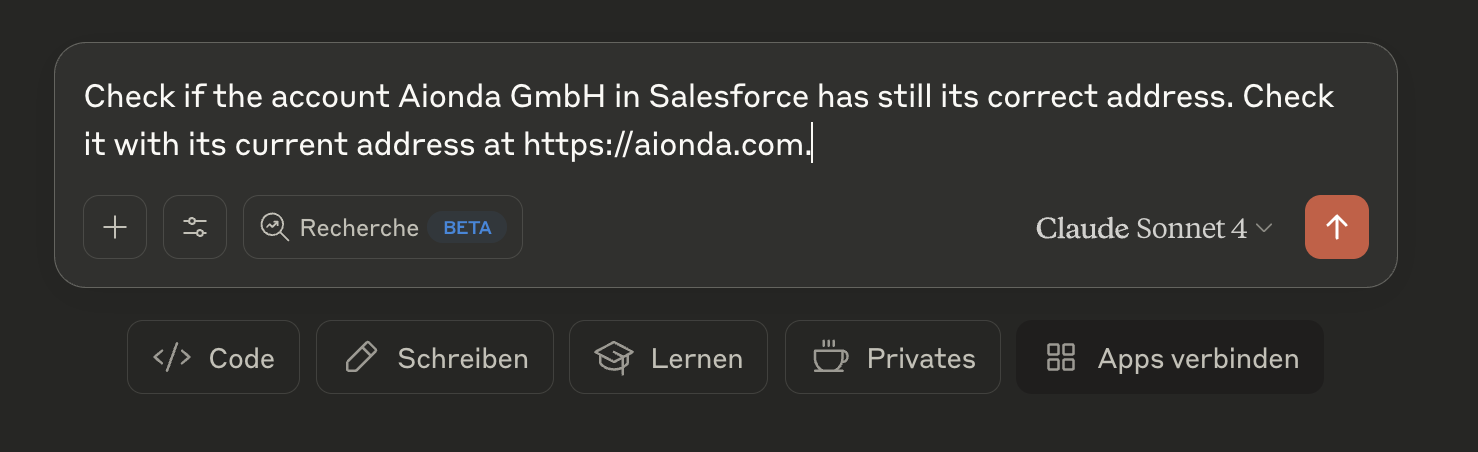
Address Verification ClaudeがSalesforce内のAionda GmbHアカウントの住所が正しいか、現在のウェブサイトの住所と比較して確認している様子

ステップ 2: 住所比較結果
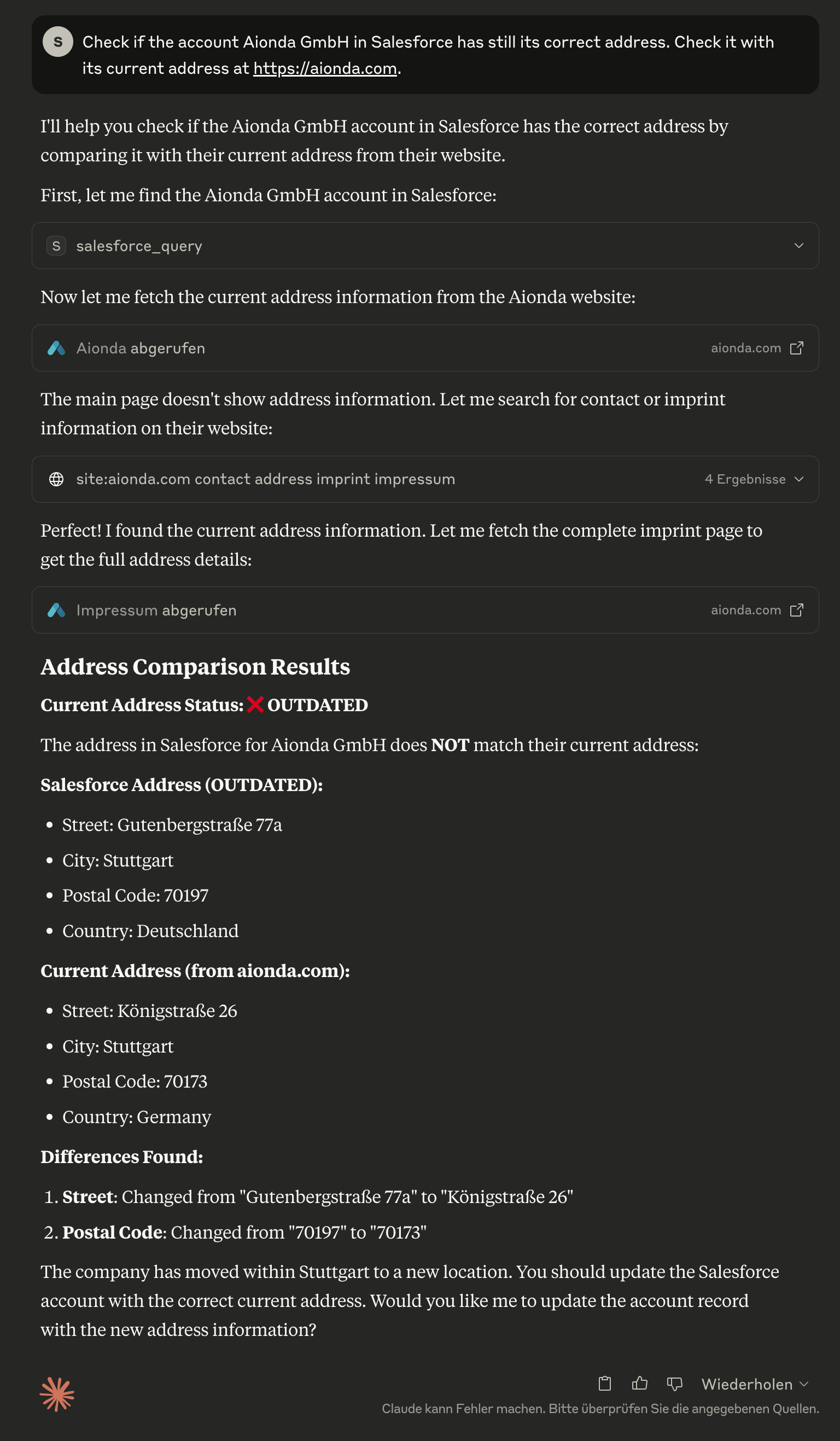
Address Analysis ClaudeがSalesforceの住所が古いことを特定し、現在のSalesforceデータと会社ウェブサイトの実際の住所との詳細な比較を表示している様子

ステップ 3: 自動住所更新
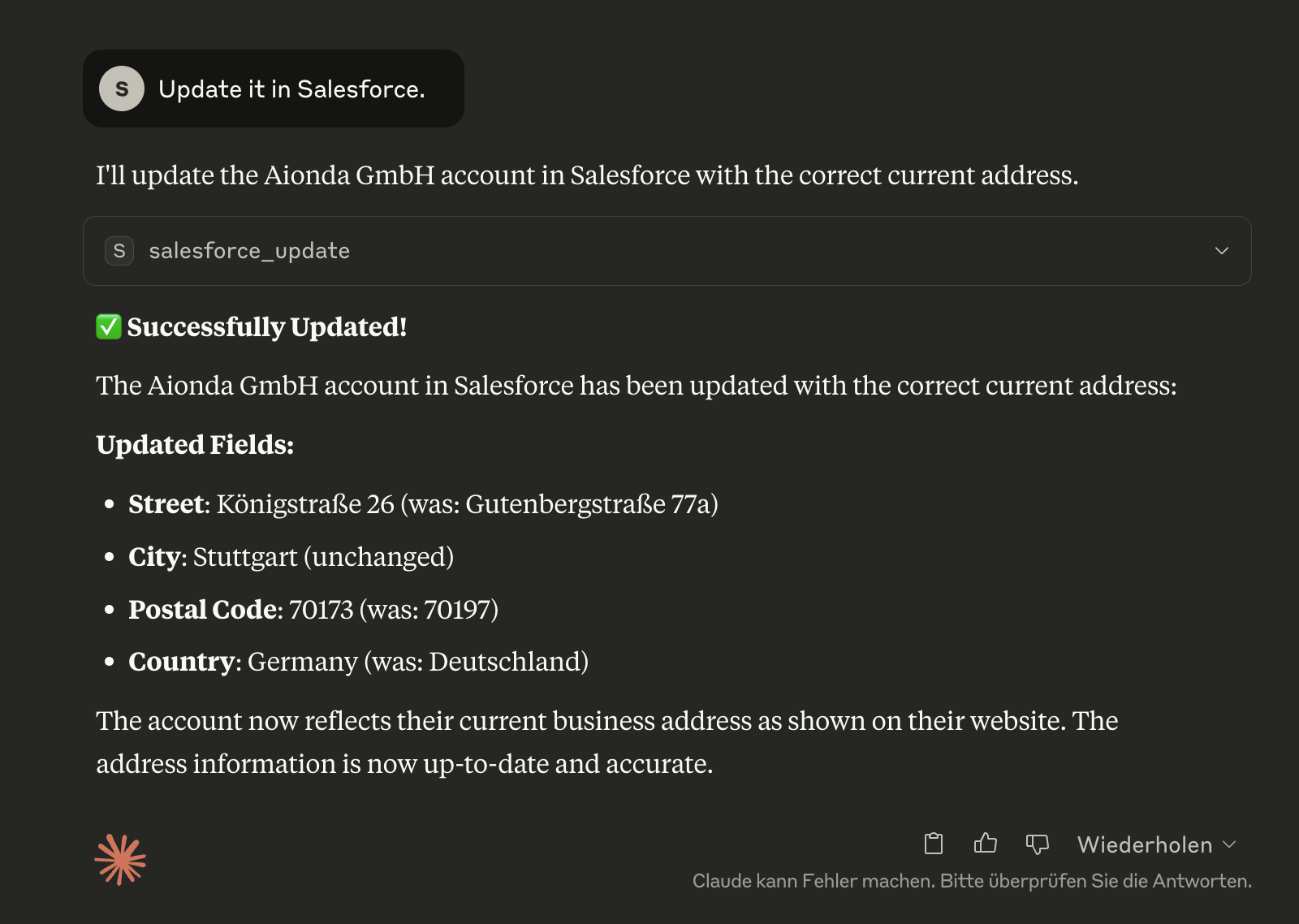
Address Update ClaudeがSalesforceアカウントを正しい現在の住所で正常に更新し、どのフィールドが変更されたかを正確に示している様子

ステップ 4: Salesforceでの検証
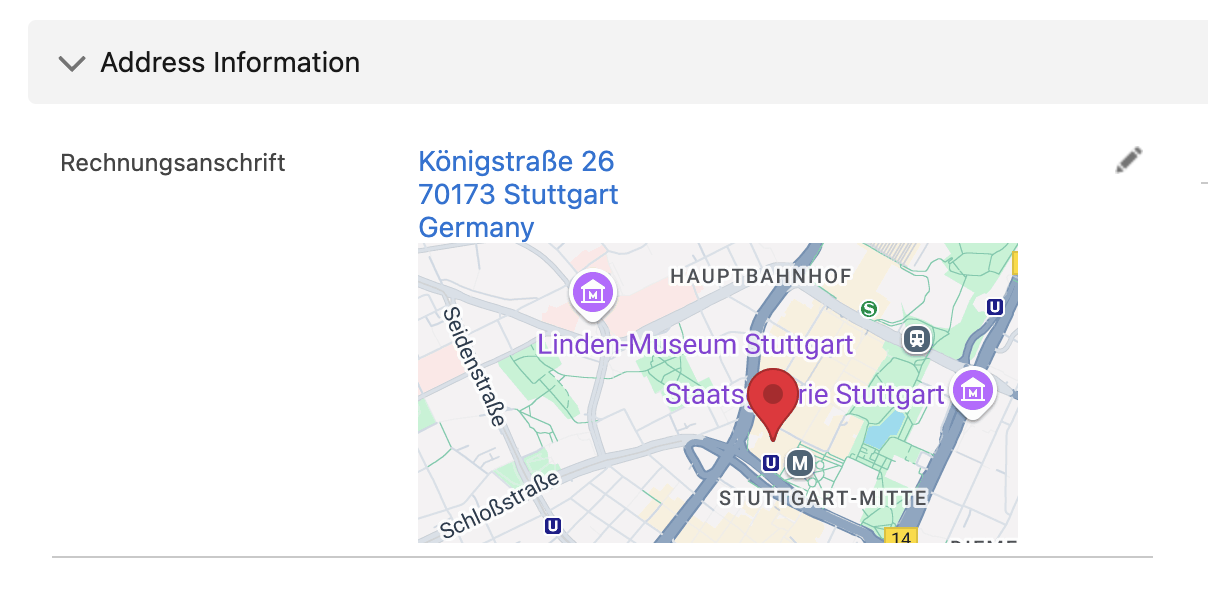
Salesforce Confirmation Salesforceの更新されたアカウントレコードで、修正された住所情報が正確かつ最新であることを確認

🛠️ 利用可能なツール

salesforce_learn

🧠 Salesforceのインストール全体を学習 - すべてのオブジェクト、フィールド、カスタマイズを一度分析し、インテリジェントな支援のためにこの情報をローカルに保存します。

// One-time analysis of the Salesforce installation
{}

// Force complete re-analysis
{
  "force_refresh": true,
  "detailed_relationships": true
}

なぜ重要か?

  • 「TimeTracking__c」、「Project__c」などのカスタムオブジェクトをClaudeが学習します

  • すべてのカスタムフィールドとそのデータ型を認識します

  • 特定の構成に基づいたインテリジェントな提案を提供します

  • 一度実行すれば、AIが永続的にその恩恵を受けられます

salesforce_installation_info

📊 学習したSalesforceインストールの概要 - 利用可能なオブジェクト、カスタムフィールド、カスタマイズを表示します。

// Complete overview of the installation
{}

// Details about a specific object
{
  "object_name": "TimeTracking__c"
}

// Search for specific fields
{
  "field_search": "email",
  "show_custom_only": true
}

salesforce_query

任意のSalesforceオブジェクトに対してSOQLクエリを実行します。

// Example: Get recent contacts
{
  "query": "SELECT Id, FirstName, LastName, Email FROM Contact WHERE CreatedDate = THIS_MONTH ORDER BY CreatedDate DESC LIMIT 10"
}

🧠 スマート学習との統合:

  • インストールがまだ学習されていない場合に自動的に警告します

  • 利用可能なオブジェクトとフィールドを提案します

  • 正しいAPI名の使用を支援します

salesforce_create

任意のSalesforceオブジェクトに新しいレコードを作成します。

// Example: Create a new contact
{
  "sobject": "Contact",
  "data": {
    "FirstName": "John",
    "LastName": "Doe", 
    "Email": "john.doe@example.com",
    "Phone": "555-1234"
  }
}

🧠 スマートコンテキスト: インストールが学習されている場合、選択したオブジェクトに必要なフィールドを自動的に表示します。

salesforce_update

既存のレコードを更新します。

// Example: Update a contact's email
{
  "sobject": "Contact",
  "id": "003XX000008b6cYAQ",
  "data": {
    "Email": "new.email@example.com",
    "Phone": "555-5678"
  }
}

🧠 スマートコンテキスト: 学習したインストールからのフィールド権限とデータ型を考慮します。

salesforce_delete

レコードを削除します (⚠️ 永続的なアクション)。

// Example: Delete a record
{
  "sobject": "Contact", 
  "id": "003XX000008b6cYAQ"
}

salesforce_describe

オブジェクトとフィールドのスキーマ情報を取得します。

// Example: Get Contact object schema
{
  "sobject": "Contact"
}

// Or get list of all available objects
{} // Empty parameters

salesforce_backup

💾 Salesforceの包括的なバックアップシステム - 詳細な復旧情報とともに、すべてのデータとファイルの完全なバックアップを作成します。

// Create complete backup
{}

// Incremental backup since specific date
{
  "backup_type": "incremental",
  "since_date": "2025-01-01T00:00:00Z"
}

// Backup with specific options
{
  "options": {
    "include_files": true,
    "include_attachments": true,
    "include_documents": true,
    "parallel_downloads": 10
  }
}

バックアップ対象:

  • 📊 すべてのオブジェクトデータ - オブジェクトあたり最大20フィールドまでのクエリ可能な全オブジェクト

  • 📁 最新のファイル - 完全なメタデータを持つContentVersion

  • 📎 レガシー添付ファイル - 正しいファイル拡張子を持つ従来の添付ファイル

  • 📄 ドキュメント - レガシーシステムからのフォルダベースのドキュメント

  • 🏗️ スキーマ情報 - 完全なオブジェクト構造とリレーションシップ

  • 📋 バックアップマニフェスト - 詳細な統計と復旧情報

バックアップ構造:

salesforce-backup-2025-06-04T16-16-35-660Z/
├── metadata/           # Schema and object definitions
├── data/              # JSON data of all objects
├── files/
│   ├── content-versions/  # Modern files
│   ├── attachments/       # Legacy attachments
│   └── documents/         # Legacy documents
└── backup-manifest.json   # Backup overview

salesforce_backup_list

📋 利用可能なバックアップを表示 - 統計とメタデータを含むすべてのローカルバックアップの概要。

// List all available backups
{}

// Details about a specific backup
{
  "backup_name": "salesforce-backup-2025-06-04T16-16-35-660Z"
}

salesforce_time_machine

⏰ Salesforceデータのタイムトラベル - 異なるバックアップ時点間のデータ変更を分析し、ターゲットを絞った復旧を可能にします。

// Compare current state with a backup
{
  "backup_timestamp": "2025-06-04T16:16:35.660Z",
  "object_name": "Account"
}

// Show all changes since a specific backup
{
  "backup_timestamp": "2025-06-04T16:16:35.660Z",
  "show_all_changes": true
}

// Detailed analysis for specific records
{
  "backup_timestamp": "2025-06-04T16:16:35.660Z",
  "object_name": "Contact", 
  "record_id": "003XX000008b6cYAQ"
}

タイムマシンの機能:

  • 📊 データ比較 - バックアップと現在の状態の差分を表示

  • 🔍 変更履歴 - どのフィールドがいつ変更されたか

  • 🗑️ 削除されたレコード - バックアップ以降に削除されたレコードを検索

  • 📈 成長分析 - データ開発の統計的評価

  • 🎯 ターゲット復旧 - 変更の正確な特定

salesforce_auth

Salesforceで認証します。認証が必要かどうかを自動的に検出し、OAuthフローを処理します。

// Example: Standard authentication (detects if needed)
{}

// Example: Force re-authentication even if tokens appear valid
{
  "force": true
}

✨ 主な機能:

  • 自動検出: 認証が必要な場合、Claudeがこのツールを自動的に提案します

  • 手動設定不要: npm run setup を手動で実行する必要がありません

  • スマート認証: 必要な場合にのみ認証し、最初に既存のトークンを確認します

  • シームレスな統合: バックグラウンドで透過的に動作します

このツールは、以下の場合に自動的に提案されます:

  • 認証なしでSalesforceツールを使用しようとした場合

  • トークンの有効期限が切れた場合

  • 認証エラーが発生した場合

  • 初回セットアップが必要な場合

🧠 スマート学習システム

なぜ学習が重要なのか?

すべてのSalesforceインストールは、以下のようにユニークです:

  • 「TimeTracking__c」、「Project__c」、「CustomerCare__c」などのカスタムオブジェクト

  • 標準オブジェクト上のカスタムフィールド

  • 特定のワークフローと入力規則

  • 個別のデータ構造

AIの通常の学習モデルは、標準のSalesforceオブジェクトしか知りません。特定のインストールに関する知識がなければ、AIはインテリジェントな支援を提供できません。

学習はどのように機能するか?

  1. 一度限りの分析: salesforce_learn がインストール全体を分析します

  2. ローカルドキュメント: すべてのオブジェクト、フィールド、リレーションシップがローカルに保存されます

  3. インテリジェントなサポート: Claudeは正確な提案を行い、複雑な質問に回答できるようになります

ワークフロー例:

You: "Are there any time tracking entries for July 2025?"

Without Learning:
❌ Claude: "I don't know any object called 'TimeTracking'"

With Learning:
✅ Claude: "I'm checking the 'TimeTracking__c' object for entries from July 2025..."
   Automatically executes the correct SOQL query

いつ学習を使用すべきか?

  • 初期セットアップ時 - インストール後に一度

  • 大幅な変更後 - 新しいカスタムオブジェクトが追加されたとき

  • 問題が発生したとき - Claudeがオブジェクトやフィールドを見つけられないとき

何が学習されるか?

  • すべてのSObject (標準およびカスタム)

  • すべてのフィールド (データ型と権限を含む)

  • オブジェクト間のリレーションシップ

  • 選択リスト値と入力規則

  • 必須フィールド (より良い検証のため)

💡 学習は一度だけ実行され、その後のすべての対話がはるかにインテリジェントになります!

💡 使用例

🚀 インストール後の最初の手順

  1. 認証: Claudeが認証が必要なタイミングを自動的に検出します

  2. 学習を開始:

    You: "Learn my Salesforce installation"
    Claude: Automatically uses the salesforce_learn tool
  3. インストールを探索:

    You: "Show me an overview of my Salesforce installation"
    Claude: Uses salesforce_installation_info for a summary

🔍 学習済みインストールによるインテリジェントなクエリ

You: "Show me all projects from this year"
Claude: Automatically recognizes your "Project__c" Custom Object and creates:
SELECT Id, Name, StartDate__c, Status__c FROM Project__c WHERE CALENDAR_YEAR(CreatedDate) = 2025
You: "Are there any time tracking entries for July 2025?"
Claude: Finds your "TimeTracking__c" object and queries:
SELECT Id, Name, Month__c, Hours__c FROM TimeTracking__c WHERE Month__c = 'July 2025'

クエリ例

-- Get all accounts in the technology industry
SELECT Id, Name, Industry, Website FROM Account WHERE Industry = 'Technology'

-- Find contacts created this week
SELECT Id, Name, Email, CreatedDate FROM Contact WHERE CreatedDate = THIS_WEEK

-- Get opportunities closing this quarter
SELECT Id, Name, Amount, CloseDate FROM Opportunity WHERE CloseDate = THIS_QUARTER

カスタムオブジェクトの操作

サーバーはカスタムオブジェクトを自動的に検出します:

// Describe a custom object
{
  "sobject": "CustomProject__c"
}

// Query custom object
{
  "query": "SELECT Id, Name, CustomField__c FROM CustomProject__c LIMIT 10"
}

// Create custom object record
{
  "sobject": "CustomProject__c",
  "data": {
    "Name": "New Project",
    "CustomField__c": "Custom Value"
  }
}

💾 バックアップとタイムマシン機能

🚀 Salesforceバックアップシステム

MCP Salesforce Serverは、Salesforceのインストール全体を保護できるプロフェッショナルなバックアップシステムを提供します:

バックアップシステムの特別な点

  • 🎯 完全なカバレッジ: 3つのSalesforceファイルシステムすべてをバックアップ

    • 最新のファイル (ContentDocument/ContentVersion)

    • **

Available Tools

14 tools
salesforce_authA

Authenticate with Salesforce. Automatically detects if authentication is needed and handles OAuth flow. Call this tool if any Salesforce operations fail due to authentication issues.

ParametersJSON Schema
NameRequiredDescriptionDefault
forceNoForce re-authentication even if current tokens appear valid

TDQS

A4.4/5.0
Behavior4/5

Does the description disclose side effects, auth requirements, rate limits, or destructive behavior?

With no annotations provided, the description carries the full burden of behavioral disclosure. It effectively describes the tool's automatic detection capability and OAuth flow handling. However, it doesn't mention important behavioral aspects like whether this persists authentication across sessions, what permissions are required, or potential rate limits. The description doesn't contradict any annotations since none exist.

Agents need to know what a tool does to the world before calling it. Descriptions should go beyond structured annotations to explain consequences.

Conciseness5/5

Is the description appropriately sized, front-loaded, and free of redundancy?

The description is perfectly concise with three sentences that each serve distinct purposes: stating the core function, describing automatic behavior, and providing usage guidance. It's front-loaded with the primary purpose and contains no redundant information.

Shorter descriptions cost fewer tokens and are easier for agents to parse. Every sentence should earn its place.

Completeness4/5

Given the tool's complexity, does the description cover enough for an agent to succeed on first attempt?

For an authentication tool with no annotations and no output schema, the description provides good coverage of the tool's purpose and usage context. However, it doesn't describe what happens after authentication (e.g., token storage, session duration) or potential error scenarios, which would be helpful given the lack of structured metadata.

Complex tools with many parameters or behaviors need more documentation. Simple tools need less. This dimension scales expectations accordingly.

Parameters3/5

Does the description clarify parameter syntax, constraints, interactions, or defaults beyond what the schema provides?

The schema description coverage is 100%, with the single parameter 'force' clearly documented in the schema. The description doesn't add any parameter-specific information beyond what's already in the schema, so it meets the baseline expectation when schema coverage is complete.

Input schemas describe structure but not intent. Descriptions should explain non-obvious parameter relationships and valid value ranges.

Purpose5/5

Does the description clearly state what the tool does and how it differs from similar tools?

The description clearly states the specific action ('Authenticate with Salesforce') and resource (Salesforce authentication system). It distinguishes this tool from all sibling tools which perform data operations (query, create, update, backup, etc.) rather than authentication.

Agents choose between tools based on descriptions. A clear purpose with a specific verb and resource helps agents select the right tool.

Usage Guidelines5/5

Does the description explain when to use this tool, when not to, or what alternatives exist?

The description provides explicit guidance on when to use this tool ('Call this tool if any Salesforce operations fail due to authentication issues') and when it automatically triggers ('Automatically detects if authentication is needed'). It also implicitly suggests alternatives by indicating this is specifically for authentication failures rather than general Salesforce operations.

Agents often have multiple tools that could apply. Explicit usage guidance like "use X instead of Y when Z" prevents misuse.

salesforce_backupA

Start comprehensive backups of Salesforce data including all file attachments. Runs asynchronously in background - returns immediately with job ID. Check progress with salesforce_backup_status.

ParametersJSON Schema
NameRequiredDescriptionDefault
backup_typeNoType of backup to perform: 'full' backs up everything, 'incremental' backs up changes since a date, 'files_only' backs up just attachmentsincremental
include_filesNoInclude modern Files (ContentDocument/ContentVersion) in backup
include_attachmentsNoInclude legacy Attachment files in backup
include_documentsNoInclude Document object files in backup
objects_filterNoSpecific objects to backup (empty array = all objects). Example: ['Account', 'Contact', 'CustomObject__c']
since_dateNoISO date for incremental backup - only backup records modified after this date. Format: YYYY-MM-DDTHH:mm:ss.sssZ
compressionNoCompress backup files with gzip to save space
parallel_downloadsNoNumber of parallel file downloads (1-10). Higher values = faster but more API usage

TDQS

A4.4/5.0
Behavior4/5

Does the description disclose side effects, auth requirements, rate limits, or destructive behavior?

With no annotations provided, the description carries full burden and discloses key behavioral traits: it's an asynchronous operation ('Runs asynchronously in background'), returns immediately with a job ID, and requires follow-up with another tool. However, it doesn't mention potential side effects like API usage impact or resource consumption.

Agents need to know what a tool does to the world before calling it. Descriptions should go beyond structured annotations to explain consequences.

Conciseness5/5

Is the description appropriately sized, front-loaded, and free of redundancy?

Three tightly focused sentences with zero waste: first states purpose, second explains execution behavior, third provides usage guidance. Every sentence earns its place and information is front-loaded appropriately.

Shorter descriptions cost fewer tokens and are easier for agents to parse. Every sentence should earn its place.

Completeness4/5

Given the tool's complexity, does the description cover enough for an agent to succeed on first attempt?

For a complex backup tool with 8 parameters and no output schema, the description provides good context about the asynchronous nature and workflow. However, it doesn't mention what the job ID looks like or potential error conditions, leaving some gaps for the agent to infer.

Complex tools with many parameters or behaviors need more documentation. Simple tools need less. This dimension scales expectations accordingly.

Parameters3/5

Does the description clarify parameter syntax, constraints, interactions, or defaults beyond what the schema provides?

Schema description coverage is 100%, so the schema fully documents all 8 parameters. The description doesn't add any parameter-specific information beyond what's in the schema, maintaining the baseline score for high coverage.

Input schemas describe structure but not intent. Descriptions should explain non-obvious parameter relationships and valid value ranges.

Purpose5/5

Does the description clearly state what the tool does and how it differs from similar tools?

The description clearly states the specific action ('Start comprehensive backups'), resource ('Salesforce data including all file attachments'), and scope ('comprehensive'). It distinguishes from siblings like 'salesforce_backup_status' by indicating this initiates the backup while status checks progress.

Agents choose between tools based on descriptions. A clear purpose with a specific verb and resource helps agents select the right tool.

Usage Guidelines5/5

Does the description explain when to use this tool, when not to, or what alternatives exist?

Explicitly states when to use this tool ('Start comprehensive backups') versus alternatives ('Check progress with salesforce_backup_status'), providing clear guidance on the asynchronous workflow and sibling tool relationships.

Agents often have multiple tools that could apply. Explicit usage guidance like "use X instead of Y when Z" prevents misuse.

salesforce_backup_listB

List all available Salesforce backups with their details including timestamp, duration, file counts, and sizes

ParametersJSON Schema
NameRequiredDescriptionDefault

No parameters

TDQS

B3.2/5.0
Behavior2/5

Does the description disclose side effects, auth requirements, rate limits, or destructive behavior?

No annotations are provided, so the description carries full burden. It describes what information is returned but doesn't disclose behavioral traits like whether this is a read-only operation, if it requires authentication, potential rate limits, pagination behavior, or error conditions. For a tool listing system backups with no annotation coverage, this leaves critical operational context unspecified.

Agents need to know what a tool does to the world before calling it. Descriptions should go beyond structured annotations to explain consequences.

Conciseness5/5

Is the description appropriately sized, front-loaded, and free of redundancy?

The description is a single, efficient sentence that immediately states the tool's purpose and what information it provides. Every word earns its place by specifying the resource (Salesforce backups) and the exact details included. There's no redundancy or unnecessary elaboration.

Shorter descriptions cost fewer tokens and are easier for agents to parse. Every sentence should earn its place.

Completeness3/5

Given the tool's complexity, does the description cover enough for an agent to succeed on first attempt?

Given the tool's complexity (simple list operation with no parameters) and the absence of both annotations and output schema, the description is minimally adequate. It tells what the tool does and what information to expect, but doesn't address behavioral aspects like authentication requirements, response format, or error handling. For a backup listing tool in a Salesforce context, more operational context would be helpful.

Complex tools with many parameters or behaviors need more documentation. Simple tools need less. This dimension scales expectations accordingly.

Parameters4/5

Does the description clarify parameter syntax, constraints, interactions, or defaults beyond what the schema provides?

The tool has zero parameters with 100% schema description coverage, so the schema already fully documents the empty parameter set. The description appropriately doesn't discuss parameters since none exist, and it adds value by specifying what details are included in the response (timestamp, duration, file counts, sizes). This exceeds the baseline expectation for a zero-parameter tool.

Input schemas describe structure but not intent. Descriptions should explain non-obvious parameter relationships and valid value ranges.

Purpose4/5

Does the description clearly state what the tool does and how it differs from similar tools?

The description clearly states the verb ('List') and resource ('Salesforce backups') with specific details about what information is included (timestamp, duration, file counts, sizes). It distinguishes from siblings like 'salesforce_backup' (create backup) and 'salesforce_backup_status' (check status) by focusing on listing existing backups. However, it doesn't explicitly differentiate from all siblings like 'salesforce_query' which could also retrieve backup data.

Agents choose between tools based on descriptions. A clear purpose with a specific verb and resource helps agents select the right tool.

Usage Guidelines2/5

Does the description explain when to use this tool, when not to, or what alternatives exist?

The description provides no guidance on when to use this tool versus alternatives. It doesn't mention when this tool is appropriate (e.g., 'to see all backups at once' vs. 'salesforce_backup_status' for a specific backup) or any prerequisites. With multiple sibling tools related to backups, this lack of differentiation is a significant gap.

Agents often have multiple tools that could apply. Explicit usage guidance like "use X instead of Y when Z" prevents misuse.

salesforce_backup_statusA

Check the status of Salesforce backup jobs. Monitor running, completed, or failed backup operations. Use without parameters to see all jobs, or specify a job_id to get detailed status of a specific backup job.

ParametersJSON Schema
NameRequiredDescriptionDefault
job_idNoOptional: Specific backup job ID to check status for. If not provided, shows status of all backup jobs.

TDQS

A3.7/5.0
Behavior3/5

Does the description disclose side effects, auth requirements, rate limits, or destructive behavior?

No annotations are provided, so the description carries the full burden. It describes the tool's behavior: checking status of backup jobs, monitoring running/completed/failed operations, and parameter usage. However, it lacks details on authentication requirements, rate limits, error handling, or response format. For a status-checking tool with no annotations, this is adequate but not comprehensive.

Agents need to know what a tool does to the world before calling it. Descriptions should go beyond structured annotations to explain consequences.

Conciseness5/5

Is the description appropriately sized, front-loaded, and free of redundancy?

The description is concise and well-structured: two sentences that efficiently cover purpose, usage, and parameter guidance without redundancy. Every sentence adds value, and it's front-loaded with the core purpose. No wasted words or unnecessary details.

Shorter descriptions cost fewer tokens and are easier for agents to parse. Every sentence should earn its place.

Completeness3/5

Given the tool's complexity, does the description cover enough for an agent to succeed on first attempt?

Given the tool's moderate complexity (status monitoring with one parameter), no annotations, and no output schema, the description is minimally complete. It explains what the tool does and how to use parameters but lacks details on authentication, response structure, or error conditions. For a tool in a Salesforce context with siblings, it could benefit from more contextual guidance.

Complex tools with many parameters or behaviors need more documentation. Simple tools need less. This dimension scales expectations accordingly.

Parameters3/5

Does the description clarify parameter syntax, constraints, interactions, or defaults beyond what the schema provides?

Schema description coverage is 100%, with the schema fully documenting the single optional parameter 'job_id'. The description adds minimal value beyond the schema: it reiterates that no parameters show all jobs and specifying job_id gives detailed status. This aligns with the schema but doesn't provide additional semantics like format examples or edge cases. Baseline 3 is appropriate given high schema coverage.

Input schemas describe structure but not intent. Descriptions should explain non-obvious parameter relationships and valid value ranges.

Purpose4/5

Does the description clearly state what the tool does and how it differs from similar tools?

The description clearly states the tool's purpose: 'Check the status of Salesforce backup jobs' with specific verbs ('check', 'monitor') and resource ('backup jobs'). It distinguishes from sibling 'salesforce_backup' (which likely initiates backups) and 'salesforce_backup_list' (which might list backup configurations rather than job status), though not explicitly named. The purpose is specific but could be more explicit about sibling differentiation.

Agents choose between tools based on descriptions. A clear purpose with a specific verb and resource helps agents select the right tool.

Usage Guidelines4/5

Does the description explain when to use this tool, when not to, or what alternatives exist?

The description provides clear context for usage: 'Use without parameters to see all jobs, or specify a job_id to get detailed status of a specific backup job.' This gives practical guidance on when to use each parameter mode. However, it doesn't explicitly state when to use this tool versus alternatives like 'salesforce_backup_list' or mention prerequisites (e.g., authentication).

Agents often have multiple tools that could apply. Explicit usage guidance like "use X instead of Y when Z" prevents misuse.

salesforce_createC

Create a new record in any Salesforce object. Automatically handles required fields validation.

ParametersJSON Schema
NameRequiredDescriptionDefault
sobjectYesSObject API name (e.g., 'Contact', 'Account', 'CustomObject__c'). Use exact API names.
dataYesField values for the new record. Use API field names as keys (e.g., {'FirstName': 'John', 'LastName': 'Doe', 'Email': 'john@example.com'})

TDQS

C2.9/5.0
Behavior2/5

Does the description disclose side effects, auth requirements, rate limits, or destructive behavior?

With no annotations provided, the description carries the full burden of behavioral disclosure. It mentions 'Automatically handles required fields validation,' which adds some context about validation behavior. However, it lacks critical details: it doesn't specify whether this is a write operation (implied but not stated), what permissions are needed, whether it's idempotent, error handling, or response format. For a mutation tool with zero annotation coverage, this is insufficient.

Agents need to know what a tool does to the world before calling it. Descriptions should go beyond structured annotations to explain consequences.

Conciseness5/5

Is the description appropriately sized, front-loaded, and free of redundancy?

The description is extremely concise with two sentences that are front-loaded and waste no words. The first sentence states the core purpose, and the second adds a key behavioral trait (validation handling). Every sentence earns its place, making it efficient and well-structured.

Shorter descriptions cost fewer tokens and are easier for agents to parse. Every sentence should earn its place.

Completeness2/5

Given the tool's complexity, does the description cover enough for an agent to succeed on first attempt?

Given the complexity of creating records in Salesforce (a mutation operation), no annotations, and no output schema, the description is incomplete. It should explain more about behavioral aspects like authentication needs, error cases, or what the return value looks like. The current description leaves too many gaps for effective tool use by an AI agent.

Complex tools with many parameters or behaviors need more documentation. Simple tools need less. This dimension scales expectations accordingly.

Parameters3/5

Does the description clarify parameter syntax, constraints, interactions, or defaults beyond what the schema provides?

Schema description coverage is 100%, so the schema already fully documents both parameters ('sobject' and 'data'). The description doesn't add any meaningful semantics beyond what's in the schema—it repeats the idea of creating a record but doesn't clarify parameter usage, constraints, or examples not already covered. Baseline 3 is appropriate when the schema does the heavy lifting.

Input schemas describe structure but not intent. Descriptions should explain non-obvious parameter relationships and valid value ranges.

Purpose4/5

Does the description clearly state what the tool does and how it differs from similar tools?

The description clearly states the verb ('Create') and resource ('new record in any Salesforce object'), making the purpose explicit. It distinguishes from siblings like 'salesforce_update' and 'salesforce_delete' by focusing on creation. However, it doesn't specifically differentiate from all siblings (e.g., 'salesforce_setup' might also involve creation), so it's not a perfect 5.

Agents choose between tools based on descriptions. A clear purpose with a specific verb and resource helps agents select the right tool.

Usage Guidelines2/5

Does the description explain when to use this tool, when not to, or what alternatives exist?

The description provides no guidance on when to use this tool versus alternatives. It doesn't mention when to choose 'salesforce_create' over 'salesforce_update' for existing records, or when to use 'salesforce_query' to check for duplicates first. There's also no mention of prerequisites like authentication or Salesforce object availability.

Agents often have multiple tools that could apply. Explicit usage guidance like "use X instead of Y when Z" prevents misuse.

salesforce_deleteA

Delete a record from any Salesforce object. This action is permanent and cannot be undone.

ParametersJSON Schema
NameRequiredDescriptionDefault
sobjectYesSObject API name (e.g., 'Contact', 'Account', 'CustomObject__c')
idYesSalesforce record ID to delete (15 or 18 character ID)

TDQS

A3.9/5.0
Behavior4/5

Does the description disclose side effects, auth requirements, rate limits, or destructive behavior?

With no annotations provided, the description carries the full burden of behavioral disclosure. It effectively communicates critical traits: the action is permanent and irreversible, which is essential for a destructive operation. However, it doesn't mention authentication requirements, error handling, or rate limits that would be helpful for complete transparency.

Agents need to know what a tool does to the world before calling it. Descriptions should go beyond structured annotations to explain consequences.

Conciseness5/5

Is the description appropriately sized, front-loaded, and free of redundancy?

The description is extremely concise with two sentences that each earn their place: the first states the purpose, and the second provides crucial behavioral warning. It's front-loaded with the core action and wastes no words, making it easy to parse quickly.

Shorter descriptions cost fewer tokens and are easier for agents to parse. Every sentence should earn its place.

Completeness3/5

Given the tool's complexity, does the description cover enough for an agent to succeed on first attempt?

For a destructive tool with no annotations and no output schema, the description covers the permanence aspect well but lacks details on authentication needs, error responses, or success indicators. Given the high stakes of deletion, more context on permissions or confirmation mechanisms would improve completeness.

Complex tools with many parameters or behaviors need more documentation. Simple tools need less. This dimension scales expectations accordingly.

Parameters3/5

Does the description clarify parameter syntax, constraints, interactions, or defaults beyond what the schema provides?

Schema description coverage is 100%, so the schema already documents both parameters (sobject and id) thoroughly. The description doesn't add any parameter-specific information beyond what's in the schema, such as examples or constraints not covered there. Baseline 3 is appropriate when the schema does the heavy lifting.

Input schemas describe structure but not intent. Descriptions should explain non-obvious parameter relationships and valid value ranges.

Purpose5/5

Does the description clearly state what the tool does and how it differs from similar tools?

The description clearly states the specific action ('Delete a record') and resource ('from any Salesforce object'), distinguishing it from siblings like create, update, query, and backup tools. It uses precise language that leaves no ambiguity about the tool's function.

Agents choose between tools based on descriptions. A clear purpose with a specific verb and resource helps agents select the right tool.

Usage Guidelines3/5

Does the description explain when to use this tool, when not to, or what alternatives exist?

The description implies usage for deletion scenarios but doesn't explicitly state when to use this tool versus alternatives like salesforce_update for soft deletes or salesforce_backup for data preservation. It provides a caution about permanence but lacks guidance on prerequisites or specific use cases.

Agents often have multiple tools that could apply. Explicit usage guidance like "use X instead of Y when Z" prevents misuse.

salesforce_describeA

Get detailed schema information for any Salesforce object, including all fields, data types, and permissions.

ParametersJSON Schema
NameRequiredDescriptionDefault
sobjectNoSObject API name to describe (e.g., 'Contact', 'Account', 'CustomObject__c'). Leave empty to get list of all available objects.

TDQS

A4/5.0
Behavior3/5

Does the description disclose side effects, auth requirements, rate limits, or destructive behavior?

No annotations are provided, so the description carries the full burden. It describes the tool's behavior as retrieving schema information, which is a read-only operation, but does not disclose other traits such as authentication requirements, rate limits, or error handling. The description is accurate but lacks depth for a tool with no annotation support.

Agents need to know what a tool does to the world before calling it. Descriptions should go beyond structured annotations to explain consequences.

Conciseness5/5

Is the description appropriately sized, front-loaded, and free of redundancy?

The description is a single, well-structured sentence that efficiently conveys the tool's purpose and key details. It is front-loaded with the main action and resource, with no redundant or unnecessary information, making it highly concise and effective.

Shorter descriptions cost fewer tokens and are easier for agents to parse. Every sentence should earn its place.

Completeness4/5

Given the tool's complexity, does the description cover enough for an agent to succeed on first attempt?

Given the tool's complexity (metadata retrieval with one optional parameter) and lack of annotations and output schema, the description is reasonably complete. It covers the purpose and parameter behavior, but could improve by mentioning authentication needs or output format. It is adequate for a read-only tool with good schema coverage.

Complex tools with many parameters or behaviors need more documentation. Simple tools need less. This dimension scales expectations accordingly.

Parameters4/5

Does the description clarify parameter syntax, constraints, interactions, or defaults beyond what the schema provides?

The input schema has 100% description coverage, so the baseline is 3. The description adds value by clarifying that leaving the parameter empty returns a list of all available objects, which is not explicitly stated in the schema description. This enhances understanding beyond the schema's basic parameter documentation.

Input schemas describe structure but not intent. Descriptions should explain non-obvious parameter relationships and valid value ranges.

Purpose5/5

Does the description clearly state what the tool does and how it differs from similar tools?

The description clearly states the verb 'Get' and the resource 'detailed schema information for any Salesforce object', specifying the content includes 'all fields, data types, and permissions'. It distinguishes from siblings like salesforce_query (data retrieval) and salesforce_create/update/delete (mutations) by focusing on metadata.

Agents choose between tools based on descriptions. A clear purpose with a specific verb and resource helps agents select the right tool.

Usage Guidelines3/5

Does the description explain when to use this tool, when not to, or what alternatives exist?

The description implies usage for schema exploration, but does not explicitly state when to use this tool versus alternatives. It mentions getting a list of all available objects when the parameter is empty, which provides some context, but lacks guidance on prerequisites (e.g., authentication) or comparisons to other tools like salesforce_setup.

Agents often have multiple tools that could apply. Explicit usage guidance like "use X instead of Y when Z" prevents misuse.

salesforce_installation_infoA

Returns comprehensive information about the learned Salesforce installation, including all object details, field specifications, relationships, permissions, and customizations from the learned installation data.

ParametersJSON Schema
NameRequiredDescriptionDefault
object_nameNoSpecific object for detailed information (optional). Example: 'Account', 'Contact', 'CustomObject__c'
field_searchNoSearch for fields with this name or label (optional)
show_custom_onlyNoShow only custom objects and custom fields
include_relationshipsNoInclude relationship information between objects
detailed_fieldsNoShow detailed field information including data types, constraints, and metadata
include_permissionsNoInclude detailed permission information for objects and fields
max_fields_per_objectNoMaximum number of fields to show per object (default: all fields)

TDQS

A3.7/5.0
Behavior3/5

Does the description disclose side effects, auth requirements, rate limits, or destructive behavior?

With no annotations provided, the description carries the full burden of behavioral disclosure. It describes the tool as a read-only operation ('Returns comprehensive information'), which is appropriate, but lacks details on performance characteristics (e.g., response time for large installations), error handling, or data freshness. It adds some context about the scope of information returned but doesn't fully compensate for the absence of annotations.

Agents need to know what a tool does to the world before calling it. Descriptions should go beyond structured annotations to explain consequences.

Conciseness5/5

Is the description appropriately sized, front-loaded, and free of redundancy?

The description is a single, well-structured sentence that front-loads the core purpose ('Returns comprehensive information') and efficiently lists the key components. There's no wasted verbiage, and every phrase adds value by specifying the scope of data returned.

Shorter descriptions cost fewer tokens and are easier for agents to parse. Every sentence should earn its place.

Completeness3/5

Given the tool's complexity, does the description cover enough for an agent to succeed on first attempt?

Given the complexity of a 7-parameter tool with no annotations and no output schema, the description is adequate but incomplete. It covers the tool's purpose and data scope well, but doesn't address behavioral aspects like response format, pagination, or error conditions. For a metadata retrieval tool with rich parameters, more context on output structure would be beneficial.

Complex tools with many parameters or behaviors need more documentation. Simple tools need less. This dimension scales expectations accordingly.

Parameters3/5

Does the description clarify parameter syntax, constraints, interactions, or defaults beyond what the schema provides?

Schema description coverage is 100%, so the schema already documents all 7 parameters thoroughly. The description doesn't add any parameter-specific semantics beyond what's in the schema, such as explaining interactions between parameters or providing usage examples. Baseline 3 is appropriate when the schema does the heavy lifting.

Input schemas describe structure but not intent. Descriptions should explain non-obvious parameter relationships and valid value ranges.

Purpose5/5

Does the description clearly state what the tool does and how it differs from similar tools?

The description clearly states the tool's purpose with specific verbs ('Returns comprehensive information') and resources ('Salesforce installation, including all object details, field specifications, relationships, permissions, and customizations'). It distinguishes itself from siblings like salesforce_query or salesforce_describe by focusing on 'learned installation data' rather than live operations.

Agents choose between tools based on descriptions. A clear purpose with a specific verb and resource helps agents select the right tool.

Usage Guidelines3/5

Does the description explain when to use this tool, when not to, or what alternatives exist?

The description implies usage context by specifying 'learned installation data,' suggesting it should be used for metadata retrieval rather than live Salesforce operations. However, it lacks explicit guidance on when to use this tool versus alternatives like salesforce_describe or salesforce_setup, and doesn't mention prerequisites such as needing prior learning via salesforce_learn.

Agents often have multiple tools that could apply. Explicit usage guidance like "use X instead of Y when Z" prevents misuse.

salesforce_learnA

Analyzes the complete Salesforce installation and creates local documentation of all objects, fields, and customizations. This should be run once after initial setup to enable intelligent assistance.

ParametersJSON Schema
NameRequiredDescriptionDefault
force_refreshNoForces a complete re-analysis even if documentation already exists
include_unusedNoIncludes unused/inactive fields and objects in the documentation
detailed_relationshipsNoAnalyzes detailed relationships between objects

TDQS

A3.9/5.0
Behavior3/5

Does the description disclose side effects, auth requirements, rate limits, or destructive behavior?

No annotations are provided, so the description carries the full burden. It discloses key behavioral traits: it performs analysis and creates local documentation, implying a read-only or data-gathering operation without explicit mutation. However, it lacks details on permissions required, execution time, rate limits, or what 'local documentation' entails (e.g., format, location), leaving gaps in behavioral context.

Agents need to know what a tool does to the world before calling it. Descriptions should go beyond structured annotations to explain consequences.

Conciseness5/5

Is the description appropriately sized, front-loaded, and free of redundancy?

The description is concise and front-loaded, consisting of two sentences that directly state the tool's purpose and usage guidelines without unnecessary details. Every sentence earns its place by providing essential information, making it efficient and well-structured for quick understanding.

Shorter descriptions cost fewer tokens and are easier for agents to parse. Every sentence should earn its place.

Completeness3/5

Given the tool's complexity, does the description cover enough for an agent to succeed on first attempt?

Given the tool's complexity (analyzing a complete Salesforce installation) and the absence of both annotations and an output schema, the description is somewhat incomplete. It covers the high-level purpose and timing but lacks details on output format, error handling, or dependencies (e.g., requiring authentication via salesforce_auth). This leaves gaps for an AI agent to fully understand the tool's behavior and results.

Complex tools with many parameters or behaviors need more documentation. Simple tools need less. This dimension scales expectations accordingly.

Parameters3/5

Does the description clarify parameter syntax, constraints, interactions, or defaults beyond what the schema provides?

The schema description coverage is 100%, with all three parameters well-documented in the input schema (force_refresh, include_unused, detailed_relationships). The description does not add any parameter-specific information beyond what the schema provides, such as explaining interactions between parameters or default behaviors. Baseline 3 is appropriate as the schema handles the heavy lifting.

Input schemas describe structure but not intent. Descriptions should explain non-obvious parameter relationships and valid value ranges.

Purpose5/5

Does the description clearly state what the tool does and how it differs from similar tools?

The description clearly states the tool's purpose with specific verbs ('analyzes', 'creates') and resources ('complete Salesforce installation', 'local documentation of all objects, fields, and customizations'). It distinguishes itself from siblings like salesforce_describe or salesforce_query by focusing on comprehensive documentation creation rather than specific queries or descriptions.

Agents choose between tools based on descriptions. A clear purpose with a specific verb and resource helps agents select the right tool.

Usage Guidelines4/5

Does the description explain when to use this tool, when not to, or what alternatives exist?

The description provides explicit guidance on when to use the tool ('run once after initial setup to enable intelligent assistance'), which gives clear context for its primary use case. However, it does not specify when not to use it or mention alternatives among the sibling tools, such as when to choose salesforce_describe instead for less comprehensive analysis.

Agents often have multiple tools that could apply. Explicit usage guidance like "use X instead of Y when Z" prevents misuse.

salesforce_learn_contextA

Learn and store personal/business context about the user and their Salesforce data model relationships. This helps provide better context-aware assistance across sessions. PROACTIVELY CAPTURE AHA MOMENTS: Whenever you discover something important about the user's workflow, business processes, preferences, challenges, or breakthrough insights during conversations, automatically use store_learning to preserve this knowledge. Look for moments when the user reveals key information, expresses frustration, shares successful strategies, or has realizations - these are valuable learnings that should be stored immediately.

ParametersJSON Schema
NameRequiredDescriptionDefault
actionYesAction to perform: start_interview (begin learning), answer_question (provide answers), show_context (display stored context), reset_context (clear all), suggest_questions (get intelligent questions based on data model), quick_setup (explain everything in one go), store_learning (AUTOMATICALLY capture breakthrough insights, aha moments, user preferences, workflow patterns, pain points, or any valuable context discovered during conversation)
question_idNoID of the question being answered (when action is 'answer_question')
answerNoAnswer to the question (when action is 'answer_question')
context_typeNoType of context to focus on (for show_context and suggest_questions). Can be any section name like 'personal', 'business', 'data_model', 'technical_preferences', etc., or 'all' for everythingall
full_nameNoYour full name (for quick_setup)
emailNoYour email address (for quick_setup)
roleNoYour professional role/position (for quick_setup)
company_nameNoYour company name (for quick_setup)
industryNoYour company's industry (for quick_setup)
business_process_descriptionNoComplete description of your business processes, how you use Salesforce, what you do, etc. (for quick_setup)
sectionNoContext section to store the learning in (for store_learning). Use descriptive names that capture the nature of the insight: 'aha_moments' for breakthrough realizations, 'pain_points' for challenges discovered, 'workflow_insights' for process discoveries, 'preferences' for user likes/dislikes, 'success_patterns' for what works well, 'technical_discoveries' for system insights, etc. Will be created dynamically if it doesn't exist.
keyNoKey name for the learning (for store_learning). Use specific, descriptive names that capture the insight: 'critical_realization_about_X', 'main_frustration_with_Y', 'breakthrough_solution_for_Z', 'preferred_approach_to_A', 'discovered_workflow_pattern_B', etc. Be specific about what was learned.
valueNoValue/content of the learning (for store_learning)
overwriteNoWhether to overwrite existing values for the same key (for store_learning). Default: false

TDQS

A4/5.0
Behavior4/5

Does the description disclose side effects, auth requirements, rate limits, or destructive behavior?

With no annotations provided, the description carries the full burden of behavioral disclosure. It effectively describes key behavioral traits: the tool stores context across sessions for better assistance, proactively captures insights during conversations, and automatically triggers 'store_learning' for valuable moments. However, it doesn't cover potential limitations like storage capacity, session persistence details, or error handling.

Agents need to know what a tool does to the world before calling it. Descriptions should go beyond structured annotations to explain consequences.

Conciseness3/5

Is the description appropriately sized, front-loaded, and free of redundancy?

The description is moderately concise but could be more front-loaded. The first sentence states the core purpose clearly, but the second sentence is lengthy and repetitive, detailing proactive capture scenarios that are somewhat redundant with the schema's 'store_learning' description. Some trimming could improve efficiency without losing key guidance.

Shorter descriptions cost fewer tokens and are easier for agents to parse. Every sentence should earn its place.

Completeness4/5

Given the tool's complexity, does the description cover enough for an agent to succeed on first attempt?

Given the tool's complexity (14 parameters, no output schema, no annotations), the description does a good job covering purpose and proactive usage. It explains the tool's role in context-aware assistance and when to invoke it, but lacks details on output format, error cases, or how stored context integrates with other tools. The schema compensates well for parameter documentation.

Complex tools with many parameters or behaviors need more documentation. Simple tools need less. This dimension scales expectations accordingly.

Parameters3/5

Does the description clarify parameter syntax, constraints, interactions, or defaults beyond what the schema provides?

The schema description coverage is 100%, so the schema already documents all 14 parameters thoroughly. The description adds minimal parameter-specific semantics beyond the schema, mainly emphasizing the 'store_learning' action for proactive capture. It doesn't provide additional meaning for parameters like 'section' or 'key' beyond what's in their schema descriptions.

Input schemas describe structure but not intent. Descriptions should explain non-obvious parameter relationships and valid value ranges.

Purpose4/5

Does the description clearly state what the tool does and how it differs from similar tools?

The description clearly states the tool's purpose: 'Learn and store personal/business context about the user and their Salesforce data model relationships' and 'helps provide better context-aware assistance across sessions.' It specifies the verb ('learn and store') and resource ('context'), but doesn't explicitly differentiate from sibling tools like 'salesforce_learn' or 'salesforce_setup' beyond the context focus.

Agents choose between tools based on descriptions. A clear purpose with a specific verb and resource helps agents select the right tool.

Usage Guidelines5/5

Does the description explain when to use this tool, when not to, or what alternatives exist?

The description provides explicit guidance on when to use the tool: 'PROACTIVELY CAPTURE AHA MOMENTS: Whenever you discover something important... automatically use store_learning to preserve this knowledge.' It lists specific scenarios (user reveals key information, expresses frustration, shares successful strategies, or has realizations) and names the specific action ('store_learning'), offering clear alternatives for other actions via the input schema.

Agents often have multiple tools that could apply. Explicit usage guidance like "use X instead of Y when Z" prevents misuse.

salesforce_queryB

Execute SOQL queries against any Salesforce object. Supports SELECT, WHERE, ORDER BY, LIMIT, and other SOQL features.

ParametersJSON Schema
NameRequiredDescriptionDefault
queryYesSOQL query string (e.g., 'SELECT Id, Name FROM Account WHERE Industry = \'Technology\' LIMIT 10'). Use proper SOQL syntax with single quotes for string literals.

TDQS

B3.1/5.0
Behavior2/5

Does the description disclose side effects, auth requirements, rate limits, or destructive behavior?

With no annotations provided, the description carries full burden but lacks critical behavioral details. It doesn't disclose whether this is read-only (implied by 'query' but not stated), authentication requirements, rate limits, error handling, or what happens with malformed queries. The description adds minimal behavioral context beyond the basic operation.

Agents need to know what a tool does to the world before calling it. Descriptions should go beyond structured annotations to explain consequences.

Conciseness4/5

Is the description appropriately sized, front-loaded, and free of redundancy?

The description is appropriately concise with two sentences that efficiently convey core functionality. The first sentence states the purpose, and the second adds useful context about supported features. No wasted words, though it could be slightly more front-loaded with critical behavioral information.

Shorter descriptions cost fewer tokens and are easier for agents to parse. Every sentence should earn its place.

Completeness2/5

Given the tool's complexity, does the description cover enough for an agent to succeed on first attempt?

For a query tool with no annotations and no output schema, the description is incomplete. It doesn't explain what the tool returns (e.g., query results format), error conditions, authentication needs, or limitations. Given the complexity of Salesforce queries and lack of structured fields, more contextual information is needed for effective use.

Complex tools with many parameters or behaviors need more documentation. Simple tools need less. This dimension scales expectations accordingly.

Parameters3/5

Does the description clarify parameter syntax, constraints, interactions, or defaults beyond what the schema provides?

Schema description coverage is 100%, so the schema already fully documents the single 'query' parameter. The description adds marginal value by mentioning SOQL features (SELECT, WHERE, etc.) and implying broad object support, but doesn't provide additional syntax or format details beyond what's in the schema description. Baseline 3 is appropriate when schema does the heavy lifting.

Input schemas describe structure but not intent. Descriptions should explain non-obvious parameter relationships and valid value ranges.

Purpose4/5

Does the description clearly state what the tool does and how it differs from similar tools?

The description clearly states the tool's purpose: 'Execute SOQL queries against any Salesforce object' with specific verb ('Execute') and resource ('SOQL queries against any Salesforce object'). It distinguishes from obvious siblings like create/delete/update by focusing on querying, though it doesn't explicitly differentiate from salesforce_time_machine_query.

Agents choose between tools based on descriptions. A clear purpose with a specific verb and resource helps agents select the right tool.

Usage Guidelines3/5

Does the description explain when to use this tool, when not to, or what alternatives exist?

The description implies usage context by mentioning 'Supports SELECT, WHERE, ORDER BY, LIMIT, and other SOQL features,' suggesting this is for querying data. However, it doesn't provide explicit guidance on when to use this vs. alternatives like salesforce_time_machine_query or salesforce_describe, nor does it mention prerequisites like authentication.

Agents often have multiple tools that could apply. Explicit usage guidance like "use X instead of Y when Z" prevents misuse.

salesforce_setupC

Configure Salesforce credentials (Client ID, Client Secret, Instance URL)

ParametersJSON Schema
NameRequiredDescriptionDefault
clientIdYesSalesforce Connected App Client ID (Consumer Key)
clientSecretYesSalesforce Connected App Client Secret (Consumer Secret)
instanceUrlYesSalesforce Instance URL (e.g., https://mycompany.salesforce.com)

TDQS

C2.9/5.0
Behavior2/5

Does the description disclose side effects, auth requirements, rate limits, or destructive behavior?

With no annotations provided, the description carries full burden but only states what parameters to configure. It doesn't disclose whether this persists credentials, requires authentication, has side effects, returns confirmation, or handles errors. 'Configure' implies a write/mutation operation but lacks behavioral details.

Agents need to know what a tool does to the world before calling it. Descriptions should go beyond structured annotations to explain consequences.

Conciseness5/5

Is the description appropriately sized, front-loaded, and free of redundancy?

Extremely concise single sentence with zero waste. Every word contributes directly to the tool's purpose. The structure is front-loaded with the core action and immediately specifies what's being configured.

Shorter descriptions cost fewer tokens and are easier for agents to parse. Every sentence should earn its place.

Completeness2/5

Given the tool's complexity, does the description cover enough for an agent to succeed on first attempt?

For a credential configuration tool with no annotations and no output schema, the description is insufficient. It doesn't explain what happens after configuration, whether credentials are validated, what the expected outcome is, or how this interacts with other Salesforce tools. The complexity of credential management warrants more complete guidance.

Complex tools with many parameters or behaviors need more documentation. Simple tools need less. This dimension scales expectations accordingly.

Parameters3/5

Does the description clarify parameter syntax, constraints, interactions, or defaults beyond what the schema provides?

Schema description coverage is 100%, so parameters are fully documented in the schema. The description lists the three parameters by name but adds minimal semantic context beyond what's already in the schema descriptions. Baseline 3 is appropriate since the schema does the heavy lifting.

Input schemas describe structure but not intent. Descriptions should explain non-obvious parameter relationships and valid value ranges.

Purpose4/5

Does the description clearly state what the tool does and how it differs from similar tools?

The description clearly states the action ('Configure') and the resource ('Salesforce credentials') with specific parameters listed. It distinguishes this as a setup/configuration tool rather than data operations like query or create, but doesn't explicitly differentiate from sibling 'salesforce_auth' which might have overlapping functionality.

Agents choose between tools based on descriptions. A clear purpose with a specific verb and resource helps agents select the right tool.

Usage Guidelines2/5

Does the description explain when to use this tool, when not to, or what alternatives exist?

No guidance on when to use this tool versus alternatives like 'salesforce_auth' or other setup-related tools. The description implies this is for initial credential configuration but doesn't specify prerequisites, timing, or whether this should be used before other Salesforce operations.

Agents often have multiple tools that could apply. Explicit usage guidance like "use X instead of Y when Z" prevents misuse.

salesforce_time_machine_queryB

Query historical Salesforce data from backups using Time Machine functionality. Supports point-in-time queries, comparisons, and record history tracking.

ParametersJSON Schema
NameRequiredDescriptionDefault
operationYesThe Time Machine operation to perform
targetDateNoTarget date for point-in-time queries (ISO 8601 format)
startDateNoStart date for comparison queries (ISO 8601 format)
endDateNoEnd date for comparison queries (ISO 8601 format)
objectTypeNoSalesforce object type to query (e.g., Account, Contact, ContentVersion)
recordIdNoSpecific record ID for history tracking
filtersNoOptional filters to apply to the query (field-value pairs, supports wildcards with *)
backupDirectoryNoPath to backup directory (defaults to ./backups)

TDQS

B3.2/5.0
Behavior2/5

Does the description disclose side effects, auth requirements, rate limits, or destructive behavior?

No annotations are provided, so the description carries the full burden of behavioral disclosure. It mentions the tool's capabilities (queries, comparisons, history tracking) but lacks critical behavioral details: it doesn't specify whether this is a read-only operation, what permissions are required, how results are returned (e.g., format, pagination), or any rate limits. For a complex query tool with 8 parameters, this is a significant gap in transparency.

Agents need to know what a tool does to the world before calling it. Descriptions should go beyond structured annotations to explain consequences.

Conciseness5/5

Is the description appropriately sized, front-loaded, and free of redundancy?

The description is appropriately sized and front-loaded: a single sentence states the core purpose, followed by a second sentence listing key operations. Every sentence earns its place by conveying essential information without redundancy or fluff. It's efficient and well-structured.

Shorter descriptions cost fewer tokens and are easier for agents to parse. Every sentence should earn its place.

Completeness2/5

Given the tool's complexity, does the description cover enough for an agent to succeed on first attempt?

Given the tool's complexity (8 parameters, no annotations, no output schema), the description is incomplete. It covers the purpose and high-level operations but misses behavioral context (e.g., read/write nature, permissions, output format) and doesn't compensate for the lack of annotations or output schema. For a tool that queries historical data with multiple operation types, more guidance is needed.

Complex tools with many parameters or behaviors need more documentation. Simple tools need less. This dimension scales expectations accordingly.

Parameters3/5

Does the description clarify parameter syntax, constraints, interactions, or defaults beyond what the schema provides?

Schema description coverage is 100%, so the schema already documents all 8 parameters thoroughly. The description adds minimal value beyond the schema: it mentions 'point-in-time queries, comparisons, and record history tracking,' which loosely maps to the 'operation' enum values, but doesn't provide additional syntax, format, or usage details for parameters. Baseline 3 is appropriate when the schema does the heavy lifting.

Input schemas describe structure but not intent. Descriptions should explain non-obvious parameter relationships and valid value ranges.

Purpose4/5

Does the description clearly state what the tool does and how it differs from similar tools?

The description clearly states the tool's purpose: 'Query historical Salesforce data from backups using Time Machine functionality.' It specifies the verb ('query'), resource ('historical Salesforce data'), and mechanism ('Time Machine functionality'). However, it doesn't explicitly differentiate from sibling tools like 'salesforce_query' or 'salesforce_backup_list' beyond mentioning 'historical' data.

Agents choose between tools based on descriptions. A clear purpose with a specific verb and resource helps agents select the right tool.

Usage Guidelines3/5

Does the description explain when to use this tool, when not to, or what alternatives exist?

The description implies usage context by listing supported operations ('point-in-time queries, comparisons, and record history tracking'), which helps identify when to use this tool. However, it doesn't provide explicit guidance on when to choose this over alternatives like 'salesforce_query' (for current data) or 'salesforce_backup_list' (for backup metadata), nor does it mention prerequisites or exclusions.

Agents often have multiple tools that could apply. Explicit usage guidance like "use X instead of Y when Z" prevents misuse.

salesforce_updateC

Update an existing record in any Salesforce object. Requires the record ID and field values to update.

ParametersJSON Schema
NameRequiredDescriptionDefault
sobjectYesSObject API name (e.g., 'Contact', 'Account', 'CustomObject__c')
idYesSalesforce record ID (15 or 18 character ID)
dataYesField values to update. Only include fields you want to change (e.g., {'Email': 'newemail@example.com', 'Phone': '555-1234'})

TDQS

C2.9/5.0
Behavior2/5

Does the description disclose side effects, auth requirements, rate limits, or destructive behavior?

With no annotations provided, the description carries the full burden of behavioral disclosure. It states it 'Requires the record ID and field values to update,' implying a mutation operation, but doesn't cover critical aspects like permissions needed, whether updates are reversible, rate limits, error handling, or what the response looks like. This is a significant gap for a mutation tool with zero annotation coverage.

Agents need to know what a tool does to the world before calling it. Descriptions should go beyond structured annotations to explain consequences.

Conciseness4/5

Is the description appropriately sized, front-loaded, and free of redundancy?

The description is concise and front-loaded in a single sentence, with no wasted words. It efficiently conveys the core action and requirements, though it could be slightly more structured by separating purpose from prerequisites.

Shorter descriptions cost fewer tokens and are easier for agents to parse. Every sentence should earn its place.

Completeness2/5

Given the tool's complexity, does the description cover enough for an agent to succeed on first attempt?

Given this is a mutation tool with no annotations and no output schema, the description is incomplete. It lacks details on behavioral traits (e.g., side effects, authentication), doesn't explain return values, and provides minimal usage guidance, making it inadequate for safe and effective agent use.

Complex tools with many parameters or behaviors need more documentation. Simple tools need less. This dimension scales expectations accordingly.

Parameters3/5

Does the description clarify parameter syntax, constraints, interactions, or defaults beyond what the schema provides?

Schema description coverage is 100%, so the schema already documents all three parameters thoroughly. The description adds minimal value beyond the schema by mentioning 'Requires the record ID and field values to update,' which restates what the schema says. Baseline 3 is appropriate when the schema does the heavy lifting.

Input schemas describe structure but not intent. Descriptions should explain non-obvious parameter relationships and valid value ranges.

Purpose4/5

Does the description clearly state what the tool does and how it differs from similar tools?

The description clearly states the verb ('Update') and resource ('existing record in any Salesforce object'), making the purpose specific and understandable. However, it doesn't explicitly differentiate from siblings like 'salesforce_create' or 'salesforce_delete', which would require mentioning it modifies existing records rather than creating new ones or removing them.

Agents choose between tools based on descriptions. A clear purpose with a specific verb and resource helps agents select the right tool.

Usage Guidelines2/5

Does the description explain when to use this tool, when not to, or what alternatives exist?

The description provides no guidance on when to use this tool versus alternatives. It doesn't mention prerequisites (e.g., authentication), compare to siblings like 'salesforce_create' for new records or 'salesforce_query' for reading, or specify scenarios where this update is appropriate, leaving the agent without contextual usage cues.

Agents often have multiple tools that could apply. Explicit usage guidance like "use X instead of Y when Z" prevents misuse.

Tool Schema Changelog

Recent tool additions, removals, and schema changes observed during successful MCP inspections.

  1. 14 tool updatesv1.2.1
    • First observedsalesforce_auth
    • First observedsalesforce_backup
    • First observedsalesforce_backup_list
    • First observedsalesforce_backup_status
    • First observedsalesforce_create
    • First observedsalesforce_delete
    • First observedsalesforce_describe
    • First observedsalesforce_installation_info
    • First observedsalesforce_learn
    • First observedsalesforce_learn_context
    • First observedsalesforce_query
    • First observedsalesforce_setup
    • First observedsalesforce_time_machine_query
    • First observedsalesforce_update

TDQS

A3.7/5.0

Scored across 14 tools

Disambiguation4/5

Most tools have distinct purposes, but there is some overlap between salesforce_describe and salesforce_installation_info, both providing schema details, which could cause confusion. Additionally, salesforce_learn and salesforce_learn_context both involve learning aspects, though their focuses differ slightly (installation vs. personal context).

Naming Consistency5/5

All tool names follow a consistent snake_case pattern with a 'salesforce_' prefix, and they use clear verbs (e.g., create, delete, query) paired with nouns or actions. This predictability makes the set easy to navigate and understand.

Tool Count5/5

With 14 tools, the server is well-scoped for managing Salesforce operations, covering authentication, CRUD, querying, backups, and setup. Each tool serves a specific function without unnecessary bloat, fitting the domain's complexity appropriately.

Completeness5/5

The tool set provides comprehensive coverage for Salesforce interactions, including full CRUD operations (create, query, update, delete), schema exploration (describe, installation_info), backup management, authentication, setup, and advanced features like time machine queries. No significant gaps are apparent for the intended domain.

Maintenance

ActivityInactive
ResponsivenessNo issues

Related MCP Connectors

Related MCP Servers

  • A
    license
    A
    quality
    D
    maintenance
    Enables AI assistants to securely interact with Salesforce CRM data through SOQL queries, CRUD operations, and metadata exploration. Supports connecting to Salesforce objects like Accounts, Contacts, and Opportunities via OAuth 2.0 authentication.
    8
    2
    MIT
  • F
    license
    Not graded
    quality
    D
    maintenance
    Enables AI assistants to interact with Salesforce CRM by executing SOQL queries and performing CRUD operations on records such as Leads. It supports secure OAuth 2.0 authentication and provides management for both standard and custom Salesforce fields.
    -
  • A
    license
    A
    quality
    B
    maintenance
    Enables interaction with Salesforce orgs to perform operations like querying data with SOQL, managing records, and executing Apex code. It provides configurable access levels and support for both standard and Tooling APIs via natural language interfaces.
    11
    MIT
  • F
    license
    B
    quality
    D
    maintenance
    Provides AI agents with secure access to Salesforce data and operations, enabling natural language interaction with CRM for sales, marketing, and executive teams.
    6
    5
    -

Appeared in Searches