Glama

Servidor MCP de Salesforce

CI

Un servidor del Protocolo de Contexto de Modelo (MCP) que proporciona una integración fluida con Salesforce mediante autenticación OAuth. Este servidor permite que asistentes de IA como Claude interactúen con cualquier organización de Salesforce a través de una interfaz segura y genérica.

✨ Características

  • 🎯 Autenticación fluida - Claude detecta automáticamente cuándo se necesita autenticación y la gestiona de forma transparente

  • 🚀 Sin configuración manual - No es necesario ejecutar comandos de terminal ni flujos de OAuth manuales

  • 🔐 Autenticación solo mediante OAuth - Configuración segura basada en navegador con actualización automática de tokens

  • 🌐 Integración universal con Salesforce - Funciona con cualquier organización de Salesforce, incluidos objetos y campos personalizados

  • 🧠 Aprendizaje inteligente de la instalación - Analiza su configuración completa de Salesforce para proporcionar asistencia inteligente

  • 🔍 Detección dinámica de esquemas - Se adapta automáticamente a su configuración de Salesforce

  • 🔒 Almacenamiento seguro de tokens - Almacenamiento basado en archivos con permisos estrictos para una seguridad de nivel de producción

  • 🏠 Almacenamiento en el directorio personal multiplataforma - Credenciales y caché almacenados en el directorio personal del usuario

  • 📝 Operaciones CRUD completas - Consultar, crear, actualizar y eliminar cualquier registro de Salesforce

  • 📊 Inspección de esquemas - Obtenga información detallada sobre objetos y campos

  • 💡 Sugerencias conscientes del contexto - Proporciona sugerencias inteligentes de nombres de campos y objetos

  • 💾 Sistema de copia de seguridad integral - Copia de seguridad completa de datos y archivos con soporte para todos los sistemas de archivos de Salesforce

  • ⏰ Función de máquina del tiempo - Recuperación de datos en un punto en el tiempo y análisis histórico

  • 📁 Soporte para archivos en múltiples formatos - Realiza copias de seguridad de ContentVersions, archivos adjuntos y documentos con los metadatos adecuados

Related MCP server: Salesforce MCP Server

🚀 Inicio rápido

Requisitos previos

  • Node.js 18+

  • macOS (requerido para el almacenamiento seguro de credenciales)

  • Aplicación conectada de Salesforce con OAuth configurado

Opciones de instalación

🎯 Recomendado: Uso de NPX (No requiere instalación)

Utilice NPX para ejecutar el servidor MCP sin ninguna instalación permanente:

{
  "mcpServers": {
    "salesforce": {
      "command": "npx",
      "args": ["@aiondadotcom/mcp-salesforce"]
    }
  }
}

✅ Beneficios del uso de NPX:

  • 🔄 Siempre actualizado: Utiliza automáticamente la última versión publicada

  • 💾 Sin espacio en disco: No requiere instalación permanente

  • 🛡️ Sin conflictos: Sin conflictos de paquetes globales

  • Actualizaciones fáciles: Solo reinicie: obtiene la última versión automáticamente

  • 📋 Configuración sencilla: Configuración de MCP lista para copiar y pegar

Uso de la línea de comandos de NPX:

# Get version
npx -p @aiondadotcom/mcp-salesforce mcp-salesforce --version

# Get help
npx -p @aiondadotcom/mcp-salesforce mcp-salesforce --help

# Run OAuth setup
npx -p @aiondadotcom/mcp-salesforce mcp-salesforce setup

🔧 Alternativa: Configuración de desarrollo

Para desarrollo o personalización:

  1. Clone e instale las dependencias:

    git clone https://github.com/AiondaDotCom/mcp-salesforce.git
    cd mcp-salesforce
    npm install
  2. Configure las credenciales: Utilice la herramienta salesforce_setup para configurar sus credenciales cuando se le solicite

  3. Añada a Claude Desktop utilizando la ruta local (consulte Configuración a continuación)

🎯 Empiece a usarlo

¡Eso es todo! Claude gestionará automáticamente la configuración y la autenticación cuando utilice por primera vez cualquier herramienta de Salesforce.

✨ ¡Proceso de configuración interactivo!

  • Utilice la herramienta salesforce_setup para configurar sus credenciales

  • Claude le pedirá los detalles de su aplicación conectada de Salesforce

  • Las credenciales se almacenan de forma segura en su directorio personal

  • Flujo de OAuth fluido directamente desde Claude Desktop

🧠 Sistema de aprendizaje inteligente

  • Utilice salesforce_learn para analizar su instalación completa de Salesforce

  • Claude aprende todos sus objetos, campos y relaciones personalizados

  • Proporciona sugerencias inteligentes basadas en su configuración específica

  • Asistencia consciente del contexto para entornos complejos de Salesforce

📦 Estado del paquete NPM

¡Paquete publicado con éxito!

El paquete @aiondadotcom/mcp-salesforce ya está en vivo en NPM y listo para su uso.

Uso del paquete publicado

El uso de NPX ya está disponible para todos los usuarios:

# Test the published package
npx -p @aiondadotcom/mcp-salesforce mcp-salesforce --version
npx -p @aiondadotcom/mcp-salesforce mcp-salesforce --help

# Run OAuth setup
npx -p @aiondadotcom/mcp-salesforce mcp-salesforce setup

Detalles de la publicación

  • Nombre del paquete: @aiondadotcom/mcp-salesforce

  • Versión: 1.0.7 (última)

  • Registro: Registro público de NPM

  • Organización: @aiondadotcom

  • Acceso: Público

Estado:

  • ✅ Paquete publicado en NPM

  • ✅ Compatibilidad con NPX verificada

  • ✅ Envoltorio binario implementado

  • ✅ Comando de configuración funcional

  • ✅ Configuración de MCP lista

  • Disponible para uso inmediato

🎉 ¡Toda la funcionalidad de NPX ya funciona para los usuarios finales de todo el mundo!

🔧 Configuración

Configuración de la aplicación conectada de Salesforce

  1. En la configuración de Salesforce, cree una nueva aplicación conectada:

    • Nombre de la aplicación: MCP Salesforce Integration

    • Nombre de API: mcp_salesforce_integration

    • Correo electrónico de contacto: Su correo electrónico

    • Habilitar configuración de OAuth: ✅ Sí

    • URL de devolución de llamada: http://localhost:9876/callback

      El puerto 9876 se eligió deliberadamente para evitar conflictos con servidores de desarrollo comunes (8080, 8000, 3000) y servicios conocidos.

    • Ámbitos de OAuth seleccionados:

      • Gestionar datos de usuario a través de API (api)

      • Realizar solicitudes en cualquier momento (refresh_token, offline_access)

  2. Después de guardar, copie la Clave de consumidor y el Secreto de consumidor

Configuración de credenciales

Configure sus credenciales utilizando la herramienta salesforce_setup cuando utilice la aplicación por primera vez:

  1. Configuración interactiva: Claude le pedirá sus credenciales de Salesforce

  2. ID de cliente: Su clave de consumidor de la aplicación conectada de Salesforce

  3. Secreto de cliente: Su secreto de consumidor de la aplicación conectada de Salesforce

  4. URL de instancia: La URL de su organización de Salesforce (p. ej., https://mycompany.salesforce.com)

La herramienta validará su entrada y almacenará las credenciales de forma segura en ~/.mcp-salesforce.json con permisos restringidos (600).

📁 Ubicaciones de archivos:

  • Credenciales: ~/.mcp-salesforce.json (contiene tokens de OAuth y credenciales)

  • Caché: ~/.mcp-salesforce-cache/ (contiene el esquema y el contexto de Salesforce aprendidos)

  • Multiplataforma: Funciona en Windows, macOS y Linux

Ejemplo de interacción:

Claude: I need to set up your Salesforce credentials first. Please use the salesforce_setup tool with your credentials.

You: Use the salesforce_setup tool with clientId: "3MVG9...", clientSecret: "1234567890...", instanceUrl: "https://mycompany.salesforce.com"

Claude: ✅ Salesforce credentials configured successfully! You can now use other Salesforce tools.

Integración con Claude Desktop

🎯 Configuración de NPX (Recomendado)

Añada esto a su configuración de MCP de Claude Desktop (~/Library/Application Support/Claude/claude_desktop_config.json):

{
  "mcpServers": {
    "salesforce": {
      "command": "npx",
      "args": ["@aiondadotcom/mcp-salesforce"]
    }
  }
}

🔧 Configuración de desarrollo/local

Para desarrollo o instalaciones personalizadas:

{
  "mcpServers": {
    "salesforce": {
      "command": "node",
      "args": ["/path/to/mcp-salesforce/src/index.js"]
    }
  }
}

🌐 Configuración de MCP para VS Code

Para VS Code con la extensión MCP:

{
  "servers": {
    "salesforce": {
      "command": "npx",
      "args": ["@aiondadotcom/mcp-salesforce"]
    }
  }
}

📸 Capturas de pantalla de demostración

Aquí tiene un recorrido paso a paso del servidor MCP de Salesforce en acción, que muestra un caso de uso real de verificación y actualización de la información de la dirección de la empresa:

Paso 1: Solicitud de verificación de dirección
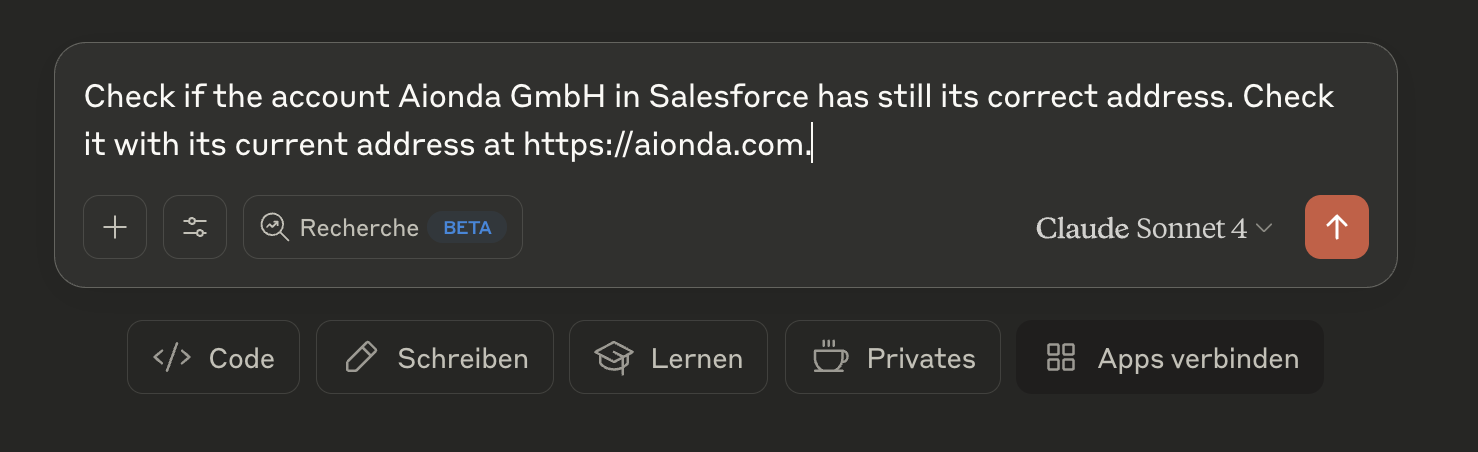
Verificación de dirección Claude comprobando si la cuenta de Aionda GmbH en Salesforce tiene la dirección correcta comparándola con la dirección de su sitio web actual

Paso 2: Resultados de la comparación de direcciones
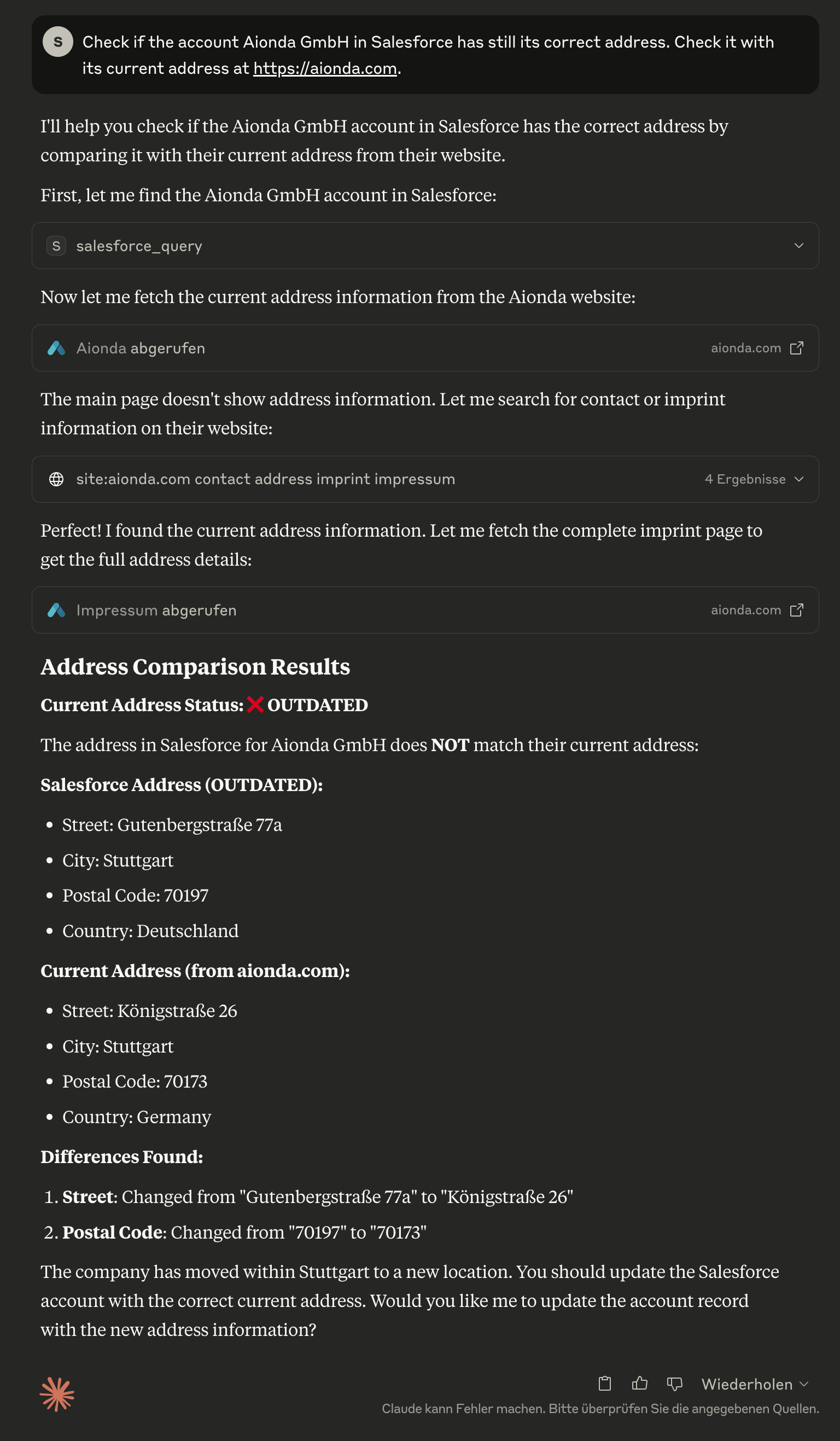
Análisis de dirección Claude identificando que la dirección de Salesforce está desactualizada, mostrando una comparación detallada entre los datos actuales de Salesforce y la dirección real del sitio web de la empresa

Paso 3: Actualización automatizada de la dirección
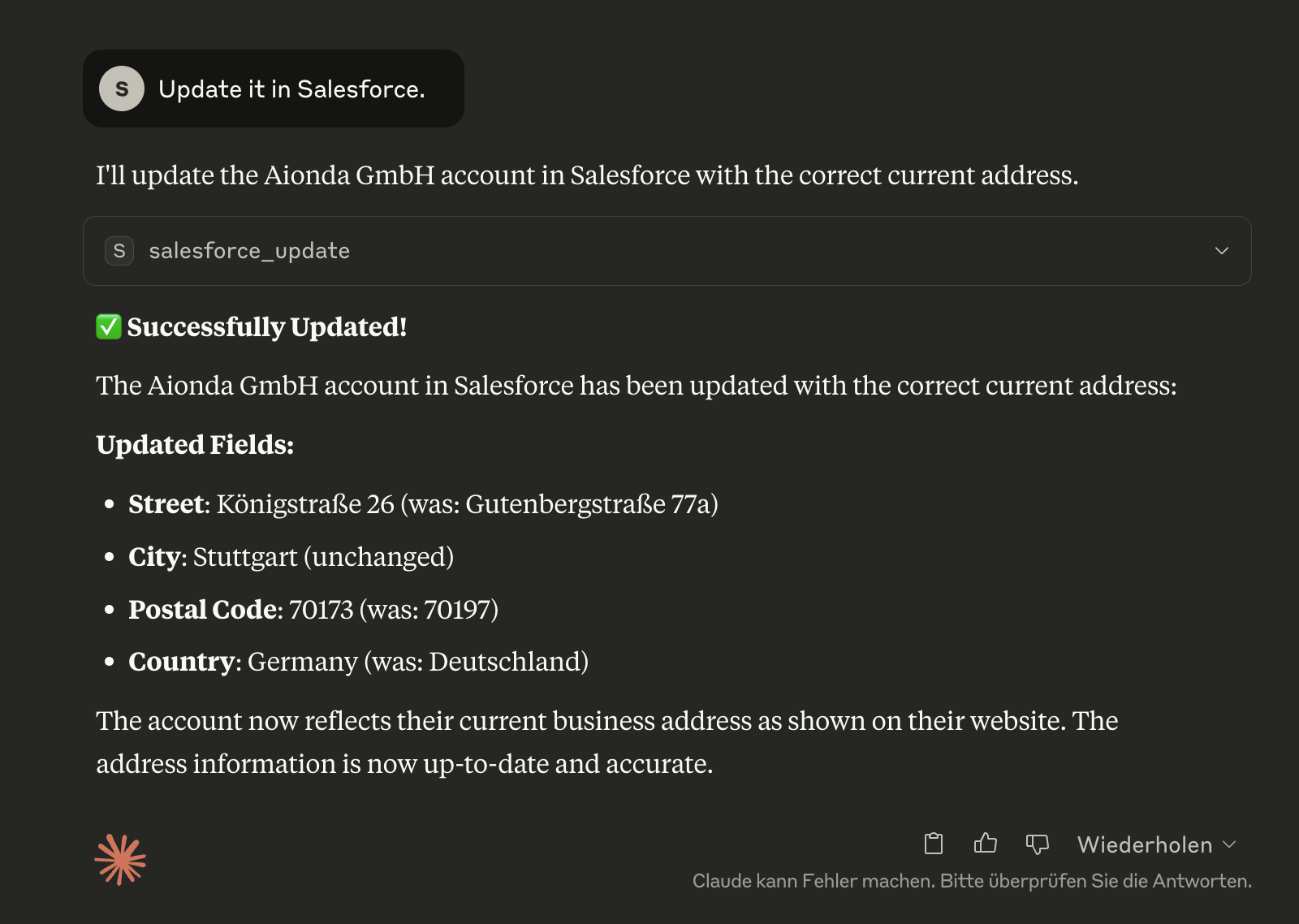
Actualización de dirección Claude actualizando con éxito la cuenta de Salesforce con la dirección actual correcta, mostrando exactamente qué campos se cambiaron

Paso 4: Verificación en Salesforce
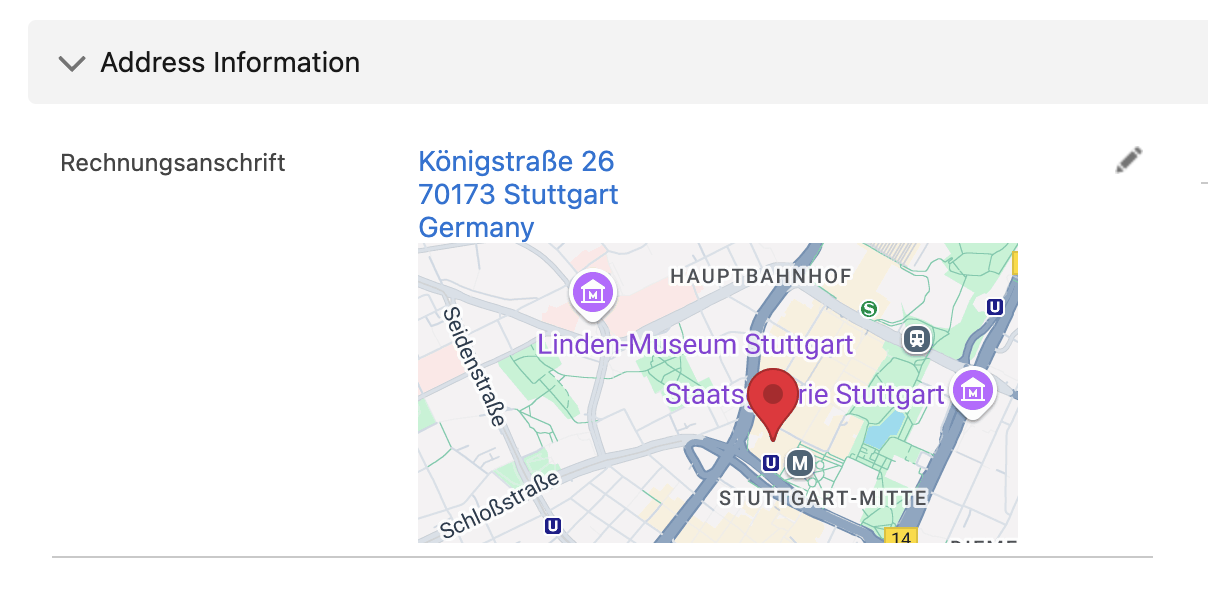
Confirmación de Salesforce El registro de cuenta actualizado en Salesforce muestra que la información de dirección corregida ahora es precisa y está actualizada

🛠️ Herramientas disponibles

salesforce_learn

🧠 Aprende su instalación completa de Salesforce - Analiza todos los objetos, campos y personalizaciones una vez y almacena esta información localmente para una asistencia inteligente.

// One-time analysis of the Salesforce installation
{}

// Force complete re-analysis
{
  "force_refresh": true,
  "detailed_relationships": true
}

¿Por qué es importante?

  • Claude aprende sus objetos personalizados como "TimeTracking__c", "Project__c", etc.

  • Reconoce todos los campos personalizados y sus tipos de datos

  • Proporciona sugerencias inteligentes basadas en su configuración específica

  • Ejecútelo una vez y la IA se beneficiará de ello permanentemente

salesforce_installation_info

📊 Descripción general de su instalación de Salesforce aprendida - Muestra los objetos disponibles, los campos personalizados y las personalizaciones.

// Complete overview of the installation
{}

// Details about a specific object
{
  "object_name": "TimeTracking__c"
}

// Search for specific fields
{
  "field_search": "email",
  "show_custom_only": true
}

salesforce_query

Ejecute consultas SOQL contra cualquier objeto de Salesforce.

// Example: Get recent contacts
{
  "query": "SELECT Id, FirstName, LastName, Email FROM Contact WHERE CreatedDate = THIS_MONTH ORDER BY CreatedDate DESC LIMIT 10"
}

🧠 Integración de aprendizaje inteligente:

  • Advierte automáticamente cuando la instalación aún no se ha aprendido

  • Sugiere objetos y campos disponibles

  • Ayuda con los nombres de API correctos

salesforce_create

Cree nuevos registros en cualquier objeto de Salesforce.

// Example: Create a new contact
{
  "sobject": "Contact",
  "data": {
    "FirstName": "John",
    "LastName": "Doe", 
    "Email": "john.doe@example.com",
    "Phone": "555-1234"
  }
}

🧠 Contexto inteligente: Muestra automáticamente los campos obligatorios para el objeto seleccionado cuando se ha aprendido la instalación.

salesforce_update

Actualice los registros existentes.

// Example: Update a contact's email
{
  "sobject": "Contact",
  "id": "003XX000008b6cYAQ",
  "data": {
    "Email": "new.email@example.com",
    "Phone": "555-5678"
  }
}

🧠 Contexto inteligente: Considera los permisos de campo y los tipos de datos de la instalación aprendida.

salesforce_delete

Elimine registros (⚠️ acción permanente).

// Example: Delete a record
{
  "sobject": "Contact", 
  "id": "003XX000008b6cYAQ"
}

salesforce_describe

Obtenga información de esquema para objetos y campos.

// Example: Get Contact object schema
{
  "sobject": "Contact"
}

// Or get list of all available objects
{} // Empty parameters

salesforce_backup

💾 Sistema de copia de seguridad integral para Salesforce - Crea copias de seguridad completas de todos los datos y archivos con información detallada de recuperación.

// Create complete backup
{}

// Incremental backup since specific date
{
  "backup_type": "incremental",
  "since_date": "2025-01-01T00:00:00Z"
}

// Backup with specific options
{
  "options": {
    "include_files": true,
    "include_attachments": true,
    "include_documents": true,
    "parallel_downloads": 10
  }
}

Qué se respalda:

  • 📊 Todos los datos de objetos - Todos los objetos consultables con hasta 20 campos por objeto

  • 📁 Archivos modernos - ContentVersions con metadatos completos

  • 📎 Archivos adjuntos heredados - Archivos adjuntos clásicos con las extensiones de archivo correctas

  • 📄 Documentos - Documentos basados en carpetas del sistema heredado

  • 🏗️ Información de esquema - Estructuras y relaciones completas de objetos

  • 📋 Manifiesto de copia de seguridad - Estadísticas detalladas e información de recuperación

Estructura de copia de seguridad:

salesforce-backup-2025-06-04T16-16-35-660Z/
├── metadata/           # Schema and object definitions
├── data/              # JSON data of all objects
├── files/
│   ├── content-versions/  # Modern files
│   ├── attachments/       # Legacy attachments
│   └── documents/         # Legacy documents
└── backup-manifest.json   # Backup overview

salesforce_backup_list

📋 Mostrar copias de seguridad disponibles - Descripción general de todas las copias de seguridad locales con estadísticas y metadatos.

// List all available backups
{}

// Details about a specific backup
{
  "backup_name": "salesforce-backup-2025-06-04T16-16-35-660Z"
}

salesforce_time_machine

⏰ Viaje en el tiempo a través de los datos de Salesforce - Analiza los cambios de datos entre diferentes puntos temporales de copia de seguridad y permite una recuperación dirigida.

// Compare current state with a backup
{
  "backup_timestamp": "2025-06-04T16:16:35.660Z",
  "object_name": "Account"
}

// Show all changes since a specific backup
{
  "backup_timestamp": "2025-06-04T16:16:35.660Z",
  "show_all_changes": true
}

// Detailed analysis for specific records
{
  "backup_timestamp": "2025-06-04T16:16:35.660Z",
  "object_name": "Contact", 
  "record_id": "003XX000008b6cYAQ"
}

Características de la máquina del tiempo:

  • 📊 Comparación de datos - Muestra las diferencias entre la copia de seguridad y el estado actual

  • 🔍 Historial de cambios - Qué campos se cambiaron y cuándo

  • 🗑️ Registros eliminados - Encuentra registros que se eliminaron desde la copia de seguridad

  • 📈 Análisis de crecimiento - Evaluación estadística del desarrollo de datos

  • 🎯 Recuperación dirigida - Identificación precisa de los cambios

salesforce_auth

Autentíquese con Salesforce. Detecta automáticamente si se necesita autenticación y gestiona el flujo de OAuth.

// Example: Standard authentication (detects if needed)
{}

// Example: Force re-authentication even if tokens appear valid
{
  "force": true
}

✨ Características clave:

  • Detección automática: Claude sugiere automáticamente esta herramienta cuando se necesita autenticación

  • Sin configuración manual: Elimina la necesidad de ejecutar npm run setup manualmente

  • Autenticación inteligente: Solo se autentica cuando es necesario, comprueba primero los tokens existentes

  • Integración fluida: Funciona de forma transparente en segundo plano

Esta herramienta se sugiere automáticamente cuando:

  • Intenta utilizar herramientas de Salesforce sin autenticación

  • Sus tokens han caducado

  • Se producen errores de autenticación

  • Se necesita una configuración inicial

🧠 Sistema de aprendizaje inteligente

¿Por qué es importante el aprendizaje?

Cada instalación de Salesforce es única con:

  • Objetos personalizados como "TimeTracking__c", "Project__c", "CustomerCare__c"

  • Campos personalizados en objetos estándar

  • Flujos de trabajo específicos y reglas de validación

  • Estructuras de datos individuales

El modelo de entrenamiento normal de la IA solo conoce los objetos estándar de Salesforce. Sin conocimiento de su instalación específica, la IA no puede proporcionar asistencia inteligente.

¿Cómo funciona el aprendizaje?

  1. Análisis único: salesforce_learn analiza su instalación completa

  2. Documentación local: Todos los objetos, campos y relaciones se almacenan localmente

  3. Soporte inteligente: Claude puede entonces hacer sugerencias precisas y responder preguntas complejas

Ejemplo de flujo de trabajo:

You: "Are there any time tracking entries for July 2025?"

Without Learning:
❌ Claude: "I don't know any object called 'TimeTracking'"

With Learning:
✅ Claude: "I'm checking the 'TimeTracking__c' object for entries from July 2025..."
   Automatically executes the correct SOQL query

¿Cuándo debería usar el aprendizaje?

  • Durante la configuración inicial - Una vez después de la instalación

  • Después de cambios importantes - Cuando se añaden nuevos objetos personalizados

  • Cuando tiene problemas - Cuando Claude no encuentra objetos o campos

¿Qué se aprende?

  • Todos los SObjects (estándar y personalizados)

  • Todos los campos con tipos de datos y permisos

  • Relaciones entre objetos

  • Valores de lista de selección y reglas de validación

  • Campos obligatorios para una mejor validación

💡 ¡El aprendizaje se ejecuta solo una vez y luego hace que todas las interacciones posteriores sean mucho más inteligentes!

💡 Ejemplos de uso

🚀 Primeros pasos después de la instalación

  1. Autenticación: Claude detecta automáticamente cuándo se necesita autenticación

  2. Iniciar aprendizaje:

    You: "Learn my Salesforce installation"
    Claude: Automatically uses the salesforce_learn tool
  3. Explorar instalación:

    You: "Show me an overview of my Salesforce installation"
    Claude: Uses salesforce_installation_info for a summary

🔍 Consultas inteligentes con la instalación aprendida

You: "Show me all projects from this year"
Claude: Automatically recognizes your "Project__c" Custom Object and creates:
SELECT Id, Name, StartDate__c, Status__c FROM Project__c WHERE CALENDAR_YEAR(CreatedDate) = 2025
You: "Are there any time tracking entries for July 2025?"
Claude: Finds your "TimeTracking__c" object and queries:
SELECT Id, Name, Month__c, Hours__c FROM TimeTracking__c WHERE Month__c = 'July 2025'

Ejemplos de consulta

-- Get all accounts in the technology industry
SELECT Id, Name, Industry, Website FROM Account WHERE Industry = 'Technology'

-- Find contacts created this week
SELECT Id, Name, Email, CreatedDate FROM Contact WHERE CreatedDate = THIS_WEEK

-- Get opportunities closing this quarter
SELECT Id, Name, Amount, CloseDate FROM Opportunity WHERE CloseDate = THIS_QUARTER

Trabajar con objetos personalizados

El servidor descubre automáticamente los objetos personalizados:

// Describe a custom object
{
  "sobject": "CustomProject__c"
}

// Query custom object
{
  "query": "SELECT Id, Name, CustomField__c FROM CustomProject__c LIMIT 10"
}

// Create custom object record
{
  "sobject": "CustomProject__c",
  "data": {
    "Name": "New Project",
    "CustomField__c": "Custom Value"
  }
}

💾 Características de copia de seguridad y máquina del tiempo

🚀 Sistema de copia de seguridad de Salesforce

El servidor

Available Tools

14 tools
salesforce_authA

Authenticate with Salesforce. Automatically detects if authentication is needed and handles OAuth flow. Call this tool if any Salesforce operations fail due to authentication issues.

ParametersJSON Schema
NameRequiredDescriptionDefault
forceNoForce re-authentication even if current tokens appear valid

TDQS

A4.4/5.0
Behavior4/5

Does the description disclose side effects, auth requirements, rate limits, or destructive behavior?

With no annotations provided, the description carries the full burden of behavioral disclosure. It effectively describes the tool's automatic detection capability and OAuth flow handling. However, it doesn't mention important behavioral aspects like whether this persists authentication across sessions, what permissions are required, or potential rate limits. The description doesn't contradict any annotations since none exist.

Agents need to know what a tool does to the world before calling it. Descriptions should go beyond structured annotations to explain consequences.

Conciseness5/5

Is the description appropriately sized, front-loaded, and free of redundancy?

The description is perfectly concise with three sentences that each serve distinct purposes: stating the core function, describing automatic behavior, and providing usage guidance. It's front-loaded with the primary purpose and contains no redundant information.

Shorter descriptions cost fewer tokens and are easier for agents to parse. Every sentence should earn its place.

Completeness4/5

Given the tool's complexity, does the description cover enough for an agent to succeed on first attempt?

For an authentication tool with no annotations and no output schema, the description provides good coverage of the tool's purpose and usage context. However, it doesn't describe what happens after authentication (e.g., token storage, session duration) or potential error scenarios, which would be helpful given the lack of structured metadata.

Complex tools with many parameters or behaviors need more documentation. Simple tools need less. This dimension scales expectations accordingly.

Parameters3/5

Does the description clarify parameter syntax, constraints, interactions, or defaults beyond what the schema provides?

The schema description coverage is 100%, with the single parameter 'force' clearly documented in the schema. The description doesn't add any parameter-specific information beyond what's already in the schema, so it meets the baseline expectation when schema coverage is complete.

Input schemas describe structure but not intent. Descriptions should explain non-obvious parameter relationships and valid value ranges.

Purpose5/5

Does the description clearly state what the tool does and how it differs from similar tools?

The description clearly states the specific action ('Authenticate with Salesforce') and resource (Salesforce authentication system). It distinguishes this tool from all sibling tools which perform data operations (query, create, update, backup, etc.) rather than authentication.

Agents choose between tools based on descriptions. A clear purpose with a specific verb and resource helps agents select the right tool.

Usage Guidelines5/5

Does the description explain when to use this tool, when not to, or what alternatives exist?

The description provides explicit guidance on when to use this tool ('Call this tool if any Salesforce operations fail due to authentication issues') and when it automatically triggers ('Automatically detects if authentication is needed'). It also implicitly suggests alternatives by indicating this is specifically for authentication failures rather than general Salesforce operations.

Agents often have multiple tools that could apply. Explicit usage guidance like "use X instead of Y when Z" prevents misuse.

salesforce_backupA

Start comprehensive backups of Salesforce data including all file attachments. Runs asynchronously in background - returns immediately with job ID. Check progress with salesforce_backup_status.

ParametersJSON Schema
NameRequiredDescriptionDefault
backup_typeNoType of backup to perform: 'full' backs up everything, 'incremental' backs up changes since a date, 'files_only' backs up just attachmentsincremental
include_filesNoInclude modern Files (ContentDocument/ContentVersion) in backup
include_attachmentsNoInclude legacy Attachment files in backup
include_documentsNoInclude Document object files in backup
objects_filterNoSpecific objects to backup (empty array = all objects). Example: ['Account', 'Contact', 'CustomObject__c']
since_dateNoISO date for incremental backup - only backup records modified after this date. Format: YYYY-MM-DDTHH:mm:ss.sssZ
compressionNoCompress backup files with gzip to save space
parallel_downloadsNoNumber of parallel file downloads (1-10). Higher values = faster but more API usage

TDQS

A4.4/5.0
Behavior4/5

Does the description disclose side effects, auth requirements, rate limits, or destructive behavior?

With no annotations provided, the description carries full burden and discloses key behavioral traits: it's an asynchronous operation ('Runs asynchronously in background'), returns immediately with a job ID, and requires follow-up with another tool. However, it doesn't mention potential side effects like API usage impact or resource consumption.

Agents need to know what a tool does to the world before calling it. Descriptions should go beyond structured annotations to explain consequences.

Conciseness5/5

Is the description appropriately sized, front-loaded, and free of redundancy?

Three tightly focused sentences with zero waste: first states purpose, second explains execution behavior, third provides usage guidance. Every sentence earns its place and information is front-loaded appropriately.

Shorter descriptions cost fewer tokens and are easier for agents to parse. Every sentence should earn its place.

Completeness4/5

Given the tool's complexity, does the description cover enough for an agent to succeed on first attempt?

For a complex backup tool with 8 parameters and no output schema, the description provides good context about the asynchronous nature and workflow. However, it doesn't mention what the job ID looks like or potential error conditions, leaving some gaps for the agent to infer.

Complex tools with many parameters or behaviors need more documentation. Simple tools need less. This dimension scales expectations accordingly.

Parameters3/5

Does the description clarify parameter syntax, constraints, interactions, or defaults beyond what the schema provides?

Schema description coverage is 100%, so the schema fully documents all 8 parameters. The description doesn't add any parameter-specific information beyond what's in the schema, maintaining the baseline score for high coverage.

Input schemas describe structure but not intent. Descriptions should explain non-obvious parameter relationships and valid value ranges.

Purpose5/5

Does the description clearly state what the tool does and how it differs from similar tools?

The description clearly states the specific action ('Start comprehensive backups'), resource ('Salesforce data including all file attachments'), and scope ('comprehensive'). It distinguishes from siblings like 'salesforce_backup_status' by indicating this initiates the backup while status checks progress.

Agents choose between tools based on descriptions. A clear purpose with a specific verb and resource helps agents select the right tool.

Usage Guidelines5/5

Does the description explain when to use this tool, when not to, or what alternatives exist?

Explicitly states when to use this tool ('Start comprehensive backups') versus alternatives ('Check progress with salesforce_backup_status'), providing clear guidance on the asynchronous workflow and sibling tool relationships.

Agents often have multiple tools that could apply. Explicit usage guidance like "use X instead of Y when Z" prevents misuse.

salesforce_backup_listB

List all available Salesforce backups with their details including timestamp, duration, file counts, and sizes

ParametersJSON Schema
NameRequiredDescriptionDefault

No parameters

TDQS

B3.2/5.0
Behavior2/5

Does the description disclose side effects, auth requirements, rate limits, or destructive behavior?

No annotations are provided, so the description carries full burden. It describes what information is returned but doesn't disclose behavioral traits like whether this is a read-only operation, if it requires authentication, potential rate limits, pagination behavior, or error conditions. For a tool listing system backups with no annotation coverage, this leaves critical operational context unspecified.

Agents need to know what a tool does to the world before calling it. Descriptions should go beyond structured annotations to explain consequences.

Conciseness5/5

Is the description appropriately sized, front-loaded, and free of redundancy?

The description is a single, efficient sentence that immediately states the tool's purpose and what information it provides. Every word earns its place by specifying the resource (Salesforce backups) and the exact details included. There's no redundancy or unnecessary elaboration.

Shorter descriptions cost fewer tokens and are easier for agents to parse. Every sentence should earn its place.

Completeness3/5

Given the tool's complexity, does the description cover enough for an agent to succeed on first attempt?

Given the tool's complexity (simple list operation with no parameters) and the absence of both annotations and output schema, the description is minimally adequate. It tells what the tool does and what information to expect, but doesn't address behavioral aspects like authentication requirements, response format, or error handling. For a backup listing tool in a Salesforce context, more operational context would be helpful.

Complex tools with many parameters or behaviors need more documentation. Simple tools need less. This dimension scales expectations accordingly.

Parameters4/5

Does the description clarify parameter syntax, constraints, interactions, or defaults beyond what the schema provides?

The tool has zero parameters with 100% schema description coverage, so the schema already fully documents the empty parameter set. The description appropriately doesn't discuss parameters since none exist, and it adds value by specifying what details are included in the response (timestamp, duration, file counts, sizes). This exceeds the baseline expectation for a zero-parameter tool.

Input schemas describe structure but not intent. Descriptions should explain non-obvious parameter relationships and valid value ranges.

Purpose4/5

Does the description clearly state what the tool does and how it differs from similar tools?

The description clearly states the verb ('List') and resource ('Salesforce backups') with specific details about what information is included (timestamp, duration, file counts, sizes). It distinguishes from siblings like 'salesforce_backup' (create backup) and 'salesforce_backup_status' (check status) by focusing on listing existing backups. However, it doesn't explicitly differentiate from all siblings like 'salesforce_query' which could also retrieve backup data.

Agents choose between tools based on descriptions. A clear purpose with a specific verb and resource helps agents select the right tool.

Usage Guidelines2/5

Does the description explain when to use this tool, when not to, or what alternatives exist?

The description provides no guidance on when to use this tool versus alternatives. It doesn't mention when this tool is appropriate (e.g., 'to see all backups at once' vs. 'salesforce_backup_status' for a specific backup) or any prerequisites. With multiple sibling tools related to backups, this lack of differentiation is a significant gap.

Agents often have multiple tools that could apply. Explicit usage guidance like "use X instead of Y when Z" prevents misuse.

salesforce_backup_statusA

Check the status of Salesforce backup jobs. Monitor running, completed, or failed backup operations. Use without parameters to see all jobs, or specify a job_id to get detailed status of a specific backup job.

ParametersJSON Schema
NameRequiredDescriptionDefault
job_idNoOptional: Specific backup job ID to check status for. If not provided, shows status of all backup jobs.

TDQS

A3.7/5.0
Behavior3/5

Does the description disclose side effects, auth requirements, rate limits, or destructive behavior?

No annotations are provided, so the description carries the full burden. It describes the tool's behavior: checking status of backup jobs, monitoring running/completed/failed operations, and parameter usage. However, it lacks details on authentication requirements, rate limits, error handling, or response format. For a status-checking tool with no annotations, this is adequate but not comprehensive.

Agents need to know what a tool does to the world before calling it. Descriptions should go beyond structured annotations to explain consequences.

Conciseness5/5

Is the description appropriately sized, front-loaded, and free of redundancy?

The description is concise and well-structured: two sentences that efficiently cover purpose, usage, and parameter guidance without redundancy. Every sentence adds value, and it's front-loaded with the core purpose. No wasted words or unnecessary details.

Shorter descriptions cost fewer tokens and are easier for agents to parse. Every sentence should earn its place.

Completeness3/5

Given the tool's complexity, does the description cover enough for an agent to succeed on first attempt?

Given the tool's moderate complexity (status monitoring with one parameter), no annotations, and no output schema, the description is minimally complete. It explains what the tool does and how to use parameters but lacks details on authentication, response structure, or error conditions. For a tool in a Salesforce context with siblings, it could benefit from more contextual guidance.

Complex tools with many parameters or behaviors need more documentation. Simple tools need less. This dimension scales expectations accordingly.

Parameters3/5

Does the description clarify parameter syntax, constraints, interactions, or defaults beyond what the schema provides?

Schema description coverage is 100%, with the schema fully documenting the single optional parameter 'job_id'. The description adds minimal value beyond the schema: it reiterates that no parameters show all jobs and specifying job_id gives detailed status. This aligns with the schema but doesn't provide additional semantics like format examples or edge cases. Baseline 3 is appropriate given high schema coverage.

Input schemas describe structure but not intent. Descriptions should explain non-obvious parameter relationships and valid value ranges.

Purpose4/5

Does the description clearly state what the tool does and how it differs from similar tools?

The description clearly states the tool's purpose: 'Check the status of Salesforce backup jobs' with specific verbs ('check', 'monitor') and resource ('backup jobs'). It distinguishes from sibling 'salesforce_backup' (which likely initiates backups) and 'salesforce_backup_list' (which might list backup configurations rather than job status), though not explicitly named. The purpose is specific but could be more explicit about sibling differentiation.

Agents choose between tools based on descriptions. A clear purpose with a specific verb and resource helps agents select the right tool.

Usage Guidelines4/5

Does the description explain when to use this tool, when not to, or what alternatives exist?

The description provides clear context for usage: 'Use without parameters to see all jobs, or specify a job_id to get detailed status of a specific backup job.' This gives practical guidance on when to use each parameter mode. However, it doesn't explicitly state when to use this tool versus alternatives like 'salesforce_backup_list' or mention prerequisites (e.g., authentication).

Agents often have multiple tools that could apply. Explicit usage guidance like "use X instead of Y when Z" prevents misuse.

salesforce_createC

Create a new record in any Salesforce object. Automatically handles required fields validation.

ParametersJSON Schema
NameRequiredDescriptionDefault
sobjectYesSObject API name (e.g., 'Contact', 'Account', 'CustomObject__c'). Use exact API names.
dataYesField values for the new record. Use API field names as keys (e.g., {'FirstName': 'John', 'LastName': 'Doe', 'Email': 'john@example.com'})

TDQS

C2.9/5.0
Behavior2/5

Does the description disclose side effects, auth requirements, rate limits, or destructive behavior?

With no annotations provided, the description carries the full burden of behavioral disclosure. It mentions 'Automatically handles required fields validation,' which adds some context about validation behavior. However, it lacks critical details: it doesn't specify whether this is a write operation (implied but not stated), what permissions are needed, whether it's idempotent, error handling, or response format. For a mutation tool with zero annotation coverage, this is insufficient.

Agents need to know what a tool does to the world before calling it. Descriptions should go beyond structured annotations to explain consequences.

Conciseness5/5

Is the description appropriately sized, front-loaded, and free of redundancy?

The description is extremely concise with two sentences that are front-loaded and waste no words. The first sentence states the core purpose, and the second adds a key behavioral trait (validation handling). Every sentence earns its place, making it efficient and well-structured.

Shorter descriptions cost fewer tokens and are easier for agents to parse. Every sentence should earn its place.

Completeness2/5

Given the tool's complexity, does the description cover enough for an agent to succeed on first attempt?

Given the complexity of creating records in Salesforce (a mutation operation), no annotations, and no output schema, the description is incomplete. It should explain more about behavioral aspects like authentication needs, error cases, or what the return value looks like. The current description leaves too many gaps for effective tool use by an AI agent.

Complex tools with many parameters or behaviors need more documentation. Simple tools need less. This dimension scales expectations accordingly.

Parameters3/5

Does the description clarify parameter syntax, constraints, interactions, or defaults beyond what the schema provides?

Schema description coverage is 100%, so the schema already fully documents both parameters ('sobject' and 'data'). The description doesn't add any meaningful semantics beyond what's in the schema—it repeats the idea of creating a record but doesn't clarify parameter usage, constraints, or examples not already covered. Baseline 3 is appropriate when the schema does the heavy lifting.

Input schemas describe structure but not intent. Descriptions should explain non-obvious parameter relationships and valid value ranges.

Purpose4/5

Does the description clearly state what the tool does and how it differs from similar tools?

The description clearly states the verb ('Create') and resource ('new record in any Salesforce object'), making the purpose explicit. It distinguishes from siblings like 'salesforce_update' and 'salesforce_delete' by focusing on creation. However, it doesn't specifically differentiate from all siblings (e.g., 'salesforce_setup' might also involve creation), so it's not a perfect 5.

Agents choose between tools based on descriptions. A clear purpose with a specific verb and resource helps agents select the right tool.

Usage Guidelines2/5

Does the description explain when to use this tool, when not to, or what alternatives exist?

The description provides no guidance on when to use this tool versus alternatives. It doesn't mention when to choose 'salesforce_create' over 'salesforce_update' for existing records, or when to use 'salesforce_query' to check for duplicates first. There's also no mention of prerequisites like authentication or Salesforce object availability.

Agents often have multiple tools that could apply. Explicit usage guidance like "use X instead of Y when Z" prevents misuse.

salesforce_deleteA

Delete a record from any Salesforce object. This action is permanent and cannot be undone.

ParametersJSON Schema
NameRequiredDescriptionDefault
sobjectYesSObject API name (e.g., 'Contact', 'Account', 'CustomObject__c')
idYesSalesforce record ID to delete (15 or 18 character ID)

TDQS

A3.9/5.0
Behavior4/5

Does the description disclose side effects, auth requirements, rate limits, or destructive behavior?

With no annotations provided, the description carries the full burden of behavioral disclosure. It effectively communicates critical traits: the action is permanent and irreversible, which is essential for a destructive operation. However, it doesn't mention authentication requirements, error handling, or rate limits that would be helpful for complete transparency.

Agents need to know what a tool does to the world before calling it. Descriptions should go beyond structured annotations to explain consequences.

Conciseness5/5

Is the description appropriately sized, front-loaded, and free of redundancy?

The description is extremely concise with two sentences that each earn their place: the first states the purpose, and the second provides crucial behavioral warning. It's front-loaded with the core action and wastes no words, making it easy to parse quickly.

Shorter descriptions cost fewer tokens and are easier for agents to parse. Every sentence should earn its place.

Completeness3/5

Given the tool's complexity, does the description cover enough for an agent to succeed on first attempt?

For a destructive tool with no annotations and no output schema, the description covers the permanence aspect well but lacks details on authentication needs, error responses, or success indicators. Given the high stakes of deletion, more context on permissions or confirmation mechanisms would improve completeness.

Complex tools with many parameters or behaviors need more documentation. Simple tools need less. This dimension scales expectations accordingly.

Parameters3/5

Does the description clarify parameter syntax, constraints, interactions, or defaults beyond what the schema provides?

Schema description coverage is 100%, so the schema already documents both parameters (sobject and id) thoroughly. The description doesn't add any parameter-specific information beyond what's in the schema, such as examples or constraints not covered there. Baseline 3 is appropriate when the schema does the heavy lifting.

Input schemas describe structure but not intent. Descriptions should explain non-obvious parameter relationships and valid value ranges.

Purpose5/5

Does the description clearly state what the tool does and how it differs from similar tools?

The description clearly states the specific action ('Delete a record') and resource ('from any Salesforce object'), distinguishing it from siblings like create, update, query, and backup tools. It uses precise language that leaves no ambiguity about the tool's function.

Agents choose between tools based on descriptions. A clear purpose with a specific verb and resource helps agents select the right tool.

Usage Guidelines3/5

Does the description explain when to use this tool, when not to, or what alternatives exist?

The description implies usage for deletion scenarios but doesn't explicitly state when to use this tool versus alternatives like salesforce_update for soft deletes or salesforce_backup for data preservation. It provides a caution about permanence but lacks guidance on prerequisites or specific use cases.

Agents often have multiple tools that could apply. Explicit usage guidance like "use X instead of Y when Z" prevents misuse.

salesforce_describeA

Get detailed schema information for any Salesforce object, including all fields, data types, and permissions.

ParametersJSON Schema
NameRequiredDescriptionDefault
sobjectNoSObject API name to describe (e.g., 'Contact', 'Account', 'CustomObject__c'). Leave empty to get list of all available objects.

TDQS

A4/5.0
Behavior3/5

Does the description disclose side effects, auth requirements, rate limits, or destructive behavior?

No annotations are provided, so the description carries the full burden. It describes the tool's behavior as retrieving schema information, which is a read-only operation, but does not disclose other traits such as authentication requirements, rate limits, or error handling. The description is accurate but lacks depth for a tool with no annotation support.

Agents need to know what a tool does to the world before calling it. Descriptions should go beyond structured annotations to explain consequences.

Conciseness5/5

Is the description appropriately sized, front-loaded, and free of redundancy?

The description is a single, well-structured sentence that efficiently conveys the tool's purpose and key details. It is front-loaded with the main action and resource, with no redundant or unnecessary information, making it highly concise and effective.

Shorter descriptions cost fewer tokens and are easier for agents to parse. Every sentence should earn its place.

Completeness4/5

Given the tool's complexity, does the description cover enough for an agent to succeed on first attempt?

Given the tool's complexity (metadata retrieval with one optional parameter) and lack of annotations and output schema, the description is reasonably complete. It covers the purpose and parameter behavior, but could improve by mentioning authentication needs or output format. It is adequate for a read-only tool with good schema coverage.

Complex tools with many parameters or behaviors need more documentation. Simple tools need less. This dimension scales expectations accordingly.

Parameters4/5

Does the description clarify parameter syntax, constraints, interactions, or defaults beyond what the schema provides?

The input schema has 100% description coverage, so the baseline is 3. The description adds value by clarifying that leaving the parameter empty returns a list of all available objects, which is not explicitly stated in the schema description. This enhances understanding beyond the schema's basic parameter documentation.

Input schemas describe structure but not intent. Descriptions should explain non-obvious parameter relationships and valid value ranges.

Purpose5/5

Does the description clearly state what the tool does and how it differs from similar tools?

The description clearly states the verb 'Get' and the resource 'detailed schema information for any Salesforce object', specifying the content includes 'all fields, data types, and permissions'. It distinguishes from siblings like salesforce_query (data retrieval) and salesforce_create/update/delete (mutations) by focusing on metadata.

Agents choose between tools based on descriptions. A clear purpose with a specific verb and resource helps agents select the right tool.

Usage Guidelines3/5

Does the description explain when to use this tool, when not to, or what alternatives exist?

The description implies usage for schema exploration, but does not explicitly state when to use this tool versus alternatives. It mentions getting a list of all available objects when the parameter is empty, which provides some context, but lacks guidance on prerequisites (e.g., authentication) or comparisons to other tools like salesforce_setup.

Agents often have multiple tools that could apply. Explicit usage guidance like "use X instead of Y when Z" prevents misuse.

salesforce_installation_infoA

Returns comprehensive information about the learned Salesforce installation, including all object details, field specifications, relationships, permissions, and customizations from the learned installation data.

ParametersJSON Schema
NameRequiredDescriptionDefault
object_nameNoSpecific object for detailed information (optional). Example: 'Account', 'Contact', 'CustomObject__c'
field_searchNoSearch for fields with this name or label (optional)
show_custom_onlyNoShow only custom objects and custom fields
include_relationshipsNoInclude relationship information between objects
detailed_fieldsNoShow detailed field information including data types, constraints, and metadata
include_permissionsNoInclude detailed permission information for objects and fields
max_fields_per_objectNoMaximum number of fields to show per object (default: all fields)

TDQS

A3.7/5.0
Behavior3/5

Does the description disclose side effects, auth requirements, rate limits, or destructive behavior?

With no annotations provided, the description carries the full burden of behavioral disclosure. It describes the tool as a read-only operation ('Returns comprehensive information'), which is appropriate, but lacks details on performance characteristics (e.g., response time for large installations), error handling, or data freshness. It adds some context about the scope of information returned but doesn't fully compensate for the absence of annotations.

Agents need to know what a tool does to the world before calling it. Descriptions should go beyond structured annotations to explain consequences.

Conciseness5/5

Is the description appropriately sized, front-loaded, and free of redundancy?

The description is a single, well-structured sentence that front-loads the core purpose ('Returns comprehensive information') and efficiently lists the key components. There's no wasted verbiage, and every phrase adds value by specifying the scope of data returned.

Shorter descriptions cost fewer tokens and are easier for agents to parse. Every sentence should earn its place.

Completeness3/5

Given the tool's complexity, does the description cover enough for an agent to succeed on first attempt?

Given the complexity of a 7-parameter tool with no annotations and no output schema, the description is adequate but incomplete. It covers the tool's purpose and data scope well, but doesn't address behavioral aspects like response format, pagination, or error conditions. For a metadata retrieval tool with rich parameters, more context on output structure would be beneficial.

Complex tools with many parameters or behaviors need more documentation. Simple tools need less. This dimension scales expectations accordingly.

Parameters3/5

Does the description clarify parameter syntax, constraints, interactions, or defaults beyond what the schema provides?

Schema description coverage is 100%, so the schema already documents all 7 parameters thoroughly. The description doesn't add any parameter-specific semantics beyond what's in the schema, such as explaining interactions between parameters or providing usage examples. Baseline 3 is appropriate when the schema does the heavy lifting.

Input schemas describe structure but not intent. Descriptions should explain non-obvious parameter relationships and valid value ranges.

Purpose5/5

Does the description clearly state what the tool does and how it differs from similar tools?

The description clearly states the tool's purpose with specific verbs ('Returns comprehensive information') and resources ('Salesforce installation, including all object details, field specifications, relationships, permissions, and customizations'). It distinguishes itself from siblings like salesforce_query or salesforce_describe by focusing on 'learned installation data' rather than live operations.

Agents choose between tools based on descriptions. A clear purpose with a specific verb and resource helps agents select the right tool.

Usage Guidelines3/5

Does the description explain when to use this tool, when not to, or what alternatives exist?

The description implies usage context by specifying 'learned installation data,' suggesting it should be used for metadata retrieval rather than live Salesforce operations. However, it lacks explicit guidance on when to use this tool versus alternatives like salesforce_describe or salesforce_setup, and doesn't mention prerequisites such as needing prior learning via salesforce_learn.

Agents often have multiple tools that could apply. Explicit usage guidance like "use X instead of Y when Z" prevents misuse.

salesforce_learnA

Analyzes the complete Salesforce installation and creates local documentation of all objects, fields, and customizations. This should be run once after initial setup to enable intelligent assistance.

ParametersJSON Schema
NameRequiredDescriptionDefault
force_refreshNoForces a complete re-analysis even if documentation already exists
include_unusedNoIncludes unused/inactive fields and objects in the documentation
detailed_relationshipsNoAnalyzes detailed relationships between objects

TDQS

A3.9/5.0
Behavior3/5

Does the description disclose side effects, auth requirements, rate limits, or destructive behavior?

No annotations are provided, so the description carries the full burden. It discloses key behavioral traits: it performs analysis and creates local documentation, implying a read-only or data-gathering operation without explicit mutation. However, it lacks details on permissions required, execution time, rate limits, or what 'local documentation' entails (e.g., format, location), leaving gaps in behavioral context.

Agents need to know what a tool does to the world before calling it. Descriptions should go beyond structured annotations to explain consequences.

Conciseness5/5

Is the description appropriately sized, front-loaded, and free of redundancy?

The description is concise and front-loaded, consisting of two sentences that directly state the tool's purpose and usage guidelines without unnecessary details. Every sentence earns its place by providing essential information, making it efficient and well-structured for quick understanding.

Shorter descriptions cost fewer tokens and are easier for agents to parse. Every sentence should earn its place.

Completeness3/5

Given the tool's complexity, does the description cover enough for an agent to succeed on first attempt?

Given the tool's complexity (analyzing a complete Salesforce installation) and the absence of both annotations and an output schema, the description is somewhat incomplete. It covers the high-level purpose and timing but lacks details on output format, error handling, or dependencies (e.g., requiring authentication via salesforce_auth). This leaves gaps for an AI agent to fully understand the tool's behavior and results.

Complex tools with many parameters or behaviors need more documentation. Simple tools need less. This dimension scales expectations accordingly.

Parameters3/5

Does the description clarify parameter syntax, constraints, interactions, or defaults beyond what the schema provides?

The schema description coverage is 100%, with all three parameters well-documented in the input schema (force_refresh, include_unused, detailed_relationships). The description does not add any parameter-specific information beyond what the schema provides, such as explaining interactions between parameters or default behaviors. Baseline 3 is appropriate as the schema handles the heavy lifting.

Input schemas describe structure but not intent. Descriptions should explain non-obvious parameter relationships and valid value ranges.

Purpose5/5

Does the description clearly state what the tool does and how it differs from similar tools?

The description clearly states the tool's purpose with specific verbs ('analyzes', 'creates') and resources ('complete Salesforce installation', 'local documentation of all objects, fields, and customizations'). It distinguishes itself from siblings like salesforce_describe or salesforce_query by focusing on comprehensive documentation creation rather than specific queries or descriptions.

Agents choose between tools based on descriptions. A clear purpose with a specific verb and resource helps agents select the right tool.

Usage Guidelines4/5

Does the description explain when to use this tool, when not to, or what alternatives exist?

The description provides explicit guidance on when to use the tool ('run once after initial setup to enable intelligent assistance'), which gives clear context for its primary use case. However, it does not specify when not to use it or mention alternatives among the sibling tools, such as when to choose salesforce_describe instead for less comprehensive analysis.

Agents often have multiple tools that could apply. Explicit usage guidance like "use X instead of Y when Z" prevents misuse.

salesforce_learn_contextA

Learn and store personal/business context about the user and their Salesforce data model relationships. This helps provide better context-aware assistance across sessions. PROACTIVELY CAPTURE AHA MOMENTS: Whenever you discover something important about the user's workflow, business processes, preferences, challenges, or breakthrough insights during conversations, automatically use store_learning to preserve this knowledge. Look for moments when the user reveals key information, expresses frustration, shares successful strategies, or has realizations - these are valuable learnings that should be stored immediately.

ParametersJSON Schema
NameRequiredDescriptionDefault
actionYesAction to perform: start_interview (begin learning), answer_question (provide answers), show_context (display stored context), reset_context (clear all), suggest_questions (get intelligent questions based on data model), quick_setup (explain everything in one go), store_learning (AUTOMATICALLY capture breakthrough insights, aha moments, user preferences, workflow patterns, pain points, or any valuable context discovered during conversation)
question_idNoID of the question being answered (when action is 'answer_question')
answerNoAnswer to the question (when action is 'answer_question')
context_typeNoType of context to focus on (for show_context and suggest_questions). Can be any section name like 'personal', 'business', 'data_model', 'technical_preferences', etc., or 'all' for everythingall
full_nameNoYour full name (for quick_setup)
emailNoYour email address (for quick_setup)
roleNoYour professional role/position (for quick_setup)
company_nameNoYour company name (for quick_setup)
industryNoYour company's industry (for quick_setup)
business_process_descriptionNoComplete description of your business processes, how you use Salesforce, what you do, etc. (for quick_setup)
sectionNoContext section to store the learning in (for store_learning). Use descriptive names that capture the nature of the insight: 'aha_moments' for breakthrough realizations, 'pain_points' for challenges discovered, 'workflow_insights' for process discoveries, 'preferences' for user likes/dislikes, 'success_patterns' for what works well, 'technical_discoveries' for system insights, etc. Will be created dynamically if it doesn't exist.
keyNoKey name for the learning (for store_learning). Use specific, descriptive names that capture the insight: 'critical_realization_about_X', 'main_frustration_with_Y', 'breakthrough_solution_for_Z', 'preferred_approach_to_A', 'discovered_workflow_pattern_B', etc. Be specific about what was learned.
valueNoValue/content of the learning (for store_learning)
overwriteNoWhether to overwrite existing values for the same key (for store_learning). Default: false

TDQS

A4/5.0
Behavior4/5

Does the description disclose side effects, auth requirements, rate limits, or destructive behavior?

With no annotations provided, the description carries the full burden of behavioral disclosure. It effectively describes key behavioral traits: the tool stores context across sessions for better assistance, proactively captures insights during conversations, and automatically triggers 'store_learning' for valuable moments. However, it doesn't cover potential limitations like storage capacity, session persistence details, or error handling.

Agents need to know what a tool does to the world before calling it. Descriptions should go beyond structured annotations to explain consequences.

Conciseness3/5

Is the description appropriately sized, front-loaded, and free of redundancy?

The description is moderately concise but could be more front-loaded. The first sentence states the core purpose clearly, but the second sentence is lengthy and repetitive, detailing proactive capture scenarios that are somewhat redundant with the schema's 'store_learning' description. Some trimming could improve efficiency without losing key guidance.

Shorter descriptions cost fewer tokens and are easier for agents to parse. Every sentence should earn its place.

Completeness4/5

Given the tool's complexity, does the description cover enough for an agent to succeed on first attempt?

Given the tool's complexity (14 parameters, no output schema, no annotations), the description does a good job covering purpose and proactive usage. It explains the tool's role in context-aware assistance and when to invoke it, but lacks details on output format, error cases, or how stored context integrates with other tools. The schema compensates well for parameter documentation.

Complex tools with many parameters or behaviors need more documentation. Simple tools need less. This dimension scales expectations accordingly.

Parameters3/5

Does the description clarify parameter syntax, constraints, interactions, or defaults beyond what the schema provides?

The schema description coverage is 100%, so the schema already documents all 14 parameters thoroughly. The description adds minimal parameter-specific semantics beyond the schema, mainly emphasizing the 'store_learning' action for proactive capture. It doesn't provide additional meaning for parameters like 'section' or 'key' beyond what's in their schema descriptions.

Input schemas describe structure but not intent. Descriptions should explain non-obvious parameter relationships and valid value ranges.

Purpose4/5

Does the description clearly state what the tool does and how it differs from similar tools?

The description clearly states the tool's purpose: 'Learn and store personal/business context about the user and their Salesforce data model relationships' and 'helps provide better context-aware assistance across sessions.' It specifies the verb ('learn and store') and resource ('context'), but doesn't explicitly differentiate from sibling tools like 'salesforce_learn' or 'salesforce_setup' beyond the context focus.

Agents choose between tools based on descriptions. A clear purpose with a specific verb and resource helps agents select the right tool.

Usage Guidelines5/5

Does the description explain when to use this tool, when not to, or what alternatives exist?

The description provides explicit guidance on when to use the tool: 'PROACTIVELY CAPTURE AHA MOMENTS: Whenever you discover something important... automatically use store_learning to preserve this knowledge.' It lists specific scenarios (user reveals key information, expresses frustration, shares successful strategies, or has realizations) and names the specific action ('store_learning'), offering clear alternatives for other actions via the input schema.

Agents often have multiple tools that could apply. Explicit usage guidance like "use X instead of Y when Z" prevents misuse.

salesforce_queryB

Execute SOQL queries against any Salesforce object. Supports SELECT, WHERE, ORDER BY, LIMIT, and other SOQL features.

ParametersJSON Schema
NameRequiredDescriptionDefault
queryYesSOQL query string (e.g., 'SELECT Id, Name FROM Account WHERE Industry = \'Technology\' LIMIT 10'). Use proper SOQL syntax with single quotes for string literals.

TDQS

B3.1/5.0
Behavior2/5

Does the description disclose side effects, auth requirements, rate limits, or destructive behavior?

With no annotations provided, the description carries full burden but lacks critical behavioral details. It doesn't disclose whether this is read-only (implied by 'query' but not stated), authentication requirements, rate limits, error handling, or what happens with malformed queries. The description adds minimal behavioral context beyond the basic operation.

Agents need to know what a tool does to the world before calling it. Descriptions should go beyond structured annotations to explain consequences.

Conciseness4/5

Is the description appropriately sized, front-loaded, and free of redundancy?

The description is appropriately concise with two sentences that efficiently convey core functionality. The first sentence states the purpose, and the second adds useful context about supported features. No wasted words, though it could be slightly more front-loaded with critical behavioral information.

Shorter descriptions cost fewer tokens and are easier for agents to parse. Every sentence should earn its place.

Completeness2/5

Given the tool's complexity, does the description cover enough for an agent to succeed on first attempt?

For a query tool with no annotations and no output schema, the description is incomplete. It doesn't explain what the tool returns (e.g., query results format), error conditions, authentication needs, or limitations. Given the complexity of Salesforce queries and lack of structured fields, more contextual information is needed for effective use.

Complex tools with many parameters or behaviors need more documentation. Simple tools need less. This dimension scales expectations accordingly.

Parameters3/5

Does the description clarify parameter syntax, constraints, interactions, or defaults beyond what the schema provides?

Schema description coverage is 100%, so the schema already fully documents the single 'query' parameter. The description adds marginal value by mentioning SOQL features (SELECT, WHERE, etc.) and implying broad object support, but doesn't provide additional syntax or format details beyond what's in the schema description. Baseline 3 is appropriate when schema does the heavy lifting.

Input schemas describe structure but not intent. Descriptions should explain non-obvious parameter relationships and valid value ranges.

Purpose4/5

Does the description clearly state what the tool does and how it differs from similar tools?

The description clearly states the tool's purpose: 'Execute SOQL queries against any Salesforce object' with specific verb ('Execute') and resource ('SOQL queries against any Salesforce object'). It distinguishes from obvious siblings like create/delete/update by focusing on querying, though it doesn't explicitly differentiate from salesforce_time_machine_query.

Agents choose between tools based on descriptions. A clear purpose with a specific verb and resource helps agents select the right tool.

Usage Guidelines3/5

Does the description explain when to use this tool, when not to, or what alternatives exist?

The description implies usage context by mentioning 'Supports SELECT, WHERE, ORDER BY, LIMIT, and other SOQL features,' suggesting this is for querying data. However, it doesn't provide explicit guidance on when to use this vs. alternatives like salesforce_time_machine_query or salesforce_describe, nor does it mention prerequisites like authentication.

Agents often have multiple tools that could apply. Explicit usage guidance like "use X instead of Y when Z" prevents misuse.

salesforce_setupC

Configure Salesforce credentials (Client ID, Client Secret, Instance URL)

ParametersJSON Schema
NameRequiredDescriptionDefault
clientIdYesSalesforce Connected App Client ID (Consumer Key)
clientSecretYesSalesforce Connected App Client Secret (Consumer Secret)
instanceUrlYesSalesforce Instance URL (e.g., https://mycompany.salesforce.com)

TDQS

C2.9/5.0
Behavior2/5

Does the description disclose side effects, auth requirements, rate limits, or destructive behavior?

With no annotations provided, the description carries full burden but only states what parameters to configure. It doesn't disclose whether this persists credentials, requires authentication, has side effects, returns confirmation, or handles errors. 'Configure' implies a write/mutation operation but lacks behavioral details.

Agents need to know what a tool does to the world before calling it. Descriptions should go beyond structured annotations to explain consequences.

Conciseness5/5

Is the description appropriately sized, front-loaded, and free of redundancy?

Extremely concise single sentence with zero waste. Every word contributes directly to the tool's purpose. The structure is front-loaded with the core action and immediately specifies what's being configured.

Shorter descriptions cost fewer tokens and are easier for agents to parse. Every sentence should earn its place.

Completeness2/5

Given the tool's complexity, does the description cover enough for an agent to succeed on first attempt?

For a credential configuration tool with no annotations and no output schema, the description is insufficient. It doesn't explain what happens after configuration, whether credentials are validated, what the expected outcome is, or how this interacts with other Salesforce tools. The complexity of credential management warrants more complete guidance.

Complex tools with many parameters or behaviors need more documentation. Simple tools need less. This dimension scales expectations accordingly.

Parameters3/5

Does the description clarify parameter syntax, constraints, interactions, or defaults beyond what the schema provides?

Schema description coverage is 100%, so parameters are fully documented in the schema. The description lists the three parameters by name but adds minimal semantic context beyond what's already in the schema descriptions. Baseline 3 is appropriate since the schema does the heavy lifting.

Input schemas describe structure but not intent. Descriptions should explain non-obvious parameter relationships and valid value ranges.

Purpose4/5

Does the description clearly state what the tool does and how it differs from similar tools?

The description clearly states the action ('Configure') and the resource ('Salesforce credentials') with specific parameters listed. It distinguishes this as a setup/configuration tool rather than data operations like query or create, but doesn't explicitly differentiate from sibling 'salesforce_auth' which might have overlapping functionality.

Agents choose between tools based on descriptions. A clear purpose with a specific verb and resource helps agents select the right tool.

Usage Guidelines2/5

Does the description explain when to use this tool, when not to, or what alternatives exist?

No guidance on when to use this tool versus alternatives like 'salesforce_auth' or other setup-related tools. The description implies this is for initial credential configuration but doesn't specify prerequisites, timing, or whether this should be used before other Salesforce operations.

Agents often have multiple tools that could apply. Explicit usage guidance like "use X instead of Y when Z" prevents misuse.

salesforce_time_machine_queryB

Query historical Salesforce data from backups using Time Machine functionality. Supports point-in-time queries, comparisons, and record history tracking.

ParametersJSON Schema
NameRequiredDescriptionDefault
operationYesThe Time Machine operation to perform
targetDateNoTarget date for point-in-time queries (ISO 8601 format)
startDateNoStart date for comparison queries (ISO 8601 format)
endDateNoEnd date for comparison queries (ISO 8601 format)
objectTypeNoSalesforce object type to query (e.g., Account, Contact, ContentVersion)
recordIdNoSpecific record ID for history tracking
filtersNoOptional filters to apply to the query (field-value pairs, supports wildcards with *)
backupDirectoryNoPath to backup directory (defaults to ./backups)

TDQS

B3.2/5.0
Behavior2/5

Does the description disclose side effects, auth requirements, rate limits, or destructive behavior?

No annotations are provided, so the description carries the full burden of behavioral disclosure. It mentions the tool's capabilities (queries, comparisons, history tracking) but lacks critical behavioral details: it doesn't specify whether this is a read-only operation, what permissions are required, how results are returned (e.g., format, pagination), or any rate limits. For a complex query tool with 8 parameters, this is a significant gap in transparency.

Agents need to know what a tool does to the world before calling it. Descriptions should go beyond structured annotations to explain consequences.

Conciseness5/5

Is the description appropriately sized, front-loaded, and free of redundancy?

The description is appropriately sized and front-loaded: a single sentence states the core purpose, followed by a second sentence listing key operations. Every sentence earns its place by conveying essential information without redundancy or fluff. It's efficient and well-structured.

Shorter descriptions cost fewer tokens and are easier for agents to parse. Every sentence should earn its place.

Completeness2/5

Given the tool's complexity, does the description cover enough for an agent to succeed on first attempt?

Given the tool's complexity (8 parameters, no annotations, no output schema), the description is incomplete. It covers the purpose and high-level operations but misses behavioral context (e.g., read/write nature, permissions, output format) and doesn't compensate for the lack of annotations or output schema. For a tool that queries historical data with multiple operation types, more guidance is needed.

Complex tools with many parameters or behaviors need more documentation. Simple tools need less. This dimension scales expectations accordingly.

Parameters3/5

Does the description clarify parameter syntax, constraints, interactions, or defaults beyond what the schema provides?

Schema description coverage is 100%, so the schema already documents all 8 parameters thoroughly. The description adds minimal value beyond the schema: it mentions 'point-in-time queries, comparisons, and record history tracking,' which loosely maps to the 'operation' enum values, but doesn't provide additional syntax, format, or usage details for parameters. Baseline 3 is appropriate when the schema does the heavy lifting.

Input schemas describe structure but not intent. Descriptions should explain non-obvious parameter relationships and valid value ranges.

Purpose4/5

Does the description clearly state what the tool does and how it differs from similar tools?

The description clearly states the tool's purpose: 'Query historical Salesforce data from backups using Time Machine functionality.' It specifies the verb ('query'), resource ('historical Salesforce data'), and mechanism ('Time Machine functionality'). However, it doesn't explicitly differentiate from sibling tools like 'salesforce_query' or 'salesforce_backup_list' beyond mentioning 'historical' data.

Agents choose between tools based on descriptions. A clear purpose with a specific verb and resource helps agents select the right tool.

Usage Guidelines3/5

Does the description explain when to use this tool, when not to, or what alternatives exist?

The description implies usage context by listing supported operations ('point-in-time queries, comparisons, and record history tracking'), which helps identify when to use this tool. However, it doesn't provide explicit guidance on when to choose this over alternatives like 'salesforce_query' (for current data) or 'salesforce_backup_list' (for backup metadata), nor does it mention prerequisites or exclusions.

Agents often have multiple tools that could apply. Explicit usage guidance like "use X instead of Y when Z" prevents misuse.

salesforce_updateC

Update an existing record in any Salesforce object. Requires the record ID and field values to update.

ParametersJSON Schema
NameRequiredDescriptionDefault
sobjectYesSObject API name (e.g., 'Contact', 'Account', 'CustomObject__c')
idYesSalesforce record ID (15 or 18 character ID)
dataYesField values to update. Only include fields you want to change (e.g., {'Email': 'newemail@example.com', 'Phone': '555-1234'})

TDQS

C2.9/5.0
Behavior2/5

Does the description disclose side effects, auth requirements, rate limits, or destructive behavior?

With no annotations provided, the description carries the full burden of behavioral disclosure. It states it 'Requires the record ID and field values to update,' implying a mutation operation, but doesn't cover critical aspects like permissions needed, whether updates are reversible, rate limits, error handling, or what the response looks like. This is a significant gap for a mutation tool with zero annotation coverage.

Agents need to know what a tool does to the world before calling it. Descriptions should go beyond structured annotations to explain consequences.

Conciseness4/5

Is the description appropriately sized, front-loaded, and free of redundancy?

The description is concise and front-loaded in a single sentence, with no wasted words. It efficiently conveys the core action and requirements, though it could be slightly more structured by separating purpose from prerequisites.

Shorter descriptions cost fewer tokens and are easier for agents to parse. Every sentence should earn its place.

Completeness2/5

Given the tool's complexity, does the description cover enough for an agent to succeed on first attempt?

Given this is a mutation tool with no annotations and no output schema, the description is incomplete. It lacks details on behavioral traits (e.g., side effects, authentication), doesn't explain return values, and provides minimal usage guidance, making it inadequate for safe and effective agent use.

Complex tools with many parameters or behaviors need more documentation. Simple tools need less. This dimension scales expectations accordingly.

Parameters3/5

Does the description clarify parameter syntax, constraints, interactions, or defaults beyond what the schema provides?

Schema description coverage is 100%, so the schema already documents all three parameters thoroughly. The description adds minimal value beyond the schema by mentioning 'Requires the record ID and field values to update,' which restates what the schema says. Baseline 3 is appropriate when the schema does the heavy lifting.

Input schemas describe structure but not intent. Descriptions should explain non-obvious parameter relationships and valid value ranges.

Purpose4/5

Does the description clearly state what the tool does and how it differs from similar tools?

The description clearly states the verb ('Update') and resource ('existing record in any Salesforce object'), making the purpose specific and understandable. However, it doesn't explicitly differentiate from siblings like 'salesforce_create' or 'salesforce_delete', which would require mentioning it modifies existing records rather than creating new ones or removing them.

Agents choose between tools based on descriptions. A clear purpose with a specific verb and resource helps agents select the right tool.

Usage Guidelines2/5

Does the description explain when to use this tool, when not to, or what alternatives exist?

The description provides no guidance on when to use this tool versus alternatives. It doesn't mention prerequisites (e.g., authentication), compare to siblings like 'salesforce_create' for new records or 'salesforce_query' for reading, or specify scenarios where this update is appropriate, leaving the agent without contextual usage cues.

Agents often have multiple tools that could apply. Explicit usage guidance like "use X instead of Y when Z" prevents misuse.

Tool Schema Changelog

Recent tool additions, removals, and schema changes observed during successful MCP inspections.

  1. 14 tool updatesv1.2.1
    • First observedsalesforce_auth
    • First observedsalesforce_backup
    • First observedsalesforce_backup_list
    • First observedsalesforce_backup_status
    • First observedsalesforce_create
    • First observedsalesforce_delete
    • First observedsalesforce_describe
    • First observedsalesforce_installation_info
    • First observedsalesforce_learn
    • First observedsalesforce_learn_context
    • First observedsalesforce_query
    • First observedsalesforce_setup
    • First observedsalesforce_time_machine_query
    • First observedsalesforce_update

TDQS

A3.7/5.0

Scored across 14 tools

Disambiguation4/5

Most tools have distinct purposes, but there is some overlap between salesforce_describe and salesforce_installation_info, both providing schema details, which could cause confusion. Additionally, salesforce_learn and salesforce_learn_context both involve learning aspects, though their focuses differ slightly (installation vs. personal context).

Naming Consistency5/5

All tool names follow a consistent snake_case pattern with a 'salesforce_' prefix, and they use clear verbs (e.g., create, delete, query) paired with nouns or actions. This predictability makes the set easy to navigate and understand.

Tool Count5/5

With 14 tools, the server is well-scoped for managing Salesforce operations, covering authentication, CRUD, querying, backups, and setup. Each tool serves a specific function without unnecessary bloat, fitting the domain's complexity appropriately.

Completeness5/5

The tool set provides comprehensive coverage for Salesforce interactions, including full CRUD operations (create, query, update, delete), schema exploration (describe, installation_info), backup management, authentication, setup, and advanced features like time machine queries. No significant gaps are apparent for the intended domain.

Maintenance

ActivityInactive
ResponsivenessNo issues

Related MCP Connectors

Related MCP Servers

  • A
    license
    A
    quality
    D
    maintenance
    Enables AI assistants to securely interact with Salesforce CRM data through SOQL queries, CRUD operations, and metadata exploration. Supports connecting to Salesforce objects like Accounts, Contacts, and Opportunities via OAuth 2.0 authentication.
    8
    2
    MIT
  • F
    license
    Not graded
    quality
    D
    maintenance
    Enables AI assistants to interact with Salesforce CRM by executing SOQL queries and performing CRUD operations on records such as Leads. It supports secure OAuth 2.0 authentication and provides management for both standard and custom Salesforce fields.
    -
  • A
    license
    A
    quality
    B
    maintenance
    Enables interaction with Salesforce orgs to perform operations like querying data with SOQL, managing records, and executing Apex code. It provides configurable access levels and support for both standard and Tooling APIs via natural language interfaces.
    11
    MIT
  • F
    license
    B
    quality
    D
    maintenance
    Provides AI agents with secure access to Salesforce data and operations, enabling natural language interaction with CRM for sales, marketing, and executive teams.
    6
    5
    -

Appeared in Searches