MCP Salesforce Server
Ein Model Context Protocol (MCP) Server, der eine nahtlose Integration mit Salesforce mittels OAuth-Authentifizierung bietet. Dieser Server ermöglicht es KI-Assistenten wie Claude, über eine sichere, generische Schnittstelle mit jeder Salesforce-Organisation zu interagieren.
✨ Funktionen
🎯 Nahtlose Authentifizierung - Claude erkennt automatisch, wenn eine Authentifizierung erforderlich ist, und wickelt diese transparent ab
🚀 Keine manuelle Einrichtung - Keine Notwendigkeit, Terminalbefehle auszuführen oder manuelle OAuth-Flows durchzuführen
🔐 Nur OAuth-Authentifizierung - Sichere browserbasierte Einrichtung mit automatischer Token-Aktualisierung
🌐 Universelle Salesforce-Integration - Funktioniert mit jeder Salesforce-Organisation, einschließlich benutzerdefinierter Objekte und Felder
🧠 Intelligentes Installationslernen - Analysiert Ihre vollständige Salesforce-Einrichtung, um intelligente Unterstützung zu bieten
🔍 Dynamische Schema-Erkennung - Passt sich automatisch an Ihre Salesforce-Konfiguration an
🔒 Sichere Token-Speicherung - Dateibasierte Speicherung mit strengen Berechtigungen für Sicherheit auf Produktionsniveau
🏠 Plattformübergreifende Speicherung im Home-Verzeichnis - Anmeldedaten und Cache werden im Home-Verzeichnis des Benutzers gespeichert
📝 Vollständige CRUD-Operationen - Abfragen, Erstellen, Aktualisieren und Löschen beliebiger Salesforce-Datensätze
📊 Schema-Inspektion - Erhalten Sie detaillierte Informationen über Objekte und Felder
💡 Kontextbezogene Vorschläge - Bietet intelligente Vorschläge für Feld- und Objektnamen
💾 Umfassendes Backup-System - Vollständige Daten- und Dateisicherung mit Unterstützung für alle Salesforce-Dateisysteme
⏰ Zeitmaschinen-Funktion - Point-in-Time-Datenwiederherstellung und historische Analyse
📁 Unterstützung für mehrere Dateiformate - Sichert ContentVersions, Anhänge und Dokumente mit korrekten Metadaten
Related MCP server: Salesforce MCP Server
🚀 Schnellstart
Voraussetzungen
Node.js 18+
macOS (erforderlich für die sichere Speicherung von Anmeldedaten)
Salesforce Connected App mit konfiguriertem OAuth
Installationsoptionen
🎯 Empfohlen: NPX-Nutzung (Keine Installation erforderlich)
Verwenden Sie NPX, um den MCP-Server ohne dauerhafte Installation auszuführen:
{
"mcpServers": {
"salesforce": {
"command": "npx",
"args": ["@aiondadotcom/mcp-salesforce"]
}
}
}✅ Vorteile der NPX-Nutzung:
🔄 Immer aktuell: Verwendet automatisch die neueste veröffentlichte Version
💾 Kein Speicherplatzbedarf: Keine dauerhafte Installation erforderlich
🛡️ Keine Konflikte: Keine globalen Paketkonflikte
⚡ Einfache Updates: Einfach neu starten - erhält automatisch die neueste Version
📋 Einfache Konfiguration: Copy-Paste-fertige MCP-Konfiguration
NPX-Befehlszeilennutzung:
# Get version
npx -p @aiondadotcom/mcp-salesforce mcp-salesforce --version
# Get help
npx -p @aiondadotcom/mcp-salesforce mcp-salesforce --help
# Run OAuth setup
npx -p @aiondadotcom/mcp-salesforce mcp-salesforce setup🔧 Alternative: Entwicklungs-Setup
Für Entwicklung oder Anpassungen:
Klonen und Abhängigkeiten installieren:
git clone https://github.com/AiondaDotCom/mcp-salesforce.git cd mcp-salesforce npm installAnmeldedaten konfigurieren: Verwenden Sie das Tool
salesforce_setup, um Ihre Anmeldedaten bei Aufforderung zu konfigurierenZu Claude Desktop hinzufügen unter Verwendung des lokalen Pfads (siehe Konfiguration unten)
🎯 Starten Sie die Nutzung
Das ist alles! Claude kümmert sich automatisch um die Einrichtung und Authentifizierung, wenn Sie zum ersten Mal ein Salesforce-Tool verwenden.
✨ Interaktiver Einrichtungsprozess!
Verwenden Sie das Tool
salesforce_setup, um Ihre Anmeldedaten zu konfigurierenClaude fragt Sie nach den Details Ihrer Salesforce Connected App
Anmeldedaten werden sicher in Ihrem Home-Verzeichnis gespeichert
Nahtloser OAuth-Flow direkt aus Claude Desktop
🧠 Intelligentes Lernsystem
Verwenden Sie
salesforce_learn, um Ihre vollständige Salesforce-Installation zu analysierenClaude lernt alle Ihre benutzerdefinierten Objekte, Felder und Beziehungen
Bietet intelligente Vorschläge basierend auf Ihrer spezifischen Einrichtung
Kontextbezogene Unterstützung für komplexe Salesforce-Umgebungen
📦 NPM-Paketstatus
✅ Paket erfolgreich veröffentlicht!
Das Paket @aiondadotcom/mcp-salesforce ist jetzt live auf NPM und einsatzbereit.
Verwendung des veröffentlichten Pakets
Die NPX-Nutzung ist jetzt für alle Benutzer verfügbar:
# Test the published package
npx -p @aiondadotcom/mcp-salesforce mcp-salesforce --version
npx -p @aiondadotcom/mcp-salesforce mcp-salesforce --help
# Run OAuth setup
npx -p @aiondadotcom/mcp-salesforce mcp-salesforce setupVeröffentlichungsdetails
Paketname:
@aiondadotcom/mcp-salesforceVersion:
1.0.7(aktuell)Registry: NPM Public Registry
Organisation:
@aiondadotcomZugriff: Öffentlich
Status:
✅ Paket auf NPM veröffentlicht
✅ NPX-Kompatibilität verifiziert
✅ Binärer Wrapper implementiert
✅ Setup-Befehl funktionsfähig
✅ MCP-Konfiguration bereit
✅ Sofort einsatzbereit
🎉 Alle NPX-Funktionen funktionieren jetzt für Endbenutzer weltweit!
🔧 Konfiguration
Einrichtung der Salesforce Connected App
Erstellen Sie in Salesforce Setup eine neue Connected App:
App-Name: MCP Salesforce Integration
API-Name: mcp_salesforce_integration
Kontakt-E-Mail: Ihre E-Mail
OAuth-Einstellungen aktivieren: ✅ Ja
Callback-URL:
http://localhost:9876/callbackPort 9876 wurde bewusst gewählt, um Konflikte mit gängigen Entwicklungsservern (8080, 8000, 3000) und bekannten Diensten zu vermeiden.
Ausgewählte OAuth-Scopes:
Benutzerdaten über APIs verwalten (api)
Anfragen jederzeit durchführen (refresh_token, offline_access)
Kopieren Sie nach dem Speichern den Consumer Key und das Consumer Secret
Konfiguration der Anmeldedaten
Konfigurieren Sie Ihre Anmeldedaten mit dem Tool salesforce_setup, wenn Sie die Anwendung zum ersten Mal verwenden:
Interaktive Einrichtung: Claude fragt Sie nach Ihren Salesforce-Anmeldedaten
Client-ID: Ihr Salesforce Connected App Consumer Key
Client-Secret: Ihr Salesforce Connected App Consumer Secret
Instanz-URL: Ihre Salesforce-Organisations-URL (z. B.
https://mycompany.salesforce.com)
Das Tool validiert Ihre Eingabe und speichert die Anmeldedaten sicher in ~/.mcp-salesforce.json mit eingeschränkten Berechtigungen (600).
📁 Dateispeicherorte:
Anmeldedaten:
~/.mcp-salesforce.json(enthält OAuth-Token und Anmeldedaten)Cache:
~/.mcp-salesforce-cache/(enthält gelerntes Salesforce-Schema und Kontext)Plattformübergreifend: Funktioniert unter Windows, macOS und Linux
Beispielinteraktion:
Claude: I need to set up your Salesforce credentials first. Please use the salesforce_setup tool with your credentials.
You: Use the salesforce_setup tool with clientId: "3MVG9...", clientSecret: "1234567890...", instanceUrl: "https://mycompany.salesforce.com"
Claude: ✅ Salesforce credentials configured successfully! You can now use other Salesforce tools.Claude Desktop-Integration
🎯 NPX-Konfiguration (Empfohlen)
Fügen Sie dies zu Ihrer Claude Desktop MCP-Konfiguration hinzu (~/Library/Application Support/Claude/claude_desktop_config.json):
{
"mcpServers": {
"salesforce": {
"command": "npx",
"args": ["@aiondadotcom/mcp-salesforce"]
}
}
}🔧 Entwicklungs-/Lokale Konfiguration
Für Entwicklung oder angepasste Installationen:
{
"mcpServers": {
"salesforce": {
"command": "node",
"args": ["/path/to/mcp-salesforce/src/index.js"]
}
}
}🌐 VS Code MCP-Konfiguration
Für VS Code mit MCP-Erweiterung:
{
"servers": {
"salesforce": {
"command": "npx",
"args": ["@aiondadotcom/mcp-salesforce"]
}
}
}📸 Demo-Screenshots
Hier ist eine Schritt-für-Schritt-Anleitung des MCP Salesforce Servers in Aktion, die einen realen Anwendungsfall der Überprüfung und Aktualisierung von Firmenadressinformationen zeigt:
Schritt 1: Adressverifizierungsanfrage
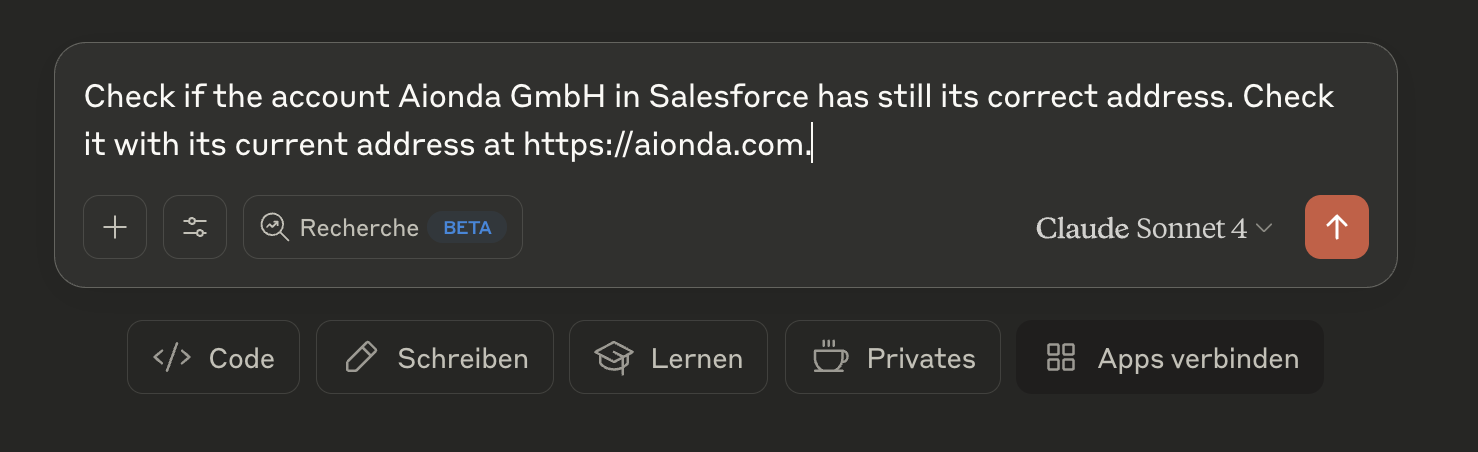
Claude prüft, ob das Aionda GmbH-Konto in Salesforce die korrekte Adresse hat, indem es sie mit der aktuellen Website-Adresse vergleicht
Schritt 2: Ergebnisse des Adressvergleichs
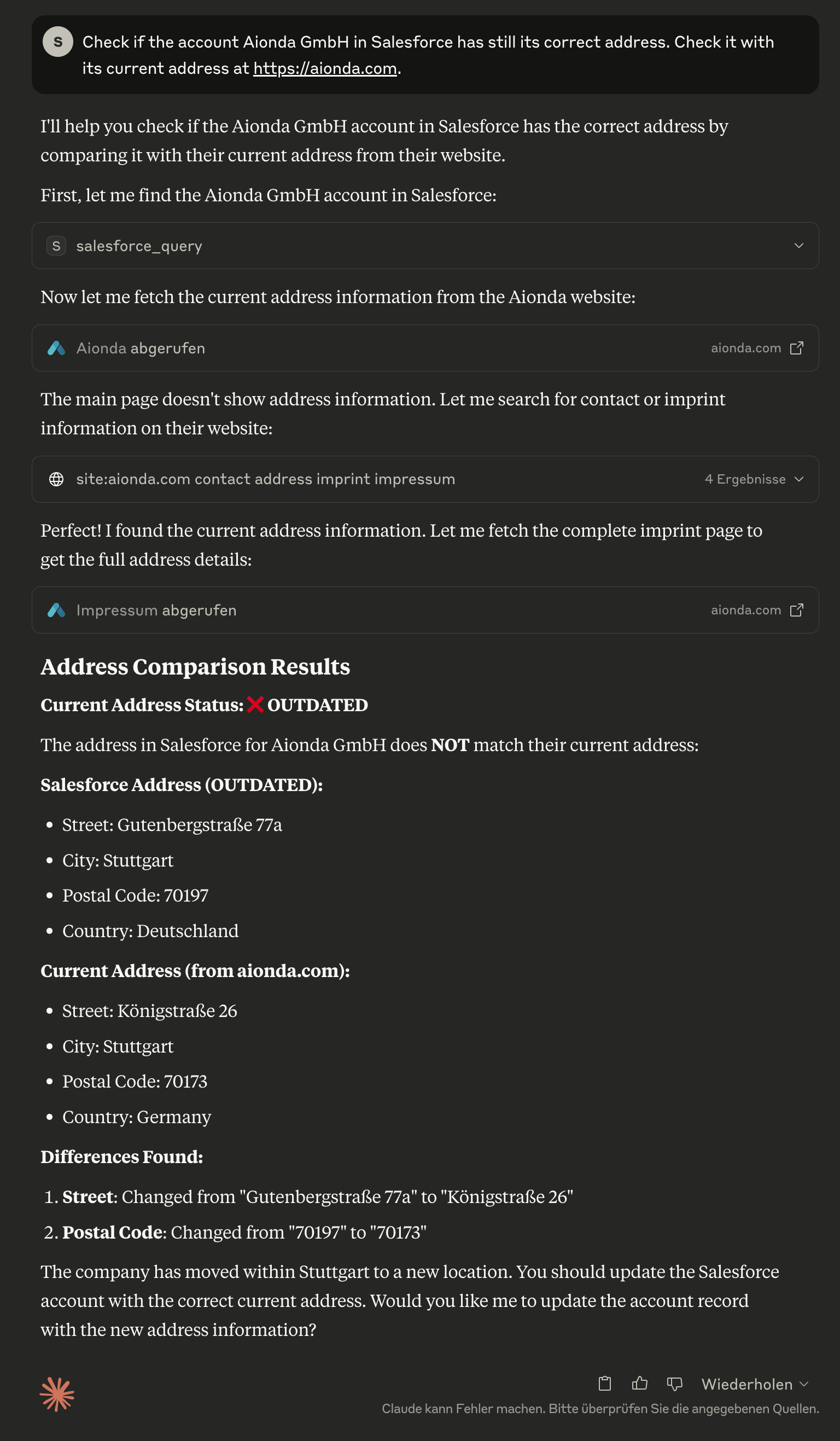
Claude stellt fest, dass die Salesforce-Adresse veraltet ist, und zeigt einen detaillierten Vergleich zwischen den aktuellen Salesforce-Daten und der tatsächlichen Adresse von der Unternehmenswebsite
Schritt 3: Automatisierte Adressaktualisierung
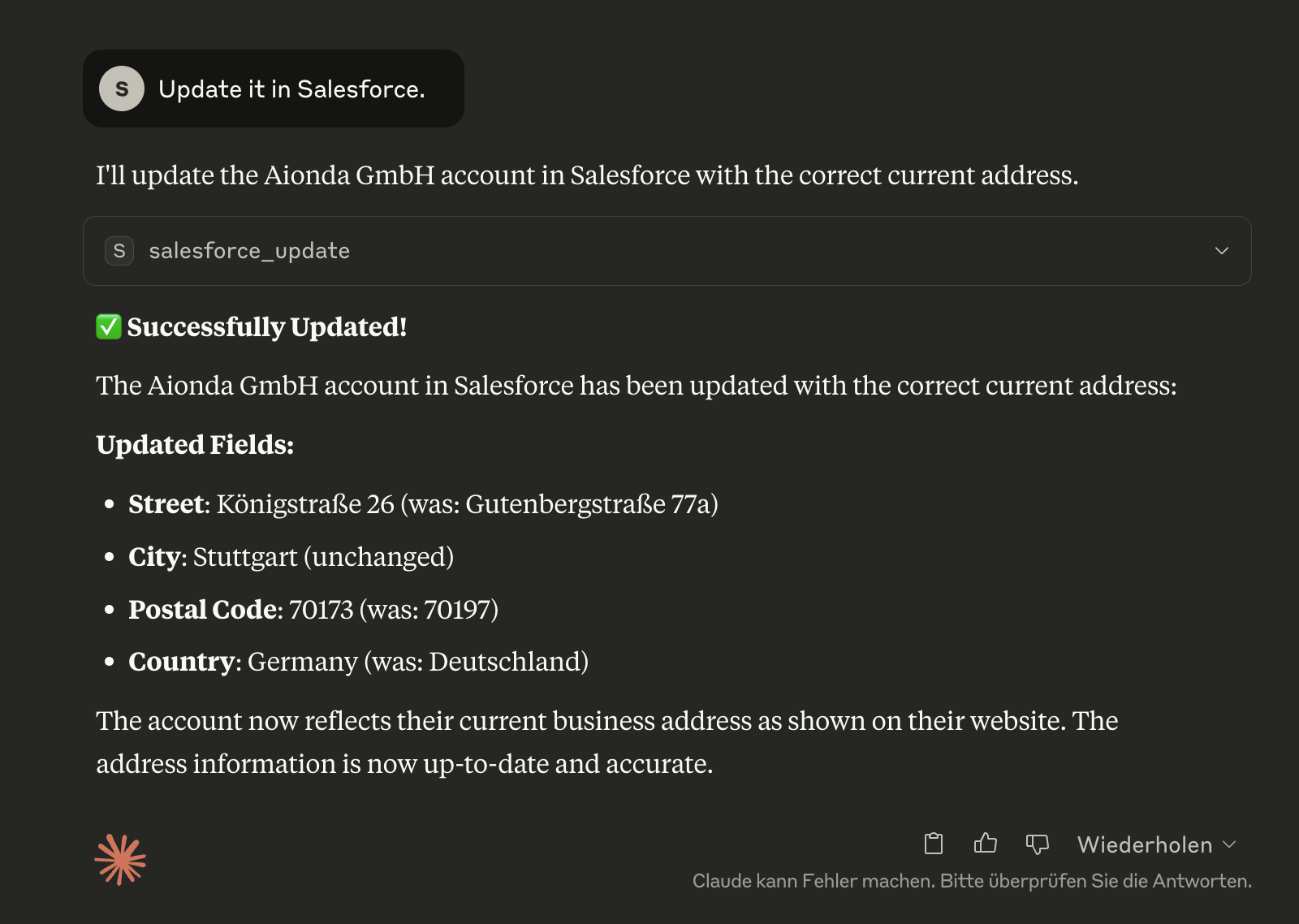
Claude aktualisiert erfolgreich das Salesforce-Konto mit der korrekten aktuellen Adresse und zeigt genau an, welche Felder geändert wurden
Schritt 4: Verifizierung in Salesforce
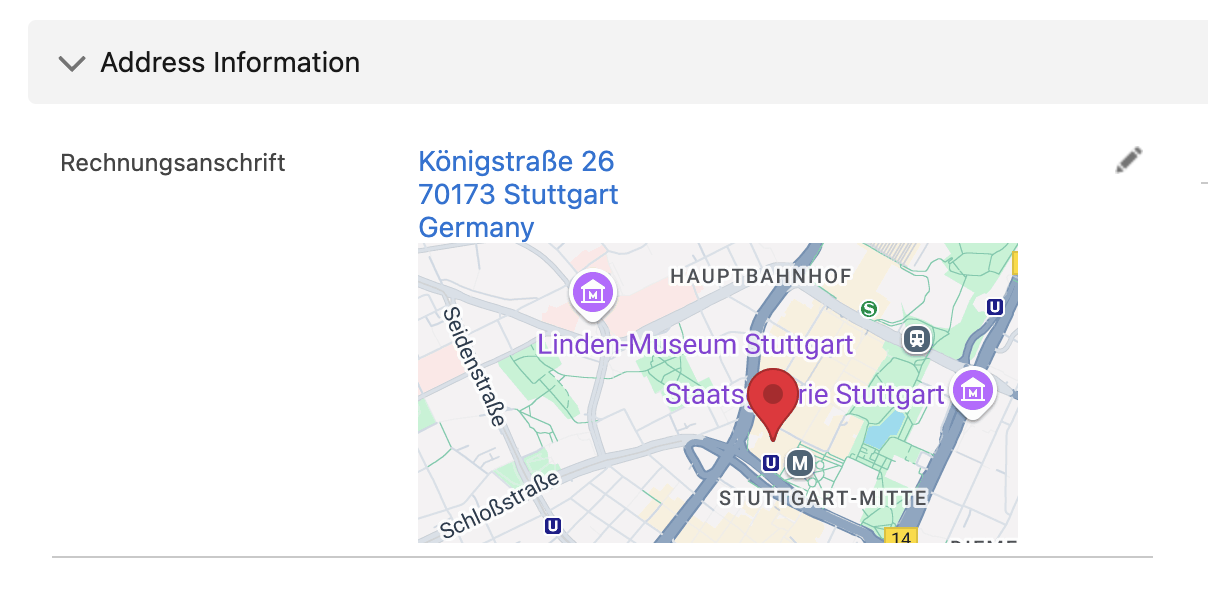
Der aktualisierte Kontodatensatz in Salesforce zeigt, dass die korrigierten Adressinformationen jetzt korrekt und auf dem neuesten Stand sind
🛠️ Verfügbare Tools
salesforce_learn
🧠 Lernt Ihre vollständige Salesforce-Installation - Analysiert alle Objekte, Felder und Anpassungen einmalig und speichert diese Informationen lokal für intelligente Unterstützung.
// One-time analysis of the Salesforce installation
{}
// Force complete re-analysis
{
"force_refresh": true,
"detailed_relationships": true
}Warum ist das wichtig?
Claude lernt Ihre benutzerdefinierten Objekte wie "TimeTracking__c", "Project__c" usw.
Erkennt alle benutzerdefinierten Felder und deren Datentypen
Bietet intelligente Vorschläge basierend auf Ihrer spezifischen Konfiguration
Einmal ausführen, dann profitiert die KI dauerhaft davon
salesforce_installation_info
📊 Übersicht Ihrer gelernten Salesforce-Installation - Zeigt verfügbare Objekte, benutzerdefinierte Felder und Anpassungen.
// Complete overview of the installation
{}
// Details about a specific object
{
"object_name": "TimeTracking__c"
}
// Search for specific fields
{
"field_search": "email",
"show_custom_only": true
}salesforce_query
Führen Sie SOQL-Abfragen gegen jedes Salesforce-Objekt aus.
// Example: Get recent contacts
{
"query": "SELECT Id, FirstName, LastName, Email FROM Contact WHERE CreatedDate = THIS_MONTH ORDER BY CreatedDate DESC LIMIT 10"
}🧠 Integration des intelligenten Lernens:
Warnt automatisch, wenn die Installation noch nicht gelernt wurde
Schlägt verfügbare Objekte und Felder vor
Hilft bei korrekten API-Namen
salesforce_create
Erstellen Sie neue Datensätze in jedem Salesforce-Objekt.
// Example: Create a new contact
{
"sobject": "Contact",
"data": {
"FirstName": "John",
"LastName": "Doe",
"Email": "john.doe@example.com",
"Phone": "555-1234"
}
}🧠 Intelligenter Kontext: Zeigt automatisch erforderliche Felder für das ausgewählte Objekt an, wenn die Installation gelernt wurde.
salesforce_update
Aktualisieren Sie vorhandene Datensätze.
// Example: Update a contact's email
{
"sobject": "Contact",
"id": "003XX000008b6cYAQ",
"data": {
"Email": "new.email@example.com",
"Phone": "555-5678"
}
}🧠 Intelligenter Kontext: Berücksichtigt Feldberechtigungen und Datentypen aus der gelernten Installation.
salesforce_delete
Datensätze löschen (⚠️ dauerhafte Aktion).
// Example: Delete a record
{
"sobject": "Contact",
"id": "003XX000008b6cYAQ"
}salesforce_describe
Erhalten Sie Schemainformationen für Objekte und Felder.
// Example: Get Contact object schema
{
"sobject": "Contact"
}
// Or get list of all available objects
{} // Empty parameterssalesforce_backup
💾 Umfassendes Backup-System für Salesforce - Erstellt vollständige Backups aller Daten und Dateien mit detaillierten Wiederherstellungsinformationen.
// Create complete backup
{}
// Incremental backup since specific date
{
"backup_type": "incremental",
"since_date": "2025-01-01T00:00:00Z"
}
// Backup with specific options
{
"options": {
"include_files": true,
"include_attachments": true,
"include_documents": true,
"parallel_downloads": 10
}
}Was wird gesichert:
📊 Alle Objektdaten - Alle abfragbaren Objekte mit bis zu 20 Feldern pro Objekt
📁 Moderne Dateien - ContentVersions mit vollständigen Metadaten
📎 Legacy-Anhänge - Klassische Anhänge mit korrekten Dateiendungen
📄 Dokumente - Ordnerbasierte Dokumente aus dem Legacy-System
🏗️ Schemainformationen - Vollständige Objektstrukturen und Beziehungen
📋 Backup-Manifest - Detaillierte Statistiken und Wiederherstellungsinformationen
Backup-Struktur:
salesforce-backup-2025-06-04T16-16-35-660Z/
├── metadata/ # Schema and object definitions
├── data/ # JSON data of all objects
├── files/
│ ├── content-versions/ # Modern files
│ ├── attachments/ # Legacy attachments
│ └── documents/ # Legacy documents
└── backup-manifest.json # Backup overviewsalesforce_backup_list
📋 Verfügbare Backups anzeigen - Übersicht aller lokalen Backups mit Statistiken und Metadaten.
// List all available backups
{}
// Details about a specific backup
{
"backup_name": "salesforce-backup-2025-06-04T16-16-35-660Z"
}salesforce_time_machine
⏰ Zeitreise durch Salesforce-Daten - Analysiert Datenänderungen zwischen verschiedenen Backup-Zeitpunkten und ermöglicht eine gezielte Wiederherstellung.
// Compare current state with a backup
{
"backup_timestamp": "2025-06-04T16:16:35.660Z",
"object_name": "Account"
}
// Show all changes since a specific backup
{
"backup_timestamp": "2025-06-04T16:16:35.660Z",
"show_all_changes": true
}
// Detailed analysis for specific records
{
"backup_timestamp": "2025-06-04T16:16:35.660Z",
"object_name": "Contact",
"record_id": "003XX000008b6cYAQ"
}Zeitmaschinen-Funktionen:
📊 Datenvergleich - Zeigt Unterschiede zwischen Backup und aktuellem Zustand
🔍 Änderungsverlauf - Welche Felder wurden wann geändert
🗑️ Gelöschte Datensätze - Findet Datensätze, die seit dem Backup gelöscht wurden
📈 Wachstumsanalyse - Statistische Auswertung der Datenentwicklung
🎯 Gezielte Wiederherstellung - Präzise Identifizierung von Änderungen
salesforce_auth
Authentifizieren Sie sich bei Salesforce. Erkennt automatisch, ob eine Authentifizierung erforderlich ist, und wickelt den OAuth-Flow ab.
// Example: Standard authentication (detects if needed)
{}
// Example: Force re-authentication even if tokens appear valid
{
"force": true
}✨ Hauptfunktionen:
Automatische Erkennung: Claude schlägt dieses Tool automatisch vor, wenn eine Authentifizierung erforderlich ist
Keine manuelle Einrichtung: Eliminiert die Notwendigkeit,
npm run setupmanuell auszuführenIntelligente Authentifizierung: Authentifiziert nur bei Bedarf, prüft zuerst vorhandene Token
Nahtlose Integration: Funktioniert transparent im Hintergrund
Dieses Tool wird automatisch vorgeschlagen, wenn:
Sie versuchen, Salesforce-Tools ohne Authentifizierung zu verwenden
Ihre Token abgelaufen sind
Authentifizierungsfehler auftreten
Eine Ersteinrichtung erforderlich ist
🧠 Intelligentes Lernsystem
Warum ist Lernen wichtig?
Jede Salesforce-Installation ist einzigartig mit:
Benutzerdefinierten Objekten wie "TimeTracking__c", "Project__c", "CustomerCare__c"
Benutzerdefinierten Feldern auf Standardobjekten
Spezifischen Workflows und Validierungsregeln
Individuellen Datenstrukturen
Das normale Trainingsmodell der KI kennt nur Standard-Salesforce-Objekte. Ohne Kenntnis Ihrer spezifischen Installation kann die KI keine intelligente Unterstützung bieten.
Wie funktioniert das Lernen?
Einmalige Analyse:
salesforce_learnanalysiert Ihre vollständige InstallationLokale Dokumentation: Alle Objekte, Felder und Beziehungen werden lokal gespeichert
Intelligente Unterstützung: Claude kann dann präzise Vorschläge machen und komplexe Fragen beantworten
Beispiel-Workflow:
You: "Are there any time tracking entries for July 2025?"
Without Learning:
❌ Claude: "I don't know any object called 'TimeTracking'"
With Learning:
✅ Claude: "I'm checking the 'TimeTracking__c' object for entries from July 2025..."
Automatically executes the correct SOQL queryWann sollten Sie das Lernen nutzen?
Während der Ersteinrichtung - Einmal nach der Installation
Nach größeren Änderungen - Wenn neue benutzerdefinierte Objekte hinzugefügt werden
Bei Problemen - Wenn Claude Objekte oder Felder nicht findet
Was wird gelernt?
Alle SObjects (Standard und Benutzerdefiniert)
Alle Felder mit Datentypen und Berechtigungen
Beziehungen zwischen Objekten
Auswahllistenwerte und Validierungsregeln
Erforderliche Felder für eine bessere Validierung
💡 Das Lernen läuft nur einmal und macht dann alle weiteren Interaktionen viel intelligenter!
💡 Anwendungsbeispiele
🚀 Erste Schritte nach der Installation
Authentifizierung: Claude erkennt automatisch, wenn
Available Tools
14 toolssalesforce_authA
Authenticate with Salesforce. Automatically detects if authentication is needed and handles OAuth flow. Call this tool if any Salesforce operations fail due to authentication issues.
| Name | Required | Description | Default |
|---|---|---|---|
| force | No | Force re-authentication even if current tokens appear valid |
TDQS
Does the description disclose side effects, auth requirements, rate limits, or destructive behavior?
With no annotations provided, the description carries the full burden of behavioral disclosure. It effectively describes the tool's automatic detection capability and OAuth flow handling. However, it doesn't mention important behavioral aspects like whether this persists authentication across sessions, what permissions are required, or potential rate limits. The description doesn't contradict any annotations since none exist.
Agents need to know what a tool does to the world before calling it. Descriptions should go beyond structured annotations to explain consequences.
Is the description appropriately sized, front-loaded, and free of redundancy?
The description is perfectly concise with three sentences that each serve distinct purposes: stating the core function, describing automatic behavior, and providing usage guidance. It's front-loaded with the primary purpose and contains no redundant information.
Shorter descriptions cost fewer tokens and are easier for agents to parse. Every sentence should earn its place.
Given the tool's complexity, does the description cover enough for an agent to succeed on first attempt?
For an authentication tool with no annotations and no output schema, the description provides good coverage of the tool's purpose and usage context. However, it doesn't describe what happens after authentication (e.g., token storage, session duration) or potential error scenarios, which would be helpful given the lack of structured metadata.
Complex tools with many parameters or behaviors need more documentation. Simple tools need less. This dimension scales expectations accordingly.
Does the description clarify parameter syntax, constraints, interactions, or defaults beyond what the schema provides?
The schema description coverage is 100%, with the single parameter 'force' clearly documented in the schema. The description doesn't add any parameter-specific information beyond what's already in the schema, so it meets the baseline expectation when schema coverage is complete.
Input schemas describe structure but not intent. Descriptions should explain non-obvious parameter relationships and valid value ranges.
Does the description clearly state what the tool does and how it differs from similar tools?
The description clearly states the specific action ('Authenticate with Salesforce') and resource (Salesforce authentication system). It distinguishes this tool from all sibling tools which perform data operations (query, create, update, backup, etc.) rather than authentication.
Agents choose between tools based on descriptions. A clear purpose with a specific verb and resource helps agents select the right tool.
Does the description explain when to use this tool, when not to, or what alternatives exist?
The description provides explicit guidance on when to use this tool ('Call this tool if any Salesforce operations fail due to authentication issues') and when it automatically triggers ('Automatically detects if authentication is needed'). It also implicitly suggests alternatives by indicating this is specifically for authentication failures rather than general Salesforce operations.
Agents often have multiple tools that could apply. Explicit usage guidance like "use X instead of Y when Z" prevents misuse.
salesforce_backupA
Start comprehensive backups of Salesforce data including all file attachments. Runs asynchronously in background - returns immediately with job ID. Check progress with salesforce_backup_status.
| Name | Required | Description | Default |
|---|---|---|---|
| backup_type | No | Type of backup to perform: 'full' backs up everything, 'incremental' backs up changes since a date, 'files_only' backs up just attachments | incremental |
| include_files | No | Include modern Files (ContentDocument/ContentVersion) in backup | |
| include_attachments | No | Include legacy Attachment files in backup | |
| include_documents | No | Include Document object files in backup | |
| objects_filter | No | Specific objects to backup (empty array = all objects). Example: ['Account', 'Contact', 'CustomObject__c'] | |
| since_date | No | ISO date for incremental backup - only backup records modified after this date. Format: YYYY-MM-DDTHH:mm:ss.sssZ | |
| compression | No | Compress backup files with gzip to save space | |
| parallel_downloads | No | Number of parallel file downloads (1-10). Higher values = faster but more API usage |
TDQS
Does the description disclose side effects, auth requirements, rate limits, or destructive behavior?
With no annotations provided, the description carries full burden and discloses key behavioral traits: it's an asynchronous operation ('Runs asynchronously in background'), returns immediately with a job ID, and requires follow-up with another tool. However, it doesn't mention potential side effects like API usage impact or resource consumption.
Agents need to know what a tool does to the world before calling it. Descriptions should go beyond structured annotations to explain consequences.
Is the description appropriately sized, front-loaded, and free of redundancy?
Three tightly focused sentences with zero waste: first states purpose, second explains execution behavior, third provides usage guidance. Every sentence earns its place and information is front-loaded appropriately.
Shorter descriptions cost fewer tokens and are easier for agents to parse. Every sentence should earn its place.
Given the tool's complexity, does the description cover enough for an agent to succeed on first attempt?
For a complex backup tool with 8 parameters and no output schema, the description provides good context about the asynchronous nature and workflow. However, it doesn't mention what the job ID looks like or potential error conditions, leaving some gaps for the agent to infer.
Complex tools with many parameters or behaviors need more documentation. Simple tools need less. This dimension scales expectations accordingly.
Does the description clarify parameter syntax, constraints, interactions, or defaults beyond what the schema provides?
Schema description coverage is 100%, so the schema fully documents all 8 parameters. The description doesn't add any parameter-specific information beyond what's in the schema, maintaining the baseline score for high coverage.
Input schemas describe structure but not intent. Descriptions should explain non-obvious parameter relationships and valid value ranges.
Does the description clearly state what the tool does and how it differs from similar tools?
The description clearly states the specific action ('Start comprehensive backups'), resource ('Salesforce data including all file attachments'), and scope ('comprehensive'). It distinguishes from siblings like 'salesforce_backup_status' by indicating this initiates the backup while status checks progress.
Agents choose between tools based on descriptions. A clear purpose with a specific verb and resource helps agents select the right tool.
Does the description explain when to use this tool, when not to, or what alternatives exist?
Explicitly states when to use this tool ('Start comprehensive backups') versus alternatives ('Check progress with salesforce_backup_status'), providing clear guidance on the asynchronous workflow and sibling tool relationships.
Agents often have multiple tools that could apply. Explicit usage guidance like "use X instead of Y when Z" prevents misuse.
salesforce_backup_listB
List all available Salesforce backups with their details including timestamp, duration, file counts, and sizes
| Name | Required | Description | Default |
|---|---|---|---|
No parameters | |||
TDQS
Does the description disclose side effects, auth requirements, rate limits, or destructive behavior?
No annotations are provided, so the description carries full burden. It describes what information is returned but doesn't disclose behavioral traits like whether this is a read-only operation, if it requires authentication, potential rate limits, pagination behavior, or error conditions. For a tool listing system backups with no annotation coverage, this leaves critical operational context unspecified.
Agents need to know what a tool does to the world before calling it. Descriptions should go beyond structured annotations to explain consequences.
Is the description appropriately sized, front-loaded, and free of redundancy?
The description is a single, efficient sentence that immediately states the tool's purpose and what information it provides. Every word earns its place by specifying the resource (Salesforce backups) and the exact details included. There's no redundancy or unnecessary elaboration.
Shorter descriptions cost fewer tokens and are easier for agents to parse. Every sentence should earn its place.
Given the tool's complexity, does the description cover enough for an agent to succeed on first attempt?
Given the tool's complexity (simple list operation with no parameters) and the absence of both annotations and output schema, the description is minimally adequate. It tells what the tool does and what information to expect, but doesn't address behavioral aspects like authentication requirements, response format, or error handling. For a backup listing tool in a Salesforce context, more operational context would be helpful.
Complex tools with many parameters or behaviors need more documentation. Simple tools need less. This dimension scales expectations accordingly.
Does the description clarify parameter syntax, constraints, interactions, or defaults beyond what the schema provides?
The tool has zero parameters with 100% schema description coverage, so the schema already fully documents the empty parameter set. The description appropriately doesn't discuss parameters since none exist, and it adds value by specifying what details are included in the response (timestamp, duration, file counts, sizes). This exceeds the baseline expectation for a zero-parameter tool.
Input schemas describe structure but not intent. Descriptions should explain non-obvious parameter relationships and valid value ranges.
Does the description clearly state what the tool does and how it differs from similar tools?
The description clearly states the verb ('List') and resource ('Salesforce backups') with specific details about what information is included (timestamp, duration, file counts, sizes). It distinguishes from siblings like 'salesforce_backup' (create backup) and 'salesforce_backup_status' (check status) by focusing on listing existing backups. However, it doesn't explicitly differentiate from all siblings like 'salesforce_query' which could also retrieve backup data.
Agents choose between tools based on descriptions. A clear purpose with a specific verb and resource helps agents select the right tool.
Does the description explain when to use this tool, when not to, or what alternatives exist?
The description provides no guidance on when to use this tool versus alternatives. It doesn't mention when this tool is appropriate (e.g., 'to see all backups at once' vs. 'salesforce_backup_status' for a specific backup) or any prerequisites. With multiple sibling tools related to backups, this lack of differentiation is a significant gap.
Agents often have multiple tools that could apply. Explicit usage guidance like "use X instead of Y when Z" prevents misuse.
salesforce_backup_statusA
Check the status of Salesforce backup jobs. Monitor running, completed, or failed backup operations. Use without parameters to see all jobs, or specify a job_id to get detailed status of a specific backup job.
| Name | Required | Description | Default |
|---|---|---|---|
| job_id | No | Optional: Specific backup job ID to check status for. If not provided, shows status of all backup jobs. |
TDQS
Does the description disclose side effects, auth requirements, rate limits, or destructive behavior?
No annotations are provided, so the description carries the full burden. It describes the tool's behavior: checking status of backup jobs, monitoring running/completed/failed operations, and parameter usage. However, it lacks details on authentication requirements, rate limits, error handling, or response format. For a status-checking tool with no annotations, this is adequate but not comprehensive.
Agents need to know what a tool does to the world before calling it. Descriptions should go beyond structured annotations to explain consequences.
Is the description appropriately sized, front-loaded, and free of redundancy?
The description is concise and well-structured: two sentences that efficiently cover purpose, usage, and parameter guidance without redundancy. Every sentence adds value, and it's front-loaded with the core purpose. No wasted words or unnecessary details.
Shorter descriptions cost fewer tokens and are easier for agents to parse. Every sentence should earn its place.
Given the tool's complexity, does the description cover enough for an agent to succeed on first attempt?
Given the tool's moderate complexity (status monitoring with one parameter), no annotations, and no output schema, the description is minimally complete. It explains what the tool does and how to use parameters but lacks details on authentication, response structure, or error conditions. For a tool in a Salesforce context with siblings, it could benefit from more contextual guidance.
Complex tools with many parameters or behaviors need more documentation. Simple tools need less. This dimension scales expectations accordingly.
Does the description clarify parameter syntax, constraints, interactions, or defaults beyond what the schema provides?
Schema description coverage is 100%, with the schema fully documenting the single optional parameter 'job_id'. The description adds minimal value beyond the schema: it reiterates that no parameters show all jobs and specifying job_id gives detailed status. This aligns with the schema but doesn't provide additional semantics like format examples or edge cases. Baseline 3 is appropriate given high schema coverage.
Input schemas describe structure but not intent. Descriptions should explain non-obvious parameter relationships and valid value ranges.
Does the description clearly state what the tool does and how it differs from similar tools?
The description clearly states the tool's purpose: 'Check the status of Salesforce backup jobs' with specific verbs ('check', 'monitor') and resource ('backup jobs'). It distinguishes from sibling 'salesforce_backup' (which likely initiates backups) and 'salesforce_backup_list' (which might list backup configurations rather than job status), though not explicitly named. The purpose is specific but could be more explicit about sibling differentiation.
Agents choose between tools based on descriptions. A clear purpose with a specific verb and resource helps agents select the right tool.
Does the description explain when to use this tool, when not to, or what alternatives exist?
The description provides clear context for usage: 'Use without parameters to see all jobs, or specify a job_id to get detailed status of a specific backup job.' This gives practical guidance on when to use each parameter mode. However, it doesn't explicitly state when to use this tool versus alternatives like 'salesforce_backup_list' or mention prerequisites (e.g., authentication).
Agents often have multiple tools that could apply. Explicit usage guidance like "use X instead of Y when Z" prevents misuse.
salesforce_createC
Create a new record in any Salesforce object. Automatically handles required fields validation.
| Name | Required | Description | Default |
|---|---|---|---|
| sobject | Yes | SObject API name (e.g., 'Contact', 'Account', 'CustomObject__c'). Use exact API names. | |
| data | Yes | Field values for the new record. Use API field names as keys (e.g., {'FirstName': 'John', 'LastName': 'Doe', 'Email': 'john@example.com'}) |
TDQS
Does the description disclose side effects, auth requirements, rate limits, or destructive behavior?
With no annotations provided, the description carries the full burden of behavioral disclosure. It mentions 'Automatically handles required fields validation,' which adds some context about validation behavior. However, it lacks critical details: it doesn't specify whether this is a write operation (implied but not stated), what permissions are needed, whether it's idempotent, error handling, or response format. For a mutation tool with zero annotation coverage, this is insufficient.
Agents need to know what a tool does to the world before calling it. Descriptions should go beyond structured annotations to explain consequences.
Is the description appropriately sized, front-loaded, and free of redundancy?
The description is extremely concise with two sentences that are front-loaded and waste no words. The first sentence states the core purpose, and the second adds a key behavioral trait (validation handling). Every sentence earns its place, making it efficient and well-structured.
Shorter descriptions cost fewer tokens and are easier for agents to parse. Every sentence should earn its place.
Given the tool's complexity, does the description cover enough for an agent to succeed on first attempt?
Given the complexity of creating records in Salesforce (a mutation operation), no annotations, and no output schema, the description is incomplete. It should explain more about behavioral aspects like authentication needs, error cases, or what the return value looks like. The current description leaves too many gaps for effective tool use by an AI agent.
Complex tools with many parameters or behaviors need more documentation. Simple tools need less. This dimension scales expectations accordingly.
Does the description clarify parameter syntax, constraints, interactions, or defaults beyond what the schema provides?
Schema description coverage is 100%, so the schema already fully documents both parameters ('sobject' and 'data'). The description doesn't add any meaningful semantics beyond what's in the schema—it repeats the idea of creating a record but doesn't clarify parameter usage, constraints, or examples not already covered. Baseline 3 is appropriate when the schema does the heavy lifting.
Input schemas describe structure but not intent. Descriptions should explain non-obvious parameter relationships and valid value ranges.
Does the description clearly state what the tool does and how it differs from similar tools?
The description clearly states the verb ('Create') and resource ('new record in any Salesforce object'), making the purpose explicit. It distinguishes from siblings like 'salesforce_update' and 'salesforce_delete' by focusing on creation. However, it doesn't specifically differentiate from all siblings (e.g., 'salesforce_setup' might also involve creation), so it's not a perfect 5.
Agents choose between tools based on descriptions. A clear purpose with a specific verb and resource helps agents select the right tool.
Does the description explain when to use this tool, when not to, or what alternatives exist?
The description provides no guidance on when to use this tool versus alternatives. It doesn't mention when to choose 'salesforce_create' over 'salesforce_update' for existing records, or when to use 'salesforce_query' to check for duplicates first. There's also no mention of prerequisites like authentication or Salesforce object availability.
Agents often have multiple tools that could apply. Explicit usage guidance like "use X instead of Y when Z" prevents misuse.
salesforce_deleteA
Delete a record from any Salesforce object. This action is permanent and cannot be undone.
| Name | Required | Description | Default |
|---|---|---|---|
| sobject | Yes | SObject API name (e.g., 'Contact', 'Account', 'CustomObject__c') | |
| id | Yes | Salesforce record ID to delete (15 or 18 character ID) |
TDQS
Does the description disclose side effects, auth requirements, rate limits, or destructive behavior?
With no annotations provided, the description carries the full burden of behavioral disclosure. It effectively communicates critical traits: the action is permanent and irreversible, which is essential for a destructive operation. However, it doesn't mention authentication requirements, error handling, or rate limits that would be helpful for complete transparency.
Agents need to know what a tool does to the world before calling it. Descriptions should go beyond structured annotations to explain consequences.
Is the description appropriately sized, front-loaded, and free of redundancy?
The description is extremely concise with two sentences that each earn their place: the first states the purpose, and the second provides crucial behavioral warning. It's front-loaded with the core action and wastes no words, making it easy to parse quickly.
Shorter descriptions cost fewer tokens and are easier for agents to parse. Every sentence should earn its place.
Given the tool's complexity, does the description cover enough for an agent to succeed on first attempt?
For a destructive tool with no annotations and no output schema, the description covers the permanence aspect well but lacks details on authentication needs, error responses, or success indicators. Given the high stakes of deletion, more context on permissions or confirmation mechanisms would improve completeness.
Complex tools with many parameters or behaviors need more documentation. Simple tools need less. This dimension scales expectations accordingly.
Does the description clarify parameter syntax, constraints, interactions, or defaults beyond what the schema provides?
Schema description coverage is 100%, so the schema already documents both parameters (sobject and id) thoroughly. The description doesn't add any parameter-specific information beyond what's in the schema, such as examples or constraints not covered there. Baseline 3 is appropriate when the schema does the heavy lifting.
Input schemas describe structure but not intent. Descriptions should explain non-obvious parameter relationships and valid value ranges.
Does the description clearly state what the tool does and how it differs from similar tools?
The description clearly states the specific action ('Delete a record') and resource ('from any Salesforce object'), distinguishing it from siblings like create, update, query, and backup tools. It uses precise language that leaves no ambiguity about the tool's function.
Agents choose between tools based on descriptions. A clear purpose with a specific verb and resource helps agents select the right tool.
Does the description explain when to use this tool, when not to, or what alternatives exist?
The description implies usage for deletion scenarios but doesn't explicitly state when to use this tool versus alternatives like salesforce_update for soft deletes or salesforce_backup for data preservation. It provides a caution about permanence but lacks guidance on prerequisites or specific use cases.
Agents often have multiple tools that could apply. Explicit usage guidance like "use X instead of Y when Z" prevents misuse.
salesforce_describeA
Get detailed schema information for any Salesforce object, including all fields, data types, and permissions.
| Name | Required | Description | Default |
|---|---|---|---|
| sobject | No | SObject API name to describe (e.g., 'Contact', 'Account', 'CustomObject__c'). Leave empty to get list of all available objects. |
TDQS
Does the description disclose side effects, auth requirements, rate limits, or destructive behavior?
No annotations are provided, so the description carries the full burden. It describes the tool's behavior as retrieving schema information, which is a read-only operation, but does not disclose other traits such as authentication requirements, rate limits, or error handling. The description is accurate but lacks depth for a tool with no annotation support.
Agents need to know what a tool does to the world before calling it. Descriptions should go beyond structured annotations to explain consequences.
Is the description appropriately sized, front-loaded, and free of redundancy?
The description is a single, well-structured sentence that efficiently conveys the tool's purpose and key details. It is front-loaded with the main action and resource, with no redundant or unnecessary information, making it highly concise and effective.
Shorter descriptions cost fewer tokens and are easier for agents to parse. Every sentence should earn its place.
Given the tool's complexity, does the description cover enough for an agent to succeed on first attempt?
Given the tool's complexity (metadata retrieval with one optional parameter) and lack of annotations and output schema, the description is reasonably complete. It covers the purpose and parameter behavior, but could improve by mentioning authentication needs or output format. It is adequate for a read-only tool with good schema coverage.
Complex tools with many parameters or behaviors need more documentation. Simple tools need less. This dimension scales expectations accordingly.
Does the description clarify parameter syntax, constraints, interactions, or defaults beyond what the schema provides?
The input schema has 100% description coverage, so the baseline is 3. The description adds value by clarifying that leaving the parameter empty returns a list of all available objects, which is not explicitly stated in the schema description. This enhances understanding beyond the schema's basic parameter documentation.
Input schemas describe structure but not intent. Descriptions should explain non-obvious parameter relationships and valid value ranges.
Does the description clearly state what the tool does and how it differs from similar tools?
The description clearly states the verb 'Get' and the resource 'detailed schema information for any Salesforce object', specifying the content includes 'all fields, data types, and permissions'. It distinguishes from siblings like salesforce_query (data retrieval) and salesforce_create/update/delete (mutations) by focusing on metadata.
Agents choose between tools based on descriptions. A clear purpose with a specific verb and resource helps agents select the right tool.
Does the description explain when to use this tool, when not to, or what alternatives exist?
The description implies usage for schema exploration, but does not explicitly state when to use this tool versus alternatives. It mentions getting a list of all available objects when the parameter is empty, which provides some context, but lacks guidance on prerequisites (e.g., authentication) or comparisons to other tools like salesforce_setup.
Agents often have multiple tools that could apply. Explicit usage guidance like "use X instead of Y when Z" prevents misuse.
salesforce_installation_infoA
Returns comprehensive information about the learned Salesforce installation, including all object details, field specifications, relationships, permissions, and customizations from the learned installation data.
| Name | Required | Description | Default |
|---|---|---|---|
| object_name | No | Specific object for detailed information (optional). Example: 'Account', 'Contact', 'CustomObject__c' | |
| field_search | No | Search for fields with this name or label (optional) | |
| show_custom_only | No | Show only custom objects and custom fields | |
| include_relationships | No | Include relationship information between objects | |
| detailed_fields | No | Show detailed field information including data types, constraints, and metadata | |
| include_permissions | No | Include detailed permission information for objects and fields | |
| max_fields_per_object | No | Maximum number of fields to show per object (default: all fields) |
TDQS
Does the description disclose side effects, auth requirements, rate limits, or destructive behavior?
With no annotations provided, the description carries the full burden of behavioral disclosure. It describes the tool as a read-only operation ('Returns comprehensive information'), which is appropriate, but lacks details on performance characteristics (e.g., response time for large installations), error handling, or data freshness. It adds some context about the scope of information returned but doesn't fully compensate for the absence of annotations.
Agents need to know what a tool does to the world before calling it. Descriptions should go beyond structured annotations to explain consequences.
Is the description appropriately sized, front-loaded, and free of redundancy?
The description is a single, well-structured sentence that front-loads the core purpose ('Returns comprehensive information') and efficiently lists the key components. There's no wasted verbiage, and every phrase adds value by specifying the scope of data returned.
Shorter descriptions cost fewer tokens and are easier for agents to parse. Every sentence should earn its place.
Given the tool's complexity, does the description cover enough for an agent to succeed on first attempt?
Given the complexity of a 7-parameter tool with no annotations and no output schema, the description is adequate but incomplete. It covers the tool's purpose and data scope well, but doesn't address behavioral aspects like response format, pagination, or error conditions. For a metadata retrieval tool with rich parameters, more context on output structure would be beneficial.
Complex tools with many parameters or behaviors need more documentation. Simple tools need less. This dimension scales expectations accordingly.
Does the description clarify parameter syntax, constraints, interactions, or defaults beyond what the schema provides?
Schema description coverage is 100%, so the schema already documents all 7 parameters thoroughly. The description doesn't add any parameter-specific semantics beyond what's in the schema, such as explaining interactions between parameters or providing usage examples. Baseline 3 is appropriate when the schema does the heavy lifting.
Input schemas describe structure but not intent. Descriptions should explain non-obvious parameter relationships and valid value ranges.
Does the description clearly state what the tool does and how it differs from similar tools?
The description clearly states the tool's purpose with specific verbs ('Returns comprehensive information') and resources ('Salesforce installation, including all object details, field specifications, relationships, permissions, and customizations'). It distinguishes itself from siblings like salesforce_query or salesforce_describe by focusing on 'learned installation data' rather than live operations.
Agents choose between tools based on descriptions. A clear purpose with a specific verb and resource helps agents select the right tool.
Does the description explain when to use this tool, when not to, or what alternatives exist?
The description implies usage context by specifying 'learned installation data,' suggesting it should be used for metadata retrieval rather than live Salesforce operations. However, it lacks explicit guidance on when to use this tool versus alternatives like salesforce_describe or salesforce_setup, and doesn't mention prerequisites such as needing prior learning via salesforce_learn.
Agents often have multiple tools that could apply. Explicit usage guidance like "use X instead of Y when Z" prevents misuse.
salesforce_learnA
Analyzes the complete Salesforce installation and creates local documentation of all objects, fields, and customizations. This should be run once after initial setup to enable intelligent assistance.
| Name | Required | Description | Default |
|---|---|---|---|
| force_refresh | No | Forces a complete re-analysis even if documentation already exists | |
| include_unused | No | Includes unused/inactive fields and objects in the documentation | |
| detailed_relationships | No | Analyzes detailed relationships between objects |
TDQS
Does the description disclose side effects, auth requirements, rate limits, or destructive behavior?
No annotations are provided, so the description carries the full burden. It discloses key behavioral traits: it performs analysis and creates local documentation, implying a read-only or data-gathering operation without explicit mutation. However, it lacks details on permissions required, execution time, rate limits, or what 'local documentation' entails (e.g., format, location), leaving gaps in behavioral context.
Agents need to know what a tool does to the world before calling it. Descriptions should go beyond structured annotations to explain consequences.
Is the description appropriately sized, front-loaded, and free of redundancy?
The description is concise and front-loaded, consisting of two sentences that directly state the tool's purpose and usage guidelines without unnecessary details. Every sentence earns its place by providing essential information, making it efficient and well-structured for quick understanding.
Shorter descriptions cost fewer tokens and are easier for agents to parse. Every sentence should earn its place.
Given the tool's complexity, does the description cover enough for an agent to succeed on first attempt?
Given the tool's complexity (analyzing a complete Salesforce installation) and the absence of both annotations and an output schema, the description is somewhat incomplete. It covers the high-level purpose and timing but lacks details on output format, error handling, or dependencies (e.g., requiring authentication via salesforce_auth). This leaves gaps for an AI agent to fully understand the tool's behavior and results.
Complex tools with many parameters or behaviors need more documentation. Simple tools need less. This dimension scales expectations accordingly.
Does the description clarify parameter syntax, constraints, interactions, or defaults beyond what the schema provides?
The schema description coverage is 100%, with all three parameters well-documented in the input schema (force_refresh, include_unused, detailed_relationships). The description does not add any parameter-specific information beyond what the schema provides, such as explaining interactions between parameters or default behaviors. Baseline 3 is appropriate as the schema handles the heavy lifting.
Input schemas describe structure but not intent. Descriptions should explain non-obvious parameter relationships and valid value ranges.
Does the description clearly state what the tool does and how it differs from similar tools?
The description clearly states the tool's purpose with specific verbs ('analyzes', 'creates') and resources ('complete Salesforce installation', 'local documentation of all objects, fields, and customizations'). It distinguishes itself from siblings like salesforce_describe or salesforce_query by focusing on comprehensive documentation creation rather than specific queries or descriptions.
Agents choose between tools based on descriptions. A clear purpose with a specific verb and resource helps agents select the right tool.
Does the description explain when to use this tool, when not to, or what alternatives exist?
The description provides explicit guidance on when to use the tool ('run once after initial setup to enable intelligent assistance'), which gives clear context for its primary use case. However, it does not specify when not to use it or mention alternatives among the sibling tools, such as when to choose salesforce_describe instead for less comprehensive analysis.
Agents often have multiple tools that could apply. Explicit usage guidance like "use X instead of Y when Z" prevents misuse.
salesforce_learn_contextA
Learn and store personal/business context about the user and their Salesforce data model relationships. This helps provide better context-aware assistance across sessions. PROACTIVELY CAPTURE AHA MOMENTS: Whenever you discover something important about the user's workflow, business processes, preferences, challenges, or breakthrough insights during conversations, automatically use store_learning to preserve this knowledge. Look for moments when the user reveals key information, expresses frustration, shares successful strategies, or has realizations - these are valuable learnings that should be stored immediately.
| Name | Required | Description | Default |
|---|---|---|---|
| action | Yes | Action to perform: start_interview (begin learning), answer_question (provide answers), show_context (display stored context), reset_context (clear all), suggest_questions (get intelligent questions based on data model), quick_setup (explain everything in one go), store_learning (AUTOMATICALLY capture breakthrough insights, aha moments, user preferences, workflow patterns, pain points, or any valuable context discovered during conversation) | |
| question_id | No | ID of the question being answered (when action is 'answer_question') | |
| answer | No | Answer to the question (when action is 'answer_question') | |
| context_type | No | Type of context to focus on (for show_context and suggest_questions). Can be any section name like 'personal', 'business', 'data_model', 'technical_preferences', etc., or 'all' for everything | all |
| full_name | No | Your full name (for quick_setup) | |
| No | Your email address (for quick_setup) | ||
| role | No | Your professional role/position (for quick_setup) | |
| company_name | No | Your company name (for quick_setup) | |
| industry | No | Your company's industry (for quick_setup) | |
| business_process_description | No | Complete description of your business processes, how you use Salesforce, what you do, etc. (for quick_setup) | |
| section | No | Context section to store the learning in (for store_learning). Use descriptive names that capture the nature of the insight: 'aha_moments' for breakthrough realizations, 'pain_points' for challenges discovered, 'workflow_insights' for process discoveries, 'preferences' for user likes/dislikes, 'success_patterns' for what works well, 'technical_discoveries' for system insights, etc. Will be created dynamically if it doesn't exist. | |
| key | No | Key name for the learning (for store_learning). Use specific, descriptive names that capture the insight: 'critical_realization_about_X', 'main_frustration_with_Y', 'breakthrough_solution_for_Z', 'preferred_approach_to_A', 'discovered_workflow_pattern_B', etc. Be specific about what was learned. | |
| value | No | Value/content of the learning (for store_learning) | |
| overwrite | No | Whether to overwrite existing values for the same key (for store_learning). Default: false |
TDQS
Does the description disclose side effects, auth requirements, rate limits, or destructive behavior?
With no annotations provided, the description carries the full burden of behavioral disclosure. It effectively describes key behavioral traits: the tool stores context across sessions for better assistance, proactively captures insights during conversations, and automatically triggers 'store_learning' for valuable moments. However, it doesn't cover potential limitations like storage capacity, session persistence details, or error handling.
Agents need to know what a tool does to the world before calling it. Descriptions should go beyond structured annotations to explain consequences.
Is the description appropriately sized, front-loaded, and free of redundancy?
The description is moderately concise but could be more front-loaded. The first sentence states the core purpose clearly, but the second sentence is lengthy and repetitive, detailing proactive capture scenarios that are somewhat redundant with the schema's 'store_learning' description. Some trimming could improve efficiency without losing key guidance.
Shorter descriptions cost fewer tokens and are easier for agents to parse. Every sentence should earn its place.
Given the tool's complexity, does the description cover enough for an agent to succeed on first attempt?
Given the tool's complexity (14 parameters, no output schema, no annotations), the description does a good job covering purpose and proactive usage. It explains the tool's role in context-aware assistance and when to invoke it, but lacks details on output format, error cases, or how stored context integrates with other tools. The schema compensates well for parameter documentation.
Complex tools with many parameters or behaviors need more documentation. Simple tools need less. This dimension scales expectations accordingly.
Does the description clarify parameter syntax, constraints, interactions, or defaults beyond what the schema provides?
The schema description coverage is 100%, so the schema already documents all 14 parameters thoroughly. The description adds minimal parameter-specific semantics beyond the schema, mainly emphasizing the 'store_learning' action for proactive capture. It doesn't provide additional meaning for parameters like 'section' or 'key' beyond what's in their schema descriptions.
Input schemas describe structure but not intent. Descriptions should explain non-obvious parameter relationships and valid value ranges.
Does the description clearly state what the tool does and how it differs from similar tools?
The description clearly states the tool's purpose: 'Learn and store personal/business context about the user and their Salesforce data model relationships' and 'helps provide better context-aware assistance across sessions.' It specifies the verb ('learn and store') and resource ('context'), but doesn't explicitly differentiate from sibling tools like 'salesforce_learn' or 'salesforce_setup' beyond the context focus.
Agents choose between tools based on descriptions. A clear purpose with a specific verb and resource helps agents select the right tool.
Does the description explain when to use this tool, when not to, or what alternatives exist?
The description provides explicit guidance on when to use the tool: 'PROACTIVELY CAPTURE AHA MOMENTS: Whenever you discover something important... automatically use store_learning to preserve this knowledge.' It lists specific scenarios (user reveals key information, expresses frustration, shares successful strategies, or has realizations) and names the specific action ('store_learning'), offering clear alternatives for other actions via the input schema.
Agents often have multiple tools that could apply. Explicit usage guidance like "use X instead of Y when Z" prevents misuse.
salesforce_queryB
Execute SOQL queries against any Salesforce object. Supports SELECT, WHERE, ORDER BY, LIMIT, and other SOQL features.
| Name | Required | Description | Default |
|---|---|---|---|
| query | Yes | SOQL query string (e.g., 'SELECT Id, Name FROM Account WHERE Industry = \'Technology\' LIMIT 10'). Use proper SOQL syntax with single quotes for string literals. |
TDQS
Does the description disclose side effects, auth requirements, rate limits, or destructive behavior?
With no annotations provided, the description carries full burden but lacks critical behavioral details. It doesn't disclose whether this is read-only (implied by 'query' but not stated), authentication requirements, rate limits, error handling, or what happens with malformed queries. The description adds minimal behavioral context beyond the basic operation.
Agents need to know what a tool does to the world before calling it. Descriptions should go beyond structured annotations to explain consequences.
Is the description appropriately sized, front-loaded, and free of redundancy?
The description is appropriately concise with two sentences that efficiently convey core functionality. The first sentence states the purpose, and the second adds useful context about supported features. No wasted words, though it could be slightly more front-loaded with critical behavioral information.
Shorter descriptions cost fewer tokens and are easier for agents to parse. Every sentence should earn its place.
Given the tool's complexity, does the description cover enough for an agent to succeed on first attempt?
For a query tool with no annotations and no output schema, the description is incomplete. It doesn't explain what the tool returns (e.g., query results format), error conditions, authentication needs, or limitations. Given the complexity of Salesforce queries and lack of structured fields, more contextual information is needed for effective use.
Complex tools with many parameters or behaviors need more documentation. Simple tools need less. This dimension scales expectations accordingly.
Does the description clarify parameter syntax, constraints, interactions, or defaults beyond what the schema provides?
Schema description coverage is 100%, so the schema already fully documents the single 'query' parameter. The description adds marginal value by mentioning SOQL features (SELECT, WHERE, etc.) and implying broad object support, but doesn't provide additional syntax or format details beyond what's in the schema description. Baseline 3 is appropriate when schema does the heavy lifting.
Input schemas describe structure but not intent. Descriptions should explain non-obvious parameter relationships and valid value ranges.
Does the description clearly state what the tool does and how it differs from similar tools?
The description clearly states the tool's purpose: 'Execute SOQL queries against any Salesforce object' with specific verb ('Execute') and resource ('SOQL queries against any Salesforce object'). It distinguishes from obvious siblings like create/delete/update by focusing on querying, though it doesn't explicitly differentiate from salesforce_time_machine_query.
Agents choose between tools based on descriptions. A clear purpose with a specific verb and resource helps agents select the right tool.
Does the description explain when to use this tool, when not to, or what alternatives exist?
The description implies usage context by mentioning 'Supports SELECT, WHERE, ORDER BY, LIMIT, and other SOQL features,' suggesting this is for querying data. However, it doesn't provide explicit guidance on when to use this vs. alternatives like salesforce_time_machine_query or salesforce_describe, nor does it mention prerequisites like authentication.
Agents often have multiple tools that could apply. Explicit usage guidance like "use X instead of Y when Z" prevents misuse.
salesforce_setupC
Configure Salesforce credentials (Client ID, Client Secret, Instance URL)
| Name | Required | Description | Default |
|---|---|---|---|
| clientId | Yes | Salesforce Connected App Client ID (Consumer Key) | |
| clientSecret | Yes | Salesforce Connected App Client Secret (Consumer Secret) | |
| instanceUrl | Yes | Salesforce Instance URL (e.g., https://mycompany.salesforce.com) |
TDQS
Does the description disclose side effects, auth requirements, rate limits, or destructive behavior?
With no annotations provided, the description carries full burden but only states what parameters to configure. It doesn't disclose whether this persists credentials, requires authentication, has side effects, returns confirmation, or handles errors. 'Configure' implies a write/mutation operation but lacks behavioral details.
Agents need to know what a tool does to the world before calling it. Descriptions should go beyond structured annotations to explain consequences.
Is the description appropriately sized, front-loaded, and free of redundancy?
Extremely concise single sentence with zero waste. Every word contributes directly to the tool's purpose. The structure is front-loaded with the core action and immediately specifies what's being configured.
Shorter descriptions cost fewer tokens and are easier for agents to parse. Every sentence should earn its place.
Given the tool's complexity, does the description cover enough for an agent to succeed on first attempt?
For a credential configuration tool with no annotations and no output schema, the description is insufficient. It doesn't explain what happens after configuration, whether credentials are validated, what the expected outcome is, or how this interacts with other Salesforce tools. The complexity of credential management warrants more complete guidance.
Complex tools with many parameters or behaviors need more documentation. Simple tools need less. This dimension scales expectations accordingly.
Does the description clarify parameter syntax, constraints, interactions, or defaults beyond what the schema provides?
Schema description coverage is 100%, so parameters are fully documented in the schema. The description lists the three parameters by name but adds minimal semantic context beyond what's already in the schema descriptions. Baseline 3 is appropriate since the schema does the heavy lifting.
Input schemas describe structure but not intent. Descriptions should explain non-obvious parameter relationships and valid value ranges.
Does the description clearly state what the tool does and how it differs from similar tools?
The description clearly states the action ('Configure') and the resource ('Salesforce credentials') with specific parameters listed. It distinguishes this as a setup/configuration tool rather than data operations like query or create, but doesn't explicitly differentiate from sibling 'salesforce_auth' which might have overlapping functionality.
Agents choose between tools based on descriptions. A clear purpose with a specific verb and resource helps agents select the right tool.
Does the description explain when to use this tool, when not to, or what alternatives exist?
No guidance on when to use this tool versus alternatives like 'salesforce_auth' or other setup-related tools. The description implies this is for initial credential configuration but doesn't specify prerequisites, timing, or whether this should be used before other Salesforce operations.
Agents often have multiple tools that could apply. Explicit usage guidance like "use X instead of Y when Z" prevents misuse.
salesforce_time_machine_queryB
Query historical Salesforce data from backups using Time Machine functionality. Supports point-in-time queries, comparisons, and record history tracking.
| Name | Required | Description | Default |
|---|---|---|---|
| operation | Yes | The Time Machine operation to perform | |
| targetDate | No | Target date for point-in-time queries (ISO 8601 format) | |
| startDate | No | Start date for comparison queries (ISO 8601 format) | |
| endDate | No | End date for comparison queries (ISO 8601 format) | |
| objectType | No | Salesforce object type to query (e.g., Account, Contact, ContentVersion) | |
| recordId | No | Specific record ID for history tracking | |
| filters | No | Optional filters to apply to the query (field-value pairs, supports wildcards with *) | |
| backupDirectory | No | Path to backup directory (defaults to ./backups) |
TDQS
Does the description disclose side effects, auth requirements, rate limits, or destructive behavior?
No annotations are provided, so the description carries the full burden of behavioral disclosure. It mentions the tool's capabilities (queries, comparisons, history tracking) but lacks critical behavioral details: it doesn't specify whether this is a read-only operation, what permissions are required, how results are returned (e.g., format, pagination), or any rate limits. For a complex query tool with 8 parameters, this is a significant gap in transparency.
Agents need to know what a tool does to the world before calling it. Descriptions should go beyond structured annotations to explain consequences.
Is the description appropriately sized, front-loaded, and free of redundancy?
The description is appropriately sized and front-loaded: a single sentence states the core purpose, followed by a second sentence listing key operations. Every sentence earns its place by conveying essential information without redundancy or fluff. It's efficient and well-structured.
Shorter descriptions cost fewer tokens and are easier for agents to parse. Every sentence should earn its place.
Given the tool's complexity, does the description cover enough for an agent to succeed on first attempt?
Given the tool's complexity (8 parameters, no annotations, no output schema), the description is incomplete. It covers the purpose and high-level operations but misses behavioral context (e.g., read/write nature, permissions, output format) and doesn't compensate for the lack of annotations or output schema. For a tool that queries historical data with multiple operation types, more guidance is needed.
Complex tools with many parameters or behaviors need more documentation. Simple tools need less. This dimension scales expectations accordingly.
Does the description clarify parameter syntax, constraints, interactions, or defaults beyond what the schema provides?
Schema description coverage is 100%, so the schema already documents all 8 parameters thoroughly. The description adds minimal value beyond the schema: it mentions 'point-in-time queries, comparisons, and record history tracking,' which loosely maps to the 'operation' enum values, but doesn't provide additional syntax, format, or usage details for parameters. Baseline 3 is appropriate when the schema does the heavy lifting.
Input schemas describe structure but not intent. Descriptions should explain non-obvious parameter relationships and valid value ranges.
Does the description clearly state what the tool does and how it differs from similar tools?
The description clearly states the tool's purpose: 'Query historical Salesforce data from backups using Time Machine functionality.' It specifies the verb ('query'), resource ('historical Salesforce data'), and mechanism ('Time Machine functionality'). However, it doesn't explicitly differentiate from sibling tools like 'salesforce_query' or 'salesforce_backup_list' beyond mentioning 'historical' data.
Agents choose between tools based on descriptions. A clear purpose with a specific verb and resource helps agents select the right tool.
Does the description explain when to use this tool, when not to, or what alternatives exist?
The description implies usage context by listing supported operations ('point-in-time queries, comparisons, and record history tracking'), which helps identify when to use this tool. However, it doesn't provide explicit guidance on when to choose this over alternatives like 'salesforce_query' (for current data) or 'salesforce_backup_list' (for backup metadata), nor does it mention prerequisites or exclusions.
Agents often have multiple tools that could apply. Explicit usage guidance like "use X instead of Y when Z" prevents misuse.
salesforce_updateC
Update an existing record in any Salesforce object. Requires the record ID and field values to update.
| Name | Required | Description | Default |
|---|---|---|---|
| sobject | Yes | SObject API name (e.g., 'Contact', 'Account', 'CustomObject__c') | |
| id | Yes | Salesforce record ID (15 or 18 character ID) | |
| data | Yes | Field values to update. Only include fields you want to change (e.g., {'Email': 'newemail@example.com', 'Phone': '555-1234'}) |
TDQS
Does the description disclose side effects, auth requirements, rate limits, or destructive behavior?
With no annotations provided, the description carries the full burden of behavioral disclosure. It states it 'Requires the record ID and field values to update,' implying a mutation operation, but doesn't cover critical aspects like permissions needed, whether updates are reversible, rate limits, error handling, or what the response looks like. This is a significant gap for a mutation tool with zero annotation coverage.
Agents need to know what a tool does to the world before calling it. Descriptions should go beyond structured annotations to explain consequences.
Is the description appropriately sized, front-loaded, and free of redundancy?
The description is concise and front-loaded in a single sentence, with no wasted words. It efficiently conveys the core action and requirements, though it could be slightly more structured by separating purpose from prerequisites.
Shorter descriptions cost fewer tokens and are easier for agents to parse. Every sentence should earn its place.
Given the tool's complexity, does the description cover enough for an agent to succeed on first attempt?
Given this is a mutation tool with no annotations and no output schema, the description is incomplete. It lacks details on behavioral traits (e.g., side effects, authentication), doesn't explain return values, and provides minimal usage guidance, making it inadequate for safe and effective agent use.
Complex tools with many parameters or behaviors need more documentation. Simple tools need less. This dimension scales expectations accordingly.
Does the description clarify parameter syntax, constraints, interactions, or defaults beyond what the schema provides?
Schema description coverage is 100%, so the schema already documents all three parameters thoroughly. The description adds minimal value beyond the schema by mentioning 'Requires the record ID and field values to update,' which restates what the schema says. Baseline 3 is appropriate when the schema does the heavy lifting.
Input schemas describe structure but not intent. Descriptions should explain non-obvious parameter relationships and valid value ranges.
Does the description clearly state what the tool does and how it differs from similar tools?
The description clearly states the verb ('Update') and resource ('existing record in any Salesforce object'), making the purpose specific and understandable. However, it doesn't explicitly differentiate from siblings like 'salesforce_create' or 'salesforce_delete', which would require mentioning it modifies existing records rather than creating new ones or removing them.
Agents choose between tools based on descriptions. A clear purpose with a specific verb and resource helps agents select the right tool.
Does the description explain when to use this tool, when not to, or what alternatives exist?
The description provides no guidance on when to use this tool versus alternatives. It doesn't mention prerequisites (e.g., authentication), compare to siblings like 'salesforce_create' for new records or 'salesforce_query' for reading, or specify scenarios where this update is appropriate, leaving the agent without contextual usage cues.
Agents often have multiple tools that could apply. Explicit usage guidance like "use X instead of Y when Z" prevents misuse.
Tool Schema Changelog
Recent tool additions, removals, and schema changes observed during successful MCP inspections.
14 tool updates
v1.2.1- First observed
salesforce_auth - First observed
salesforce_backup - First observed
salesforce_backup_list - First observed
salesforce_backup_status - First observed
salesforce_create - First observed
salesforce_delete - First observed
salesforce_describe - First observed
salesforce_installation_info - First observed
salesforce_learn - First observed
salesforce_learn_context - First observed
salesforce_query - First observed
salesforce_setup - First observed
salesforce_time_machine_query - First observed
salesforce_update
TDQS
Scored across 14 tools
Most tools have distinct purposes, but there is some overlap between salesforce_describe and salesforce_installation_info, both providing schema details, which could cause confusion. Additionally, salesforce_learn and salesforce_learn_context both involve learning aspects, though their focuses differ slightly (installation vs. personal context).
All tool names follow a consistent snake_case pattern with a 'salesforce_' prefix, and they use clear verbs (e.g., create, delete, query) paired with nouns or actions. This predictability makes the set easy to navigate and understand.
With 14 tools, the server is well-scoped for managing Salesforce operations, covering authentication, CRUD, querying, backups, and setup. Each tool serves a specific function without unnecessary bloat, fitting the domain's complexity appropriately.
The tool set provides comprehensive coverage for Salesforce interactions, including full CRUD operations (create, query, update, delete), schema exploration (describe, installation_info), backup management, authentication, setup, and advanced features like time machine queries. No significant gaps are apparent for the intended domain.
Maintenance
Related MCP Connectors
Plan Salesforce deploys, open pull requests and trigger pipelines from your AI client.
Run SOQL queries to explore and retrieve Salesforce data. Access accounts, contacts, opportunities…
Run SOQL queries against your Salesforce org to retrieve records and insights. Explore objects, fi…
- mcpOAuthcom.vibgrate
Query your team's drift, vulnerability, and upgrade data from any AI assistant. OAuth 2.1, 51 tools.
Related MCP Servers
- AlicenseAqualityDmaintenanceEnables AI assistants to securely interact with Salesforce CRM data through SOQL queries, CRUD operations, and metadata exploration. Supports connecting to Salesforce objects like Accounts, Contacts, and Opportunities via OAuth 2.0 authentication.82MIT
- FlicenseNot gradedqualityDmaintenanceEnables AI assistants to interact with Salesforce CRM by executing SOQL queries and performing CRUD operations on records such as Leads. It supports secure OAuth 2.0 authentication and provides management for both standard and custom Salesforce fields.-
- AlicenseAqualityBmaintenanceEnables interaction with Salesforce orgs to perform operations like querying data with SOQL, managing records, and executing Apex code. It provides configurable access levels and support for both standard and Tooling APIs via natural language interfaces.11MIT
- FlicenseBqualityDmaintenanceProvides AI agents with secure access to Salesforce data and operations, enabling natural language interaction with CRM for sales, marketing, and executive teams.65-