MCP-Email-Verify
Verificación de correo electrónico de MCP
Un servidor ligero de Protocolo de Contexto de Modelo (MCP) que permite a su LLM validar direcciones de correo electrónico. Esta herramienta verifica el formato del correo electrónico, la validez del dominio y la capacidad de entrega mediante la API de Validación de Correo Electrónico AbstractAPI. Ideal para integrar la validación de correo electrónico en aplicaciones de IA como Claude Desktop.
¿Qué es el Protocolo de Contexto Modelo (MCP)?
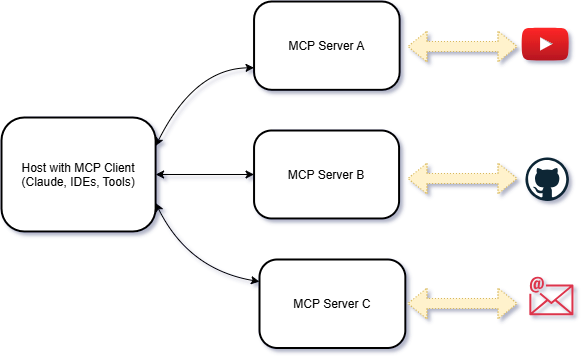
En esencia, MCP es un protocolo estandarizado diseñado para optimizar la comunicación entre modelos de IA y sistemas externos. Considérelo un lenguaje universal que permite que diferentes agentes, herramientas y servicios de IA interactúen fluidamente.
Características
Verificación de correo electrónico : verifique direcciones de correo electrónico en tiempo real.
Integración con MCP : conéctese sin problemas con LLM compatibles con MCP.
Fácil configuración : creado con Python y el SDK MCP para una implementación rápida.
MCP sigue una arquitectura cliente-servidor:

Mira la demostración
Haga clic en la imagen a continuación para ver una demostración en video de la herramienta MCP Email Verify en acción:

Related MCP server: @bounceprotect/mcp
Requisitos
Python : Python 3.11.0 o superior.
UV : 0.6.9 o superior.
Configuración
1. Clonar el repositorio
git clone https://github.com/Abhi5h3k/MCP-Email-Verify.git
cd MCP-Email-Verify2. Instalar UV
Si no tienes UV instalado, puedes instalarlo usando los siguientes comandos:
powershell -ExecutionPolicy ByPass -c "irm https://astral.sh/uv/install.ps1 | iex"Verificar la instalación:
uv --version3. Configurar el entorno virtual
Crear un entorno virtual usando UV:
uv venvActivar el entorno virtual: En Windows:
.venv\Scripts\activate4. Instalar dependencias Instale las dependencias requeridas desde pyproject.toml usando UV:
uv installEjecución del servidor
Configurar variables de entorno Cree un archivo .env en el directorio raíz y agregue su clave AbstractAPI :
ABSTRACT_API_KEY=your_api_key_hereEjecutar el servidor Inicie el servidor MCP:
uv run server.pyUso
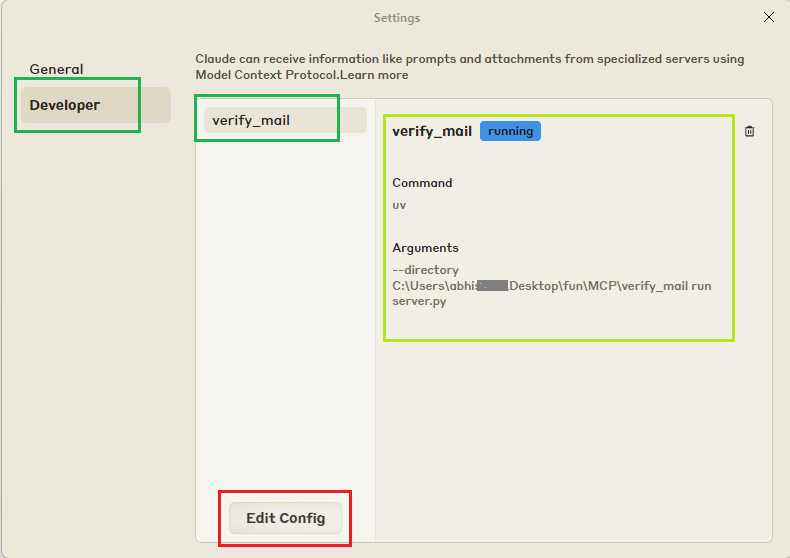
Registrar el servidor con Claude Desktop Actualice el archivo claude_desktop_config.json para incluir su servidor MCP:
{
"mcpServers": {
"verify_mail": {
"command": "uv",
"args": [
"--directory",
"C:\\ABSOLUTE\\PATH\\TO\\MCP-Email-Verify",
"run",
"server.py"
]
}
}
}Reiniciar Claude Desktop Reinicie Claude Desktop para detectar la nueva herramienta.
Verificar correos electrónicos Utilice indicaciones como:
Estaba intentando escribirle a Thanos a thanos@snap.io para pedirle que volviera a poner en línea mi programa favorito, pero no sé si es un correo electrónico válido. ¿Podrías comprobar si es real o solo un snap a ciegas?
Desarrollo
Formato y linting Este proyecto utiliza black e isort para formatear el código y ordenar las importaciones.
Instalar dependencias de desarrollo:
uv add black isort --devFormatear el código:
black .Ordenar importaciones:
isort .Configurar pre-commit
pre-commit install
pre-commit run --all-filesDisponible en el servidor de Smithery.ai: Verificación de correo electrónico de MCP
Artículo: Protocolo de Contexto Modelo (MCP): Una guía para principiantes sobre el futuro de la comunicación con IA
Available Tools
1 toolverify_emailA
Validates an email address using an external email validation API.
This function checks the validity, deliverability, and other attributes of an email address.
It returns a detailed dictionary containing information about the email's format, domain,
and SMTP server.
Args:
email (str): The email address to validate.
Returns:
dict[str, Any]: A dictionary containing detailed validation results. The dictionary
includes the following keys:
- "email" (str): The email address being validated.
- "autocorrect" (str): Suggested autocorrection if the email is invalid or malformed.
- "deliverability" (str): The deliverability status of the email (e.g., "DELIVERABLE").
- "quality_score" (str): A score representing the quality of the email address.
- "is_valid_format" (dict): Whether the email is in a valid format.
- "value" (bool): True if the format is valid, False otherwise.
- "text" (str): A textual representation of the format validity (e.g., "TRUE").
- "is_free_email" (dict): Whether the email is from a free email provider.
- "value" (bool): True if the email is from a free provider, False otherwise.
- "text" (str): A textual representation (e.g., "TRUE").
- "is_disposable_email" (dict): Whether the email is from a disposable email service.
- "value" (bool): True if the email is disposable, False otherwise.
- "text" (str): A textual representation (e.g., "FALSE").
- "is_role_email" (dict): Whether the email is a role-based email (e.g., "admin@domain.com").
- "value" (bool): True if the email is role-based, False otherwise.
- "text" (str): A textual representation (e.g., "FALSE").
- "is_catchall_email" (dict): Whether the domain uses a catch-all email address.
- "value" (bool): True if the domain is catch-all, False otherwise.
- "text" (str): A textual representation (e.g., "FALSE").
- "is_mx_found" (dict): Whether MX records are found for the email domain.
- "value" (bool): True if MX records are found, False otherwise.
- "text" (str): A textual representation (e.g., "TRUE").
- "is_smtp_valid" (dict): Whether the SMTP server for the email domain is valid.
- "value" (bool): True if the SMTP server is valid, False otherwise.
- "text" (str): A textual representation (e.g., "TRUE").
Example:
>>> await verify_email("thanos@snap.io")
{
"email": "thanos@snap.io",
"autocorrect": "",
"deliverability": "UNDELIVERABLE",
"quality_score": "0.00",
"is_valid_format": {
"value": true,
"text": "TRUE"
},
"is_free_email": {
"value": false,
"text": "FALSE"
},
"is_disposable_email": {
"value": false,
"text": "FALSE"
},
"is_role_email": {
"value": false,
"text": "FALSE"
},
"is_catchall_email": {
"value": false,
"text": "FALSE"
},
"is_mx_found": {
"value": false,
"text": "FALSE"
},
"is_smtp_valid": {
"value": false,
"text": "FALSE"
}
}
Raises:
ValueError: If the API key is not found in the environment variables.
requests.exceptions.HTTPError: If the API request fails (e.g., 4xx or 5xx error).
Exception: For any other unexpected errors.
| Name | Required | Description | Default |
|---|---|---|---|
| Yes |
TDQS
Does the description disclose side effects, auth requirements, rate limits, or destructive behavior?
With no annotations provided, the description carries full burden and delivers comprehensive behavioral disclosure. It explains the external API dependency, detailed return structure, example output, and specific error conditions (ValueError for missing API key, HTTPError for API failures, Exception for other errors). This goes well beyond basic functionality description.
Agents need to know what a tool does to the world before calling it. Descriptions should go beyond structured annotations to explain consequences.
Is the description appropriately sized, front-loaded, and free of redundancy?
The description is well-structured with clear sections (purpose, Args, Returns, Example, Raises) and front-loaded with the core functionality. While comprehensive, some sections like the detailed Returns explanation could be more concise, but overall it maintains good information density with minimal redundancy.
Shorter descriptions cost fewer tokens and are easier for agents to parse. Every sentence should earn its place.
Given the tool's complexity, does the description cover enough for an agent to succeed on first attempt?
Given the tool's complexity (external API integration, detailed return structure) and absence of both annotations and output schema, the description provides exceptional completeness. It covers purpose, parameter, return value structure with detailed key explanations, concrete example, and error conditions - leaving no significant gaps for the agent to understand tool behavior.
Complex tools with many parameters or behaviors need more documentation. Simple tools need less. This dimension scales expectations accordingly.
Does the description clarify parameter syntax, constraints, interactions, or defaults beyond what the schema provides?
With 0% schema description coverage and only one parameter, the description fully compensates by clearly explaining the 'email' parameter as 'The email address to validate' in the Args section. However, it doesn't provide additional semantic context like format expectations or validation rules beyond what's implied by the tool's purpose.
Input schemas describe structure but not intent. Descriptions should explain non-obvious parameter relationships and valid value ranges.
Does the description clearly state what the tool does and how it differs from similar tools?
The description clearly states the tool's purpose with specific verbs ('validates', 'checks') and resources ('email address', 'external email validation API'). It distinguishes what the tool does by specifying it checks 'validity, deliverability, and other attributes' and returns 'detailed dictionary containing information about the email's format, domain, and SMTP server'.
Agents choose between tools based on descriptions. A clear purpose with a specific verb and resource helps agents select the right tool.
Does the description explain when to use this tool, when not to, or what alternatives exist?
The description implies usage context through the detailed example and return value explanation, suggesting it's for email validation scenarios. However, there are no explicit guidelines on when to use this tool versus alternatives (though no sibling tools exist), prerequisites, or limitations beyond the error handling section.
Agents often have multiple tools that could apply. Explicit usage guidance like "use X instead of Y when Z" prevents misuse.
Tool Schema Changelog
Recent tool additions, removals, and schema changes observed during successful MCP inspections.
1 tool update
v1.0.0- First observed
verify_email
TDQS
Scored across 1 tool
With only one tool, there is no possibility of ambiguity or overlap between tools. The single verify_email tool has a clearly distinct purpose focused on email validation, making disambiguation trivial.
With only one tool, naming consistency is inherently perfect. The tool name follows a clear verb_noun pattern (verify_email) that would be appropriate if more tools were added, though there are no other tools to compare against.
A single tool is generally too few for most server purposes, creating a thin surface. While email verification could be a narrow domain, typical MCP servers benefit from 3-15 tools for richer functionality. This minimal tool count limits agent capabilities significantly.
For the narrow domain of email verification, the single tool provides comprehensive validation functionality. However, there are notable gaps for broader email-related operations like bulk verification, list management, or integration with email sending services that might be expected from an email-focused server.
Related MCP Connectors
Email validation for Claude and any MCP client — verdicts with evidence, bulk jobs, refunds.
Email safety MCP server. Detects phishing, prompt injection, CEO fraud for AI agents.
A comprehensive Model Context Protocol (MCP) server that enables AI assistants to interact with yo…
MCP server for e-mail testing: create disposable inboxes, wait for delivery, and extract e-mail content or links - all from your AI agent or test automation workflow. Get a free API key on https://app.zyntra.app/
Related MCP Servers
- FlicenseNot gradedqualityDmaintenanceA Model Context Protocol (MCP) server built with the mcp-framework for developing and managing custom tools. It provides a structured foundation for building and integrating modular components like data processors and API clients into Claude Desktop.2 npm-

@bounceprotect/mcpofficial
AlicenseAqualityDmaintenanceEmail validation and SMTP verification for Claude Desktop, Cursor, and Claude Code641 npmMIT- AlicenseAqualityDmaintenanceA Model Context Protocol (MCP) server that enables Claude Desktop to manage emails via SMTP and IMAP. Send emails, fetch unread messages, and create draft replies directly from conversations.312 npmMIT
- AlicenseNot gradedqualityDmaintenanceA Model Context Protocol (MCP) server that enables Claude Desktop to interact with Gmail through secure OAuth 2.0 authentication. Send emails, search messages, read emails, and manage multiple Gmail accounts directly from Claude Desktop.98 npmMIT