Glama
Abhi5h3k

MCP-Email-Verify

by Abhi5h3k

MCP Email Verify

A lightweight Model Context Protocol (MCP) server that enables your LLM to validate email addresses. This tool checks email format, domain validity, and deliverability using the AbstractAPI Email Validation API. Perfect for integrating email validation into AI applications like Claude Desktop.


What is Model Context Protocol (MCP)?

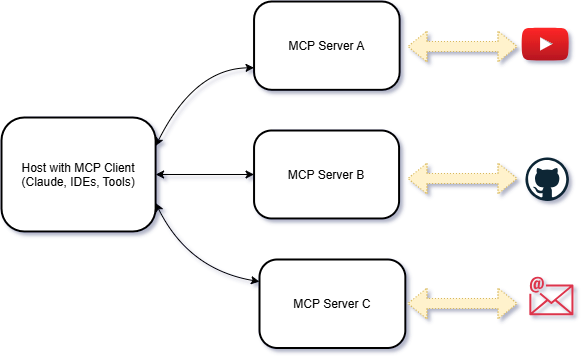
At its core, MCP is a standardized protocol designed to streamline communication between AI models and external systems. Think of it as a universal language that allows different AI agents, tools, and services to interact seamlessly.
MCP drawio (1)


Features

  • Email Verification: Verify email addresses in real-time.

  • MCP Integration: Seamlessly connect with MCP-compatible LLMs.

  • Easy Setup: Built with Python and the MCP SDK for quick deployment.


MCP follows a client-server architecture:

client server drawio


Watch the Demo

Click the image below to watch a video demo of the MCP Email Verify tool in action:

Screenshot 2025-03-23 115525


Related MCP server: @bounceprotect/mcp

Requirements

  • Python: Python 3.11.0 or higher.

  • UV: 0.6.9 or higher.


Setup

1. Clone the Repository

git clone https://github.com/Abhi5h3k/MCP-Email-Verify.git
cd MCP-Email-Verify

2. Install UV

If you don’t have UV installed, you can install it using the following commands:

powershell -ExecutionPolicy ByPass -c "irm https://astral.sh/uv/install.ps1 | iex"

Verify the installation:

uv --version

3. Set Up the Virtual Environment

Create a virtual environment using UV:

uv venv

Activate the virtual environment: On Windows:

.venv\Scripts\activate

4. Install Dependencies Install the required dependencies from pyproject.toml using UV:

uv install

Running the Server

  1. Set Up Environment Variables Create a .env file in the root directory and add your AbstractAPI key:

ABSTRACT_API_KEY=your_api_key_here
  1. Run the Server Start the MCP server:

uv run server.py

Usage

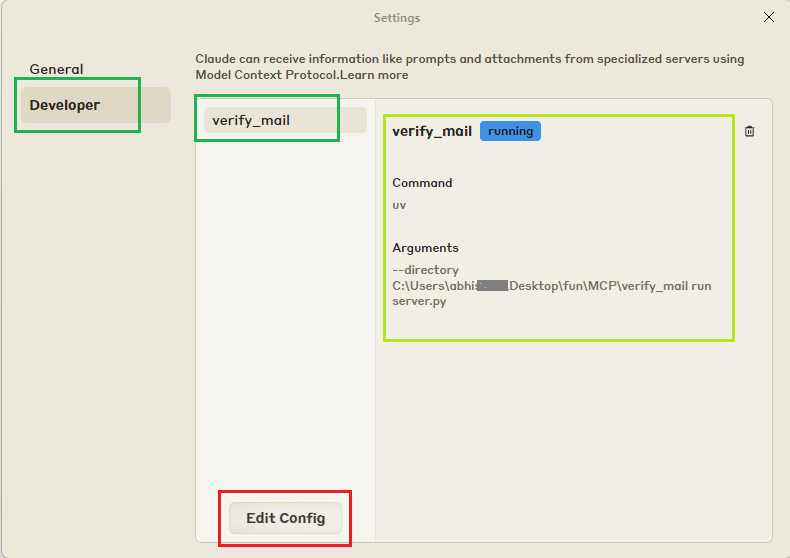
  1. Register the Server with Claude Desktop Update the claude_desktop_config.json file to include your MCP server:

{
    "mcpServers": {
        "verify_mail": {
            "command": "uv",
            "args": [
                "--directory",
                "C:\\ABSOLUTE\\PATH\\TO\\MCP-Email-Verify",
                "run",
                "server.py"
            ]
        }
    }
}
image

  1. Restart Claude Desktop Restart Claude Desktop to detect the new tool.

  2. Verify Emails Use prompts like:

"I was trying to email Thanos at thanos@snap.io to ask him to bring back my favorite TV show, but I’m not sure if it’s a valid email. Can you check if it’s real or just a snap in the dark?"

Development

Formatting and Linting This project uses black and isort for code formatting and import sorting.

  1. Install development dependencies:

     uv add black isort --dev
  2. Format the code:

    black .
  3. Sort imports:

  isort .

Set up pre-commit

pre-commit install
pre-commit run --all-files

Available On Smithery.ai Server: MCP Email Verify

Article: Model Context Protocol (MCP): A Beginner's Guide to the Future of AI Communication

Available Tools

1 tool
verify_emailA
Validates an email address using an external email validation API.

This function checks the validity, deliverability, and other attributes of an email address.
It returns a detailed dictionary containing information about the email's format, domain,
and SMTP server.

Args:
    email (str): The email address to validate.

Returns:
    dict[str, Any]: A dictionary containing detailed validation results. The dictionary
    includes the following keys:
        - "email" (str): The email address being validated.
        - "autocorrect" (str): Suggested autocorrection if the email is invalid or malformed.
        - "deliverability" (str): The deliverability status of the email (e.g., "DELIVERABLE").
        - "quality_score" (str): A score representing the quality of the email address.
        - "is_valid_format" (dict): Whether the email is in a valid format.
            - "value" (bool): True if the format is valid, False otherwise.
            - "text" (str): A textual representation of the format validity (e.g., "TRUE").
        - "is_free_email" (dict): Whether the email is from a free email provider.
            - "value" (bool): True if the email is from a free provider, False otherwise.
            - "text" (str): A textual representation (e.g., "TRUE").
        - "is_disposable_email" (dict): Whether the email is from a disposable email service.
            - "value" (bool): True if the email is disposable, False otherwise.
            - "text" (str): A textual representation (e.g., "FALSE").
        - "is_role_email" (dict): Whether the email is a role-based email (e.g., "admin@domain.com").
            - "value" (bool): True if the email is role-based, False otherwise.
            - "text" (str): A textual representation (e.g., "FALSE").
        - "is_catchall_email" (dict): Whether the domain uses a catch-all email address.
            - "value" (bool): True if the domain is catch-all, False otherwise.
            - "text" (str): A textual representation (e.g., "FALSE").
        - "is_mx_found" (dict): Whether MX records are found for the email domain.
            - "value" (bool): True if MX records are found, False otherwise.
            - "text" (str): A textual representation (e.g., "TRUE").
        - "is_smtp_valid" (dict): Whether the SMTP server for the email domain is valid.
            - "value" (bool): True if the SMTP server is valid, False otherwise.
            - "text" (str): A textual representation (e.g., "TRUE").

Example:
    >>> await verify_email("thanos@snap.io")
    {
        "email": "thanos@snap.io",
        "autocorrect": "",
        "deliverability": "UNDELIVERABLE",
        "quality_score": "0.00",
        "is_valid_format": {
            "value": true,
            "text": "TRUE"
        },
        "is_free_email": {
            "value": false,
            "text": "FALSE"
        },
        "is_disposable_email": {
            "value": false,
            "text": "FALSE"
        },
        "is_role_email": {
            "value": false,
            "text": "FALSE"
        },
        "is_catchall_email": {
            "value": false,
            "text": "FALSE"
        },
        "is_mx_found": {
            "value": false,
            "text": "FALSE"
        },
        "is_smtp_valid": {
            "value": false,
            "text": "FALSE"
        }
    }
Raises:
    ValueError: If the API key is not found in the environment variables.
    requests.exceptions.HTTPError: If the API request fails (e.g., 4xx or 5xx error).
    Exception: For any other unexpected errors.
ParametersJSON Schema
NameRequiredDescriptionDefault
emailYes

TDQS

A4.4/5.0
Behavior5/5

Does the description disclose side effects, auth requirements, rate limits, or destructive behavior?

With no annotations provided, the description carries full burden and delivers comprehensive behavioral disclosure. It explains the external API dependency, detailed return structure, example output, and specific error conditions (ValueError for missing API key, HTTPError for API failures, Exception for other errors). This goes well beyond basic functionality description.

Agents need to know what a tool does to the world before calling it. Descriptions should go beyond structured annotations to explain consequences.

Conciseness4/5

Is the description appropriately sized, front-loaded, and free of redundancy?

The description is well-structured with clear sections (purpose, Args, Returns, Example, Raises) and front-loaded with the core functionality. While comprehensive, some sections like the detailed Returns explanation could be more concise, but overall it maintains good information density with minimal redundancy.

Shorter descriptions cost fewer tokens and are easier for agents to parse. Every sentence should earn its place.

Completeness5/5

Given the tool's complexity, does the description cover enough for an agent to succeed on first attempt?

Given the tool's complexity (external API integration, detailed return structure) and absence of both annotations and output schema, the description provides exceptional completeness. It covers purpose, parameter, return value structure with detailed key explanations, concrete example, and error conditions - leaving no significant gaps for the agent to understand tool behavior.

Complex tools with many parameters or behaviors need more documentation. Simple tools need less. This dimension scales expectations accordingly.

Parameters4/5

Does the description clarify parameter syntax, constraints, interactions, or defaults beyond what the schema provides?

With 0% schema description coverage and only one parameter, the description fully compensates by clearly explaining the 'email' parameter as 'The email address to validate' in the Args section. However, it doesn't provide additional semantic context like format expectations or validation rules beyond what's implied by the tool's purpose.

Input schemas describe structure but not intent. Descriptions should explain non-obvious parameter relationships and valid value ranges.

Purpose5/5

Does the description clearly state what the tool does and how it differs from similar tools?

The description clearly states the tool's purpose with specific verbs ('validates', 'checks') and resources ('email address', 'external email validation API'). It distinguishes what the tool does by specifying it checks 'validity, deliverability, and other attributes' and returns 'detailed dictionary containing information about the email's format, domain, and SMTP server'.

Agents choose between tools based on descriptions. A clear purpose with a specific verb and resource helps agents select the right tool.

Usage Guidelines3/5

Does the description explain when to use this tool, when not to, or what alternatives exist?

The description implies usage context through the detailed example and return value explanation, suggesting it's for email validation scenarios. However, there are no explicit guidelines on when to use this tool versus alternatives (though no sibling tools exist), prerequisites, or limitations beyond the error handling section.

Agents often have multiple tools that could apply. Explicit usage guidance like "use X instead of Y when Z" prevents misuse.

Tool Schema Changelog

Recent tool additions, removals, and schema changes observed during successful MCP inspections.

  1. 1 tool updatev1.0.0
    • First observedverify_email

TDQS

A4.2/5.0

Scored across 1 tool

Disambiguation5/5

With only one tool, there is no possibility of ambiguity or overlap between tools. The single verify_email tool has a clearly distinct purpose focused on email validation, making disambiguation trivial.

Naming Consistency5/5

With only one tool, naming consistency is inherently perfect. The tool name follows a clear verb_noun pattern (verify_email) that would be appropriate if more tools were added, though there are no other tools to compare against.

Tool Count2/5

A single tool is generally too few for most server purposes, creating a thin surface. While email verification could be a narrow domain, typical MCP servers benefit from 3-15 tools for richer functionality. This minimal tool count limits agent capabilities significantly.

Completeness3/5

For the narrow domain of email verification, the single tool provides comprehensive validation functionality. However, there are notable gaps for broader email-related operations like bulk verification, list management, or integration with email sending services that might be expected from an email-focused server.

Maintenance

ActivityInactive
ResponsivenessNo issues

Related MCP Connectors

Related MCP Servers

  • F
    license
    Not graded
    quality
    D
    maintenance
    A Model Context Protocol (MCP) server built with the mcp-framework for developing and managing custom tools. It provides a structured foundation for building and integrating modular components like data processors and API clients into Claude Desktop.
    5
    -
  • A
    license
    A
    quality
    D
    maintenance
    A Model Context Protocol (MCP) server that enables Claude Desktop to manage emails via SMTP and IMAP. Send emails, fetch unread messages, and create draft replies directly from conversations.
    3
    20
    MIT
  • A
    license
    Not graded
    quality
    D
    maintenance
    A Model Context Protocol (MCP) server that enables Claude Desktop to interact with Gmail through secure OAuth 2.0 authentication. Send emails, search messages, read emails, and manage multiple Gmail accounts directly from Claude Desktop.
    81
    MIT