
A
licenseA
qualityD
maintenanceAn MCP server that enables highly personalized music recommendations from TIDAL based on custom criteria, allowing users to create and manage playlists directly in their TIDAL account.
7
MIT

The TIDAL MCP server enables personalized music recommendations and playlist management by integrating with TIDAL's API.
With this server, you can:
Authenticate with your TIDAL account through a browser flow
Retrieve favorite tracks from your TIDAL library
Get personalized music recommendations based on your favorites, specific seed tracks, or custom criteria (mood, genre, tempo, recency)
View and list your existing TIDAL playlists
Retrieve tracks contained within any of your playlists
Create new playlists in your TIDAL account with specified titles and tracks
Delete playlists you no longer need
Mentioned as a reference point for music recommendation features, but the MCP specifically integrates with TIDAL, not Spotify.
Provides tools for interacting with TIDAL music streaming service, including authenticating with TIDAL, retrieving favorite tracks, getting personalized music recommendations, creating and managing playlists, and accessing track radio functionality.
Click on "Deploy Server".
Wait a few minutes for the server to deploy. Once ready, it will show a "Started" state.
In the chat, type @ followed by the MCP server name and your instructions, e.g., "@TIDAL MCP: My Custom Picks create a playlist from my favorite tracks with chill late-night vibes"
That's it! The server will respond to your query, and you can continue using it as needed.
Here is a step-by-step guide with screenshots.
Most music platforms offer recommendations — Daily Discovery, Top Artists, New Arrivals, etc. — but even with the state-of-the-art system, they often feel too "aggregated". I wanted something more custom and context-aware.
With TIDAL MCP, you can ask for things like:
"Based on my last 10 favorites, find similar tracks — but only ones from recent years."
"Find me tracks like those in this playlist, but slower and more acoustic."
The LLM filters and curates results using your input, finds similar tracks via TIDAL’s API, and builds new playlists directly in your account.
🌟 Music Recommendations: Get personalized track recommendations based on your listening history plus your custom criteria.
၊၊||၊ Playlist Management: Create, view, and manage your TIDAL playlists
Related MCP server: Spotify Overload - More Tools (18) | More Functions | More Rocking Out
Python 3.10+
uv (Python package manager)
TIDAL subscription
Clone this repository:
git clone https://github.com/yuhuacheng/tidal-mcp.git
cd tidal-mcp
Create a virtual environment and install dependencies using uv:
uv venv
source .venv/bin/activate  # On Windows: .venv\Scripts\activate
Install the package with all dependencies from the pyproject.toml file:
uv pip install --editable .This will install all dependencies defined in the pyproject.toml file and set up the project in development mode.
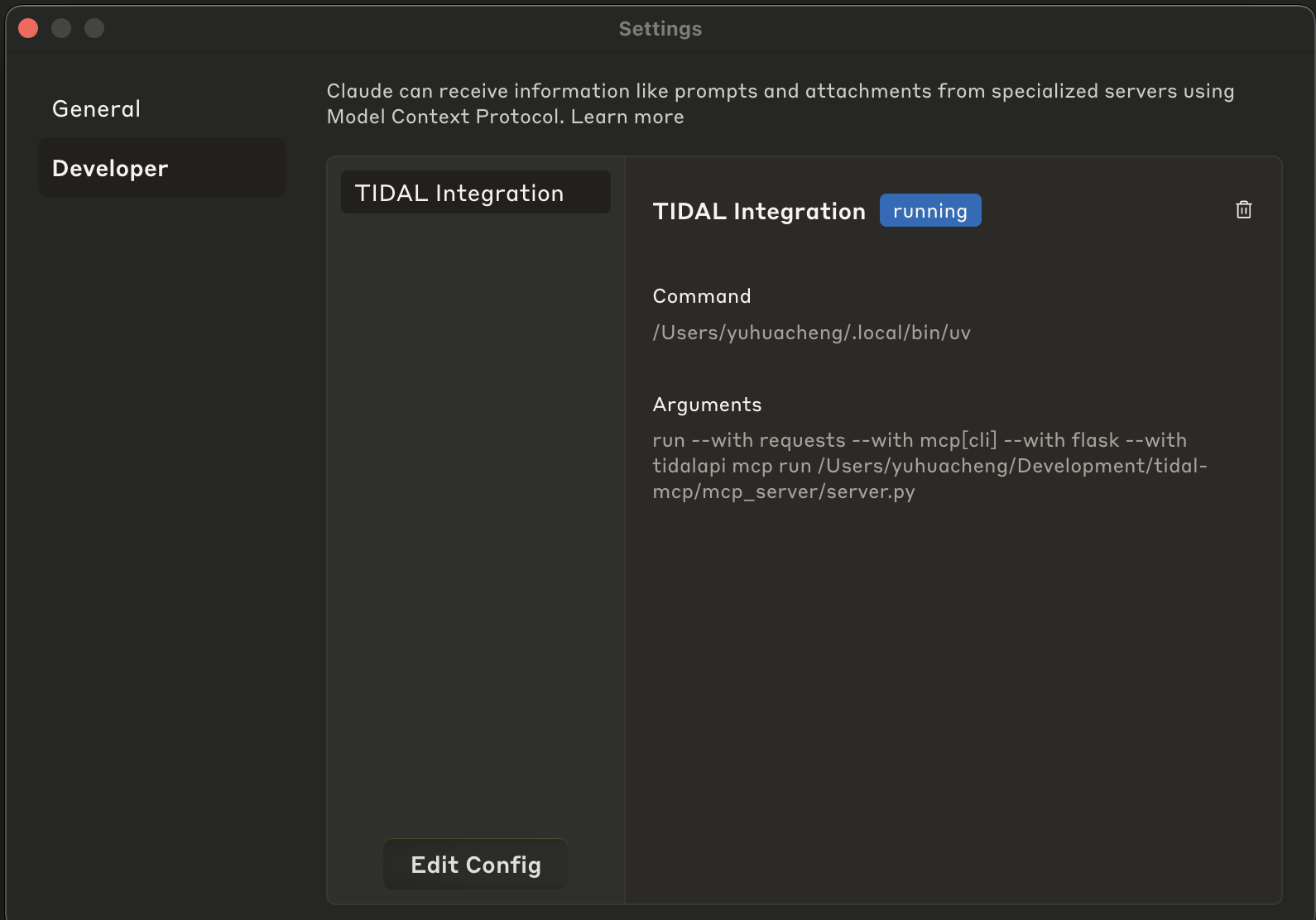
To add this MCP server to Claude Desktop, you need to update the MCP configuration file. Here's an example configuration:
(you can specify the port by adding an optional env section with the TIDAL_MCP_PORT environment variable)
{
  "mcpServers": {
    "TIDAL Integration": {
      "command": "/path/to/your/uv",
      "env": {
        "TIDAL_MCP_PORT": "5100"
      },
      "args": [
        "run",
        "--with",
        "requests",
        "--with",
        "mcp[cli]",
        "--with",
        "flask",
        "--with",
        "tidalapi",
        "mcp",
        "run",
        "/path/to/your/project/tidal-mcp/mcp_server/server.py"
      ]
    }
  }
}
Example scrrenshot of the MCP configuration in Claude Desktop:
Open Claude Desktop
Go to Settings > Developer
Click on "Edit Config"
Paste the modified JSON configuration
Save the configuration
Restart Claude Desktop
Once configured, you can interact with your TIDAL account through a LLM by asking questions like:
“Recommend songs like those in this playlist, but slower and more acoustic.”
“Create a playlist based on my top tracks, but focused on chill, late-night vibes.”
“Find songs like these in playlist XYZ but in languages other than English.”
💡 You can also ask the model to:
Use more tracks as seeds to broaden the inspiration.
Return more recommendations if you want a longer playlist.
Or delete a playlist if you’re not into it — no pressure!
The TIDAL MCP integration provides the following tools:
tidal_login: Authenticate with TIDAL through browser login flow
get_favorite_tracks: Retrieve your favorite tracks from TIDAL
recommend_tracks: Get personalized music recommendations
create_tidal_playlist: Create a new playlist in your TIDAL account
get_user_playlists: List all your playlists on TIDAL
get_playlist_tracks: Retrieve all tracks from a specific playlist
delete_tidal_playlist: Delete a playlist from your TIDAL account
Creates a new TIDAL playlist with the specified tracks.

USE THIS TOOL WHENEVER A USER ASKS FOR:
- "Create a playlist with these songs"
- "Make a TIDAL playlist"
- "Save these tracks to a playlist"
- "Create a collection of songs"
- Any request to create a new playlist in their TIDAL account

This function creates a new playlist in the user's TIDAL account and adds the specified tracks to it.
The user must be authenticated with TIDAL first.

NAMING CONVENTION GUIDANCE:
When suggesting or creating a playlist, first check the user's existing playlists using get_user_playlists()
to understand their naming preferences. Some patterns to look for:
- Do they use emoji in playlist names?
- Do they use all caps, title case, or lowercase?
- Do they include dates or seasons in names?
- Do they name by mood, genre, activity, or artist?
- Do they use specific prefixes or formatting (e.g., "Mix: Summer Vibes" or "[Workout] High Energy")

Try to match their style when suggesting new playlist names. If they have no playlists yet or you
can't determine a pattern, use a clear, descriptive name based on the tracks' common themes.

When processing the results of this tool:
1. Confirm the playlist was created successfully
2. Provide the playlist title, number of tracks added, and URL
3. Always include the direct TIDAL URL (https://tidal.com/playlist/{playlist_id})
4. Suggest that the user can now access this playlist in their TIDAL account

Args:
    title: The name of the playlist to create
    track_ids: List of TIDAL track IDs to add to the playlist
    description: Optional description for the playlist (default: "")

Returns:
    A dictionary containing the status of the playlist creation and details about the created playlist
Inputs: title (required), track_ids (required), description.
Deletes a TIDAL playlist by its ID.

USE THIS TOOL WHENEVER A USER ASKS FOR:
- "Delete my playlist"
- "Remove a playlist from my TIDAL account"
- "Get rid of this playlist"
- "Delete the playlist with ID X"
- Any request to delete or remove a TIDAL playlist

This function deletes a specific playlist from the user's TIDAL account.
The user must be authenticated with TIDAL first.

When processing the results of this tool:
1. Confirm the playlist was deleted successfully
2. Provide a clear message about the deletion

Args:
    playlist_id: The TIDAL ID of the playlist to delete (required)

Returns:
    A dictionary containing the status of the playlist deletion
Inputs: playlist_id (required).
Retrieves tracks from the user's TIDAL account favorites.

USE THIS TOOL WHENEVER A USER ASKS FOR:
- "What are my favorite tracks?"
- "Show me my TIDAL favorites"
- "What music do I have saved?"
- "Get my favorite songs"
- Any request to view their saved/favorite tracks

This function retrieves the user's favorite tracks from TIDAL.

Args:
    limit: Maximum number of tracks to retrieve (default: 20, note it should be large enough by default unless specified otherwise).

Returns:
    A dictionary containing track information including track ID, title, artist, album, and duration.
    Returns an error message if not authenticated or if retrieval fails.
Inputs: limit.
Retrieves all tracks from a specified TIDAL playlist.

USE THIS TOOL WHENEVER A USER ASKS FOR:
- "Show me the songs in my playlist"
- "What tracks are in my [playlist name] playlist?"
- "List the songs from my playlist"
- "Get tracks from my playlist"
- "View contents of my TIDAL playlist"
- Any request to see what songs/tracks are in a specific playlist

This function retrieves all tracks from a specific playlist in the user's TIDAL account.
The playlist_id must be provided, which can be obtained from the get_user_playlists() function.

When processing the results of this tool:
1. Present the playlist information (title, description, track count) as context
2. List the tracks in a clear, organized format with track name, artist, and album
3. Include track durations where available
4. Mention the total number of tracks in the playlist
5. If there are many tracks, focus on highlighting interesting patterns or variety

Args:
    playlist_id: The TIDAL ID of the playlist to retrieve (required)
    limit: Maximum number of tracks to retrieve (default: 100)

Returns:
    A dictionary containing the playlist information and all tracks in the playlist
Inputs: playlist_id (required), limit.
Fetches the user's playlists from their TIDAL account.

USE THIS TOOL WHENEVER A USER ASKS FOR:
- "Show me my playlists"
- "List my TIDAL playlists"
- "What playlists do I have?"
- "Get my music collections"
- Any request to view or list their TIDAL playlists

This function retrieves the user's playlists from TIDAL and returns them sorted
by last updated date (most recent first).

When processing the results of this tool:
1. Present the playlists in a clear, organized format
2. Include key information like title, track count, and the TIDAL URL for each playlist
3. Mention when each playlist was last updated if available
4. If the user has many playlists, focus on the most recently updated ones unless specified otherwise

Returns:
    A dictionary containing the user's playlists sorted by last updated date
Inputs: no named parameters.
Recommends music tracks based on specified track IDs or can use the user's TIDAL favorites if no IDs are provided.

USE THIS TOOL WHENEVER A USER ASKS FOR:
- Music recommendations
- Track suggestions
- Music similar to their TIDAL favorites or specific tracks
- "What should I listen to?"
- Any request to recommend songs/tracks/music based on their TIDAL history or specific tracks

This function gets recommendations based on provided track IDs or retrieves the user's
favorite tracks as seeds if no IDs are specified.

When processing the results of this tool:
1. Analyze the seed tracks to understand the music taste or direction
2. Review the recommended tracks from TIDAL
3. IMPORTANT: Do NOT include any tracks from the seed tracks in your recommendations
4. Ensure there are NO DUPLICATES in your recommended tracks list
5. Select and rank the most appropriate tracks based on the seed tracks and filter criteria
6. Group recommendations by similar styles, artists, or moods with descriptive headings
7. For each recommended track, provide:
   - The track name, artist, album
   - Always include the track's URL to make it easy for users to listen to the track
   - A brief explanation of why this track might appeal to the user based on the seed tracks
   - If applicable, how this track matches their specific filter criteria
8. Format your response as a nicely presented list of recommendations with helpful context (remember to include the track's URL!)
9. Begin with a brief introduction explaining your selection strategy
10. Lastly, unless specified otherwise, you should recommend MINIMUM 20 tracks (or more if possible) to give the user a good variety to choose from.

[IMPORTANT NOTE] If you're not familiar with any artists or tracks mentioned, you should use internet search capabilities if available to provide more accurate information.

Args:
    track_ids: Optional list of TIDAL track IDs to use as seeds for recommendations.
              If not provided, will use the user's favorite tracks.
    filter_criteria: Specific preferences for filtering recommendations (e.g., "relaxing music,"
                     "recent releases," "upbeat," "jazz influences")
    limit_per_track: Maximum number of recommendations to get per track (NOTE: default: 20, unless specified otherwise, we'd like to keep the default large enough to have enough candidates to work with)
    limit_from_favorite: Maximum number of favorite tracks to use as seeds (NOTE: default: 20, unless specified otherwise, we'd like to keep the default large enough to have enough candidates to work with)

Returns:
    A dictionary containing both the seed tracks and recommended tracks
Inputs: track_ids, filter_criteria, limit_per_track, limit_from_favorite.
Authenticate with TIDAL through browser login flow.
This will open a browser window for the user to log in to their TIDAL account.

Returns:
    A dictionary containing authentication status and user information if successful
Inputs: no named parameters.
Recent tool additions, removals, and schema changes observed during successful MCP inspections.
Loading tool schema changelog…
Scored across 7 tools
Each tool has a distinct purpose with no overlap: create/delete playlists, get favorites, get playlist tracks, get user playlists, recommend tracks, and login. The descriptions clearly differentiate them, and an agent can easily select the correct tool for any TIDAL-related request without confusion.
All tool names follow a consistent verb_noun pattern with 'tidal' prefix (e.g., create_tidal_playlist, get_favorite_tracks, recommend_tracks). The naming is uniform and predictable, making it easy for agents to understand and use the toolset.
With 7 tools, this server is well-scoped for managing TIDAL playlists and recommendations. It covers essential operations (CRUD for playlists, fetching tracks, login) without being too sparse or bloated, making each tool valuable and necessary for the domain.
The toolset provides strong coverage for playlist management (create, delete, list, view tracks) and recommendations, with a login tool for authentication. A minor gap is the lack of an update_playlist tool for modifying existing playlists, but agents can work around this by deleting and recreating. Overall, it supports core TIDAL workflows effectively.
AI playlist engine that turns music prompts into real YouTube playlists and filters bad versions.
Find independent music by how it sounds: similar tracks and playlists from a track link.
Turn music ideas, articles and tracklists into playable mixes, cited stories and narrated clips.
MCP server for Producer/Riffusion AI music generation