
Beanquery MCP
Beancount MCP 服务器是模型上下文协议 (MCP)的实验性实现,旨在与Beancount账本文件进行交互。该服务器利用Beancount 查询语言 (BQL)和beanquery工具,实现对 Beancount 格式存储的财务数据的无缝查询和分析。通过集成 MCP,该服务器促进了 AI 助手与 Beancount 账本之间的标准化通信,从而增强了财务数据的可访问性和实用性。
注意:此服务器处于实验阶段,可能会发生重大变化。建议在开发环境中使用它并提供反馈,以便进一步改进。
可以在sample.bean中找到生成的示例分类账
可用资源和工具
工具:
set_ledger_file:设置用于查询的 Beancount 分类账文件(如果未通过环境变量设置)。run_query:针对加载的 Beancount 文件运行 BQL 查询。
资源:
beanquery://tables:获取 BQL 可以访问的表列表。beanquery://accounts:获取已加载的 Beancount 文件中的帐户列表。
使用 Claude.ai 的示例
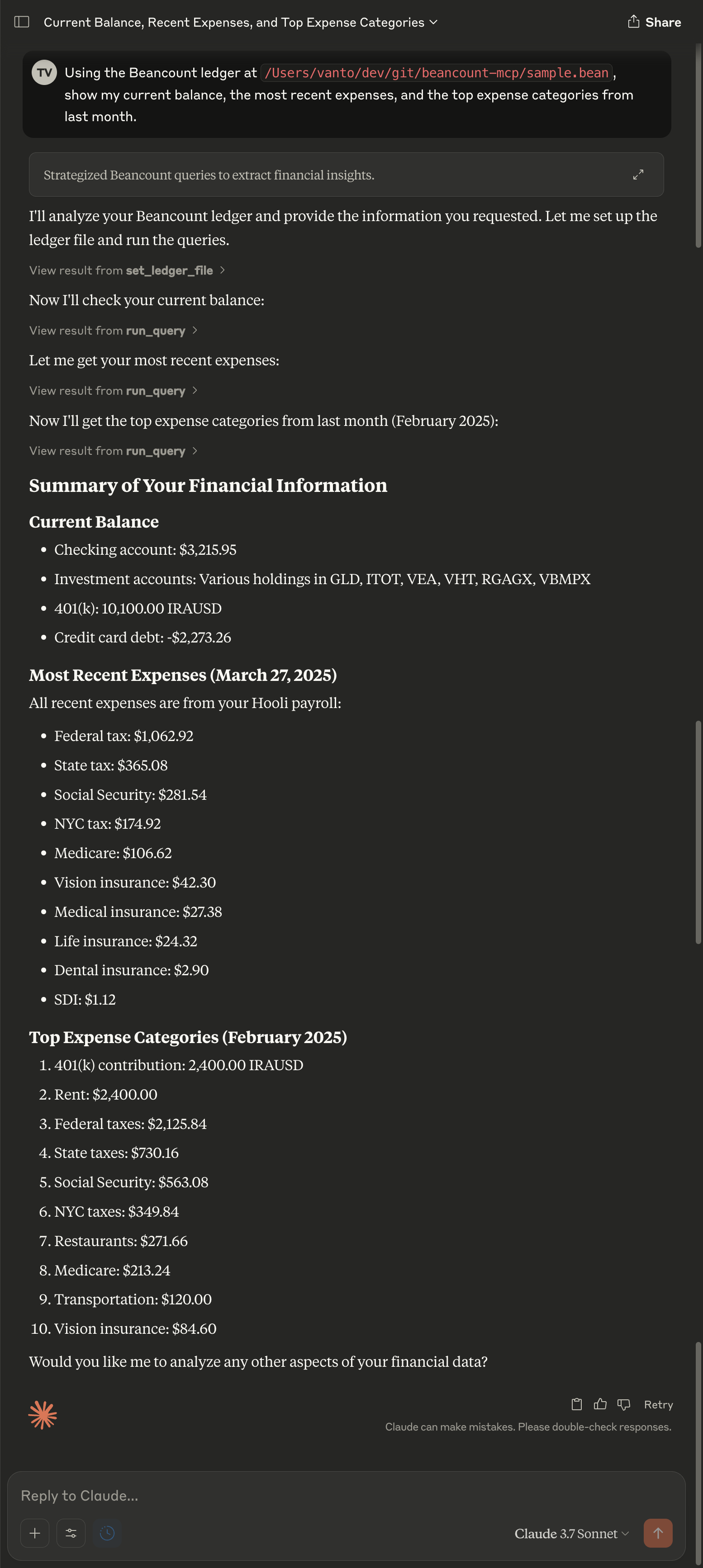
要查看扩展 MCP 交互的屏幕截图,请参见此处。
Related MCP server: Linear MCP Server
⚠️ 隐私警告
该工具通过模型上下文协议 (MCP) 与语言模型提供商 (LLM) 交互,因此可以将您的 Beancount 分类账的部分内容(包括潜在的机密或私人财务信息)传输给第三方服务。
请谨慎使用此工具,尤其是在以下情况下:
您的分类账包含敏感数据(例如客户姓名、工资详情、健康相关费用)。
您正在使用云托管或非自托管的 LLM 后端。
建议:
屏蔽或编辑测试账本中的敏感数据。
尽可能使用自托管的 LLM。
审查通过 MCP 发送的数据以确保符合您的隐私和安全要求。
注意:您有责任保护自己的财务数据。请勿分享您不愿公开的账本。
设置
先决条件
Python 3.10 或更高版本
uv用于管理 Python 项目(推荐)
用法
运行服务器
开发模式:使用 MCP 检查器测试和调试您的服务器:
mcp dev server.pyClaude Desktop 集成:将服务器安装到 Claude Desktop:
mcp install server.py快速入门:
uv run mcp install server.py -v BEANCOUNT_LEDGER=$(pwd)/sample.bean --with beancount --with beanquery自定义名称:
uv run mcp install server.py --name "Beanquery MCP Server" --with beancount --with beanquery环境变量:
uv run mcp install server.py -v BEANCOUNT_LEDGER=/path/to/your/ledger.bean --with beancount --with beanquery uv run mcp install server.py -f .env --with beancount --with beanquery
测试
使用pytest运行测试套件:
贡献
分叉存储库。
创建功能分支:
git checkout -b feature-name提交您的更改:
git commit -m "Add feature description"推送到你的分支:
git push origin feature-name打开拉取请求。
执照
本项目遵循 MIT 许可证。详情请参阅LICENSE文件。