
Enables querying Kubernetes audit logs stored in Alibaba Cloud Log Service, providing access to cluster activity monitoring and investigation capabilities.
Provides access to Kubernetes audit logs stored in AWS CloudWatch Logs, enabling monitoring and analysis of EKS cluster activities and security events.
Allows querying Kubernetes audit logs from Google Cloud Logging, providing insights into GKE cluster operations and security monitoring.
Provides comprehensive tools for querying and analyzing Kubernetes audit logs across multiple clusters, enabling investigation of resource activities, user actions, and security events with filtering by namespace, resource types, verbs, and time ranges.
Click on "Install Server".
Wait a few minutes for the server to deploy. Once ready, it will show a "Started" state.
In the chat, type
@followed by the MCP server name and your instructions, e.g., "@kube-audit-mcpshow recent audit logs for the production cluster"
That's it! The server will respond to your query, and you can continue using it as needed.
Here is a step-by-step guide with screenshots.
kube-audit-mcp
English | 简体中文
kube-audit-mcp is a Model Context Protocol (MCP) server that gives AI agents, assistants, and chatbots the ability to query Kubernetes Audit Logs.
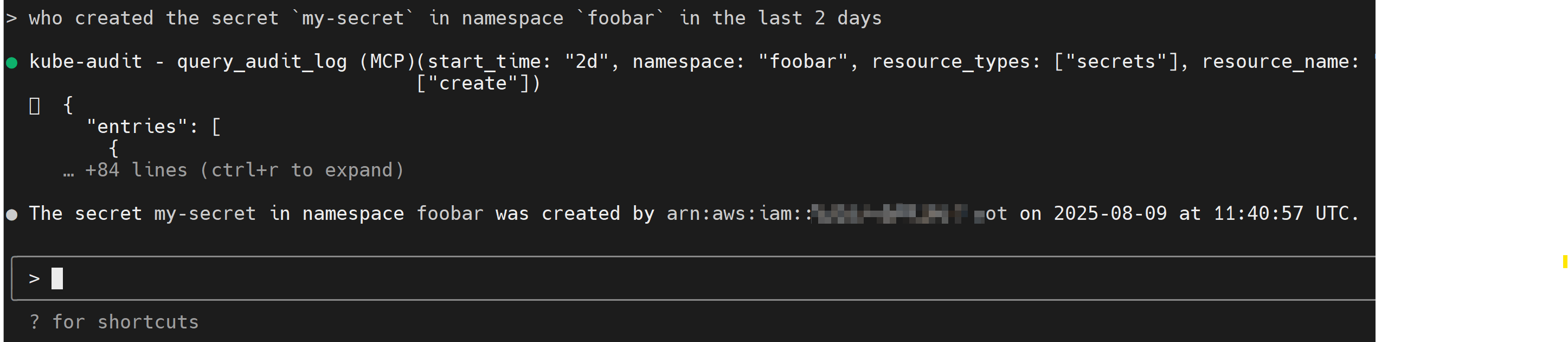
Table of Contents
Installation
First, download and install the latest release from the releases page.
You can also install via docker:
docker pull quay.io/mozillazg/kube-audit-mcp:latest
Then, configure the provider of Kubernetes Audit Logs. See Configurations for details.
MCP Clients
Theoretically, any MCP client should work with kube-audit-mcp.
Standard config works in most of the clients:
{
  "mcpServers": {
    "kube-audit": {
      "type": "stdio",
      "command": "kube-audit-mcp",
      "args": [
        "mcp"
      ]
    }
  }
}
You can also run kube-audit-mcp via docker, use the following config:
{
  "mcpServers": {
    "kube-audit": {
      "type": "stdio",
      "command": "docker",
      "args": [
        "run",
        "-i",
        "--rm",
        "-v",
        "/etc/kube-audit-mcp/config.yaml:/etc/kube-audit-mcp/config.yaml:ro",
        "quay.io/mozillazg/kube-audit-mcp:latest",
        "mcp",
        "--config",
        "/etc/kube-audit-mcp/config.yaml"
      ],
      "env": {
        "ALIBABA_CLOUD_ACCESS_KEY_ID": "needed_if_you_use_alibaba_sls_provider",
        "ALIBABA_CLOUD_ACCESS_KEY_SECRET": "needed_if_you_use_alibaba_sls_provider",
        "AWS_ACCESS_KEY_ID": "needed_if_you_use_aws_cloudwatch_logs_provider",
        "AWS_SECRET_ACCESS_KEY": "needed_if_you_use_aws_cloudwatch_logs_provider",
        "GOOGLE_APPLICATION_CREDENTIALS": "needed_if_you_use_gcp_cloud_logging_provider"
      }
    }
  }
}
Claude Code
Use the Claude Code CLI to add the kube-audit-mcp:
claude mcp add kube-audit kube-audit-mcp mcpClaude Desktop
Follow the MCP install guide, use the standard config above.
Gemini CLI
Follow the MCP install guide, use the standard config above.
VS Code
Follow the MCP install guide, use the standard config above. You can also install the kube-audit-mcp MCP server using the VS Code CLI:
# For VS Code
code --add-mcp '''{"name":"kube-audit","command":"kube-audit-mcp","args":["mcp"]}'''
After installation, the kube-audit-mcp MCP server will be available for use with your GitHub Copilot agent in VS Code.
kubectl-ai
servers:
  # Local MCP server (stdio-based)
  - name: kube-audit
    command: kube-audit-mcp
    args:
      - mcp
Transport Options
STDIO Transport (Default)
The default transport mode uses standard input/output for communication. This is the standard MCP transport used by most clients like Claude Desktop.
# Run with default stdio transport
kube-audit-mcp mcp

# Or explicitly specify stdio
kube-audit-mcp mcp --transport stdio
Configurations
kube-audit-mcp requires a configuration file to specify the provider of Kubernetes Audit Logs.
The configuration file is typically located at ~/.config/kube-audit-mcp/config.yaml
or specified via the --config flag.
Sample Config
You can get a sample config via the following command:
kube-audit-mcp sample-configdefault_cluster: prod # The default cluster to use
clusters: # List of clusters
- name: prod # Name of the cluster
provider: # Provider configuration, see below for details
name: aws-cloudwatch-logs # Use CloudWatch Logs as the provider
aws_cloudwatch_logs:
log_group_name: /aws/eks/test/cluster # Replace with your CloudWatch Logs log group name
- name: dev # Name of the cluster
provider:
name: alibaba-sls # Use Alibaba Cloud Log Service as the provider
alibaba_sls:
endpoint: cn-hangzhou.log.aliyuncs.com # Replace with your Log Service endpoint
project: k8s-log-cxxx # Replace with your Log Service project
logstore: audit-cxxx # Replace with your Log Service logstore
- name: test
provider:
name: gcp-cloud-logging # Use Google Cloud Logging as the provider
gcp_cloud_logging:
project_id: test-233xxx # Replace with your Project ID
cluster_name: test-cluster # Replace with your GKE cluster name (optional)Or save the sample configuration to the default config file location:
kube-audit-mcp sample-config --saveProvider
Alibaba Cloud Log Service
Prerequisites:
Install and configure the Alibaba Cloud CLI with credentials
Ensure your Alibaba Cloud user or role has the necessary permissions to read from the specified Log Service project and logstore. The following policy can be used to grant the necessary permissions:
{
  "Version": "1",
  "Statement": [
    {
      "Effect": "Allow",
      "Action": [
        "log:GetLogStoreLogs"
      ],
      "Resource": "*"
    }
  ]
}
Config:
name: alibaba-sls
alibaba_sls:
  endpoint: cn-hangzhou.log.aliyuncs.com  # Replace with your Log Service endpoint
  logstore: ${log_store}                  # Replace with your Log Service logstore
  project: ${project_name}                # Replace with your Log Service project
AWS CloudWatch Logs
Prerequisites:
Ensure your AWS IAM user or role has the necessary permissions to read from the specified CloudWatch Logs log group. The following policy can be used to grant the necessary permissions:
{
  "Version": "2012-10-17",
  "Statement": [
    {
      "Effect": "Allow",
      "Action": [
        "logs:StartQuery",
        "logs:GetQueryResults"
      ],
      "Resource": "*"
    }
  ]
}
Config:
name: aws-cloudwatch-logs
aws_cloudwatch_logs:
  log_group_name: /aws/eks/${cluster_name}/cluster # Replace with your CloudWatch Logs log group name
Google Cloud Logging
Prerequisites:
Install and configure the Google Cloud CLI with Application Default Credentials
Ensure your Google Cloud IAM user or service account has the necessary permissions to read from the specified Cloud Logging log bucket. The following role can be used to grant the necessary permissions:
roles/logging.viewer.
Config:
name: gcp-cloud-logging
gcp_cloud_logging:
  project_id: ${project_id}         # Replace with your Project ID
  cluster_name: ${cluster_name}     # Replace with your GKE cluster name (optional)
Available Tools
This MCP server exposes the following tools to the AI agent:
query_audit_log
Queries the Kubernetes audit logs from the configured provider. This is the primary tool for investigating activity in your clusters.
Parameters:
cluster_name(string, optional): The name of the cluster to query. You can see available clusters with thelist_clusterstool. Defaults to the configureddefault_cluster.start_time(string, optional): The start time for the query. Can be in ISO 8601 format (2024-01-01T10:00:00) or relative time (7d,1h,30m). Defaults to7d.end_time(string, optional): The end time for the query. If omitted, defaults to the current time.limit(number, optional): The maximum number of log entries to return. Defaults to10, with a maximum of20.namespace(string, optional): Filter logs by a specific namespace. Supports suffix wildcards (e.g.,kube-*).resource_types(array of strings, optional): Filter by one or more Kubernetes resource types (e.g.,pods,deployments). Supports short names (e.g.,po,deploy). Uselist_common_resource_typesto discover available types.resource_name(string, optional): Filter by a specific resource name. Supports suffix wildcards.verbs(array of strings, optional): Filter by one or more action verbs (e.g.,create,delete,update).user(string, optional): Filter by the user who performed the action. Supports suffix wildcards.
list_clusters
Lists all clusters that are configured in the config.yaml file. This is useful for discovering which clusters you can target for queries.
Parameters: None
list_common_resource_types
Returns a list of common Kubernetes resource types, grouped by category (e.g., "Core Resources", "Apps Resources"). This helps in finding the correct value for the resource_types parameter in the query_audit_log tool.
Parameters: None