
Tibber MCP 服务器
这是挪威电力供应商Tibber的模型上下文协议 (MCP)服务器。
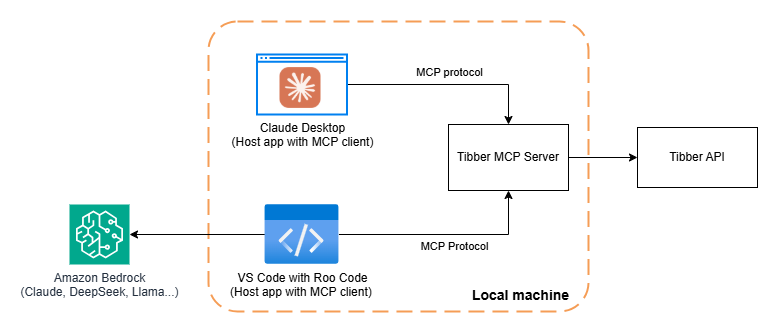
您可以在本地运行 MCP 服务器并通过不同的主机(例如 Claude Desktop 或Roo Code)访问它。
欲了解更多详情,请查看我的博客文章:
构建 Tibber MCP 服务器:将您的 AI 代理连接到能源消耗数据
概述
Tibber MCP 服务器为 AI 代理提供了一种便捷的方式与Tibber API交互并查询当前能源价格和能源消耗数据等信息。
Related MCP server: hostinger-api-mcp
示例查询
一旦连接到 MCP 服务器,您可以提出以下问题:
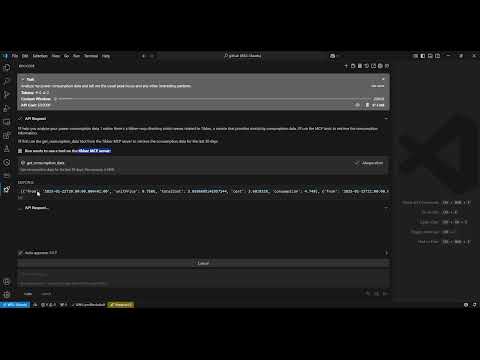
“分析我的电力消耗数据,并以易于阅读的格式呈现通常的高峰时段和任何其他有趣的模式。”
“我昨天什么时候用电量最多?”
“昨天早上 7 点我消耗了多少电?”
“现在的能源价格是多少?”
“列出明天最便宜的 3 个小时。”
“明天能源价格是上涨还是下跌?”
演示视频
建筑学
要求
Python 3.12
Tibber API 令牌(您可以从Tibber 开发者门户获取)
安装
安装
uv:# On macOS and Linux curl -LsSf https://astral.sh/uv/install.sh | sh# On Windows powershell -ExecutionPolicy ByPass -c "irm https://astral.sh/uv/install.ps1 | iex"克隆此存储库:
git clone https://github.com/linkcd/tibber-mcp.git cd tibber-mcp设置Python虚拟环境并安装依赖项:
uv venv --python 3.12 && source .venv/bin/activate && uv pip install --requirement pyproject.toml
主机配置
在 VS 中的 Claude Desktop 或 Roo Code 中
{
"mcpServers":{
"tibber":{
"command":"uv",
"args":[
"--directory",
"[PATH-TO-ROOT-OF-THE-CLONED-TIBBER-MCP-FOLDER]",
"run",
"server.py"
],
"env":{
"TIBBER_API_TOKEN":"[YOUR-TIBBER-TOKEN]"
}
}
}
}
重要提示:请将
[YOUR-TIBBER-TOKEN]替换为您的实际令牌。切勿将实际凭证提交到版本控制中。
在本地调试和测试 MCP 服务器
在本地运行服务器并对其运行MCP 检查器
npx @modelcontextprotocol/inspector -e TIBBER_API_TOKEN=[YOUR-TIBBER-TOKEN] python server.py
可用工具
服务器公开了 LLM 可以使用的以下工具:
get_consumption_data():获取过去 30 天的每小时消耗数据,例如时间段、总成本、基本能源成本和消耗的千瓦时get_price_and_home_info():获取价格信息(当前、今天和明天)和家庭信息(所有者、地址、订阅......)