
A
licenseA
qualityA
maintenanceA Model Context Protocol server that integrates Google Calendar with Claude Desktop, enabling users to manage calendar events (view, create, update, delete) through natural language.
5
39 npm
59
MIT

Provides comprehensive calendar management capabilities including creating, listing, updating, and deleting calendar events through the Google Calendar service
Click on "Deploy Server".
Wait a few minutes for the server to deploy. Once ready, it will show a "Started" state.
In the chat, type @ followed by the MCP server name and your instructions, e.g., "@Calendar Tools MCP Server create a meeting with the team tomorrow at 2pm"
That's it! The server will respond to your query, and you can continue using it as needed.
Here is a step-by-step guide with screenshots.
A powerful Model Context Protocol (MCP) server providing comprehensive calendar management capabilities.
Create calendar events
List calendar events
Update existing events
Delete events
Related MCP server: Google Calendar MCP Server
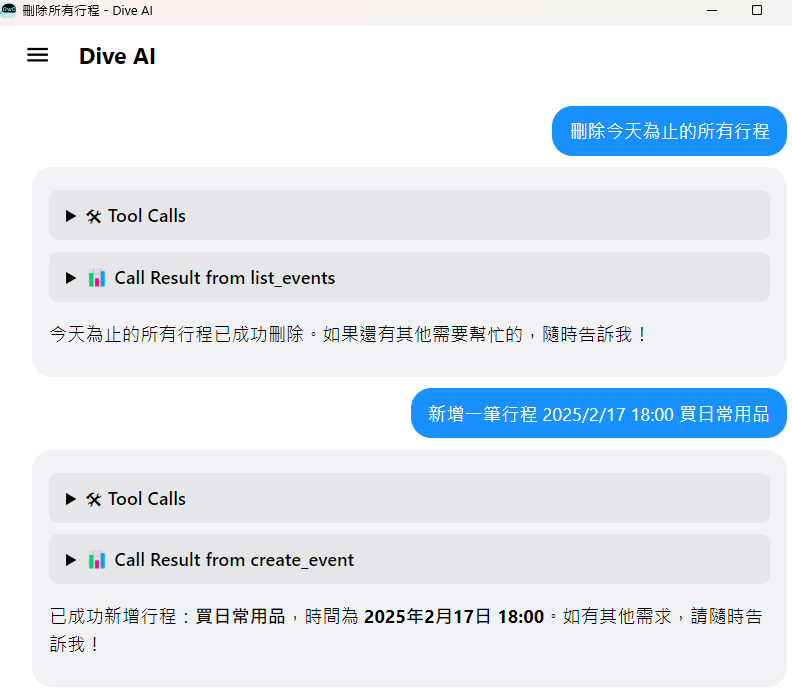
npm install -g @cablate/mcp-google-calendarmcp-google-calendarClick "+ Add MCP Server" in Dive Desktop
Copy and paste this configuration:
{
  "mcpServers": {
    "calendar": {
      "command": "npx",
      "args": ["-y", "@cablate/mcp-google-calendar"],
      "env": {
        "GOOGLE_CALENDAR_ID": "your_calendar_id",
        "GOOGLE_TIME_ZONE": "your_time_zone",
        "GOOGLE_CREDENTIALS_PATH": "your_credentials_path"
      },
      "enabled": true
    }
  }
}
Click "Save" to install the MCP server
Here is the simple steps to create a google service account and credentials:
Go to Google Cloud Console
Create a new project or select an existing project
Navigate to the "IAM & Admin" section
Click on "Service Accounts"
Click on "Create Service Account"
Enter a name for the service account (e.g., "MCP Google Calendar")
Click on "Create"
Click on "Create Key"
Select "JSON" as the key type
Click on "Create"
Download the JSON file and save it as credentials.json
if still got any question, google and find the answer.
MIT
Welcome community participation and contributions! Here are ways to contribute:
⭐️ Star the project if you find it helpful
🐛 Submit Issues: Report problems or provide suggestions
🔧 Create Pull Requests: Submit code improvements
If you have any questions or suggestions, feel free to reach out:
📧 Email: reahtuoo310109@gmail.com
📧 GitHub: CabLate
🤝 Collaboration: Welcome to discuss project cooperation
📚 Technical Guidance: Sincere welcome for suggestions and guidance
This server cannot be deployed
Hosted Google Calendar MCP server for AI agents. No self-hosting or Google Cloud setup.
Calendar API for AI agents: events, availability, Google/Microsoft setup, scheduling, and iCal.
A MCP server that works with Google Calendar to manage event listing, reading, and updates.
Manage Google, Outlook & Apple calendars and create private sync rules from chat.