---
title: "Postgres MCP Server Review - Supabase MCP Server"
description: "A deep-dive review of Supabase MCP Server, examining its hosted architecture, OAuth authentication, feature grouping, token efficiency, and security guardrails. Includes practical guidance for existing Supabase users and teams evaluating hosted Postgres providers."
---
_Last updated: Dec 22, 2025_
This is the second in a series of deep-dive reviews examining popular Postgres MCP servers. We're reviewing [Supabase MCP Server](https://github.com/supabase-community/supabase-mcp), a MCP server that gives AI assistants direct access to Supabase projects for database operations, schema changes, and project configuration.
- **GitHub Stars**
[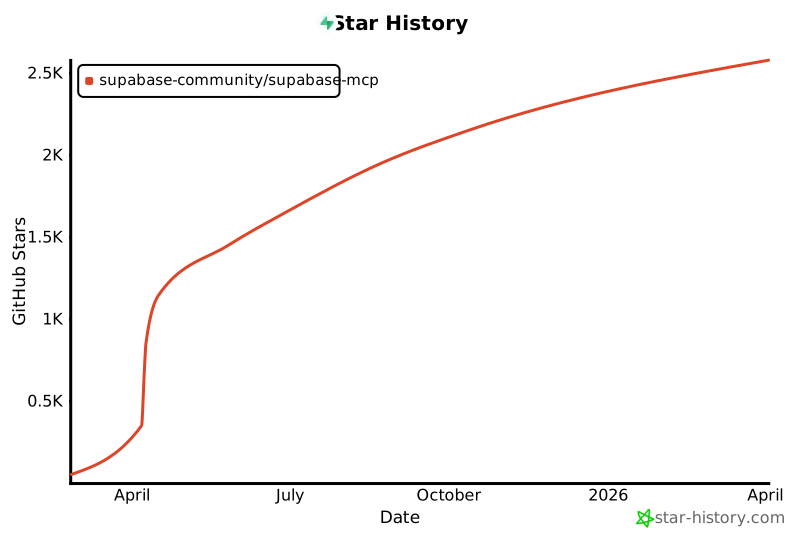](https://www.star-history.com/#supabase-community/supabase-mcp&type=date&legend=top-left)
- **License:** Apache-2.0
- **Language:** TypeScript
## Installation
<Note>While Supabase MCP offers both hosted and self-hosted versions, the majority of users use the hosted version. For this review, I tested the hosted implementation.</Note>
Installation is straightforward—follow [the official instructions](https://supabase.com/docs/guides/getting-started/mcp) to set up the MCP server.
On first connection, my Claude Code prompts for OAuth authentication to my Supabase account.
```bash
Supabase MCP Server │
│
Status: △ needs authentication │
URL: https://mcp.supabase.com/mcp │
Config location: /Users/tianzhou/.claude.json [project: /Users/tianzhou/Desktop/dbhub] │
│
❯ 1. Authenticate │
2. Disable
```
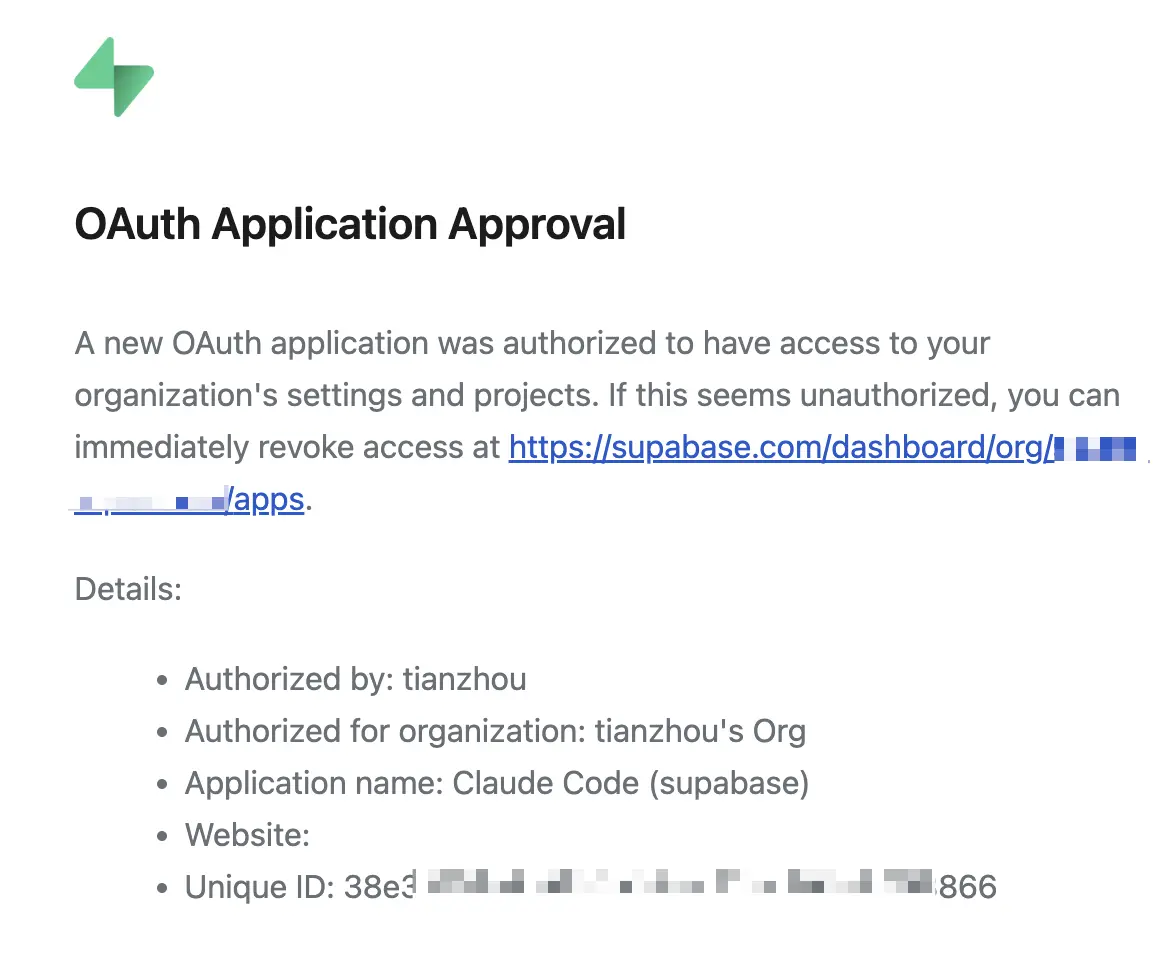
Once authenticated, I received an email confirming the OAuth app addition.
## Tools
Supabase MCP provides over 20 tools organized into feature groups. These tools serve as a wrapper around the [Supabase Management API](https://supabase.com/docs/reference/api/introduction), translating MCP tool calls into the corresponding API endpoints. For example:
- [execute_sql](https://github.com/supabase-community/supabase-mcp/blob/c5b2b044/packages/mcp-server-supabase/src/platform/api-platform.ts#L179) calls the [query](https://supabase.com/docs/reference/api/v1-run-a-query) endpoint
- [apply_migration](https://github.com/supabase-community/supabase-mcp/blob/c5b2b044/packages/mcp-server-supabase/src/platform/api-platform.ts#L218) calls the [migration](https://supabase.com/docs/reference/api/v1-upsert-a-migration) endpoint.
| Group | Key Tools | Purpose |
|-------|-----------|---------|
| **Account** | `list_projects`, `create_project`, `get_cost`, `confirm_cost` | Project and organization management, cost calculation |
| **Database** | `list_tables`, `execute_sql`, `apply_migration` | Schema inspection, SQL execution, migrations |
| **Debugging** | `get_logs`, `get_advisors` | Service logs, advisory security notices |
| **Development** | `generate_typescript_types`, API configuration | Type generation, API key retrieval |
| **Edge Functions** | Function deployment and management | Serverless function operations |
| **Branching** | Development branch operations | Testing changes before production (paid plans) |
| **Docs** | `search_docs` | Supabase documentation search |
| **Storage** (disabled) | File storage operations | Object storage management (enable with `features=storage`) |
## Token Efficiency
### Loading All Tools
The default configuration loads all 29 tools across all feature groups:
```bash
│ Tools for supabase (29 tools) │
│ │
│ ❯ 1. Search docs read-only │
│ 2. List organizations read-only │
│ 3. Get organization details read-only │
│ 4. List projects read-only │
│ ↓ 5. Get project details read-only
```
The token cost is 19.3k tokens:
```bash
> /context
⎿
Context Usage
⛁ ⛁ ⛁ ⛁ ⛁ ⛁ ⛁ ⛁ ⛁ ⛁ claude-sonnet-4-5-20250929 · 87k/200k tokens (43%)
⛁ ⛁ ⛁ ⛁ ⛁ ⛁ ⛁ ⛁ ⛀ ⛀
⛁ ⛀ ⛶ ⛶ ⛶ ⛶ ⛶ ⛶ ⛶ ⛶ ⛁ System prompt: 2.6k tokens (1.3%)
⛶ ⛶ ⛶ ⛶ ⛶ ⛶ ⛶ ⛶ ⛶ ⛶ ⛁ System tools: 15.9k tokens (7.9%)
⛶ ⛶ ⛶ ⛶ ⛶ ⛶ ⛶ ⛶ ⛶ ⛶ ⛁ MCP tools: 19.3k tokens (9.6%)
⛶ ⛶ ⛶ ⛶ ⛶ ⛶ ⛶ ⛶ ⛶ ⛶ ⛁ Custom agents: 247 tokens (0.1%)
⛶ ⛶ ⛶ ⛶ ⛶ ⛶ ⛶ ⛶ ⛶ ⛶ ⛁ Memory files: 2.4k tokens (1.2%)
⛶ ⛶ ⛶ ⛶ ⛶ ⛶ ⛶ ⛝ ⛝ ⛝ ⛁ Messages: 1.3k tokens (0.6%)
⛝ ⛝ ⛝ ⛝ ⛝ ⛝ ⛝ ⛝ ⛝ ⛝ ⛶ Free space: 113k (56.6%)
⛝ ⛝ ⛝ ⛝ ⛝ ⛝ ⛝ ⛝ ⛝ ⛝ ⛝ Autocompact buffer: 45.0k tokens (22.5%)
```
### Selecting Specific Feature Groups
A more efficient approach is to specify only the [feature groups](https://github.com/supabase-community/supabase-mcp#feature-groups) you need. For example, if you only need database operations and documentation search:
```bash
https://mcp.supabase.com/mcp?features=database,docs
```
This configuration loads just 6 tools and reduces token usage to 4.2k tokens—a 4.6x reduction:
```bash
> /context
⎿
Context Usage
⛁ ⛁ ⛁ ⛁ ⛁ ⛁ ⛁ ⛁ ⛁ ⛁ claude-sonnet-4-5-20250929 · 72k/200k tokens (36%)
⛁ ⛀ ⛁ ⛀ ⛶ ⛶ ⛶ ⛶ ⛶ ⛶
⛶ ⛶ ⛶ ⛶ ⛶ ⛶ ⛶ ⛶ ⛶ ⛶ ⛁ System prompt: 2.7k tokens (1.3%)
⛶ ⛶ ⛶ ⛶ ⛶ ⛶ ⛶ ⛶ ⛶ ⛶ ⛁ System tools: 15.9k tokens (7.9%)
⛶ ⛶ ⛶ ⛶ ⛶ ⛶ ⛶ ⛶ ⛶ ⛶ ⛁ MCP tools: 4.2k tokens (2.1%)
⛶ ⛶ ⛶ ⛶ ⛶ ⛶ ⛶ ⛶ ⛶ ⛶ ⛁ Custom agents: 247 tokens (0.1%)
⛶ ⛶ ⛶ ⛶ ⛶ ⛶ ⛶ ⛶ ⛶ ⛶ ⛁ Memory files: 2.4k tokens (1.2%)
⛶ ⛶ ⛶ ⛶ ⛶ ⛶ ⛶ ⛝ ⛝ ⛝ ⛁ Messages: 1.3k tokens (0.6%)
⛝ ⛝ ⛝ ⛝ ⛝ ⛝ ⛝ ⛝ ⛝ ⛝ ⛶ Free space: 128k (64.1%)
⛝ ⛝ ⛝ ⛝ ⛝ ⛝ ⛝ ⛝ ⛝ ⛝ ⛝ Autocompact buffer: 45.0k tokens (22.5%)
MCP tools · /mcp
└ mcp__supabase__search_docs (supabase): 1.1k tokens
└ mcp__supabase__list_tables (supabase): 640 tokens
└ mcp__supabase__list_extensions (supabase): 596 tokens
└ mcp__supabase__list_migrations (supabase): 596 tokens
└ mcp__supabase__apply_migration (supabase): 668 tokens
└ mcp__supabase__execute_sql (supabase): 657 tokens
```
## Security
Database MCP servers face a fundamental challenge: **LLMs cannot distinguish between instructions and data**. In July 2025, security researchers demonstrated this with the ["lethal trifecta"](https://simonwillison.net/2025/Jul/6/supabase-mcp-lethal-trifecta/) attack—a prompt injection vulnerability affecting all database MCP servers, not just Supabase. This is an industry-wide problem with no complete solution.
Supabase has implemented several mitigations and prominently features [security best practices](https://supabase.com/docs/guides/getting-started/mcp#recommendations) in their documentation. Key configuration options include:
**Project Scoping** — Restricts operations to a single project:
```json
"url": "https://mcp.supabase.com/mcp?project_ref=your_dev_project"
```
**Read-Only Mode** — Blocks destructive operations using a special `supabase_read_only_user`:
```json
"url": "https://mcp.supabase.com/mcp?read_only=true"
```
**Feature Group Restrictions** — Reduces attack surface by limiting available tools:
```json
"url": "https://mcp.supabase.com/mcp?features=database,docs"
```
## Summary
**Supabase MCP Server** isn't a general-purpose PostgreSQL MCP server—it's a management interface specifically for Supabase projects. The hosted architecture, OAuth authentication, and Supabase-specific features (branching, Edge Functions) only work with Supabase, so this is for teams already using the platform.
### The Good
- **Simple setup**: Add one JSON configuration block and authenticate via OAuth 2.1 with automatic token refresh. No binary downloads, no local servers, no dependency management, no hardcoded credentials. Most database MCP servers still require manual credential management in config files.
- **Better security defaults**: While prompt injection attacks affect all database MCP servers, Supabase implements more security guardrails than most. OAuth authentication with project scoping prevents cross-project access. Read-only mode uses a dedicated `supabase_read_only_user` (not just query filtering).
### The Bad
- **Supabase lock-in**: Can't connect to external PostgreSQL instances, other cloud providers, or on-premise databases. Your data must be in Supabase.
- **Feature group granularity**: Token-conscious users may want to load individual tools rather than entire feature groups. The `features=database` group loads 6 tools (4.2k tokens) when you might only need `execute_sql`.
- **Beta API and missing safeguards**: Some Management API endpoints it depends on like `execute_sql` are still tagged as beta and lack common safety parameters like row limits and timeouts.
### Should You Use It?
**If you're already using Supabase:**
The MCP server is useful for AI-assisted schema design, migrations, and project management. The Supabase-specific features (branching, Edge Functions, TypeScript type generation) aren't available in generic servers. Follow the security best practices—use `read_only=true`, restrict to specific projects with `project_ref`, and limit feature groups to reduce attack surface.
**If you're choosing a hosted Postgres provider:**
Supabase MCP is a differentiator worth considering. It implements more security guardrails than most database MCP servers. While prompt injection remains unsolved industry-wide, the MCP integration is a factor to weigh when comparing Postgres providers—just understand the inherent risks and platform lock-in.
---
**Postgres MCP Server Review Series:**
1. [MCP Toolbox for Databases](/blog/postgres-mcp-server-review-mcp-toolbox) - Google's multi-database MCP server with 40+ data source support
2. **Supabase MCP Server** (this article) - Hosted MCP server for Supabase projects
3. [DBHub](/blog/postgres-mcp-server-review-dbhub) - Minimal, vendor-neutral MCP server for PostgreSQL, MySQL, SQL Server, MariaDB, and SQLite
