# Nova - Customization/Notifications
*Source: https://nova.laravel.com/docs/v5/customization/notifications*
---
- [Community](https://discord.com/invite/laravel)
- [Blog](https://blog.laravel.com)
##### Get Started
- [Installation](/docs/v5/installation)
- [Release Notes](/docs/v5/releases)
- [Upgrade Guide](/docs/v5/upgrade)
##### Resources
- [The Basics](/docs/v5/resources/the-basics)
- [Fields](/docs/v5/resources/fields)
- [Dependent Fields](/docs/v5/resources/dependent-fields)
- [Date Fields](/docs/v5/resources/date-fields)
- [File Fields](/docs/v5/resources/file-fields)
- [Repeater Fields](/docs/v5/resources/repeater-fields)
- [Field Panels](/docs/v5/resources/panels)
- [Relationships](/docs/v5/resources/relationships)
- [Validation](/docs/v5/resources/validation)
- [Authorization](/docs/v5/resources/authorization)
##### Search
- [The Basics](/docs/v5/search/the-basics)
- [Global Search](/docs/v5/search/global-search)
- [Scout Integration](/docs/v5/search/scout-integration)
##### Filters
- [Defining Filters](/docs/v5/filters/defining-filters)
- [Registering Filters](/docs/v5/filters/registering-filters)
##### Lenses
- [Defining Lenses](/docs/v5/lenses/defining-lenses)
- [Registering Lenses](/docs/v5/lenses/registering-lenses)
##### Actions
- [Defining Actions](/docs/v5/actions/defining-actions)
- [Registering Actions](/docs/v5/actions/registering-actions)
##### Metrics
- [Defining Metrics](/docs/v5/metrics/defining-metrics)
- [Registering Metrics](/docs/v5/metrics/registering-metrics)
##### Digging Deeper
- [Dashboards](/docs/v5/customization/dashboards)
- [Menus](/docs/v5/customization/menus)
- [Notifications](/docs/v5/customization/notifications)
- [Authentication](/docs/v5/customization/authentication)
- [Impersonation](/docs/v5/customization/impersonation)
- [Tools](/docs/v5/customization/tools)
- [Resource Tools](/docs/v5/customization/resource-tools)
- [Cards](/docs/v5/customization/cards)
- [Fields](/docs/v5/customization/fields)
- [Filters](/docs/v5/customization/filters)
- [CSS / JavaScript](/docs/v5/customization/frontend)
- [Assets](/docs/v5/customization/assets)
- [Localization](/docs/v5/customization/localization)
- [Stubs](/docs/v5/customization/stubs)
On this page
- [Overview](#overview)
- [Sending Notifications](#sending-notifications)
- [Opening Remote Action URLs in New Tabs](#opening-remote-action-urls-in-new-tabs)
- [Notification Icons](#notification-icons)
- [Disabling Notifications](#disabling-notifications)
- [Enabling Unread Notifications Count](#enabling-unread-notifications-count)
Digging Deeper
# Notifications
Learn how to send notifications to Nova users.
## [](#overview) Overview
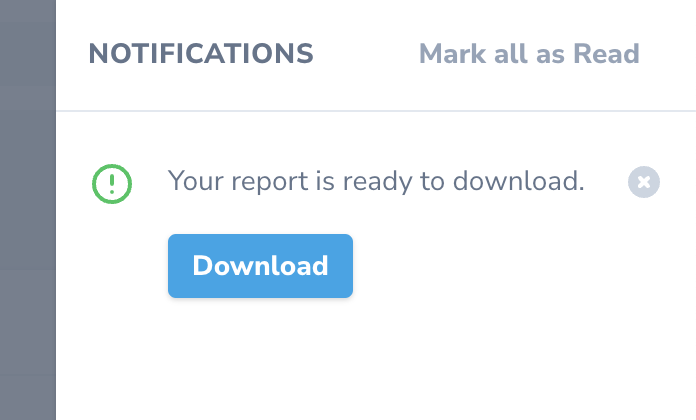
Nova notifications allow you to notify Nova users of events within your application, such as a report being ready to download or of an invoice that needs attention. Nova notifications are displayed within a slide-out menu that can be accessed via the “bell” icon within Nova’s top navigation menu.
## [](#sending-notifications) Sending Notifications
To send a notification, you simply need to send a `NovaNotification` instance to a user’s `notify` method. Of course, before getting started, you should ensure that your user model is [notifiable](https://laravel.com/docs/notifications).
Nova notifications may be generated via the `NovaNotification` class, which provides convenient methods like `message`, `action`, `icon`, and `type`. The currently supported notification types include `success`, `error`, `warning`, and `info`:
Copy
Ask AI
```
use Laravel\Nova\Notifications\NovaNotification;
use Laravel\Nova\URL;
// ...
$request->user()->notify(
NovaNotification::make()
->message('Your report is ready to download.')
->action('Download', URL::remote('https://example.com/report.pdf'))
->icon('download')
->type('info')
);
```
You may also send a Nova notification by including the `NovaChannel` in the array of channels returned by a notification’s `via` method:
Copy
Ask AI
```
use Laravel\Nova\Notifications\NovaNotification;
use Laravel\Nova\Notifications\NovaChannel;
use Laravel\Nova\URL;
// ...
/**
* Get the notification's delivery channels
*
* @param mixed $notifiable
* @return array
*/
public function via($notifiable)
{
return [NovaChannel::class];
}
/**
* Get the nova representation of the notification
*
* @return array
*/
public function toNova()
{
return (new NovaNotification)
->message('Your report is ready to download.')
->action('Download', URL::remote('https://example.com/report.pdf'))
->icon('download')
->type('info');
}
```
#### [](#opening-remote-action-urls-in-new-tabs) Opening Remote Action URLs in New Tabs
When defining a notification action, the `openInNewTab` method may be invoked to instruct Nova to open the given URL in a new browser tab:
Copy
Ask AI
```
return (new NovaNotification)
->action(
'Download', URL::remote('https://example.com/report.pdf')
)->openInNewTab()
```
#### [](#notification-icons) Notification Icons
Nova utilizes the free [Heroicons](https://heroicons.com/) icon set by [Steve Schoger](https://twitter.com/steveschoger). Therefore, you may simply specify the name of one of these icons when providing the icon name to the Nova notification’s `icon` method.
## [](#disabling-notifications) Disabling Notifications
If you wish to completely disable notifications inside Nova, you can call the `withoutNotifications` method from your `App/Providers/NovaServiceProvider`:
app/Providers/NovaServiceProvider.php
Copy
Ask AI
```
/**
* Boot any application services.
*/
public function boot(): void
{
parent::boot();
Nova::withoutNotificationCenter();
}
```
## [](#enabling-unread-notifications-count) Enabling Unread Notifications Count
By default, Nova shows a visual indicator when there are unread notifications inside the notification center.
If you would like Nova to show the number of unread notifications, you can call the `showUnreadCountInNotificationCenter` method from your `App/Providers/NovaServiceProvider`:
app/Providers/NovaServiceProvider.php
Copy
Ask AI
```
/**
* Boot any application services.
*/
public function boot(): void
{
parent::boot();
Nova::showUnreadCountInNotificationCenter();
}
```
Was this page helpful?
YesNo
[Menus](/docs/v5/customization/menus)[Authentication](/docs/v5/customization/authentication)
⌘I
