# Nova - Customization/Menus
*Source: https://nova.laravel.com/docs/v5/customization/menus*
---
- [Community](https://discord.com/invite/laravel)
- [Blog](https://blog.laravel.com)
##### Get Started
- [Installation](/docs/v5/installation)
- [Release Notes](/docs/v5/releases)
- [Upgrade Guide](/docs/v5/upgrade)
##### Resources
- [The Basics](/docs/v5/resources/the-basics)
- [Fields](/docs/v5/resources/fields)
- [Dependent Fields](/docs/v5/resources/dependent-fields)
- [Date Fields](/docs/v5/resources/date-fields)
- [File Fields](/docs/v5/resources/file-fields)
- [Repeater Fields](/docs/v5/resources/repeater-fields)
- [Field Panels](/docs/v5/resources/panels)
- [Relationships](/docs/v5/resources/relationships)
- [Validation](/docs/v5/resources/validation)
- [Authorization](/docs/v5/resources/authorization)
##### Search
- [The Basics](/docs/v5/search/the-basics)
- [Global Search](/docs/v5/search/global-search)
- [Scout Integration](/docs/v5/search/scout-integration)
##### Filters
- [Defining Filters](/docs/v5/filters/defining-filters)
- [Registering Filters](/docs/v5/filters/registering-filters)
##### Lenses
- [Defining Lenses](/docs/v5/lenses/defining-lenses)
- [Registering Lenses](/docs/v5/lenses/registering-lenses)
##### Actions
- [Defining Actions](/docs/v5/actions/defining-actions)
- [Registering Actions](/docs/v5/actions/registering-actions)
##### Metrics
- [Defining Metrics](/docs/v5/metrics/defining-metrics)
- [Registering Metrics](/docs/v5/metrics/registering-metrics)
##### Digging Deeper
- [Dashboards](/docs/v5/customization/dashboards)
- [Menus](/docs/v5/customization/menus)
- [Notifications](/docs/v5/customization/notifications)
- [Authentication](/docs/v5/customization/authentication)
- [Impersonation](/docs/v5/customization/impersonation)
- [Tools](/docs/v5/customization/tools)
- [Resource Tools](/docs/v5/customization/resource-tools)
- [Cards](/docs/v5/customization/cards)
- [Fields](/docs/v5/customization/fields)
- [Filters](/docs/v5/customization/filters)
- [CSS / JavaScript](/docs/v5/customization/frontend)
- [Assets](/docs/v5/customization/assets)
- [Localization](/docs/v5/customization/localization)
- [Stubs](/docs/v5/customization/stubs)
On this page
- [Overview](#overview)
- [Customizing the Main Menu](#customizing-the-main-menu)
- [Customizing the User Menu](#customizing-the-user-menu)
- [Appending / Prepending to the Menu](#appending-%2F-prepending-to-the-menu)
- [Menu Sections](#menu-sections)
- [Menu Section Icons](#menu-section-icons)
- [Menu Section Badges](#menu-section-badges)
- [Conditional Badges](#conditional-badges)
- [Collapsable Menu Sections](#collapsable-menu-sections)
- [Menu Groups](#menu-groups)
- [Collapsable Menu Groups](#collapsable-menu-groups)
- [Menu Items](#menu-items)
- [Resource Menu Items](#resource-menu-items)
- [Filtered Resource Menu Items](#filtered-resource-menu-items)
- [Using Multiple Filters With Filtered Resource Menu Items](#using-multiple-filters-with-filtered-resource-menu-items)
- [Passing Constructor Parameters to Filtered Resource Menu Items](#passing-constructor-parameters-to-filtered-resource-menu-items)
- [Lens Menu Items](#lens-menu-items)
- [Dashboard Menu Items](#dashboard-menu-items)
- [External Link Menu Items](#external-link-menu-items)
- [Menu Item Badges](#menu-item-badges)
- [Conditional Badges](#conditional-badges-2)
- [Authorizing Menu Items](#authorizing-menu-items)
Digging Deeper
# Menus
Nova menus provide a convenient way to customize the main and user menus.
## [](#overview) Overview
By default, Nova’s main left-side navigation menu displays all of your application’s dashboards, resources, and any custom tools you have registered.
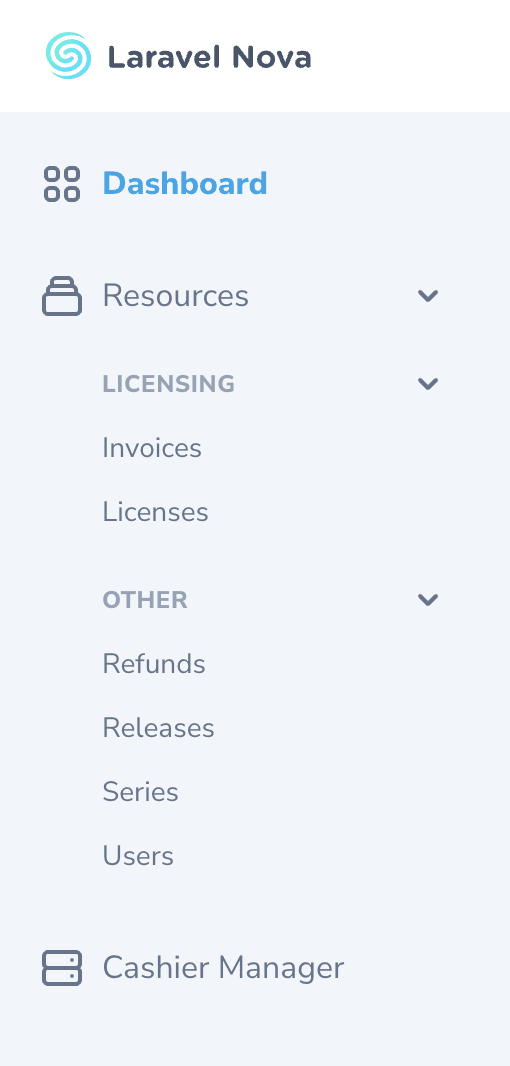
When rendering the main menu, Nova will order your dashboards according to the order in which they are returned by the `dashboards` method within your application’s `App\Providers\NovaServiceProvider` class.
Nova will also automatically group your resources under the default “Resources” menu section according to the [`group` property defined in the `Resource` class](./../resources/the-basics#grouping-resources). In addition, any custom tools you have registered will be listed in the order they are defined within your application’s `NovaServiceProvider`.
### [](#customizing-the-main-menu) Customizing the Main Menu
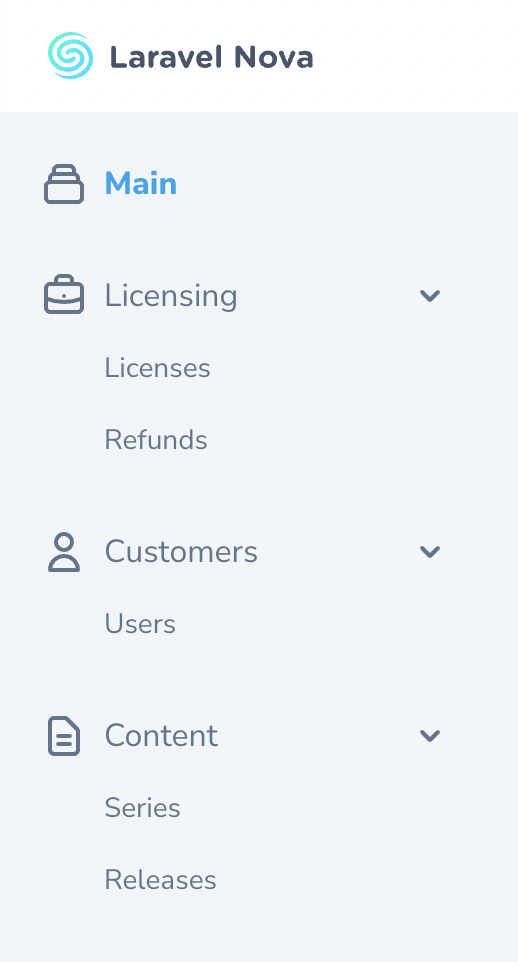
While Nova’s default main menu is sufficient for most applications, there are times you may wish to completely customize the menu based on your own preferences. For that reason, Nova allows you to define your own main menu via the `Nova::mainMenu` method. Typically, this method should be invoked within the `boot` method of your application’s `App\Providers\NovaServiceProvider` class:
app/Providers/NovaServiceProvider.php
Copy
Ask AI
```
use Illuminate\Http\Request;
use Laravel\Nova\Menu\Menu;
use Laravel\Nova\Menu\MenuItem;
use Laravel\Nova\Menu\MenuSection;
use Laravel\Nova\Nova;
// ...
/**
* Bootstrap any application services.
*/
public function boot(): void
{
parent::boot();
Nova::mainMenu(function (Request $request) {
return [
MenuSection::dashboard(Main::class)->icon('chart-bar'),
MenuSection::make('Customers', [
MenuItem::resource(User::class),
MenuItem::resource(License::class),
])->icon('user')->collapsable(),
MenuSection::make('Content', [
MenuItem::resource(Series::class),
MenuItem::resource(Release::class),
])->icon('document-text')->collapsable(),
];
});
}
```
### [](#customizing-the-user-menu) Customizing the User Menu
Nova also allows you to customize the “user” menu found in the top-right navigation area. You can customize Nova’s user menu by calling the `Nova::userMenu` method. This method is typically invoked within the `boot` method of your application’s `App\Providers\NovaServiceProvider`:
app/Providers/NovaServiceProvider.php
Copy
Ask AI
```
use Illuminate\Http\Request;
use Laravel\Nova\Menu\Menu;
use Laravel\Nova\Menu\MenuItem;
use Laravel\Nova\Nova;
// ...
/**
* Bootstrap any application services.
*/
public function boot(): void
{
parent::boot();
Nova::userMenu(function (Request $request, Menu $menu) {
if ($request->user()->subscribed()) {
$menu->append(
MenuItem::make('Subscriber Dashboard')
->path('/subscribers/dashboard')
);
}
$menu->prepend(
MenuItem::make(
'My Profile',
"/resources/users/{$request->user()->getKey()}"
)
);
return $menu;
});
}
```
By default, Nova is configured to display a “logout” link in the user menu. This link may not be removed.
Nova’s user menu only supports `MenuItem` objects. Using `MenuSection` or `MenuGroup` inside the user menu will throw an `Exception`.
### [](#appending-/-prepending-to-the-menu) Appending / Prepending to the Menu
You may call the `append` and `prepend` methods on a `Menu` instance to prepend or append new items to the. These methods are typically most helpful when customizing the user menu, since you often do not want to completely replace the existing menu:
app/Providers/NovaServiceProvider.php
Copy
Ask AI
```
use Illuminate\Http\Request;
use Laravel\Nova\Menu\Menu;
use Laravel\Nova\Menu\MenuItem;
use Laravel\Nova\Nova;
// ...
Nova::userMenu(function (Request $request, Menu $menu) {
return $menu
->append(MenuItem::externalLink('API Docs', 'http://example.com'))
->prepend(MenuItem::link('My Profile', '/resources/users/'.$request->user()->getKey()));
});
```
## [](#menu-sections) Menu Sections
Menu sections represent a top-level navigation item and are typically displayed with an corresponding icon representing the types of items in the menu. You can create a new menu section by calling the `MenuSection::make` method. This method accepts the name of the menu section and array of menu groups / items that should be placed within the section:
app/Providers/NovaServiceProvider.php
Copy
Ask AI
```
use App\Nova\Dashboards\Sales;
use App\Nova\Lenses\MostValuableUsers;
use App\Nova\License;
use App\Nova\Refund;
use App\Nova\User;
// ...
Nova::mainMenu(function (Request $request, Menu $menu) {
return [
MenuSection::make('Business', [
MenuGroup::make('Licensing', [
MenuItem::dashboard(Sales::class),
MenuItem::resource(License::class),
MenuItem::resource(Refund::class),
MenuItem::externalLink('Stripe Payments', 'https://dashboard.stripe.com/payments?status%5B%5D=successful'),
]),
MenuGroup::make('Customers', [
MenuItem::lens(User::class, MostValuableUsers::class),
]),
]),
];
});
```
Instead of displaying a list of links, you may indicate that a menu section should just be a large, emphasized link to another location. To accomplish this, you may invoke the `path` method when defining the menu section:
Copy
Ask AI
```
use Laravel\Nova\Menu\MenuSection;
// ...
MenuSection::make('Dashboard')->path('/dashboards/main');
```
For convenience, if you are only creating a menu section to serve as a large, emphasized link to a Nova dashboard, you may invoke the `MenuSection::dashboard` method:
Copy
Ask AI
```
use App\Nova\Dashboards\Sales;
use Laravel\Nova\Menu\MenuSection;
// ...
MenuSection::dashboard(Sales::class);
```
Since you will often be creating links to Nova resources, you may use the `resource` method to quickly create a link to the appropriate path for a given resource:
Copy
Ask AI
```
use App\Nova\User;
use Larave
*[Content truncated for length]*
