
Laravel 12 Docs MCP Server
by brianirish
- laravel-docs-mcp
- docs
- external
- nova
- customization
dashboards.md•9.86 kB
# Nova - Customization/Dashboards
*Source: https://nova.laravel.com/docs/v5/customization/dashboards*
---
- [Community](https://discord.com/invite/laravel)
- [Blog](https://blog.laravel.com)
##### Get Started
- [Installation](/docs/v5/installation)
- [Release Notes](/docs/v5/releases)
- [Upgrade Guide](/docs/v5/upgrade)
##### Resources
- [The Basics](/docs/v5/resources/the-basics)
- [Fields](/docs/v5/resources/fields)
- [Dependent Fields](/docs/v5/resources/dependent-fields)
- [Date Fields](/docs/v5/resources/date-fields)
- [File Fields](/docs/v5/resources/file-fields)
- [Repeater Fields](/docs/v5/resources/repeater-fields)
- [Field Panels](/docs/v5/resources/panels)
- [Relationships](/docs/v5/resources/relationships)
- [Validation](/docs/v5/resources/validation)
- [Authorization](/docs/v5/resources/authorization)
##### Search
- [The Basics](/docs/v5/search/the-basics)
- [Global Search](/docs/v5/search/global-search)
- [Scout Integration](/docs/v5/search/scout-integration)
##### Filters
- [Defining Filters](/docs/v5/filters/defining-filters)
- [Registering Filters](/docs/v5/filters/registering-filters)
##### Lenses
- [Defining Lenses](/docs/v5/lenses/defining-lenses)
- [Registering Lenses](/docs/v5/lenses/registering-lenses)
##### Actions
- [Defining Actions](/docs/v5/actions/defining-actions)
- [Registering Actions](/docs/v5/actions/registering-actions)
##### Metrics
- [Defining Metrics](/docs/v5/metrics/defining-metrics)
- [Registering Metrics](/docs/v5/metrics/registering-metrics)
##### Digging Deeper
- [Dashboards](/docs/v5/customization/dashboards)
- [Menus](/docs/v5/customization/menus)
- [Notifications](/docs/v5/customization/notifications)
- [Authentication](/docs/v5/customization/authentication)
- [Impersonation](/docs/v5/customization/impersonation)
- [Tools](/docs/v5/customization/tools)
- [Resource Tools](/docs/v5/customization/resource-tools)
- [Cards](/docs/v5/customization/cards)
- [Fields](/docs/v5/customization/fields)
- [Filters](/docs/v5/customization/filters)
- [CSS / JavaScript](/docs/v5/customization/frontend)
- [Assets](/docs/v5/customization/assets)
- [Localization](/docs/v5/customization/localization)
- [Stubs](/docs/v5/customization/stubs)
On this page
- [Overview](#overview)
- [Default Dashboard](#default-dashboard)
- [Defining Dashboards](#defining-dashboards)
- [Dashboard Names](#dashboard-names)
- [Dashboard URI Keys](#dashboard-uri-keys)
- [Registering Dashboards](#registering-dashboards)
- [Customizing Dashboard Menus](#customizing-dashboard-menus)
- [Refreshing Dashboard Metrics](#refreshing-dashboard-metrics)
- [Authorization](#authorization)
Digging Deeper
# Dashboards
Nova dashboards provide a convenient way to build information overview pages that contain a variety of metrics and cards.
## [](#overview) Overview
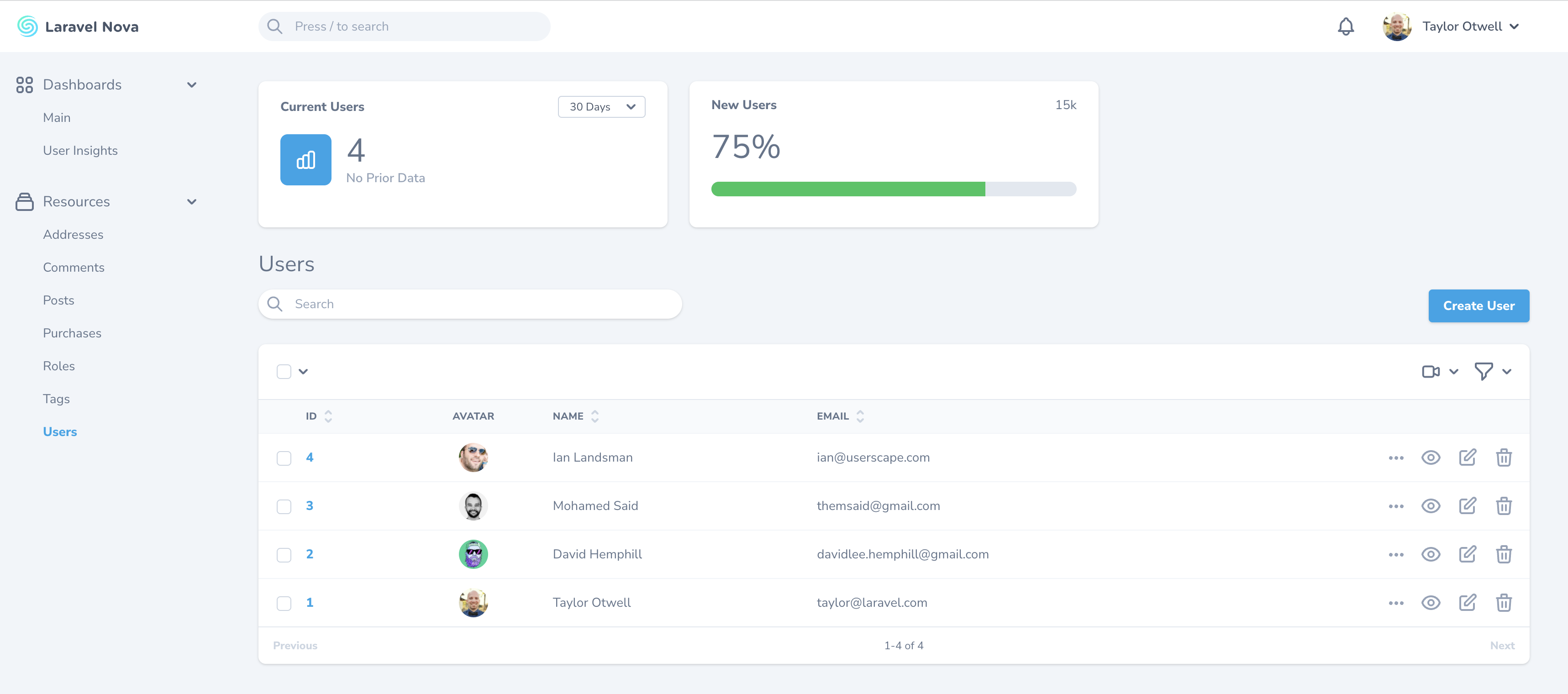
Nova dashboards provide a convenient way to build information overview pages that contain a variety of [metrics](./../metrics/defining-metrics) and [cards](../customization/cards).
### [](#default-dashboard) Default Dashboard
Nova ships with a default `App\Nova\Dashboards\Main` dashboard class containing a `cards` method. You can customize which cards are present on the default dashboard via this method:
app/Nova/Dashboards/Main.php
Copy
Ask AI
```
namespace App\Nova\Dashboards;
use Laravel\Nova\Cards\Help;
use Laravel\Nova\Dashboards\Main as Dashboard;
class Main extends Dashboard
{
/**
* Get the cards that should be displayed on the Nova dashboard.
*
* @return array<int, \Laravel\Nova\Card>
*/
public function cards(): array
{
return [
new Help,
];
}
}
```
More information regarding dashboard metrics can be found [within our documentation on metrics](../metrics/registering-metrics#dashboard-metrics).
## [](#defining-dashboards) Defining Dashboards
Custom dashboards may be generated using the `nova:dashboard` Artisan command. By default, all new dashboards will be placed in the `app/Nova/Dashboards` directory:
Copy
Ask AI
```
php artisan nova:dashboard UserInsights
```
Once your dashboard class has been generated, you’re ready to customize it. Each dashboard class contains a `cards` method. This method should return an array of card or metric classes:
app/Nova/Dashboards/UserInsights.php
Copy
Ask AI
```
namespace App\Nova\Dashboards;
use Laravel\Nova\Dashboard;
use App\Nova\Metrics\TotalUsers;
use App\Nova\Metrics\UsersOverTime;
class UserInsights extends Dashboard
{
/**
* Get the cards for the dashboard.
*
* @return array<int, \Laravel\Nova\Card>
*/
public function cards(): array
{
return [
TotalUsers::make(),
UsersOverTime::make(),
];
}
}
```
#### [](#dashboard-names) Dashboard Names
By default, Nova will use the dashboard’s class name to determine the displayable name of your dashboard that should be placed in the left-side navigation bar. You may customize the name of the dashboard displayed in the left-side navigation bar by overriding the `name` method within your dashboard class:
app/Nova/Dashboards/UserInsights.php
Copy
Ask AI
```
/**
* Get the displayable name of the dashboard.
*
* @return \Stringable|string
*/
public function name()
{
return 'User Insights';
}
```
#### [](#dashboard-uri-keys) Dashboard URI Keys
If you need to change the URI of the dashboard, you may override the dashboard class’ `uriKey` method. Of course, the URI represents the browser location that Nova will navigate to in when you click on the dashboard link in the left-side navigation bar:
app/Nova/Dashboards/UserInsights.php
Copy
Ask AI
```
/**
* Get the URI key of the dashboard.
*
* @return string
*/
public function uriKey()
{
return 'user-insights-improved';
}
```
## [](#registering-dashboards) Registering Dashboards
To register a dashboard, add the dashboard to the array returned by the `dashboards` method of your application’s `App/Providers/NovaServiceProvider` class. Once you have added the dashboard to this method, it will become available for navigation in Nova’s left-side navigation bar:
app/Providers/NovaServiceProvider.php
Copy
Ask AI
```
use App\Nova\Dashboards\Main;
use App\Nova\Dashboards\UserInsights;
// ...
/**
* Get the dashboards that should be listed in the Nova sidebar.
*
* @return array<int, \Laravel\Nova\Dashboard>
*/
protected function dashboards(): array
{
return [
Main::make(),
UserInsights::make(),
];
}
```
#### [](#customizing-dashboard-menus) Customizing Dashboard Menus
You can customize the dashboard’s menu by defining a `menu` method on your dashboard class:
app/Nova/Dashboards/UserInsights.php
Copy
Ask AI
```
use Illuminate\Http\Request;
// ...
/**
* Get the menu that should represent the dashboard.
*
* @return \Laravel\Nova\Menu\MenuItem
*/
public function menu(Request $request)
{
return parent::menu($request)->withBadge(function () {
return 'NEW!';
});
}
```
Please refer to the documentation on [menu customization](./menus) for more information.
### [](#refreshing-dashboard-metrics) Refreshing Dashboard Metrics
Occasionally, you may wish to refresh all the metrics’ values inside your dashboard. You may do this by enabling the refresh button by using the `showRefreshButton` method on the dashboard instance:
app/Providers/NovaServiceProvider.php
Copy
Ask AI
```
use App\Nova\Dashboards\Main;
use App\Nova\Dashboards\UserInsights;
// ...
/**
* Get the dashboards that should be listed in the Nova sidebar.
*
* @return array<int, \Laravel\Nova\Dashboard>
*/
protected function dashboards(): array
{
return [
Main::make(),
UserInsights::make()->showRefreshButton(),
];
}
```
### [](#authorization) Authorization
If you would like to only expose a given dashboard to certain users, you may invoke the `canSee` method when registering your dashboard. The `canSee` method accepts a closure which should return `true` or `false`. The closure will receive the incoming HTTP request:
app/Providers/NovaServiceProvider.php
Copy
Ask AI
```
use App\Models\User;
use App\Nova\Dashboards\Main;
use App\Nova\Dashboards\UserInsights;
// ...
/**
* Get the dashboards that should be listed in the Nova sidebar.
*
* @return array<int, \Laravel\Nova\Dashboard>
*/
protected function dashboards(): array
{
return [
Main::make(),
UserInsights::make()->canSee(function ($request) {
return $request->user()->can('viewUserInsights', User::class);
}),
];
}
```
In the example above, we are using Laravel’s `Authorizable` trait’s can method on our `User` model to determine if the authorized user is authorized for the `viewUserInsights` action. However, since proxying to authorization policy methods is a common use-case for `canSee`, you may use the `canSeeWhen` method to achieve the same behavior. The `canSeeWhen` method has the same method signature as the `Illuminate\Foundation\Auth\Access\Authorizable` trait’s `can` method:
app/Providers/NovaServiceProvider.php
Copy
Ask AI
```
use App\Models\User;
use App\Nova\Dashboards\Main;
use App\Nova\Dashboards\UserInsights;
// ...
/**
* Get the dashboards that should be listed in the Nova sidebar.
*
* @return array<int, \Laravel\Nova\Dashboard>
*/
protected function dashboards(): array
{
return [
Main::make(),
UserInsights::make()->canSeeWhen('viewUserInsights', User::class),
];
}
```
Was this page helpful?
YesNo
[Registering Metrics](/docs/v5/metrics/registering-metrics)[Menus](/docs/v5/customization/menus)
⌘I
Latest Blog Posts
- MCP Moves to the Linux Foundation: Neutral Stewardship for Agentic InfrastructureBy Om-Shree-0709 on .mcpanthropicLinux Foundation
MCP directory API
We provide all the information about MCP servers via our MCP API.
curl -X GET 'https://glama.ai/api/mcp/v1/servers/brianirish/laravel-docs-mcp'
If you have feedback or need assistance with the MCP directory API, please join our Discord server