
F
licenseNot graded
qualityD
maintenanceA secure Model Context Protocol server that manages time-based operations using timing attack protection and timelock encryption, allowing for timed interval management and secure data storage.
3
-

Crypto_MCP is a server for encryption, decryption, and hashing operations.
AES Encryption/Decryption: 128-bit AES with various modes (ECB, CBC, CFB, OFB, CTR), padding options, and formats (base64, hex)
DES Encryption/Decryption: 64-bit DES with multiple modes and format options
Hashing Algorithms: MD5, SHA1, SHA224, SHA256, SHA384, and SHA512
Click on "Install Server".
Wait a few minutes for the server to deploy. Once ready, it will show a "Started" state.
In the chat, type @ followed by the MCP server name and your instructions, e.g., "@Crypto_MCP encrypt this message with AES using CBC mode"
That's it! The server will respond to your query, and you can continue using it as needed.
Here is a step-by-step guide with screenshots.
A Model Context Protocol (MCP) server for encrypting/decrypting/algorithm/hash.
Related MCP server: Filesystem MCP Server
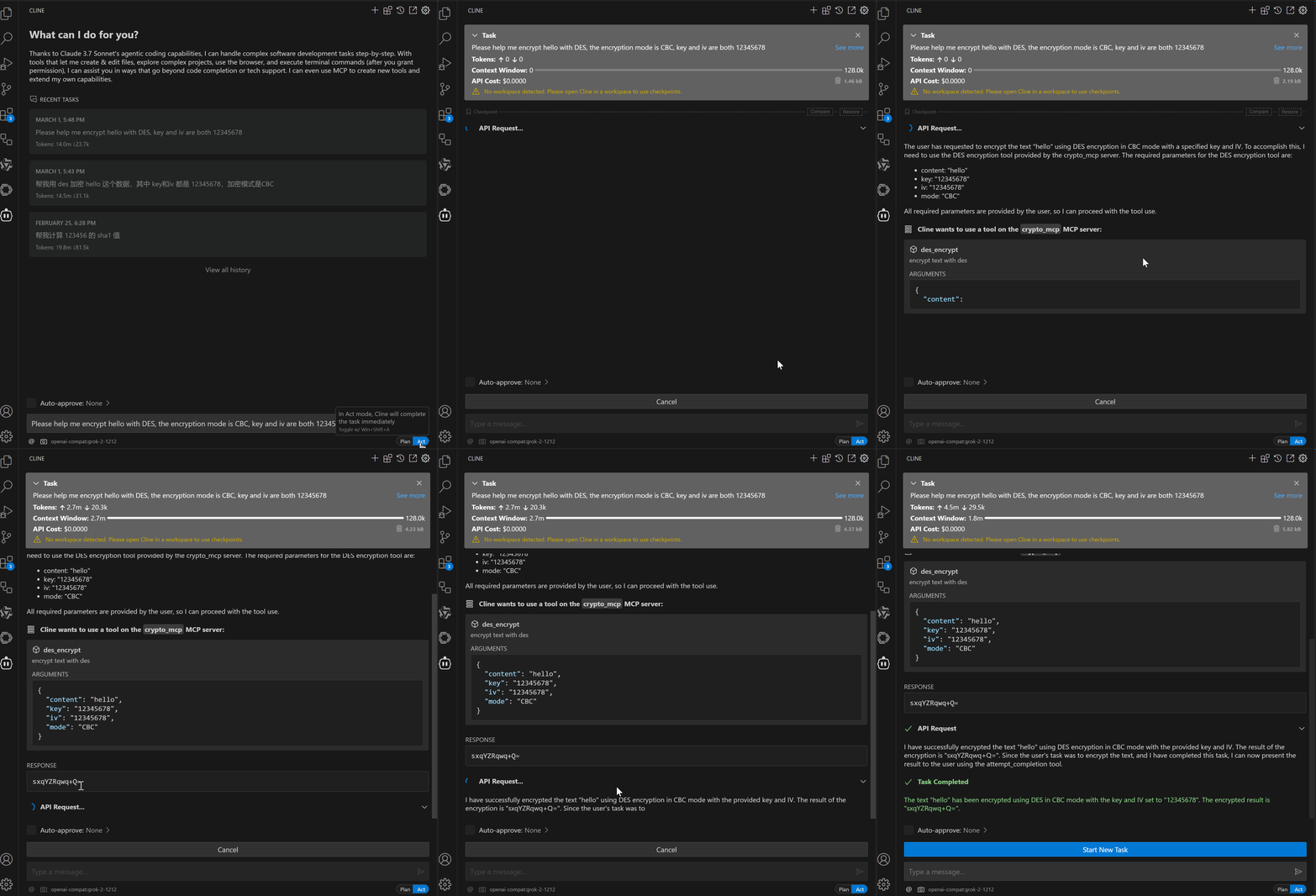
Support AES encryption and decryption (128 bits)
Support mode: ECB, CBC, CFB, OFB, CTR
Support padding mode: Pkcs7, Iso97971, AnsiX923, Iso10126, ZeroPadding, NoPadding.
Support output format: base64, hex
Support input format: base64, hex
Support MD5, SHA1, SHA256, SHA384, SHA512, SHA224 algorithm
Support DES encryption and decryption (64 bits)
Support mode: ECB, CBC, CFB, OFB, CTR
Support padding mode: Pkcs7, Iso97971, AnsiX923, Iso10126, ZeroPadding, NoPadding.
Support Base64 encode and decode
Support Hex encode and decode
Support more encryption and decryption algorithms
To install Crypto_MCP for Claude Desktop automatically via Smithery:
npx -y @smithery/cli install @1595901624/crypto-mcp --client claudeClone the Repository
git clone https://github.com/1595901624/crypto-mcp.gitInstall Dependencies
pnpm installBuild the Project
pnpm run buildAdd to your Claude Desktop MCP settings file
{
   "mcpServers": {
    "crypto-mcp": {
      "command": "node",
      "args": ["path/to/crypto-mcp/build/index.js"],
      "disabled": false,
      "autoApprove": []
    }
  }
}aes_encrypt: Encrypt text with AES
parameters:
text: The text to encrypt (Required)
key: The key to encrypt the text (optional, default is your-key-0123456)
padding: The padding mode (optional, default is Pkcs7)
outputFormat: The output format (optional, default is base64)
iv: The initialization vector (optional, default is your-iv-01234567)
mode: The mode to encrypt the text (optional, default is ECB)
aes_decrypt: Decrypt text with AES
parameters:
text: The text to decrypt (Required)
key: The key to decrypt the text (optional, default is your-key-0123456)
padding: The padding mode (optional, default is Pkcs7)
inputFormat: The input format (optional, default is base64)
iv: The initialization vector (optional, default is your-iv-01234567)
mode: The mode to decrypt the text (optional, default is ECB)
md5: Calculate MD5 hash of a string
parameters:
input: The input string to hash (Required)
sha1: Calculate SHA-1 hash of a string
parameters:
input: The input string to hash (Required)
sha256: Calculate SHA-256 hash of a string
parameters:
input: The input string to hash (Required)
sha384: Calculate SHA-384 hash of a string
parameters:
input: The input string to hash (Required)
sha512: Calculate SHA-512 hash of a string
parameters:
input: The input string to hash (Required)
sha224: Calculate SHA-224 hash of a string
parameters:
input: The input string to hash (Required)
des_encrypt: Encrypt text with DES
parameters:
text: The text to encrypt (Required)
key: The key to encrypt the text (optional, default is your-key)
padding: The padding mode (optional, default is Pkcs7)
outputFormat: The output format (optional, default is base64)
iv: The initialization vector (optional, default is your-iv-)
mode: The mode to encrypt the text (optional, default is ECB)
des_decrypt: Decrypt text with DES
parameters:
text: The text to decrypt (Required)
key: The key to decrypt the text (optional, default is your-key)
padding: The padding mode (optional, default is Pkcs7)
inputFormat: The input format (optional, default is base64)
iv: The initialization vector (optional, default is your-iv-)
mode: The mode to decrypt the text (optional, default is ECB)
base64_encode: Encode text to base64
parameters:
content: The text to encode (Required)
base64_decode: Decode base64 to text
parameters:
content: The base64 text to decode (Required)
hex_encode: Encode text to hex
parameters:
content: The text to encode (Required)
hex_decode: Decode hex to text
parameters:
content: The hex text to decode (Required)
# Install dependencies
npm install

# Build the project
npm run build

# Development with auto-rebuild
npm run watchThis project is licensed under the MIT License. See the LICENSE file for details.
decrypt text with aes
| Name | Required | Description | Default |
|---|---|---|---|
| content | Yes | text to encrypt and decrypt | |
| key | No | decrypt key, default is your-key-0123456 | |
| padding | No | padding mode, default is Pkcs7 | Pkcs7 |
| inputFormat | No | input format, default is base64 | base64 |
| iv | No | iv, default is your-iv-01234567 | |
| mode | No | mode, default is ECB | ECB |
Does the description disclose side effects, auth requirements, rate limits, or destructive behavior?
With no annotations, the description carries the full burden. It only says 'decrypt text with aes,' failing to disclose important behavioral traits such as default values, error handling, or required input formats (e.g., ciphertext expected in base64 or hex as per schema). The description adds minimal value beyond the tool name.
Agents need to know what a tool does to the world before calling it. Descriptions should go beyond structured annotations to explain consequences.
Is the description appropriately sized, front-loaded, and free of redundancy?
The description is a single short sentence, which is under-specified for a tool with 6 parameters and 3 enums. It lacks essential details and is not front-loaded with key information.
Shorter descriptions cost fewer tokens and are easier for agents to parse. Every sentence should earn its place.
Given the tool's complexity, does the description cover enough for an agent to succeed on first attempt?
Given the complexity (6 parameters, multiple enums, no output schema, no annotations) and sibling tools, the description is extremely incomplete. It does not mention that this tool likely pairs with aes_encrypt, nor does it explain the output format or default behaviors.
Complex tools with many parameters or behaviors need more documentation. Simple tools need less. This dimension scales expectations accordingly.
Does the description clarify parameter syntax, constraints, interactions, or defaults beyond what the schema provides?
Schema description coverage is 100%, so the schema already documents all parameters. The description does not add any additional meaning to parameters like key, iv, mode, or padding beyond what is in the schema.
Input schemas describe structure but not intent. Descriptions should explain non-obvious parameter relationships and valid value ranges.
Does the description clearly state what the tool does and how it differs from similar tools?
The description states the tool decrypts text with AES, which is a specific verb and resource, but it does not distinguish this tool from siblings like aes_encrypt or des_decrypt. The purpose is clear but lacks differentiation.
Agents choose between tools based on descriptions. A clear purpose with a specific verb and resource helps agents select the right tool.
Does the description explain when to use this tool, when not to, or what alternatives exist?
The description provides no guidance on when to use this tool versus alternatives like aes_encrypt, des_decrypt, or others. There is no mention of prerequisites or typical use cases.
Agents often have multiple tools that could apply. Explicit usage guidance like "use X instead of Y when Z" prevents misuse.
encrypt text with aes
| Name | Required | Description | Default |
|---|---|---|---|
| content | Yes | text to encrypt and decrypt | |
| key | No | encrypt key, default is your-key-0123456 | |
| padding | No | padding mode, default is Pkcs7 | Pkcs7 |
| outputFormat | No | output format, default is base64 | base64 |
| iv | No | iv, default is your-iv-01234567 | your-iv-01234567 |
| mode | No | mode, default is ECB | ECB |
Does the description disclose side effects, auth requirements, rate limits, or destructive behavior?
With no annotations, the description carries full burden for behavioral disclosure. It fails to mention that the tool uses default key and IV values, defaults to ECB mode (which has security implications), or that the same parameter 'content' is described for both encryption and decryption despite the tool name suggesting encryption only. The lack of security notes or behavior details is a significant gap.
Agents need to know what a tool does to the world before calling it. Descriptions should go beyond structured annotations to explain consequences.
Is the description appropriately sized, front-loaded, and free of redundancy?
At only three words, the description is overly concise for a tool with six parameters and crypto operations. It fails to front-load key information such as default values or important options, making it less helpful than a slightly longer description that summarizes the configurable aspects.
Shorter descriptions cost fewer tokens and are easier for agents to parse. Every sentence should earn its place.
Given the tool's complexity, does the description cover enough for an agent to succeed on first attempt?
Given the complexity of AES encryption (six parameters, no output schema, no annotations), the description is incomplete. It omits crucial context like default mode (ECB), default key/IV, and the fact that the tool can also decrypt (as implied by the content parameter description). The agent would need to read the entire schema to understand tool behavior.
Complex tools with many parameters or behaviors need more documentation. Simple tools need less. This dimension scales expectations accordingly.
Does the description clarify parameter syntax, constraints, interactions, or defaults beyond what the schema provides?
Schema description coverage is 100%, with each parameter having a clear description. The tool description adds no additional meaning beyond the schema, so it meets the baseline expectation for high coverage without providing extra context.
Input schemas describe structure but not intent. Descriptions should explain non-obvious parameter relationships and valid value ranges.
Does the description clearly state what the tool does and how it differs from similar tools?
The description 'encrypt text with aes' clearly indicates the action (encrypt) and resource (text with aes), distinguishing it from siblings like aes_decrypt. However, it is minimal and does not specify the AES variant (e.g., AES-128, AES-256) or that the algorithm details are configurable via parameters, which would improve clarity.
Agents choose between tools based on descriptions. A clear purpose with a specific verb and resource helps agents select the right tool.
Does the description explain when to use this tool, when not to, or what alternatives exist?
No guidance is provided on when to use this tool versus siblings such as aes_decrypt, base64_encode, or hash functions. The description does not mention appropriate contexts, prerequisites (e.g., key length requirements), or when not to use the tool, leaving the agent to infer solely from the name.
Agents often have multiple tools that could apply. Explicit usage guidance like "use X instead of Y when Z" prevents misuse.
decode base64 to text
| Name | Required | Description | Default |
|---|---|---|---|
| content | Yes | base64 text to decode |
Does the description disclose side effects, auth requirements, rate limits, or destructive behavior?
No annotations are provided, so the description carries full burden. It fails to disclose error handling (e.g., invalid base64 input) or output format (e.g., UTF-8 text). The tool is simple, but more transparency is expected.
Agents need to know what a tool does to the world before calling it. Descriptions should go beyond structured annotations to explain consequences.
Is the description appropriately sized, front-loaded, and free of redundancy?
The description is concise with no extraneous words. It fits in a single line, which is efficient. However, it could be slightly expanded to improve clarity without becoming verbose.
Shorter descriptions cost fewer tokens and are easier for agents to parse. Every sentence should earn its place.
Given the tool's complexity, does the description cover enough for an agent to succeed on first attempt?
Given the tool's simplicity (one parameter, no output schema), the description is minimally adequate. It doesn't explain the output encoding or error cases, but these are common knowledge for a base64 decode operation.
Complex tools with many parameters or behaviors need more documentation. Simple tools need less. This dimension scales expectations accordingly.
Does the description clarify parameter syntax, constraints, interactions, or defaults beyond what the schema provides?
Schema description coverage is 100% (parameter 'content' described as 'base64 text to decode'). The tool description adds minimal extra meaning beyond restating what the schema already provides.
Input schemas describe structure but not intent. Descriptions should explain non-obvious parameter relationships and valid value ranges.
Does the description clearly state what the tool does and how it differs from similar tools?
The description ('decode base64 to text') clearly states the verb and resource, distinguishing it from the sibling tool base64_encode. However, it could be more specific by noting the output format.
Agents choose between tools based on descriptions. A clear purpose with a specific verb and resource helps agents select the right tool.
Does the description explain when to use this tool, when not to, or what alternatives exist?
The description provides no guidance on when to use this tool versus siblings or alternatives, such as when to use base64_decode vs base64_encode or other decoders.
Agents often have multiple tools that could apply. Explicit usage guidance like "use X instead of Y when Z" prevents misuse.
encode text to base64
| Name | Required | Description | Default |
|---|---|---|---|
| content | Yes | text to encode |
Does the description disclose side effects, auth requirements, rate limits, or destructive behavior?
With no annotations, the description carries full burden for behavioral disclosure, but it only states the basic operation. It does not address edge cases like empty strings or performance considerations.
Agents need to know what a tool does to the world before calling it. Descriptions should go beyond structured annotations to explain consequences.
Is the description appropriately sized, front-loaded, and free of redundancy?
The description is a single, efficient sentence. It is appropriately sized for a simple tool, though slightly minimal.
Shorter descriptions cost fewer tokens and are easier for agents to parse. Every sentence should earn its place.
Given the tool's complexity, does the description cover enough for an agent to succeed on first attempt?
Given the simplicity (1 param, no output schema, no annotations), the description is adequate but could mention the return format. It does not add enough context for an unfamiliar agent.
Complex tools with many parameters or behaviors need more documentation. Simple tools need less. This dimension scales expectations accordingly.
Does the description clarify parameter syntax, constraints, interactions, or defaults beyond what the schema provides?
Schema coverage is 100%, so the baseline is 3. The description adds no additional meaning beyond the schema's parameter description.
Input schemas describe structure but not intent. Descriptions should explain non-obvious parameter relationships and valid value ranges.
Does the description clearly state what the tool does and how it differs from similar tools?
The description clearly states the tool's function: encoding text to base64. It uses a specific verb and resource, distinguishing it from sibling tools like base64_decode.
Agents choose between tools based on descriptions. A clear purpose with a specific verb and resource helps agents select the right tool.
Does the description explain when to use this tool, when not to, or what alternatives exist?
No guidance is provided on when to use this tool versus alternatives (e.g., hex_encode). The description offers no context for selection.
Agents often have multiple tools that could apply. Explicit usage guidance like "use X instead of Y when Z" prevents misuse.
decrypt text with des
| Name | Required | Description | Default |
|---|---|---|---|
| content | Yes | text to decrypt | |
| key | No | decryption key, default is your-key | |
| iv | No | initialization vector, default is your-iv- | your-iv- |
| padding | No | padding mode, default is Pkcs7 | Pkcs7 |
| inputFormat | No | input format, default is base64 | base64 |
| mode | No | mode, default is ECB | ECB |
Does the description disclose side effects, auth requirements, rate limits, or destructive behavior?
No annotations provided; the description does not disclose behavioral traits such as side effects, error handling, key requirements, or reversibility. Merely states the operation.
Agents need to know what a tool does to the world before calling it. Descriptions should go beyond structured annotations to explain consequences.
Is the description appropriately sized, front-loaded, and free of redundancy?
While short, the description is underspecified for a tool with 6 parameters and no annotations. Every sentence must earn its place; this one does not add value beyond the name.
Shorter descriptions cost fewer tokens and are easier for agents to parse. Every sentence should earn its place.
Given the tool's complexity, does the description cover enough for an agent to succeed on first attempt?
For a cryptographic tool with multiple modes, padding, and IV, the description lacks essential context. No output schema or behavioral hints provided; incomplete for safe use.
Complex tools with many parameters or behaviors need more documentation. Simple tools need less. This dimension scales expectations accordingly.
Does the description clarify parameter syntax, constraints, interactions, or defaults beyond what the schema provides?
Schema coverage is 100% with clear descriptions for each parameter. The tool description adds no additional parameter information, so baseline score applies.
Input schemas describe structure but not intent. Descriptions should explain non-obvious parameter relationships and valid value ranges.
Does the description clearly state what the tool does and how it differs from similar tools?
Description 'decrypt text with des' states the verb and resource but is barely more than the tool name. It is not misleading, but it lacks specificity.
Agents choose between tools based on descriptions. A clear purpose with a specific verb and resource helps agents select the right tool.
Does the description explain when to use this tool, when not to, or what alternatives exist?
No guidance on when to use this tool over siblings like aes_decrypt or des_encrypt. No context on appropriate scenarios.
Agents often have multiple tools that could apply. Explicit usage guidance like "use X instead of Y when Z" prevents misuse.
encrypt text with des
| Name | Required | Description | Default |
|---|---|---|---|
| content | Yes | text to encrypt | |
| key | No | encryption key, default is your-key | |
| iv | No | initialization vector, default is your-iv- | your-iv- |
| padding | No | padding mode, default is Pkcs7 | Pkcs7 |
| outputFormat | No | output format, default is base64 | base64 |
| mode | No | mode, default is ECB | ECB |
Does the description disclose side effects, auth requirements, rate limits, or destructive behavior?
The description does not disclose behavioral traits beyond stating the basic function. Without annotations, it fails to mention that the tool is non-destructive, uses default values for optional parameters, or that it requires secure key management.
Agents need to know what a tool does to the world before calling it. Descriptions should go beyond structured annotations to explain consequences.
Is the description appropriately sized, front-loaded, and free of redundancy?
The description is extremely concise (4 words) but lacks structure. It earns its place by stating the purpose, but could be more informative without sacrificing brevity.
Shorter descriptions cost fewer tokens and are easier for agents to parse. Every sentence should earn its place.
Given the tool's complexity, does the description cover enough for an agent to succeed on first attempt?
Given the complexity with 6 parameters and no output schema, the description is insufficient. It does not explain the algorithm's security implications, default modes, or output format, relying entirely on the schema for detail.
Complex tools with many parameters or behaviors need more documentation. Simple tools need less. This dimension scales expectations accordingly.
Does the description clarify parameter syntax, constraints, interactions, or defaults beyond what the schema provides?
Schema description coverage is 100%, so the baseline is 3. The description adds no extra meaning beyond the schema; it only reiterates the algorithm. It does not clarify parameter relationships or provide examples.
Input schemas describe structure but not intent. Descriptions should explain non-obvious parameter relationships and valid value ranges.
Does the description clearly state what the tool does and how it differs from similar tools?
The description clearly states the tool encrypts text using DES, distinguishing it from siblings like aes_encrypt (different algorithm) and des_decrypt (opposite operation). However, it does not specify that it uses symmetric encryption or elaborate on default parameters.
Agents choose between tools based on descriptions. A clear purpose with a specific verb and resource helps agents select the right tool.
Does the description explain when to use this tool, when not to, or what alternatives exist?
No guidance is provided on when to use this tool versus alternatives like aes_encrypt. The description lacks context for preferred use cases, such as legacy system support or specific compliance requirements.
Agents often have multiple tools that could apply. Explicit usage guidance like "use X instead of Y when Z" prevents misuse.
decode hex to text
| Name | Required | Description | Default |
|---|---|---|---|
| content | Yes | hex to decode |
Does the description disclose side effects, auth requirements, rate limits, or destructive behavior?
No annotations provided; the description offers no behavioral details such as error handling, output format, or assumptions (e.g., character encoding).
Agents need to know what a tool does to the world before calling it. Descriptions should go beyond structured annotations to explain consequences.
Is the description appropriately sized, front-loaded, and free of redundancy?
Extremely concise single sentence, but lacks detail that could be included without harming clarity.
Shorter descriptions cost fewer tokens and are easier for agents to parse. Every sentence should earn its place.
Given the tool's complexity, does the description cover enough for an agent to succeed on first attempt?
Tool is simple, but without an output schema, the description should explain the return value (e.g., string of decoded text); it does not.
Complex tools with many parameters or behaviors need more documentation. Simple tools need less. This dimension scales expectations accordingly.
Does the description clarify parameter syntax, constraints, interactions, or defaults beyond what the schema provides?
Schema already describes the parameter ('hex to decode'); description merely restates it without adding meaningful new information.
Input schemas describe structure but not intent. Descriptions should explain non-obvious parameter relationships and valid value ranges.
Does the description clearly state what the tool does and how it differs from similar tools?
The description explicitly states the action (decode) and resource (hex) with expected output (text), clearly distinguishing from siblings like hex_encode.
Agents choose between tools based on descriptions. A clear purpose with a specific verb and resource helps agents select the right tool.
Does the description explain when to use this tool, when not to, or what alternatives exist?
No guidance on when to use this tool versus alternatives; no context for when it should or should not be used.
Agents often have multiple tools that could apply. Explicit usage guidance like "use X instead of Y when Z" prevents misuse.
encode text to hex
| Name | Required | Description | Default |
|---|---|---|---|
| content | Yes | text to encode |
Does the description disclose side effects, auth requirements, rate limits, or destructive behavior?
No annotations are provided, but the description is straightforward and does not mislead. It does not disclose output format or potential side effects, but the operation is simple and non-destructive, so a score of 3 is appropriate.
Agents need to know what a tool does to the world before calling it. Descriptions should go beyond structured annotations to explain consequences.
Is the description appropriately sized, front-loaded, and free of redundancy?
The description is a single, concise sentence with no unnecessary words. It is front-loaded with the key action and target.
Shorter descriptions cost fewer tokens and are easier for agents to parse. Every sentence should earn its place.
Given the tool's complexity, does the description cover enough for an agent to succeed on first attempt?
For a simple one-parameter tool, the description is almost complete. It lacks mention of the output format (hex string) or behavior on empty input, but the low complexity makes this acceptable.
Complex tools with many parameters or behaviors need more documentation. Simple tools need less. This dimension scales expectations accordingly.
Does the description clarify parameter syntax, constraints, interactions, or defaults beyond what the schema provides?
The input schema has 100% coverage for the single parameter 'content' with description 'text to encode'. The description adds no extra meaning beyond what the schema already provides, so baseline score 3.
Input schemas describe structure but not intent. Descriptions should explain non-obvious parameter relationships and valid value ranges.
Does the description clearly state what the tool does and how it differs from similar tools?
The description 'encode text to hex' clearly specifies the action (encode) and the target transformation (text to hex). It effectively distinguishes the tool from sibling tools like hex_decode (decoding) and other encoding/hashing tools.
Agents choose between tools based on descriptions. A clear purpose with a specific verb and resource helps agents select the right tool.
Does the description explain when to use this tool, when not to, or what alternatives exist?
The description provides no guidance on when to use hex encoding versus alternatives like base64 or md5. There are no context hints or examples indicating typical use cases.
Agents often have multiple tools that could apply. Explicit usage guidance like "use X instead of Y when Z" prevents misuse.
Calculate MD5 hash of a string
| Name | Required | Description | Default |
|---|---|---|---|
| input | Yes | The input string to hash |
Does the description disclose side effects, auth requirements, rate limits, or destructive behavior?
Describes pure function behavior (calculate hash) but doesn't mention output format (e.g., hex string) or any limitations; no annotations provided.
Agents need to know what a tool does to the world before calling it. Descriptions should go beyond structured annotations to explain consequences.
Is the description appropriately sized, front-loaded, and free of redundancy?
Single sentence, no unnecessary words, front-loaded with verb and purpose.
Shorter descriptions cost fewer tokens and are easier for agents to parse. Every sentence should earn its place.
Given the tool's complexity, does the description cover enough for an agent to succeed on first attempt?
Simple tool with one parameter and no output schema; description covers core purpose but omits output format details.
Complex tools with many parameters or behaviors need more documentation. Simple tools need less. This dimension scales expectations accordingly.
Does the description clarify parameter syntax, constraints, interactions, or defaults beyond what the schema provides?
Schema coverage 100% and parameter description is clear; description adds no extra meaning beyond schema.
Input schemas describe structure but not intent. Descriptions should explain non-obvious parameter relationships and valid value ranges.
Does the description clearly state what the tool does and how it differs from similar tools?
Clearly states the verb 'calculate' and resource 'MD5 hash of a string', distinguishing it from sibling tools like sha1, aes_encrypt, etc.
Agents choose between tools based on descriptions. A clear purpose with a specific verb and resource helps agents select the right tool.
Does the description explain when to use this tool, when not to, or what alternatives exist?
No guidance on when to use MD5 versus other hash functions; lacks context about security or preferences.
Agents often have multiple tools that could apply. Explicit usage guidance like "use X instead of Y when Z" prevents misuse.
Calculate SHA-1 hash of a string
| Name | Required | Description | Default |
|---|---|---|---|
| input | Yes | The input string to hash |
Does the description disclose side effects, auth requirements, rate limits, or destructive behavior?
The description states 'calculate hash' but does not disclose key behavioral details such as the output format (e.g., hex string), input encoding assumptions, or security status. With no annotations, the description should provide more context.
Agents need to know what a tool does to the world before calling it. Descriptions should go beyond structured annotations to explain consequences.
Is the description appropriately sized, front-loaded, and free of redundancy?
The description is a single, concise sentence that immediately conveys the tool's purpose with no extraneous information.
Shorter descriptions cost fewer tokens and are easier for agents to parse. Every sentence should earn its place.
Given the tool's complexity, does the description cover enough for an agent to succeed on first attempt?
For a simple 1-parameter tool with no output schema, the description is minimally adequate but lacks details on output format and encoding, which are important for correct invocation.
Complex tools with many parameters or behaviors need more documentation. Simple tools need less. This dimension scales expectations accordingly.
Does the description clarify parameter syntax, constraints, interactions, or defaults beyond what the schema provides?
The input schema already describes the single parameter 'input' as 'The input string to hash', covering 100% of the schema. The description adds no additional meaning beyond what the schema provides, so the baseline score of 3 applies.
Input schemas describe structure but not intent. Descriptions should explain non-obvious parameter relationships and valid value ranges.
Does the description clearly state what the tool does and how it differs from similar tools?
The description clearly states the tool calculates SHA-1 hash of a string, using a specific verb and resource. It distinguishes from sibling tools that compute other hash functions like md5 or sha256.
Agents choose between tools based on descriptions. A clear purpose with a specific verb and resource helps agents select the right tool.
Does the description explain when to use this tool, when not to, or what alternatives exist?
No guidance is provided on when to use SHA-1 versus alternatives like SHA-256. The description does not mention security concerns (SHA-1 is deprecated) or any prerequisites, leaving the agent without context for appropriate selection.
Agents often have multiple tools that could apply. Explicit usage guidance like "use X instead of Y when Z" prevents misuse.
Calculate SHA-224 hash of a string
| Name | Required | Description | Default |
|---|---|---|---|
| input | Yes | The input string to hash |
Does the description disclose side effects, auth requirements, rate limits, or destructive behavior?
No annotations are present, so the description must carry the full burden. It only states 'calculate hash' without detailing deterministic nature, output format (e.g., hex string), or side effects. This is minimal disclosure for a one-way cryptographic operation.
Agents need to know what a tool does to the world before calling it. Descriptions should go beyond structured annotations to explain consequences.
Is the description appropriately sized, front-loaded, and free of redundancy?
The description is a single, front-loaded sentence with no redundant words. Every word is necessary for the basic purpose.
Shorter descriptions cost fewer tokens and are easier for agents to parse. Every sentence should earn its place.
Given the tool's complexity, does the description cover enough for an agent to succeed on first attempt?
Given the tool's simplicity (one parameter, no output schema), the description is largely complete. It misses an explicit note that the output is a hex string, but this is implied by 'hash'. Sibling tools have similar minimal descriptions.
Complex tools with many parameters or behaviors need more documentation. Simple tools need less. This dimension scales expectations accordingly.
Does the description clarify parameter syntax, constraints, interactions, or defaults beyond what the schema provides?
Schema coverage is 100% with the parameter described as 'The input string to hash'. The description adds no new meaning beyond the schema, so baseline 3 is appropriate.
Input schemas describe structure but not intent. Descriptions should explain non-obvious parameter relationships and valid value ranges.
Does the description clearly state what the tool does and how it differs from similar tools?
The description clearly states the verb 'calculate' and the specific resource 'SHA-224 hash', which distinguishes it from sibling tools like md5, sha1, sha256, etc. It is precise and unambiguous.
Agents choose between tools based on descriptions. A clear purpose with a specific verb and resource helps agents select the right tool.
Does the description explain when to use this tool, when not to, or what alternatives exist?
The description provides no guidance on when to use SHA-224 versus other hash algorithms (e.g., SHA-256, MD5). It lacks context about security levels or compatibility, leaving the agent without decision-making support.
Agents often have multiple tools that could apply. Explicit usage guidance like "use X instead of Y when Z" prevents misuse.
Calculate SHA-256 hash of a string
| Name | Required | Description | Default |
|---|---|---|---|
| input | Yes | The input string to hash |
Does the description disclose side effects, auth requirements, rate limits, or destructive behavior?
The description does not disclose output format (e.g., hex string), that the hash is deterministic, or any side effects. With no annotations, the agent is left guessing about the return format and behavior.
Agents need to know what a tool does to the world before calling it. Descriptions should go beyond structured annotations to explain consequences.
Is the description appropriately sized, front-loaded, and free of redundancy?
The description is a single sentence with no wasted words. However, it is slightly under-specified for the tool's complexity; an ideal balance would include output format.
Shorter descriptions cost fewer tokens and are easier for agents to parse. Every sentence should earn its place.
Given the tool's complexity, does the description cover enough for an agent to succeed on first attempt?
Given no output schema and no annotations, the description is incomplete. It omits crucial details like the output format (likely a 64-character hex string) and that it is a one-way function, which an agent needs to use the tool correctly.
Complex tools with many parameters or behaviors need more documentation. Simple tools need less. This dimension scales expectations accordingly.
Does the description clarify parameter syntax, constraints, interactions, or defaults beyond what the schema provides?
The input schema already describes the parameter adequately. The description adds no extra meaning beyond the schema. Schema coverage is 100%, so baseline 3 is appropriate.
Input schemas describe structure but not intent. Descriptions should explain non-obvious parameter relationships and valid value ranges.
Does the description clearly state what the tool does and how it differs from similar tools?
The description clearly states the tool calculates a SHA-256 hash of a string, using a specific verb and resource. It distinguishes well from sibling tools like sha1, sha224, sha384, and sha512 by naming the exact algorithm.
Agents choose between tools based on descriptions. A clear purpose with a specific verb and resource helps agents select the right tool.
Does the description explain when to use this tool, when not to, or what alternatives exist?
No guidance is provided on when to use SHA-256 versus other hash functions (e.g., security level, performance, or suitability for password hashing). The description gives no context or exclusions.
Agents often have multiple tools that could apply. Explicit usage guidance like "use X instead of Y when Z" prevents misuse.
Calculate SHA-384 hash of a string
| Name | Required | Description | Default |
|---|---|---|---|
| input | Yes | The input string to hash |
Does the description disclose side effects, auth requirements, rate limits, or destructive behavior?
No annotations; description only states the action without detailing output format, encoding, or side effects beyond calculation.
Agents need to know what a tool does to the world before calling it. Descriptions should go beyond structured annotations to explain consequences.
Is the description appropriately sized, front-loaded, and free of redundancy?
Single concise sentence, front-loaded with action and resource, no redundancy.
Shorter descriptions cost fewer tokens and are easier for agents to parse. Every sentence should earn its place.
Given the tool's complexity, does the description cover enough for an agent to succeed on first attempt?
Lacks output specification (e.g., hex string) and any usage hints; adequate for a simple tool but incomplete without examples.
Complex tools with many parameters or behaviors need more documentation. Simple tools need less. This dimension scales expectations accordingly.
Does the description clarify parameter syntax, constraints, interactions, or defaults beyond what the schema provides?
Schema coverage is 100% with parameter description; tool description adds no additional meaning beyond what the schema provides.
Input schemas describe structure but not intent. Descriptions should explain non-obvious parameter relationships and valid value ranges.
Does the description clearly state what the tool does and how it differs from similar tools?
Clear verb 'Calculate' and specific resource 'SHA-384 hash of a string' distinguishes it from sibling hash tools.
Agents choose between tools based on descriptions. A clear purpose with a specific verb and resource helps agents select the right tool.
Does the description explain when to use this tool, when not to, or what alternatives exist?
No guidance on when to use SHA-384 versus other hash algorithms, no security or performance context.
Agents often have multiple tools that could apply. Explicit usage guidance like "use X instead of Y when Z" prevents misuse.
Calculate SHA-512 hash of a string
| Name | Required | Description | Default |
|---|---|---|---|
| input | Yes | The input string to hash |
Does the description disclose side effects, auth requirements, rate limits, or destructive behavior?
No annotations exist; the description only says 'calculate hash' without specifying output format (e.g., hex string, base64) or behavior on edge cases like empty input.
Agents need to know what a tool does to the world before calling it. Descriptions should go beyond structured annotations to explain consequences.
Is the description appropriately sized, front-loaded, and free of redundancy?
A single, direct sentence with no superfluous content, efficiently conveying the tool's purpose.
Shorter descriptions cost fewer tokens and are easier for agents to parse. Every sentence should earn its place.
Given the tool's complexity, does the description cover enough for an agent to succeed on first attempt?
For a simple hash tool with one parameter and no output schema, the description is minimally adequate but lacks details on output representation.
Complex tools with many parameters or behaviors need more documentation. Simple tools need less. This dimension scales expectations accordingly.
Does the description clarify parameter syntax, constraints, interactions, or defaults beyond what the schema provides?
The schema already explains the single parameter at 100% coverage; the description adds no additional meaning beyond what the schema provides.
Input schemas describe structure but not intent. Descriptions should explain non-obvious parameter relationships and valid value ranges.
Does the description clearly state what the tool does and how it differs from similar tools?
The description clearly states the action (calculate) and the specific algorithm (SHA-512) on a string input, distinguishing it from sibling hash functions and other crypto tools.
Agents choose between tools based on descriptions. A clear purpose with a specific verb and resource helps agents select the right tool.
Does the description explain when to use this tool, when not to, or what alternatives exist?
No guidance on when to use SHA-512 over alternatives like sha256 or sha384, nor any contextual hints about appropriate use cases.
Agents often have multiple tools that could apply. Explicit usage guidance like "use X instead of Y when Z" prevents misuse.
Every tool has a clearly distinct purpose with no ambiguity - each performs a specific cryptographic operation (encryption/decryption for specific algorithms, encoding/decoding for specific formats, or hashing with specific algorithms). The descriptions clearly differentiate between operations like AES encryption vs DES encryption, or MD5 vs SHA-256 hashing.
All tools follow a perfectly consistent naming pattern using snake_case with clear algorithm_operation structure (e.g., aes_encrypt, base64_decode, sha256). The naming convention is uniform throughout all 14 tools, making them easily predictable and readable.
14 tools is well-scoped for a cryptographic utility server, covering symmetric encryption (AES, DES), encoding (base64, hex), and multiple hash algorithms. Each tool earns its place by providing distinct cryptographic functionality without redundancy or bloat.
The tool surface provides complete coverage for basic cryptographic operations - symmetric encryption with multiple algorithms, text encoding/decoding in common formats, and comprehensive hash algorithm support. There are no obvious gaps for a utility-focused cryptographic server.
Unclaimed servers have limited discoverability.
If you are the server author, to access and configure the admin panel.
A comprehensive Model Context Protocol (MCP) server that enables AI assistants to interact with yo…
Model Context Protocol server for the Apideck Unified API. Connect any MCP-compatible agent framework to 100+ accounting systems, HRIS platforms, file storage providers, and more through one integration. More information https://www.apideck.com/mcp-server
A Model Context Protocol server for Wix AI tools
The Mercado Pago MCP Server implements the Model Context Protocol to provide AI agents and LLMs with access to Mercado Pago's APIs and tools within compatible development environments. It acts as an intermediary that translates Mercado Pago resources into executable functions (tools) that AI applications can invoke to perform actions and automate flows. The server simplifies integration, enables using documentation to implement or improve code, and optimizes operations through natural language interactions without manual implementations.
We provide all the information about MCP servers via our MCP API.
curl -X GET 'https://glama.ai/api/mcp/v1/servers/1595901624/crypto-mcp'
If you have feedback or need assistance with the MCP directory API, please join our Discord server