
F
licenseNot graded
qualityD
maintenanceThis server implements the Model Context Protocol to facilitate meaningful interaction and understanding development between humans and AI through structured tools and progressive interaction patterns.
57
-

This server is an MCP interface to ZenML, letting AI assistants read, create, update, delete, and trigger ML pipeline resources live from a ZenML server.
Discover resources: list supported ZenML resource types and their operation schemas via zenml_describe_resources.
Read/list resources: fetch pipelines, runs, steps, stacks, components, flavors, artifacts, models, deployments, services, snapshots, tags, builds, connectors, projects, and more with filters and pagination.
Get detailed resources: retrieve a single resource by ID, including parents/scopes where required (e.g., artifact versions, model versions, run steps).
Create, update, delete or archive resources: manage allowed ZenML entities with typed payloads and bounded destructive options.
Run lifecycle/relation actions: execute finite actions like triggering, replaying, or managing connections through zenml_action_resource.
Trigger pipeline runs: run the latest runnable snapshot, a specific snapshot, or a deprecated template; optionally override the stack.
Fetch live diagnostics and context: check setup health (diagnose_zenml_setup), get active user and active project.
Inspect step details: retrieve step logs (up to 50k entries) and step source code.
Inspect deployment logs: tail logs from deployment infrastructure (if the deployer plugin supports it).
Open interactive MCP Apps: pipeline runs dashboard and 30-day run activity chart (requires Streamable HTTP transport).
Profiles and policies: choose compact or legacy tool names, and read-only or read-write write policies via environment variables.
Click on "Deploy Server".
Wait a few minutes for the server to deploy. Once ready, it will show a "Started" state.
In the chat, type @ followed by the MCP server name and your instructions, e.g., "@ZenML MCP Server list my recent pipeline runs"
That's it! The server will respond to your query, and you can continue using it as needed.
Here is a step-by-step guide with screenshots.
This project implements a Model Context Protocol (MCP) server for interacting with the ZenML API.
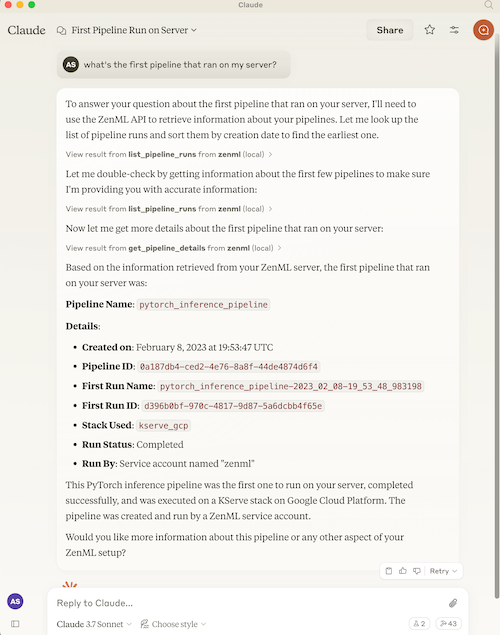
The Model Context Protocol (MCP) is an open protocol that standardizes how applications provide context to Large Language Models (LLMs). It acts like a "USB-C port for AI applications" - providing a standardized way to connect AI models to different data sources and tools.
MCP follows a client-server architecture where:
MCP Hosts: Programs like Claude Desktop or IDEs that want to access data through MCP
MCP Clients: Protocol clients that maintain 1:1 connections with servers
MCP Servers: Lightweight programs that expose specific capabilities through the standardized protocol
Local Data Sources: Your computer's files, databases, and services that MCP servers can securely access
Remote Services: External systems available over the internet that MCP servers can connect to
Related MCP server: MCP Server for continue.dev
ZenML is an open-source platform for building and managing ML and AI pipelines. It provides a unified interface for managing data, models, and experiments.
For more information, see the ZenML website and our documentation.
The server provides MCP tools to access core read functionality from the ZenML server, providing a way to get live information about:
Users - user accounts and permissions
Stacks - infrastructure configurations
Stack Components - individual stack building blocks
Flavors - available component types
Service Connectors - cloud authentication
Pipelines - pipeline definitions
Pipeline Runs - execution history and status
Pipeline Steps - individual step details, code, and logs
Schedules - automated run schedules
Artifacts - metadata about data artifacts (not the data itself)
Snapshots - frozen pipeline configurations (the "what to run/serve" artifact)
Deployments - runtime serving instances with status, URL, and logs
Services - model serving endpoints
Projects - organizational containers for ZenML resources
Tags - cross-cutting metadata labels for discovery
Builds - pipeline build artifacts with image and code info
Models - ML model registry entries
Model Versions - versioned model artifacts
Pipeline run templates remain available in ZenML 0.97.0, while Snapshots are preferred for new workflows (see Migration Guide)
The server also allows you to trigger new pipeline runs using snapshots (preferred) or the deprecated template-based trigger parameter.
Note: We're continuously improving this integration based on user feedback. Please join our Slack community to share your experience and help us make it even better!
The default compact profile advertises 16 tools. Seven generic tools cover the
resource catalog, reads, ordinary mutations, and finite lifecycle actions:
Tool | Purpose |
| Discover supported resource types and bounded operation schemas |
| List one resource type with validated filters and pagination |
| Get one resource, with parent and project scope where required |
| Create a supported resource from a typed payload |
| Update one exact resource UUID |
| Delete or archive one exact resource UUID |
| Run an allowlisted lifecycle or relation action without retries |
Nine focused tools remain because they provide diagnostics, active context, streamed logs or code, pipeline execution, or an interactive App:
diagnose_zenml_setup
get_active_user and get_active_project
trigger_pipeline
get_step_logs, get_step_code, and get_deployment_logs
open_pipeline_run_dashboard and open_run_activity_chart
get_step_logs returns at most 50,000 entries, oldest first, with a
possibly_truncated flag, plus a note saying which entries are missing and
why. Pass tail to get only the newest entries. On ZenML 0.97+ servers it
pages through the log store; on 0.96 it uses the older single-request endpoint.
Use ZENML_MCP_PROFILE=legacy when an existing client still depends on the old
entity-specific names such as list_pipeline_runs. This retains the
characterized tool-name and schema compatibility layer for ZenML 0.97.0. It
does not add support for older ZenML server versions. Use it only while
migrating: legacy response shapes may expose more operational metadata than the
compact tools, although the server omits credential-bearing configuration and
other sensitive fields from both profiles.
Registration and write access are independent:
Profile | Policy | Advertised tools |
|
| 16 |
|
| 11 |
|
| 57 |
|
| 52 |
Set ZENML_MCP_WRITE_POLICY=read_only to remove all four generic mutation tools
and trigger_pipeline from MCP discovery and dispatch. Resource discovery also
omits create, update, delete, and action schemas. The older
ZENML_MCP_READ_ONLY=true setting remains accepted; invalid policy values fail
closed to read-only mode. An invalid ZENML_MCP_PROFILE stops startup with a
configuration error.
Version 2.0.0 requires MCP Python SDK 2.2.0 and ZenML 0.96.4. The compact
profile is the new default and is a breaking discovery change for clients that
call entity-specific tool names. Set ZENML_MCP_PROFILE=legacy while migrating
those clients, then move each call to the generic resource tools.
Mutation results distinguish completed, accepted, and unknown outcomes.
The server does not retry a mutation after it may have reached ZenML. For an
accepted or unknown result, follow the reconciliation instructions in the
response before deciding whether to call again. Use the named read when one is
available. Webhook creation and secret rotation can return a new signing secret
once; later reads omit it. Delete schemas state
whether an operation archives metadata, removes metadata, deprovisions a live
resource, or can delete stored artifact data.
The first 2.0 release covers ordinary operations for projects, stacks and
components, flavors, services, pipelines and runs, snapshots and templates,
deployments, artifacts and versions, models and versions, tags, connectors,
code repositories, webhooks, triggers, wait conditions, and hook invocations.
Users, schedules, service connector types, secrets, and resource requests have
the read-only coverage shown by zenml_describe_resources. It excludes ZenML
Cloud control-plane administration, Resource Manager administration, user and
credential administration, secret-value CRUD, connector login and verification,
raw webhook events, and aggregate debugging or lineage tools.
Start a generic workflow by discovering the precise schema, then calling it:
zenml_describe_resources(resource_type="pipeline_run", operation="list")
zenml_list_resources(
    resource_type="pipeline_run",
    filters={"status": "completed", "sort_by": "desc:created"},
    page=1,
    size=10,
)
Prompts and resources remain available in both profiles. The analysis prompts,
the bounded resource-schema endpoints, and most_recent_runs are MCP prompts or
resources rather than tools.
ZenML 0.97.0 retains run-template CRUD APIs. Snapshots are preferred for new
workflows. Pipeline convenience creation and the template-based trigger
parameter are deprecated. In the legacy profile, get_run_template and
list_run_templates remain available for existing clients.
The legacy tag input remains in list_run_templates for schema compatibility,
but ZenML 0.97.0 has no equivalent server-side filter. A non-null value is
rejected before the SDK call. Snapshot tag filtering remains available.
Why the change? Snapshots replaced run templates as ZenML's preferred runnable pipeline artifact. The 0.97.0 SDK still supports run-template CRUD, while new code should use snapshots.
Legacy Pattern (Templates) | Compact Pattern (Snapshots) |
|
|
|
|
|
|
1. Discover project context:
   → get_active_project()

2. Find runnable snapshots:
   → zenml_list_resources(resource_type="snapshot", filters={"runnable": true, "named_only": true})

3. Trigger a run:
   → trigger_pipeline(snapshot_name_or_id="my-snapshot")

4. Check deployments:
   → zenml_list_resources(resource_type="deployment", filters={"status": "running"})
   → get_deployment_logs(name_id_or_prefix="my-deployment", tail=100)
Note: get_deployment_logs returns bounded output (default 100 lines, max 1000, capped at 100KB) and requires the appropriate deployer integration to be installed.
The easiest way to set up the ZenML MCP Server is through your ZenML dashboard's MCP Settings page.
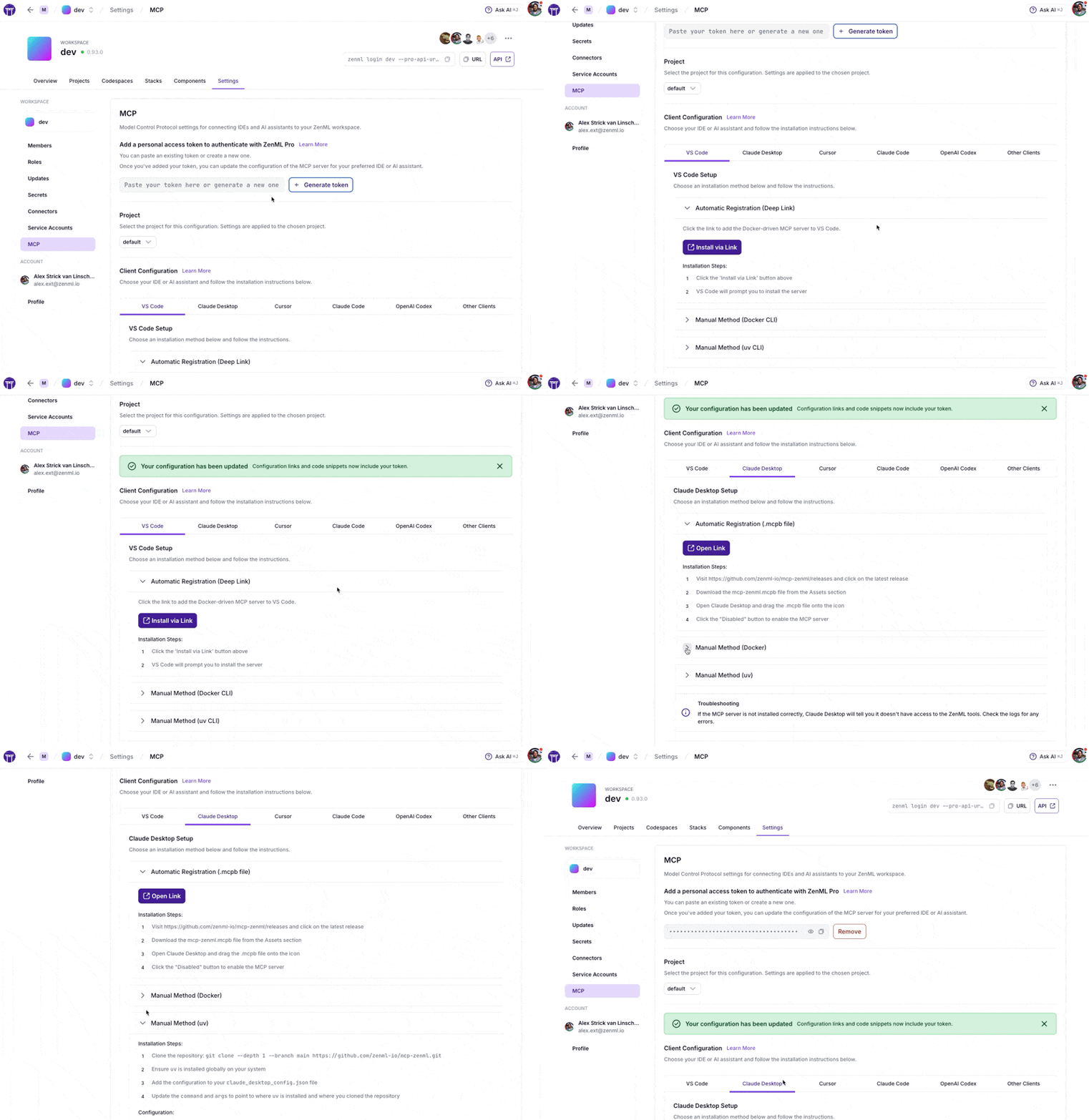
Navigate to Settings → MCP in your ZenML dashboard to get:
Pre-configured snippets for your specific server URL and credentials
One-click installation via deep links for supported IDEs
Copy-paste configurations for VS Code, Claude Desktop, Cursor, Claude Code, OpenAI Codex, and more
Docker and uv options based on your preference
The MCP Settings page lets you generate a Personal Access Token (PAT) with a single click. The token is automatically included in all generated configuration snippets.
First create a service account token via Settings → Service Accounts
Paste the token into the MCP Settings page
Copy the generated configuration for your IDE
Prefer manual setup? See the detailed instructions below.
What are MCP Apps? MCP Apps are interactive HTML UIs that MCP servers can serve directly into AI clients. They render in sandboxed iframes and can call server tools bidirectionally. See the official announcement for full details.
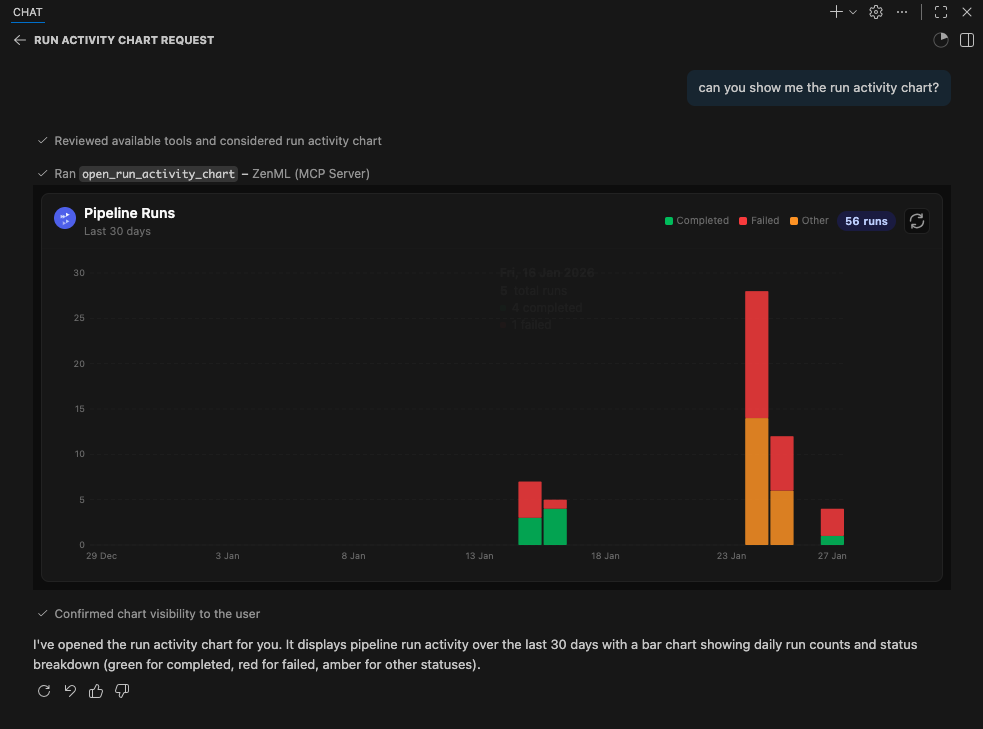
This server includes two experimental MCP Apps:
App | Tool | Description |
Pipeline Runs Dashboard |
| Interactive table of recent pipeline runs with status, step details, and logs |
Run Activity Chart |
| Bar chart of pipeline run activity over the last 30 days with status breakdown |
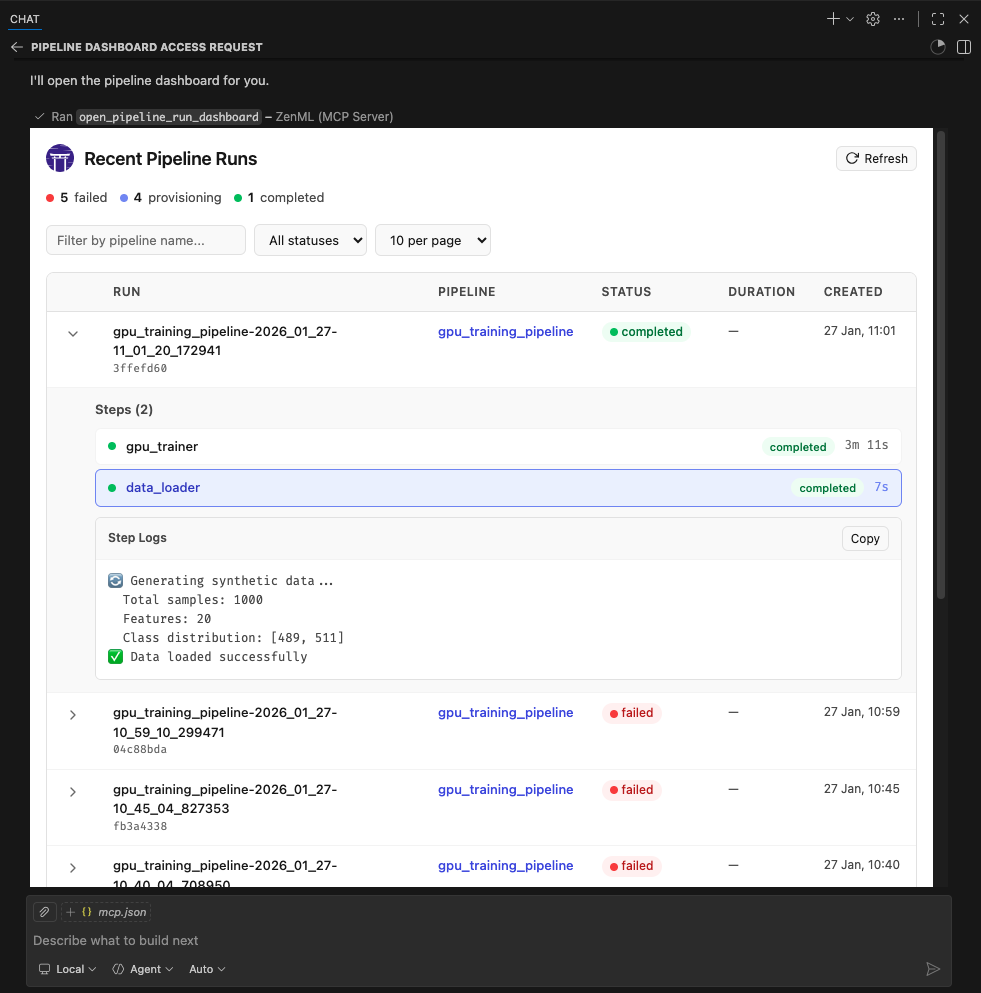
These apps are included as proof-of-concept examples. We welcome feedback and contributions for more MCP Apps. It is still early days for this new feature so we'll have to see how it evolves. We expect to support it more fully in the future.
MCP Apps require Streamable HTTP transport (not stdio). The following clients currently support MCP Apps:
✅ VS Code (Insiders Edition)
✅ Goose
✅ ChatGPT (launching soon)
⚠️ Claude Desktop -- as of late January 2026, doesn't yet render Apps.
⚠️ Claude.ai (web) — as of late January 2026, doesn't yet render Apps.
Note: We were unable to test thoroughly with Claude Desktop or Claude.ai at the time of writing. If you encounter issues, please report them.
MCP Apps use Streamable HTTP. Keep the container port bound to loopback and put an authenticated reverse proxy or identity-aware access service in front of it before allowing remote access. Host and Origin validation protect against DNS rebinding; they do not authenticate callers.
1. Build and run the Docker container:
docker build -t mcp-zenml:apps .

docker run --rm -d --name mcp-zenml-apps -p 127.0.0.1:8001:8001 \
  -e ZENML_STORE_URL="https://your-zenml-server.example.com" \
  -e ZENML_STORE_API_KEY="your-api-key" \
  -e ZENML_MCP_PROFILE="compact" \
  -e ZENML_MCP_WRITE_POLICY="read_write" \
  -e ZENML_ACTIVE_PROJECT_ID="your-project-id" \
  mcp-zenml:apps --transport streamable-http --host 0.0.0.0 --port 8001 \
  --disable-dns-rebinding-protection
2. Configure authenticated remote access:
Create a named Cloudflare Tunnel, Tailscale Funnel with access controls, or an
equivalent authenticated reverse proxy. Point its private origin at
http://127.0.0.1:8001, require an identity or service credential for the
public hostname, and pass only authenticated requests to the origin. Configure
your MCP client to use the provider's supported OAuth flow or authorization
headers.
Before adding ZenML credentials to the container, verify that an unauthenticated request cannot reach MCP:
curl -i https://mcp.example.com/mcpThe response must be the access provider's 401, 403, or login redirect. A
JSON-RPC or MCP response means the perimeter is open and must be fixed first.
3. Connect your authenticated client:
{
	"servers": {
		"ZenML": {
			"url": "https://mcp.example.com/mcp",
			"type": "http"
		}
	},
	"inputs": []
}
Ask the AI to "open the pipeline runs dashboard" or "show the run activity chart"
Important notes:
ZENML_ACTIVE_PROJECT_ID is required — without it, pipeline run tools will
fail with "No project is currently set as active"
--disable-dns-rebinding-protection is only appropriate when the authenticated
proxy validates the public host and the container port remains loopback-only
Restrict the ZenML API key to the permissions the MCP client needs; use
ZENML_MCP_WRITE_POLICY=read_only for inspection-only clients
This project includes automated testing to ensure the MCP server remains functional:
🔄 Automated Smoke Tests: A comprehensive smoke test runs every 3 days via GitHub Actions
🚨 Issue Creation: Failed tests automatically create GitHub issues with detailed debugging information
⚡ Fast CI: Uses UV with caching for quick dependency installation and testing
🧪 Manual Testing: You can run the smoke test locally using uv run scripts/test_mcp_server.py server/zenml_server.py
The automated tests verify:
MCP protocol connection and handshake
Server initialization and tool discovery
Basic tool functionality (when ZenML server is accessible)
Resource and prompt enumeration
diagnose_zenml_setup returns structured diagnostics even in constrained environments
Credential-free CI covers every adapter through the MCP protocol. PR and release CI also start a fresh ZenML 0.97.0 OSS server on a loopback address and run persisted CRUD and same-name project-isolation receipts. The server uses a temporary configuration and database that are removed when the job exits; no repository environment, self-hosted runner, or ZenML credential is required.
ZenML's local OSS server disables authentication and its SQL store does not
support pipeline replay or external deployment infrastructure. Restricted
access and feature-enabled trigger, replay, deployment, wait-condition, and
resource-request receipts therefore remain separate opt-in gates. They require
ZENML_MCP_RESTRICTED_INTEGRATION=1 with
ZENML_MCP_RESTRICTED_API_KEY, or ZENML_MCP_ACTION_INTEGRATION=1 with the
exact disposable fixture UUIDs in ZENML_MCP_ACTION_FIXTURE, respectively. A
gated skip is not evidence that those capabilities passed. An operator can set
ZENML_MCP_REQUIRE_COMPLETE_INTEGRATION=1 to turn a missing opt-in gate into a
failure. Cloud infrastructure provisioning is never part of the default test
run.
For interactive debugging, use the MCP Inspector — a web-based tool that lets you test MCP tools in real-time:
# Using .env.local (recommended for development)
cp .env.local.example .env.local  # Then edit with your credentials
source .env.local && npx @modelcontextprotocol/inspector \
  -e ZENML_STORE_URL=$ZENML_STORE_URL \
  -e ZENML_STORE_API_KEY=$ZENML_STORE_API_KEY \
  -- uv run server/zenml_server.py
This opens a web UI with your credentials pre-filled — just click Connect and use the Tools tab to test any tool interactively.
See CLAUDE.md for more detailed debugging instructions.
The ZenML MCP Server collects anonymous usage analytics to help us improve the product.
We track:
Which tools are used and how often
Error rates and types (error type only, no messages)
Basic environment info (OS, Python version, and whether running in Docker/CI)
Session duration and tool usage patterns
We do NOT collect:
Your ZenML server URL or API key
Pipeline names, model names, or any business data
Error messages or stack traces
Any personally identifiable information
To disable analytics:
# Option 1
export ZENML_MCP_ANALYTICS_ENABLED=false

# Option 2
export ZENML_MCP_DISABLE_ANALYTICS=true
For debugging/testing (logs events to stderr instead of sending):
export ZENML_MCP_ANALYTICS_DEV=trueFor Docker users: You can set ZENML_MCP_ANALYTICS_ID (must be a valid UUID) to maintain a consistent anonymous ID across container restarts. If you don't set it and the container filesystem can't persist the analytics ID file, the server falls back to a deterministic anonymous UUID derived from a hash of ZENML_STORE_URL (the URL itself is never sent as an event property).
Additional analytics options:
ZENML_MCP_ANALYTICS_SHUTDOWN_TIMEOUT_S — max time (seconds) to flush analytics synchronously during shutdown (default: 1.0)
Note on shutdown tracking: Shutdown events are sent synchronously with a bounded timeout for best delivery reliability. However, if a container is killed with SIGKILL (e.g., docker kill), shutdown handlers cannot fire — this is a Docker/OS limitation, not a bug.
You can enable a lightweight startup diagnostic check:
# Print warnings but start normally
uv run server/zenml_server.py --startup-validation warn

# Exit non-zero if required setup is missing (useful in Docker/CI)
uv run server/zenml_server.py --startup-validation strict
You can also set this via environment variable: ZENML_MCP_STARTUP_VALIDATION=warn.
The diagnose_zenml_setup tool is also available as an MCP tool for runtime troubleshooting — it works even when the ZenML SDK is not installed or environment variables are missing.
You will need to have access to a deployed ZenML server. If you don't have one, you can sign up for a free trial at ZenML Pro and we'll manage the deployment for you.
Tip: Once you have a ZenML server, check out the MCP Settings page in your dashboard for the easiest setup experience.
Compatibility: The current version is tested against ZenML 0.97.0. If you are running an older ZenML version, please use an earlier release of this MCP server.
You will also (probably) need to have uv installed locally. For more information, see
the uv documentation.
We recommend installation via their installer script or via brew if using a
Mac. (Technically you don't need it, but it makes installation and setup easy.)
You will also need to clone this repository somewhere locally:
git clone https://github.com/zenml-io/mcp-zenml.gitThe MCP config file is a JSON file that tells the MCP client how to connect to your MCP server. Different MCP clients will use or specify this differently. Two commonly-used MCP clients are Claude Desktop and Cursor, for which we provide installation instructions below.
You will need to specify your ZenML MCP server in the following format:
{
    "mcpServers": {
        "zenml": {
            "command": "/usr/local/bin/uv",
            "args": ["run", "path/to/server/zenml_server.py"],
            "env": {
                "LOGLEVEL": "WARNING",
                "NO_COLOR": "1",
                "ZENML_LOGGING_COLORS_DISABLED": "true",
                "ZENML_LOGGING_VERBOSITY": "WARN",
                "ZENML_ENABLE_RICH_TRACEBACK": "false",
                "ZENML_MCP_PROFILE": "compact",
                "ZENML_MCP_WRITE_POLICY": "read_write",
                "PYTHONUNBUFFERED": "1",
                "PYTHONIOENCODING": "UTF-8",
                "ZENML_STORE_URL": "https://your-zenml-server-goes-here.com",
                "ZENML_STORE_API_KEY": "your-api-key-here"
            }
        }
    }
}
There are four dummy values that you will need to replace:
the path to your locally installed uv (the path listed above is where it
would be on a Mac if you installed it via brew)
the path to the zenml_server.py file (this is the file that will be run when
you connect to the MCP server). This file is located inside this repository at
the root. You will need to specify the exact full path to this file.
the ZenML server URL (this is the URL of your ZenML server. You can find this
in the ZenML Cloud UI). It will look something like https://d534d987a-zenml.cloudinfra.zenml.io.
the ZenML server API key (this is the API key for your ZenML server. You can find this in the ZenML Cloud UI or read these docs on how to create one. For the purposes of the ZenML MCP server we recommend using a service account.)
You are free to change the way you run the MCP server Python file, but using
uv will probably be the easiest option since it handles the environment and
dependency installation for you.
Quick alternative: Use the MCP Settings page in your ZenML dashboard (Settings → MCP) to get pre-configured installation instructions and deep links for Claude Desktop.
You will need to have the latest version of Claude Desktop installed.
You can simply open the Settings menu and drag the mcp-zenml.mcpb file from the
root of this repository onto the menu and it will guide you through the
installation and setup process. You'll need to add your ZenML server URL and API key.
Note: MCP bundles (.mcpb) replace the older Desktop Extensions (.dxt) format; existing .dxt files still work in Claude Desktop.
For a better experience with ZenML tool results, you can configure Claude to display the JSON responses in a more readable format. In Claude Desktop, go to Settings → Profile, and in the "What personal preferences should Claude consider in responses?" section, add something like the following (or use these exact words!):
When using zenml tools which return JSON strings and you're asked a question, you might want to consider using markdown tables to summarize the results or make them easier to view!This will encourage Claude to format ZenML tool outputs as markdown tables, making the information much easier to read and understand.
Quick alternative: The MCP Settings page in your ZenML dashboard (Settings → MCP) can generate the exact
mcp.jsoncontent with your credentials pre-filled.
You will need to have Cursor installed.
Cursor works slightly differently to Claude Desktop in that you specify the config file on a per-repository basis. This means that if you want to use the ZenML MCP server in multiple repos, you will need to specify the config file in each of them.
To set it up for a single repository, you will need to:
create a .cursor folder in the root of your repository
inside it, create a mcp.json file with the content above
go into your Cursor settings and click on the ZenML server to 'enable' it.
In our experience, sometimes it shows a red error indicator even though it is working. You can try it out by chatting in the Cursor chat window. It will let you know if is able to access the ZenML tools or not.
You can run the server as a Docker container. The process communicates over stdio, so it will wait for an MCP client connection. Pass your ZenML credentials via environment variables.
Pull the latest multi-arch image:
docker pull zenmldocker/mcp-zenml:latestVersioned releases are tagged as X.Y.Z:
docker pull zenmldocker/mcp-zenml:2.0.0Run with your ZenML credentials (stdio mode):
docker run -i --rm \
  -e ZENML_STORE_URL="https://your-zenml-server.example.com" \
  -e ZENML_STORE_API_KEY="your-api-key" \
zenmldocker/mcp-zenml:latest{
"mcpServers": {
"zenml": {
"command": "docker",
"args": [
"run", "-i", "--rm",
"-e", "ZENML_STORE_URL=https://...",
"-e", "ZENML_STORE_API_KEY=ZENKEY_...",
"-e", "ZENML_ACTIVE_PROJECT_ID=...",
"-e", "ZENML_MCP_PROFILE=compact",
"-e", "ZENML_MCP_WRITE_POLICY=read_write",
"-e", "LOGLEVEL=WARNING",
"-e", "NO_COLOR=1",
"-e", "ZENML_LOGGING_COLORS_DISABLED=true",
"-e", "ZENML_LOGGING_VERBOSITY=WARN",
"-e", "ZENML_ENABLE_RICH_TRACEBACK=false",
"-e", "PYTHONUNBUFFERED=1",
"-e", "PYTHONIOENCODING=UTF-8",
"zenmldocker/mcp-zenml:latest"
]
}
}
}From the repository root:
docker build -t zenmldocker/mcp-zenml:local .Run the locally built image:
docker run -i --rm \
  -e ZENML_STORE_URL="https://your-zenml-server.example.com" \
  -e ZENML_STORE_API_KEY="your-api-key" \
zenmldocker/mcp-zenml:localThis project uses MCP Bundles (.mcpb) — the successor to Anthropic's Desktop Extensions (DXT). MCP Bundles package an entire MCP server (including dependencies) into a single file with user-friendly configuration.
Note on rename: MCP Bundles replace the older .dxt format. Claude Desktop remains backward‑compatible with existing .dxt files, but we now ship mcp-zenml.mcpb and recommend using it going forward.
The mcp-zenml.mcpb file in the repository root uses the MCPB 0.4 UV runtime.
The host installs the pinned Python dependencies for the current operating
system, so the same bundle works on macOS, Windows, and Linux without embedding
platform-specific native extensions. Installation needs network access the
first time UV resolves the bundled environment.
Bundle builds reuse the committed mcpb-uv.lock and resolve its Python
dependency graph in offline mode. The bundle's dependency list comes from
[project].dependencies in pyproject.toml. After changing that list, set
MCPB_REFRESH_LOCK=1 to re-resolve online while keeping every pin that still
fits; MCPB_REFRESH_LOCK=upgrade moves every pin to its newest version.
When you drag and drop the .mcpb file into Claude Desktop's settings, it automatically handles:
Runtime dependency installation
Secure configuration management
Cross-platform compatibility
User-friendly setup process
For more information, see Anthropic's announcement of Desktop Extensions (DXT) and related MCP bundle packaging guidance in their documentation: https://www.anthropic.com/engineering/desktop-extensions
This MCP server is published to the official Anthropic MCP Registry and is discoverable by compatible hosts. On each tagged release, our CI updates the registry entry via the registry’s mcp-publisher CLI using GitHub OIDC, so you can install or discover the ZenML MCP Server directly wherever the registry is supported (e.g., Claude Desktop’s Extensions catalog).
Always up to date: the registry entry is refreshed with every release from the tagged commit’s manifest.json and server.json.
Alternate install paths: you can still install locally via the packaged .mcpb bundle (see above) or run the Docker image.
Learn more about the registry here:
Anthropic MCP Registry (community repo): https://github.com/modelcontextprotocol/registry
Diagnose ZenML MCP server setup (env vars, connectivity, auth, versions).
Returns structured diagnostics about the server's configuration and connectivity. This tool works even when the ZenML SDK is not installed or environment variables are missing - use it to troubleshoot setup issues.
| Name | Required | Description | Default |
|---|---|---|---|
No parameters | |||
| Name | Required | Description |
|---|---|---|
No output parameters | ||
Does the description disclose side effects, auth requirements, rate limits, or destructive behavior?
With no annotations provided, the description carries the behavioral disclosure burden. It reveals that the tool works without the SDK or env vars and that it returns structured diagnostics, which is valuable context. It does not explicitly state side-effect-free behavior, but the 'diagnose' and 'Returns diagnostics' language strongly implies a read-only operation.
Agents need to know what a tool does to the world before calling it. Descriptions should go beyond structured annotations to explain consequences.
Is the description appropriately sized, front-loaded, and free of redundancy?
The description is short and front-loaded with the core purpose, followed by the key operational caveat and a clear use case. Every sentence earns its place without redundancy.
Shorter descriptions cost fewer tokens and are easier for agents to parse. Every sentence should earn its place.
Given the tool's complexity, does the description cover enough for an agent to succeed on first attempt?
For a zero-parameter diagnostic tool with an output schema available, the description covers the essential context: what it diagnoses, what it returns, and when to use it. Nothing important appears to be missing for an agent to invoke it correctly.
Complex tools with many parameters or behaviors need more documentation. Simple tools need less. This dimension scales expectations accordingly.
Does the description clarify parameter syntax, constraints, interactions, or defaults beyond what the schema provides?
This tool has zero parameters, so there is nothing the description needs to clarify about arguments. The baseline for no-parameter tools is 4, and the description appropriately makes no unsupported parameter claims.
Input schemas describe structure but not intent. Descriptions should explain non-obvious parameter relationships and valid value ranges.
Does the description clearly state what the tool does and how it differs from similar tools?
The description states a specific verb and resource: 'Diagnose ZenML MCP server setup' and lists the areas covered (env vars, connectivity, auth, versions). It is clear and specific, but it does not explicitly differentiate itself from sibling tools, so it misses the top score.
Agents choose between tools based on descriptions. A clear purpose with a specific verb and resource helps agents select the right tool.
Does the description explain when to use this tool, when not to, or what alternatives exist?
The description gives clear usage context: 'use it to troubleshoot setup issues' and notes it works even when the ZenML SDK is not installed or environment variables are missing. It does not mention exclusions or alternative tools, but the intended scenario is well established.
Agents often have multiple tools that could apply. Explicit usage guidance like "use X instead of Y when Z" prevents misuse.
Get the currently active project.
Projects are organizational containers for ZenML resources. Most SDK methods are project-scoped, and this tool returns the default project context.
| Name | Required | Description | Default |
|---|---|---|---|
No parameters | |||
| Name | Required | Description |
|---|---|---|
No output parameters | ||
Does the description disclose side effects, auth requirements, rate limits, or destructive behavior?
No annotations are provided, so the description carries the full burden of behavioral disclosure. It states the operation ('Get the currently active project') but does not disclose behaviors such as what happens if no active project exists, whether project context must be explicitly set, potential errors, or permission requirements. The phrase 'default project context' adds slight context but leaves key behavioral details undisclosed.
Agents need to know what a tool does to the world before calling it. Descriptions should go beyond structured annotations to explain consequences.
Is the description appropriately sized, front-loaded, and free of redundancy?
The description is two sentences with no filler. The primary operation is front-loaded, and the second sentence provides essential context about what a project is and why the active project matters. Every sentence earns its place.
Shorter descriptions cost fewer tokens and are easier for agents to parse. Every sentence should earn its place.
Given the tool's complexity, does the description cover enough for an agent to succeed on first attempt?
For a zero-parameter tool with an output schema and a clear domain concept, the description provides sufficient context: it defines projects, explains their role in ZenML, and clarifies that this returns the default context. It stops short of describing edge cases or setup prerequisites, but given the tool's simplicity and the presence of an output schema, the coverage is adequate but not exhaustive.
Complex tools with many parameters or behaviors need more documentation. Simple tools need less. This dimension scales expectations accordingly.
Does the description clarify parameter syntax, constraints, interactions, or defaults beyond what the schema provides?
The tool has 0 parameters, so the description does not need to add parameter semantics. Per the rubric, 0 params warrants a baseline score of 4. The description appropriately focuses on the operation itself rather than inventing parameter details.
Input schemas describe structure but not intent. Descriptions should explain non-obvious parameter relationships and valid value ranges.
Does the description clearly state what the tool does and how it differs from similar tools?
The description clearly states 'Get the currently active project' with a specific verb and resource, and explains that projects are organizational containers. It does not explicitly contrast with siblings like get_active_user, but the resource (project vs user) is unambiguous from the name and description.
Agents choose between tools based on descriptions. A clear purpose with a specific verb and resource helps agents select the right tool.
Does the description explain when to use this tool, when not to, or what alternatives exist?
The description provides no direct guidance on when to use this tool versus alternatives. It mentions that 'most SDK methods are project-scoped' and that this returns the default project context, which implies a use case, but there is no explicit when-to-use or when-not-to-use guidance, nor any mention of sibling tools that might be more appropriate for specific scenarios.
Agents often have multiple tools that could apply. Explicit usage guidance like "use X instead of Y when Z" prevents misuse.
Get the currently active user.
| Name | Required | Description | Default |
|---|---|---|---|
No parameters | |||
| Name | Required | Description |
|---|---|---|
No output parameters | ||
Does the description disclose side effects, auth requirements, rate limits, or destructive behavior?
With no annotations provided, the description carries full responsibility for behavioral disclosure. It only says 'get', which implies a read operation, but it doesn't disclose what happens if no user is active, error handling, or any side effects. The output schema exists but is not referenced in the description, so the agent is left to infer behavior beyond the basic action.
Agents need to know what a tool does to the world before calling it. Descriptions should go beyond structured annotations to explain consequences.
Is the description appropriately sized, front-loaded, and free of redundancy?
The description is a single, short sentence with no unnecessary words. It is front-loaded with the action and resource, and every word contributes to the meaning. This is appropriately sized for a tool with no parameters.
Shorter descriptions cost fewer tokens and are easier for agents to parse. Every sentence should earn its place.
Given the tool's complexity, does the description cover enough for an agent to succeed on first attempt?
Given the tool has no parameters, an output schema exists (providing return value structure), and the description clearly states the purpose, it is largely complete. It doesn't elaborate on edge cases or the meaning of 'active' in context, but these are minor gaps for such a simple getter. The description adequately covers what an agent needs to call it correctly.
Complex tools with many parameters or behaviors need more documentation. Simple tools need less. This dimension scales expectations accordingly.
Does the description clarify parameter syntax, constraints, interactions, or defaults beyond what the schema provides?
The tool has zero parameters, and the schema reflects that with 100% coverage. Per the rubric, a baseline of 4 is appropriate for 0 parameters since there is nothing for the description to add. The description is consistent with the schema, providing no additional parameter information needed.
Input schemas describe structure but not intent. Descriptions should explain non-obvious parameter relationships and valid value ranges.
Does the description clearly state what the tool does and how it differs from similar tools?
The description clearly identifies the action (get) and the resource (active user). It is distinct from sibling tools like get_active_project, which targets a different resource. However, it doesn't explicitly contrast itself with any sibling, so it misses a point for proactive differentiation.
Agents choose between tools based on descriptions. A clear purpose with a specific verb and resource helps agents select the right tool.
Does the description explain when to use this tool, when not to, or what alternatives exist?
The description implies that this tool is used when you need the currently active user, but it doesn't explicitly state when to use it versus alternatives (e.g., get_active_project) or any conditions. It provides no explicit exclusions or context, falling into the 'implied usage' category.
Agents often have multiple tools that could apply. Explicit usage guidance like "use X instead of Y when Z" prevents misuse.
Get logs for a specific deployment.
Retrieves logs from the deployment's underlying infrastructure. This is useful
for debugging deployment issues or monitoring deployment behavior.

Note: Log availability depends on the deployer plugin being installed and
the deployment infrastructure supporting log retrieval.

Args:
    name_id_or_prefix: The name, ID or prefix of the deployment
    project: Optional project scope (defaults to active project)
    tail: Number of recent log lines to retrieve (default: 100, max recommended: 500)

Returns:
    Dict with 'logs' (string) and metadata about truncation if applicable
| Name | Required | Description | Default |
|---|---|---|---|
| tail | No | ||
| project | No | ||
| name_id_or_prefix | Yes |
| Name | Required | Description |
|---|---|---|
No output parameters | ||
Does the description disclose side effects, auth requirements, rate limits, or destructive behavior?
With no annotations, the description carries the transparency burden. It discloses dependencies (deployer plugin, infrastructure support) and mentions return structure and truncation metadata, but does not explicitly state that the operation is read-only or mention any side effects. This is adequate but not exhaustive.
Agents need to know what a tool does to the world before calling it. Descriptions should go beyond structured annotations to explain consequences.
Is the description appropriately sized, front-loaded, and free of redundancy?
The description is well-structured with a clear purpose, a dependency note, and a bulleted parameter list. Each sentence earns its place; it is not overly verbose and front-loads the core action.
Shorter descriptions cost fewer tokens and are easier for agents to parse. Every sentence should earn its place.
Given the tool's complexity, does the description cover enough for an agent to succeed on first attempt?
Given the tool's moderate complexity, the description covers key aspects: dependencies, return format, and parameter semantics. An output schema exists, so the explicit return summary is a bonus. It does not address error handling or performance characteristics, but these are not critical for a log retrieval tool.
Complex tools with many parameters or behaviors need more documentation. Simple tools need less. This dimension scales expectations accordingly.
Does the description clarify parameter syntax, constraints, interactions, or defaults beyond what the schema provides?
Schema coverage is 0%, so the description must compensate. It explains all three parameters in the Args section, including purpose, defaults, and a recommended max for 'tail'. This adds meaningful context beyond the bare schema, though it could go deeper on edge cases (e.g., behavior with non-existent deployment).
Input schemas describe structure but not intent. Descriptions should explain non-obvious parameter relationships and valid value ranges.
Does the description clearly state what the tool does and how it differs from similar tools?
States a specific verb 'Get' with a clear resource 'logs for a specific deployment'. Differentiates from sibling get_step_logs implicitly via 'deployment' but does not name it explicitly, leaving a small gap in differentiation.
Agents choose between tools based on descriptions. A clear purpose with a specific verb and resource helps agents select the right tool.
Does the description explain when to use this tool, when not to, or what alternatives exist?
Provides general context ('useful for debugging deployment issues or monitoring deployment behavior') but offers no explicit guidance on when to use this tool versus get_step_logs or other siblings. No exclusions or alternative routing are mentioned, leaving the agent to infer the distinction.
Agents often have multiple tools that could apply. Explicit usage guidance like "use X instead of Y when Z" prevents misuse.
Get the code for a step.
Args:
    step_run_id: The ID of the step to retrieve
| Name | Required | Description | Default |
|---|---|---|---|
| step_run_id | Yes |
| Name | Required | Description |
|---|---|---|
| result | Yes |
Does the description disclose side effects, auth requirements, rate limits, or destructive behavior?
With no annotations, the description must disclose behavioral traits. It only says 'Get the code' and provides no information about read-only nature, error conditions, or what happens if the step run ID is invalid. It doesn't state whether the operation is safe or has side effects. This is a significant gap for a tool with no annotation support.
Agents need to know what a tool does to the world before calling it. Descriptions should go beyond structured annotations to explain consequences.
Is the description appropriately sized, front-loaded, and free of redundancy?
The description is very concise—two sentences with no fluff. It is appropriately sized for a simple getter, though it might be under-specified rather than concise. The structure is front-loaded with the main action, but the parameter description is minimal.
Shorter descriptions cost fewer tokens and are easier for agents to parse. Every sentence should earn its place.
Given the tool's complexity, does the description cover enough for an agent to succeed on first attempt?
Given the simplicity (one required parameter), one might expect a basic description to suffice, but there is no output schema information provided, no error handling, and no details about what 'code' means (e.g., source code, generated code, etc.). With no annotations and minimal description, the tool is incomplete for an agent to use confidently.
Complex tools with many parameters or behaviors need more documentation. Simple tools need less. This dimension scales expectations accordingly.
Does the description clarify parameter syntax, constraints, interactions, or defaults beyond what the schema provides?
The description includes a line for step_run_id: 'The ID of the step to retrieve', which adds a minimal semantic hint beyond the schema's property name and type. However, schema description coverage is 0% and the description doesn't explain the format or constraints of the ID, nor how to obtain it. It barely compensates for the missing schema descriptions.
Input schemas describe structure but not intent. Descriptions should explain non-obvious parameter relationships and valid value ranges.
Does the description clearly state what the tool does and how it differs from similar tools?
The description states a clear action ('Get the code') and resource ('for a step'), which distinguishes it from siblings like get_step_logs (logs vs code). However, it doesn't explicitly mention the ZenML pipeline context, but the sibling names imply it. Slight ambiguity about what 'step' refers to, but given the parameter step_run_id, it's understandable.
Agents choose between tools based on descriptions. A clear purpose with a specific verb and resource helps agents select the right tool.
Does the description explain when to use this tool, when not to, or what alternatives exist?
No guidance on when to use this tool versus alternatives. It doesn't mention when to prefer this over get_step_logs or other resource tools. The description simply states the function without any contextual use cases or exclusions.
Agents often have multiple tools that could apply. Explicit usage guidance like "use X instead of Y when Z" prevents misuse.
Get the logs for a specific step run.
Args:
    step_run_id: The ID of the step run to get logs for.
    source: Optional log source. Defaults to ZenML's ordinary ``step`` source.
    logs_id: Optional exact log record ID. Cannot be combined with ``source``.
| Name | Required | Description | Default |
|---|---|---|---|
| source | No | ||
| logs_id | No | ||
| step_run_id | Yes |
| Name | Required | Description |
|---|---|---|
No output parameters | ||
Does the description disclose side effects, auth requirements, rate limits, or destructive behavior?
With no annotations, the description carries the behavioral burden. It discloses the optional source default and the mutual exclusion between source and logs_id, which is useful. It does not mention return format, pagination, or error behavior, though the presence of an output schema mitigates the return-format gap.
Agents need to know what a tool does to the world before calling it. Descriptions should go beyond structured annotations to explain consequences.
Is the description appropriately sized, front-loaded, and free of redundancy?
The description is concise and front-loaded with the purpose. The Args section is terse and each line adds specific meaning without filler or redundant restatement of the schema.
Shorter descriptions cost fewer tokens and are easier for agents to parse. Every sentence should earn its place.
Given the tool's complexity, does the description cover enough for an agent to succeed on first attempt?
For a focused retrieval tool with an output schema, the description is largely complete: it covers the operation and all parameters. Minor gaps remain around possible source values and behavior when no logs exist, but these are not critical for a typical call.
Complex tools with many parameters or behaviors need more documentation. Simple tools need less. This dimension scales expectations accordingly.
Does the description clarify parameter syntax, constraints, interactions, or defaults beyond what the schema provides?
Schema description coverage is 0%, so the description is the only source of parameter meaning. It explains all three parameters clearly, including the default behavior of source and the exclusivity constraint on logs_id. This fully compensates for the schema's lack of descriptions.
Input schemas describe structure but not intent. Descriptions should explain non-obvious parameter relationships and valid value ranges.
Does the description clearly state what the tool does and how it differs from similar tools?
The description begins with a specific verb and resource: 'Get the logs for a specific step run.' This clearly distinguishes it from related tools such as get_deployment_logs or get_step_code by targeting step-run-scoped log records. The purpose is unambiguous.
Agents choose between tools based on descriptions. A clear purpose with a specific verb and resource helps agents select the right tool.
Does the description explain when to use this tool, when not to, or what alternatives exist?
The description gives clear context for when the tool is appropriate and includes useful parameter usage constraints (logs_id cannot be combined with source). However, it does not explicitly contrast this tool with sibling tools like get_deployment_logs or get_step_code, leaving the selection decision partly to inference.
Agents often have multiple tools that could apply. Explicit usage guidance like "use X instead of Y when Z" prevents misuse.
Open an interactive dashboard of recent ZenML pipeline runs.
The dashboard shows pipeline runs with status indicators, expandable step details, filtering, and drill-down into step logs — all in an interactive UI. The dashboard fetches its own data dynamically.
| Name | Required | Description | Default |
|---|---|---|---|
No parameters | |||
| Name | Required | Description |
|---|---|---|
| result | Yes |
Does the description disclose side effects, auth requirements, rate limits, or destructive behavior?
With no annotations, the description must carry behavioral disclosure. It states the dashboard 'fetches its own data dynamically,' which is a useful behavior, and implies a read-only interactive view. However, it does not explicitly state whether it is non-destructive, how the dashboard is presented (e.g., opens in a browser or returns a URL), or any side effects. This partial disclosure warrants a 3.
Agents need to know what a tool does to the world before calling it. Descriptions should go beyond structured annotations to explain consequences.
Is the description appropriately sized, front-loaded, and free of redundancy?
The description is concise and front-loaded, with the core purpose in the first sentence and supporting details in the second. Every sentence adds value, and there is no redundancy or filler. The structure is efficient and easy to parse.
Shorter descriptions cost fewer tokens and are easier for agents to parse. Every sentence should earn its place.
Given the tool's complexity, does the description cover enough for an agent to succeed on first attempt?
The description is largely complete given the tool has no parameters and an output schema is present. It explains what the dashboard shows and that it fetches data dynamically, which covers the essential behavior. However, it could be improved by explicitly mentioning how the dashboard is delivered (e.g., opens in a browser, returns a link) and by clarifying its relationship to open_run_activity_chart. Minor gaps prevent a 5.
Complex tools with many parameters or behaviors need more documentation. Simple tools need less. This dimension scales expectations accordingly.
Does the description clarify parameter syntax, constraints, interactions, or defaults beyond what the schema provides?
The tool has zero parameters, so the description does not need to explain parameter semantics. The schema is trivially covered (empty object). The baseline for 0 parameters is 4, and the description correctly avoids adding unnecessary parameter details.
Input schemas describe structure but not intent. Descriptions should explain non-obvious parameter relationships and valid value ranges.
Does the description clearly state what the tool does and how it differs from similar tools?
The description clearly states the tool opens an interactive dashboard of recent ZenML pipeline runs, with a specific verb and resource. It lists the dashboard's features (status indicators, expandable step details, filtering, drill-down into logs), which distinguishes it from general resource tools. However, it does not explicitly differentiate from the sibling open_run_activity_chart, which could be a similar dashboard, so it loses a point.
Agents choose between tools based on descriptions. A clear purpose with a specific verb and resource helps agents select the right tool.
Does the description explain when to use this tool, when not to, or what alternatives exist?
The description provides no guidance on when to use this tool versus alternatives. It does not mention any conditions, prerequisites, or contrasts with sibling tools like open_run_activity_chart or get_step_logs. The only implicit cue is the name and the general purpose, but no explicit usage direction is given.
Agents often have multiple tools that could apply. Explicit usage guidance like "use X instead of Y when Z" prevents misuse.
Open an interactive chart showing pipeline run activity over the last 30 days.
Shows a bar chart with daily run counts, hover tooltips, and status breakdown (completed in green, failed in red, other in amber).
| Name | Required | Description | Default |
|---|---|---|---|
No parameters | |||
| Name | Required | Description |
|---|---|---|
| result | Yes |
Does the description disclose side effects, auth requirements, rate limits, or destructive behavior?
No annotations are provided, so the description carries the full burden. It discloses the interactive elements (hover tooltips, status breakdown) and color coding, which are useful behavioral hints, but it does not state whether the operation is read-only, has side effects, or requires any setup. For a 0-param tool, this is adequate but not rich.
Agents need to know what a tool does to the world before calling it. Descriptions should go beyond structured annotations to explain consequences.
Is the description appropriately sized, front-loaded, and free of redundancy?
Two sentences with no filler. The primary action is front-loaded, and the second sentence adds specific details about the chart's interactivity and color coding. Every word earns its place.
Shorter descriptions cost fewer tokens and are easier for agents to parse. Every sentence should earn its place.
Given the tool's complexity, does the description cover enough for an agent to succeed on first attempt?
For a parameterless tool, the description fully covers what the agent needs to know to invoke it: what the chart shows and its scope. The existence of an output schema fills in any return-value details, so nothing essential is missing. It could mention what happens with no data, but that's minor.
Complex tools with many parameters or behaviors need more documentation. Simple tools need less. This dimension scales expectations accordingly.
Does the description clarify parameter syntax, constraints, interactions, or defaults beyond what the schema provides?
The tool has zero parameters, so the baseline is 4. There is no parameter ambiguity to resolve, and the description's mention of 'last 30 days' is a fixed behavior, not a parameter.
Input schemas describe structure but not intent. Descriptions should explain non-obvious parameter relationships and valid value ranges.
Does the description clearly state what the tool does and how it differs from similar tools?
The description states a specific verb ('Open') and a specific resource ('interactive chart showing pipeline run activity over the last 30 days'), clearly going beyond the name. However, it does not explicitly differentiate from the sibling open_pipeline_run_dashboard, so it earns a 4 rather than a 5.
Agents choose between tools based on descriptions. A clear purpose with a specific verb and resource helps agents select the right tool.
Does the description explain when to use this tool, when not to, or what alternatives exist?
The description clearly states the chart's scope (last 30 days) and content, giving the agent a clear context for when to use it. It does not name any alternative or provide exclusion criteria, so it falls short of a 5.
Agents often have multiple tools that could apply. Explicit usage guidance like "use X instead of Y when Z" prevents misuse.
Trigger a pipeline to run from the server.
Args:
    pipeline_name_or_id: Optional name or ID of the pipeline to trigger. A
        snapshot or template can be triggered without it.
    snapshot_name_or_id: The name or ID of a specific snapshot to run (preferred)
    stack_name_or_id: Optional stack override for the run
    template_id: Deprecated template-based trigger parameter. Use
        `snapshot_name_or_id` for new integrations. ZenML 0.96.4 still
        retains run-template CRUD APIs.

Usage examples:
    * Run the latest runnable snapshot for a pipeline:
    ```python
    trigger_pipeline(pipeline_name_or_id=<NAME>)
    ```
    * Run the latest runnable snapshot for a pipeline on a specific stack:
    ```python
    trigger_pipeline(
        pipeline_name_or_id=<NAME>,
        stack_name_or_id=<STACK_NAME_OR_ID>
    )
    ```
    * Run a specific snapshot (RECOMMENDED):
    ```python
    trigger_pipeline(
        snapshot_name_or_id=<SNAPSHOT_NAME_OR_ID>
    )
    ```
    * Run a specific template (DEPRECATED - use snapshot_name_or_id instead):
    ```python
    trigger_pipeline(template_id=<ID>)
    ```
| Name | Required | Description | Default |
|---|---|---|---|
| template_id | No | ||
| stack_name_or_id | No | ||
| pipeline_name_or_id | No | ||
| snapshot_name_or_id | No |
| Name | Required | Description |
|---|---|---|
No output parameters | ||
Does the description disclose side effects, auth requirements, rate limits, or destructive behavior?
No annotations are present, so the description must carry all behavioral disclosure. It states the tool triggers a run 'from the server' but does not say whether the call blocks until completion, what side effects are created (a new pipeline run), or what authentication/configuration is required. For an action that starts a run, this is a meaningful omission.
Agents need to know what a tool does to the world before calling it. Descriptions should go beyond structured annotations to explain consequences.
Is the description appropriately sized, front-loaded, and free of redundancy?
The description is well-structured with an Args block and four usage examples, but it is longer than necessary. The first two examples are nearly identical except for the stack override, and the content could be tightened without losing information.
Shorter descriptions cost fewer tokens and are easier for agents to parse. Every sentence should earn its place.
Given the tool's complexity, does the description cover enough for an agent to succeed on first attempt?
Given four optional parameters and no annotation support, the description provides enough parameter semantics, conditionals, and examples to call the tool correctly. The main gap is behavioral context (sync vs async, side effects), but the presence of an output schema partially covers return expectations. It is largely complete for invocation.
Complex tools with many parameters or behaviors need more documentation. Simple tools need less. This dimension scales expectations accordingly.
Does the description clarify parameter syntax, constraints, interactions, or defaults beyond what the schema provides?
Schema properties have no descriptions (0% coverage), so the description is the sole source of parameter meaning. It explains all four parameters, including the conditional relationship (pipeline_name_or_id optional if snapshot/template given), the preferred status of snapshot_name_or_id, and the deprecation of template_id, going well beyond the bare schema.
Input schemas describe structure but not intent. Descriptions should explain non-obvious parameter relationships and valid value ranges.
Does the description clearly state what the tool does and how it differs from similar tools?
The description opens with "Trigger a pipeline to run from the server" — a specific verb and resource that tells the agent exactly what happens. It is clearly distinguished from sibling tools like zenml_list_resources or open_pipeline_run_dashboard because it is the only one about starting a run.
Agents choose between tools based on descriptions. A clear purpose with a specific verb and resource helps agents select the right tool.
Does the description explain when to use this tool, when not to, or what alternatives exist?
The Args section and usage examples explicitly describe when to use each parameter path: pipeline_name_or_id runs the latest runnable snapshot, snapshot_name_or_id runs a specific snapshot (RECOMMENDED), and template_id is marked DEPRECATED with a pointer to snapshot_name_or_id. This is strong internal guidance, though it does not contrast with sibling tools or mention prerequisites like needing a server connection.
Agents often have multiple tools that could apply. Explicit usage guidance like "use X instead of Y when Z" prevents misuse.
Run one finite ZenML lifecycle or relation action.
Inspect ``zenml_describe_resources(resource_type, "action")`` for the exact
action names and payload schema. Every identifier must be an exact UUID.
Actions may have effects outside the ZenML server and are never retried.
| Name | Required | Description | Default |
|---|---|---|---|
| action | Yes | ||
| payload | No | ||
| project_id | No | ||
| resource_id | Yes | ||
| resource_type | Yes |
| Name | Required | Description |
|---|---|---|
No output parameters | ||
Does the description disclose side effects, auth requirements, rate limits, or destructive behavior?
Annotations already flag destructive, non-read-only, non-idempotent behavior. The description adds genuinely useful context by warning that effects may occur outside the ZenML server and that actions are never retried, which goes beyond what the structured annotations state alone. There is no contradiction with the annotations.
Agents need to know what a tool does to the world before calling it. Descriptions should go beyond structured annotations to explain consequences.
Is the description appropriately sized, front-loaded, and free of redundancy?
Three short sentences, each earning its place: what the tool does, where to get exact action/payload details, and the key cautions about external effects and retries. The most important information is front-loaded and there is no boilerplate.
Shorter descriptions cost fewer tokens and are easier for agents to parse. Every sentence should earn its place.
Given the tool's complexity, does the description cover enough for an agent to succeed on first attempt?
For a destructive arbitrary-action tool with strong annotations and an output schema, the description covers the critical facts: finite scope, lookup procedure, exact identifiers, external side effects, and no retries. The only omitted details, such as specific action names, are intentionally delegated to zenml_describe_resources, which is the correct source.
Complex tools with many parameters or behaviors need more documentation. Simple tools need less. This dimension scales expectations accordingly.
Does the description clarify parameter syntax, constraints, interactions, or defaults beyond what the schema provides?
With 0% schema description coverage, the description compensates by telling the agent to use zenml_describe_resources for exact action names and payload schema, and by clarifying that every identifier must be an exact UUID. This adds real meaning to resource_id/project_id and provides a lookup mechanism for action/payload. It still leaves resource_type values and project_id requirements somewhat implicit.
Input schemas describe structure but not intent. Descriptions should explain non-obvious parameter relationships and valid value ranges.
Does the description clearly state what the tool does and how it differs from similar tools?
The description opens with a concrete verb ('Run') and identifies the target as a single finite ZenML lifecycle/relation action, which is enough to communicate the tool's core function. It does not explicitly name or contrast a sibling tool, so it stops short of full sibling differentiation.
Agents choose between tools based on descriptions. A clear purpose with a specific verb and resource helps agents select the right tool.
Does the description explain when to use this tool, when not to, or what alternatives exist?
The description gives a concrete prerequisite: consult zenml_describe_resources(resource_type, "action") to discover exact action names and payload schema. It also warns that actions are never retried and may have effects outside the server. It does not explicitly compare against CRUD siblings like zenml_create_resource or zenml_delete_resource, but the usage context is clear.
Agents often have multiple tools that could apply. Explicit usage guidance like "use X instead of Y when Z" prevents misuse.
Create one allowlisted ZenML resource with a strict typed payload.
Inspect ``zenml_describe_resources(resource_type, "create")`` first.
Project-scoped creates require an exact project UUID and never change the
client's active project.
| Name | Required | Description | Default |
|---|---|---|---|
| payload | No | ||
| model_id | No | ||
| project_id | No | ||
| resource_type | Yes |
| Name | Required | Description |
|---|---|---|
No output parameters | ||
Does the description disclose side effects, auth requirements, rate limits, or destructive behavior?
Annotations already indicate readOnlyHint=false and idempotentHint=false, so mutation and non-idempotency are known. The description adds valuable behavioral context beyond annotations: creates require an exact project UUID, never change the active project, and demand a 'strict typed payload.' There is no contradiction with the annotations.
Agents need to know what a tool does to the world before calling it. Descriptions should go beyond structured annotations to explain consequences.
Is the description appropriately sized, front-loaded, and free of redundancy?
The description is two sentences with no filler. The primary action is front-loaded, and the supporting guidance about inspecting describe_resources and project UUID handling earns its place. It is compact without sacrificing essential context.
Shorter descriptions cost fewer tokens and are easier for agents to parse. Every sentence should earn its place.
Given the tool's complexity, does the description cover enough for an agent to succeed on first attempt?
The description covers the key side-effect warning and directs the agent to the describe tool for full creation payload details, which is a sound pattern. However, as a standalone description, it leaves resource_type semantics, model_id, and payload structure largely unexplained. The output schema helps with return values, but parameter coverage remains incomplete.
Complex tools with many parameters or behaviors need more documentation. Simple tools need less. This dimension scales expectations accordingly.
Does the description clarify parameter syntax, constraints, interactions, or defaults beyond what the schema provides?
Schema description coverage is 0%, so the description carries the burden of explaining parameters. It clarifies project_id ('exact project UUID') and hints at payload ('strict typed payload'), but it does not explain resource_type values, model_id, or how to structure the payload. The instruction to inspect describe_resources helps, but the description itself under-specifies the parameters.
Input schemas describe structure but not intent. Descriptions should explain non-obvious parameter relationships and valid value ranges.
Does the description clearly state what the tool does and how it differs from similar tools?
The description clearly states the action ('Create') and the resource ('one allowlisted ZenML resource'), and it distinguishes this as a creation operation versus sibling update/delete/list tools. However, it doesn't explicitly contrast with siblings like zenml_update_resource or zenml_delete_resource, so it stops short of a 5.
Agents choose between tools based on descriptions. A clear purpose with a specific verb and resource helps agents select the right tool.
Does the description explain when to use this tool, when not to, or what alternatives exist?
It gives a concrete preparatory step: 'Inspect zenml_describe_resources(resource_type, "create") first.' It also adds a crucial usage constraint about project-scoped creates requiring an exact project UUID and never changing the active project. It does not explicitly state when not to use this tool, but the create/update/delete sibling structure makes that mostly clear.
Agents often have multiple tools that could apply. Explicit usage guidance like "use X instead of Y when Z" prevents misuse.
Delete or archive one exact UUID using bounded destructive options.
| Name | Required | Description | Default |
|---|---|---|---|
| payload | No | ||
| model_id | No | ||
| project_id | No | ||
| artifact_id | No | ||
| resource_id | Yes | ||
| resource_type | Yes | ||
| component_type | No |
| Name | Required | Description |
|---|---|---|
No output parameters | ||
Does the description disclose side effects, auth requirements, rate limits, or destructive behavior?
Annotations already declare destructiveHint=true, but the description adds meaningful behavioral context: the operation is limited to one exact UUID desu, and there is an archive alternative. It also conveys that destructive options are bounded, which is valuable beyond the raw annotation.
Agents need to know what a tool does to the world before calling it. Descriptions should go beyond structured annotations to explain consequences.
Is the description appropriately sized, front-loaded, and free of redundancy?
The description is a single sentence with no filler. It front-loads the core action and scope ('Delete or archive one exact UUID') and wastes no words.
Shorter descriptions cost fewer tokens and are easier for agents to parse. Every sentence should earn its place.
Given the tool's complexity, does the description cover enough for an agent to succeed on first attempt?
Despite having an output schema and annotations, the tool has 7 parameters, 0% schema coverage, and no enums. The description does not explain how to select resource_type, which parameters apply to each resource type, or when deletion versus archiving is appropriate. For a destructive operation, this is incomplete.
Complex tools with many parameters or behaviors need more documentation. Simple tools need less. This dimension scales expectations accordingly.
Does the description clarify parameter syntax, constraints, interactions, or defaults beyond what the schema provides?
Schema description coverage is 0%, so the description must compensate for the 7 parameters. The only hint is 'one exact UUID', which loosely maps to resource_id, but resource_type, payload, model_id, project_id, artifact_id, and component_type are left entirely unexplained. This is a severe gap for a destructive tool.
Input schemas describe structure but not intent. Descriptions should explain non-obvious parameter relationships and valid value ranges.
Does the description clearly state what the tool does and how it differs from similar tools?
The description clearly states a specific action ('Delete or archive') applied to 'one exact UUID', which identifies the resource by ID. It conveys destructive scope and separates this tool from read/list/create tools, though it does not explicitly name sibling alternatives.
Agents choose between tools based on descriptions. A clear purpose with a specific verb and resource helps agents select the right tool.
Does the description explain when to use this tool, when not to, or what alternatives exist?
No explicit guidance is given for when to use this tool versus zenml_update_resource or zenml_action_resource. The phrase 'using bounded destructive options' implies a destructive context, but there is no when-to-use, when-not-to-use, or alternative routing.
Agents often have multiple tools that could apply. Explicit usage guidance like "use X instead of Y when Z" prevents misuse.
Discover supported generic ZenML resources or one operation schema.
With no arguments this returns a short catalog. Pass a canonical singular resource type to inspect its operations, and add an operation name for its bounded input schema and a small example.
| Name | Required | Description | Default |
|---|---|---|---|
| operation | No | ||
| resource_type | No |
| Name | Required | Description |
|---|---|---|
No output parameters | ||
Does the description disclose side effects, auth requirements, rate limits, or destructive behavior?
With no annotations, the description carries the full burden of behavioral disclosure. It transparently describes what each invocation returns: a short catalog, operations for a resource type, and a bounded input schema with a small example. It does not discuss side effects or error behavior, but this is a read-only discovery tool and those gaps are minor.
Agents need to know what a tool does to the world before calling it. Descriptions should go beyond structured annotations to explain consequences.
Is the description appropriately sized, front-loaded, and free of redundancy?
The description is two sentences with no filler. The lead sentence states the core purpose immediately, and the second sentence delivers the usage pattern in a compact, ordered way.
Shorter descriptions cost fewer tokens and are easier for agents to parse. Every sentence should earn its place.
Given the tool's complexity, does the description cover enough for an agent to succeed on first attempt?
The output schema exists, so return values do not need deeper explanation. The description covers all invocation modes and parameter combinations sufficiently for an agent to call the tool. It could mention what happens with invalid inputs or explicitly point to the sibling CRUD tools for actual operations, but those are not essential.
Complex tools with many parameters or behaviors need more documentation. Simple tools need less. This dimension scales expectations accordingly.
Does the description clarify parameter syntax, constraints, interactions, or defaults beyond what the schema provides?
The input schema has zero parameter descriptions, so the description must compensate. It explains both optional parameters and how they combine: resource_type selects a resource and operation narrows to a specific schema. It does not enumerate canonical resource type values, but the no-argument catalog is the intended way to discover them.
Input schemas describe structure but not intent. Descriptions should explain non-obvious parameter relationships and valid value ranges.
Does the description clearly state what the tool does and how it differs from similar tools?
The description states a specific purpose: discover supported generic ZenML resources or one operation schema. It clearly distinguishes itself from sibling CRUD/list tools by being an introspective metadata tool rather than an action tool.
Agents choose between tools based on descriptions. A clear purpose with a specific verb and resource helps agents select the right tool.
Does the description explain when to use this tool, when not to, or what alternatives exist?
The description gives explicit usage modes: no arguments for a catalog, resource type for operations, and operation name for the schema. It does not explicitly name alternatives or say when not to use it, but the usage context is clear and separate from the sibling tools.
Agents often have multiple tools that could apply. Explicit usage guidance like "use X instead of Y when Z" prevents misuse.
Get one allowlisted ZenML resource by its identifier.
Artifact versions, model versions, and run steps require their parent identifier. Stack components require their fixed component type.
| Name | Required | Description | Default |
|---|---|---|---|
| hydrate | No | ||
| model_id | No | ||
| project_id | No | ||
| artifact_id | No | ||
| resource_id | Yes | ||
| resource_type | Yes | ||
| component_type | No | ||
| pipeline_run_id | No |
| Name | Required | Description |
|---|---|---|
No output parameters | ||
Does the description disclose side effects, auth requirements, rate limits, or destructive behavior?
No annotations are provided, so the description carries full burden. It doesn't mention any side effects, access requirements, or rate limits. It doesn't state whether the tool is read-only, but 'Get' implies read-only; however, without annotations, this is implicit and not explicitly disclosed. Could mention that it only retrieves allowlisted resources.
Agents need to know what a tool does to the world before calling it. Descriptions should go beyond structured annotations to explain consequences.
Is the description appropriately sized, front-loaded, and free of redundancy?
The description is concise, with two sentences. It front-loads the core purpose and then adds necessary context about parent identifiers and component type. No fluff, each sentence earns its place.
Shorter descriptions cost fewer tokens and are easier for agents to parse. Every sentence should earn its place.
Given the tool's complexity, does the description cover enough for an agent to succeed on first attempt?
Given the complexity of 8 parameters with 0% schema coverage and no annotations, the description is insufficient. It doesn't specify which parameters are required for each resource type, nor does it explain the output format (though output schema exists, so that's covered). It leaves ambiguity for agents on how to fill parameters for different resource types.
Complex tools with many parameters or behaviors need more documentation. Simple tools need less. This dimension scales expectations accordingly.
Does the description clarify parameter syntax, constraints, interactions, or defaults beyond what the schema provides?
Schema description coverage is 0%, so the description must compensate. The description explains that parent identifiers are needed for certain resource types and component type for stack components, which adds meaning to those parameters. However, it doesn't explain hydrate, project_id, model_id, artifact_id, pipeline_run_id in detail, leaving uncertainty about which to use for which resource type.
Input schemas describe structure but not intent. Descriptions should explain non-obvious parameter relationships and valid value ranges.
Does the description clearly state what the tool does and how it differs from similar tools?
The description states the tool gets a single allowlisted ZenML resource by identifier, which is clear. It distinguishes from siblings like list and describe by emphasizing 'one' resource. However, it doesn't explicitly name siblings like zenml_describe_resources to differentiate, but the purpose is clear enough.
Agents choose between tools based on descriptions. A clear purpose with a specific verb and resource helps agents select the right tool.
Does the description explain when to use this tool, when not to, or what alternatives exist?
The description provides some usage context by noting that artifact versions, model versions, and run steps require parent identifiers, and stack components require component type. This implies when to use those parameters but doesn't explicitly say when to use this tool over zenml_describe_resources or list. No exclusions or alternatives mentioned.
Agents often have multiple tools that could apply. Explicit usage guidance like "use X instead of Y when Z" prevents misuse.
List one allowlisted ZenML resource type with validated filters.
Use ``zenml_describe_resources(resource_type, "list")`` to discover the
accepted filters. Page sizes are capped at 200. Project-scoped reads use
``project_id`` when supplied and otherwise report the active project used.
| Name | Required | Description | Default |
|---|---|---|---|
| page | No | ||
| size | No | ||
| filters | No | ||
| project_id | No | ||
| resource_type | Yes |
| Name | Required | Description |
|---|---|---|
No output parameters | ||
Does the description disclose side effects, auth requirements, rate limits, or destructive behavior?
With no annotations, the description carries the behavioral burden and discloses concrete traits: page size cap of 200 and project_id fallback to the active project. It doesn't mention auth or error behavior, but for a list operation these are secondary.
Agents need to know what a tool does to the world before calling it. Descriptions should go beyond structured annotations to explain consequences.
Is the description appropriately sized, front-loaded, and free of redundancy?
Four sentences, each adding distinct information; purpose is front-loaded, and no filler. The reference to describe is compact but actionable.
Shorter descriptions cost fewer tokens and are easier for agents to parse. Every sentence should earn its place.
Given the tool's complexity, does the description cover enough for an agent to succeed on first attempt?
Given an output schema, return values need no explanation. The description covers the non-obvious runtime constraints (page cap, project fallback, filter discovery) and leaves only minor parameter details (page behavior, size null) unexplained.
Complex tools with many parameters or behaviors need more documentation. Simple tools need less. This dimension scales expectations accordingly.
Does the description clarify parameter syntax, constraints, interactions, or defaults beyond what the schema provides?
Schema coverage is 0%, so the description must compensate. It adds meaning for size (cap 200), project_id (fallback behavior), and filters (via pointer to describe), but leaves resource_type values and page semantics undocumented. This is partial compensation, not full.
Input schemas describe structure but not intent. Descriptions should explain non-obvious parameter relationships and valid value ranges.
Does the description clearly state what the tool does and how it differs from similar tools?
States the operation ('List') and scope ('one allowlisted ZenML resource type') and mentions validated filters. It doesn't explicitly contrast with sibling get/create/update/delete tools, but the verb and resource scoping make the purpose clear.
Agents choose between tools based on descriptions. A clear purpose with a specific verb and resource helps agents select the right tool.
Does the description explain when to use this tool, when not to, or what alternatives exist?
Explicitly routes filter discovery to zenml_describe_resources(resource_type, 'list'), giving the agent a clear precondition. It does not state exclusions for sibling tools, but the list-specific guidance is sufficient context.
Agents often have multiple tools that could apply. Explicit usage guidance like "use X instead of Y when Z" prevents misuse.
Update one exact UUID through an allowlisted operation-specific payload.
| Name | Required | Description | Default |
|---|---|---|---|
| payload | No | ||
| model_id | No | ||
| project_id | No | ||
| artifact_id | No | ||
| resource_id | Yes | ||
| resource_type | Yes | ||
| component_type | No |
| Name | Required | Description |
|---|---|---|
No output parameters | ||
Does the description disclose side effects, auth requirements, rate limits, or destructive behavior?
Annotations already declare readOnlyHint=false, idempotentHint=false, and destructiveHint=false, so the mutation profile is known. The description adds context by emphasizing 'one exact UUID' and an 'allowlisted operation-specific payload,' which suggests constrained, targeted updates. It does not explain permissions, side effects, or failure behavior, but the annotation coverage lowers the burden.
Agents need to know what a tool does to the world before calling it. Descriptions should go beyond structured annotations to explain consequences.
Is the description appropriately sized, front-loaded, and free of redundancy?
The description is a single front-loaded sentence with no filler. Every word adds some meaning, and it is appropriately sized for a tool definition that relies on structured schema/annotations for the rest.
Shorter descriptions cost fewer tokens and are easier for agents to parse. Every sentence should earn its place.
Given the tool's complexity, does the description cover enough for an agent to succeed on first attempt?
This is a 7-parameter mutation tool with no parameter descriptions, no enums, and no sibling routing. The description only captures the core update intent but omits the resource_type semantics, payload constraints, and selection guidance needed for reliable invocation. The existence of an output schema reduces the need for return-value explanation, but the input-side gaps remain significant.
Complex tools with many parameters or behaviors need more documentation. Simple tools need less. This dimension scales expectations accordingly.
Does the description clarify parameter syntax, constraints, interactions, or defaults beyond what the schema provides?
Schema description coverage is 0%, so the description must compensate, but it only vaguely maps to resource_id ('one exact UUID') and payload ('operation-specific payload'). Required resource_type and optional model_id, project_id, artifact_id, and component_type are left unexplained, making correct parameter selection difficult.
Input schemas describe structure but not intent. Descriptions should explain non-obvious parameter relationships and valid value ranges.
Does the description clearly state what the tool does and how it differs from similar tools?
The description identifies a clear verb and object: 'Update one exact UUID through an allowlisted operation-specific payload.' This distinguishes the tool from create, delete, get, and list siblings. It does not explicitly name sibling alternatives, but the update resource scope is reasonably clear.
Agents choose between tools based on descriptions. A clear purpose with a specific verb and resource helps agents select the right tool.
Does the description explain when to use this tool, when not to, or what alternatives exist?
No guidance is given about when to use this tool versus zenml_create_resource, zenml_delete_resource, zenml_action_resource, or other siblings. The verb 'Update' implies it is for modifying an existing resource, but no exclusions, prerequisites, or alternative-selection cues are provided.
Agents often have multiple tools that could apply. Explicit usage guidance like "use X instead of Y when Z" prevents misuse.
Recent tool additions, removals, and schema changes observed during successful MCP inspections.
v2.0.0diagnose_zenml_setupeaster_eggget_active_project5 fields changedInput schema / additionalPropertiesAdded value: +falseOutput schema / additionalPropertiesAdded value: +trueOutput schema / propertiesRemoved value: -{
- "result": {
- "title": "Result",
- "type": "string"
- }
-}Output schema / requiredRemoved value: -[
- "result"
-]Output schema / titlePrevious value: -"get_active_projectOutput"New value: +"get_active_projectDictOutput"get_active_user5 fields changedInput schema / additionalPropertiesAdded value: +falseOutput schema / additionalPropertiesAdded value: +trueOutput schema / propertiesRemoved value: -{
- "result": {
- "title": "Result",
- "type": "string"
- }
-}Output schema / requiredRemoved value: -[
- "result"
-]Output schema / titlePrevious value: -"get_active_userOutput"New value: +"get_active_userDictOutput"get_buildget_deploymentget_deployment_logs5 fields changedInput schema / additionalPropertiesAdded value: +falseOutput schema / additionalPropertiesAdded value: +trueOutput schema / propertiesRemoved value: -{
- "result": {
- "title": "Result",
- "type": "string"
- }
-}Output schema / requiredRemoved value: -[
- "result"
-]Output schema / titlePrevious value: -"get_deployment_logsOutput"New value: +"get_deployment_logsDictOutput"get_flavorget_modelget_model_versionget_pipeline_detailsget_pipeline_runget_projectget_run_stepget_run_templateget_scheduleget_serviceget_service_connectorget_snapshotget_stackget_stack_componentget_step_code1 field changedInput schema / additionalPropertiesAdded value: +falseget_step_logs7 fields changedInput schema / additionalPropertiesAdded value: +falseInput schema / properties / logs_idAdded value: +{
+ "anyOf": [
+ {
+ "type": "string"
+ },
+ {
+ "type": "null"
+ }
+ ],
+ "default": null,
+ "title": "Logs Id"
+}Input schema / properties / sourceAdded value: +{
+ "anyOf": [
+ {
+ "type": "string"
+ },
+ {
+ "type": "null"
+ }
+ ],
+ "default": null,
+ "title": "Source"
+}Output schema / additionalPropertiesAdded value: +trueOutput schema / propertiesRemoved value: -{
- "result": {
- "title": "Result",
- "type": "string"
- }
-}Output schema / requiredRemoved value: -[
- "result"
-]Output schema / titlePrevious value: -"get_step_logsOutput"New value: +"get_step_logsDictOutput"get_tagget_userlist_artifactslist_buildslist_deploymentslist_flavorslist_model_versionslist_modelslist_pipeline_runslist_pipelineslist_projectslist_run_stepslist_run_templateslist_scheduleslist_secretslist_service_connectorslist_serviceslist_snapshotslist_stack_componentslist_stackslist_tagslist_usersopen_pipeline_run_dashboardopen_run_activity_charttrigger_pipeline9 fields changedInput schema / additionalPropertiesAdded value: +falseInput schema / properties / pipeline_name_or_id / anyOfAdded value: +[
+ {
+ "type": "string"
+ },
+ {
+ "type": "null"
+ }
+]Input schema / properties / pipeline_name_or_id / defaultAdded value: +nullInput schema / properties / pipeline_name_or_id / typeRemoved value: -"string"Input schema / requiredRemoved value: -[
- "pipeline_name_or_id"
-]Output schema / additionalPropertiesAdded value: +trueOutput schema / propertiesRemoved value: -{
- "result": {
- "title": "Result",
- "type": "string"
- }
-}Output schema / requiredRemoved value: -[
- "result"
-]Output schema / titlePrevious value: -"trigger_pipelineOutput"New value: +"trigger_pipelineDictOutput"zenml_action_resourcezenml_create_resourcezenml_delete_resourcezenml_describe_resourceszenml_get_resourcezenml_list_resourceszenml_update_resourcev1.2.0easter_eggget_active_projectget_active_userget_buildget_deploymentget_deployment_logsget_flavorget_modelget_model_versionget_pipeline_detailsget_pipeline_runget_projectget_run_stepget_run_templateget_scheduleget_serviceget_service_connectorget_snapshotget_stackget_stack_componentget_step_codeget_step_logsget_tagget_userlist_artifactslist_buildslist_deploymentslist_flavorslist_model_versionslist_modelslist_pipeline_runslist_pipelineslist_projectslist_run_stepslist_run_templateslist_scheduleslist_secretslist_service_connectorslist_serviceslist_snapshotslist_stack_componentslist_stackslist_tagslist_userstrigger_pipelineScored across 16 tools
Each tool has a distinct purpose: resource CRUD operations are clearly separated by verb (list, get, create, update, delete, action), and specific tools for logs, code, diagnostics, and dashboards are differentiated by target entity (step, deployment, pipeline, user, project). No two tools appear to perform the same function.
The tool names follow a predictable pattern: generic resource operations all use the 'zenml_<verb>_resource' convention, while specific operations use descriptive verbs like 'get_', 'open_', 'trigger_', and 'diagnose_'. This creates two consistent sub-patterns, but the mix is still readable and distinguishable.
With 16 tools, the server is slightly above the typical 3-15 range but still well-scoped for a comprehensive ZenML MCP server. Each tool serves a clear purpose, covering resource management, pipeline execution, logging, diagnostics, and visualization without redundancy.
The tool set provides full CRUD and lifecycle coverage through the generic resource tools, supplemented by specific operations for pipeline triggering, log retrieval, step code, and user/project context. The dashboard and chart tools offer monitoring capabilities, leaving no obvious gaps for common ZenML workflows.
A Model Context Protocol server for Wix AI tools
Enable secure connectivity between Sentry issues and debugging data, and LLM clients, using a Model Context Protocol (MCP) server.
A comprehensive Model Context Protocol (MCP) server that enables AI assistants to interact with yo…
Model Context Protocol server for the Apideck Unified API. Connect any MCP-compatible agent framework to 100+ accounting systems, HRIS platforms, file storage providers, and more through one integration. More information https://www.apideck.com/mcp-server