A
licenseD
qualityC
maintenanceA tool that creates MCP (Model Context Protocol) servers from OpenAPI/Swagger specifications, enabling AI assistants to interact with your APIs.
3
67 npm
52
MIT

This server does not currently have a deployable release on Glama. Follow the repository's setup instructions to install and configure it for your MCP client, including any required credentials and local dependencies.


将 OpenAPI/Swagger 规范转换为 Model Context Protocol (MCP) 格式的工具
零配置将您的 REST API 转换为 AI 可调用的工具
Languages: English | 中文

Related MCP server: Swagger MCP
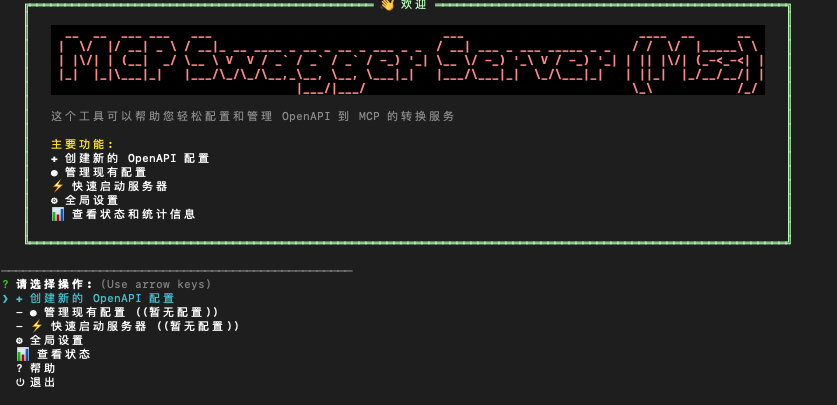
MCP Swagger Server 是一个将 OpenAPI/Swagger 规范转换为 Model Context Protocol (MCP) 格式的工具。
mcp-swagger-server/
├── packages/
│   ├── mcp-swagger-server/     # 🔧 核心 MCP 服务器 (可用)
│   ├── mcp-swagger-parser/     # 📝 OpenAPI 解析器 (可用)
│   └── mcp-swagger-api/        # 🔗 REST API 后端 (可用)
└── scripts/ # 🔨 构建脚本🔄 零配置转换: 输入 OpenAPI 规范,立即获得 MCP 工具
🎯 渐进式命令行: 提供逐步引导的命令行界面,方便用户配置
🖥️ 终端优先体验: 以 CLI / 交互式终端作为主要使用方式
🔌 多传输协议: 支持 SSE、Streamable 和 Stdio 传输
🔐 安全认证: 支持 Bearer Token 认证保护 API 访问
Node.js ≥ 20.0.0
pnpm ≥ 8.0.0 (推荐)
npm i mcp-swagger-server -gmss:交互式终端界面(默认)
mcp-swagger-server / mcp-swagger:标准命令行(适合脚本和 AI 客户端集成)
mss --openapi ...:直接启动模式(跳过交互界面)
说明:交互式会话模式下不支持 STDIO 启动;如需 STDIO,请使用
mss --openapi ... --transport stdio(兼容别名:mcp-swagger-server --transport stdio ...)。
mssmss --openapi https://api.example.com/openapi.json \
--operation-filter-methods GET \
--operation-filter-methods POST \
--transport streamable \
--auth-type bearer \
--bearer-token "your-token-here"
# 使用配置文件
mss --config config.json# 基本用法
mss [选项]
# 选项:
--openapi, -o OpenAPI 规范的 URL 或文件路径
--transport, -t 传输协议 (stdio|sse|streamable)
--port, -p 端口号
--endpoint, -e 自定义端点路径 (默认 sse:/sse, streamable:/mcp)
--base-url 覆盖 API 基础 URL(优先级最高)
--watch, -w 监控文件变化
--env 环境变量文件路径 (.env)
# Bearer Token 认证选项:
--auth-type 认证类型 (bearer)
--bearer-token 直接指定 Bearer Token
--bearer-env 从环境变量读取 Token
--config, -c 配置文件路径
--custom-header 自定义请求头 "Key=Value" (可重复)
--custom-header-env 环境变量请求头 "Key=VAR_NAME" (可重复)
--custom-headers-config 自定义请求头配置文件 (JSON)
--debug-headers 请求头调试日志
# 操作过滤选项:
--operation-filter-methods <method> HTTP方法过滤 (可重复) [示例: GET]
--operation-filter-paths <path> 路径过滤 (支持通配符, 可重复) [示例: /api/*]
--operation-filter-operation-ids <id> 操作ID过滤 (可重复) [示例: getUserById]
--operation-filter-status-codes <code> 状态码过滤 (可重复) [示例: 200]
--operation-filter-parameters <param> 参数过滤 (可重复) [示例: userId]提示:如果要在
mss中直接启动(跳过交互界面),请显式传入--openapi参数。若 OpenAPI 文档中的servers.url是相对路径(如/v1),请优先使用远程 URL 加载文档,或显式传入--base-url。Swagger 2.0 文档会在启动时自动转换为 OpenAPI 3.x(含host/basePath映射)。
export XQUIK_API_KEY="your-xquik-api-key"
mss --openapi https://xquik.com/openapi.json \
  --base-url https://xquik.com \
  --custom-header-env x-api-key=XQUIK_API_KEY \
  --transport streamable \
--port 3323mcp-swagger-server 支持 Bearer Token 认证,可以保护需要身份验证的 API 访问。
1. 直接指定 Token
mss --auth-type bearer --bearer-token "your-token-here" --openapi https://api.example.com/openapi.json --transport streamable创建 .env 文件:
# 基础配置
MCP_PORT=3322
MCP_TRANSPORT=stdio
MCP_OPENAPI_URL=https://api.example.com/openapi.json
MCP_ENDPOINT=/mcp
MCP_BASE_URL=https://api.example.com/v1

# 认证配置
MCP_AUTH_TYPE=bearer
API_TOKEN=your-bearer-token-here{
"mcpServers": {
"swagger-converter": {
"command": "mss",
"args": [
"--openapi", "https://petstore.swagger.io/v2/swagger.json",
"--transport", "stdio"
]
},
"secured-api": {
"command": "mss",
"args": [
"--openapi", "https://api.example.com/openapi.json",
"--transport", "stdio",
"--auth-type", "bearer",
"--bearer-env", "API_TOKEN"
],
"env": {
"API_TOKEN": "your-bearer-token-here"
}
}
}
}# 构建所有包
pnpm build
# 构建核心工作区包
pnpm build:packages
# 终端开发模式(CLI / parser watch)
pnpm dev
# 清理构建产物
pnpm clean欢迎贡献!请先阅读 贡献指南。
MIT License - 详见 LICENSE 文件。
Built with ❤️ by ZhaoYaNan(ZTE)
This server cannot be deployed
MCP server for AI access to Swagger by SmartBear.
A comprehensive Model Context Protocol (MCP) server that enables AI assistants to interact with yo…
Model Context Protocol server for the Apideck Unified API. Connect any MCP-compatible agent framework to 100+ accounting systems, HRIS platforms, file storage providers, and more through one integration. More information https://www.apideck.com/mcp-server
AI-native mock API server with MCP. Create REST/SOAP mocks from Claude, Cursor, or Windsurf.