
A
licenseNot graded
qualityF
maintenanceEnables AI assistants to perform network scanning operations using NMAP, offering a standardized interface for network analysis and security assessments through AI conversations.
32 npm
49
MIT

Uses SQLite for task management and storage of scan results, tracking scanning task status and history.
Click on "Deploy Server".
Wait a few minutes for the server to deploy. Once ready, it will show a "Started" state.
In the chat, type @ followed by the MCP server name and your instructions, e.g., "@Nmap MCP Server quick scan of 192.168.1.1"
That's it! The server will respond to your query, and you can continue using it as needed.
Here is a step-by-step guide with screenshots.


An Nmap scanning service developed based on the FastMCP framework, providing remote invocation capabilities via the Streamable HTTP protocol and supporting MCP (Model Context Protocol) client integration.
Using Nmap MCP Server for port scanning in DeepSOC:
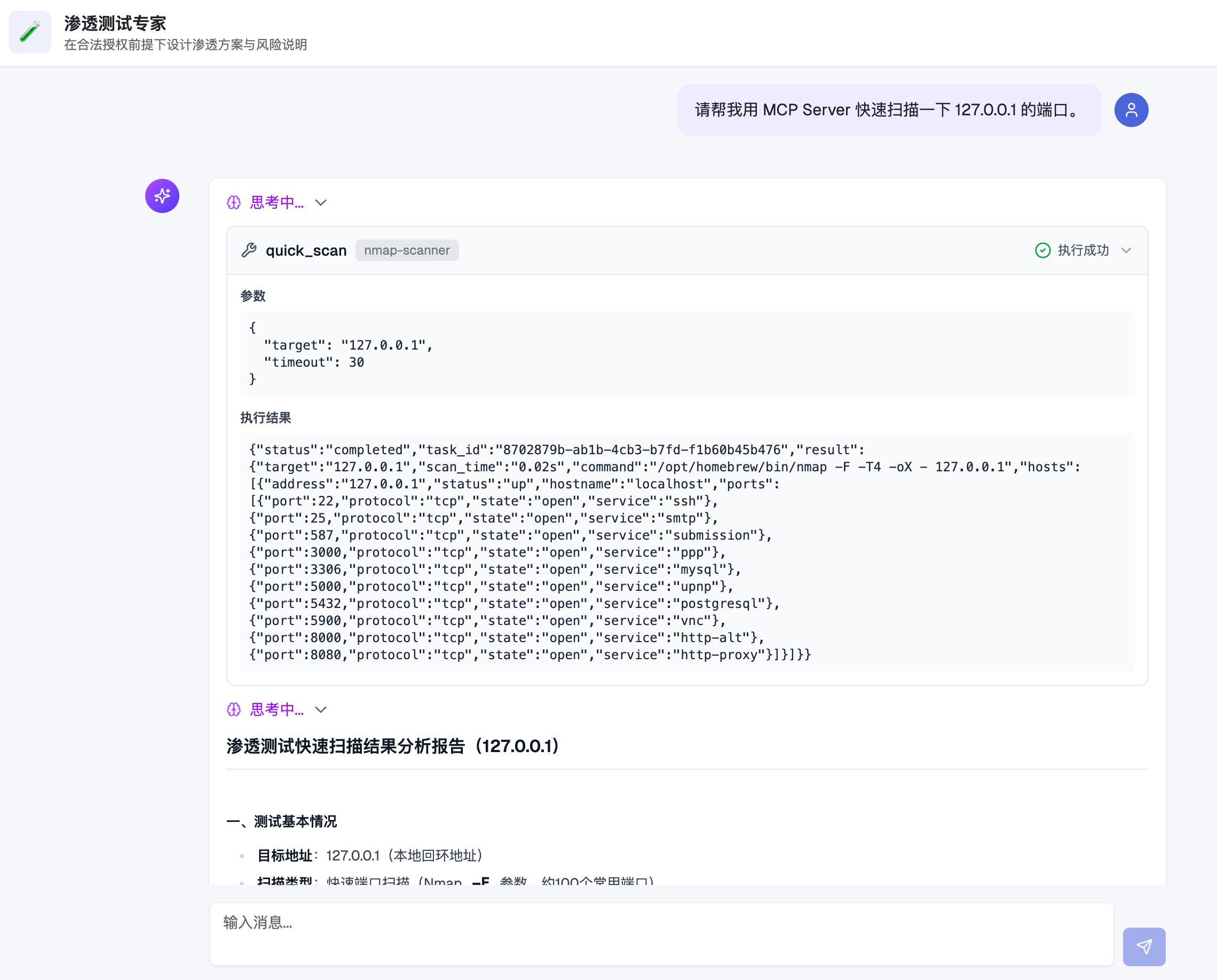
Related MCP server: Nmap MCP Server
Quick Scan - Scans common ports (approx. 100) on the target host
Full Scan - Scans all 65,535 ports, with support for service version detection
Custom Scan - Supports arbitrary Nmap command arguments
Async Tasks - Long-running scans are automatically converted to background tasks, with results queryable via task ID
Token Authentication - Supports both URL parameter and Bearer Token authentication methods
Structured Output - Quick/Full scans return structured data in JSON format
┌─────────────┐     HTTP/MCP      ┌─────────────────┐
│  MCP Client │ ◄───────────────► │  Nmap MCP Server │
└─────────────┘                   └────────┬────────┘
                                           │
                                           ▼
                                  ┌─────────────────┐
                                  │   Task Manager  │
                                  │    (SQLite)     │
                                  └────────┬────────┘
                                           │
                                           ▼
                                  ┌─────────────────┐
                                  │     Scanner     │
                                  │  (Nmap + XML)   │
                                  └─────────────────┘
Request Handling: MCP Client sends a scan request via the Streamable HTTP protocol
Task Scheduling: The server creates a task record and stores it in an SQLite database
Synchronous Waiting: Attempts to complete the scan within the configured timeout (default 30 seconds)
Async Fallback: If not completed within the timeout, the task is moved to background execution, returning a task ID for subsequent queries
Result Parsing: Nmap outputs in XML format, which the server parses and returns as structured JSON
Python 3.10+
Nmap (must be installed on the system)
# 克隆项目
git clone <repository-url>
cd nmap-mcp-http

# 创建虚拟环境
python3 -m venv venv
source venv/bin/activate  # Linux/macOS
# 或 venv\Scripts\activate  # Windows

# 安装依赖
pip install -r requirements.txt

# 生成配置文件模板
python server.py --init

# 编辑配置文件
cp config.example.json config.json
vim config.json # 修改 token 等配置Example config.json configuration file:
{
  "host": "0.0.0.0",
  "port": 3004,
  "path": "/mcp",
  "token": "your_secret_token_here",
  "sync_timeout": 30,
  "max_concurrent_tasks": 10,
  "db_path": "nmap_tasks.db",
  "nmap_path": "nmap"
}
Parameter | Description | Default Value |
| Listening address |
|
| Listening port |
|
| MCP service path |
|
| Authentication token | Auto-generated |
| Sync wait timeout (seconds) |
|
| Max concurrent tasks |
|
| SQLite database path |
|
| Nmap executable path |
|
The project provides a Dockerfile and docker-compose.yml for direct containerized execution.
# 初始化配置文件(请修改 token)
cp config.example.json config.json

# 预创建 SQLite 文件,避免被 Docker 识别成目录
touch nmap_tasks.dbdocker compose up -d --builddocker compose logs -f nmap-mcp-serverdocker compose downSuitable for scenarios where you don't want to pull the source code and just want to run the container directly.
Prepare local directory and configuration file:
mkdir -p nmap-mcp-data
cd nmap-mcp-data

cat > config.json <<'EOF'
{
  "host": "0.0.0.0",
  "port": 3004,
  "path": "/mcp",
  "token": "replace_with_your_token",
  "sync_timeout": 30,
  "max_concurrent_tasks": 10,
  "db_path": "nmap_tasks.db",
  "nmap_path": "nmap"
}
EOF

touch nmap_tasks.db
Pull the image (prioritize organization repository):
docker pull ghcr.io/flagify-com/nmap-mcp-http:latest
# fallback:
# docker pull ghcr.io/wzfukui/nmap-mcp-http:latest
Start the container:
docker run -d \
  --name nmap-mcp-server \
  -p 3004:3004 \
  -v "$(pwd)/config.json:/app/config.json:ro" \
  -v "$(pwd)/nmap_tasks.db:/app/nmap_tasks.db" \
  --restart always \
  ghcr.io/flagify-com/nmap-mcp-http:latest
View logs:
docker logs -f nmap-mcp-serverStop and remove the container:
docker rm -f nmap-mcp-serverIf the logs show the following error:
IsADirectoryError: [Errno 21] Is a directory: '/app/config.json'It usually means the config.json does not exist on the host, and Docker automatically created a directory with the same name and mounted it into the container.
You can execute the following command to fix it (in the host's runtime directory):
docker rm -f nmap-mcp-server
rm -rf config.json
test -d nmap_tasks.db && rm -rf nmap_tasks.db
cat > config.json <<'EOF'
{
  "host": "0.0.0.0",
  "port": 3004,
  "path": "/mcp",
  "token": "replace_with_your_token",
  "sync_timeout": 30,
  "max_concurrent_tasks": 10,
  "db_path": "nmap_tasks.db",
  "nmap_path": "nmap"
}
EOF
touch nmap_tasks.db
Then re-execute docker run ... to start the container.
The repository has added .github/workflows/docker-publish.yml, with the following trigger conditions:
push to main
push v* tag (e.g., v1.0.0)
manual trigger workflow_dispatch
The Workflow will automatically:
Log in to GHCR (ghcr.io)
Build the Docker image
Push the image to ghcr.io/<owner>/<repo>
Example image address:
# preferred (org):
ghcr.io/flagify-com/nmap-mcp-http:latest
ghcr.io/flagify-com/nmap-mcp-http:main
ghcr.io/flagify-com/nmap-mcp-http:sha-<commit>

# fallback (personal):
ghcr.io/wzfukui/nmap-mcp-http:latest
ghcr.io/wzfukui/nmap-mcp-http:main
ghcr.io/wzfukui/nmap-mcp-http:sha-<commit># 使用默认配置文件 (config.json)
python server.py
# 指定配置文件
python server.py -c /path/to/config.json
# 生成配置模板
python server.py --initAfter the service starts, it will print the MCP client configuration, supporting two authentication methods:
Method 1: URL Token
{
  "mcpServers": {
    "nmap-scanner": {
      "name": "Nmap Scanner",
      "type": "streamableHttp",
      "description": "Nmap 端口扫描服务",
      "isActive": true,
      "baseUrl": "http://127.0.0.1:3004/mcp?token=your_token"
    }
  }
}
Method 2: Bearer Token
{
  "mcpServers": {
    "nmap-scanner": {
      "name": "Nmap Scanner",
      "type": "streamableHttp",
      "description": "Nmap 端口扫描服务",
      "isActive": true,
      "baseUrl": "http://127.0.0.1:3004/mcp",
      "headers": {
        "Authorization": "Bearer your_token"
      }
    }
  }
}The project comes with a test client program to quickly verify if the MCP Server is working properly.
# 激活虚拟环境
source venv/bin/activate

# 运行测试(需要先启动服务)
python test_client.py <your_token>

# 示例
python test_client.py your_secret_token_here
Test content includes:
URL Token authentication method
HTTP Header Bearer Token authentication method
No Token request (verify rejection)
Invalid Token request (verify rejection)
The test program will automatically call the quick scan tool and query the task status to ensure all functions are running normally.
List of tools provided by Nmap MCP Server:
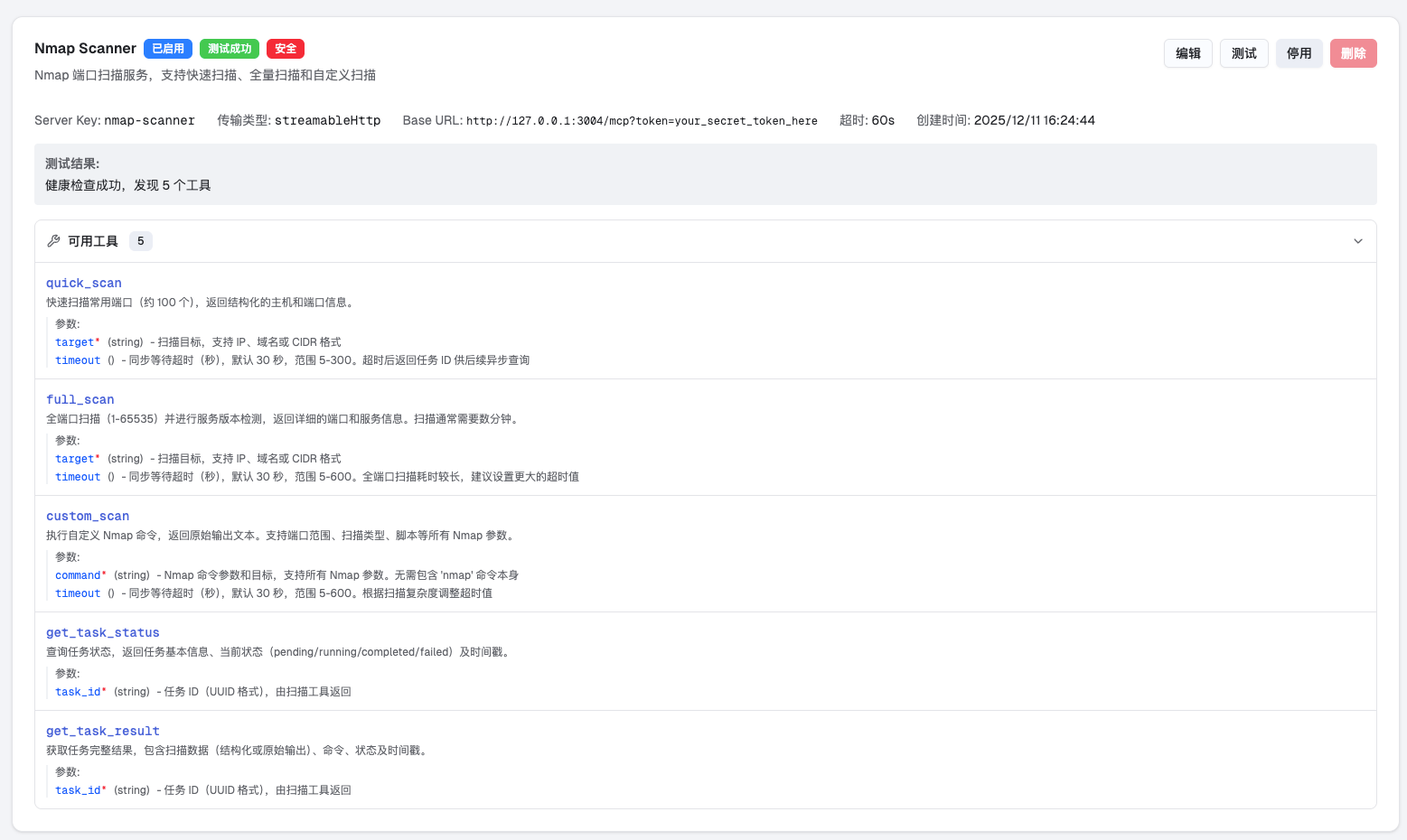
Quickly scan common ports (approx. 100) on the target host.
Parameters:
target (required): Target IP, domain, or CIDR format
timeout (optional): Sync wait timeout, 5-300 seconds
Example:
{"target": "192.168.1.1"}
{"target": "example.com", "timeout": 60}Full scan of all ports (1-65535) on the target host, including service version detection.
Parameters:
target (required): Target IP, domain, or CIDR format
timeout (optional): Sync wait timeout, 5-600 seconds
Example:
{"target": "10.0.0.1", "timeout": 300}Execute custom Nmap commands.
Parameters:
command (required): Nmap command arguments (excluding the nmap command itself)
timeout (optional): Sync wait timeout, 5-600 seconds
Example:
{"command": "-sS -p 80,443,8080 192.168.1.1"}
{"command": "-sV -sC -p 22 example.com"}
{"command": "--script vuln 192.168.1.1", "timeout": 120}Query the status of a scan task.
Parameters:
task_id (required): Task ID (UUID format)
Return Status:
pending: Waiting to execute
running: Scanning
completed: Scan completed
failed: Scan failed
Get the full results of a scan task.
Parameters:
task_id (required): Task ID (UUID format)
{
  "status": "completed",
  "task_id": "550e8400-e29b-41d4-a716-446655440000",
  "result": {
    "target": "192.168.1.1",
    "scan_time": 2.5,
    "hosts": [
      {
        "address": "192.168.1.1",
        "status": "up",
        "ports": [
          {
            "port": 22,
            "protocol": "tcp",
            "state": "open",
            "service": "ssh",
            "version": "OpenSSH 8.0"
          },
          {
            "port": 80,
            "protocol": "tcp",
            "state": "open",
            "service": "http",
            "version": "nginx 1.18.0"
          }
        ]
      }
    ]
  }
}{
"status": "pending",
"task_id": "550e8400-e29b-41d4-a716-446655440000",
"message": "扫描任务已提交,请使用 get_task_status 或 get_task_result 查询结果"
}Token Protection: Please be sure to change the default Token to avoid unauthorized access
Network Isolation: It is recommended to run in a trusted network environment or use with a firewall
Permission Control: This service does not restrict scan targets; please ensure it is used only for authorized security testing
Command Injection: The custom_scan tool accepts arbitrary Nmap arguments; please assess the risks
Concurrency Limit: Default maximum of 10 concurrent tasks; requests will be rejected if exceeded
Timeout Settings: Full scans take a long time; it is recommended to use the async task mode
Resource Usage: Large-scale scans (e.g., /16 subnets) will consume significant system resources
Containerized Deployment: Docker deployment is recommended for easy isolation and management
Log Monitoring: It is recommended to configure log collection to monitor scanning activities
Regular Cleanup: The SQLite database will continue to grow; it is recommended to clean up historical tasks regularly
nmap-mcp-http/
├── .github/workflows/
│   └── docker-publish.yml # GitHub Actions Docker 构建与发布
├── .dockerignore      # Docker 构建忽略规则
├── Dockerfile         # 容器镜像构建文件
├── server.py          # MCP 服务器主程序
├── config.py          # 配置管理模块
├── models.py          # 数据模型定义
├── scanner.py         # Nmap 扫描器封装
├── task_manager.py    # 任务管理器(SQLite)
├── auth.py            # Token 鉴权中间件
├── test_client.py     # 测试客户端
├── config.json        # 配置文件(需自行创建)
├── config.example.json # 配置文件模板
├── requirements.txt   # Python 依赖
├── docker-compose.yml # 本地容器编排
├── VERSION            # 版本号
├── LICENSE            # MIT 开源许可证
├── README.md          # 项目说明
└── images/            # 截图资源
    ├── deepsoc-with-nmap-mcp.png
└── nmap-mcp-available-tools.pngIssues and Pull Requests are welcome! This project is fully open source, and we look forward to community participation and contributions.
This project is licensed under the MIT License.
Copyright (c) 2025 Shanghai Wuzhi Intelligent Technology Co., Ltd.
This server cannot be deployed
Scans remote MCP servers for protocol, security, and TLS issues; exposes scan tools via MCP.
nmap - Network Port Scanner & Service Detection
Free, read-only security scanner for remote MCP servers, before you connect them.
Security scanner for MCP servers. Detect vulnerabilities, prompt injection, and tool poisoning.