
A
licenseNot graded
qualityF
maintenanceEnables AI assistants to perform network scanning operations using NMAP, offering a standardized interface for network analysis and security assessments through AI conversations.
36 npm
49
MIT


FastMCPフレームワークに基づいて開発されたNmapスキャンサービスです。Streamable HTTPプロトコルを通じてリモート呼び出し機能を提供し、MCP (Model Context Protocol) クライアントとの統合をサポートします。
DeepSOCでNmap MCP Serverを使用してポートスキャンを実行:
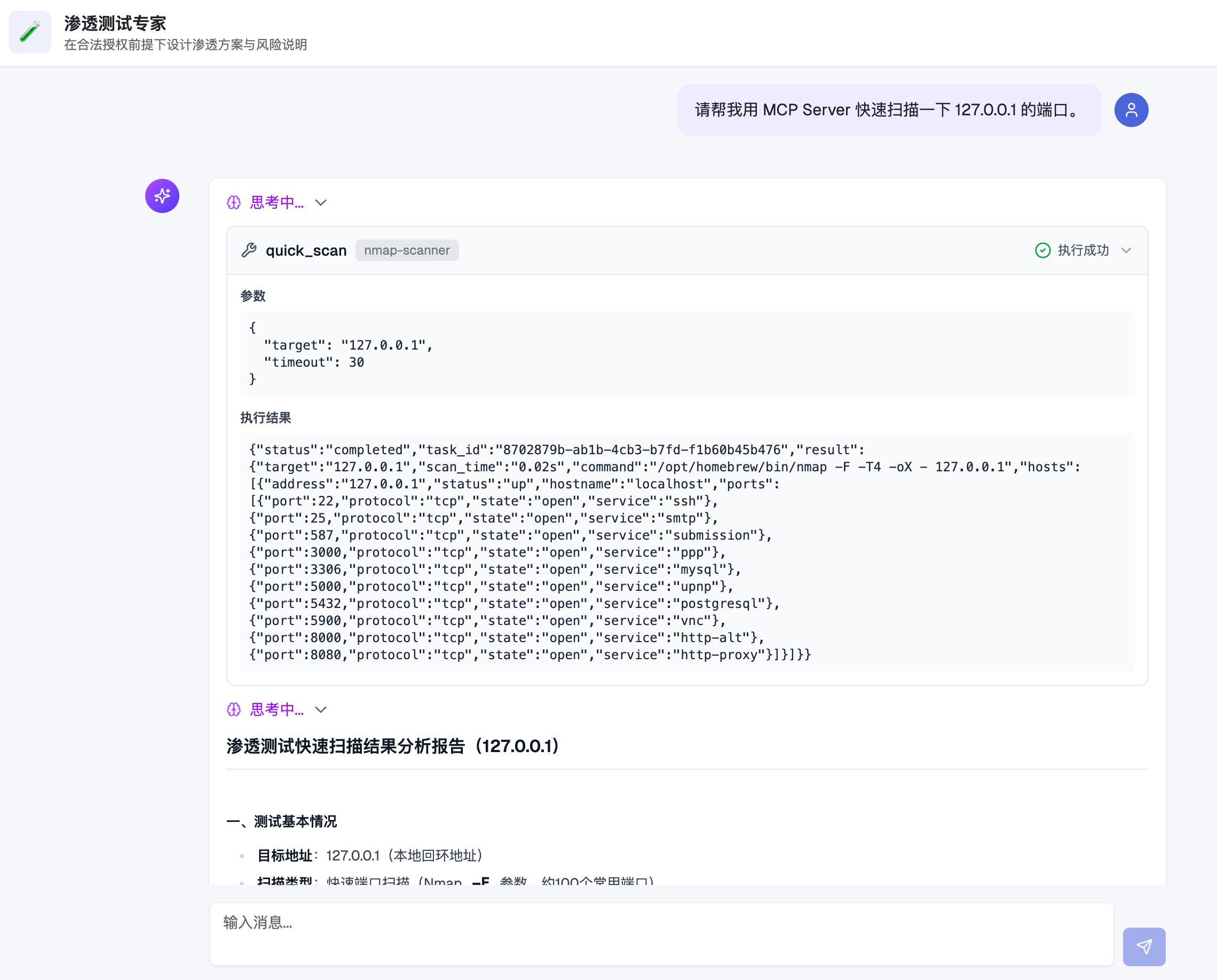
Related MCP server: Nmap MCP Server
クイックスキャン - ターゲットホストの一般的なポート(約100個)をスキャン
フルスキャン - 全65535ポートをスキャンし、サービスバージョン検出をサポート
カスタムスキャン - 任意のNmapコマンド引数をサポート
非同期タスク - 長時間のスキャンは自動的にバックグラウンドタスクに移行し、タスクIDで結果を照会可能
Token認証 - URLパラメータおよびBearer Tokenの2種類の認証方式をサポート
構造化出力 - クイック/フルスキャンはJSON形式の構造化データを返却
┌─────────────┐     HTTP/MCP      ┌─────────────────┐
│  MCP Client │ ◄───────────────► │  Nmap MCP Server │
└─────────────┘                   └────────┬────────┘
                                           │
                                           ▼
                                  ┌─────────────────┐
                                  │   Task Manager  │
                                  │    (SQLite)     │
                                  └────────┬────────┘
                                           │
                                           ▼
                                  ┌─────────────────┐
                                  │     Scanner     │
                                  │  (Nmap + XML)   │
└─────────────────┘リクエスト処理:MCP ClientがStreamable HTTPプロトコルを通じてスキャンリクエストを送信
タスクスケジューリング:サーバーがタスクレコードを作成し、SQLiteデータベースに保存
同期待機:設定されたタイムアウト時間(デフォルト30秒)内にスキャンの完了を試行
非同期へのフォールバック:タイムアウトまでに完了しない場合、タスクはバックグラウンド実行に移行し、後続の照会用にタスクIDを返却
結果解析:NmapがXML形式で出力し、サーバーが解析後に構造化JSONを返却
Python 3.10+
Nmap(システムにインストール済みであること)
# 克隆项目
git clone <repository-url>
cd nmap-mcp-http

# 创建虚拟环境
python3 -m venv venv
source venv/bin/activate  # Linux/macOS
# 或 venv\Scripts\activate  # Windows

# 安装依赖
pip install -r requirements.txt

# 生成配置文件模板
python server.py --init

# 编辑配置文件
cp config.example.json config.json
vim config.json # 修改 token 等配置設定ファイル config.json の例:
{
  "host": "0.0.0.0",
  "port": 3004,
  "path": "/mcp",
  "token": "your_secret_token_here",
  "sync_timeout": 30,
  "max_concurrent_tasks": 10,
  "db_path": "nmap_tasks.db",
  "nmap_path": "nmap"
}
パラメータ | 説明 | デフォルト値 |
| リッスンアドレス |
|
| リッスンポート |
|
| MCPサービスパス |
|
| 認証トークン | 自動生成 |
| 同期待機タイムアウト(秒) |
|
| 最大同時タスク数 |
|
| SQLiteデータベースパス |
|
| Nmap実行ファイルパス |
|
プロジェクトには Dockerfile と docker-compose.yml が含まれており、直接コンテナ化して実行可能です。
# 初始化配置文件(请修改 token)
cp config.example.json config.json

# 预创建 SQLite 文件,避免被 Docker 识别成目录
touch nmap_tasks.dbdocker compose up -d --builddocker compose logs -f nmap-mcp-serverdocker compose downソースコードをプルせず、コンテナを直接実行したい場合に適しています。
ローカルディレクトリと設定ファイルの準備:
mkdir -p nmap-mcp-data
cd nmap-mcp-data

cat > config.json <<'EOF'
{
  "host": "0.0.0.0",
  "port": 3004,
  "path": "/mcp",
  "token": "replace_with_your_token",
  "sync_timeout": 30,
  "max_concurrent_tasks": 10,
  "db_path": "nmap_tasks.db",
  "nmap_path": "nmap"
}
EOF

touch nmap_tasks.db
イメージのプル(組織リポジトリを優先):
docker pull ghcr.io/flagify-com/nmap-mcp-http:latest
# fallback:
# docker pull ghcr.io/wzfukui/nmap-mcp-http:latest
コンテナの起動:
docker run -d \
  --name nmap-mcp-server \
  -p 3004:3004 \
  -v "$(pwd)/config.json:/app/config.json:ro" \
  -v "$(pwd)/nmap_tasks.db:/app/nmap_tasks.db" \
  --restart always \
  ghcr.io/flagify-com/nmap-mcp-http:latest
ログの確認:
docker logs -f nmap-mcp-serverコンテナの停止と削除:
docker rm -f nmap-mcp-serverログに以下のエラーが表示される場合:
IsADirectoryError: [Errno 21] Is a directory: '/app/config.json'通常、ホスト側に config.json が存在せず、Dockerが同名のディレクトリを自動作成してコンテナにマウントしたことを意味します。
以下のコマンドを実行して修復してください(ホストの実行ディレクトリにて):
docker rm -f nmap-mcp-server
rm -rf config.json
test -d nmap_tasks.db && rm -rf nmap_tasks.db
cat > config.json <<'EOF'
{
  "host": "0.0.0.0",
  "port": 3004,
  "path": "/mcp",
  "token": "replace_with_your_token",
  "sync_timeout": 30,
  "max_concurrent_tasks": 10,
  "db_path": "nmap_tasks.db",
  "nmap_path": "nmap"
}
EOF
touch nmap_tasks.db
その後、再度 docker run ... を実行してコンテナを起動します。
リポジトリには .github/workflows/docker-publish.yml が追加されており、以下の条件でトリガーされます:
main へのpush
v* タグのpush(例:v1.0.0)
手動トリガー workflow_dispatch
Workflowは自動的に以下を実行します:
GHCR(ghcr.io)へのログイン
Dockerイメージのビルド
ghcr.io/<owner>/<repo> へのイメージプッシュ
イメージアドレスの例:
# preferred (org):
ghcr.io/flagify-com/nmap-mcp-http:latest
ghcr.io/flagify-com/nmap-mcp-http:main
ghcr.io/flagify-com/nmap-mcp-http:sha-<commit>

# fallback (personal):
ghcr.io/wzfukui/nmap-mcp-http:latest
ghcr.io/wzfukui/nmap-mcp-http:main
ghcr.io/wzfukui/nmap-mcp-http:sha-<commit># 使用默认配置文件 (config.json)
python server.py
# 指定配置文件
python server.py -c /path/to/config.json
# 生成配置模板
python server.py --initサービス起動時にMCPクライアントの設定が表示されます。2種類の認証方式をサポートしています:
方式1:URL Token
{
  "mcpServers": {
    "nmap-scanner": {
      "name": "Nmap Scanner",
      "type": "streamableHttp",
      "description": "Nmap 端口扫描服务",
      "isActive": true,
      "baseUrl": "http://127.0.0.1:3004/mcp?token=your_token"
    }
  }
}
方式2:Bearer Token
{
  "mcpServers": {
    "nmap-scanner": {
      "name": "Nmap Scanner",
      "type": "streamableHttp",
      "description": "Nmap 端口扫描服务",
      "isActive": true,
      "baseUrl": "http://127.0.0.1:3004/mcp",
      "headers": {
        "Authorization": "Bearer your_token"
      }
    }
  }
}プロジェクトにはテストクライアントプログラムが付属しており、MCP Serverが正常に動作しているかを迅速に検証できます。
# 激活虚拟环境
source venv/bin/activate

# 运行测试(需要先启动服务)
python test_client.py <your_token>

# 示例
python test_client.py your_secret_token_here
テスト内容:
URL Token認証方式
HTTP Header Bearer Token認証方式
トークンなしのリクエスト(拒否されることを確認)
不正なトークンでのリクエスト(拒否されることを確認)
テストプログラムは自動的にクイックスキャンツールを呼び出し、タスク状態を照会して、すべての機能が正常に動作していることを確認します。
Nmap MCP Serverが提供するツール一覧:
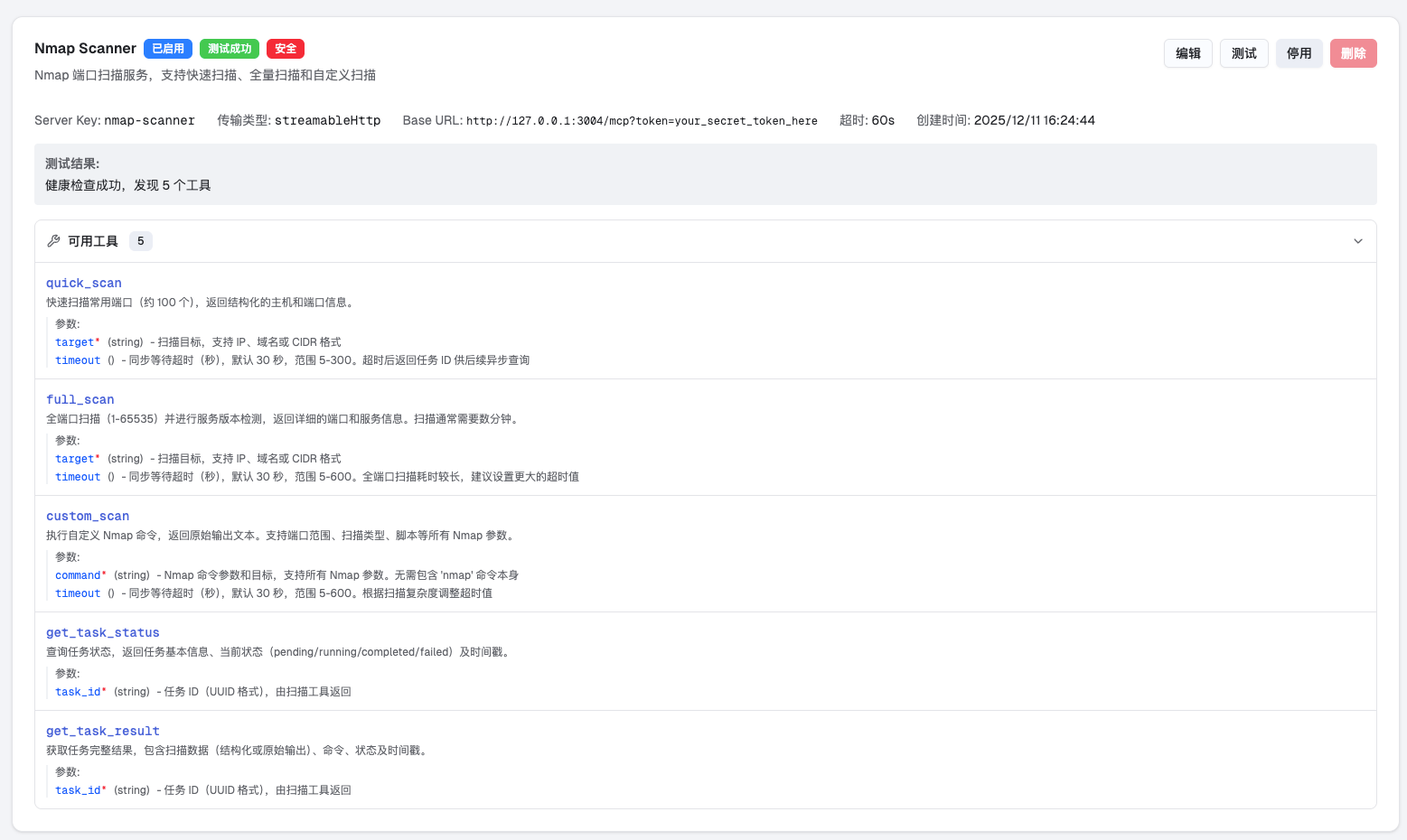
ターゲットホストの一般的なポート(約100個)をクイックスキャンします。
引数:
target (必須): ターゲットIP、ドメイン、またはCIDR形式
timeout (任意): 同期待機タイムアウト、5〜300秒
例:
{"target": "192.168.1.1"}
{"target": "example.com", "timeout": 60}ターゲットホストの全ポート(1-65535)をフルスキャンし、サービスバージョン検出を含めます。
引数:
target (必須): ターゲットIP、ドメイン、またはCIDR形式
timeout (任意): 同期待機タイムアウト、5〜600秒
例:
{"target": "10.0.0.1", "timeout": 300}カスタムNmapコマンドを実行します。
引数:
command (必須): Nmapコマンド引数(nmapコマンド自体は含めない)
timeout (任意): 同期待機タイムアウト、5〜600秒
例:
{"command": "-sS -p 80,443,8080 192.168.1.1"}
{"command": "-sV -sC -p 22 example.com"}
{"command": "--script vuln 192.168.1.1", "timeout": 120}スキャンタスクの状態を照会します。
引数:
task_id (必須): タスクID(UUID形式)
返却される状態:
pending: 実行待ち
running: スキャン中
completed: スキャン完了
failed: スキャン失敗
スキャンタスクの完全な結果を取得します。
引数:
task_id (必須): タスクID(UUID形式)
{
  "status": "completed",
  "task_id": "550e8400-e29b-41d4-a716-446655440000",
  "result": {
    "target": "192.168.1.1",
    "scan_time": 2.5,
    "hosts": [
      {
        "address": "192.168.1.1",
        "status": "up",
        "ports": [
          {
            "port": 22,
            "protocol": "tcp",
            "state": "open",
            "service": "ssh",
            "version": "OpenSSH 8.0"
          },
          {
            "port": 80,
            "protocol": "tcp",
            "state": "open",
            "service": "http",
            "version": "nginx 1.18.0"
          }
        ]
      }
    ]
  }
}{
"status": "pending",
"task_id": "550e8400-e29b-41d4-a716-446655440000",
"message": "扫描任务已提交,请使用 get_task_status 或 get_task_result 查询结果"
}トークンの保護:デフォルトのトークンは必ず変更し、不正アクセスを防止してください
ネットワーク分離:信頼できるネットワーク環境で実行するか、ファイアウォールと併用することを推奨します
権限管理:本サービスはスキャン対象を制限しません。許可されたセキュリティテストのみに使用してください
コマンドインジェクション:custom_scanツールは任意のNmap引数を受け入れるため、リスクを評価してください
同時実行制限:デフォルトで最大10個の同時タスクを許可し、超過したリクエストは拒否されます
タイムアウト設定:フルスキャンは時間がかかるため、非同期タスクモードの使用を推奨します
リソース消費:広範囲のスキャン(例:/16サブネット)は大量のシステムリソースを消費します
コンテナ化デプロイ:分離と管理が容易なDockerデプロイを推奨します
ログ監視:ログ収集を設定し、スキャン活動を監視することを推奨します
定期的なクリーンアップ:SQLiteデータベースは継続的に増加するため、定期的に過去のタスクを削除することを推奨します
nmap-mcp-http/
├── .github/workflows/
│   └── docker-publish.yml # GitHub Actions Docker 构建与发布
├── .dockerignore      # Docker 构建忽略规则
├── Dockerfile         # 容器镜像构建文件
├── server.py          # MCP 服务器主程序
├── config.py          # 配置管理模块
├── models.py          # 数据模型定义
├── scanner.py         # Nmap 扫描器封装
├── task_manager.py    # 任务管理器(SQLite)
├── auth.py            # Token 鉴权中间件
├── test_client.py     # 测试客户端
├── config.json        # 配置文件(需自行创建)
├── config.example.json # 配置文件模板
├── requirements.txt   # Python 依赖
├── docker-compose.yml # 本地容器编排
├── VERSION            # 版本号
├── LICENSE            # MIT 开源许可证
├── README.md          # 项目说明
└── images/            # 截图资源
    ├── deepsoc-with-nmap-mcp.png
└── nmap-mcp-available-tools.pngIssueやPull Requestを歓迎します!本プロジェクトは完全にオープンソースであり、コミュニティの参加と貢献を期待しています。
本プロジェクトは MIT License の下で公開されています。
Copyright (c) 2025 上海霧幟智能科技有限公司 (Shanghai Wuzhi Intelligent Technology Co., Ltd.)
This server cannot be deployed
Scans remote MCP servers for protocol, security, and TLS issues; exposes scan tools via MCP.
Free, read-only security scanner for remote MCP servers, before you connect them.
Security scanner for MCP servers. Detect vulnerabilities, prompt injection, and tool poisoning.
Nmap Cloud - Port Scanner & Service Detection | Free Trial