
A
licenseNot graded
qualityF
maintenanceEnables AI assistants to perform network scanning operations using NMAP, offering a standardized interface for network analysis and security assessments through AI conversations.
36 npm
49
MIT


FastMCP 프레임워크를 기반으로 개발된 Nmap 스캔 서비스로, Streamable HTTP 프로토콜을 통해 원격 호출 기능을 제공하며 MCP (Model Context Protocol) 클라이언트 통합을 지원합니다.
DeepSOC에서 Nmap MCP 서버를 사용하여 포트 스캔 수행:
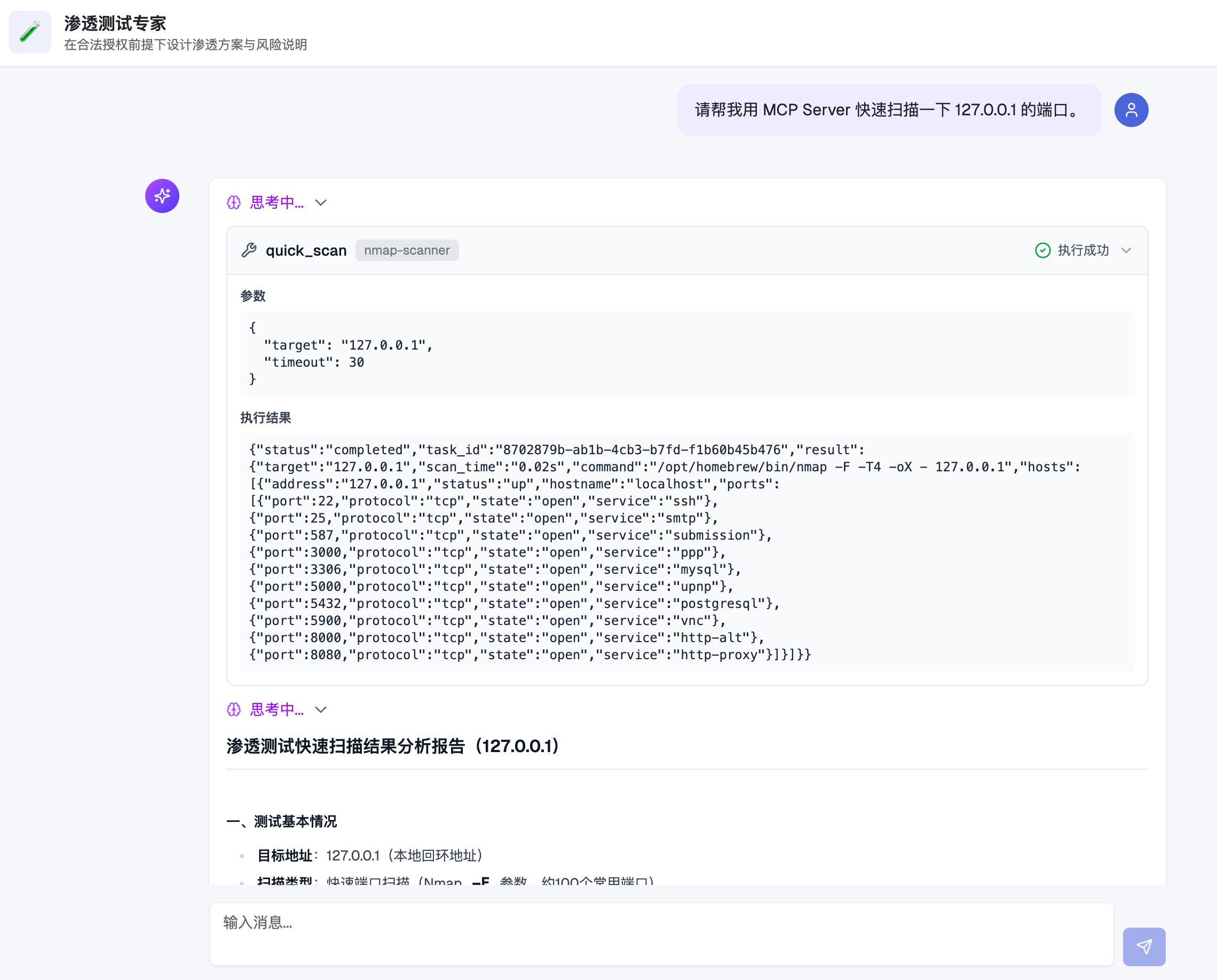
Related MCP server: Nmap MCP Server
빠른 스캔 - 대상 호스트의 일반적인 포트(약 100개) 스캔
전체 스캔 - 65535개 포트 전체 스캔, 서비스 버전 탐지 지원
사용자 정의 스캔 - 임의의 Nmap 명령 매개변수 지원
비동기 작업 - 장시간 스캔은 자동으로 백그라운드 작업으로 전환되며, 작업 ID를 통해 결과 조회 가능
토큰 인증 - URL 매개변수 및 Bearer Token 인증 방식 지원
구조화된 출력 - 빠른/전체 스캔 시 JSON 형식의 구조화된 데이터 반환
┌─────────────┐     HTTP/MCP      ┌─────────────────┐
│  MCP Client │ ◄───────────────► │  Nmap MCP Server │
└─────────────┘                   └────────┬────────┘
                                           │
                                           ▼
                                  ┌─────────────────┐
                                  │   Task Manager  │
                                  │    (SQLite)     │
                                  └────────┬────────┘
                                           │
                                           ▼
                                  ┌─────────────────┐
                                  │     Scanner     │
                                  │  (Nmap + XML)   │
                                  └─────────────────┘
요청 처리: MCP 클라이언트가 Streamable HTTP 프로토콜을 통해 스캔 요청 전송
작업 스케줄링: 서버가 작업 기록을 생성하고 SQLite 데이터베이스에 저장
동기 대기: 설정된 타임아웃 시간(기본값 30초) 동안 스캔 완료 시도
비동기 전환: 타임아웃 내 완료되지 않을 경우, 작업을 백그라운드 실행으로 전환하고 추후 조회를 위한 작업 ID 반환
결과 해석: Nmap이 XML 형식으로 출력하면, 서버가 이를 해석하여 구조화된 JSON으로 반환
Python 3.10+
Nmap (시스템에 설치되어 있어야 함)
# 克隆项目
git clone <repository-url>
cd nmap-mcp-http

# 创建虚拟环境
python3 -m venv venv
source venv/bin/activate  # Linux/macOS
# 或 venv\Scripts\activate  # Windows

# 安装依赖
pip install -r requirements.txt

# 生成配置文件模板
python server.py --init

# 编辑配置文件
cp config.example.json config.json
vim config.json # 修改 token 等配置config.json 설정 파일 예시:
{
  "host": "0.0.0.0",
  "port": 3004,
  "path": "/mcp",
  "token": "your_secret_token_here",
  "sync_timeout": 30,
  "max_concurrent_tasks": 10,
  "db_path": "nmap_tasks.db",
  "nmap_path": "nmap"
}
매개변수 | 설명 | 기본값 |
| 리스닝 주소 |
|
| 리스닝 포트 |
|
| MCP 서비스 경로 |
|
| 인증 토큰 | 자동 생성 |
| 동기 대기 타임아웃(초) |
|
| 최대 동시 작업 수 |
|
| SQLite 데이터베이스 경로 |
|
| Nmap 실행 파일 경로 |
|
프로젝트는 Dockerfile과 docker-compose.yml을 제공하며, 컨테이너 환경에서 바로 실행할 수 있습니다.
# 初始化配置文件(请修改 token)
cp config.example.json config.json

# 预创建 SQLite 文件,避免被 Docker 识别成目录
touch nmap_tasks.dbdocker compose up -d --builddocker compose logs -f nmap-mcp-serverdocker compose down소스 코드를 다운로드하지 않고 컨테이너만 바로 실행하려는 경우에 적합합니다.
로컬 디렉토리 및 설정 파일 준비:
mkdir -p nmap-mcp-data
cd nmap-mcp-data

cat > config.json <<'EOF'
{
  "host": "0.0.0.0",
  "port": 3004,
  "path": "/mcp",
  "token": "replace_with_your_token",
  "sync_timeout": 30,
  "max_concurrent_tasks": 10,
  "db_path": "nmap_tasks.db",
  "nmap_path": "nmap"
}
EOF

touch nmap_tasks.db
이미지 풀 (조직 저장소 우선):
docker pull ghcr.io/flagify-com/nmap-mcp-http:latest
# fallback:
# docker pull ghcr.io/wzfukui/nmap-mcp-http:latest
컨테이너 시작:
docker run -d \
  --name nmap-mcp-server \
  -p 3004:3004 \
  -v "$(pwd)/config.json:/app/config.json:ro" \
  -v "$(pwd)/nmap_tasks.db:/app/nmap_tasks.db" \
  --restart always \
  ghcr.io/flagify-com/nmap-mcp-http:latest
로그 확인:
docker logs -f nmap-mcp-server컨테이너 중지 및 삭제:
docker rm -f nmap-mcp-server로그에 다음과 같은 오류가 나타나는 경우:
IsADirectoryError: [Errno 21] Is a directory: '/app/config.json'이는 일반적으로 호스트 시스템에 config.json이 존재하지 않아 Docker가 동일한 이름의 디렉토리를 자동으로 생성하고 컨테이너에 마운트했음을 의미합니다.
다음 명령을 실행하여 수정하십시오 (호스트의 실행 디렉토리에서):
docker rm -f nmap-mcp-server
rm -rf config.json
test -d nmap_tasks.db && rm -rf nmap_tasks.db
cat > config.json <<'EOF'
{
  "host": "0.0.0.0",
  "port": 3004,
  "path": "/mcp",
  "token": "replace_with_your_token",
  "sync_timeout": 30,
  "max_concurrent_tasks": 10,
  "db_path": "nmap_tasks.db",
  "nmap_path": "nmap"
}
EOF
touch nmap_tasks.db
그 후 docker run ...을 다시 실행하여 컨테이너를 시작하십시오.
저장소에 .github/workflows/docker-publish.yml이 추가되었으며, 트리거 조건은 다음과 같습니다:
main 브랜치로 push
v* 태그 push (예: v1.0.0)
수동 workflow_dispatch 트리거
워크플로우는 자동으로 다음을 수행합니다:
GHCR(ghcr.io) 로그인
Docker 이미지 빌드
ghcr.io/<owner>/<repo>로 이미지 푸시
이미지 주소 예시:
# preferred (org):
ghcr.io/flagify-com/nmap-mcp-http:latest
ghcr.io/flagify-com/nmap-mcp-http:main
ghcr.io/flagify-com/nmap-mcp-http:sha-<commit>

# fallback (personal):
ghcr.io/wzfukui/nmap-mcp-http:latest
ghcr.io/wzfukui/nmap-mcp-http:main
ghcr.io/wzfukui/nmap-mcp-http:sha-<commit># 使用默认配置文件 (config.json)
python server.py
# 指定配置文件
python server.py -c /path/to/config.json
# 生成配置模板
python server.py --init서비스가 시작되면 MCP 클라이언트 설정이 출력되며, 두 가지 인증 방식을 지원합니다:
방식 1: URL 토큰
{
  "mcpServers": {
    "nmap-scanner": {
      "name": "Nmap Scanner",
      "type": "streamableHttp",
      "description": "Nmap 端口扫描服务",
      "isActive": true,
      "baseUrl": "http://127.0.0.1:3004/mcp?token=your_token"
    }
  }
}
방식 2: Bearer 토큰
{
  "mcpServers": {
    "nmap-scanner": {
      "name": "Nmap Scanner",
      "type": "streamableHttp",
      "description": "Nmap 端口扫描服务",
      "isActive": true,
      "baseUrl": "http://127.0.0.1:3004/mcp",
      "headers": {
        "Authorization": "Bearer your_token"
      }
    }
  }
}프로젝트에 포함된 테스트 클라이언트 프로그램을 사용하여 MCP 서버가 정상적으로 작동하는지 빠르게 확인할 수 있습니다.
# 激活虚拟环境
source venv/bin/activate

# 运行测试(需要先启动服务)
python test_client.py <your_token>

# 示例
python test_client.py your_secret_token_here
테스트 내용:
URL 토큰 인증 방식
HTTP Header Bearer 토큰 인증 방식
토큰 없는 요청 (거부 확인)
잘못된 토큰 요청 (거부 확인)
테스트 프로그램은 자동으로 빠른 스캔 도구를 호출하고 작업 상태를 조회하여 모든 기능이 정상 작동하는지 확인합니다.
Nmap MCP 서버에서 제공하는 도구 목록:
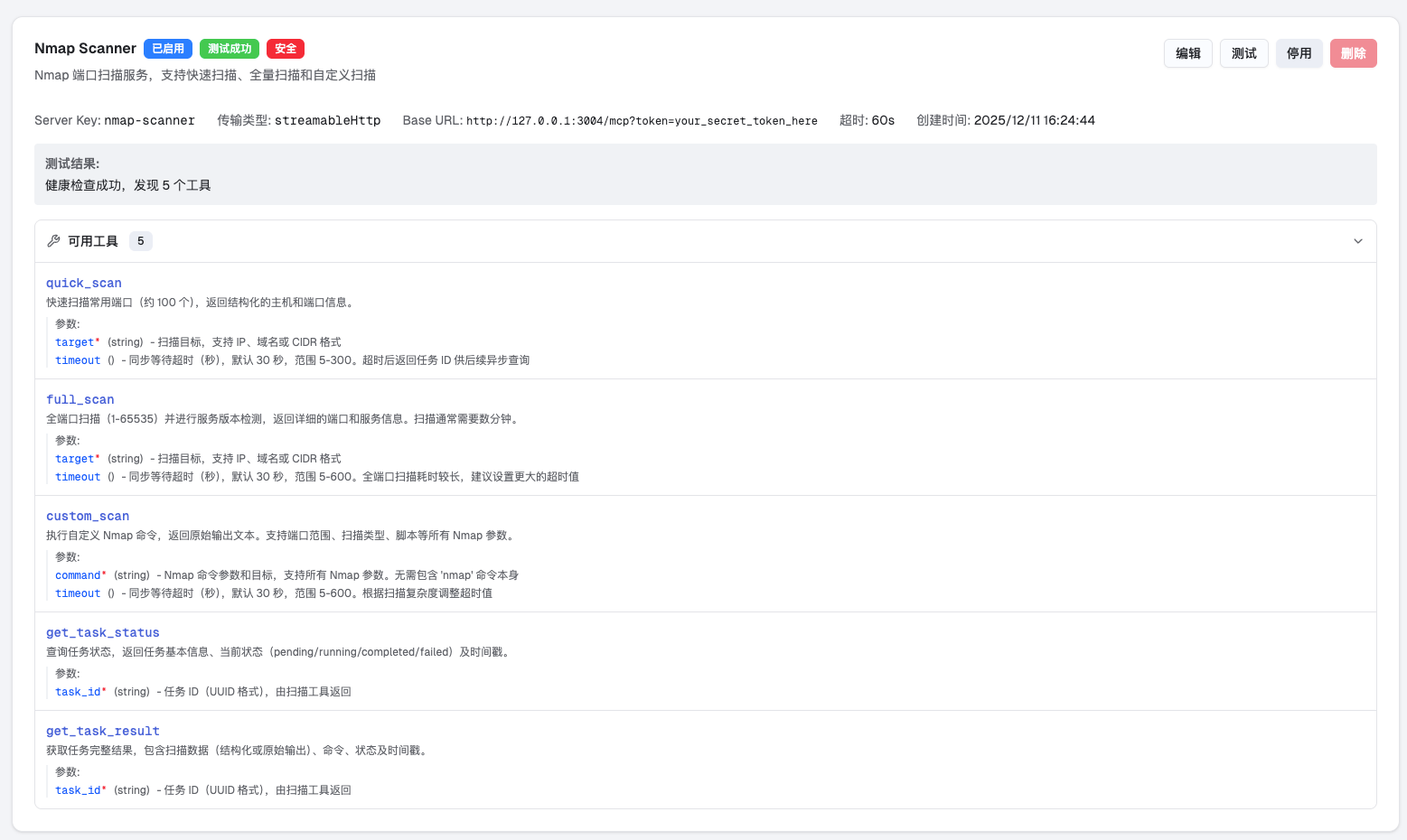
대상 호스트의 일반적인 포트(약 100개)를 빠르게 스캔합니다.
매개변수:
target (필수): 대상 IP, 도메인 또는 CIDR 형식
timeout (선택): 동기 대기 타임아웃, 5-300초
예시:
{"target": "192.168.1.1"}
{"target": "example.com", "timeout": 60}대상 호스트의 모든 포트(1-65535)를 스캔하며, 서비스 버전 탐지를 포함합니다.
매개변수:
target (필수): 대상 IP, 도메인 또는 CIDR 형식
timeout (선택): 동기 대기 타임아웃, 5-600초
예시:
{"target": "10.0.0.1", "timeout": 300}사용자 정의 Nmap 명령을 실행합니다.
매개변수:
command (필수): Nmap 명령 매개변수 (nmap 명령 자체는 제외)
timeout (선택): 동기 대기 타임아웃, 5-600초
예시:
{"command": "-sS -p 80,443,8080 192.168.1.1"}
{"command": "-sV -sC -p 22 example.com"}
{"command": "--script vuln 192.168.1.1", "timeout": 120}스캔 작업 상태를 조회합니다.
매개변수:
task_id (필수): 작업 ID (UUID 형식)
반환 상태:
pending: 실행 대기 중
running: 스캔 중
completed: 스캔 완료
failed: 스캔 실패
스캔 작업의 전체 결과를 가져옵니다.
매개변수:
task_id (필수): 작업 ID (UUID 형식)
{
  "status": "completed",
  "task_id": "550e8400-e29b-41d4-a716-446655440000",
  "result": {
    "target": "192.168.1.1",
    "scan_time": 2.5,
    "hosts": [
      {
        "address": "192.168.1.1",
        "status": "up",
        "ports": [
          {
            "port": 22,
            "protocol": "tcp",
            "state": "open",
            "service": "ssh",
            "version": "OpenSSH 8.0"
          },
          {
            "port": 80,
            "protocol": "tcp",
            "state": "open",
            "service": "http",
            "version": "nginx 1.18.0"
          }
        ]
      }
    ]
  }
}{
"status": "pending",
"task_id": "550e8400-e29b-41d4-a716-446655440000",
"message": "扫描任务已提交,请使用 get_task_status 或 get_task_result 查询结果"
}토큰 보호: 기본 토큰을 반드시 변경하여 무단 액세스를 방지하십시오.
네트워크 격리: 신뢰할 수 있는 네트워크 환경에서 실행하거나 방화벽과 함께 사용하는 것을 권장합니다.
권한 제어: 본 서비스는 스캔 대상을 제한하지 않으므로, 승인된 보안 테스트에만 사용하십시오.
명령 주입: custom_scan 도구는 임의의 Nmap 매개변수를 허용하므로 위험을 평가하십시오.
동시성 제한: 기본적으로 최대 10개의 동시 작업이 가능하며, 초과 시 요청이 거부됩니다.
타임아웃 설정: 전체 스캔은 시간이 오래 걸리므로 비동기 작업 모드 사용을 권장합니다.
리소스 점유: 대규모 스캔(/16 대역 등)은 많은 시스템 리소스를 소모합니다.
컨테이너화 배포: 격리 및 관리가 용이한 Docker 배포를 권장합니다.
로그 모니터링: 로그 수집을 설정하여 스캔 활동을 모니터링하십시오.
정기 정리: SQLite 데이터베이스가 지속적으로 커지므로 정기적으로 이전 작업을 정리하십시오.
nmap-mcp-http/
├── .github/workflows/
│   └── docker-publish.yml # GitHub Actions Docker 构建与发布
├── .dockerignore      # Docker 构建忽略规则
├── Dockerfile         # 容器镜像构建文件
├── server.py          # MCP 服务器主程序
├── config.py          # 配置管理模块
├── models.py          # 数据模型定义
├── scanner.py         # Nmap 扫描器封装
├── task_manager.py    # 任务管理器(SQLite)
├── auth.py            # Token 鉴权中间件
├── test_client.py     # 测试客户端
├── config.json        # 配置文件(需自行创建)
├── config.example.json # 配置文件模板
├── requirements.txt   # Python 依赖
├── docker-compose.yml # 本地容器编排
├── VERSION            # 版本号
├── LICENSE            # MIT 开源许可证
├── README.md          # 项目说明
└── images/            # 截图资源
    ├── deepsoc-with-nmap-mcp.png
└── nmap-mcp-available-tools.pngIssue 및 Pull Request 제출을 환영합니다! 본 프로젝트는 완전히 오픈 소스이며 커뮤니티의 참여와 기여를 기대합니다.
본 프로젝트는 MIT License 오픈 소스 라이선스를 따릅니다.
Copyright (c) 2025 Shanghai Wuzhi Intelligent Technology Co., Ltd.
This server cannot be deployed
Scans remote MCP servers for protocol, security, and TLS issues; exposes scan tools via MCP.
Free, read-only security scanner for remote MCP servers, before you connect them.
Security scanner for MCP servers. Detect vulnerabilities, prompt injection, and tool poisoning.
Nmap Cloud - Port Scanner & Service Detection | Free Trial