
F
licenseNot graded
qualityD
maintenanceA Model Context Protocol server that connects AI assistants to MISP threat intelligence platforms. It enables threat intelligence search, IOC lookup, and event analysis through natural conversation.
-

Use conversational AI to query, analyze, and manage Illumio PCE policy, workloads, traffic, and security posture.
Query, create, update, and delete workloads, labels, IP lists, services, rulesets, and allow/deny/override-deny rules.
Analyze traffic flows, summaries, timelines, shadow-AI/egress, identity-based traffic, and policy decisions across configurable label dimensions.
Automate app-to-app ringfencing for one app or batches, including selective enforcement, deny-consumer options, dry runs, and merge-safe rule creation.
Identify infrastructure services via graph scoring, assess enforcement readiness and policy coverage, compare draft vs active policy, and provision changes.
Detect lateral movement paths, unmanaged traffic, unknown endpoints, and run compliance checks or collect audit evidence for segmentation controls.
Monitor PCE events, connectivity/health, capacity and limits, and server changelog behavior changes.
Work with Kubernetes/container clusters, container workload profiles, Kubernetes workloads, and pairing profiles.
In HTTP/auth mode, manage per-user PCE credentials and use OAuth, role-based authorization, audit logging, and confirm-token protections.
Offers containerized deployment of the Illumio MCP server with configuration options for environment variables, volume mounting, and integration with Claude Desktop.
Creates diagram visualizations for Illumio project planning and implementation timelines.
Provides an interface to interact with Illumio PCE (Policy Compute Engine), enabling programmatic management of workloads, labels, and traffic flow analysis in Illumio's zero-trust segmentation platform.
Generates visualizations and interactive components for Illumio data analysis, including application dependencies, traffic patterns, security assessments, and remediation planning.
Click on "Deploy Server".
Wait a few minutes for the server to deploy. Once ready, it will show a "Started" state.
In the chat, type @ followed by the MCP server name and your instructions, e.g., "@Illumio MCP Server show me traffic flows from the last 24 hours"
That's it! The server will respond to your query, and you can continue using it as needed.
Here is a step-by-step guide with screenshots.


📚 Documentation site — installation, getting started, workflows, the full tool reference, and central deployment.
A Model Context Protocol (MCP) server that provides an interface to interact with Illumio PCE (Policy Compute Engine). This server enables programmatic access to Illumio workload management, label operations, traffic flow analysis, automated ringfencing, and infrastructure service identification.
Use conversational AI to talk to your PCE:
Full CRUD on workloads, labels, IP lists, services, and rulesets
Traffic analysis over the whole window — summaries aggregate every flow the PCE returns, not the first 500, and report how much exists vs how much is shown
Aggregate on any label — app/env by default, or business unit,
compliance scope, role+location; whatever dimensions your PCE defines
Shadow-AI / egress discovery — which process talks to which provider, with attribution from RDAP and vendor-published ranges refreshed weekly in CI
Process-qualified policy — "only this binary may reach that app", via Windows egress services and service references in rules
Automated ringfencing — analyze traffic and create app-to-app segmentation policies with one command
Selective enforcement — add deny rules for apps in selective mode with configurable consumer flavors
Infrastructure service identification — discover which apps are infrastructure services using graph centrality analysis, so you know what to policy first
Deny rule management — create, update, and delete deny rules (including override deny for emergencies)
Rules editable in place — update-sec-rule / delete-sec-rule instead of rebuilding a ruleset
Event monitoring — query PCE events with severity and type filters
PCE health checks — verify connectivity and credentials
Tells you when it changed — get-server-changelog reports behaviour changes
to a session whose cached tool list is stale
Related MCP server: OpenCTI MCP Server
Python 3.12 or 3.13 (see requires-python in pyproject.toml)
Access to an Illumio PCE instance
Valid API credentials for the PCE
Clone the repository:
git clone https://github.com/alexgoller/illumio-mcp-server.git
cd illumio-mcp-server
Install dependencies:
uv syncYou should run this using the uv command, which makes it easier to pass in environment variables and run it in the background.
On MacOS: ~/Library/Application\ Support/Claude/claude_desktop_config.json
On Windows: %APPDATA%/Claude/claude_desktop_config.json
Add the following to the custom_settings section:
"mcpServers": {
    "illumio-mcp": {
      "command": "uv",
      "args": [
        "--directory",
        "/path/to/illumio-mcp-server",
        "run",
        "illumio-mcp"
      ],
      "env": {
        "PCE_HOST": "your-pce-host",
        "PCE_PORT": "your-pce-port",
        "PCE_ORG_ID": "1",
        "API_KEY": "api_key",
        "API_SECRET": "api_secret"
      }
    }
  }
}uvx builds the server from GitHub into its cache and runs the console script;
nothing to clone, no virtualenv to manage, and a tag pins the version:
uvx --env-file /path/to/illumio.env \
    --from "git+https://github.com/alexgoller/illumio-mcp-server@v0.13.1" illumio-mcp
--env-file is how credentials reach it: there is no repository directory, so
the usual .env auto-load does not happen. Use @main for the latest, and
uvx --refresh … when a tag moves or you want a fresh build; the first run
compiles the package (~15 s), later runs start in under a second. Verified
end to end on 2026-11-06: 55 tools, check-pce-connection ok.
Register it with Claude Code the same way, replacing the uv --directory form:
claude mcp add -s user illumio-mcp \
  -- uvx --env-file /path/to/illumio.env \
     --from "git+https://github.com/alexgoller/illumio-mcp-server@v0.13.1" illumio-mcp
Claude Desktop needs the absolute path to uvx (it does not inherit your
shell's PATH); which uvx tells you (/opt/homebrew/bin/uvx on a Homebrew
Mac):
"illumio-mcp": {
  "command": "/opt/homebrew/bin/uvx",
  "args": ["--env-file", "/path/to/illumio.env",
           "--from", "git+https://github.com/alexgoller/illumio-mcp-server@v0.13.1",
           "illumio-mcp"]
}One command registers the server as a stdio MCP server for Claude Code. Replace
the path and the five PCE values; -s user makes it available in every project
(-s project writes a shareable .mcp.json into the current repo instead --
do not put real credentials in that one).
claude mcp add -s user illumio-mcp \
  -e PCE_HOST=https://your-pce.example.com \
  -e PCE_PORT=443 \
  -e PCE_ORG_ID=1 \
  -e API_KEY=api_xxxxxxxxxxxxxxxx \
  -e API_SECRET=your_api_secret \
  -- uv --directory /path/to/illumio-mcp-server run illumio-mcp
Optional: -e PCE_TLS_VERIFY=false for a self-signed PCE certificate, and
-e MCP_LOG_LEVEL=DEBUG while diagnosing (the log is illumio-mcp.log in the
repo directory, because --directory makes it the working directory).
Verify, then ask Claude Code to call check-pce-connection:
claude mcp get illumio-mcp      # Status: ✔ Connected, and the env you set
claude mcp list                 # every server and whether it connects
claude mcp remove -s user illumio-mcp   # to undo
Already have a .env in the repo? The server loads it from the working
directory, so with --directory set you can omit the -e flags entirely --
but the file then holds the secrets, so keep it out of git (it is in
.gitignore).
The server runs over HTTP using the MCP Streamable HTTP transport (spec rev 2025-03-26) and validates OAuth 2.1 bearer tokens issued by your IdP. This is Phase 3a: identity is enforced; per-user PCE keys land in Phase 3b.
export MCP_PUBLIC_URL=https://mcp.illumio.example
export MCP_OAUTH_ISSUER=https://login.microsoftonline.com/<tenant-id>/v2.0
export MCP_OAUTH_JWKS_URL=https://login.microsoftonline.com/<tenant-id>/discovery/v2.0/keys
export MCP_OAUTH_AUDIENCE=https://mcp.illumio.example
export MCP_OAUTH_REQUIRED_SCOPE=illumio-mcp.use   # default; override if needed
illumio-mcp-http --host 127.0.0.1 --port 8080
The server refuses to start without these env vars (unless MCP_DEV_INSECURE=1).
MCP clients discover the AS via the standard RFC 9728 endpoint:
GET /.well-known/oauth-protected-resourceUnauthenticated requests to /mcp return 401 with
WWW-Authenticate: Bearer resource_metadata="<URL>", which any spec-compliant
MCP client (Claude Desktop, ChatGPT, MCP Inspector) follows automatically to
run PKCE auth code flow against the configured AS.
MCP_DEV_INSECURE=1 illumio-mcp-httpThe server logs a prominent warning. Do NOT use in production.
GET /healthz — liveness
GET /readyz — readiness (Phase 3a returns the same as healthz; Phase 3b/c will add PCE + JWKS reachability)
The HTTP server supports three ways to source PCE credentials, selected via
MCP_PCE_MODE:
Mode |
| PCE creds | Onboarding | PCE-side audit |
Per-user (default) |
| One PCE API key per authenticated user, encrypted in keystore | User registers via | PCE logs show the real human via per-user API key |
Shared |
| One PCE service-account key from env (same as stdio) | None — works immediately for any authenticated user | PCE logs show the service account; the MCP audit log is the source of truth for "who did what" |
Hybrid |
| Per-user key where the user registered one; the shared service account otherwise | Optional — works immediately; | Mixed by design: the human where registered, the service account elsewhere. Every MCP audit row records |
Choose per-user when:
You want PCE-side audit attribution to identify the human
Users are happy to provide their own PCE API key once
You can tolerate the per-user PCE key sprawl (PCE has limits)
Choose shared when:
The PCE limits API keys per user too aggressively for per-user mode
You want zero-friction onboarding (no /setup step)
You're OK relying on the MCP audit log alone for human-level attribution
You operate the PCE service account yourself and rotate it on a schedule
Choose hybrid when:
You rolled out in shared mode and want a stepwise migration to per-user
Compliance needs named PCE-side attribution for some users without forcing everyone to onboard
You accept that the PCE audit log is mixed, and will read effective_pce_mode in the MCP audit log
Hybrid requires both the shared env (PCE_*, API_*) and MCP_KEK; it refuses to
start without either. check-pce-credentials-status reports the mode that applies
to the calling user for this request — including the case where their stored
key exists but could not be used and the call ran as the service account.
In shared mode, /setup is not mounted, the credential-management tools
(register-pce-credentials, delete-pce-credentials) refuse with a friendly
error, and MCP_KEK is not required. SSO + JWT + role-based authz + audit
log + confirm tokens all still apply identically.
# Shared mode — same env that stdio uses today, plus auth/role config
export MCP_PCE_MODE=shared
export PCE_HOST=https://your-pce.example.com
export PCE_PORT=8443
export PCE_ORG_ID=1
export API_KEY=your_pce_api_key_name
export API_SECRET=your_pce_api_key_secret
# (other auth/role env vars from earlier sections still apply)
illumio-mcp-httpEach authenticated user has their own PCE API key/secret stored in an encrypted SQLite keystore. PCE-side audit logs attribute correctly per human; revoking a user is a single tool call.
Additional env required when running with auth:
export MCP_KEK=$(python -c 'import os, base64; print(base64.b64encode(os.urandom(32)).decode())')
export MCP_KEYSTORE_PATH=/var/lib/illumio-mcp/keys.db   # default: ./data/keys.db
The KEK is never stored next to the database. Loss of KEK = total loss of stored creds (intentional, fail-closed). For production, source MCP_KEK from KMS or Vault rather than the operator's shell.
Onboarding paths (either works):
Browser — visit /setup after authenticating; paste credentials in the form.
MCP client — call the register-pce-credentials tool; the only tool
available before credentials are registered.
Other credential tools:
check-pce-credentials-status — does this user have credentials registered?
delete-pce-credentials — remove this user's credentials.
The server maps each user's IdP groups to one of three internal roles:
reader, operator, admin. Per-tool authorization is enforced by the
dispatcher using the roles metadata on each ToolSpec.
Configure group → role mapping via env (comma-separated):
# A user matching ANY of these groups gets that role; highest role wins.
export MCP_ROLE_GROUPS_ADMIN=sg-illumio-mcp-admin
export MCP_ROLE_GROUPS_OPERATOR=sg-illumio-mcp-operator,sg-illumio-mcp-admin
export MCP_ROLE_GROUPS_READER=sg-illumio-mcp-readonly,sg-illumio-mcp-operator,sg-illumio-mcp-admin

# Optional: fallback role when no group matches. Leave unset to refuse.
# export MCP_ROLE_DEFAULT=reader
Tool-by-tool defaults:
Tool category | Roles allowed | Examples |
Reads | reader, operator, admin |
|
Writes | operator, admin |
|
Provisioning + bulk | admin |
|
A user without a matching role (and no MCP_ROLE_DEFAULT) receives a structured
forbidden_no_role error.
Every dispatcher decision (allow / deny / error) is written to a SQLite audit database. Schema and storage location:
# Defaults to <keystore_dir>/audit.db
export MCP_AUDIT_LOG_PATH=/var/lib/illumio-mcp/audit.db
Audit rows include (ts, sub, iss, tool, decision, reason, role, request_id)
— never tool arguments. The request_id matches the X-Request-Id
response header so external traces can be correlated.
Query examples:
-- Recent denied calls per user
SELECT ts, sub, tool, reason FROM audit_log
WHERE decision='denied'
ORDER BY ts DESC LIMIT 20;

-- Tool-call volume by user
SELECT sub, COUNT(*) FROM audit_log
WHERE ts > date('now', '-7 days')
GROUP BY sub ORDER BY 2 DESC;Tools marked requires_confirm=True (currently provision-policy,
ringfence-batch, register-pce-credentials, delete-pce-credentials) require
a server-issued single-use confirm token in params._meta.confirm_token when
called over HTTP. Stdio mode is unaffected — the operator who launched the
process can call mutating tools directly.
Required env in auth mode:
export MCP_CONFIRM_HMAC_KEY=$(python -c 'import os, base64; print(base64.b64encode(os.urandom(32)).decode())')
# Optional:
# export MCP_CONFIRM_TTL_SECONDS=120
# export MCP_CONFIRM_JTI_PATH=/var/lib/illumio-mcp/jti.db
# export MCP_CONFIRM_FRESH_AUTH_SECONDS=300 # require JWT auth_time within 5 minCall the mutating tool without a token → server returns:
{"error": "confirm_required", "params_hash": "<sha256>", "message": "..."}Call POST /confirm with the JWT and the params_hash:
curl -X POST https://mcp.illumio.example/confirm \
  -H "Authorization: Bearer $JWT" \
  -H "Content-Type: application/json" \
  -d '{"tool":"provision-policy","params_hash":"<sha256>"}'
# → {"confirm_token": "...", "expires_in": 120}
Re-call the tool with the token in params._meta.confirm_token.
Tokens are single-use (replays return confirm_token_replay) and scoped
to (sub, tool, params_hash). Tampering with any field invalidates the token.
Set MCP_CONFIRM_FRESH_AUTH_SECONDS=300 to require the JWT's auth_time
claim to be within the last 5 minutes. Forces the user to re-authenticate
before minting a token — the strongest prompt-injection defense available
without an interactive session model. Requires the IdP to issue auth_time
(Entra and Okta both do for OIDC sign-in flows).
get-workloads — Retrieve workloads with optional filtering by name, hostname, IP, labels, and max results
create-workload — Create an unmanaged workload with name, IP addresses, and labels
update-workload — Update an existing workload's properties
delete-workload — Remove a workload from PCE
get-labels — Retrieve labels with optional filtering by key, value, and max results
create-label — Create a new label with key-value pair
update-label — Update an existing label
delete-label — Remove a label
get-rulesets — Get rulesets with optional filtering by name, description, and enabled status
create-ruleset — Create a new ruleset with scopes
update-ruleset — Update ruleset properties
delete-ruleset — Remove a ruleset
create-deny-rule — Create a deny rule (regular or override deny) in a ruleset
update-deny-rule — Update an existing deny rule
delete-deny-rule — Remove a deny rule
get-iplists — Get IP lists with structured ip_ranges and fqdns, pversion draft|active, is_default on the Any list, and contains_ip for an exact server-side "which lists cover this address" lookup
create-iplist — Create a new IP list
update-iplist — Update an existing IP list
delete-iplist — Remove an IP list
get-services — Get services with optional filtering by name, port, protocol, and max results
create-service — Create a new service definition
update-service — Update an existing service
delete-service — Remove a service
get-traffic-flows — Get detailed traffic flow data with filtering by date range, source/destination, service, policy decision, and more
get-traffic-flows-summary — Get aggregated traffic summaries grouped by app, env, port, and protocol
create-ringfence — Automated app-to-app segmentation policy creation. Analyzes traffic flows to discover which remote apps communicate with a target app, then creates a ruleset with:
Intra-scope allow rule — all workloads within the app can communicate freely
Extra-scope allow rules — each discovered remote app gets an allow rule on All Services
Selective enforcement mode (selective=true) — adds a deny rule blocking all inbound, with allow rules for known apps processed first. Gets you to enforcement faster than full enforcement mode.
Deny consumer flavors (deny_consumer parameter):
any (default) — IP list Any (0.0.0.0/0) as consumer, deny only at destination. Safest.
ams — All Workloads as consumer, deny pushed to every managed workload. Broader.
ams_and_any — Both. Maximum coverage.
Policy coverage awareness — each rule is annotated as already_allowed (traffic covered by existing policy, created for documentation) or newly_allowed (filling a policy gap). Summary shows how many remote apps are already covered vs need new rules.
skip_allowed parameter — set to true to only create rules for traffic not yet covered by existing policy, producing minimal rulesets that fill gaps only
Merge-safe — detects existing rulesets and rules, never creates duplicates
Dry-run support — preview what would be created without making changes
identify-infrastructure-services — Discover which apps are infrastructure services by analyzing traffic patterns. Builds an app-to-app communication graph and uses dual-pattern scoring to recognize two types of infrastructure:
Provider infra (AD, DNS, shared DB) — consumed by many apps, high in-degree, low out-degree. Consumer infra (monitoring, backup, log shipping) — connects out to many apps, high out-degree, low in-degree.
Two scores are computed per app, and the higher one wins:
Score | Degree metric (40%) | Directionality (30%) | Betweenness (25%) | Volume (5%) |
Provider | In-degree | Consumer ratio (in/total) | Betweenness centrality | Connection volume |
Consumer | Out-degree | Producer ratio (out/total) | Betweenness centrality | Connection volume |
Mixed-traffic dampening: score *= 1 / (1 + min(in_degree, out_degree) * 0.3) — apps with both significant inbound AND outbound connections are business apps, not infrastructure. Pure directional apps (all in OR all out) get no penalty.
Non-production environments (staging, dev, etc.) receive a 50% score penalty since infrastructure services typically live in production.
Apps are classified into tiers:
Core Infrastructure (score >= 75) — monitoring, AD, SIEM, DNS. Policy these first.
Shared Service (score >= 50) — shared databases, message queues. Policy these second.
Standard Application (score < 50) — normal business apps.
Each result includes a dominant_pattern field ("provider" or "consumer") indicating which type of infrastructure the app resembles.
Why this matters: Infrastructure services are consumed by many apps OR connect out to many apps. If you ringfence apps without allowing infrastructure services first, you break dependencies. This tool tells you what to policy first.
provision-policy — Provision pending draft changes to move them from draft to active state. Can provision all pending changes or specific items by href. Includes change descriptions for audit trail.
compare-draft-active — Compare draft vs active policy to preview what would change on provisioning. Shows created, updated, and deleted rulesets, rules, IP lists, and services.
enforcement-readiness — Assess whether an app is ready for enforcement. Analyzes traffic flows, existing policy coverage, enforcement modes, and ringfence status. Returns a readiness score (0-100) with actionable recommendations:
Policy coverage (40 points) — what percentage of traffic is covered by rules
Ringfence exists (20 points) — has a ringfence ruleset been created
Enforcement mode (20 points) — are workloads in full/selective/visibility_only
No blocked traffic (10 points) — no unintended blocks
All remote apps covered (10 points) — no uncovered remote app traffic
ringfence-batch — Ringfence multiple apps at once. Optionally uses identify-infrastructure-services to auto-order apps by infrastructure score (infrastructure first, then standard apps). Supports dry-run mode to preview all changes before applying.
get-workload-enforcement-status — Get enforcement mode status across workloads, grouped by app and environment. Shows counts per mode (idle, visibility_only, selective, full) and identifies apps with mixed enforcement states — a common issue during rollouts.
get-policy-coverage-report — Generate a policy coverage report for an app showing what traffic is covered by existing rules vs what would be blocked. Breaks down by inbound/outbound, identifies uncovered services and remote apps, and provides an overall coverage percentage.
find-unmanaged-traffic — Find traffic involving unmanaged workloads or IP addresses. These are sources/destinations without app/env labels, representing policy blind spots. Filters by direction (inbound/outbound/both) and connection count.
detect-lateral-movement-paths — Detect potential lateral movement paths by analyzing app-to-app traffic patterns. Identifies articulation points (bridge nodes) whose compromise would provide access to otherwise disconnected app groups. Computes reachability from any starting app and traces multi-hop paths up to a configurable depth.
compliance-check — First look at policy posture against a framework (PCI-DSS, DORA, NIS2, NIST 800-53, CIS Controls, ISO 27001, SWIFT CSP, HIPAA, or general best practices). Keyword-routed heuristics on draft policy and recent traffic, summarised as a score with per-check findings (PASS/FAIL/WARNING). Not audit evidence.
collect-compliance-evidence — Audit evidence for segmentation controls per app/env scope pair, from active policy and observed traffic: inventory, enforcement, VEN health, unmanaged workloads, described providing rules, no broad consumer, admitted services versus an approved list, inbound and outbound boundary crossings with a blocked-flow timeline, draft-versus-active drift, events and flows in the window. Per test and pair: PASS/FAIL/EXCEPTION/NOT_TESTED with the rule, the measured values and the rows. A capped pull never passes. Framework mapping lives in the illumio://compliance/* resources.
get-events — Get PCE events with optional filtering by event type, severity, status, and result limits
check-pce-connection — Verify PCE connectivity and credentials
The project includes a comprehensive integration test suite that runs against a real PCE using the MCP protocol.
# Set up credentials in .env
cat > .env << EOF
PCE_HOST=your-pce-host
PCE_PORT=8443
PCE_ORG_ID=1
API_KEY=your-api-key
API_SECRET=your-api-secret
EOF

# Run all tests
uv run pytest tests/ -v
The test suite covers:
Tool listing and schema validation
Full CRUD lifecycle for workloads, labels, IP lists, services, rulesets, and deny rules
Traffic flow queries and summaries
Ringfence creation (standard, selective, deny consumer flavors, merge idempotency)
Infrastructure service identification (scoring, sorting, tier classification)
Error handling for missing resources
Understanding rule processing is essential for ringfencing:
Essential rules — built-in, cannot be modified
Override Deny rules — block traffic overriding all allows (emergency use)
Allow rules — permit traffic (ringfence remote app rules go here)
Deny rules — block specific traffic (ringfence deny-all-inbound goes here)
Default action — selective mode = allow-all, full enforcement = deny-all
In selective enforcement, the default is allow-all, so a deny rule is needed to make the ringfence effective. Known remote apps get allow rules (step 3) which are processed before the deny (step 4).
All the examples below were generated by Claude Desktop and with data obtained through this MCP server.
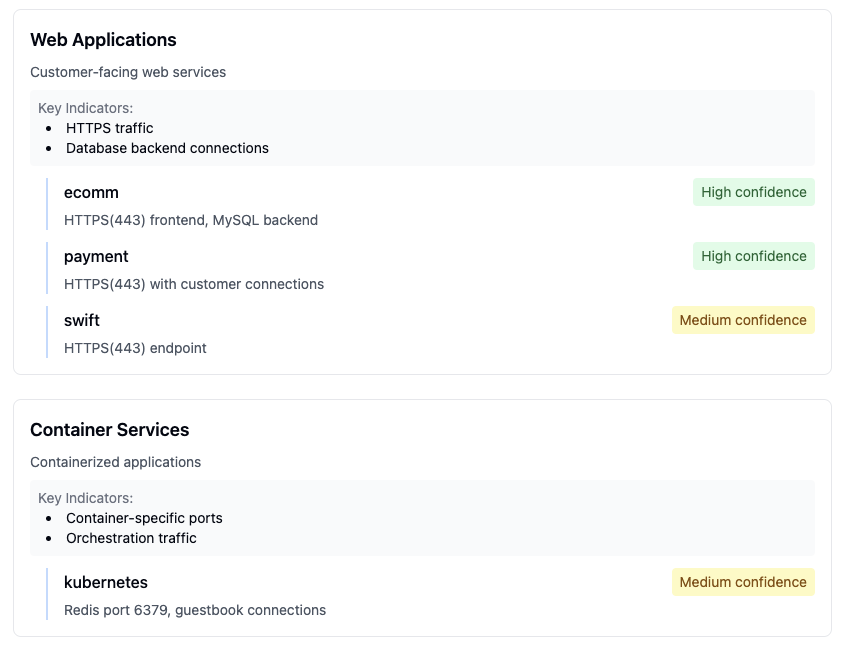 Detailed view of application communication patterns and dependencies
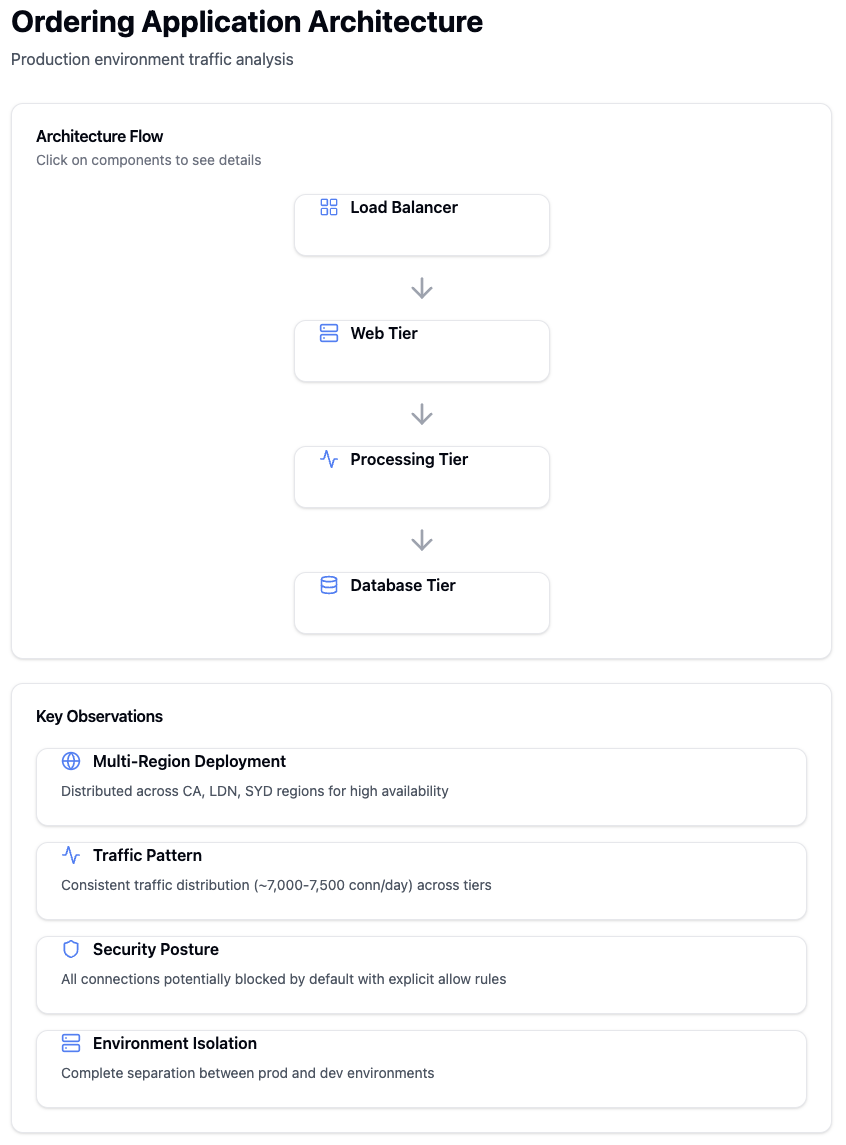 Analysis of traffic patterns between different application tiers
 Overview dashboard showing key infrastructure metrics and status
 Detailed analysis of infrastructure service communications
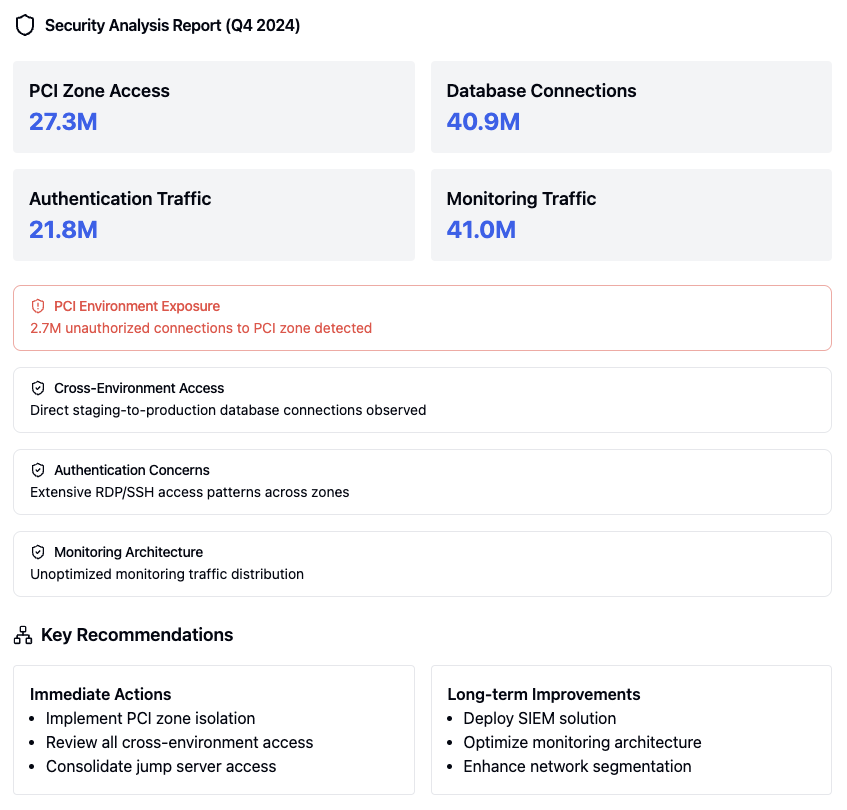 Comprehensive security analysis report
 Security assessment findings for high-risk vulnerabilities
 PCI compliance assessment findings
 SWIFT compliance assessment findings
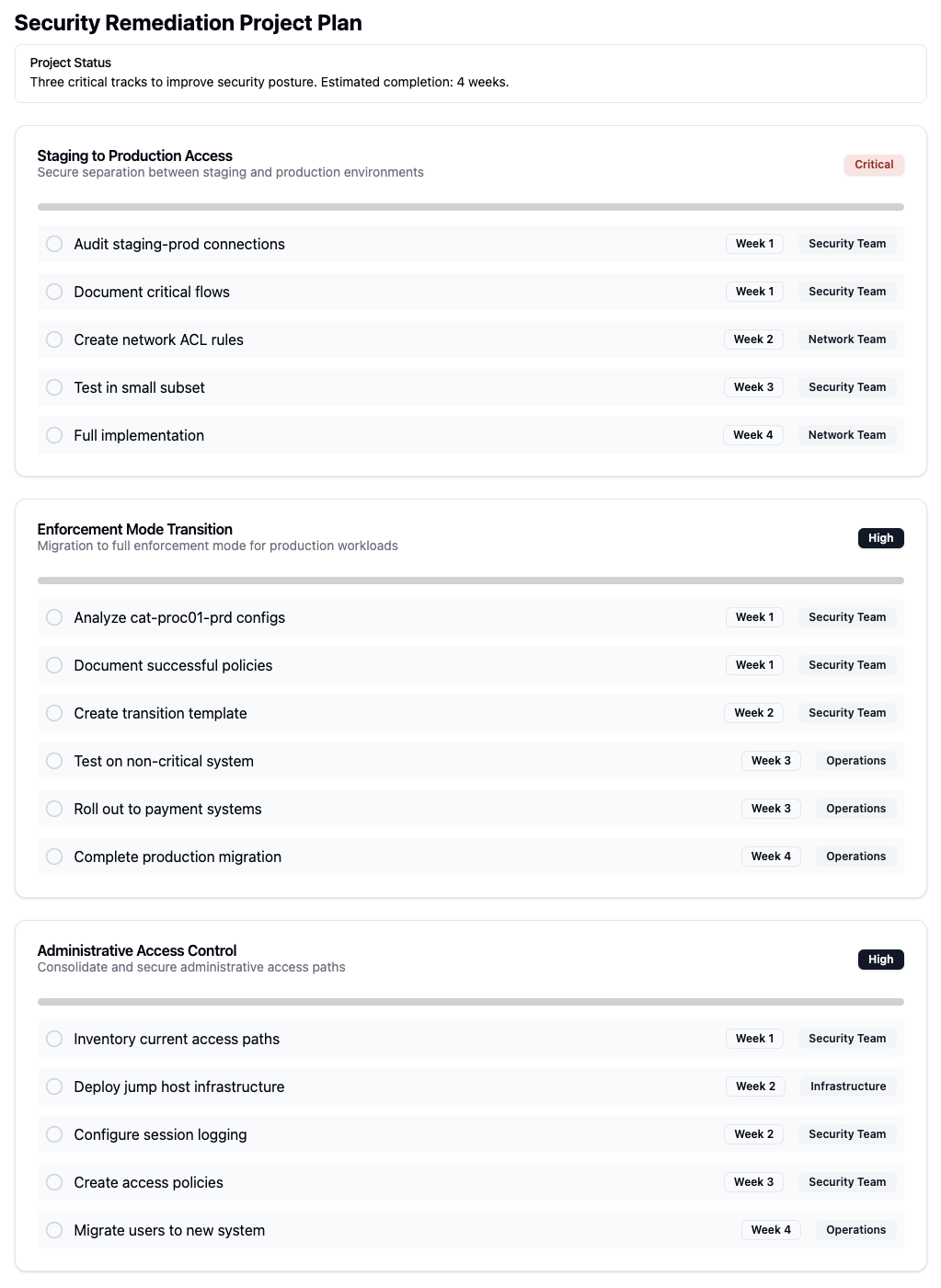 Overview of security remediation planning
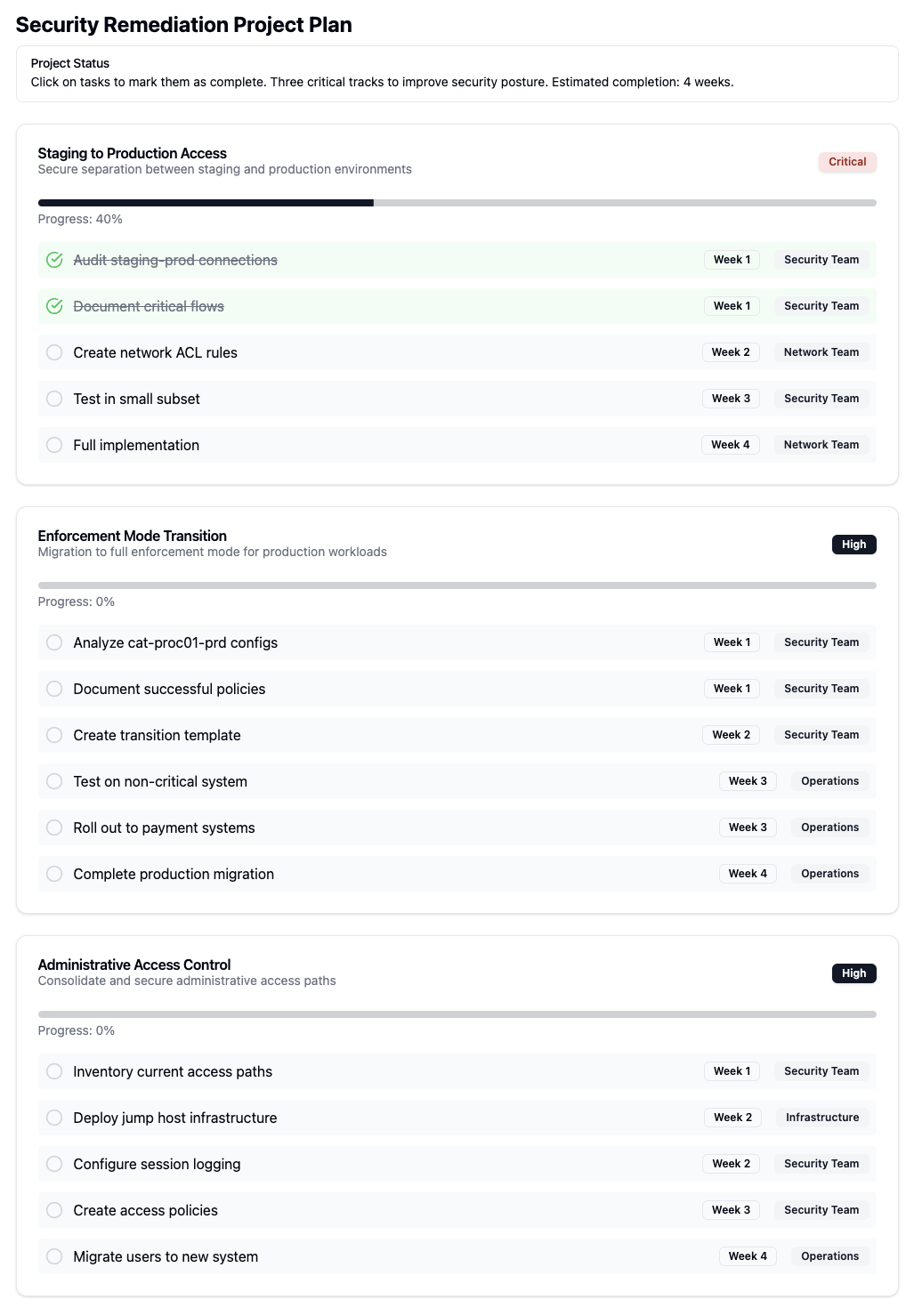 Detailed steps for security remediation implementation
 Management interface for IP lists
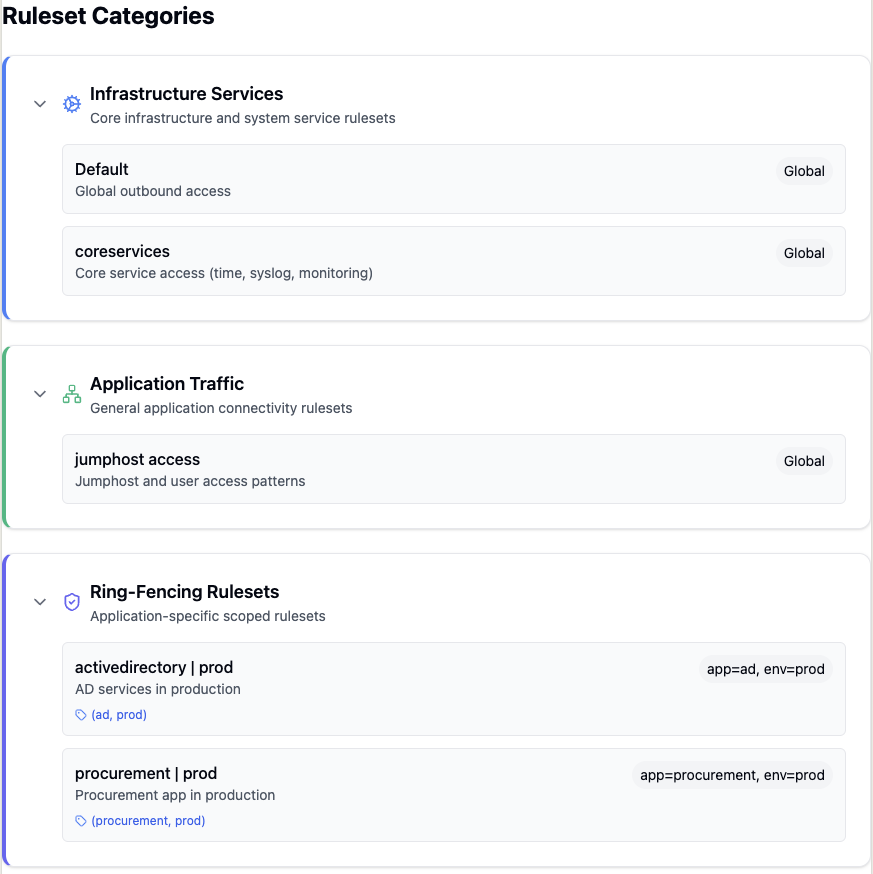 Overview of ruleset categories and organization
 Configuration of application ruleset ordering
 Detailed workload analysis and metrics
 Identification and analysis of workload traffic patterns
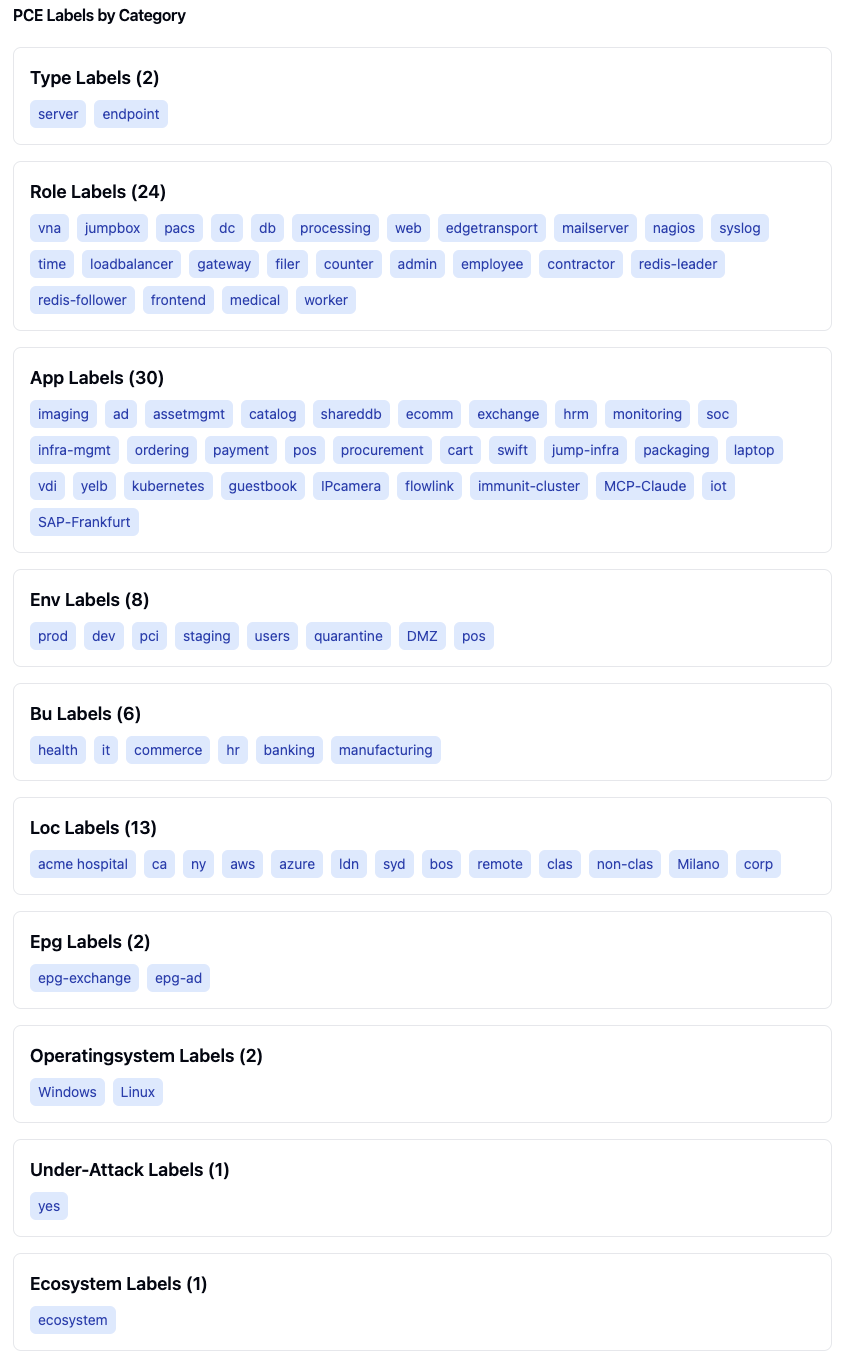 Organization of PCE labels by type and category
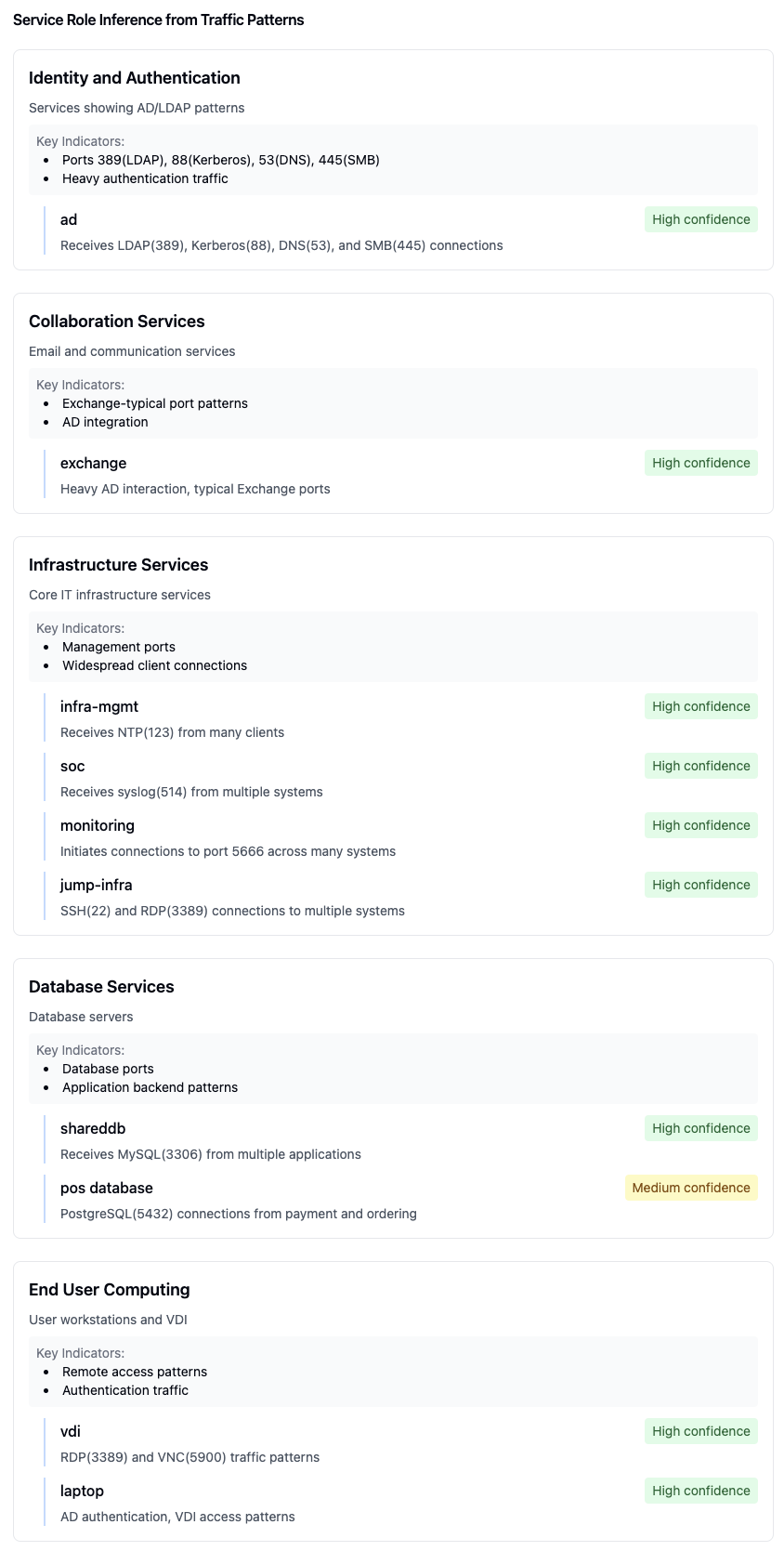 Automatic inference of service roles based on traffic patterns
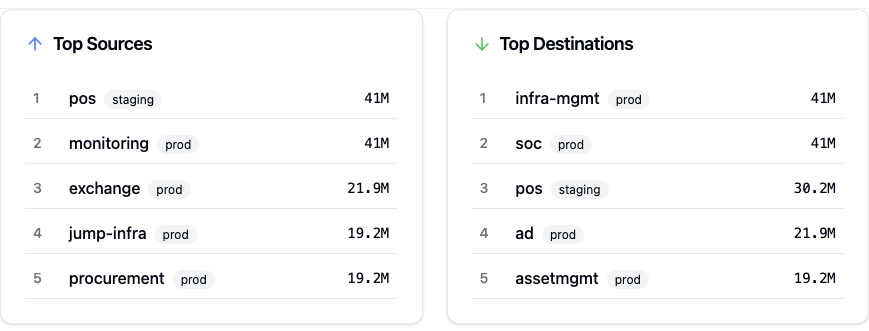 Analysis of top 5 traffic sources and destinations
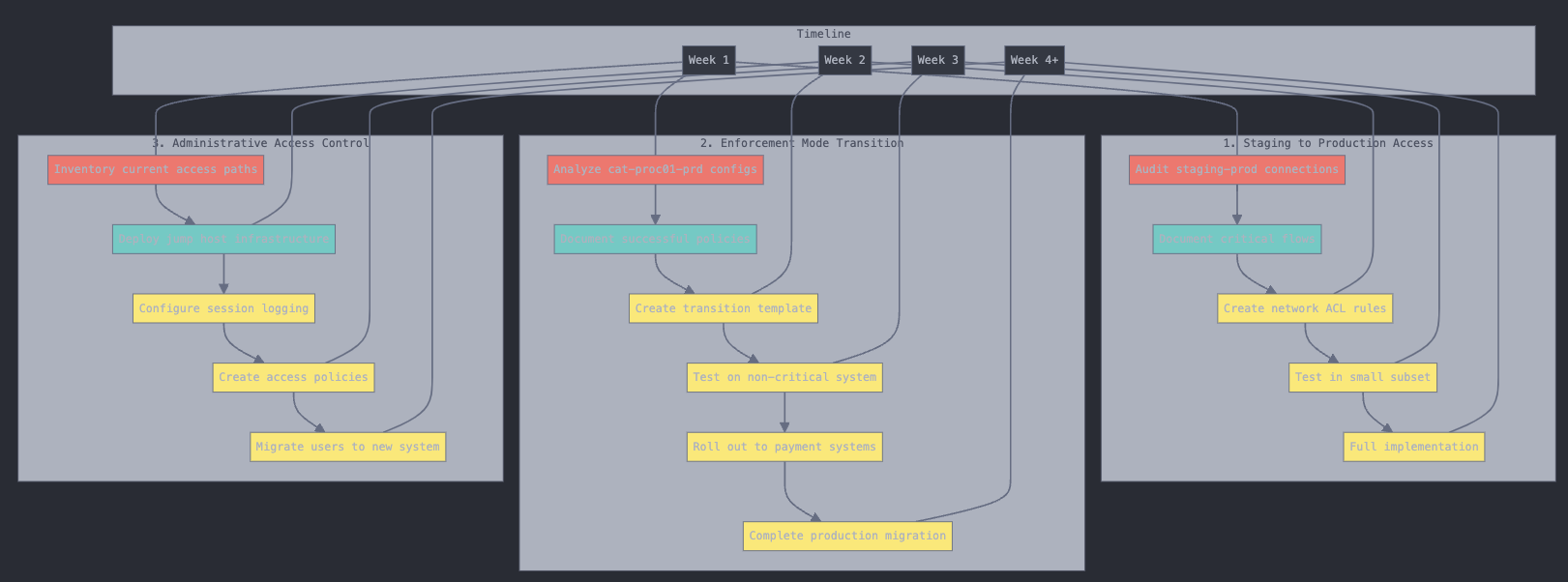 Project implementation timeline and milestones
The ringfence-application prompt helps create security policies to isolate and protect applications by controlling inbound and outbound traffic.
Required Arguments:
application_name: Name of the application to ringfence
application_environment: Environment of the application to ringfence
Features:
Creates rules for inter-tier communication within the application
Uses traffic flows to identify required external connections
Implements inbound traffic restrictions based on source applications
Creates outbound traffic rules for necessary external communications
Handles both intra-scope (same app/env) and extra-scope (external) connections
Creates separate rulesets for remote application connections
The analyze-application-traffic prompt provides detailed analysis of application traffic patterns and connectivity.
Required Arguments:
application_name: Name of the application to analyze
application_environment: Environment of the application to analyze
Analysis Features:
Orders traffic by inbound and outbound flows
Groups by application/environment/role combinations
Identifies relevant label types and patterns
Displays results in a React component format
Shows protocol and port information
Attempts to identify known service patterns (e.g., Nagios on port 5666)
Categorizes traffic into infrastructure and application types
Determines internet exposure
Displays Illumio role, application, and environment labels
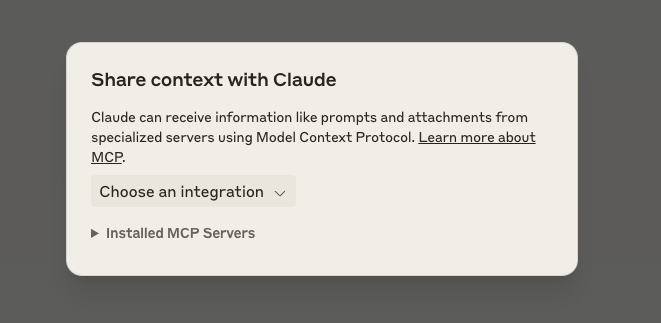
Step1: Click "Attach from MCP" button in the interface

Step 2: Choose from installed MCP servers
Step 3: Fill in required prompt arguments:
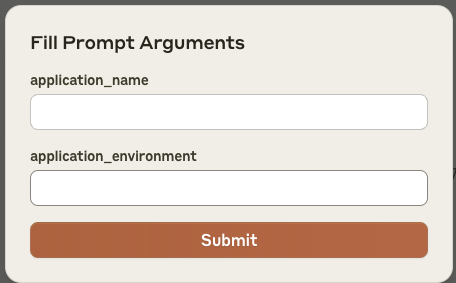
Step 4: Click Submit to send the configured prompt
The MCP server sends the configured prompt to Claude
Claude receives context through the Model Context Protocol
Allows specialized handling of Illumio-specific tasks
This workflow enables automated context sharing between Illumio systems and Claude for application traffic analysis and ringfencing tasks.
The application is available as a Docker container from the GitHub Container Registry.
docker pull ghcr.io/alexgoller/illumio-mcp-server:latestYou can also use a specific version by replacing latest with a version number:
docker pull ghcr.io/alexgoller/illumio-mcp-server:1.0.0To use the container with Claude Desktop, you'll need to:
Create an environment file (e.g. ~/.illumio-mcp.env) with your PCE credentials:
PCE_HOST=your-pce-host
PCE_PORT=your-pce-port
PCE_ORG_ID=1
API_KEY=your-api-key
API_SECRET=your-api-secret
Add the following configuration to your Claude Desktop config file:
On MacOS (~/Library/Application Support/Claude/claude_desktop_config.json):
{
    "mcpServers": {
        "illumio-mcp-docker": {
            "command": "docker",
            "args": [
                "run",
                "-i",
                "--init",
                "--rm",
                "-v",
                "/Users/YOUR_USERNAME/tmp:/var/log/illumio-mcp",
                "-e",
                "DOCKER_CONTAINER=true",
                "-e",
                "PYTHONWARNINGS=ignore",
                "--env-file",
                "/Users/YOUR_USERNAME/.illumio-mcp.env",
                "illumio-mcp:latest"
            ]
        }
    }
}
Make sure to:
Replace YOUR_USERNAME with your actual username
Create the log directory (e.g. ~/tmp)
Adjust the paths according to your system
You can also run the container directly:
docker run -i --init --rm \
  -v /path/to/logs:/var/log/illumio-mcp \
  -e DOCKER_CONTAINER=true \
  -e PYTHONWARNINGS=ignore \
  --env-file ~/.illumio-mcp.env \
ghcr.io/alexgoller/illumio-mcp-server:latestFor development or testing, you can use Docker Compose:
version: '3'
services:
  illumio-mcp:
    image: ghcr.io/alexgoller/illumio-mcp-server:latest
    init: true
    volumes:
      - ./logs:/var/log/illumio-mcp
    environment:
      - DOCKER_CONTAINER=true
      - PYTHONWARNINGS=ignore
    env_file:
      - ~/.illumio-mcp.env
Then run:
docker-compose upFork the repository
Create a feature branch
Commit your changes
Push to the branch
Create a Pull Request
This project is licensed under the GPL-3.0 License. See the LICENSE file for details.
For support, please create an issue.
Identity-centric view of traffic: which ACCOUNT the communicating process ran as, which workloads it acted from, what it reached, and over what period. Answers least-privilege questions that workload labels cannot -- what can this account reach, and from how many places. Resolves DOMAIN\user and user@realm to one identity, so a person appearing as both CRYSTAL\jdoe and jdoe is not counted twice. Classifies service accounts (root, SYSTEM, mysql) separately from interactive ones, because wide host spread is normal for a daemon and notable for a person. Findings are ranked by how unexpected they are, and are observations, not verdicts.
Inputs: top, end_date, identity, start_date, +6 more.
Is the PCE answering, and how fast. Probes GET /health first and returns JSON: status (ok | unreachable), health_http_status, health_round_trip_ms, total_seconds. On failure the error names the host, how long it waited and the HTTP status or timeout -- a 5xx is the PCE or its front end, a timeout is the network. Waits are bounded (MCP_PCE_RETRIES, MCP_PCE_REQUEST_TIMEOUT); run this first when any other tool returns tool_timeout.
Inputs: no named parameters.
Check which PCE credentials apply to the current user without revealing secrets. Always carries mode: per_user (your own key), shared (the operator's service account -- PCE-side audit shows it, not you), or stdio. In hybrid mode this reflects THIS request: registered users whose key could not be used are told they ran as shared.
Inputs: no named parameters.
Audit evidence for segmentation controls, per app/env scope pair, from ACTIVE policy (pversion=active by default) and observed traffic. Runs the framework-independent tests the illumio-compliance-evidence skill defines (T1 inventory, T2 enforcement, T3 VEN health, T4 unmanaged in scope, T5 providing rules described, T6 no broad consumer, T7 admitted services vs approved list, T8 inbound boundary flows with potentially-blocked and blocked evidence plus a per-day timeline, T9 outbound crossings, T11 draft-vs-active drift for the scope's rulesets, T14 events and flows present) and returns, per test and per pair, {result: PASS|FAIL|EXCEPTION|NOT_TESTED, measured, rows, evidence}. No score. A capped pull never yields PASS (EXCEPTION). An unknown scope label is an error. T10 (unknown endpoints), T12 and T13 (attestations) are listed in not_run. Framework requirement mapping stays in the illumio://compliance/* resources. Read-only. Query cost: scope-wide one pull each of labels, rulesets, IP lists, services, pending changes and events, plus per pair one workload pull, four traffic queries and one deny-rule read per matched ruleset; queries reports the count.
Inputs: scope (required), tests, end_date, max_rows, +5 more.
Compare draft vs active policy to see what would change on provisioning. Shows new, modified, and deleted rulesets, rules, IP lists, and services.
Inputs: resource_type.
First look at policy posture against a framework (PCI-DSS, DORA, NIS2, NIST, CIS, ISO 27001, SWIFT CSP, HIPAA): keyword-routed heuristics on draft policy and recent traffic, summarised as a score. Not audit evidence: for per-test results from ACTIVE policy for an app/env scope use collect-compliance-evidence. An unknown app_name or env_name label is an error, not an estate-wide run.
Inputs: app_name, env_name, framework, lookback_days.
Create a deny rule in an existing ruleset. Deny rules block specific traffic (processed after allow rules). Override deny rules (override_deny=true) are the HIGHEST priority — they block traffic even when allow rules exist, meaning 'this must not happen under any circumstances.' Use override deny for emergency isolation, hard compliance blocks, or active attack response — NOT for normal segmentation or ringfencing. Rule processing order: 1) Essential rules, 2) Override Deny (blocks above all), 3) Allow rules, 4) Deny rules, 5) Default action. WRITE OPERATION: changes PCE state. In clients that gate tool calls (Claude Desktop, Claude Code), this pauses for the user to approve it -- the call has not failed and must not be retried while waiting.
Inputs: consumers (required), providers (required), ingress_services (required), ruleset_href, +3 more.
Create an IP List from IP ranges, FQDNs (api.example.com, *.example.com), or both. At least one entry is required. WRITE OPERATION: changes PCE state. In clients that gate tool calls (Claude Desktop, Claude Code), this pauses for the user to approve it -- the call has not failed and must not be retried while waiting.
Inputs: name (required), fqdn, fqdns, ip_ranges, +1 more.
Create a label of a specific type and the value in the PCE WRITE OPERATION: changes PCE state. In clients that gate tool calls (Claude Desktop, Claude Code), this pauses for the user to approve it -- the call has not failed and must not be retried while waiting.
Inputs: key (required), value (required).
Create a ringfencing policy for an application. This analyzes traffic flows to discover which other apps communicate with this app, then creates a ruleset with:
An intra-scope rule allowing all workloads within the app to communicate on All Services
Extra-scope rules for each remote app+env discovered in traffic, allowing them in on All Services The result is a coarse-grained segmentation that controls which apps can talk to each other, reducing risk without requiring per-port policies. WRITE OPERATION: changes PCE state. In clients that gate tool calls (Claude Desktop, Claude Code), this pauses for the user to approve it -- the call has not failed and must not be retried while waiting.
Inputs: app_name (required), env_name (required), dry_run, selective, +5 more.
Create a ruleset in the PCE with support for ring-fencing patterns WRITE OPERATION: changes PCE state. In clients that gate tool calls (Claude Desktop, Claude Code), this pauses for the user to approve it -- the call has not failed and must not be retried while waiting.
Inputs: name (required), scopes (required), rules, description.
Create a service in the PCE. Supply at least one of service_ports, windows_services or windows_egress_services. windows_egress_services matches a process on the consumer side and needs a Windows VEN there. WRITE OPERATION: changes PCE state. In clients that gate tool calls (Claude Desktop, Claude Code), this pauses for the user to approve it -- the call has not failed and must not be retried while waiting.
Inputs: name (required), description, service_ports, windows_services, +1 more.
Create a Illumio Core unmanaged workload in the PCE WRITE OPERATION: changes PCE state. In clients that gate tool calls (Claude Desktop, Claude Code), this pauses for the user to approve it -- the call has not failed and must not be retried while waiting.
Inputs: name (required), ip_addresses (required), labels.
Delete a deny rule from a ruleset by its href WRITE OPERATION: changes PCE state. In clients that gate tool calls (Claude Desktop, Claude Code), this pauses for the user to approve it -- the call has not failed and must not be retried while waiting.
Inputs: href (required).
Delete an IP List from the PCE. Provide either 'href' or 'name' (but not both) to identify the IP List. WRITE OPERATION: changes PCE state. In clients that gate tool calls (Claude Desktop, Claude Code), this pauses for the user to approve it -- the call has not failed and must not be retried while waiting.
Inputs: href, name.
Delete a label in the PCE WRITE OPERATION: changes PCE state. In clients that gate tool calls (Claude Desktop, Claude Code), this pauses for the user to approve it -- the call has not failed and must not be retried while waiting.
Inputs: key (required), value (required).
Remove the current user's stored PCE credentials. Idempotent — safe to call even if no credentials are stored. WRITE OPERATION: changes PCE state. In clients that gate tool calls (Claude Desktop, Claude Code), this pauses for the user to approve it -- the call has not failed and must not be retried while waiting.
Inputs: no named parameters.
Delete a ruleset from the PCE by its href WRITE OPERATION: changes PCE state. In clients that gate tool calls (Claude Desktop, Claude Code), this pauses for the user to approve it -- the call has not failed and must not be retried while waiting.
Inputs: href (required).
Delete a single allow rule from a ruleset, leaving the rest of the ruleset intact. For deny rules use delete-deny-rule. WRITE OPERATION: changes PCE state. In clients that gate tool calls (Claude Desktop, Claude Code), this pauses for the user to approve it -- the call has not failed and must not be retried while waiting.
Inputs: href (required).
Delete a service from the PCE. Identify by href (preferred) or name. WRITE OPERATION: changes PCE state. In clients that gate tool calls (Claude Desktop, Claude Code), this pauses for the user to approve it -- the call has not failed and must not be retried while waiting.
Inputs: href, name.
Delete a workload from the PCE. Identify by href (preferred) or name. WRITE OPERATION: changes PCE state. In clients that gate tool calls (Claude Desktop, Claude Code), this pauses for the user to approve it -- the call has not failed and must not be retried while waiting.
Inputs: href, name.
Analyze traffic patterns to detect potential lateral movement paths — chains of connections that could allow an attacker to pivot between applications. Identifies apps that serve as bridges between otherwise disconnected app groups.
Inputs: app_name, env_name, max_hops, lookback_days.
Find which processes talk to destinations outside this PCE's managed estate - the shadow-IT / unsanctioned-egress question. Returns ranked findings of process -> external destination with port, protocol, the user, current policy decision and volume, preferring an FQDN over a bare IP where the PCE resolved one. Use this instead of get-traffic-flows when the question is 'what is talking out', not 'show me all traffic'.
Inputs: limit, process, end_date, start_date, +5 more.
Assess whether an application is ready for enforcement by analyzing its traffic flows, existing policy coverage, and identifying potential gaps. Provides a readiness score and actionable recommendations.
Inputs: app_name (required), env_name (required), lookback_days.
Which IP addresses show up in traffic that the PCE does not know as a workload at all, and what do they do. Unknown = Explorer attached no workload to that side of the flow AND the IP is not an interface address of any inventoried workload (managed or unmanaged). Not the same as find-unmanaged-traffic, whose test is 'no app label'. One Explorer pull, one workload pull, one IP-list pull. Per endpoint: fqdn, address_class (private | public | link_local | multicast | broadcast | loopback), ip_lists (named lists containing it; the 0.0.0.0/0 default list is dropped), likely_provider for public addresses, neighbourhood (the /24 or /64 it shares with N managed workloads), as_source / as_destination blocks (connections, flows, peer workloads, peer apps as 'app (env)', top-10 ports with an admin flag, policy mix, first/last seen), peers_enforced, and profile shapes: scanner, fan_in_server, admin_reach, high_volume, single_peer, with the numbers each test used. Noise classes are counted but listed only with include_noise. With ip set, profiles that one address: full peer x port table and a timeline (1h buckets up to two days, else 1d) with the shared spike rule. Read-only.
Inputs: ip, top_n, end_date, direction, +9 more.
Find traffic involving unmanaged (unlabeled) workloads or IP addresses. These are sources or destinations without app/env labels, representing potential policy blind spots.
Inputs: top_n, direction, lookback_days, min_connections.
Get container clusters (Kubernetes/OpenShift) registered in the PCE. Shows cluster name, CLAS mode, online status, kubelink version, and node count.
Inputs: name, max_results.
Get Container Workload Profiles for a container cluster. These profiles control how Kubernetes pods are managed by Illumio — mapping K8s namespaces to Illumio labels and enforcement modes.
Inputs: managed, namespace, cluster_href.
PCE audit events as data. Each event carries created_by as {type: user|agent|system, username, href}, resource_changes as [{resource_type, href, name, change_type, changes}] (which ruleset, rule, workload... changed and how), notifications as [{notification_type, info}] and action as {api_endpoint, api_method, src_ip, http_status_code}. Filter by event_type (one string or a list, ORed) or by kind: policy = sec_policy.create/restore, rule_set., sec_rule., deny_rule., ip_list., service.* (create/update/delete); enforcement = workloads.bulk_update / workload.update whose changes name enforcement_mode; ven = agent.activate/deactivate/tampering/clone_detected/suspend/unsuspend, workloads.unpair; auth = user.login/logout/sign_in/sign_out/authenticate, request.authorization_failed. Verified on a live PCE (26.30): rule_set., sec_rule.create/delete, deny_rule., ip_list., service., workloads.bulk_update, request.authorization_failed. The rest are Illumio's documented names not yet seen on a PCE (expected); event_types_unverified lists them per call. The PCE filters on one event_type per request, so a list or kind is one request per type, merged newest-first and capped at max_results; event_types_queried echoes the list.
Inputs: kind, status, severity, created_by, +4 more.
Get IP lists from the PCE with optional filtering. Each list carries ip_ranges as [{from_ip, to_ip, exclusion, description}] and fqdns as [{fqdn, description}], plus is_default: true on the built-in list that covers 0.0.0.0/0 or ::/0. Use contains_ip for an exact 'which lists cover this address' answer, evaluated server-side (CIDRs, from/to spans, exclusions, IPv4 and IPv6); the ip_address filter is the PCE's substring match on the range text and does not look inside CIDRs.
Inputs: fqdn, name, pversion, ip_address, +3 more.
Get Kubernetes Workloads (CLAS mode) from a container cluster. Shows Deployments, Services, and other K8s objects managed by Illumio with their labels and policy sync state.
Inputs: namespace, max_results, cluster_href.
Get labels from the PCE with optional filtering
Inputs: key, usage, value, max_results, +1 more.
Get pairing profiles from the PCE. Pairing profiles define the initial enforcement mode and labels for VENs when they pair with the PCE.
Inputs: name, max_results.
How full is this PCE, against its limits. Reads the documented metrics -- flow storage and retention per source vs limits (traffic_flows/database_metrics), managed-workload count over time (reports/time_series_statistics), and soft_limit_exceeded / hard_limit_exceeded events in the window -- and probes the object-limit API (/api/v2/object_limit_profiles and /api/v2/api_usage_limit_profiles, root-level, undocumented). A 403 there is reported as 'exists but this key is not allowed' (the PCE logs an authorization_failed audit event), a 404 as 'not on this PCE version', a 200 passed through with a best-effort summary. warnings lists anything at or above 80% of a limit or above a soft limit.
Inputs: lookback_days, include_object_limits.
Generate a policy coverage report for an app, showing what traffic is covered by existing rules vs what would be blocked. Helps understand how much of an app's traffic is already policy'd.
Inputs: app_name (required), env_name (required), lookback_days.
Get rulesets and their rules, from draft or active policy, rendered as data: scopes as [{key, value, href}], consumers/providers as {label: {key, value, href}} | {all_workloads: true} | {ip_list: {name, href}} | {label_group: {name, href}}, ingress_services as {port, proto} or {service: {name, href}}. Allow, deny and override_deny rules share one shape (rule_type). Rulesets and rules carry created_at, updated_at, update_type and created_by/updated_by as {username, href} when the PCE sends them (username needs GET /users; null if this key may not list users). labels matches ruleset SCOPE; actor_labels returns only the rules that NAME those labels as consumer or provider, in any ruleset -- 'the policy that touches app X'. Each ruleset costs one extra request for its deny rules, so filter where you can.
Inputs: name, labels, enabled, pversion, +4 more.
What changed in this MCP server. Call this when tool behaviour does not match what you expect, after the server has been updated mid-session, or before relying on assumptions formed earlier in a long session -- a cached tools/list and remembered response shapes are not refreshed when the server changes. The unlearn field lists behaviour changes that make previously correct assumptions wrong. Needs no PCE connection.
Inputs: since, unlearn_only.
Get services from the PCE with optional filtering
Inputs: name, port, proto, description, +3 more.
A snapshot of who talks to whom on which service -- for the whole org, one environment (scope={env}) or one app (scope={app, env}) -- and the drift against an earlier snapshot. One Explorer query over the window; keys are app-pair x service with the decision set seen (A allowed, P potentially blocked, B blocked), never counts, plus per-app shape: peers in/out, external destinations and sources, services, blocked share, attributed providers. Compare by passing baseline (the fingerprint object this tool returned before) or baseline_days (a second query over the N days before the window): new / changed / gone keys, drift per app, the peers and providers that came and went. A compare across another PCE, org, scope or identity axis is refused; unequal windows and truncated sides are warned, since they inflate new or gone. Use it for 'what changed in payments/prod since last month', 'is this environment's shape stable', or to keep a per-app history.
Inputs: scope, baseline, end_date, start_date, +6 more.
Get traffic flows from the PCE with comprehensive filtering options
Inputs: end_date (required), start_date (required), group_by, query_name, +9 more.
Summarize traffic flows as structured JSON. Sections: by_process (which binary talks to which destination, on which port, under which policy, and as which user), external_destinations (traffic leaving the managed estate), blocked (what policy is stopping), app_to_app (coarse view). Prefer this over get-traffic-flows for analysis - it is far smaller and answers the usual questions directly.
Inputs: end_date (required), start_date (required), query_name, max_results, +10 more.
Time-bucketed flow counts from ONE Explorer query: how many flows and connections fell into each 15m/1h/6h/1d bucket of the window, with every bucket present (zeros included). Use it for 'blocked flows per hour for app X' instead of one summary query per bucket. Rows are bucketed by first_detected; Explorer aggregates a persistent connection (and, for older data, several days) into one row, so rows_spanning_buckets and resolution_note say how much the start of the window is smeared. spikes=true applies the shared rule: a bucket >= 3x the median of the non-zero buckets is a spike, and worst names the largest with its multiple.
Inputs: bucket, spikes, end_date, split_by, +12 more.
Get enforcement mode status across all workloads, grouped by application and environment. Shows counts per enforcement mode and identifies apps with mixed enforcement states.
Inputs: app_name, env_name.
Get workloads from the PCE. Use detail_level to control breadth vs depth: 'compact' (default) for tabular overviews of thousands of workloads, 'full' for complete data on specific workloads, 'labels_only' for maximum breadth with just identity and labels.
Inputs: name, labels, online, managed, +6 more.
Analyze traffic flows to identify infrastructure services in your environment. Builds an app-to-app communication graph and computes centrality metrics to rank apps by how 'infrastructure-like' they are. Infrastructure services (DNS, AD, logging, monitoring platforms, shared databases) are consumed by many apps and should be policy'd first during segmentation rollouts. Returns a ranked list with scores, classification tiers, and connectivity details.
Inputs: top_n, lookback_days, min_connections.
Provision pending draft policy changes in the PCE. This moves draft rulesets, rules, IP lists, services, and label groups from draft to active state. You can provision all pending changes or specific items by href. WRITE OPERATION: changes PCE state. In clients that gate tool calls (Claude Desktop, Claude Code), this pauses for the user to approve it -- the call has not failed and must not be retried while waiting. Additionally requires an explicit confirm token, so it takes two steps: the first call returns a token to be passed back in the second.
Inputs: hrefs, change_description.
Register (or overwrite) PCE credentials for the current authenticated user. After registering, all PCE tools become available in this session. WRITE OPERATION: changes PCE state. In clients that gate tool calls (Claude Desktop, Claude Code), this pauses for the user to approve it -- the call has not failed and must not be retried while waiting.
Inputs: api_key (required), pce_host (required), pce_port (required), api_secret (required), +3 more.
Create ringfence policies for multiple applications at once. Optionally auto-discovers infrastructure services and ringfences them first, then standard apps. Uses the same logic as create-ringfence for each app. WRITE OPERATION: changes PCE state. In clients that gate tool calls (Claude Desktop, Claude Code), this pauses for the user to approve it -- the call has not failed and must not be retried while waiting. Additionally requires an explicit confirm token, so it takes two steps: the first call returns a token to be passed back in the second.
Inputs: apps (required), dry_run, auto_order, lookback_days.
Update a Container Workload Profile to manage Kubernetes pods in Illumio. Set managed=true and assign labels to start managing pods in a namespace. WRITE OPERATION: changes PCE state. In clients that gate tool calls (Claude Desktop, Claude Code), this pauses for the user to approve it -- the call has not failed and must not be retried while waiting.
Inputs: profile_href (required), managed, assign_labels, enforcement_mode.
Update an existing deny rule in a ruleset. Identify the rule by its href. WRITE OPERATION: changes PCE state. In clients that gate tool calls (Claude Desktop, Claude Code), this pauses for the user to approve it -- the call has not failed and must not be retried while waiting.
Inputs: href (required), enabled, consumers, providers, +1 more.
Update an existing IP List in the PCE. Provide either 'href' or 'name' (but not both) to identify the IP List. WRITE OPERATION: changes PCE state. In clients that gate tool calls (Claude Desktop, Claude Code), this pauses for the user to approve it -- the call has not failed and must not be retried while waiting.
Inputs: fqdn, href, name, fqdns, +2 more.
Update an existing label in the PCE. Provide either: 1) href + new_value (optionally with key), or 2) key + value + new_value to identify and update the label. WRITE OPERATION: changes PCE state. In clients that gate tool calls (Claude Desktop, Claude Code), this pauses for the user to approve it -- the call has not failed and must not be retried while waiting.
Inputs: key, href, value, new_value.
Update an existing ruleset in the PCE. Provide either 'href' or 'name' (but not both) to identify the ruleset. WRITE OPERATION: changes PCE state. In clients that gate tool calls (Claude Desktop, Claude Code), this pauses for the user to approve it -- the call has not failed and must not be retried while waiting.
Inputs: href, name, scopes, enabled, +1 more.
Update an allow rule inside a ruleset, identified by its href. Only the fields you supply change. Use this to refine a rule in place — swapping an inline port for a process-qualified service, for example — instead of rebuilding the ruleset. For deny rules use update-deny-rule. WRITE OPERATION: changes PCE state. In clients that gate tool calls (Claude Desktop, Claude Code), this pauses for the user to approve it -- the call has not failed and must not be retried while waiting.
Inputs: href (required), enabled, consumers, providers, +4 more.
Update an existing service in the PCE. Identify by href (preferred) or name. WRITE OPERATION: changes PCE state. In clients that gate tool calls (Claude Desktop, Claude Code), this pauses for the user to approve it -- the call has not failed and must not be retried while waiting.
Inputs: href, name, new_name, description, +3 more.
Update a workload in the PCE. Identify by href (preferred) or name. Provide only fields you want to change. WRITE OPERATION: changes PCE state. In clients that gate tool calls (Claude Desktop, Claude Code), this pauses for the user to approve it -- the call has not failed and must not be retried while waiting.
Inputs: href, name, labels, hostname, +4 more.
Recent tool additions, removals, and schema changes observed during successful MCP inspections.
Loading tool schema changelog…
Scored across 56 tools
Most CRUD tools are cleanly separated by resource (workload, label, service, iplist, ruleset, sec-rule, deny-rule), but the read/analysis surface is crowded with near-neighbours: get-traffic-flows, get-traffic-flows-summary, get-traffic-fingerprint, get-traffic-timeline, discover-process-egress, build-identity-graph, find-unmanaged-traffic and find-unknown-endpoints all answer 'what is talking to what'. Likewise enforcement-readiness, get-policy-coverage-report, compliance-check and collect-compliance-evidence are four posture-assessment tools whose boundaries require careful reading of long descriptions. The descriptions do explicitly steer ('use this instead of get-traffic-flows', 'not the same as find-unmanaged-traffic'), which rescues the set from being genuinely ambiguous, but an agent must read a lot of prose to pick correctly.
The dominant pattern is consistent kebab-case verb-noun: get-/create-/update-/delete- prefixes applied uniformly across workloads, labels, services, iplists, rulesets and rules. Minor deviations exist — enforcement-readiness and ringfence-batch drop the verb, and find- vs get- vs discover- vs identify- are used for similar read actions — but on the whole the naming is predictable.
56 tools is well past the point where a single agent can hold the surface in context, especially with eight traffic-analysis variants and four compliance/posture tools. The domain (Illumio PCE segmentation) is broad enough to justify many tools, but this set looks like it has accumulated one tool per question rather than staying scoped, and the write-tool approval boilerplate repeated across ~25 descriptions makes the list expensive to read.
Coverage is strong for workloads, labels, services, IP lists, rulesets, deny rules and container/cluster artifacts, plus provisioning, draft-vs-active diffing and a rich read-only analytics layer. However there is a notable gap around allow rules: update-sec-rule and delete-sec-rule exist but there is no create-sec-rule (allow rules can only be created indirectly via create-ruleset or create-ringfence), and there is no label-group tooling or VEN/agent listing despite VEN health being referenced in compliance tests. These are workable but force detours.
An MCP server that provides an API to LLMs to manage their JumpCloud resources.
A Model Context Protocol server for Wix AI tools
A comprehensive Model Context Protocol (MCP) server that enables AI assistants to interact with yo…
MCP server for secureFlows: token-free URL builders and integration-linting tools for AI agents.