A
licenseA
qualityD
maintenanceProvides access to Google Maps API functionality including places search, geocoding, directions, distance matrix, elevation data, and static map generation through the MCP interface.
8
14 npm
1
MIT

Este paquete proporciona integración de OpenStreetMap para MCP, lo que permite a los usuarios consultar y visualizar datos de mapas a través de una interfaz MCP.
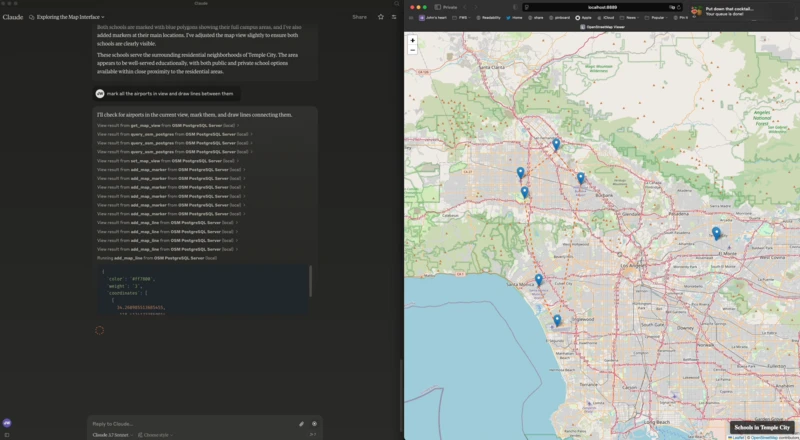
Visor de mapas basado en web que utiliza Leaflet y OpenStreetMap
Comunicación de servidor a cliente mediante eventos enviados por el servidor (SSE)
Herramientas MCP para el control de mapas (agregar marcadores, polígonos, configurar la vista, obtener la vista)
Interfaz de consulta PostgreSQL/PostGIS para datos de OpenStreetMap
Related MCP server: Google Maps Platform MCP Server
Este es mi claude_desktop_config.json :
{
  "mcpServers": {
    "OSM PostgreSQL Server": {
      "command": "/Users/wiseman/.local/bin/uv",
      "args": [
        "run",
        "--env-file",
        ".env",
        "--with",
        "mcp[cli]",
        "--with",
        "psycopg2",
        "--with-editable",
        "/Users/wiseman/src/mcp-osm",
        "--directory",
        "/Users/wiseman/src/mcp-osm",
        "mcp",
        "run",
        "mcp.py"
      ]
    }
  }
}
Cuando se inicia el servidor MCP, también inicia un servidor web en http://localhost:8889/ que tiene la interfaz de mapa.
Las siguientes variables de entorno se pueden utilizar para configurar el MCP:
FLASK_HOST : host para el servidor Flask (predeterminado: 127.0.0.1)
FLASK_PORT - Puerto para el servidor Flask (predeterminado: 8889)
PGHOST - Host de PostgreSQL (predeterminado: localhost)
PGPORT - Puerto PostgreSQL (predeterminado: 5432)
PGDB : nombre de la base de datos PostgreSQL (predeterminado: osm)
PGUSER - Nombre de usuario de PostgreSQL (predeterminado: postgres)
PGPASSWORD - Contraseña de PostgreSQL (predeterminada: postgres)
Las siguientes herramientas MCP están disponibles:
get_map_view - Obtener la vista del mapa actual
set_map_view - Establece la vista del mapa en coordenadas o límites específicos
set_map_title - Establece el título que se muestra en la parte inferior derecha del mapa
add_map_marker - Agrega un marcador en coordenadas específicas
add_map_line - Agrega una línea definida por un conjunto de coordenadas
add_map_polygon - Agrega un polígono definido por un conjunto de coordenadas
query_osm_postgres : ejecuta una consulta SQL en la base de datos OpenStreetMap
This server cannot be deployed
OpenTripMap MCP — wraps the OpenTripMap Places API (dev.opentripmap.org)
Nominatim MCP — wraps OpenStreetMap Nominatim geocoding API (free, no auth)
OpenStreetMap Overpass MCP — programmatic queries against the OSM database
MCP registry & directory: search, find & install 31k+ MCP servers & tools. Catalog and marketplace.