

A
licenseB
qualityD
maintenanceAn MCP server integrating Google Analytics 4, Search Console, and Indexing API, enabling AI agents to run reports, inspect URLs, manage properties, and request indexing.
16
121 npm
2
MIT

Provides access to Google Analytics 4 (GA4) metrics, enabling tools for fetching landing page data, generating trend reports, assessing data quality, and computing merged analytics outputs.
Enables interaction with Google Search Console to list sites and retrieve search performance data, including top queries and top pages.
Click on "Deploy Server".
Wait a few minutes for the server to deploy. Once ready, it will show a "Started" state.
In the chat, type @ followed by the MCP server name and your instructions, e.g., "@SEO Analytics MCP analyze my top pages and give me actionable SEO insights"
That's it! The server will respond to your query, and you can continue using it as needed.
Here is a step-by-step guide with screenshots.
MCP server for Google Search Console (GSC) + Google Analytics 4 (GA4).
.venv Means.venv is this project's private Python environment.
It contains its own Python interpreter and dependencies for this repo only.
run-local.sh activates .venv so the MCP server runs with the correct package versions.
stdio Meansstdio means the MCP client and server communicate through standard input/output streams.
The client starts run-local.sh, sends tool requests in, and reads JSON responses out.
No web server or HTTP endpoint is required for the default local setup.
Your MCP client (Claude/Codex) launches run-local.sh as a stdio server process.
run-local.sh prepares .venv, installs dependencies, loads config/.env, and validates config/service-account.json.
The Python server (seo-analytics-mcp) receives tool calls, fetches data from GSC/GA4 using the service account, and computes merged analysis outputs.
Results are returned to the MCP client as structured JSON.
Related MCP server: mcp-site-analyst
This project is deployed as a local process on your machine via stdio.
It is not an HTTP API service by default and does not require cloud hosting.
To "deploy" it for another environment, clone the repo there, provide config/.env and config/service-account.json, then register that machine's run-local.sh path in the MCP client.
Python 3.11+
Create local config files from templates:
cp config/.env.example config/.env
cp config/service-account.example.json config/service-account.json
Fill required values:
config/.env
DEFAULT_GSC_SITE_URL (required format: sc-domain:example.com)
DEFAULT_GA4_PROPERTY_ID
config/service-account.json
Replace all REPLACE_WITH_... fields with real Google service-account values.
Run the server:
./run-local.shThe script creates/uses .venv, installs dependencies, loads config/.env, validates credentials, and starts seo-analytics-mcp over stdio.
Use the local launcher script as the MCP server command:
/absolute/path/to/analytics/run-local.shAdd server:
codex mcp add seo-analytics -- /absolute/path/to/analytics/run-local.shVerify:
codex mcp listRemove:
codex mcp remove seo-analyticsAdd server:
claude mcp add -s project seo-analytics -- /absolute/path/to/analytics/run-local.shVerify:
claude mcp listRemove:
claude mcp remove seo-analyticsQuit Claude Desktop completely.
Edit ~/Library/Application Support/Claude/claude_desktop_config.json.
Add this server entry (merge into existing mcpServers if present):
{
  "mcpServers": {
    "seo-analytics": {
      "type": "stdio",
      "command": "/absolute/path/to/analytics/run-local.sh",
      "args": []
    }
  }
}
Start Claude Desktop again.
In a new chat, run tool capabilities to confirm connection.
capabilities
gsc_list_sites
gsc_top_pages
gsc_top_queries
ga4_landing_pages
analytics_merge_page_metrics
analytics_generate_action_items
analytics_trend_report
analytics_data_quality_report
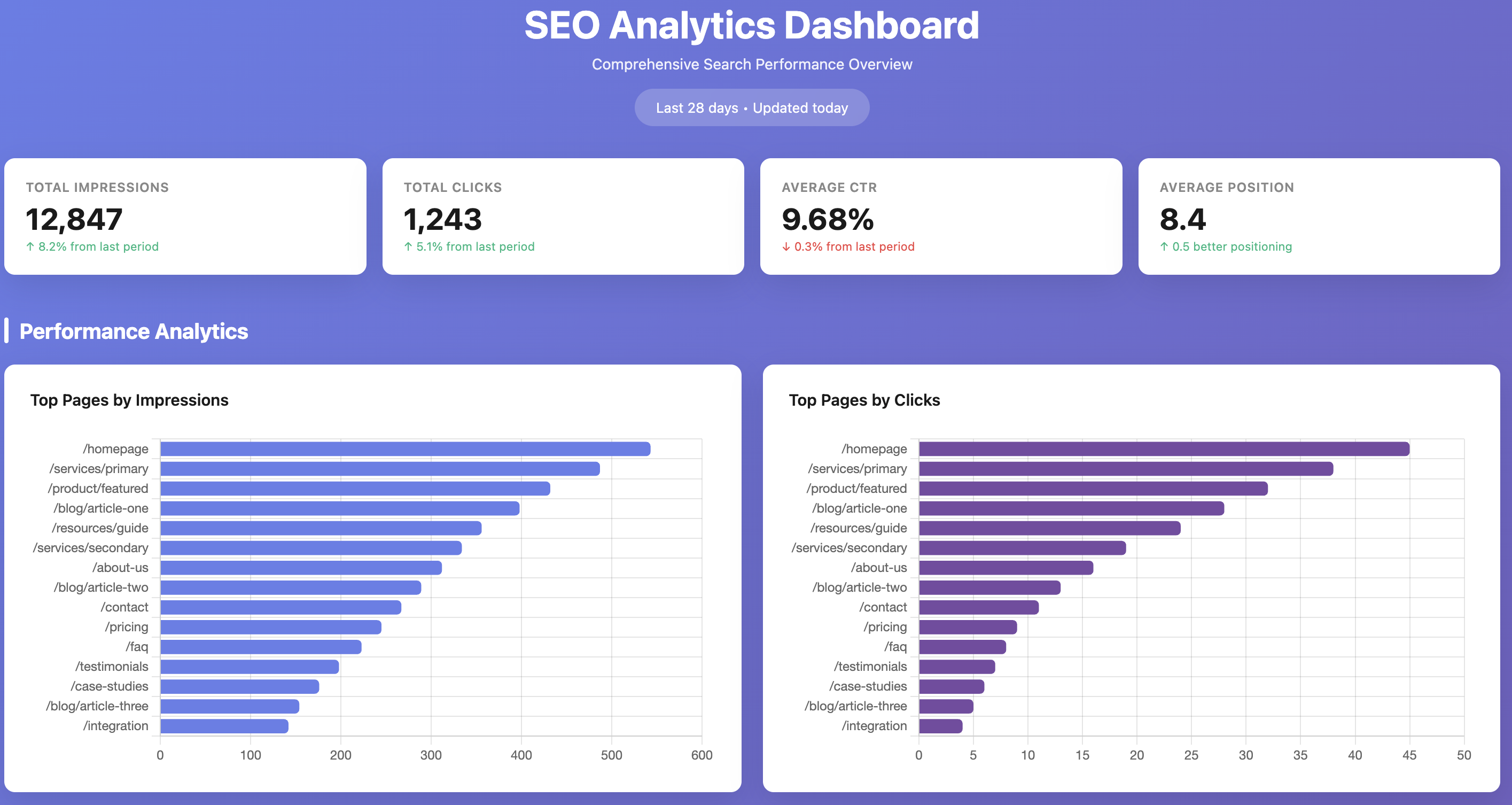
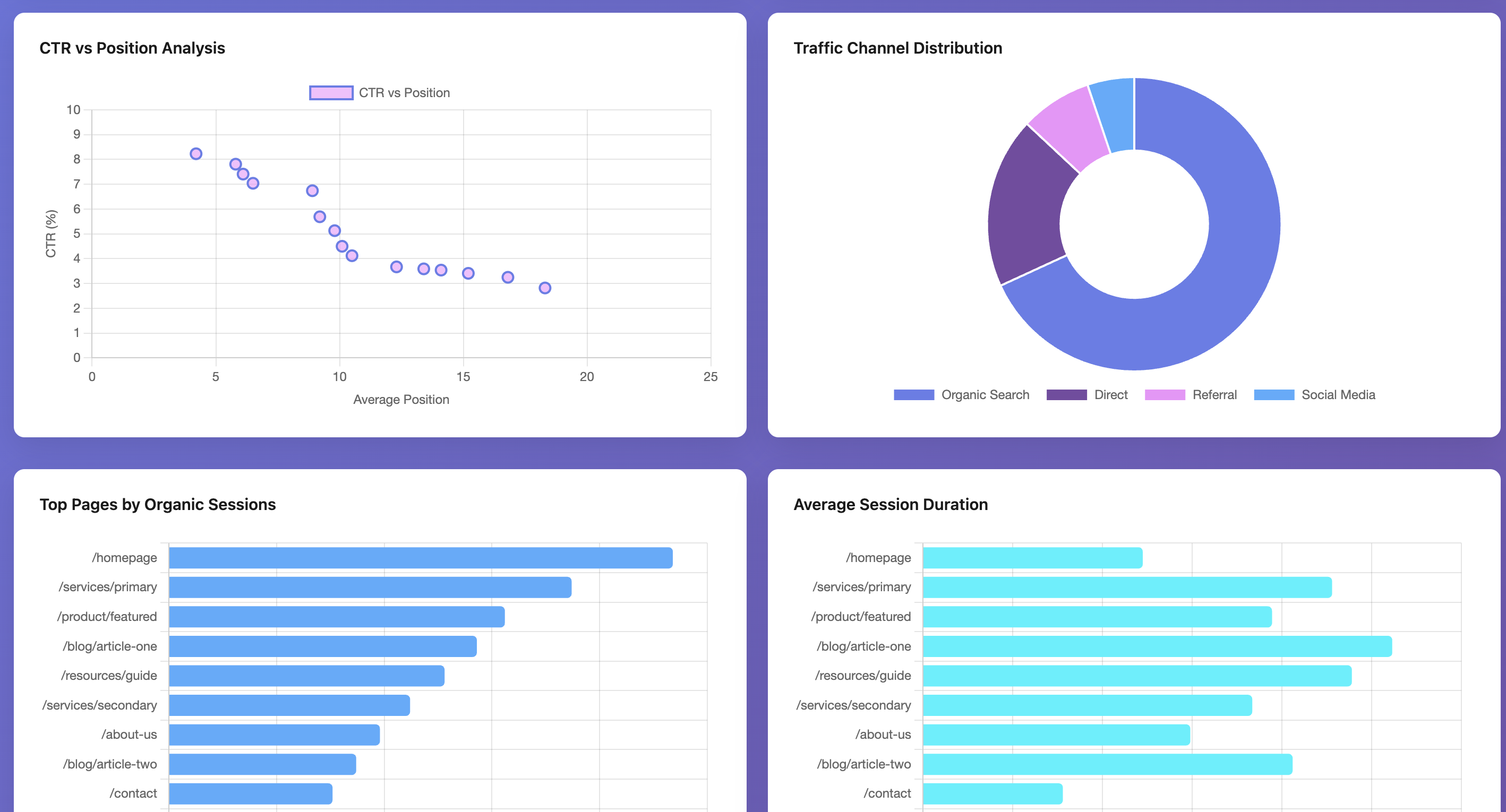
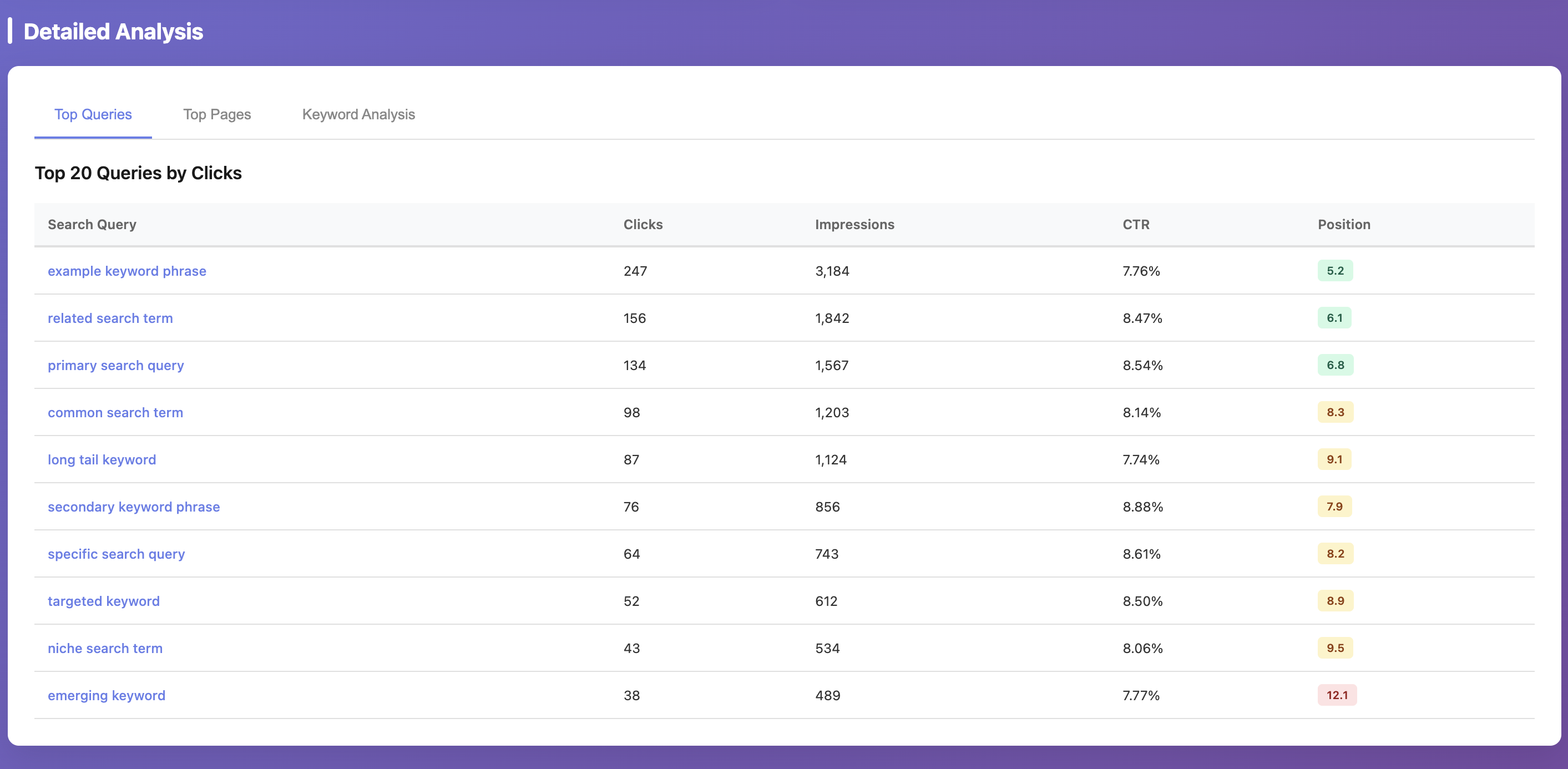
These screenshots are example outputs produced by using Claude Code with this MCP server. The MCP provides the underlying GSC/GA4 data and analytics tools; dashboard rendering is not generated by default by the server itself. For privacy reasons, values shown in the screenshots are randomized; the actual workflow was executed against real data.
service-account.json still contains placeholder values
Replace all REPLACE_WITH_... fields in config/service-account.json.
No such file or directory: .../credentials/service-account.json
You have a stale credential env override from an older setup.
Re-add the MCP server so it runs the latest run-local.sh and uses config/service-account.json.
Operation not permitted when Claude Desktop starts MCP
macOS is blocking execution from protected folders (commonly ~/Documents).
Either grant Claude Desktop access in System Settings -> Privacy & Security (Files and Folders and/or Full Disk Access) or move the repo to a non-protected path like ~/dev/analytics.
After changing permissions/path, restart Claude Desktop and re-add the MCP entry if needed.
Missing property_id and DEFAULT_GA4_PROPERTY_ID is not set
Set DEFAULT_GA4_PROPERTY_ID in config/.env.
Missing site_url...
Set DEFAULT_GSC_SITE_URL in config/.env.
GSC permission error on https://... property
This server enforces GSC properties in sc-domain:<domain> format to avoid URL-prefix mismatch issues.
Use a Domain property in Search Console and grant your service account access there.
Never commit config/service-account.json or config/.env.
Commit only template files:
config/service-account.example.json
config/.env.example
Show merge coverage and top URL mismatches between GSC and GA4.
| Name | Required | Description | Default |
|---|---|---|---|
| site_url | No | ||
| property_id | No | ||
| start_date | No | ||
| end_date | No | ||
| max_rows | No | ||
| top_n_unmatched | No |
| Name | Required | Description |
|---|---|---|
No output parameters | ||
Does the description disclose side effects, auth requirements, rate limits, or destructive behavior?
With no annotations provided, the description carries full burden but provides minimal behavioral context. It mentions what the tool shows but doesn't disclose whether this is a read-only operation, if it requires specific permissions, rate limits, data freshness, or what format the output takes. The description doesn't contradict annotations (none exist), but provides inadequate behavioral transparency for a tool with 6 parameters.
Agents need to know what a tool does to the world before calling it. Descriptions should go beyond structured annotations to explain consequences.
Is the description appropriately sized, front-loaded, and free of redundancy?
The description is extremely concise - a single sentence that gets straight to the point. There's no wasted language or unnecessary elaboration. It's front-loaded with the core purpose. This is appropriate conciseness for a tool description.
Shorter descriptions cost fewer tokens and are easier for agents to parse. Every sentence should earn its place.
Given the tool's complexity, does the description cover enough for an agent to succeed on first attempt?
Given the tool has 6 parameters, 0% schema description coverage, no annotations, but does have an output schema, the description is incomplete. The output schema existence means return values don't need explanation, but the description should provide more context about what 'merge coverage' and 'URL mismatches' mean in practice, and how parameters affect the report. It's minimally adequate but with significant gaps.
Complex tools with many parameters or behaviors need more documentation. Simple tools need less. This dimension scales expectations accordingly.
Does the description clarify parameter syntax, constraints, interactions, or defaults beyond what the schema provides?
Schema description coverage is 0%, so the description must compensate but fails to do so. The description mentions 'merge coverage' and 'top URL mismatches' which might relate to some parameters, but doesn't explain what any of the 6 parameters mean or how they affect the report. No parameter guidance is provided beyond what's in the schema titles.
Input schemas describe structure but not intent. Descriptions should explain non-obvious parameter relationships and valid value ranges.
Does the description clearly state what the tool does and how it differs from similar tools?
The description clearly states the tool shows 'merge coverage and top URL mismatches between GSC and GA4', which is a specific verb+resource combination. It distinguishes from siblings by focusing on data quality reporting rather than other analytics functions like trend reports or action items. However, it doesn't explicitly differentiate from all siblings like 'analytics_merge_page_metrics' which might have some overlap.
Agents choose between tools based on descriptions. A clear purpose with a specific verb and resource helps agents select the right tool.
Does the description explain when to use this tool, when not to, or what alternatives exist?
The description provides no guidance on when to use this tool versus alternatives. With siblings like 'analytics_merge_page_metrics' and 'ga4_channel_report', there's no indication of when this data quality report is appropriate versus other analytics tools. No prerequisites, exclusions, or comparison context is provided.
Agents often have multiple tools that could apply. Explicit usage guidance like "use X instead of Y when Z" prevents misuse.
Generate prioritized SEO and content action items from merged data.
| Name | Required | Description | Default |
|---|---|---|---|
| site_url | No | ||
| property_id | No | ||
| start_date | No | ||
| end_date | No | ||
| include_previous_period | No | ||
| max_rows | No | ||
| max_items | No | ||
| priorities | No |
| Name | Required | Description |
|---|---|---|
No output parameters | ||
Does the description disclose side effects, auth requirements, rate limits, or destructive behavior?
With no annotations provided, the description carries the full burden of behavioral disclosure. It mentions 'prioritized' action items but doesn't explain how prioritization works, what format the output takes, whether this is a read-only or write operation, performance characteristics, or any limitations. The description is too brief to provide meaningful behavioral context for an 8-parameter tool.
Agents need to know what a tool does to the world before calling it. Descriptions should go beyond structured annotations to explain consequences.
Is the description appropriately sized, front-loaded, and free of redundancy?
The description is extremely concise - a single sentence that gets straight to the point with no wasted words. It's front-loaded with the core functionality. While it may be too brief for completeness, it's structurally efficient.
Shorter descriptions cost fewer tokens and are easier for agents to parse. Every sentence should earn its place.
Given the tool's complexity, does the description cover enough for an agent to succeed on first attempt?
Given the tool has 8 parameters with 0% schema description coverage and no annotations, the description is insufficiently complete. While an output schema exists (which helps with return values), the description doesn't address the purpose of parameters, behavioral characteristics, or usage context needed for a tool of this complexity. The single sentence description leaves too many gaps.
Complex tools with many parameters or behaviors need more documentation. Simple tools need less. This dimension scales expectations accordingly.
Does the description clarify parameter syntax, constraints, interactions, or defaults beyond what the schema provides?
Schema description coverage is 0%, meaning none of the 8 parameters have descriptions in the schema. The tool description provides no information about any parameters - it doesn't mention site_url, property_id, date ranges, priorities, or any other inputs. This leaves all parameters completely undocumented, which is inadequate for a tool with this many inputs.
Input schemas describe structure but not intent. Descriptions should explain non-obvious parameter relationships and valid value ranges.
Does the description clearly state what the tool does and how it differs from similar tools?
The description states the tool 'Generate prioritized SEO and content action items from merged data', which provides a clear verb ('Generate') and resource ('action items'), but it's somewhat vague about what 'merged data' refers to and doesn't specifically differentiate this tool from sibling tools like 'analytics_query_page_opportunities' or 'analytics_topic_clusters' that might also generate insights or recommendations.
Agents choose between tools based on descriptions. A clear purpose with a specific verb and resource helps agents select the right tool.
Does the description explain when to use this tool, when not to, or what alternatives exist?
No explicit guidance is provided on when to use this tool versus alternatives. The description mentions 'merged data' but doesn't clarify what data sources are merged or prerequisites for using this tool. There's no mention of when-not-to-use scenarios or comparisons with sibling tools that might handle similar tasks.
Agents often have multiple tools that could apply. Explicit usage guidance like "use X instead of Y when Z" prevents misuse.
Merge normalized GSC + GA4 page metrics into one dataset.
| Name | Required | Description | Default |
|---|---|---|---|
| site_url | No | ||
| property_id | No | ||
| start_date | No | ||
| end_date | No | ||
| include_previous_period | No | ||
| max_rows | No |
| Name | Required | Description |
|---|---|---|
No output parameters | ||
Does the description disclose side effects, auth requirements, rate limits, or destructive behavior?
With no annotations, the description carries full burden but only states the merge action without behavioral details. It doesn't disclose whether this is read-only or mutative, authentication needs, rate limits, data processing time, or error handling. The term 'merge' suggests data transformation but lacks operational context.
Agents need to know what a tool does to the world before calling it. Descriptions should go beyond structured annotations to explain consequences.
Is the description appropriately sized, front-loaded, and free of redundancy?
The description is a single, efficient sentence with zero waste, front-loading the core purpose. It's appropriately sized for a tool with an output schema, avoiding unnecessary elaboration.
Shorter descriptions cost fewer tokens and are easier for agents to parse. Every sentence should earn its place.
Given the tool's complexity, does the description cover enough for an agent to succeed on first attempt?
Given 6 parameters with 0% schema coverage, no annotations, and an output schema, the description is incomplete. It covers the high-level purpose but lacks details on parameters, behavioral traits, and usage context. The output schema mitigates some gaps, but overall completeness is minimal.
Complex tools with many parameters or behaviors need more documentation. Simple tools need less. This dimension scales expectations accordingly.
Does the description clarify parameter syntax, constraints, interactions, or defaults beyond what the schema provides?
Schema description coverage is 0%, so the description must compensate but adds no parameter information. It doesn't explain what 'site_url', 'property_id', or other parameters mean, their relationships, or how they affect the merge. The baseline is low due to poor coverage and no compensation.
Input schemas describe structure but not intent. Descriptions should explain non-obvious parameter relationships and valid value ranges.
Does the description clearly state what the tool does and how it differs from similar tools?
The description clearly states the action ('merge') and resources ('normalized GSC + GA4 page metrics'), specifying the outcome ('into one dataset'). It distinguishes from siblings by focusing on data merging rather than reporting, analysis, or raw queries, though it doesn't explicitly name alternatives.
Agents choose between tools based on descriptions. A clear purpose with a specific verb and resource helps agents select the right tool.
Does the description explain when to use this tool, when not to, or what alternatives exist?
No guidance on when to use this tool versus alternatives like analytics_trend_report or gsc_query_page_pairs is provided. The description implies usage for combining metrics but lacks context on prerequisites, data availability, or specific scenarios where merging is preferred over separate queries.
Agents often have multiple tools that could apply. Explicit usage guidance like "use X instead of Y when Z" prevents misuse.
Get top pages by clicks, impressions, sessions, and conversions.
| Name | Required | Description | Default |
|---|---|---|---|
| site_url | No | ||
| property_id | No | ||
| start_date | No | ||
| end_date | No | ||
| top_n | No | ||
| max_rows | No |
| Name | Required | Description |
|---|---|---|
No output parameters | ||
Does the description disclose side effects, auth requirements, rate limits, or destructive behavior?
No annotations are provided, so the description carries full burden for behavioral disclosure. The description mentions 'Get top pages' but doesn't specify whether this is a read-only operation, what permissions are required, whether it's cached or real-time, or any rate limits. It also doesn't describe the output format or pagination behavior. For a tool with 6 parameters and no annotation coverage, this leaves significant behavioral gaps.
Agents need to know what a tool does to the world before calling it. Descriptions should go beyond structured annotations to explain consequences.
Is the description appropriately sized, front-loaded, and free of redundancy?
The description is extremely concise at just one sentence: 'Get top pages by clicks, impressions, sessions, and conversions.' Every word earns its place by specifying the action, resource, and metrics. It's front-loaded with the core purpose and wastes no space on redundant information. This is an excellent example of efficiency in description writing.
Shorter descriptions cost fewer tokens and are easier for agents to parse. Every sentence should earn its place.
Given the tool's complexity, does the description cover enough for an agent to succeed on first attempt?
Given the tool's complexity (6 parameters, no annotations, but has output schema), the description is incomplete. The output schema existence means the description doesn't need to explain return values, but it should address parameter usage, behavioral context, and differentiation from siblings. The description covers the basic purpose well but misses parameter explanations, usage guidelines, and behavioral transparency needed for a tool of this complexity.
Complex tools with many parameters or behaviors need more documentation. Simple tools need less. This dimension scales expectations accordingly.
Does the description clarify parameter syntax, constraints, interactions, or defaults beyond what the schema provides?
Schema description coverage is 0%, so the description must compensate by explaining parameters. The description mentions 'top pages' which loosely relates to 'top_n' and 'max_rows', and implies date filtering through 'snapshot', but doesn't explain the 6 parameters: 'site_url', 'property_id', 'start_date', 'end_date', 'top_n', and 'max_rows'. It provides no guidance on parameter formats, defaults, or relationships, failing to add meaningful semantics beyond the bare schema.
Input schemas describe structure but not intent. Descriptions should explain non-obvious parameter relationships and valid value ranges.
Does the description clearly state what the tool does and how it differs from similar tools?
The description clearly states the tool's purpose: 'Get top pages by clicks, impressions, sessions, and conversions.' This specifies the verb ('Get'), resource ('top pages'), and metrics involved. It distinguishes from siblings like 'analytics_trend_report' or 'gsc_top_pages' by focusing on multiple engagement metrics rather than trends or search-specific data. However, it doesn't explicitly mention the analytics platform or data source, leaving some ambiguity.
Agents choose between tools based on descriptions. A clear purpose with a specific verb and resource helps agents select the right tool.
Does the description explain when to use this tool, when not to, or what alternatives exist?
The description provides no guidance on when to use this tool versus alternatives. With siblings like 'analytics_trend_report' (for trends), 'gsc_top_pages' (for search data), and 'ga4_landing_pages' (for GA4-specific data), there's no indication of which tool is appropriate for different scenarios. It lacks context about prerequisites, data sources, or comparison to other tools in the server.
Agents often have multiple tools that could apply. Explicit usage guidance like "use X instead of Y when Z" prevents misuse.
Find high-impression query/page pairs with weak CTR and weak on-page outcomes.
| Name | Required | Description | Default |
|---|---|---|---|
| site_url | No | ||
| property_id | No | ||
| start_date | No | ||
| end_date | No | ||
| min_impressions | No | ||
| top_n | No | ||
| max_rows | No |
| Name | Required | Description |
|---|---|---|
No output parameters | ||
Does the description disclose side effects, auth requirements, rate limits, or destructive behavior?
No annotations are provided, so the description carries the full burden. It mentions the tool finds 'high-impression query/page pairs' but doesn't disclose behavioral traits like whether this is a read-only operation, what data source it queries (e.g., Google Analytics, Search Console), potential rate limits, authentication needs, or what 'weak' means quantitatively. The description is too vague for a tool with 7 parameters and no annotation coverage.
Agents need to know what a tool does to the world before calling it. Descriptions should go beyond structured annotations to explain consequences.
Is the description appropriately sized, front-loaded, and free of redundancy?
The description is a single, efficient sentence that front-loads the core purpose without unnecessary words. It's appropriately sized for a tool with a clear focus, though the brevity contributes to gaps in other dimensions.
Shorter descriptions cost fewer tokens and are easier for agents to parse. Every sentence should earn its place.
Given the tool's complexity, does the description cover enough for an agent to succeed on first attempt?
Given the complexity (7 parameters, no annotations, but has an output schema), the description is incomplete. It states the goal but lacks details on inputs, behavior, or output interpretation. The output schema existence means return values might be documented elsewhere, but the description doesn't provide enough context for effective use without heavy reliance on external documentation or schema inspection.
Complex tools with many parameters or behaviors need more documentation. Simple tools need less. This dimension scales expectations accordingly.
Does the description clarify parameter syntax, constraints, interactions, or defaults beyond what the schema provides?
The schema description coverage is 0%, so the description must compensate. It doesn't explain any of the 7 parameters (e.g., what 'site_url' or 'property_id' refer to, date formats, how 'min_impressions' or 'top_n' relate to 'high-impression', or what 'max_rows' controls). The description only hints at criteria ('high-impression', 'weak CTR', 'weak on-page outcomes') without mapping them to parameters, leaving significant gaps.
Input schemas describe structure but not intent. Descriptions should explain non-obvious parameter relationships and valid value ranges.
Does the description clearly state what the tool does and how it differs from similar tools?
The description clearly states the tool's purpose: 'Find high-impression query/page pairs with weak CTR and weak on-page outcomes.' It specifies the action (find), resource (query/page pairs), and criteria (high impressions, weak CTR, weak on-page outcomes). However, it doesn't explicitly differentiate from sibling tools like 'gsc_query_page_pairs' or 'gsc_search_analytics_raw', which appear related.
Agents choose between tools based on descriptions. A clear purpose with a specific verb and resource helps agents select the right tool.
Does the description explain when to use this tool, when not to, or what alternatives exist?
The description provides no guidance on when to use this tool versus alternatives. It doesn't mention any of the sibling tools (like 'gsc_query_page_pairs' or 'analytics_trend_report') or specify scenarios where this tool is preferred. The context is implied (finding opportunities based on specific metrics) but lacks explicit usage boundaries or prerequisites.
Agents often have multiple tools that could apply. Explicit usage guidance like "use X instead of Y when Z" prevents misuse.
Extract high-impact query token clusters to guide content focus.
| Name | Required | Description | Default |
|---|---|---|---|
| site_url | No | ||
| start_date | No | ||
| end_date | No | ||
| min_query_impressions | No | ||
| top_n_topics | No | ||
| max_rows | No |
| Name | Required | Description |
|---|---|---|
No output parameters | ||
Does the description disclose side effects, auth requirements, rate limits, or destructive behavior?
With no annotations provided, the description carries full burden for behavioral disclosure. It mentions 'extract' and 'high-impact' but doesn't clarify whether this is a read-only operation, what data source it uses (e.g., Google Search Console), potential rate limits, or what 'clusters' entail (e.g., grouping of search queries). The description is too brief to adequately inform the agent about behavioral traits.
Agents need to know what a tool does to the world before calling it. Descriptions should go beyond structured annotations to explain consequences.
Is the description appropriately sized, front-loaded, and free of redundancy?
The description is a single, efficient sentence that gets straight to the point with no wasted words. It's appropriately sized for a tool with an output schema and clear naming, though its brevity contributes to gaps in other dimensions.
Shorter descriptions cost fewer tokens and are easier for agents to parse. Every sentence should earn its place.
Given the tool's complexity, does the description cover enough for an agent to succeed on first attempt?
Given the tool has 6 parameters with 0% schema coverage and no annotations, but does have an output schema, the description is incomplete. It doesn't explain parameters or behavioral context, though the output schema may cover return values. For an analytics tool with multiple parameters, more detail is needed to be fully helpful, but the presence of an output schema prevents the lowest score.
Complex tools with many parameters or behaviors need more documentation. Simple tools need less. This dimension scales expectations accordingly.
Does the description clarify parameter syntax, constraints, interactions, or defaults beyond what the schema provides?
Schema description coverage is 0%, so the description must compensate by explaining parameters. It adds no information about any of the 6 parameters (e.g., what 'site_url' refers to, date formats, or how 'min_query_impressions' affects results). The description fails to provide meaningful context beyond the schema's titles, leaving parameters largely unexplained.
Input schemas describe structure but not intent. Descriptions should explain non-obvious parameter relationships and valid value ranges.
Does the description clearly state what the tool does and how it differs from similar tools?
The description states the tool 'extract[s] high-impact query token clusters' which indicates a verb ('extract') and resource ('clusters'), but it's vague about what 'high-impact' means and doesn't specify the data source or how it differs from sibling tools like 'analytics_query_page_opportunities' or 'gsc_top_queries'. The purpose is understandable but lacks specificity and sibling differentiation.
Agents choose between tools based on descriptions. A clear purpose with a specific verb and resource helps agents select the right tool.
Does the description explain when to use this tool, when not to, or what alternatives exist?
No guidance is provided on when to use this tool versus alternatives. The description mentions 'to guide content focus' which implies a use case, but doesn't specify prerequisites, when to choose it over similar analytics tools, or any exclusions. This leaves the agent without clear selection criteria.
Agents often have multiple tools that could apply. Explicit usage guidance like "use X instead of Y when Z" prevents misuse.
Compare current vs previous period to surface gainers and decliners.
| Name | Required | Description | Default |
|---|---|---|---|
| site_url | No | ||
| property_id | No | ||
| start_date | No | ||
| end_date | No | ||
| top_n | No | ||
| max_rows | No |
| Name | Required | Description |
|---|---|---|
No output parameters | ||
Does the description disclose side effects, auth requirements, rate limits, or destructive behavior?
No annotations are provided, so the description carries full burden. It mentions comparing periods to surface gainers and decliners, which hints at a read-only analysis function, but doesn't disclose critical behaviors like whether it requires authentication, has rate limits, returns paginated results, or what format the output takes. For a tool with 6 parameters and no annotation coverage, this is insufficient.
Agents need to know what a tool does to the world before calling it. Descriptions should go beyond structured annotations to explain consequences.
Is the description appropriately sized, front-loaded, and free of redundancy?
The description is a single, efficient sentence that gets straight to the point with no wasted words. It's appropriately sized for a basic tool overview, though its brevity contributes to gaps in other dimensions.
Shorter descriptions cost fewer tokens and are easier for agents to parse. Every sentence should earn its place.
Given the tool's complexity, does the description cover enough for an agent to succeed on first attempt?
Given the tool's complexity (6 parameters, analytics domain), lack of annotations, and 0% schema coverage, the description is incomplete. While an output schema exists (which mitigates need to explain returns), the description doesn't cover parameter meanings, usage context, or behavioral traits, leaving significant gaps for an AI agent to operate effectively.
Complex tools with many parameters or behaviors need more documentation. Simple tools need less. This dimension scales expectations accordingly.
Does the description clarify parameter syntax, constraints, interactions, or defaults beyond what the schema provides?
Schema description coverage is 0%, so the description must compensate but adds no parameter information. It doesn't explain what site_url, property_id, start_date, end_date, top_n, or max_rows mean or how they interact (e.g., if site_url and property_id are alternatives). With 6 undocumented parameters, the description fails to provide necessary context beyond the bare schema.
Input schemas describe structure but not intent. Descriptions should explain non-obvious parameter relationships and valid value ranges.
Does the description clearly state what the tool does and how it differs from similar tools?
The description states the tool compares current vs previous periods to identify gainers and decliners, which gives a general purpose. However, it's vague about what exactly is being compared (e.g., metrics, pages, queries) and doesn't clearly distinguish this trend analysis tool from siblings like analytics_popularity_snapshot or analytics_query_page_opportunities that might also involve comparative analysis.
Agents choose between tools based on descriptions. A clear purpose with a specific verb and resource helps agents select the right tool.
Does the description explain when to use this tool, when not to, or what alternatives exist?
No explicit guidance on when to use this tool versus alternatives. The description implies it's for trend analysis, but doesn't specify scenarios (e.g., for performance monitoring, identifying outliers) or prerequisites. With siblings like analytics_data_quality_report and analytics_generate_action_items, there's no help in choosing between them.
Agents often have multiple tools that could apply. Explicit usage guidance like "use X instead of Y when Z" prevents misuse.
Show enabled connectors, defaults, and key analysis thresholds.
| Name | Required | Description | Default |
|---|---|---|---|
No parameters | |||
| Name | Required | Description |
|---|---|---|
No output parameters | ||
Does the description disclose side effects, auth requirements, rate limits, or destructive behavior?
No annotations are provided, so the description carries the full burden of behavioral disclosure. It mentions what is shown ('enabled connectors, defaults, and key analysis thresholds') but does not describe traits like read-only status, potential rate limits, authentication needs, or output format. For a tool with no annotations, this is a significant gap in transparency.
Agents need to know what a tool does to the world before calling it. Descriptions should go beyond structured annotations to explain consequences.
Is the description appropriately sized, front-loaded, and free of redundancy?
The description is a single, efficient sentence: 'Show enabled connectors, defaults, and key analysis thresholds.' It is front-loaded with the core purpose, has zero waste, and is appropriately sized for a no-parameter tool, making it highly concise and well-structured.
Shorter descriptions cost fewer tokens and are easier for agents to parse. Every sentence should earn its place.
Given the tool's complexity, does the description cover enough for an agent to succeed on first attempt?
Given the tool's complexity (simple, no parameters) and the presence of an output schema, the description is minimally complete. It states what is shown but lacks behavioral context (e.g., read-only nature, which is implied but not explicit). With an output schema, it need not explain return values, but for a tool with no annotations, more disclosure would improve completeness.
Complex tools with many parameters or behaviors need more documentation. Simple tools need less. This dimension scales expectations accordingly.
Does the description clarify parameter syntax, constraints, interactions, or defaults beyond what the schema provides?
The tool has 0 parameters, and schema description coverage is 100%, so no parameter documentation is needed. The description does not add parameter semantics, but with no parameters, the baseline is 4 as it adequately addresses the lack of inputs without unnecessary detail.
Input schemas describe structure but not intent. Descriptions should explain non-obvious parameter relationships and valid value ranges.
Does the description clearly state what the tool does and how it differs from similar tools?
The description clearly states the tool's purpose: 'Show enabled connectors, defaults, and key analysis thresholds.' It uses specific verbs ('show') and resources ('connectors, defaults, thresholds'), making the function evident. However, it does not explicitly distinguish this tool from its sibling tools (e.g., analytics or GSC tools), which slightly reduces clarity in context.
Agents choose between tools based on descriptions. A clear purpose with a specific verb and resource helps agents select the right tool.
Does the description explain when to use this tool, when not to, or what alternatives exist?
The description provides no guidance on when to use this tool versus alternatives. It lacks context on prerequisites, timing, or comparisons to sibling tools (e.g., analytics_data_quality_report or gsc_list_sites), leaving the agent without usage direction beyond the basic purpose.
Agents often have multiple tools that could apply. Explicit usage guidance like "use X instead of Y when Z" prevents misuse.
Break down GA4 landing pages by default channel group.
| Name | Required | Description | Default |
|---|---|---|---|
| property_id | No | ||
| start_date | No | ||
| end_date | No | ||
| top_n | No |
| Name | Required | Description |
|---|---|---|
No output parameters | ||
Does the description disclose side effects, auth requirements, rate limits, or destructive behavior?
No annotations are provided, so the description carries full burden. It mentions 'break down' which implies a read/analysis operation, but doesn't disclose behavioral traits like whether it's read-only, requires authentication, has rate limits, returns paginated results, or what the output contains. For a reporting tool with zero annotation coverage, this is inadequate.
Agents need to know what a tool does to the world before calling it. Descriptions should go beyond structured annotations to explain consequences.
Is the description appropriately sized, front-loaded, and free of redundancy?
The description is a single, efficient sentence with no wasted words. It's appropriately sized for a simple reporting tool and front-loads the core purpose immediately.
Shorter descriptions cost fewer tokens and are easier for agents to parse. Every sentence should earn its place.
Given the tool's complexity, does the description cover enough for an agent to succeed on first attempt?
Given the tool's moderate complexity (4 parameters, analytics reporting), no annotations, and an output schema (which relieves the description from explaining return values), the description is incomplete. It covers the basic purpose but lacks parameter guidance and behavioral context, making it minimally adequate but with clear gaps.
Complex tools with many parameters or behaviors need more documentation. Simple tools need less. This dimension scales expectations accordingly.
Does the description clarify parameter syntax, constraints, interactions, or defaults beyond what the schema provides?
Schema description coverage is 0%, so the description must compensate. It mentions no parameters at all—not even hinting at date ranges, property selection, or result limits. With 4 parameters (property_id, start_date, end_date, top_n) completely undocumented in both schema and description, the description adds zero value beyond the schema.
Input schemas describe structure but not intent. Descriptions should explain non-obvious parameter relationships and valid value ranges.
Does the description clearly state what the tool does and how it differs from similar tools?
The description clearly states the tool's purpose: 'Break down GA4 landing pages by default channel group.' It specifies the verb ('break down'), resource ('GA4 landing pages'), and grouping dimension ('default channel group'). However, it doesn't explicitly differentiate from sibling tools like 'ga4_landing_pages' or 'ga4_run_report_raw', which prevents a perfect score.
Agents choose between tools based on descriptions. A clear purpose with a specific verb and resource helps agents select the right tool.
Does the description explain when to use this tool, when not to, or what alternatives exist?
The description provides no guidance on when to use this tool versus alternatives. It doesn't mention any prerequisites, context for selection among the many GA4/analytics siblings, or exclusions. The agent must infer usage from the purpose alone.
Agents often have multiple tools that could apply. Explicit usage guidance like "use X instead of Y when Z" prevents misuse.
Return GA4 landing pages with engagement and conversion metrics.
| Name | Required | Description | Default |
|---|---|---|---|
| property_id | No | ||
| start_date | No | ||
| end_date | No | ||
| top_n | No | ||
| max_rows | No |
| Name | Required | Description |
|---|---|---|
No output parameters | ||
Does the description disclose side effects, auth requirements, rate limits, or destructive behavior?
With no annotations provided, the description carries full burden for behavioral disclosure. It states this is a read operation ('Return'), but doesn't mention authentication requirements, rate limits, pagination behavior, error conditions, or what specific engagement/conversion metrics are included. The description is minimal and lacks important operational context.
Agents need to know what a tool does to the world before calling it. Descriptions should go beyond structured annotations to explain consequences.
Is the description appropriately sized, front-loaded, and free of redundancy?
The description is a single, efficient sentence that gets straight to the point with zero wasted words. It's appropriately sized for a tool description and front-loads the essential information.
Shorter descriptions cost fewer tokens and are easier for agents to parse. Every sentence should earn its place.
Given the tool's complexity, does the description cover enough for an agent to succeed on first attempt?
Given the tool has 5 parameters with 0% schema coverage and no annotations, but does have an output schema, the description is incomplete. While the output schema may document return values, the description lacks crucial information about parameters, usage context, and behavioral traits needed for effective tool selection and invocation.
Complex tools with many parameters or behaviors need more documentation. Simple tools need less. This dimension scales expectations accordingly.
Does the description clarify parameter syntax, constraints, interactions, or defaults beyond what the schema provides?
With 0% schema description coverage for 5 parameters, the description provides no information about any parameters. It doesn't explain what 'property_id' refers to, date format requirements, what 'top_n' and 'max_rows' control, or default behaviors. The description fails to compensate for the complete lack of schema documentation.
Input schemas describe structure but not intent. Descriptions should explain non-obvious parameter relationships and valid value ranges.
Does the description clearly state what the tool does and how it differs from similar tools?
The description clearly states the verb ('Return') and resource ('GA4 landing pages') along with the specific metrics ('engagement and conversion metrics'). It distinguishes this from general reporting tools but doesn't explicitly differentiate from sibling GA4 tools like 'ga4_channel_report' or 'ga4_run_report_raw'.
Agents choose between tools based on descriptions. A clear purpose with a specific verb and resource helps agents select the right tool.
Does the description explain when to use this tool, when not to, or what alternatives exist?
No guidance is provided about when to use this tool versus alternatives. The description doesn't mention any prerequisites, constraints, or comparison to sibling tools like 'ga4_channel_report' or 'analytics_query_page_opportunities' that might serve similar purposes.
Agents often have multiple tools that could apply. Explicit usage guidance like "use X instead of Y when Z" prevents misuse.
Run raw GA4 report with optional dimension/metric filters and ordering.
| Name | Required | Description | Default |
|---|---|---|---|
| property_id | No | ||
| start_date | No | ||
| end_date | No | ||
| dimensions | No | ||
| metrics | No | ||
| limit | No | ||
| offset | No | ||
| keep_empty_rows | No | ||
| currency_code | No | ||
| dimension_filter | No | ||
| metric_filter | No | ||
| order_bys | No |
| Name | Required | Description |
|---|---|---|
No output parameters | ||
Does the description disclose side effects, auth requirements, rate limits, or destructive behavior?
No annotations are provided, so the description carries the full burden of behavioral disclosure. It states the tool runs a report but doesn't clarify if it's read-only, requires authentication, has rate limits, returns paginated data, or handles errors. The mention of 'optional dimension/metric filters and ordering' hints at customization but lacks operational details needed for safe invocation.
Agents need to know what a tool does to the world before calling it. Descriptions should go beyond structured annotations to explain consequences.
Is the description appropriately sized, front-loaded, and free of redundancy?
The description is a single, efficient sentence that front-loads the core action ('Run raw GA4 report') and adds key modifiers ('with optional dimension/metric filters and ordering'). There's no wasted verbiage, making it easy to parse quickly.
Shorter descriptions cost fewer tokens and are easier for agents to parse. Every sentence should earn its place.
Given the tool's complexity, does the description cover enough for an agent to succeed on first attempt?
Given the complexity (12 parameters, no annotations, 0% schema coverage) and the presence of an output schema (which reduces need to describe return values), the description is incomplete. It covers the basic purpose but lacks usage guidelines, parameter explanations, and behavioral context. For a tool with many parameters and no annotations, more detail is needed to be fully helpful.
Complex tools with many parameters or behaviors need more documentation. Simple tools need less. This dimension scales expectations accordingly.
Does the description clarify parameter syntax, constraints, interactions, or defaults beyond what the schema provides?
With 12 parameters and 0% schema description coverage, the schema provides only titles (e.g., 'Property Id', 'Start Date') without explanations. The description mentions 'optional dimension/metric filters and ordering', which loosely relates to parameters like 'dimensions', 'metrics', 'dimension_filter', 'metric_filter', and 'order_bys', but doesn't explain their formats, required values, or interactions. It fails to compensate for the schema's lack of detail.
Input schemas describe structure but not intent. Descriptions should explain non-obvious parameter relationships and valid value ranges.
Does the description clearly state what the tool does and how it differs from similar tools?
The description clearly states the action ('Run') and resource ('raw GA4 report'), specifying it's for GA4 (Google Analytics 4) reports. It mentions optional dimension/metric filters and ordering, which adds specificity. However, it doesn't distinguish this tool from sibling tools like 'ga4_channel_report' or 'analytics_trend_report', which likely serve different analytical purposes.
Agents choose between tools based on descriptions. A clear purpose with a specific verb and resource helps agents select the right tool.
Does the description explain when to use this tool, when not to, or what alternatives exist?
The description provides no guidance on when to use this tool versus alternatives. It doesn't mention prerequisites (e.g., needing a GA4 property), exclusions, or compare it to sibling tools like 'ga4_channel_report' (which might be for specific channel analysis) or 'analytics_trend_report' (which might focus on trends). This leaves the agent without context for tool selection.
Agents often have multiple tools that could apply. Explicit usage guidance like "use X instead of Y when Z" prevents misuse.
List Search Console properties available to the authenticated account.
| Name | Required | Description | Default |
|---|---|---|---|
No parameters | |||
| Name | Required | Description |
|---|---|---|
No output parameters | ||
Does the description disclose side effects, auth requirements, rate limits, or destructive behavior?
No annotations are provided, so the description carries the full burden of behavioral disclosure. It mentions authentication ('authenticated account') but lacks details on rate limits, pagination, error handling, or the structure of returned properties. This leaves significant gaps for a tool that interacts with an external API.
Agents need to know what a tool does to the world before calling it. Descriptions should go beyond structured annotations to explain consequences.
Is the description appropriately sized, front-loaded, and free of redundancy?
The description is a single, clear sentence with no wasted words. It is front-loaded with the core action and resource, making it efficient and easy to parse.
Shorter descriptions cost fewer tokens and are easier for agents to parse. Every sentence should earn its place.
Given the tool's complexity, does the description cover enough for an agent to succeed on first attempt?
Given that there is an output schema (which handles return values) and no parameters, the description is minimally adequate. However, as a list operation with no annotations, it should ideally mention behavioral aspects like pagination or filtering options to be more complete.
Complex tools with many parameters or behaviors need more documentation. Simple tools need less. This dimension scales expectations accordingly.
Does the description clarify parameter syntax, constraints, interactions, or defaults beyond what the schema provides?
The input schema has 0 parameters with 100% coverage, so no parameter documentation is needed. The description appropriately does not discuss parameters, earning a baseline of 4 for not adding unnecessary information.
Input schemas describe structure but not intent. Descriptions should explain non-obvious parameter relationships and valid value ranges.
Does the description clearly state what the tool does and how it differs from similar tools?
The description clearly states the verb ('List') and resource ('Search Console properties'), making the purpose specific and understandable. However, it does not explicitly differentiate this tool from its siblings (e.g., gsc_top_pages, gsc_search_analytics_raw), which would require a 5.
Agents choose between tools based on descriptions. A clear purpose with a specific verb and resource helps agents select the right tool.
Does the description explain when to use this tool, when not to, or what alternatives exist?
The description provides no guidance on when to use this tool versus alternatives (e.g., gsc_top_pages for page-level data) or any context about prerequisites. It only states what the tool does, not when it should be selected.
Agents often have multiple tools that could apply. Explicit usage guidance like "use X instead of Y when Z" prevents misuse.
Return query+page combinations from GSC for intent/page matching analysis.
| Name | Required | Description | Default |
|---|---|---|---|
| site_url | No | ||
| start_date | No | ||
| end_date | No | ||
| search_type | No | web | |
| top_n | No | ||
| max_rows | No |
| Name | Required | Description |
|---|---|---|
No output parameters | ||
Does the description disclose side effects, auth requirements, rate limits, or destructive behavior?
With no annotations provided, the description carries full burden but offers minimal behavioral insight. It implies a read-only operation ('Return') but doesn't disclose rate limits, authentication needs, data freshness, or output format details. For a tool with 6 parameters and no annotation coverage, this is inadequate.
Agents need to know what a tool does to the world before calling it. Descriptions should go beyond structured annotations to explain consequences.
Is the description appropriately sized, front-loaded, and free of redundancy?
The description is a single, efficient sentence with zero waste. It's front-loaded with the core purpose and includes the specific use case without redundancy. Every word earns its place, making it highly concise and well-structured.
Shorter descriptions cost fewer tokens and are easier for agents to parse. Every sentence should earn its place.
Given the tool's complexity, does the description cover enough for an agent to succeed on first attempt?
Given 6 parameters with 0% schema coverage, no annotations, but an output schema exists, the description is incomplete. It specifies the tool's purpose but lacks parameter semantics and behavioral context. The output schema may cover return values, but critical usage and input details are missing, making it minimally adequate.
Complex tools with many parameters or behaviors need more documentation. Simple tools need less. This dimension scales expectations accordingly.
Does the description clarify parameter syntax, constraints, interactions, or defaults beyond what the schema provides?
Schema description coverage is 0%, so the description must compensate but adds no parameter information. It doesn't explain what 'query+page combinations' entail, how parameters like 'site_url' or 'search_type' affect results, or the meaning of 'top_n' versus 'max_rows'. This leaves all 6 parameters semantically unclear.
Input schemas describe structure but not intent. Descriptions should explain non-obvious parameter relationships and valid value ranges.
Does the description clearly state what the tool does and how it differs from similar tools?
The description clearly states the action ('Return') and resource ('query+page combinations from GSC'), specifying it's for 'intent/page matching analysis'. It distinguishes from siblings like 'gsc_top_pages' or 'gsc_top_queries' by focusing on combinations rather than individual rankings, though it doesn't explicitly contrast them.
Agents choose between tools based on descriptions. A clear purpose with a specific verb and resource helps agents select the right tool.
Does the description explain when to use this tool, when not to, or what alternatives exist?
No guidance is provided on when to use this tool versus alternatives. It mentions 'intent/page matching analysis' as a use case but doesn't specify prerequisites, exclusions, or compare to siblings like 'gsc_search_analytics_raw' for similar data. This leaves the agent without clear selection criteria.
Agents often have multiple tools that could apply. Explicit usage guidance like "use X instead of Y when Z" prevents misuse.
Run a raw Search Console Search Analytics query with full options.
| Name | Required | Description | Default |
|---|---|---|---|
| site_url | No | ||
| start_date | No | ||
| end_date | No | ||
| dimensions | No | ||
| row_limit | No | ||
| start_row | No | ||
| search_type | No | web | |
| data_state | No | ||
| aggregation_type | No | ||
| dimension_filter_groups | No |
| Name | Required | Description |
|---|---|---|
No output parameters | ||
Does the description disclose side effects, auth requirements, rate limits, or destructive behavior?
With no annotations provided, the description carries full burden for behavioral disclosure but offers minimal information. It mentions 'raw' and 'full options' but doesn't describe authentication needs, rate limits, data freshness, error handling, or what 'raw' entails operationally. This is inadequate for a tool with 10 parameters and complex functionality.
Agents need to know what a tool does to the world before calling it. Descriptions should go beyond structured annotations to explain consequences.
Is the description appropriately sized, front-loaded, and free of redundancy?
The description is a single, efficient sentence that front-loads the core purpose. Every word earns its place, with no wasted verbiage or redundancy, making it easy to parse quickly.
Shorter descriptions cost fewer tokens and are easier for agents to parse. Every sentence should earn its place.
Given the tool's complexity, does the description cover enough for an agent to succeed on first attempt?
Given the tool's complexity (10 parameters, no schema descriptions, no annotations) and the presence of an output schema, the description is incomplete. It doesn't provide enough context for the agent to understand when to use it, what the parameters do, or behavioral aspects, despite the output schema handling return values. This leaves significant gaps for effective tool selection and invocation.
Complex tools with many parameters or behaviors need more documentation. Simple tools need less. This dimension scales expectations accordingly.
Does the description clarify parameter syntax, constraints, interactions, or defaults beyond what the schema provides?
Schema description coverage is 0%, so the description must compensate but fails to do so. It mentions 'full options' but doesn't explain any of the 10 parameters' purposes, relationships, or constraints (e.g., what 'dimensions' or 'aggregation_type' mean, date format requirements). The agent must rely solely on schema titles, which are minimal.
Input schemas describe structure but not intent. Descriptions should explain non-obvious parameter relationships and valid value ranges.
Does the description clearly state what the tool does and how it differs from similar tools?
The description clearly states the action ('Run') and resource ('Search Console Search Analytics query'), specifying it's a 'raw' query with 'full options'. However, it doesn't differentiate from sibling tools like 'gsc_top_pages' or 'gsc_top_queries', which likely provide more curated or specific data subsets rather than raw queries.
Agents choose between tools based on descriptions. A clear purpose with a specific verb and resource helps agents select the right tool.
Does the description explain when to use this tool, when not to, or what alternatives exist?
The description provides no guidance on when to use this tool versus alternatives. It mentions 'full options' but doesn't explain what scenarios require this versus simpler sibling tools like 'gsc_top_pages' or 'gsc_query_page_pairs', leaving the agent to guess based on tool names alone.
Agents often have multiple tools that could apply. Explicit usage guidance like "use X instead of Y when Z" prevents misuse.
Return top pages from GSC with clicks, impressions, CTR, and position.
| Name | Required | Description | Default |
|---|---|---|---|
| site_url | No | ||
| start_date | No | ||
| end_date | No | ||
| search_type | No | web | |
| top_n | No | ||
| max_rows | No |
| Name | Required | Description |
|---|---|---|
No output parameters | ||
Does the description disclose side effects, auth requirements, rate limits, or destructive behavior?
With no annotations provided, the description carries the full burden of behavioral disclosure. While it mentions what data is returned (clicks, impressions, CTR, position), it doesn't address important behavioral aspects like whether this is a read-only operation, what permissions are required, whether there are rate limits, or how the 'top pages' are determined (e.g., by clicks, impressions, or another metric).
Agents need to know what a tool does to the world before calling it. Descriptions should go beyond structured annotations to explain consequences.
Is the description appropriately sized, front-loaded, and free of redundancy?
The description is extremely concise - a single sentence that efficiently communicates the core functionality. It's front-loaded with the essential information and contains no wasted words or redundant information.
Shorter descriptions cost fewer tokens and are easier for agents to parse. Every sentence should earn its place.
Given the tool's complexity, does the description cover enough for an agent to succeed on first attempt?
Given that there's an output schema (which reduces the need to describe return values in the description) but no annotations and 6 parameters with 0% schema coverage, the description is incomplete. It adequately states what the tool does at a high level but fails to provide crucial context about parameters, usage scenarios, and behavioral characteristics that would help an agent use it effectively.
Complex tools with many parameters or behaviors need more documentation. Simple tools need less. This dimension scales expectations accordingly.
Does the description clarify parameter syntax, constraints, interactions, or defaults beyond what the schema provides?
The schema has 0% description coverage, meaning none of the 6 parameters have explanations in the schema. The description provides no information about any parameters - it doesn't mention site_url, date ranges, search_type, top_n, or max_rows. For a tool with 6 undocumented parameters, this represents a significant gap in parameter understanding.
Input schemas describe structure but not intent. Descriptions should explain non-obvious parameter relationships and valid value ranges.
Does the description clearly state what the tool does and how it differs from similar tools?
The description clearly states the tool's purpose: 'Return top pages from GSC with clicks, impressions, CTR, and position.' It specifies the action (return), resource (top pages from GSC), and key metrics included. However, it doesn't explicitly differentiate from sibling tools like 'gsc_search_analytics_raw' or 'gsc_top_queries', which prevents a perfect score.
Agents choose between tools based on descriptions. A clear purpose with a specific verb and resource helps agents select the right tool.
Does the description explain when to use this tool, when not to, or what alternatives exist?
The description provides no guidance on when to use this tool versus alternatives. With multiple GSC-related sibling tools available (gsc_list_sites, gsc_query_page_pairs, gsc_search_analytics_raw, gsc_top_queries), there's no indication of what makes this tool distinct or when it's the appropriate choice.
Agents often have multiple tools that could apply. Explicit usage guidance like "use X instead of Y when Z" prevents misuse.
Return top queries from GSC by clicks.
| Name | Required | Description | Default |
|---|---|---|---|
| site_url | No | ||
| start_date | No | ||
| end_date | No | ||
| search_type | No | web | |
| top_n | No | ||
| max_rows | No |
| Name | Required | Description |
|---|---|---|
No output parameters | ||
Does the description disclose side effects, auth requirements, rate limits, or destructive behavior?
With no annotations provided, the description carries full burden for behavioral disclosure. It states it returns top queries by clicks but doesn't mention whether this is a read-only operation, what permissions are required, rate limits, pagination behavior, or what happens with null/default parameters. For a tool with 6 parameters and no annotation coverage, this is insufficient.
Agents need to know what a tool does to the world before calling it. Descriptions should go beyond structured annotations to explain consequences.
Is the description appropriately sized, front-loaded, and free of redundancy?
The description is extremely concise with a single sentence that directly states the core functionality. There's no wasted verbiage or unnecessary elaboration, making it efficiently front-loaded.
Shorter descriptions cost fewer tokens and are easier for agents to parse. Every sentence should earn its place.
Given the tool's complexity, does the description cover enough for an agent to succeed on first attempt?
Given the tool has 6 parameters with 0% schema coverage and no annotations, but does have an output schema, the description is incomplete. While the output schema may cover return values, the description fails to address parameter meanings, behavioral context, or usage guidelines that would help an agent invoke the tool correctly.
Complex tools with many parameters or behaviors need more documentation. Simple tools need less. This dimension scales expectations accordingly.
Does the description clarify parameter syntax, constraints, interactions, or defaults beyond what the schema provides?
With 0% schema description coverage for all 6 parameters, the description provides no additional parameter semantics beyond what's implied by the tool name. It doesn't explain what 'site_url', 'search_type', 'top_n', or other parameters mean in context, leaving significant gaps in understanding how to use the tool effectively.
Input schemas describe structure but not intent. Descriptions should explain non-obvious parameter relationships and valid value ranges.
Does the description clearly state what the tool does and how it differs from similar tools?
The description clearly states the verb ('Return') and resource ('top queries from GSC by clicks'), making the purpose specific and understandable. However, it doesn't distinguish this tool from its sibling 'gsc_search_analytics_raw' or 'gsc_query_page_pairs', which likely serve related GSC query analysis functions.
Agents choose between tools based on descriptions. A clear purpose with a specific verb and resource helps agents select the right tool.
Does the description explain when to use this tool, when not to, or what alternatives exist?
The description provides no guidance on when to use this tool versus alternatives like 'gsc_search_analytics_raw' or 'gsc_query_page_pairs'. There's no mention of prerequisites, typical use cases, or contextual constraints beyond the basic functionality.
Agents often have multiple tools that could apply. Explicit usage guidance like "use X instead of Y when Z" prevents misuse.
Recent tool additions, removals, and schema changes observed during successful MCP inspections.
v0.1.0analytics_data_quality_reportanalytics_generate_action_itemsanalytics_merge_page_metricsanalytics_popularity_snapshotanalytics_query_page_opportunitiesanalytics_topic_clustersanalytics_trend_reportcapabilitiesga4_channel_reportga4_landing_pagesga4_run_report_rawgsc_list_sitesgsc_query_page_pairsgsc_search_analytics_rawgsc_top_pagesgsc_top_queriesScored across 16 tools
Most tools have distinct purposes, such as merging data, generating reports, or querying specific platforms. However, some overlap exists between analytics tools like 'analytics_popularity_snapshot' and 'gsc_top_pages', which could cause confusion in selection for similar tasks.
The naming is mixed, with prefixes like 'analytics_', 'ga4_', and 'gsc_' used consistently within groups, but the overall pattern is not uniform. Tools like 'capabilities' break the verb_noun convention, and there is no single naming style across all tools.
With 16 tools, the count is slightly high but reasonable for an SEO analytics domain that covers data merging, reporting, and platform-specific queries. It provides comprehensive coverage without being overly bloated.
The tool set offers complete coverage for SEO analytics, including data integration from GSC and GA4, trend analysis, opportunity identification, and action item generation. There are no obvious gaps, supporting end-to-end workflows effectively.
Read-only Google Search Console MCP server for AI assistants.
SEO MCP server for keyword research, SERP analysis, audits, and Search Console workflows.
SEO MCP: Search Console, GA4, SERP and domain data, rank tracking, AI citations and site fixes.
Free Google Search Console MCP: your real GSC, Google Analytics and keyword data for AI agents.