

A
licenseA
qualityD
maintenanceA MCP server that enables human-in-the-loop workflow in AI-assisted development tools by allowing users to run commands, view their output, and provide textual feedback directly to the AI assistant.
1
1,703
MIT

Servidor MCP que proporciona humanos como herramientas MCP
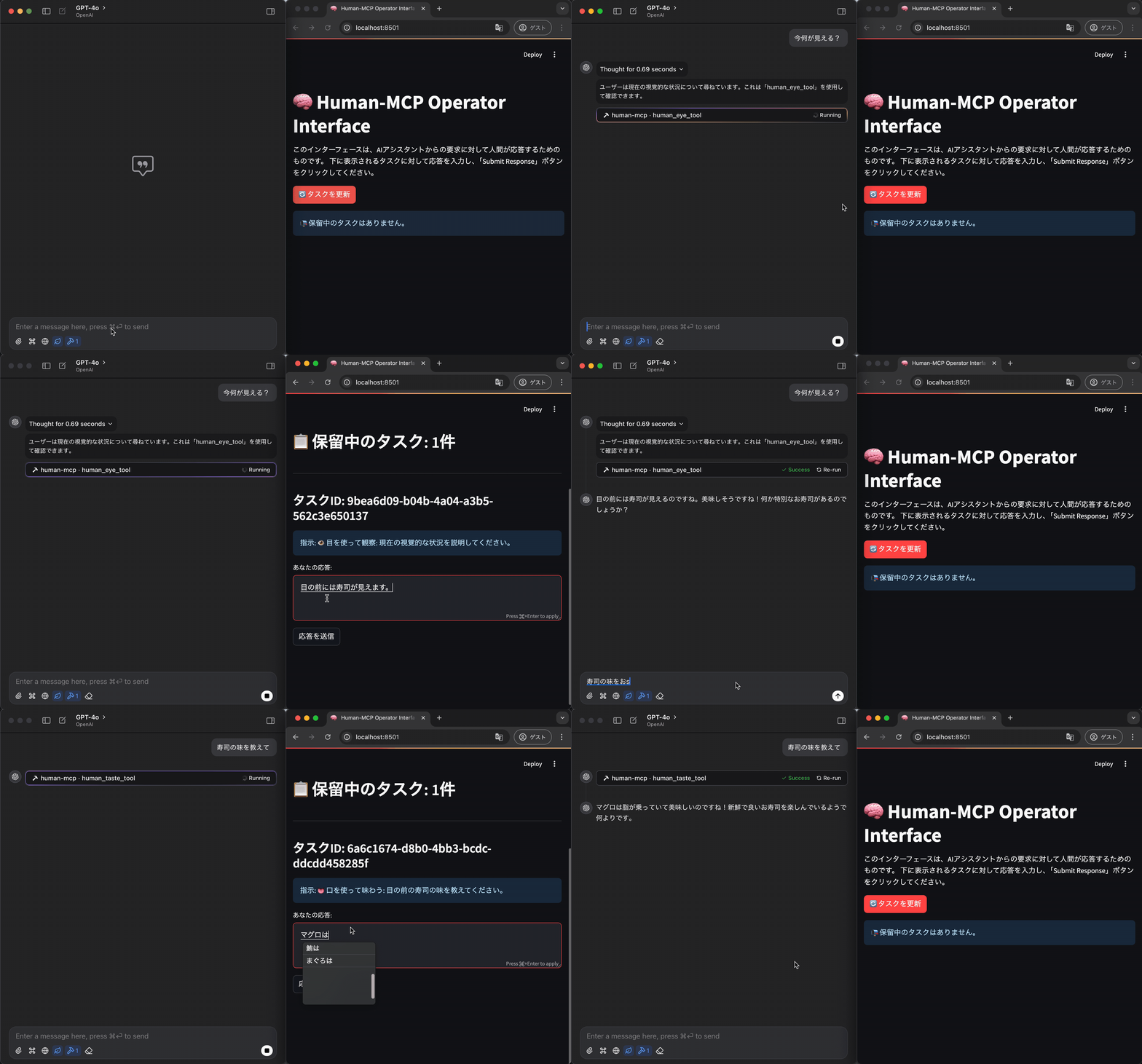
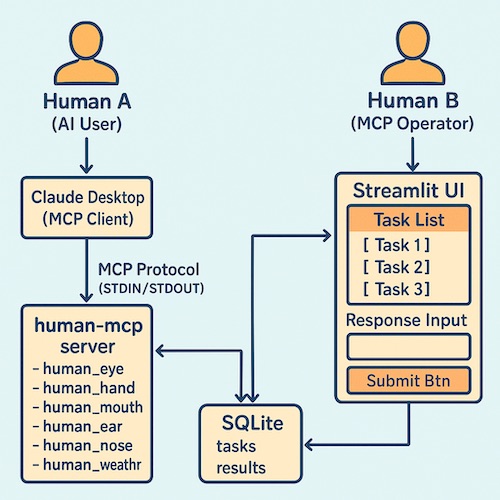
human-mcp es un servidor MCP que permite a los asistentes de IA aprovechar las capacidades humanas. Recibe solicitudes del asistente de IA, muestra instrucciones al humano y devuelve la respuesta del humano al asistente de IA.
Características principales:
Acepta solicitudes de ejecución de herramientas (a través de STDIN) de clientes MCP
Escribe las instrucciones necesarias para la ejecución en una base de datos SQLite
La aplicación Streamlit monitorea SQLite, muestra instrucciones al humano y solicita respuestas.
Escriba los resultados de la entrada humana a través de Streamlit en SQLite
El servidor MCP lee los resultados de SQLite y los devuelve al cliente (a través de STDOUT) como una respuesta MCP.
Related MCP server: Interactive Feedback MCP
human_eye_tool : El ojo humano se utiliza para describir una situación o localizar algo específico.
human_hand_tool : Un humano que usa su mano para realizar una manipulación física simple.
human_mouth_tool : Un humano usa su boca para decir las palabras especificadas.
human_weather_tool : Un humano verifica e informa el clima en su ubicación.
human_ear_tool : Un humano usa sus oídos para escuchar sonidos y describir la situación.
human_nose_tool : Un humano usa su nariz para identificar olores.
human_taste_tool : Un humano usa su boca para saborear la comida y describir su sabor.
Python 3.12 o superior
ultravioleta
SQLite3
Clonar el repositorio
git clone https://github.com/yourusername/human-mcp.git
cd human-mcp
Crear y activar el entorno virtual
uv venv
source .venv/bin/activate
Instalar dependencias
uv pip install .Instalar el servidor MCP
task install-mcpConectarse al servidor MCP desde Claude
"human-mcp": {
  "command": "uv",
  "args": [
    "run",
    "--with",
    "mcp[cli]",
    "mcp",
    "run",
    "$PATH_TO_REPOSITORY/human_mcp/mcp_server.py"
  ]
}
Inicie Streamlit UI en una segunda terminal
task run-streamlitAcceda a la interfaz de usuario de Streamlit en su navegador (normalmente http://localhost:8501 )
Una vez que envíe su solicitud a través de su cliente MCP (por ejemplo, Claude Desktop), la tarea aparecerá en la interfaz de usuario de Streamlit.
Una vez que ingrese su respuesta en la interfaz de usuario de Streamlit y haga clic en el botón "Enviar respuesta", la respuesta se enviará de vuelta al cliente MCP.
human-mcp/
├── human_mcp/              # メインのPythonパッケージ
│   ├── __init__.py         # パッケージマーカー
│   ├── db_utils.py         # SQLite関連ユーティリティ
│   ├── tools.py            # ツール定義
│   ├── mcp_server.py       # MCPサーバー本体
│   └── streamlit_app.py    # Streamlit UI アプリ
├── human_tasks.db          # SQLite データベースファイル (実行時に生成)
├── pyproject.toml          # プロジェクト設定、依存関係
└── README.md # このファイルInstituto Tecnológico de Massachusetts (MIT)
Este proyecto pretende ser una broma. En la práctica, es necesario tener en cuenta factores como la carga de los operadores humanos y los retrasos en la respuesta.
人間が耳を使って音を聞き、状況を説明します。
例:
- 周囲の環境音の確認
- 特定の音源の識別
- 会話の聞き取り
Inputs: instruction (required).
人間が目で見て状況を説明したり、特定のものを探したりします。
Inputs: prompt (required).
人間が手を使って簡単な物理的操作を実行します。
Inputs: instruction (required).
人間が口を使って指定された言葉を発話します。
Inputs: utterance (required).
人間が鼻を使って匂いを確認します。
例:
- 食べ物の新鮮さの確認
- ガス漏れなどの危険な匂いの検知
- 香りの評価
Inputs: instruction (required).
人間が口を使って食べ物を味わい、その味を説明します。
例:
- 料理の味の評価
- 食材の新鮮さの確認
- 味の分析(甘味、酸味、塩味、苦味、うま味)
Inputs: instruction (required).
人間が現在地の天気を確認して報告します。
Inputs: no named parameters.
Recent tool additions, removals, and schema changes observed during successful MCP inspections.
Loading tool schema changelog…
Scored across 7 tools
Each tool corresponds to a distinct human sensory organ or function (ear, eye, hand, mouth, nose, taste, weather), with no overlap in purpose. The descriptions clearly differentiate their roles, such as hearing sounds, seeing visuals, physical manipulation, speaking, smelling, tasting, and weather reporting, making misselection unlikely.
All tool names follow a consistent 'human_[organ/function]_tool' pattern using snake_case. This uniform naming convention makes the tools predictable and easy to identify, with no deviations or mixed styles across the set.
With 7 tools, the count is reasonable for covering human sensory and basic environmental interactions. It's slightly lean for a broad 'human' scope but well-scoped for sensory functions, with each tool earning its place without feeling excessive or thin.
The tool set provides good coverage for human sensory inputs (sight, sound, smell, taste, touch) and basic actions (speaking, weather checking). Minor gaps exist, such as no tools for cognitive functions like thinking or memory, but agents can work around this for the stated sensory domain.
MCP server that lets your AI assistant build and deploy apps, hosting each one at a live URL.
MCP server that lets AI assistants use all OneSchema features exposed via the public API.
MCP server for building and testing AI agents with multi-model experimentation and insights.
MCP server for AI dialogue using various LLM models via AceDataCloud