If you contribute to more than a couple of projects, PRs go stale without you noticing. A maintainer asks for a change, CI breaks after a rebase, a branch picks up a conflict, and you find out two weeks later.
OSS Autopilot checks every open PR you have on GitHub and sorts them into what needs you and what is waiting on someone else. For the ones that need you, it helps draft the reply, diagnose the CI failure, or rebase the branch. You approve each push and each comment before it goes out.
Contents
Related MCP server: MCP GitHub Project Manager
Requirements
Node.js 22 or newer
GitHub CLI installed and logged in (gh auth login), or a GITHUB_TOKEN in your environment
For the plugin: Claude Code, plus npm and network access on first run (see below)
CI runs on Ubuntu and macOS. Windows is untested.
Quick start (Claude Code)
/plugin marketplace add costajohnt/oss-autopilot
/plugin install oss-autopilot@oss-autopilot
Restart Claude Code, then:
Setup asks for your GitHub username, the languages and labels you care about, and how many PRs you want open at once. After that, run /oss whenever you want to check in.
About the first run. The plugin ships as source. The first /setup-oss or /oss installs dependencies and builds the CLI inside the plugin directory, so it needs npm (or pnpm) and a network connection, and it takes longer than later runs. If the build fails, see Troubleshooting.
Other ways to run it
Save your GitHub username once:
npx @oss-autopilot/core@latest init <your-github-username>
Then add the server to your MCP client config:
{
  "mcpServers": {
    "oss-autopilot": {
      "command": "npx",
      "args": ["@oss-autopilot/mcp@latest"]
    }
  }
}
The MCP server exposes 35 tools, 6 resources, and 4 prompts. @latest means you get new releases automatically; pin a version (@oss-autopilot/mcp@<version>) if you would rather update on your own schedule.
npx @oss-autopilot/core@latest init <your-github-username>
npx @oss-autopilot/core@latest daily          # human-readable digest
npx @oss-autopilot/core@latest daily --json   # structured output
npx @oss-autopilot/core@latest doctor         # check token, state, rate limit

# or install it
npm install -g @oss-autopilot/core
oss-autopilot --help
Every command accepts --json and returns { success, data, error, timestamp }, so it is easy to script.
npm install @oss-autopilot/core
import { runDaily, runSearch } from '@oss-autopilot/core/commands';

const digest = await runDaily();
const issues = await runSearch({ maxResults: 10 });
API reference: jcosta.tech/oss-autopilot.
The daily check
Run /oss.
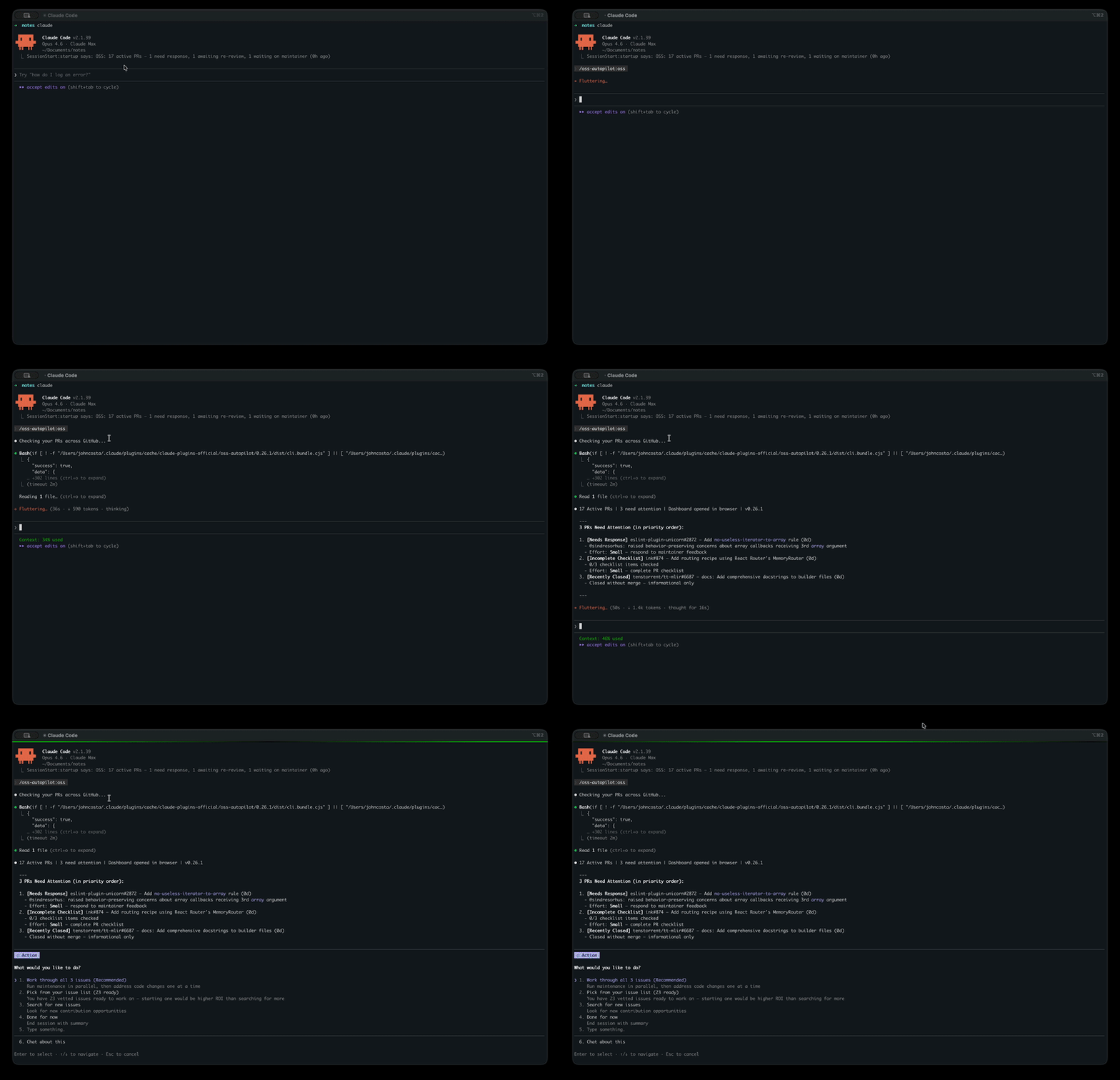
The CLI fetches your open PRs from GitHub and classifies each one: failing CI, changes requested, unanswered maintainer comment, merge conflict, incomplete checklist, or waiting on the maintainer.
You get a short list with the PRs that need you first, and a menu of actions.
Pick one. An agent reads the thread and the diff, then drafts a reply or prepares a fix.
You read the draft and approve, edit, or discard it. Nothing is pushed or posted until you approve that specific action.
Repeat, or stop. Most days this is a few minutes.
If you are new to this, set maxActivePRs to 3 to 5. A few PRs you respond to quickly do better than many you let sit.
Commands
The plugin adds 9 slash commands:
Command | What it does |
/oss
| Daily check: what needs attention, then an action menu |
/oss-search
| Find issues to work on, matched to your languages and history |
/oss-overnight
| Unattended run that prepares fix branches locally and writes a morning report |
/oss-dashboard
| Open the local dashboard in your browser |
/oss-guidelines
| View or edit what the tool has learned about each repo's review preferences |
/pr-ready
| Pre-push loop: lint, tests, parallel review agents, fix, repeat until clean |
/plan-ready
| The same review loop for an implementation plan, before you write code |
/setup-oss
| Configure preferences |
/oss-help
| Quick reference |
Commands: /oss, /oss-search, /oss-overnight, /oss-dashboard, /oss-guidelines, /pr-ready, /plan-ready, /setup-oss, /oss-help
The plugin also ships 8 specialized agents that Claude dispatches for you:
Agent | Job |
pr-responder
| Drafts replies to maintainer feedback |
pr-health-checker
| Diagnoses CI failures, conflicts, stale reviews; rebases when needed |
pr-compliance-checker
| Checks a PR against opensource.guide practices and the repo's own guidelines |
pre-commit-reviewer
| Reviews your diff before you commit |
issue-scout
| Searches for and vets issues |
repo-evaluator
| Judges whether a repo is worth your time before you start |
contribution-strategist
| Looks at your history and suggests where to focus |
overnight-preparer
| Prepares one fix branch in a local worktree during /oss-overnight |
Agents exist only in the Claude Code plugin. MCP and CLI users get the same underlying data through tools and commands.
For a deeper pre-push review, install the optional pr-review-toolkit plugin from the Claude Code marketplace. /pr-ready uses its reviewers in parallel when present and falls back to the built-in pre-commit-reviewer when not.
Finding new issues
/oss-search (or oss-autopilot search) looks for open issues that match your configured languages and labels, then vets each candidate: is it already claimed, is there a linked PR, does the repo merge outside contributions, how fast do maintainers respond. Search and vetting live in a separate package, oss-scout.
Two documents explain the scoring so you can see why a repo did or did not show up:
Repo scores: the history score (your own merged and closed PRs in that repo) and the health score (the repo's current activity, review speed, and merge rate).
Anti-LLM policy detection: repos whose CONTRIBUTING, CODE_OF_CONDUCT, or README say they do not accept AI-assisted contributions are skipped.
Overnight mode
/oss-overnight runs the daily check unattended. For PRs with a CI failure, a conflict, or requested changes, it prepares a fix branch in a local git worktree and runs the project's tests. It writes a report to ~/.oss-autopilot/reports/, and your next /oss shows it so you can decide what ships.
To schedule it on macOS:
oss-autopilot overnight schedule --install --hour 2
--install writes a launchd plist to ~/Library/LaunchAgents/ and prints the launchctl bootstrap command that loads it. It does not load it for you. Without --install it only prints the plist. There is no built-in scheduler for Linux yet; commands/oss-overnight.md describes the invocation to put in a systemd timer.
Read this before scheduling it. The unattended run is started with an allowlist of tools and a deny list that blocks git push, gh pr comment, gh api, npm publish, and similar commands, and it cannot ask you questions. That stops a well-behaved model from writing to GitHub. It is not a sandbox: the run executes each project's test suite with your credentials available, the same as if you ran those tests yourself. If that is more trust than you want to give, run the job as a separate OS user with no push credentials. See commands/oss-overnight.md for the full threat model.
Dashboard
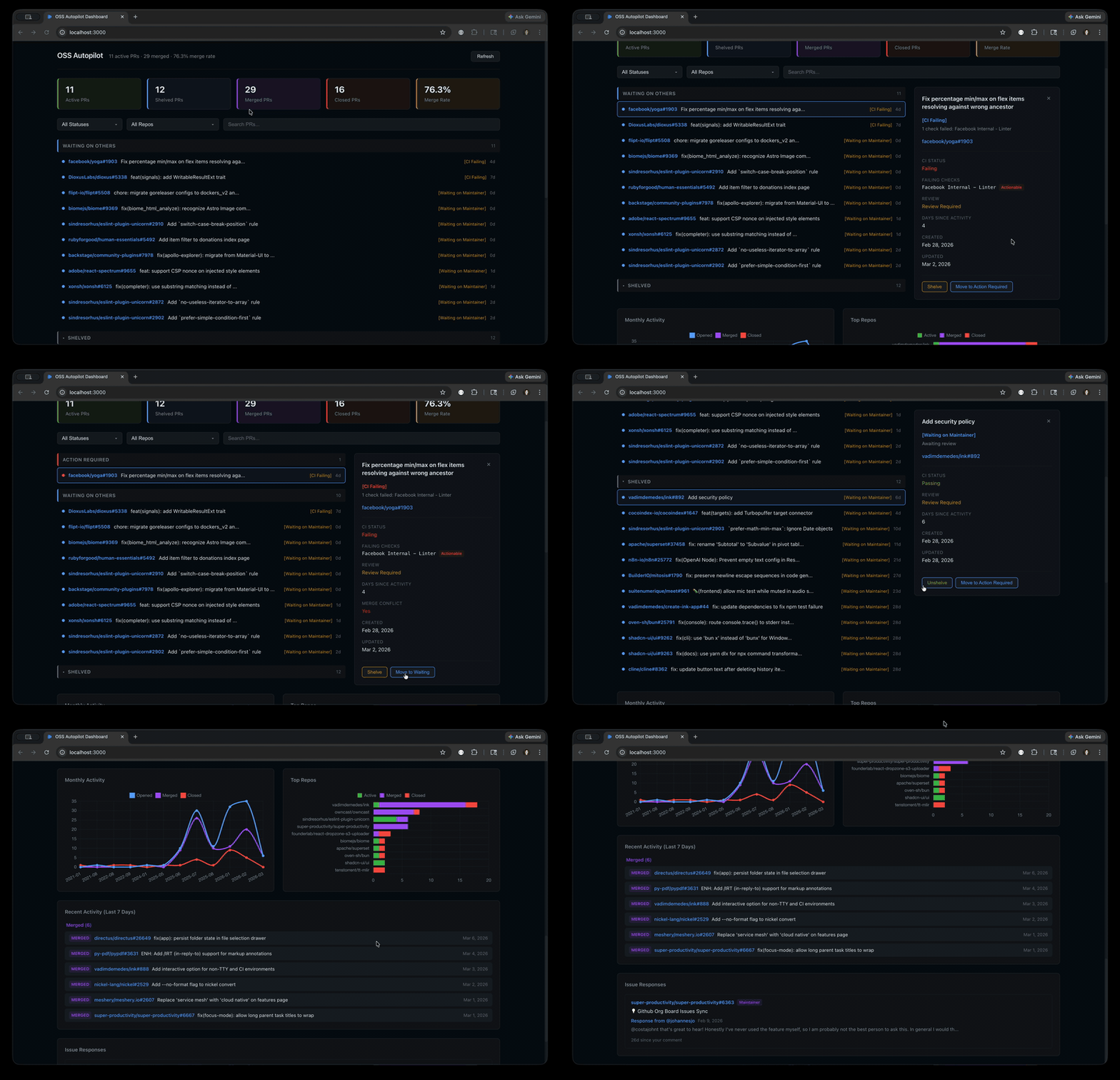
/oss-dashboard opens a local web UI at http://localhost:3000 with your PRs by status, contribution charts, and buttons to shelve or re-prioritize a PR. It binds to loopback only.
Without Claude Code, run it from the CLI (needs @oss-autopilot/core 3.28.1 or newer, and one daily run so there is data to show):
npx @oss-autopilot/core@latest daily
npx @oss-autopilot/core@latest dashboard serve
Configuration
Settings live in ~/.oss-autopilot/state.json under config. Change them with /setup-oss, or from the CLI:
oss-autopilot config                     # show everything
oss-autopilot config maxActivePRs 5      # set one value
Setting | Default | Description |
githubUsername
| (detected) | Your GitHub username |
maxActivePRs
| 10 | Open-PR count at which the tool suggests finishing before starting more |
maxOpenPRsColdRepo
| 1 | While none of your PRs in a repo have merged, search leaves the repo out once you have this many open PRs there, and the PR workflow warns before pushing another (0 = off) |
maxOpenPRsPerRepo
| 0 (off) | Same cap for every repo, including ones where your PRs have merged |
maxConcurrentImplementations
| 2 | How many implementations may run in the background at once, across sessions and machines (0 = off). Two never share a checkout |
dormantDays
| 30 | Days without activity before a PR is marked dormant |
minStars
| 50 | Minimum repo stars to count in stats and charts |
languages
| (chosen at setup) | Languages for issue search |
labels
| (chosen at setup) | Issue labels for issue search |
squashByDefault
| true
| Squash commits before merge (true, false, or "ask") |
excludeRepos
| []
| Repos to leave out of issue discovery. PRs already open there are still tracked; the pre-push repo-cap check warns before opening a new one |
excludeOrgs
| []
| Orgs to leave out of issue discovery. PRs already open there are still tracked |
untrackedOrgs
| []
| Orgs whose PRs are not tracked at all (for example, your employer). Discovery is unaffected |
avoidRepos
| []
| Repos to rank lower in search without excluding them |
boostIssueTypes
| []
| Issue label types to rank higher in search (for example bug) |
includeDocIssues
| true
| Include documentation issues in search |
complexIssues
| off
| warm relaxes issue vetting in repos where you already have a merged PR, so larger and maintainer-filed issues surface there
|
autoExtractLearnings
| true
| After a PR merges, extract what the maintainers asked for into per-repo guidelines |
issueListPath
| (none) | Path to your own curated issue list |
projectCategories
| []
| Categories to prioritize (nonprofit, devtools, and so on) |
preferredOrgs
| []
| Orgs to prioritize |
Stats and badges. oss-autopilot stats prints your merged-PR numbers; --markdown gives a shareable report and --badge gives shields.io endpoint JSON.
Sync across machines (optional). State can be stored in a secret GitHub gist instead of only on disk. See oss-autopilot state --help. A secret gist is unlisted, not access-controlled, so anyone with the URL can read it.
How it works
One core, three front ends. The plugin calls the CLI with --json. The MCP server imports the same functions. The dashboard is served by the CLI. They share one state file.
The logic is code, not prompts. PR status, CI failure categories (your bug, fork limitation, auth gate, flaky infrastructure), staleness, and repo scores are computed in TypeScript with tests. The model reads structured JSON and does the parts that need language: reading a review thread, drafting a reply, proposing a fix.
Nothing is cached about your PRs. Each run fetches your open PRs fresh from GitHub's Search API and enriches them with CI status, review decisions, and conflict state. Local state holds your config, your merged and closed history, per-repo scores, and learned guidelines.
It is careful with the API. ETag-based HTTP caching, rate-limit backoff, bounded concurrency, and GraphQL batching keep a daily run well inside GitHub's limits.
Text from GitHub is treated as untrusted. Issue bodies, comments, and review text are fenced and labeled before an agent sees them.
More detail: ARCHITECTURE.md. Security model and reporting: SECURITY.md.
What it will and will not do on its own
| Interactive (/oss, MCP, CLI) | Unattended (/oss-overnight) |
Read your PRs, issues, CI logs | Yes | Yes |
Edit files in a local clone or worktree | When you pick an action | Yes, in a worktree it creates |
Run a project's tests | When you pick an action | Yes |
Push a branch | Only after you approve | Direct git push is blocked; the CLI's own overnight push-prep refuses |
Post a comment, open or merge a PR | Only after you approve | Direct gh writes are blocked; the CLI's own post and claim refuse |
Send data anywhere other than GitHub | No | No |
In interactive use, approval is per action. Approving one reply does not approve the next one.
All data stays in ~/.oss-autopilot/ (files are written 0600, the directory 0700). There is no telemetry.
Troubleshooting
Start here. It checks your token, the CLI bundle, the state file, and your rate limit:
npx @oss-autopilot/core@latest doctor
gh is missing or not logged in
brew install gh        # macOS; see https://cli.github.com for other platforms
gh auth login
The plugin's first-run build failed
find ~/.claude/plugins -name "oss-autopilot" -type d    # locate the plugin
cd <that path>/packages/core
npm install
npm run bundle
My PRs do not show up
Run /setup-oss and confirm the GitHub username.
Only PRs you authored are tracked, and PRs to repos you own are skipped.
Check untrackedOrgs. excludeRepos and excludeOrgs only affect issue discovery, and minStars only affects stats and charts.
Updating
Plugin: /plugin update oss-autopilot
MCP and CLI via npx ...@latest: nothing to do
Your configuration carries over. Changelogs: core, mcp
Found a bug? Open an issue with the output of doctor --json.
Limitations
GitHub only. No GitLab, Bitbucket, or other forges.
1,000-result cap. GitHub's Search API returns at most 1,000 results per query. If you have more than 1,000 open, merged, or closed PRs, the oldest are not counted.
Single user. It tracks one person's PRs. No team views or shared state.
Overnight scheduling is macOS only out of the box.
Contributing
Bug fixes, new agents, CLI improvements, and documentation are all welcome. CONTRIBUTING.md has setup instructions.
git clone https://github.com/costajohnt/oss-autopilot.git
cd oss-autopilot
pnpm install
pnpm test
pnpm start -- daily --json      # run the CLI from source
claude --plugin-dir .           # load your checkout as the plugin
The diagrams in this README are generated from the JSON files in docs/diagrams/ with archify. Regenerate them with node docs/diagrams/export-svg.mjs.
About
Built and used daily by costajohnt.
License
MIT


