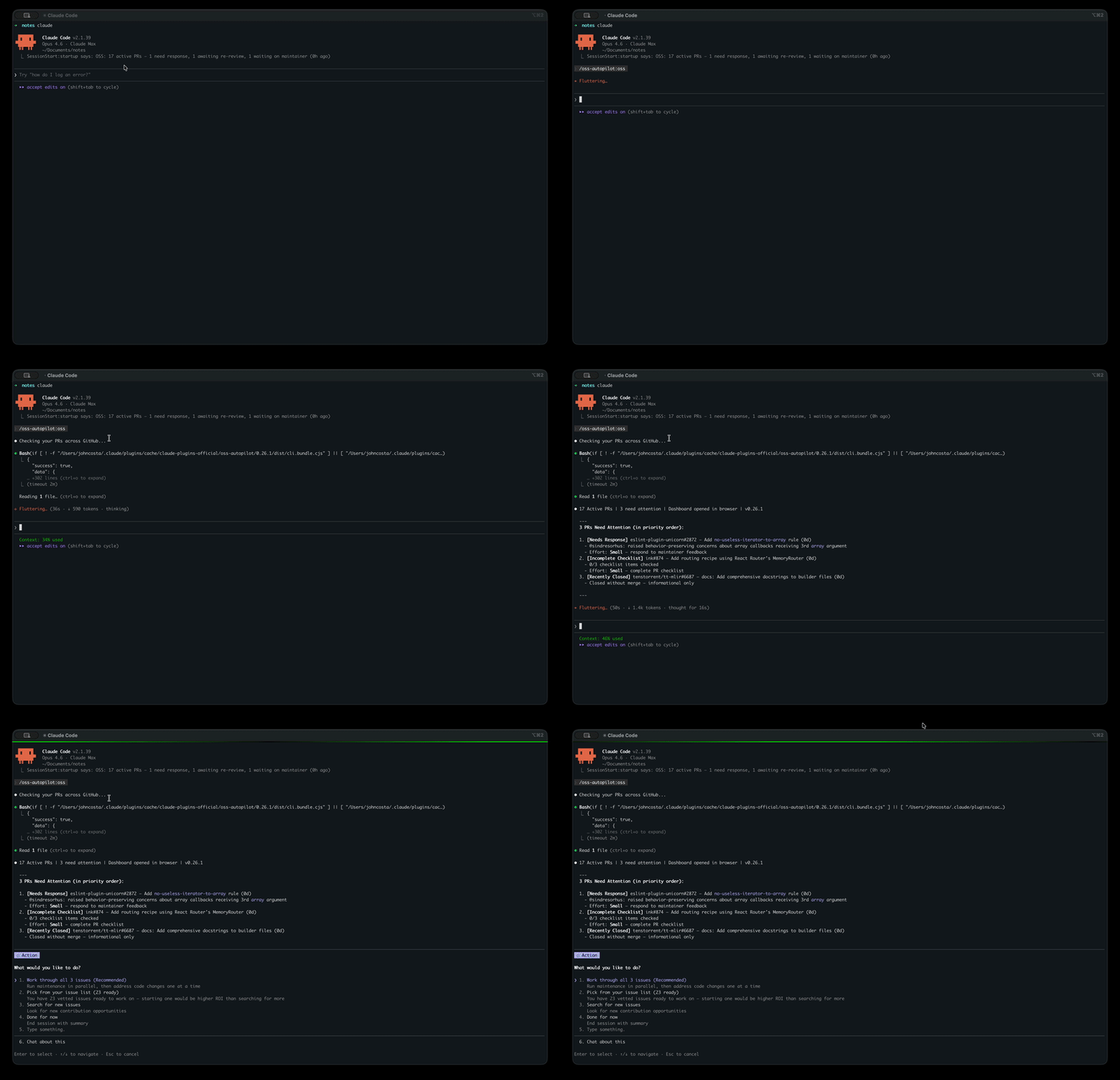
oss-autopilot
OSS Autopilot is an AI-powered server that helps you monitor, manage, and discover open-source GitHub pull requests and issues. It exposes 20 tools across four areas:
PR Monitoring & Management
daily— Fetch all open PRs enriched with CI status, reviews, and conflicts, returned as a prioritized summarystatus— View current tracked, shelved, and dismissed PRs/issues (supports offline/cached mode)track/untrack— Start or stop monitoring a specific pull requestread— Mark PR notifications as read (one or all)comments— Fetch all comments on a PR, including review comments (optional bot filtering)shelve/unshelve— Temporarily hide/restore a PR from daily checksmove— Manually set a PR's state:attention,waiting,shelved, orauto
Issue Discovery & Vetting
search— Find beginner-friendly GitHub issues matching your configured languages and interestsvet— Analyze a specific issue URL for contribution viability (clarity, scope, assignees, staleness)dismiss/undismiss— Hide or restore a GitHub issue from your notifications
GitHub Interaction
post— Post a comment on any GitHub issue or pull requestclaim— Claim an issue by posting a comment expressing intent to work on it
Configuration & Setup
init— Initialize with your GitHub usernamesetup— Configure preferences (languages, interests, goals) interactively or viakey=valuepairsconfig— Get or set individual configuration valuescheck-setup— Verify configuration and identify anything missingstartup— Run startup checks including GitHub auth verification and state file validation
Provides automated triage for Dependabot alerts and pull requests as part of a headless workflow for maintaining open-source repositories.
Monitors GitHub pull requests to track CI failures, merge conflicts, and maintainer feedback, while identifying new open-source contribution opportunities based on the user's history and repository health.
Built and used daily by costajohnt — 3rd biggest contributor to Ink (the React CLI framework behind Claude Code, Gemini CLI, and Codex — 32k+ stars) and repeat contributor to Homebrew.
What It Does
OSS Autopilot monitors all your open PRs across GitHub, alerts you when maintainers leave feedback, helps you draft responses, diagnoses CI failures, and finds new issues matched to your contribution history. It's the workflow engine behind the stats above.

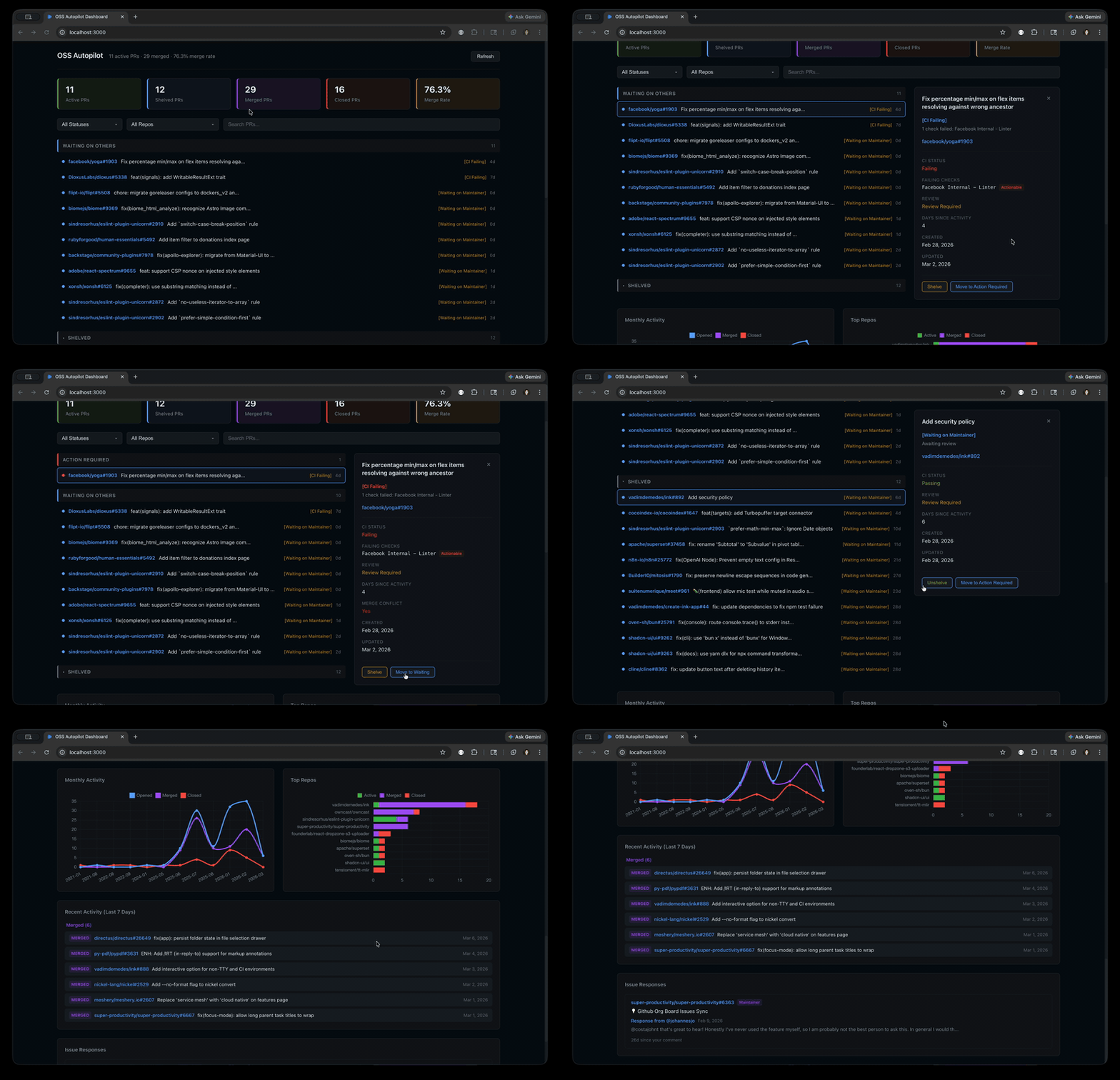
Interactive Dashboard
A Preact SPA that auto-opens when you run /oss-dashboard — PR management, charts, contribution stats, and status overrides. Also available standalone: npx @oss-autopilot/core dashboard serve.
Related MCP server: Claude Code Toolkit
Engineering Highlights
┌──────────────────────────────────────────────────┐
│ Claude Code Plugin Layer │
│ 8 slash commands (/oss, /oss-search, …) │
│ 7 specialized agents, contribution skills │
├──────────────────────────────────────────────────┤
│ │
│ ┌──────────────┐ ┌──────────────────────────┐ │
│ │ MCP Server │ │ Interactive Dashboard │ │
│ │ @oss-auto- │ │ @oss-autopilot/dashboard │ │
│ │ pilot/mcp │ │ Preact + Vite │ │
│ │ │ │ PR management, charts, │ │
│ │ 30 tools │ │ actions │ │
│ │ 6 resources │ │ │ │
│ │ 4 prompts │ │ │ │
│ └──────┬───────┘ └────────────┬─────────────┘ │
│ │ │ │
│ ┌──────┴───────────────────────┴─────────────┐ │
│ │ Core Library — @oss-autopilot/core │ │
│ │ PR monitoring, issue discovery, state mgmt │ │
│ │ GitHub API, CLI, structured JSON output │ │
│ └────────────────────────────────────────────┘ │
│ │
└──────────────────────────────────────────────────┘Monorepo with three npm packages — pnpm workspaces with each package independently publishable to npm. Core library, MCP server, and interactive Preact dashboard with shared types.
Three deployment models — Claude Code plugin with 7 specialized agents, MCP server for Cursor/Claude Desktop/Codex/Windsurf, and a standalone CLI with --json structured output. Same core, different interfaces.
Deterministic core, AI orchestration layer — Critical logic (PR status classification, CI failure analysis, state management) lives in tested TypeScript, not in prompts. The CLI returns structured JSON that agents consume. CI failures are categorized into a deterministic taxonomy — actionable vs. fork limitation vs. auth gate vs. infrastructure — rather than asking an LLM each time. 2,600+ tests validate the core independently of any LLM.
Production-grade GitHub API integration — ETag-based HTTP caching, automatic rate limit backoff with retries, bounded concurrency pools, and paginated fetching. Handles the full complexity of fork-based contribution workflows: correct diff ranges, squash commit counting, and --head flag handling for cross-fork PRs. Designed to run daily without hitting API limits.
Human-in-the-loop guardrails — Nothing is posted to GitHub without explicit approval. AI drafts responses but the contributor always reviews before sending. Pre-commit review gates catch issues before they reach maintainers. Factual claims in draft comments are verified against the actual diff before presenting to the user.
Modular extraction — Issue discovery and vetting grew complex enough to extract into its own npm package (oss-scout). Connected via a bridge pattern that maps state between the two systems, following the same approach used by the broader ecosystem of extraction-and-reconnect patterns.
Fresh-fetch architecture — PRs aren't stored locally. Every run fetches live data from GitHub's Search API and enriches each PR with CI status, review decisions, merge conflict detection, maintainer comment classification, and checklist completion. No stale data, no sync bugs.
Security discipline — State files written with 0o600 permissions, data directory created with 0o700. Concurrent state write protection prevents corruption from parallel runs. Runtime schema validation via Zod on every state file read. XSS prevention tested. Input validation hardened across CLI arguments and API responses.
Automated release pipeline — Conventional commits feed into release-please for automatic versioning and changelogs, with CI/CD publishing to npm on merge. 200+ changelog versions across both packages (core v0.1.0 through v3.x, mcp through v5.x) since the first release in January 2025.
Every feature in the list above was driven by real usage — capacity warnings came from overcommitting, "skip comment when code speaks for itself" came from over-commenting, diminishing returns detection came from spending too long searching. The tool is shaped by the contributions it manages.
Install & Usage
Claude Code Plugin (recommended):
/plugin marketplace add costajohnt/oss-autopilot
/plugin install oss-autopilot@oss-autopilotRestart Claude Code, then run /setup-oss. Done.
First initialize your GitHub username (one-time setup):
npx @oss-autopilot/core@latest init <your-github-username>Then add to your MCP client config:
{
"mcpServers": {
"oss-autopilot": {
"command": "npx",
"args": ["@oss-autopilot/mcp@latest"]
}
}
}The MCP server exposes 30 tools, 6 resources, and 4 prompts — the full OSS Autopilot feature set.
# Run any command directly (uses gh auth token automatically)
npx @oss-autopilot/core daily --json
npx @oss-autopilot/core dashboard serve
# Or install globally
npm install -g @oss-autopilot/core
# Or import programmatically
npm install @oss-autopilot/coreimport { runDaily, runSearch, runStatus } from '@oss-autopilot/core/commands';
const digest = await runDaily();
const issues = await runSearch({ maxResults: 10 });All commands return { success, data, error, timestamp } with --json.
Daily workflow (5 min):
Run
/ossto see what needs attentionWork through critical issues (CI failures, maintainer comments, conflicts)
Done for now
Commands: /oss (daily check), /oss-search (find issues), /oss-dashboard (interactive dashboard), /oss-guidelines (per-repo guidelines), /pr-ready (pre-push review loop), /plan-ready (plan review loop), /setup-oss (configure), /oss-help (reference)
By the Numbers
Metric | Value |
Releases | 200+ changelog versions (spanning core v0.1 through current v3.x; mcp through current v5.x) |
Tests | 3,000+ across 120+ files |
Issues + PRs | 1,200+ |
Time span | Jan 2025 → present |
npm packages | 3 |
CLI commands | 35+ |
Agents | 7 |
Everything Else
Claude automatically dispatches these based on context:
Agent | Purpose | When it runs |
pr-responder | Drafts responses to maintainer feedback | PR needs a response to maintainer feedback |
pr-health-checker | Diagnoses CI failures, merge conflicts, stale reviews | PR has CI failure or merge conflict |
pr-compliance-checker | Validates PRs against opensource.guide best practices | Before marking a new PR ready for review |
pre-commit-reviewer | Reviews code changes before committing | After code changes, before commit |
issue-scout | Finds and vets new issues to work on | User searches for new issues |
repo-evaluator | Analyzes repository health before contributing | Before contributing to an unfamiliar repo |
contribution-strategist | Strategic advice for your OSS journey | User asks for contribution strategy |
Agents are available in the Claude Code plugin. MCP and CLI users access the same capabilities through tools and commands.
oss-autopilot stats # Terminal output
oss-autopilot stats --json # Structured JSON
oss-autopilot stats --markdown # Shareable markdown report
oss-autopilot stats --badge # Shields.io endpoint JSONAdd a live badge to your GitHub profile README:
Embed rich SVG widgets powered by oss-widgets — stats card, recent contributions, and 26-week activity graph. All update hourly and support ?theme=dark.
Configuration is stored in ~/.oss-autopilot/state.json (inside the config field). Run /setup-oss to configure interactively, or use setup --set key=value from the CLI:
Setting | Default | Description |
| (detected) | Your GitHub username |
| 10 | Capacity limit before suggesting focus |
| 30 | Days until PR marked dormant |
| 50 | Minimum repo stars for inclusion in stats and charts |
| (chosen at setup) | Languages to filter issue search |
| (chosen at setup) | Issue labels to search for |
|
| Squash commits before merging ( |
|
| Repos to exclude from all tracking |
|
| Orgs to exclude from all tracking (e.g., private work orgs) |
|
| Repos to softly downrank in discovery (milder than |
|
| Issue label types to softly boost in discovery ranking (e.g., |
|
| Include documentation issues in discovery |
| (optional) | Path to curated issue list file |
|
| Project categories to prioritize (nonprofit, devtools, etc.) |
|
| GitHub organizations to prioritize |
Does Claude post comments or push code automatically? No. Claude drafts responses and suggests actions. Nothing is posted to GitHub without your explicit approval.
Where is my data stored?
All data lives in ~/.oss-autopilot/ — configuration, PR tracking state, event history, and HTTP cache. The dashboard runs locally at http://localhost:3000. Nothing is sent to external servers beyond GitHub API calls.
Can I use this without Claude Code?
Yes. The MCP server (npx @oss-autopilot/mcp) works with Cursor, Claude Desktop, Codex, Windsurf, and any MCP client. The CLI (npx @oss-autopilot/core daily --json) runs standalone. The Claude Code plugin provides the best experience with specialized agents and skills, but all core functionality is available through any path.
How do I update?
Plugin: /plugin update oss-autopilot. MCP server / CLI: uses npx @latest by default, so you always get the latest. Your configuration is preserved across updates. See the Changelog for what's new.
Any tips for getting started?
Set maxActivePRs to 3-5 when starting out. Fewer active PRs with fast responses beats many stale ones. Run /oss every few days — stale PRs are hard to revive.
GitHub CLI authentication errors:
brew install gh # macOS
gh auth loginBuild fails on first run:
# Find your plugin directory
find ~/.claude/plugins -name "oss-autopilot" -type d
# Rebuild
cd <path-from-find-command>/packages/core
npm install
npm run bundlePRs not showing up:
Run
/setup-ossto ensure your GitHub username is configuredCheck that
gh auth statusshows you're authenticatedThe plugin only tracks PRs you authored
git clone https://github.com/costajohnt/oss-autopilot.git
cd oss-autopilot
pnpm install # Install all workspace dependencies
pnpm test # Run all tests across all packages
pnpm start -- daily --json # Run CLI via tsx (no bundle needed)
pnpm run bundle # Rebuild CLI bundle (esbuild)Project structure:
├── commands/ # 8 plugin slash commands (/oss, /oss-search, /pr-ready, …)
├── agents/ # 7 specialized agents (PR responder, issue scout, etc.)
├── skills/ # Contribution best practices
├── workflows/ # Delegated logic loaded by commands on demand
├── packages/
│ ├── core/ # @oss-autopilot/core — CLI + core library
│ │ ├── src/commands/ # CLI subcommands
│ │ ├── src/core/ # Domain logic + tests
│ │ └── dist/cli.bundle.cjs # Built bundle (auto-generated)
│ ├── mcp-server/ # @oss-autopilot/mcp — MCP server
│ │ └── src/ # Tools, resources, prompts, server
│ └── dashboard/ # @oss-autopilot/dashboard — Interactive UI
└── pnpm-workspace.yaml # Workspace definitionTest as a local plugin:
claude --plugin-dir ./oss-autopilotThe plugin includes a built-in pre-commit-reviewer agent that reviews all code changes before committing. For enhanced parallel review, install the pr-review-toolkit plugin (search for it in the Claude Code plugin marketplace) — it adds 5 reviewers that run simultaneously, plus a conditional type-design-analyzer for TypeScript diffs:
Agent | Focus |
| Bugs, logic errors, security, conventions |
| Error handling gaps, swallowed errors |
| Dead code, unnecessary complexity |
| Test coverage and assertion quality |
| Comment accuracy and maintainability |
| TypeScript type design (encapsulation, invariants, enforcement) — dispatched only when the diff includes |
Without pr-review-toolkit, the built-in pre-commit-reviewer handles all review phases as a single agent with the same fix-and-re-review loop.
Limitations
GitHub only — GitLab, Bitbucket, and other forges are not supported. Contributions welcome.
1,000 PR cap — GitHub's Search API returns at most 1,000 results per query. If you have more than 1,000 open, merged, or closed PRs, the oldest results may be truncated.
Individual contributor focus — Designed for solo contributors managing their own PRs. No team dashboards, shared state, or multi-user workflows.
How It Decides
Two docs explain the heuristics that shape which repos surface in discovery and how they're evaluated:
Repo scores — two distinct 1–10 numbers per repo: the cached history score (your own merged/closed PR outcomes, recency, responsiveness, hostility signals; the default
minRepoScoreThresholdof 4 excludes repos below the cutoff from search results) and the fresh health score (repo-vet's weighted rubric over the repo's current activity, PR speed, merge rate, guidelines, and stability).Anti-LLM policy detection — scans CONTRIBUTING / CODE_OF_CONDUCT / README for language indicating the project doesn't accept AI-assisted contributions. Hard skip when matched.
Both docs explain the exact rules so you can understand why a given repo did or didn't surface.
API Documentation
Full API documentation for @oss-autopilot/core is available at jcosta.tech/oss-autopilot.
Contributing
Bug fixes, new agents, CLI improvements, and documentation are all welcome. See CONTRIBUTING.md for setup instructions.
License
MIT
Available Tools
20 toolscheck-setupARead-only
Check whether OSS Autopilot is properly set up and configured. Returns setup status and any missing configuration.
| Name | Required | Description | Default |
|---|---|---|---|
No parameters | |||
TDQS
Does the description disclose side effects, auth requirements, rate limits, or destructive behavior?
Annotations already declare readOnlyHint=true, so the read-only nature is covered. The description adds that it returns setup status and missing configuration, which is consistent but does not disclose additional behavioral traits beyond the annotation.
Agents need to know what a tool does to the world before calling it. Descriptions should go beyond structured annotations to explain consequences.
Is the description appropriately sized, front-loaded, and free of redundancy?
The description is two sentences long, front-loaded with the primary purpose, and contains no unnecessary words.
Shorter descriptions cost fewer tokens and are easier for agents to parse. Every sentence should earn its place.
Given the tool's complexity, does the description cover enough for an agent to succeed on first attempt?
Given no output schema, the description adequately states what is returned (setup status and missing configuration). However, additional detail on the return format or structure would improve completeness for a tool with no parameters.
Complex tools with many parameters or behaviors need more documentation. Simple tools need less. This dimension scales expectations accordingly.
Does the description clarify parameter syntax, constraints, interactions, or defaults beyond what the schema provides?
The input schema has no parameters, so there are no parameters to describe. With schema description coverage at 100%, the description does not need to add parameter info. The baseline for 0 parameters is 4.
Input schemas describe structure but not intent. Descriptions should explain non-obvious parameter relationships and valid value ranges.
Does the description clearly state what the tool does and how it differs from similar tools?
The description explicitly states the verb 'check' and the resource 'OSS Autopilot setup', clearly distinguishing it from siblings like 'setup' (which likely performs setup) and 'status' (general status). It specifies the return of setup status and missing configuration.
Agents choose between tools based on descriptions. A clear purpose with a specific verb and resource helps agents select the right tool.
Does the description explain when to use this tool, when not to, or what alternatives exist?
No guidance is provided on when to use this tool versus alternatives such as 'setup', 'init', or 'status'. The description lacks explicit context for appropriate usage or exclusions.
Agents often have multiple tools that could apply. Explicit usage guidance like "use X instead of Y when Z" prevents misuse.
claimA
Claim a GitHub issue by posting a comment expressing intent to work on it.
| Name | Required | Description | Default |
|---|---|---|---|
| message | No | Custom claim message. If omitted, a default message is used. | |
| issueUrl | Yes | Full GitHub issue URL to claim |
TDQS
Does the description disclose side effects, auth requirements, rate limits, or destructive behavior?
Annotations indicate it is not read-only and not destructive. The description adds context that it posts a comment, which is a write operation. However, it does not disclose potential side effects like whether multiple claims are allowed or if it overrides existing claims.
Agents need to know what a tool does to the world before calling it. Descriptions should go beyond structured annotations to explain consequences.
Is the description appropriately sized, front-loaded, and free of redundancy?
The description is a single, clear sentence with no redundancy. Every word contributes to understanding the tool's purpose.
Shorter descriptions cost fewer tokens and are easier for agents to parse. Every sentence should earn its place.
Given the tool's complexity, does the description cover enough for an agent to succeed on first attempt?
The description omits any mention of return values or error handling. Given the lack of an output schema, this information would help the agent interpret results. The tool is simple, but return behavior is not addressed.
Complex tools with many parameters or behaviors need more documentation. Simple tools need less. This dimension scales expectations accordingly.
Does the description clarify parameter syntax, constraints, interactions, or defaults beyond what the schema provides?
With 100% schema description coverage, the input schema already provides adequate parameter descriptions. The tool description adds no further semantic value beyond what the schema offers.
Input schemas describe structure but not intent. Descriptions should explain non-obvious parameter relationships and valid value ranges.
Does the description clearly state what the tool does and how it differs from similar tools?
The description clearly states the action ('claim'), the resource ('GitHub issue'), and the mechanism ('posting a comment expressing intent'). It effectively distinguishes from sibling tools like 'post' or 'startup' by specifying the intent-based claiming behavior.
Agents choose between tools based on descriptions. A clear purpose with a specific verb and resource helps agents select the right tool.
Does the description explain when to use this tool, when not to, or what alternatives exist?
No explicit guidance on when to use this tool versus alternatives such as 'track' or 'post'. While the purpose implies usage for claiming, it does not mention prerequisites (e.g., needing a GitHub token) or scenarios to avoid.
Agents often have multiple tools that could apply. Explicit usage guidance like "use X instead of Y when Z" prevents misuse.
commentsARead-only
Fetch and display comments on a pull request, including review comments and issue comments.
| Name | Required | Description | Default |
|---|---|---|---|
| prUrl | Yes | Full GitHub PR URL to fetch comments for | |
| showBots | No | If true, include bot comments in the output |
TDQS
Does the description disclose side effects, auth requirements, rate limits, or destructive behavior?
Annotations already set readOnlyHint=true, so the read-only nature is clear. The description adds that it includes both review and issue comments, providing some additional context beyond annotations.
Agents need to know what a tool does to the world before calling it. Descriptions should go beyond structured annotations to explain consequences.
Is the description appropriately sized, front-loaded, and free of redundancy?
Single sentence of 17 words, front-loaded with key action and resource. No unnecessary information.
Shorter descriptions cost fewer tokens and are easier for agents to parse. Every sentence should earn its place.
Given the tool's complexity, does the description cover enough for an agent to succeed on first attempt?
For a simple read-only tool with 2 parameters and no output schema, the description adequately covers purpose and scope. Could mention return format but not essential.
Complex tools with many parameters or behaviors need more documentation. Simple tools need less. This dimension scales expectations accordingly.
Does the description clarify parameter syntax, constraints, interactions, or defaults beyond what the schema provides?
Input schema has 100% coverage with descriptions for both parameters. The description does not add meaning beyond what the schema already provides, so baseline applies.
Input schemas describe structure but not intent. Descriptions should explain non-obvious parameter relationships and valid value ranges.
Does the description clearly state what the tool does and how it differs from similar tools?
The description clearly states the action ('Fetch and display') and the resource ('comments on a pull request'), including specific types (review comments and issue comments). It distinguishes from siblings like 'post' which would create comments.
Agents choose between tools based on descriptions. A clear purpose with a specific verb and resource helps agents select the right tool.
Does the description explain when to use this tool, when not to, or what alternatives exist?
No guidance on when to use this tool versus alternatives. The description does not mention when not to use it or suggest alternative tools for different contexts.
Agents often have multiple tools that could apply. Explicit usage guidance like "use X instead of Y when Z" prevents misuse.
configAIdempotent
Get or set OSS Autopilot configuration values. With no args, shows all config. With key and value, sets the value.
| Name | Required | Description | Default |
|---|---|---|---|
| key | No | Configuration key to get or set (e.g. "languages", "username") | |
| value | No | Value to set for the given key. Omit to read the current value. |
TDQS
Does the description disclose side effects, auth requirements, rate limits, or destructive behavior?
Annotations indicate non-read-only and idempotent. The description confirms mutability and adds the behavior with no args. It does not contradict annotations. However, it lacks details on persistence or side effects, relying on annotations for baseline.
Agents need to know what a tool does to the world before calling it. Descriptions should go beyond structured annotations to explain consequences.
Is the description appropriately sized, front-loaded, and free of redundancy?
Two sentences with no fluff. The description is front-loaded with action verbs and clearly separates the two modes. Every word contributes to understanding.
Shorter descriptions cost fewer tokens and are easier for agents to parse. Every sentence should earn its place.
Given the tool's complexity, does the description cover enough for an agent to succeed on first attempt?
For a simple tool with two optional parameters and no output schema, the description covers essential behavior across parameter combinations. It does not describe output format or errors, but these are less critical given the tool's simplicity.
Complex tools with many parameters or behaviors need more documentation. Simple tools need less. This dimension scales expectations accordingly.
Does the description clarify parameter syntax, constraints, interactions, or defaults beyond what the schema provides?
Input schema covers both parameters with descriptions. The description adds context by tying parameters to use cases: key for identification, value for setting, omit for reading. This enhances understanding beyond the schema.
Input schemas describe structure but not intent. Descriptions should explain non-obvious parameter relationships and valid value ranges.
Does the description clearly state what the tool does and how it differs from similar tools?
The description clearly states the tool's dual purpose of getting or setting configuration values, and specifies behavior based on arguments (no args shows all, key+value sets). This uniquely identifies it among siblings.
Agents choose between tools based on descriptions. A clear purpose with a specific verb and resource helps agents select the right tool.
Does the description explain when to use this tool, when not to, or what alternatives exist?
The description provides clear usage context for viewing or modifying configuration, with distinct behavior based on parameter presence. It does not explicitly exclude scenarios or name alternatives, but the context is adequate for an agent.
Agents often have multiple tools that could apply. Explicit usage guidance like "use X instead of Y when Z" prevents misuse.
dailyA
Run daily PR monitoring check. Fetches all open PRs, enriches with CI status, reviews, and conflicts, then returns a prioritized summary.
| Name | Required | Description | Default |
|---|---|---|---|
No parameters | |||
TDQS
Does the description disclose side effects, auth requirements, rate limits, or destructive behavior?
The description explains the main behavior (fetches, enriches, returns) but does not address the annotations: readOnlyHint=false suggests potential side effects, yet no writes are mentioned. The description should clarify if any state is modified (e.g., logging the check). Without that, there is ambiguity.
Agents need to know what a tool does to the world before calling it. Descriptions should go beyond structured annotations to explain consequences.
Is the description appropriately sized, front-loaded, and free of redundancy?
The description is a single sentence of 20 words that succinctly conveys the action and output. Every word is necessary; no redundancy. It is front-loaded with the tool's purpose.
Shorter descriptions cost fewer tokens and are easier for agents to parse. Every sentence should earn its place.
Given the tool's complexity, does the description cover enough for an agent to succeed on first attempt?
For a parameterless tool with no output schema, the description adequately covers what the tool does. However, it could mention the output format (e.g., what the 'prioritized summary' looks like) or any prerequisites (e.g., authentication). Given the simplicity, it is nearly complete.
Complex tools with many parameters or behaviors need more documentation. Simple tools need less. This dimension scales expectations accordingly.
Does the description clarify parameter syntax, constraints, interactions, or defaults beyond what the schema provides?
There are no parameters, so the schema coverage is 100% (empty). The description adds no parameter info, but given zero parameters, a baseline of 4 is appropriate. The tool effectively requires no input, which is clear.
Input schemas describe structure but not intent. Descriptions should explain non-obvious parameter relationships and valid value ranges.
Does the description clearly state what the tool does and how it differs from similar tools?
The description clearly states the tool's purpose: performing a daily PR monitoring check. It specifies the actions (fetching open PRs, enriching with CI status, reviews, conflicts, and returning a prioritized summary), which is specific and well-scoped. The verb 'Run' and resource 'daily PR monitoring check' are distinct from sibling tools like 'check-setup' or 'status'.
Agents choose between tools based on descriptions. A clear purpose with a specific verb and resource helps agents select the right tool.
Does the description explain when to use this tool, when not to, or what alternatives exist?
The usage context is implied by the name and description: it's meant for daily PR monitoring. However, it does not explicitly state when to use this tool versus alternatives (e.g., 'status' for overall status, or 'search' for custom queries). No exclusions or prerequisites are mentioned.
Agents often have multiple tools that could apply. Explicit usage guidance like "use X instead of Y when Z" prevents misuse.
dismissA
Dismiss a GitHub issue so it no longer appears in notifications.
| Name | Required | Description | Default |
|---|---|---|---|
| url | Yes | Full GitHub issue URL to dismiss |
TDQS
Does the description disclose side effects, auth requirements, rate limits, or destructive behavior?
The description adds context about the notification effect beyond annotations, which indicate mutation (readOnlyHint=false) and non-destructiveness (destructiveHint=false). It does not contradict annotations.
Agents need to know what a tool does to the world before calling it. Descriptions should go beyond structured annotations to explain consequences.
Is the description appropriately sized, front-loaded, and free of redundancy?
The description is a single, front-loaded sentence that efficiently conveys the tool's purpose and effect with no unnecessary words.
Shorter descriptions cost fewer tokens and are easier for agents to parse. Every sentence should earn its place.
Given the tool's complexity, does the description cover enough for an agent to succeed on first attempt?
The description completely covers the tool's purpose and effect for a simple one-parameter tool, though it could briefly mention the existence of 'undismiss' for reversibility context.
Complex tools with many parameters or behaviors need more documentation. Simple tools need less. This dimension scales expectations accordingly.
Does the description clarify parameter syntax, constraints, interactions, or defaults beyond what the schema provides?
With 100% schema description coverage, the description adds no additional meaning beyond the schema's parameter description for 'url'.
Input schemas describe structure but not intent. Descriptions should explain non-obvious parameter relationships and valid value ranges.
Does the description clearly state what the tool does and how it differs from similar tools?
The description clearly states the action 'dismiss', the resource 'GitHub issue', and the effect 'no longer appears in notifications', distinguishing it from siblings like 'undismiss'.
Agents choose between tools based on descriptions. A clear purpose with a specific verb and resource helps agents select the right tool.
Does the description explain when to use this tool, when not to, or what alternatives exist?
The description implies usage for dismissing issues from notifications but does not explicitly state when to use vs alternatives like 'undismiss' or other sibling tools.
Agents often have multiple tools that could apply. Explicit usage guidance like "use X instead of Y when Z" prevents misuse.
initA
Initialize OSS Autopilot with a GitHub username. Creates the state file and sets up initial configuration.
| Name | Required | Description | Default |
|---|---|---|---|
| username | Yes | Your GitHub username |
TDQS
Does the description disclose side effects, auth requirements, rate limits, or destructive behavior?
Annotations (readOnlyHint=false, destructiveHint=false) already indicate a non-read, non-destructive write operation. Description adds that it creates a state file and config, consistent with annotations, but does not detail idempotency or side effects.
Agents need to know what a tool does to the world before calling it. Descriptions should go beyond structured annotations to explain consequences.
Is the description appropriately sized, front-loaded, and free of redundancy?
Single sentence, front-loaded with key action and inputs, no wasted words.
Shorter descriptions cost fewer tokens and are easier for agents to parse. Every sentence should earn its place.
Given the tool's complexity, does the description cover enough for an agent to succeed on first attempt?
For a simple init tool with one parameter and no output schema, the description covers the essentials: what it does, what it requires, and what it creates. Minor omission about re-running behavior.
Complex tools with many parameters or behaviors need more documentation. Simple tools need less. This dimension scales expectations accordingly.
Does the description clarify parameter syntax, constraints, interactions, or defaults beyond what the schema provides?
Schema coverage is 100% and description repeats 'GitHub username' from schema, adding no further semantics beyond what the schema provides.
Input schemas describe structure but not intent. Descriptions should explain non-obvious parameter relationships and valid value ranges.
Does the description clearly state what the tool does and how it differs from similar tools?
The description clearly states what the tool does: initialize OSS Autopilot with a GitHub username, creating state file and config. It distinguishes from siblings by specifying initialization action, though not explicitly contrasting with 'setup'.
Agents choose between tools based on descriptions. A clear purpose with a specific verb and resource helps agents select the right tool.
Does the description explain when to use this tool, when not to, or what alternatives exist?
Implied usage as a first-step tool, but there is no explicit guidance on when to use or when not to use, nor alternatives mentioned.
Agents often have multiple tools that could apply. Explicit usage guidance like "use X instead of Y when Z" prevents misuse.
moveA
Move a PR between states: attention (need attention), waiting (waiting on maintainer), shelved (hidden), or auto (reset to computed status).
| Name | Required | Description | Default |
|---|---|---|---|
| prUrl | Yes | Full GitHub PR URL | |
| target | Yes | Target state for the PR |
TDQS
Does the description disclose side effects, auth requirements, rate limits, or destructive behavior?
Annotations indicate a non-destructive mutation, and the description adds state-specific detail, but it does not clarify side effects (e.g., whether 'shelved' hides the PR) or other behavioral traits beyond the state list.
Agents need to know what a tool does to the world before calling it. Descriptions should go beyond structured annotations to explain consequences.
Is the description appropriately sized, front-loaded, and free of redundancy?
The description is a single concise sentence that efficiently conveys the main purpose, though it could benefit from minor structuring for clarity.
Shorter descriptions cost fewer tokens and are easier for agents to parse. Every sentence should earn its place.
Given the tool's complexity, does the description cover enough for an agent to succeed on first attempt?
Given the tool's simplicity, no output schema, and parameters fully described, the description covers the essential functionality adequately, though it omits return behavior or error conditions.
Complex tools with many parameters or behaviors need more documentation. Simple tools need less. This dimension scales expectations accordingly.
Does the description clarify parameter syntax, constraints, interactions, or defaults beyond what the schema provides?
Both parameters are fully described in the schema; the description adds no additional meaning beyond what the schema already provides, meeting the baseline for 100% schema coverage.
Input schemas describe structure but not intent. Descriptions should explain non-obvious parameter relationships and valid value ranges.
Does the description clearly state what the tool does and how it differs from similar tools?
The description clearly specifies the tool's action ('Move a PR between states') and lists the valid target states, distinguishing it from siblings like 'shelve' or 'claim'.
Agents choose between tools based on descriptions. A clear purpose with a specific verb and resource helps agents select the right tool.
Does the description explain when to use this tool, when not to, or what alternatives exist?
The description states what the tool does but does not provide explicit guidance on when to use it versus alternatives (e.g., 'shelve' for the shelved state) or when not to use it.
Agents often have multiple tools that could apply. Explicit usage guidance like "use X instead of Y when Z" prevents misuse.
postC
Post a comment on a GitHub issue or pull request.
| Name | Required | Description | Default |
|---|---|---|---|
| url | Yes | Full GitHub issue or PR URL to comment on | |
| message | Yes | The comment text to post |
TDQS
Does the description disclose side effects, auth requirements, rate limits, or destructive behavior?
Annotations already indicate readOnlyHint=false and destructiveHint=false, so the description's claim of 'post a comment' adds no new behavioral insight. No details are given about idempotency, error handling, authentication requirements, or side effects beyond the basic write operation.
Agents need to know what a tool does to the world before calling it. Descriptions should go beyond structured annotations to explain consequences.
Is the description appropriately sized, front-loaded, and free of redundancy?
The description is a single sentence with no extraneous words. It efficiently conveys the core purpose without wasting any text.
Shorter descriptions cost fewer tokens and are easier for agents to parse. Every sentence should earn its place.
Given the tool's complexity, does the description cover enough for an agent to succeed on first attempt?
Despite the tool's simplicity, the description omits critical context: no mention of the return value (given no output schema), no note on success/failure behavior, and no hints about required permissions or rate limits. This leaves the agent with incomplete information for reliable invocation.
Complex tools with many parameters or behaviors need more documentation. Simple tools need less. This dimension scales expectations accordingly.
Does the description clarify parameter syntax, constraints, interactions, or defaults beyond what the schema provides?
The input schema has 100% coverage of its two parameters (url and message) with descriptions. The tool description itself adds no additional parameter meaning beyond what the schema already provides, so the baseline score of 3 is appropriate.
Input schemas describe structure but not intent. Descriptions should explain non-obvious parameter relationships and valid value ranges.
Does the description clearly state what the tool does and how it differs from similar tools?
The description clearly states the verb 'post' and the resource ('comment on a GitHub issue or pull request'), making the tool's purpose unambiguous. However, it does not explicitly differentiate from sibling tools like 'claim' or 'dismiss', which also perform mutations but on different entities.
Agents choose between tools based on descriptions. A clear purpose with a specific verb and resource helps agents select the right tool.
Does the description explain when to use this tool, when not to, or what alternatives exist?
The description provides no guidance on when to use this tool versus alternatives. It lacks any context about prerequisites, when not to use it, or which sibling tool might be more appropriate for related tasks (e.g., reading comments).
Agents often have multiple tools that could apply. Explicit usage guidance like "use X instead of Y when Z" prevents misuse.
readA
Mark PR notifications as read. Requires either prUrl or all to be specified.
| Name | Required | Description | Default |
|---|---|---|---|
| all | No | If true, mark all PRs as read | |
| prUrl | No | Full GitHub PR URL to mark as read. Omit to use --all instead. |
TDQS
Does the description disclose side effects, auth requirements, rate limits, or destructive behavior?
Annotations indicate readOnlyHint=false and destructiveHint=false, meaning the tool mutates state but is not destructive. The description confirms mutation by saying 'Mark as read' but adds little beyond that. No annotation contradiction is present.
Agents need to know what a tool does to the world before calling it. Descriptions should go beyond structured annotations to explain consequences.
Is the description appropriately sized, front-loaded, and free of redundancy?
The description consists of two short, focused sentences. The first sentence states the purpose, and the second adds a critical usage requirement. No extraneous information or redundancy.
Shorter descriptions cost fewer tokens and are easier for agents to parse. Every sentence should earn its place.
Given the tool's complexity, does the description cover enough for an agent to succeed on first attempt?
For a simple tool with two parameters and no output schema, the description is mostly complete. It explains the action and a key constraint. However, it does not describe the return value or side effects (e.g., whether notifications disappear). The complexity is low, so minor gaps are acceptable.
Complex tools with many parameters or behaviors need more documentation. Simple tools need less. This dimension scales expectations accordingly.
Does the description clarify parameter syntax, constraints, interactions, or defaults beyond what the schema provides?
The schema already describes both parameters with detailed descriptions. The description adds the mutual exclusivity constraint ('Requires either prUrl or all'), which is not explicitly in the schema. This adds value but is marginal given the schema coverage is 100%.
Input schemas describe structure but not intent. Descriptions should explain non-obvious parameter relationships and valid value ranges.
Does the description clearly state what the tool does and how it differs from similar tools?
The description clearly states the tool's action: 'Mark PR notifications as read.' It specifies the verb (mark as read) and resource (PR notifications), making the purpose unambiguous. However, it does not differentiate from sibling tools like 'dismiss' or 'claim', which might have overlapping effects.
Agents choose between tools based on descriptions. A clear purpose with a specific verb and resource helps agents select the right tool.
Does the description explain when to use this tool, when not to, or what alternatives exist?
The description includes a usage constraint: 'Requires either prUrl or all to be specified.' This provides a necessary precondition but offers no guidance on when to choose this tool over alternatives like 'dismiss' or 'shelve'. The sibling list is provided but not referenced.
Agents often have multiple tools that could apply. Explicit usage guidance like "use X instead of Y when Z" prevents misuse.
searchARead-only
Search GitHub for beginner-friendly open-source issues to contribute to. Returns issues matching configured languages and interests.
| Name | Required | Description | Default |
|---|---|---|---|
| maxResults | No | Maximum number of issues to return (default: 5) |
TDQS
Does the description disclose side effects, auth requirements, rate limits, or destructive behavior?
Annotations already indicate readOnlyHint=true. The description adds that it returns issues matching configured languages/interests, which is useful but vague. It does not detail side effects or limits beyond reading.
Agents need to know what a tool does to the world before calling it. Descriptions should go beyond structured annotations to explain consequences.
Is the description appropriately sized, front-loaded, and free of redundancy?
Two sentences, front-loaded with action and purpose, no unnecessary words. Efficient and clear.
Shorter descriptions cost fewer tokens and are easier for agents to parse. Every sentence should earn its place.
Given the tool's complexity, does the description cover enough for an agent to succeed on first attempt?
With one parameter and no output schema, the description minimally covers what the tool does. However, it lacks details on return format or how configuration works, which would be needed for full completeness.
Complex tools with many parameters or behaviors need more documentation. Simple tools need less. This dimension scales expectations accordingly.
Does the description clarify parameter syntax, constraints, interactions, or defaults beyond what the schema provides?
Schema description coverage is 100% for the single parameter 'maxResults', so the description's role is minimal. It does not add additional meaning beyond what schema provides.
Input schemas describe structure but not intent. Descriptions should explain non-obvious parameter relationships and valid value ranges.
Does the description clearly state what the tool does and how it differs from similar tools?
Description clearly states it searches GitHub for beginner-friendly issues and returns results matching configured preferences. It provides a specific verb and resource, but does not explicitly differentiate from sibling tools like 'read' or 'claim'.
Agents choose between tools based on descriptions. A clear purpose with a specific verb and resource helps agents select the right tool.
Does the description explain when to use this tool, when not to, or what alternatives exist?
The description gives context for using the tool to find issues to contribute to, but lacks explicit guidance on when not to use it or alternatives among siblings. No exclusion criteria are mentioned.
Agents often have multiple tools that could apply. Explicit usage guidance like "use X instead of Y when Z" prevents misuse.
setupB
Run OSS Autopilot setup to configure preferences like languages, interests, and contribution goals.
| Name | Required | Description | Default |
|---|---|---|---|
| set | No | Set preferences non-interactively as key=value pairs (e.g. ["languages=typescript,rust"]) | |
| reset | No | If true, reset all preferences to defaults before running setup |
TDQS
Does the description disclose side effects, auth requirements, rate limits, or destructive behavior?
Annotations indicate the tool is neither read-only nor destructive. The description confirms it configures preferences, implying mutation. However, it does not disclose specific side effects (e.g., whether existing settings are overwritten, if reset is required first) or the interactive nature when no 'set' parameter is provided.
Agents need to know what a tool does to the world before calling it. Descriptions should go beyond structured annotations to explain consequences.
Is the description appropriately sized, front-loaded, and free of redundancy?
The description is a single concise sentence, efficiently conveying the core purpose. No redundant information is present, though it could benefit from listing common use cases or mentioning the two parameters.
Shorter descriptions cost fewer tokens and are easier for agents to parse. Every sentence should earn its place.
Given the tool's complexity, does the description cover enough for an agent to succeed on first attempt?
Given the tool's simplicity (2 optional parameters, no output schema), the description covers the basic functionality. However, it lacks information about return values, potential interactivity, and any required prior setup, leaving some contextual gaps.
Complex tools with many parameters or behaviors need more documentation. Simple tools need less. This dimension scales expectations accordingly.
Does the description clarify parameter syntax, constraints, interactions, or defaults beyond what the schema provides?
Input schema coverage is 100% with clear parameter descriptions. The tool description adds no additional guidance beyond the schema, missing an opportunity to explain the 'set' format or interaction between 'reset' and 'set'. Baseline 3 is appropriate.
Input schemas describe structure but not intent. Descriptions should explain non-obvious parameter relationships and valid value ranges.
Does the description clearly state what the tool does and how it differs from similar tools?
The description clearly states the action ('Run OSS Autopilot setup') and the resource ('preferences like languages, interests, and contribution goals'). It effectively communicates the tool's purpose among siblings such as 'check-setup' and 'config', though it does not explicitly differentiate from them.
Agents choose between tools based on descriptions. A clear purpose with a specific verb and resource helps agents select the right tool.
Does the description explain when to use this tool, when not to, or what alternatives exist?
The description provides a general purpose but lacks explicit guidance on when to use this tool versus alternatives like 'check-setup' or 'config'. There is no mention of prerequisites, typical scenarios, or exclusions, which limits the agent's ability to make a well-contextualized choice.
Agents often have multiple tools that could apply. Explicit usage guidance like "use X instead of Y when Z" prevents misuse.
shelveA
Shelve a PR to temporarily hide it from daily checks and status reports without untracking it.
| Name | Required | Description | Default |
|---|---|---|---|
| prUrl | Yes | Full GitHub PR URL to shelve |
TDQS
Does the description disclose side effects, auth requirements, rate limits, or destructive behavior?
Annotations indicate non-read-only and non-destructive. The description adds behavioral clarity by explaining the temporary hiding effect and that tracking is preserved, providing context beyond annotations.
Agents need to know what a tool does to the world before calling it. Descriptions should go beyond structured annotations to explain consequences.
Is the description appropriately sized, front-loaded, and free of redundancy?
The description is a single, front-loaded sentence with no unnecessary words. Every word earns its place.
Shorter descriptions cost fewer tokens and are easier for agents to parse. Every sentence should earn its place.
Given the tool's complexity, does the description cover enough for an agent to succeed on first attempt?
The tool is simple with one parameter and no output schema. The description covers the core behavior, though it could hint at reversibility via 'unshelve' for completeness. Still adequate.
Complex tools with many parameters or behaviors need more documentation. Simple tools need less. This dimension scales expectations accordingly.
Does the description clarify parameter syntax, constraints, interactions, or defaults beyond what the schema provides?
Schema description coverage is 100% for the single parameter 'prUrl'. The description does not add additional parameter meaning beyond what the schema already provides, so it meets the baseline.
Input schemas describe structure but not intent. Descriptions should explain non-obvious parameter relationships and valid value ranges.
Does the description clearly state what the tool does and how it differs from similar tools?
The description uses a specific verb 'Shelve' and resource 'PR', clearly stating the action: temporarily hide from daily checks and status reports without untracking. This distinguishes it from siblings like 'untrack' and 'unshelve'.
Agents choose between tools based on descriptions. A clear purpose with a specific verb and resource helps agents select the right tool.
Does the description explain when to use this tool, when not to, or what alternatives exist?
The description implies usage for temporarily hiding a PR while keeping it tracked, but it does not explicitly state when to use versus alternatives like 'untrack' or 'dismiss'. No when-not scenarios are mentioned.
Agents often have multiple tools that could apply. Explicit usage guidance like "use X instead of Y when Z" prevents misuse.
startupB
Run startup checks including GitHub auth verification, state file validation, and configuration status.
| Name | Required | Description | Default |
|---|---|---|---|
No parameters | |||
TDQS
Does the description disclose side effects, auth requirements, rate limits, or destructive behavior?
Annotations provide no safety hints (readOnlyHint=false, destructiveHint=false). The description lacks disclosure of side effects, idempotency, or state changes. For a startup tool, it should clarify if it modifies any configuration or just checks.
Agents need to know what a tool does to the world before calling it. Descriptions should go beyond structured annotations to explain consequences.
Is the description appropriately sized, front-loaded, and free of redundancy?
Single sentence, no wasted words, front-loaded with the verb 'Run' and clearly lists the checks.
Shorter descriptions cost fewer tokens and are easier for agents to parse. Every sentence should earn its place.
Given the tool's complexity, does the description cover enough for an agent to succeed on first attempt?
With no output schema and no behavioral annotations, the description is insufficient. It omits what the tool returns (e.g., success/failure), whether it's safe to run repeatedly, and any impact on system state. The listed checks are vague without further context.
Complex tools with many parameters or behaviors need more documentation. Simple tools need less. This dimension scales expectations accordingly.
Does the description clarify parameter syntax, constraints, interactions, or defaults beyond what the schema provides?
No parameters exist; schema coverage is 100%. Baseline for 0 parameters is 4. The description does not add parameter details, which is acceptable.
Input schemas describe structure but not intent. Descriptions should explain non-obvious parameter relationships and valid value ranges.
Does the description clearly state what the tool does and how it differs from similar tools?
The description clearly states the tool runs startup checks and lists three specific areas: GitHub auth verification, state file validation, and configuration status. It differentiates from siblings like 'check-setup' or 'setup' by being the comprehensive startup routine.
Agents choose between tools based on descriptions. A clear purpose with a specific verb and resource helps agents select the right tool.
Does the description explain when to use this tool, when not to, or what alternatives exist?
Implied usage as the main startup sequence, but no explicit guidance on when to use this vs alternative tools (e.g., 'check-setup' for partial checks). No exclusions or prerequisites mentioned.
Agents often have multiple tools that could apply. Explicit usage guidance like "use X instead of Y when Z" prevents misuse.
statusARead-only
Show current PR tracking status including open PRs, shelved PRs, and dismissed issues.
| Name | Required | Description | Default |
|---|---|---|---|
| offline | No | If true, show only locally cached state without fetching from GitHub |
TDQS
Does the description disclose side effects, auth requirements, rate limits, or destructive behavior?
Annotations already declare readOnlyHint=true, so the read-only nature is clear. The description adds moderate value by specifying the categories of status shown, but does not disclose any further behavioral nuances (e.g., caching behavior beyond the offline parameter, data freshness).
Agents need to know what a tool does to the world before calling it. Descriptions should go beyond structured annotations to explain consequences.
Is the description appropriately sized, front-loaded, and free of redundancy?
The description is a single sentence that directly states the tool's purpose and key items. It is front-loaded and contains no filler, making it highly efficient.
Shorter descriptions cost fewer tokens and are easier for agents to parse. Every sentence should earn its place.
Given the tool's complexity, does the description cover enough for an agent to succeed on first attempt?
For a simple read-only query tool with one optional parameter and no output schema, the description adequately conveys the purpose and scope. However, it could provide more detail on how the status is structured or returned, and it does not clarify how the offline parameter interacts with the described output.
Complex tools with many parameters or behaviors need more documentation. Simple tools need less. This dimension scales expectations accordingly.
Does the description clarify parameter syntax, constraints, interactions, or defaults beyond what the schema provides?
The input schema covers the single boolean parameter 'offline' with a clear description. The tool-level description does not mention the parameter nor add meaning beyond the schema, so baseline 3 applies due to 100% schema coverage.
Input schemas describe structure but not intent. Descriptions should explain non-obvious parameter relationships and valid value ranges.
Does the description clearly state what the tool does and how it differs from similar tools?
The description uses a specific verb ('Show') and resource ('current PR tracking status'), and details the exact items included (open PRs, shelved PRs, dismissed issues). This clearly defines the tool's purpose and distinguishes it from sibling action tools like track or shelve.
Agents choose between tools based on descriptions. A clear purpose with a specific verb and resource helps agents select the right tool.
Does the description explain when to use this tool, when not to, or what alternatives exist?
The description provides no guidance on when to use this tool versus alternatives such as search, track, or shelve. It lacks explicit when-to-use, when-not-to-use, or comparison with siblings.
Agents often have multiple tools that could apply. Explicit usage guidance like "use X instead of Y when Z" prevents misuse.
trackA
Start tracking a pull request. Adds the PR to your monitored list so it appears in daily checks and status reports.
| Name | Required | Description | Default |
|---|---|---|---|
| prUrl | Yes | Full GitHub PR URL to track (e.g. https://github.com/owner/repo/pull/123) |
TDQS
Does the description disclose side effects, auth requirements, rate limits, or destructive behavior?
Annotations already indicate non-readonly (readOnlyHint=false) and non-destructive (destructiveHint=false). The description adds context that the tool mutates state by adding to a monitored list and affects daily checks, which is helpful beyond the annotations.
Agents need to know what a tool does to the world before calling it. Descriptions should go beyond structured annotations to explain consequences.
Is the description appropriately sized, front-loaded, and free of redundancy?
Two sentences, no redundant words, front-loaded with the action. Every word serves a purpose.
Shorter descriptions cost fewer tokens and are easier for agents to parse. Every sentence should earn its place.
Given the tool's complexity, does the description cover enough for an agent to succeed on first attempt?
For a simple tracking tool with one parameter and no output schema, the description covers essential behavior. It mentions the effect on daily checks and status reports, though it could optionally note return value or confirmation.
Complex tools with many parameters or behaviors need more documentation. Simple tools need less. This dimension scales expectations accordingly.
Does the description clarify parameter syntax, constraints, interactions, or defaults beyond what the schema provides?
Schema coverage is 100% with a clear description for prUrl, including an example. The tool description does not reiterate or enhance parameter meaning, so baseline 3 is appropriate.
Input schemas describe structure but not intent. Descriptions should explain non-obvious parameter relationships and valid value ranges.
Does the description clearly state what the tool does and how it differs from similar tools?
The description clearly states the tool's purpose: 'Start tracking a pull request. Adds the PR to your monitored list...' It uses a specific verb-resource pair ('track' + 'pull request') and distinguishes from sibling 'untrack' which removes tracking.
Agents choose between tools based on descriptions. A clear purpose with a specific verb and resource helps agents select the right tool.
Does the description explain when to use this tool, when not to, or what alternatives exist?
The description implies when to use (when you want to monitor a PR for daily checks) without explicit alternatives or exclusions. Sibling tools like 'untrack' provide contrast, but no direct comparison is made.
Agents often have multiple tools that could apply. Explicit usage guidance like "use X instead of Y when Z" prevents misuse.
undismissA
Undismiss a previously dismissed issue, re-enabling notifications.
| Name | Required | Description | Default |
|---|---|---|---|
| url | Yes | Full GitHub issue URL to undismiss |
TDQS
Does the description disclose side effects, auth requirements, rate limits, or destructive behavior?
Annotations already indicate non-destructive and non-readonly behavior. The description adds the effect of re-enabling notifications, which is useful but does not disclose prerequisites or side effects beyond that.
Agents need to know what a tool does to the world before calling it. Descriptions should go beyond structured annotations to explain consequences.
Is the description appropriately sized, front-loaded, and free of redundancy?
One clear, front-loaded sentence with no wasted words. Appropriate length for a simple operation.
Shorter descriptions cost fewer tokens and are easier for agents to parse. Every sentence should earn its place.
Given the tool's complexity, does the description cover enough for an agent to succeed on first attempt?
Given a single parameter with full schema coverage, no output schema, and annotations present, the description is complete enough for an AI to correctly select and invoke the tool.
Complex tools with many parameters or behaviors need more documentation. Simple tools need less. This dimension scales expectations accordingly.
Does the description clarify parameter syntax, constraints, interactions, or defaults beyond what the schema provides?
The input schema fully describes the single parameter 'url' with 100% coverage, so the description adds no additional meaning beyond the schema.
Input schemas describe structure but not intent. Descriptions should explain non-obvious parameter relationships and valid value ranges.
Does the description clearly state what the tool does and how it differs from similar tools?
The description clearly states the verb 'undismiss', the resource 'issue', and the effect 're-enabling notifications'. This effectively distinguishes from its sibling 'dismiss'.
Agents choose between tools based on descriptions. A clear purpose with a specific verb and resource helps agents select the right tool.
Does the description explain when to use this tool, when not to, or what alternatives exist?
The description implies use only for previously dismissed issues, but does not explicitly state when to use or when not, nor mention alternatives like 'unshelve' or 'vet'.
Agents often have multiple tools that could apply. Explicit usage guidance like "use X instead of Y when Z" prevents misuse.
unshelveA
Unshelve a previously shelved PR, returning it to active monitoring.
| Name | Required | Description | Default |
|---|---|---|---|
| prUrl | Yes | Full GitHub PR URL to unshelve |
TDQS
Does the description disclose side effects, auth requirements, rate limits, or destructive behavior?
Annotations already indicate non-read-only and non-destructive behavior. The description adds context about returning to active monitoring but does not disclose prerequisites, side effects, or error conditions.
Agents need to know what a tool does to the world before calling it. Descriptions should go beyond structured annotations to explain consequences.
Is the description appropriately sized, front-loaded, and free of redundancy?
The description is a single, concise sentence with no wasted words. It is front-loaded with the verb and efficiently conveys the tool's function.
Shorter descriptions cost fewer tokens and are easier for agents to parse. Every sentence should earn its place.
Given the tool's complexity, does the description cover enough for an agent to succeed on first attempt?
For a simple tool with one parameter and no output schema, the description covers the core functionality and outcome. It lacks detail on preconditions but is largely adequate.
Complex tools with many parameters or behaviors need more documentation. Simple tools need less. This dimension scales expectations accordingly.
Does the description clarify parameter syntax, constraints, interactions, or defaults beyond what the schema provides?
Schema coverage is 100% with a clear parameter description. The tool description adds minimal extra meaning beyond the schema, simply rephrasing the parameter's purpose.
Input schemas describe structure but not intent. Descriptions should explain non-obvious parameter relationships and valid value ranges.
Does the description clearly state what the tool does and how it differs from similar tools?
The description uses a specific verb 'unshelve' and resource 'PR', clearly stating the action of returning it to active monitoring. It effectively differentiates from sibling tools like 'shelve'.
Agents choose between tools based on descriptions. A clear purpose with a specific verb and resource helps agents select the right tool.
Does the description explain when to use this tool, when not to, or what alternatives exist?
The description implies usage when a PR is shelved and needs reactivation, providing clear context. However, it does not explicitly state when not to use it or mention alternatives.
Agents often have multiple tools that could apply. Explicit usage guidance like "use X instead of Y when Z" prevents misuse.
untrackADestructive
Stop tracking a pull request. Removes the PR from your monitored list.
| Name | Required | Description | Default |
|---|---|---|---|
| prUrl | Yes | Full GitHub PR URL to untrack (e.g. https://github.com/owner/repo/pull/123) |
TDQS
Does the description disclose side effects, auth requirements, rate limits, or destructive behavior?
Annotations already declare destructiveHint=true, and the description merely confirms the removal action without adding new behavioral context. No contradiction, but no extra info beyond what annotations provide.
Agents need to know what a tool does to the world before calling it. Descriptions should go beyond structured annotations to explain consequences.
Is the description appropriately sized, front-loaded, and free of redundancy?
The description is extremely concise: two short sentences that front-load the purpose with zero wasted words.
Shorter descriptions cost fewer tokens and are easier for agents to parse. Every sentence should earn its place.
Given the tool's complexity, does the description cover enough for an agent to succeed on first attempt?
Given the tool's simplicity (one required parameter, clear annotations, no output schema), the description fully communicates what is needed for an agent to use it correctly.
Complex tools with many parameters or behaviors need more documentation. Simple tools need less. This dimension scales expectations accordingly.
Does the description clarify parameter syntax, constraints, interactions, or defaults beyond what the schema provides?
Schema coverage is 100% with a well-described parameter (prUrl). The tool description adds no additional meaning beyond what the schema already provides.
Input schemas describe structure but not intent. Descriptions should explain non-obvious parameter relationships and valid value ranges.
Does the description clearly state what the tool does and how it differs from similar tools?
The description clearly specifies the action ('Stop tracking' / 'Removes') and the resource ('pull request from your monitored list'), which distinguishes it from sibling tools like 'track'.
Agents choose between tools based on descriptions. A clear purpose with a specific verb and resource helps agents select the right tool.
Does the description explain when to use this tool, when not to, or what alternatives exist?
The description implicitly indicates when to use the tool (when you want to stop tracking a PR), but provides no explicit guidance on alternatives or when not to use it.
Agents often have multiple tools that could apply. Explicit usage guidance like "use X instead of Y when Z" prevents misuse.
vetARead-only
Analyze a GitHub issue to determine if it is a good candidate for contribution. Checks for clarity, scope, existing assignees, and staleness.
| Name | Required | Description | Default |
|---|---|---|---|
| issueUrl | Yes | Full GitHub issue URL to vet (e.g. https://github.com/owner/repo/issues/123) |
TDQS
Does the description disclose side effects, auth requirements, rate limits, or destructive behavior?
Annotations already declare readOnlyHint=true, so the tool is non-destructive. The description adds behavioral details about what it checks (clarity, scope, assignees, staleness), providing useful context beyond the annotation. No contradiction.
Agents need to know what a tool does to the world before calling it. Descriptions should go beyond structured annotations to explain consequences.
Is the description appropriately sized, front-loaded, and free of redundancy?
Two efficient sentences: first states the primary purpose, second lists specific checks. No redundant words, front-loaded with key action.
Shorter descriptions cost fewer tokens and are easier for agents to parse. Every sentence should earn its place.
Given the tool's complexity, does the description cover enough for an agent to succeed on first attempt?
The description adequately explains the tool's function and checks. However, it does not hint at the output format (e.g., boolean or detailed report), which would enhance completeness. Nonetheless, for a simple assessment tool, it is mostly complete.
Complex tools with many parameters or behaviors need more documentation. Simple tools need less. This dimension scales expectations accordingly.
Does the description clarify parameter syntax, constraints, interactions, or defaults beyond what the schema provides?
The single parameter issueUrl is fully described in the input schema with a clear format and example. The tool description adds no additional semantic information about the parameter beyond what the schema provides, achieving baseline for high schema coverage.
Input schemas describe structure but not intent. Descriptions should explain non-obvious parameter relationships and valid value ranges.
Does the description clearly state what the tool does and how it differs from similar tools?
The description clearly states the verb 'Analyze' and the resource 'a GitHub issue', with a specific purpose 'to determine if it is a good candidate for contribution'. It also enumerates the checks performed (clarity, scope, assignees, staleness), making it distinct from sibling tools like 'read' or 'claim'.
Agents choose between tools based on descriptions. A clear purpose with a specific verb and resource helps agents select the right tool.
Does the description explain when to use this tool, when not to, or what alternatives exist?
The description clearly indicates when to use this tool: to vet an issue for contribution. While it doesn't explicitly state when not to use it, the sibling tool names provide context (e.g., 'claim', 'read'), and the description implies it is for assessment, not action.
Agents often have multiple tools that could apply. Explicit usage guidance like "use X instead of Y when Z" prevents misuse.
TDQS
Most tools are distinct, but there is overlap between check-setup and startup, both checking setup status, and between move and shelve, since move can also shelve a PR. This could cause some agent confusion.
Tool names are mostly single-word verbs (e.g., claim, post, track) with consistent lowercase, but check-setup uses a hyphen, breaking the pattern. Overall, the naming is clear and predictable.
With 18 tools, the server covers a well-defined domain of OSS contribution management without being overwhelming. Each tool serves a clear purpose, and the count is appropriate for the complexity.
The tool set covers the core workflow: finding issues, claiming, tracking PRs, managing states, and configuration. Minor gaps exist, such as no tool to create a PR, but this is reasonable as the server focuses on upstream contributions.
Maintenance
Resources
Unclaimed servers have limited discoverability.
Looking for Admin?
If you are the server author, to access and configure the admin panel.
Related MCP Connectors
AI-native git hosting — repos, PRs, issues, CI gates, and AI code review over MCP (60 tools).
A Model Context Protocol (MCP) application for automated GitHub PR analysis and issue management.…
Package intelligence MCP for AI agents — 22 tools, 19 ecosystems, AGPL SDK, free.
Repo intel for AI coding agents: overview, PRs, contributors, hot files, CI, deps. Remote MCP.
Related MCP Servers
- AlicenseAqualityDmaintenanceA unified developer toolkit for AI-assisted workflows. Task timing, doc drift detection, env validation, secret scanning, port conflict resolution, AI context generation, and license auditing — one MCP server, one install.73MIT
- AlicenseAqualityFmaintenanceMaintenance, recovery, and observability for Claude Code. CLI + MCP server + dashboard.4044108MIT
- AlicenseNot gradedqualityCmaintenanceMCP server that equips AI agents with dev workflow tools including GitHub project management, conventional commits, visual regression testing, Jira/Confluence integration, and a persistent memory knowledge graph.21MIT
- AlicenseAqualityBmaintenanceOne MCP that turns Claude Code into your whole dev stack by swallowing other MCP servers, delegating to Codex & Gemini on your CLI subscriptions, remembering projects in a searchable knowledge graph, and carrying setup across sessions — secret-free by design.233MIT
Latest Blog Posts
- Who's Calling? MCP Hosts Are an Identity Blind Spot (And the Spec Knows It)By Om-Shree-0709 on .mcpAgent IdentityOAuth 2.1
- Your AI Chatbot Just Exposed Your CEO's Salary to an InternBy Om-Shree-0709 on .Agent IdentityMCP SecurityOAuth Delegation
- Why MCP Servers Need Execution Sandboxing (And Why Your Current Stack Isn't Enough)By Om-Shree-0709 on .Agentic AiPrompt InjectionWebAssembly
MCP directory API
We provide all the information about MCP servers via our MCP API.
curl -X GET 'https://glama.ai/api/mcp/v1/servers/costajohnt/oss-autopilot'
If you have feedback or need assistance with the MCP directory API, please join our Discord server