


A
licenseNot graded
qualityD
maintenanceAn MCP server that indexes documents and serves relevant context to LLMs via Retrieval Augmented Generation (RAG).
28 npm
36
MIT

Click on "Deploy Server".
Wait a few minutes for the server to deploy. Once ready, it will show a "Started" state.
In the chat, type @ followed by the MCP server name and your instructions, e.g., "@Tiny Chat Search the knowledge base for information on API rate limits"
That's it! The server will respond to your query, and you can continue using it as needed.
Here is a step-by-step guide with screenshots.

Tested with Python 3.10 or later
pip install -r requirements.txt# Build the package
pip install build
python -m build
# Install the built package
pip install dist/*.whlRelated MCP server: RAG MCP Server
streamlit run tiny_chat/main.py --server.address=127.0.0.1streamlit run tiny_chat/main.py --server.address=127.0.0.1 -- --databasetiny-chattiny-chat --database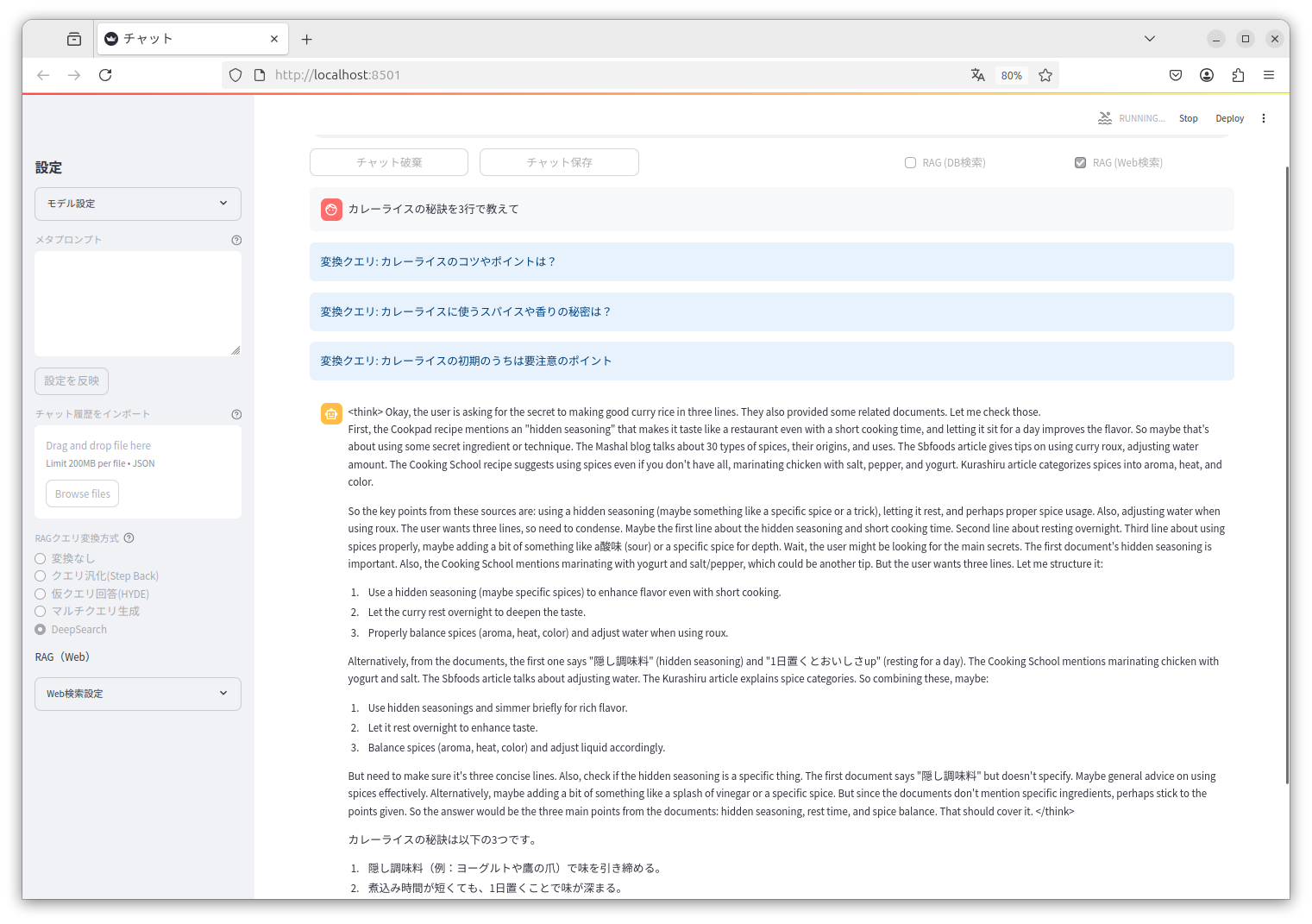
Claude Desktop example.
{
  "mcpServers": {
    "tiny-chat": {
      "command": "/path/to/tiny_chat/.venv/bin/tiny-chat-mcp",
      "env": {
        "DB_CONFIG": "/path/to/tiny_chat/database_config.json"
      }
    }
  }
}tiny-chat-apimodel: target search qdrant collection name (model change in conversation).
curl http://localhost:8080/v1/chat/completions -H "Content-Type: application/json" -d '{"model": "qdrant-collection-name", "messages": [{"role": "user", "content": "カレーライスの材料は?"}]}'default Information Collection Store
| Name | Required | Description | Default |
|---|---|---|---|
| query | Yes | ||
| top_k | No | ||
| score_threshold | No |
Does the description disclose side effects, auth requirements, rate limits, or destructive behavior?
No annotations are provided, so the description must disclose behavioral traits. It reveals nothing about side effects, permissions, return behavior, or limitations. It is essentially empty of behavioral information.
Agents need to know what a tool does to the world before calling it. Descriptions should go beyond structured annotations to explain consequences.
Is the description appropriately sized, front-loaded, and free of redundancy?
While the description is short, it is an under-specified placeholder, not an appropriately sized description. It lacks any useful content and does not earn its place.
Shorter descriptions cost fewer tokens and are easier for agents to parse. Every sentence should earn its place.
Given the tool's complexity, does the description cover enough for an agent to succeed on first attempt?
Given the tool has 3 parameters, no output schema, and no annotations, the description is completely inadequate. It provides no context for how the tool should be used or what it returns.
Complex tools with many parameters or behaviors need more documentation. Simple tools need less. This dimension scales expectations accordingly.
Does the description clarify parameter syntax, constraints, interactions, or defaults beyond what the schema provides?
Schema description coverage is 0%, and the description adds no meaning to the parameters. The parameter names (query, top_k, score_threshold) suggest functionality, but the description fails to explain them or their semantics.
Input schemas describe structure but not intent. Descriptions should explain non-obvious parameter relationships and valid value ranges.
Does the description clearly state what the tool does and how it differs from similar tools?
The description 'default Information Collection Store' does not state what the tool does. It is a vague placeholder that does not specify a verb, resource, or action, and provides no differentiation from any other tool.
Agents choose between tools based on descriptions. A clear purpose with a specific verb and resource helps agents select the right tool.
Does the description explain when to use this tool, when not to, or what alternatives exist?
There is no guidance on when to use this tool or when not to. The description gives no context, prerequisites, or alternative comparisons.
Agents often have multiple tools that could apply. Explicit usage guidance like "use X instead of Y when Z" prevents misuse.
Recent tool additions, removals, and schema changes observed during successful MCP inspections.
v0.1.0search-defaultScored across 1 tool
With only one tool, there is no possibility of selecting between overlapping tools. The vague description does not create disambiguation issues.
With a single tool, there is no pattern to evaluate for consistency. The name 'search-default' is unconventional but does not conflict with other naming styles.
A single tool for a chat-focused server is clearly insufficient. The tool 'search-default' appears trivial and not aligned with the server's apparent domain.
The server provides no chat-related operations such as messaging or channel management. It appears severely incomplete for a chat server, offering only a vague search capability.
Cloud or self-hosted knowledge for AI agents: hybrid search, reranking, GraphRAG, scoped MCP tools.
Agentic search over your Dewey document collections from any MCP-compatible client.
MCP server for searching Airweave collections with natural language queries.