

A
licenseA
qualityC
maintenanceA MCP server that enables human-in-the-loop workflow in AI-assisted development tools by allowing users to run commands, view their output, and provide textual feedback directly to the AI assistant.
1
1,702
MIT

Used as the persistent storage layer that manages the state of tasks between the AI assistant and human operators, storing instructions and responses.
Provides a user interface for humans to view tasks requested by the AI and submit responses, acting as the bridge between human operators and the AI assistant.
Click on "Deploy Server".
Wait a few minutes for the server to deploy. Once ready, it will show a "Started" state.
In the chat, type @ followed by the MCP server name and your instructions, e.g., "@human-mcp use human_eye_tool to check if my coffee machine is turned on"
That's it! The server will respond to your query, and you can continue using it as needed.
Here is a step-by-step guide with screenshots.
MCP server that provides humans as MCP tools
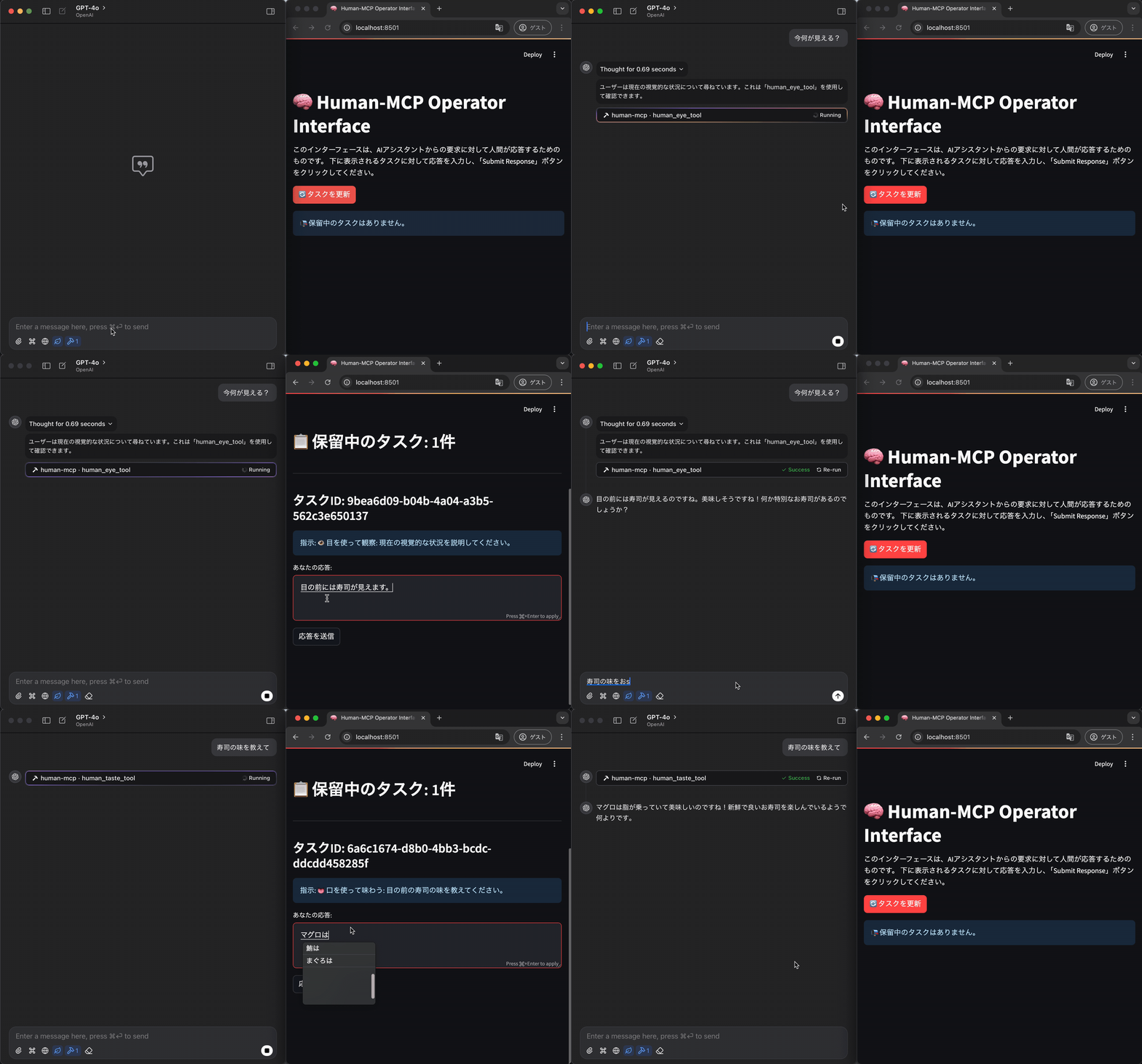
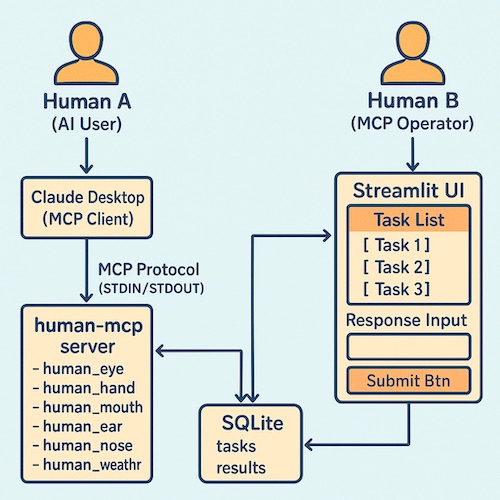
human-mcp is an MCP server that allows AI assistants to leverage human capabilities: it receives requests from AI assistants, displays instructions to humans, and returns responses from humans to the AI assistant.
Key features:
Accepts tool execution requests (via STDIN) from MCP clients
Write the instructions required for execution to a SQLite database
The Streamlit application monitors SQLite, displays instructions to the human, and prompts for responses.
Write the results of human input via Streamlit to SQLite
The MCP server reads the results from SQLite and returns them to the client (via STDOUT) as an MCP response.
Related MCP server: Interactive Feedback MCP
human_eye_tool : A human eye is used to describe a situation or locate something specific.
human_hand_tool : A human using his or her hand to perform a simple physical manipulation.
human_mouth_tool : A human uses his mouth to say the specified words.
human_weather_tool : A human checks and reports the weather in your location.
human_ear_tool : A human uses his ears to hear sounds and describe the situation.
human_nose_tool : A human uses their nose to identify smells.
human_taste_tool : A human uses his mouth to taste food and describe its taste.
Python 3.12 or higher
uv
SQLite3
Clone the repository
git clone https://github.com/yourusername/human-mcp.git
cd human-mcp
Create and activate the virtual environment
uv venv
source .venv/bin/activate
Install dependencies
uv pip install .Install MCP server
task install-mcpConnect to MCP server from Claude
"human-mcp": {
  "command": "uv",
  "args": [
    "run",
    "--with",
    "mcp[cli]",
    "mcp",
    "run",
    "$PATH_TO_REPOSITORY/human_mcp/mcp_server.py"
  ]
}
Launch Streamlit UI in a second terminal
task run-streamlitAccess the Streamlit UI in your browser (usually http://localhost:8501 )
Once you submit your request through your MCP client (e.g. Claude Desktop), the task will appear in the Streamlit UI.
Once you enter your response in the Streamlit UI and click the "Send Response" button, the response will be sent back to the MCP client.
human-mcp/
├── human_mcp/              # メインのPythonパッケージ
│   ├── __init__.py         # パッケージマーカー
│   ├── db_utils.py         # SQLite関連ユーティリティ
│   ├── tools.py            # ツール定義
│   ├── mcp_server.py       # MCPサーバー本体
│   └── streamlit_app.py    # Streamlit UI アプリ
├── human_tasks.db          # SQLite データベースファイル (実行時に生成)
├── pyproject.toml          # プロジェクト設定、依存関係
└── README.md # このファイルMIT
This project is intended for use as a joke. In actual operation, it is necessary to take into account the burden on human operators and response delays.
人間が耳を使って音を聞き、状況を説明します。
例:
- 周囲の環境音の確認
- 特定の音源の識別
- 会話の聞き取り
| Name | Required | Description | Default |
|---|---|---|---|
| instruction | Yes |
Does the description disclose side effects, auth requirements, rate limits, or destructive behavior?
No annotations are provided, so the description carries full burden. It mentions the action ('聞き' - listen) and outcome ('状況を説明します' - describe situations), but lacks critical behavioral details: it doesn't specify what kind of human is involved (e.g., their hearing capabilities, language skills), doesn't mention limitations (e.g., hearing range, background noise interference), and doesn't describe the format or reliability of the description output. For a tool with no annotation coverage, this leaves significant gaps in understanding how it behaves.
Agents need to know what a tool does to the world before calling it. Descriptions should go beyond structured annotations to explain consequences.
Is the description appropriately sized, front-loaded, and free of redundancy?
The description is appropriately sized with a clear opening statement followed by three bullet-point examples. Each sentence earns its place by clarifying the tool's purpose and potential use cases. However, it could be more front-loaded with a more comprehensive purpose statement that includes differentiation from siblings.
Shorter descriptions cost fewer tokens and are easier for agents to parse. Every sentence should earn its place.
Given the tool's complexity, does the description cover enough for an agent to succeed on first attempt?
Given the complexity of a human sensory tool with no annotations, no output schema, and 1 undocumented parameter, the description is incomplete. It doesn't address key contextual elements: what constitutes a valid 'instruction', what the output looks like (despite no output schema), reliability factors, or limitations compared to sibling tools. The examples provide some context but don't compensate for the missing structural information.
Complex tools with many parameters or behaviors need more documentation. Simple tools need less. This dimension scales expectations accordingly.
Does the description clarify parameter syntax, constraints, interactions, or defaults beyond what the schema provides?
The input schema has 1 parameter with 0% description coverage, and the tool description provides no information about the 'instruction' parameter. The examples hint at possible instructions ('周囲の環境音の確認' - check surrounding environmental sounds), but don't explain parameter syntax, format, or constraints. With low schema coverage, the description fails to compensate by adding meaningful parameter semantics.
Input schemas describe structure but not intent. Descriptions should explain non-obvious parameter relationships and valid value ranges.
Does the description clearly state what the tool does and how it differs from similar tools?
The description clearly states what the tool does: '人間が耳を使って音を聞き、状況を説明します' (A human uses ears to listen to sounds and describe situations). It provides a specific verb ('聞き' - listen) and resource ('音' - sounds), though it doesn't explicitly differentiate from sibling tools like human_eye_tool or human_mouth_tool. The examples help clarify the scope but don't establish clear boundaries with siblings.
Agents choose between tools based on descriptions. A clear purpose with a specific verb and resource helps agents select the right tool.
Does the description explain when to use this tool, when not to, or what alternatives exist?
The description provides implied usage through examples ('周囲の環境音の確認', '特定の音源の識別', '会話の聞き取り'), suggesting contexts where this tool is appropriate. However, it doesn't explicitly state when to use this tool versus alternatives like human_eye_tool for visual tasks or human_mouth_tool for speaking. No explicit exclusions or prerequisites are mentioned.
Agents often have multiple tools that could apply. Explicit usage guidance like "use X instead of Y when Z" prevents misuse.
人間が目で見て状況を説明したり、特定のものを探したりします。
| Name | Required | Description | Default |
|---|---|---|---|
| prompt | Yes |
Does the description disclose side effects, auth requirements, rate limits, or destructive behavior?
No annotations are provided, so the description carries the full burden of behavioral disclosure. It mentions the tool 'explains situations or searches for specific things,' but doesn't describe how it operates (e.g., real-time observation, image analysis), what inputs it expects beyond the prompt, or any constraints like rate limits or permissions. This is inadequate for a tool with no annotation coverage.
Agents need to know what a tool does to the world before calling it. Descriptions should go beyond structured annotations to explain consequences.
Is the description appropriately sized, front-loaded, and free of redundancy?
The description is a single, efficient sentence in Japanese that conveys the core idea without unnecessary words. It's appropriately sized and front-loaded, though it could be more structured for clarity. Every sentence earns its place, but it's slightly vague.
Shorter descriptions cost fewer tokens and are easier for agents to parse. Every sentence should earn its place.
Given the tool's complexity, does the description cover enough for an agent to succeed on first attempt?
Given the complexity (a sensory-based tool with no annotations, 0% schema coverage, and no output schema), the description is incomplete. It doesn't explain return values, error conditions, or how the tool interacts with the environment. For a tool that likely involves real-world observation, more context is needed to guide the agent effectively.
Complex tools with many parameters or behaviors need more documentation. Simple tools need less. This dimension scales expectations accordingly.
Does the description clarify parameter syntax, constraints, interactions, or defaults beyond what the schema provides?
Schema description coverage is 0%, and the description doesn't add any meaning about the single parameter 'prompt.' It doesn't explain what the prompt should contain, its format, or examples of usage. With low schema coverage and no parameter details in the description, it fails to compensate for the documentation gap.
Input schemas describe structure but not intent. Descriptions should explain non-obvious parameter relationships and valid value ranges.
Does the description clearly state what the tool does and how it differs from similar tools?
The description states the tool 'explains situations or searches for specific things using human vision,' which provides a general purpose but lacks specificity about what resources it accesses or what exactly it does. It distinguishes from siblings by mentioning 'human eye' but doesn't clearly differentiate functionality from tools like human_hand_tool or human_weather_tool beyond the sensory modality.
Agents choose between tools based on descriptions. A clear purpose with a specific verb and resource helps agents select the right tool.
Does the description explain when to use this tool, when not to, or what alternatives exist?
No explicit guidance on when to use this tool versus alternatives is provided. The description implies usage for visual tasks but doesn't specify contexts, exclusions, or comparisons to sibling tools like human_ear_tool for auditory tasks. This leaves the agent without clear decision-making criteria.
Agents often have multiple tools that could apply. Explicit usage guidance like "use X instead of Y when Z" prevents misuse.
人間が手を使って簡単な物理的操作を実行します。
| Name | Required | Description | Default |
|---|---|---|---|
| instruction | Yes |
Does the description disclose side effects, auth requirements, rate limits, or destructive behavior?
With no annotations provided, the description carries the full burden of behavioral disclosure. It mentions '簡単な物理的操作' (simple physical operations) but doesn't specify what types of operations are supported, any limitations (e.g., precision, strength), safety considerations, or expected outcomes. This leaves significant gaps in understanding how the tool behaves in practice.
Agents need to know what a tool does to the world before calling it. Descriptions should go beyond structured annotations to explain consequences.
Is the description appropriately sized, front-loaded, and free of redundancy?
The description is a single, efficient sentence in Japanese that directly states the tool's purpose without unnecessary elaboration. It's appropriately front-loaded and wastes no words, though it could benefit from more detail given the lack of annotations and schema coverage.
Shorter descriptions cost fewer tokens and are easier for agents to parse. Every sentence should earn its place.
Given the tool's complexity, does the description cover enough for an agent to succeed on first attempt?
Given the tool's complexity (a physical operation tool with no annotations, 0% schema coverage, and no output schema), the description is incomplete. It doesn't explain what the tool returns, how errors are handled, or provide enough detail for an agent to use it effectively in context with sibling tools.
Complex tools with many parameters or behaviors need more documentation. Simple tools need less. This dimension scales expectations accordingly.
Does the description clarify parameter syntax, constraints, interactions, or defaults beyond what the schema provides?
The schema has 1 parameter with 0% description coverage, so the description must compensate. It provides no information about the 'instruction' parameter—what format it should take, examples of valid instructions, or how it influences the tool's behavior. This fails to add meaningful semantics beyond the bare schema.
Input schemas describe structure but not intent. Descriptions should explain non-obvious parameter relationships and valid value ranges.
Does the description clearly state what the tool does and how it differs from similar tools?
The description states the tool's purpose as '人間が手を使って簡単な物理的操作を実行します' (a human performs simple physical operations using hands), which provides a general verb+resource combination. However, it's vague about what specific operations are possible and doesn't distinguish this tool from sibling tools like human_ear_tool or human_eye_tool, which likely involve different sensory modalities.
Agents choose between tools based on descriptions. A clear purpose with a specific verb and resource helps agents select the right tool.
Does the description explain when to use this tool, when not to, or what alternatives exist?
The description offers no guidance on when to use this tool versus alternatives. It doesn't mention any prerequisites, constraints, or scenarios where this tool would be preferred over other human_* tools, leaving the agent with no usage context beyond the basic purpose statement.
Agents often have multiple tools that could apply. Explicit usage guidance like "use X instead of Y when Z" prevents misuse.
人間が口を使って指定された言葉を発話します。
| Name | Required | Description | Default |
|---|---|---|---|
| utterance | Yes |
Does the description disclose side effects, auth requirements, rate limits, or destructive behavior?
No annotations are provided, so the description carries full burden. It states the tool causes speech, implying a behavioral effect, but doesn't disclose any traits like whether it requires human availability, has rate limits, affects other tools, or what happens if the utterance is invalid. For a tool with no annotations, this is a significant gap in behavioral context.
Agents need to know what a tool does to the world before calling it. Descriptions should go beyond structured annotations to explain consequences.
Is the description appropriately sized, front-loaded, and free of redundancy?
The description is a single, efficient sentence in Japanese that directly states the tool's function. It's front-loaded with the core purpose and has no unnecessary words, making it appropriately concise and well-structured.
Shorter descriptions cost fewer tokens and are easier for agents to parse. Every sentence should earn its place.
Given the tool's complexity, does the description cover enough for an agent to succeed on first attempt?
Given the tool's complexity (a human action tool with no annotations, 1 parameter at 0% schema coverage, and no output schema), the description is incomplete. It lacks details on behavioral traits, parameter usage, output expectations, and differentiation from siblings, leaving gaps for effective tool selection and invocation.
Complex tools with many parameters or behaviors need more documentation. Simple tools need less. This dimension scales expectations accordingly.
Does the description clarify parameter syntax, constraints, interactions, or defaults beyond what the schema provides?
The description adds minimal meaning beyond the input schema. It mentions '指定された言葉' (specified words), which aligns with the 'utterance' parameter, but schema description coverage is 0%, so the schema provides no details. The description doesn't elaborate on parameter format, constraints, or examples, offering only basic semantic context.
Input schemas describe structure but not intent. Descriptions should explain non-obvious parameter relationships and valid value ranges.
Does the description clearly state what the tool does and how it differs from similar tools?
The description clearly states the tool's purpose: '人間が口を使って指定された言葉を発話します' (A human uses their mouth to speak specified words). It specifies the verb (speak) and resource (words), but doesn't explicitly differentiate from siblings like human_ear_tool (hearing) or human_hand_tool (manual actions). The purpose is clear but lacks sibling distinction.
Agents choose between tools based on descriptions. A clear purpose with a specific verb and resource helps agents select the right tool.
Does the description explain when to use this tool, when not to, or what alternatives exist?
The description provides no guidance on when to use this tool versus alternatives. It doesn't mention any context, prerequisites, or exclusions, nor does it reference sibling tools. Usage is implied (when speech is needed), but there's no explicit guidance.
Agents often have multiple tools that could apply. Explicit usage guidance like "use X instead of Y when Z" prevents misuse.
人間が鼻を使って匂いを確認します。
例:
- 食べ物の新鮮さの確認
- ガス漏れなどの危険な匂いの検知
- 香りの評価
| Name | Required | Description | Default |
|---|---|---|---|
| instruction | Yes |
Does the description disclose side effects, auth requirements, rate limits, or destructive behavior?
No annotations are provided, so the description carries the full burden of behavioral disclosure. It mentions the action (checking smells) but fails to describe key traits: it doesn't specify if this is a read-only or destructive operation, what permissions or prerequisites are needed (e.g., human availability), potential limitations (e.g., accuracy, time constraints), or the expected output format. For a tool with no annotation coverage, this is a significant gap in transparency.
Agents need to know what a tool does to the world before calling it. Descriptions should go beyond structured annotations to explain consequences.
Is the description appropriately sized, front-loaded, and free of redundancy?
The description is appropriately sized and front-loaded, starting with a clear purpose statement followed by bullet-point examples. Each sentence earns its place by illustrating use cases, though it could be slightly more structured (e.g., separating guidelines from examples). Overall, it's efficient with minimal waste.
Shorter descriptions cost fewer tokens and are easier for agents to parse. Every sentence should earn its place.
Given the tool's complexity, does the description cover enough for an agent to succeed on first attempt?
Given the tool's complexity (involving human sensory input), lack of annotations, no output schema, and low parameter coverage, the description is incomplete. It covers basic purpose and examples but misses critical details: behavioral traits, parameter explanations, and output expectations. For a tool that relies on human interaction, more context is needed to ensure proper agent usage.
Complex tools with many parameters or behaviors need more documentation. Simple tools need less. This dimension scales expectations accordingly.
Does the description clarify parameter syntax, constraints, interactions, or defaults beyond what the schema provides?
The input schema has 1 parameter with 0% description coverage, and the tool description does not mention or explain the 'instruction' parameter at all. While the examples hint at possible uses, they don't add semantic meaning beyond what's implied, failing to compensate for the lack of schema documentation. This leaves the parameter's purpose and format unclear.
Input schemas describe structure but not intent. Descriptions should explain non-obvious parameter relationships and valid value ranges.
Does the description clearly state what the tool does and how it differs from similar tools?
The description clearly states the tool's purpose: '人間が鼻を使って匂いを確認します' (a human uses their nose to check smells). It specifies the verb (check/confirm smells) and resource (human nose), making the function understandable. However, it doesn't explicitly differentiate from sibling tools like human_taste_tool or human_mouth_tool, which might also involve sensory evaluation, so it falls short of a perfect score.
Agents choose between tools based on descriptions. A clear purpose with a specific verb and resource helps agents select the right tool.
Does the description explain when to use this tool, when not to, or what alternatives exist?
The description provides implied usage through examples (e.g., checking food freshness, detecting gas leaks, evaluating scents), which suggests contexts for application. However, it lacks explicit guidance on when to use this tool versus alternatives (e.g., human_taste_tool for taste-related tasks) or any exclusions, leaving room for ambiguity in tool selection.
Agents often have multiple tools that could apply. Explicit usage guidance like "use X instead of Y when Z" prevents misuse.
人間が口を使って食べ物を味わい、その味を説明します。
例:
- 料理の味の評価
- 食材の新鮮さの確認
- 味の分析(甘味、酸味、塩味、苦味、うま味)
| Name | Required | Description | Default |
|---|---|---|---|
| instruction | Yes |
Does the description disclose side effects, auth requirements, rate limits, or destructive behavior?
No annotations are provided, so the description carries the full burden. It mentions the action ('taste and describe') but fails to disclose key behavioral traits like whether this is a simulation or real-world interaction, time requirements, accuracy limitations, or any prerequisites (e.g., food availability). This leaves significant gaps in understanding how the tool behaves beyond its basic function.
Agents need to know what a tool does to the world before calling it. Descriptions should go beyond structured annotations to explain consequences.
Is the description appropriately sized, front-loaded, and free of redundancy?
The description is appropriately sized and front-loaded: the first sentence clearly states the purpose, followed by concise examples that illustrate usage without redundancy. Every sentence adds value by clarifying application scenarios, making it efficient and well-structured for quick comprehension.
Shorter descriptions cost fewer tokens and are easier for agents to parse. Every sentence should earn its place.
Given the tool's complexity, does the description cover enough for an agent to succeed on first attempt?
Given the complexity of a human sensory tool with no annotations, no output schema, and minimal parameter documentation, the description is incomplete. It covers the basic purpose and examples but lacks details on behavioral aspects (e.g., how results are returned, limitations), parameter specifics, and differentiation from siblings, making it inadequate for full agent understanding without additional context.
Complex tools with many parameters or behaviors need more documentation. Simple tools need less. This dimension scales expectations accordingly.
Does the description clarify parameter syntax, constraints, interactions, or defaults beyond what the schema provides?
The input schema has 1 parameter with 0% description coverage, so the description must compensate. It adds meaning by implying the 'instruction' parameter should specify what to taste (e.g., food items) and what aspects to describe (e.g., flavors), as shown in the examples. However, it doesn't detail the format or constraints of the instruction, leaving some ambiguity, which aligns with the baseline for moderate schema coverage.
Input schemas describe structure but not intent. Descriptions should explain non-obvious parameter relationships and valid value ranges.
Does the description clearly state what the tool does and how it differs from similar tools?
The description clearly states the tool's purpose: humans use their mouth to taste food and describe its flavor. It specifies the action ('taste and describe') and resource ('food'), making it distinct from generic tools. However, it doesn't explicitly differentiate from sibling tools like 'human_mouth_tool', which might have overlapping functions, leaving room for ambiguity.
Agents choose between tools based on descriptions. A clear purpose with a specific verb and resource helps agents select the right tool.
Does the description explain when to use this tool, when not to, or what alternatives exist?
The description provides implied usage through examples (e.g., evaluating dish taste, checking ingredient freshness, analyzing flavors), suggesting when to use it. However, it lacks explicit guidance on when not to use it or alternatives, such as distinguishing from 'human_nose_tool' for aroma-related tasks or 'human_mouth_tool' for other oral functions, leaving the agent to infer context.
Agents often have multiple tools that could apply. Explicit usage guidance like "use X instead of Y when Z" prevents misuse.
人間が現在地の天気を確認して報告します。
| Name | Required | Description | Default |
|---|---|---|---|
No parameters | |||
Does the description disclose side effects, auth requirements, rate limits, or destructive behavior?
No annotations are provided, so the description carries the full burden of behavioral disclosure. It implies a human-in-the-loop process (checking and reporting), but doesn't specify critical traits like latency (how long it takes for the human to respond), reliability, or any constraints (e.g., availability during certain hours). For a tool with zero annotation coverage, this leaves significant gaps in understanding its behavior.
Agents need to know what a tool does to the world before calling it. Descriptions should go beyond structured annotations to explain consequences.
Is the description appropriately sized, front-loaded, and free of redundancy?
The description is a single, efficient sentence in Japanese that directly states the tool's function without any wasted words. It's front-loaded with the core purpose, making it easy for an agent to parse quickly.
Shorter descriptions cost fewer tokens and are easier for agents to parse. Every sentence should earn its place.
Given the tool's complexity, does the description cover enough for an agent to succeed on first attempt?
Given the tool's complexity (human-involved weather checking) and lack of annotations or output schema, the description is minimally adequate. It covers the basic purpose but misses details on behavioral traits, output format, or usage context. With no structured fields to rely on, the description should do more to compensate, but it only meets the minimum viable threshold.
Complex tools with many parameters or behaviors need more documentation. Simple tools need less. This dimension scales expectations accordingly.
Does the description clarify parameter syntax, constraints, interactions, or defaults beyond what the schema provides?
The input schema has 0 parameters with 100% coverage, so no parameters need documentation. The description doesn't add parameter details, which is appropriate here. A baseline of 4 is applied as it effectively handles the lack of parameters without introducing confusion.
Input schemas describe structure but not intent. Descriptions should explain non-obvious parameter relationships and valid value ranges.
Does the description clearly state what the tool does and how it differs from similar tools?
The description clearly states the tool's purpose: '人間が現在地の天気を確認して報告します' (A human checks and reports the weather at the current location). It specifies the verb (check and report), resource (weather), and scope (current location). However, it doesn't explicitly differentiate from sibling tools like 'human_eye_tool' or 'human_nose_tool', which might have overlapping sensory functions, so it doesn't reach the highest score.
Agents choose between tools based on descriptions. A clear purpose with a specific verb and resource helps agents select the right tool.
Does the description explain when to use this tool, when not to, or what alternatives exist?
The description provides no guidance on when to use this tool versus alternatives. It doesn't mention any prerequisites, exclusions, or context for usage compared to sibling tools. The agent must infer usage based on the purpose alone, which is insufficient for optimal tool selection.
Agents often have multiple tools that could apply. Explicit usage guidance like "use X instead of Y when Z" prevents misuse.
Recent tool additions, removals, and schema changes observed during successful MCP inspections.
human_ear_toolhuman_eye_toolhuman_hand_toolhuman_mouth_toolhuman_nose_toolhuman_taste_toolhuman_weather_toolScored across 7 tools
Each tool corresponds to a distinct human sensory organ or function (ear, eye, hand, mouth, nose, taste, weather), with no overlap in purpose. The descriptions clearly differentiate their roles, such as hearing sounds, seeing visuals, physical manipulation, speaking, smelling, tasting, and weather reporting, making misselection unlikely.
All tool names follow a consistent 'human_[organ/function]_tool' pattern using snake_case. This uniform naming convention makes the tools predictable and easy to identify, with no deviations or mixed styles across the set.
With 7 tools, the count is reasonable for covering human sensory and basic environmental interactions. It's slightly lean for a broad 'human' scope but well-scoped for sensory functions, with each tool earning its place without feeling excessive or thin.
The tool set provides good coverage for human sensory inputs (sight, sound, smell, taste, touch) and basic actions (speaking, weather checking). Minor gaps exist, such as no tools for cognitive functions like thinking or memory, but agents can work around this for the stated sensory domain.
MCP server that lets your AI assistant build and deploy apps, hosting each one at a live URL.
MCP server that lets AI assistants use all OneSchema features exposed via the public API.
MCP server for building and testing AI agents with multi-model experimentation and insights.
MCP server for AI dialogue using various LLM models via AceDataCloud