Glama
Arbitrum MCP Server

Arbitrum MCP Server

Arbitrum MCP Server

CI License: MIT Docker TypeScript

A Model Context Protocol (MCP) server for interfacing with Arbitrum Nitro nodes and chains in natural language. Monitor chain health, batch posting, assertions, and gas prices across all Arbitrum networks including core chains (Arbitrum One, Nova) and Orbit chains.

Demo
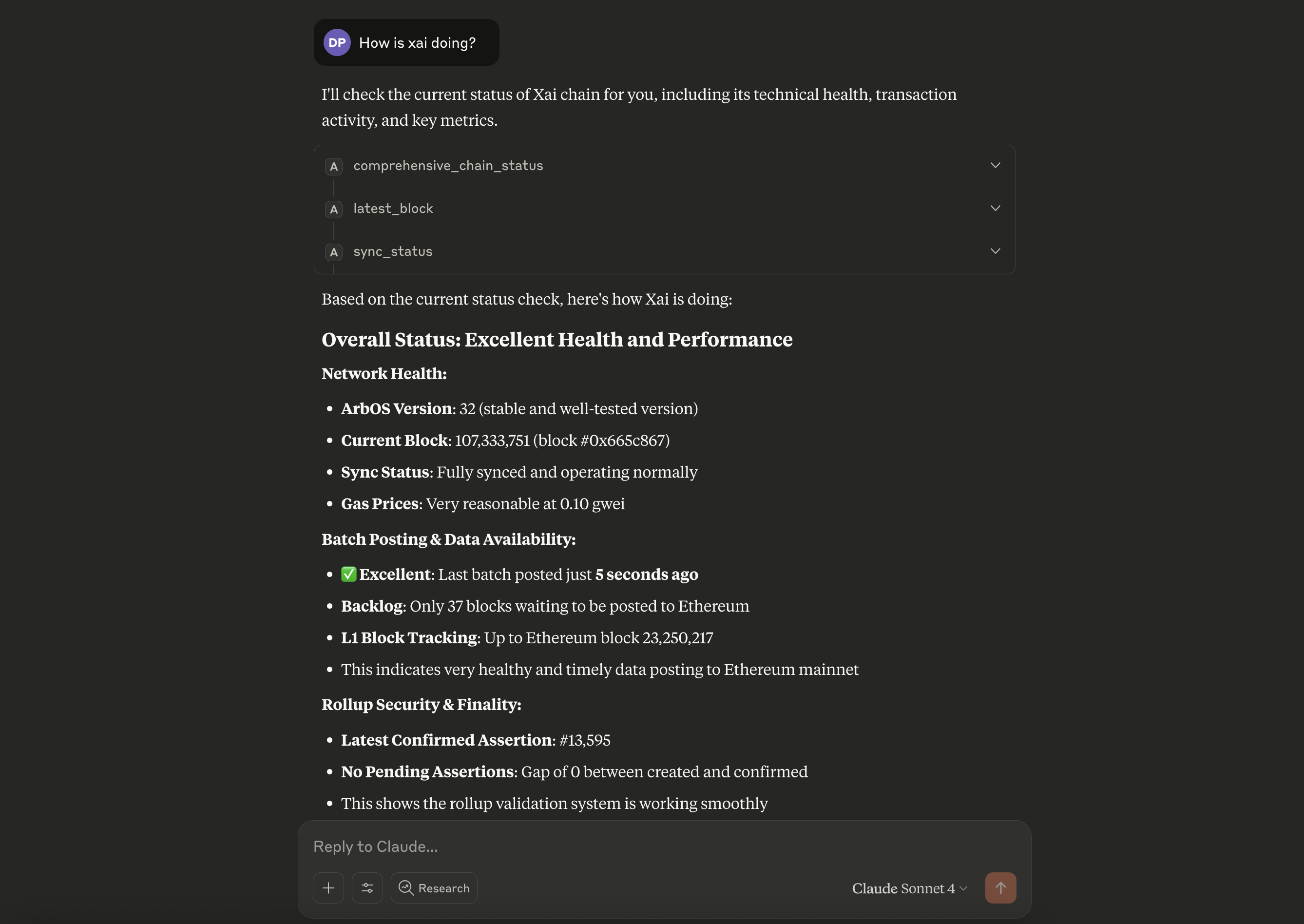
Arbitrum MCP Server in Action

Monitor Arbitrum chains with natural language queries through any MCP-compatible client

Related MCP server: EVM MCP Server

Features

Core Monitoring Tools

  • Comprehensive Chain Status - Complete health overview for any Arbitrum chain

  • Batch Posting Monitoring - Track sequencer batch delivery and backlog

  • Assertion Monitoring - Monitor NodeCreated vs NodeConfirmed events

  • Gas Price Monitoring - Track current gas prices and detect spikes

  • ArbOS Version Detection - Get current ArbOS version for any chain

Chain Support

  • Core Arbitrum Chains - Arbitrum One, Arbitrum Nova

  • Orbit Chains - All public Orbit chains (Xai, Superposition, etc.)

  • Auto-Resolution - Contract addresses resolved automatically from chain names

Arbitrum Node APIs

  • Health checks and sync status

  • Transaction tracing (arbtrace_*)

  • Debug and validation APIs

  • Maintenance operations

  • Timeboost express lanes

Usage Examples

"What is the current status of Xai?"

comprehensive_chain_status --chainName "Xai"

"Are batches being posted for Arbitrum One?"

batch_posting_status --chainName "Arbitrum One"

"Check gas prices on Nova"

gas_status --chainName "Nova"

Available Tools

Monitoring Tools

  • comprehensive_chain_status - Complete chain health overview

  • batch_posting_status - Batch posting monitoring

  • assertion_status - Assertion creation/confirmation tracking

  • gas_status - Current gas price information

Chain Information

  • list_chains - Show all available Arbitrum chains

  • search_chains - Find chains by name or ID

  • chain_info - Get detailed chain information

  • arbos_version - Get ArbOS version for any chain

Node Operations

  • node_health - Check node health status

  • sync_status - Get synchronization status

  • latest_block - Get latest block information

Account Operations

  • get_balance / get_balance_ether - Check account balances

  • get_transaction / get_transaction_receipt - Transaction details

  • is_contract - Check if address is a contract

Key Benefits

  • Comprehensive Monitoring - Complete chain health overview in one query

  • Multi-Chain Support - Consistent interface across all Arbitrum chains

  • Natural Language Interface - Query blockchain data using plain English

  • Real-Time Data - Live blockchain data with automatic chain discovery

  • Troubleshooting Ready - Quick health checks for issue diagnosis

  • Gas & Performance Tracking - Monitor network congestion and costs

Setup & Installation

The easiest way to run the MCP server with maximum client compatibility:

# Run directly from Docker Hub (no build required!)
docker run -i --rm dewanshparashar/arbitrum-mcp

Direct Node.js

# Install dependencies
npm install

# Build
npm run build

# Run
npm start

MCP Client Configuration

Claude Desktop

Add to your Claude Desktop configuration:

{
  "mcpServers": {
    "arbitrum-mcp": {
      "command": "docker",
      "args": ["run", "-i", "--rm", "dewanshparashar/arbitrum-mcp"]
    }
  }
}

Cline/Claude Code

{
  "mcpServers": {
    "arbitrum-mcp": {
      "command": "docker",
      "args": ["run", "-i", "--rm", "dewanshparashar/arbitrum-mcp"]
    }
  }
}

Development

# Install dependencies
npm install

# Build
npm run build

# Run tests
npm test

# Development mode with watch
npm run dev

Docker

See DOCKER.md for detailed Docker setup instructions.

⚠️ Important: When using Docker containers to connect to local testnodes, use http://host.docker.internal:8547 instead of http://127.0.0.1:8547 for the RPC URL.

Technology Stack

  • TypeScript - Type-safe development

  • Viem - Ethereum client for blockchain interactions

  • @arbitrum/sdk - Official Arbitrum SDK for core chain data

  • MCP SDK - Model Context Protocol implementation

  • Docker - Containerized deployment

Contributing

  1. Fork the repository

  2. Create a feature branch

  3. Add tests for new functionality

  4. Submit a pull request

License

MIT License - see LICENSE file for details.

Available Tools

38 tools
arb_check_publisher_healthA

Check the health status of the transaction publisher/sequencer (requires admin API)

Inputs: rpcUrl, chainName.

arbdebug_validateMessageNumberC

Validate a specific message number (requires debug API)

Inputs: msgNum (required), rpcUrl, chainName, full, +1 more.

arbdebug_validationInputsAtC

Get validation inputs at a specific message (requires debug API)

Inputs: msgNum (required), rpcUrl, chainName, target.

arb_get_raw_block_metadataC

Retrieve raw block metadata for specified block ranges (requires admin API)

Inputs: fromBlock (required), rpcUrl, chainName, toBlock.

arb_latest_validatedC

Get the latest validated global state information (requires admin API)

Inputs: rpcUrl, chainName.

arbos_versionA

Get the ArbOS version number for any Arbitrum chain. Use this for questions like 'what ArbOS version is Xai running?', 'ArbOS version of Arbitrum One', 'what version of ArbOS', or 'check ArbOS version'. Supports chain names like 'Xai', 'Arbitrum One', 'Nova', etc.

Inputs: rpcUrl, chainName.

arbtrace_blockB

Get trace information for all transactions in a block (requires trace API)

Inputs: blockNumOrHash (required), rpcUrl, chainName.

arbtrace_callB

Trace individual calls with specified trace types (requires trace API)

Inputs: callArgs (required), rpcUrl, chainName, traceTypes, +1 more.

arbtrace_callManyB

Trace multiple calls in batch for efficiency (requires trace API)

Inputs: calls (required), rpcUrl, chainName, blockNumOrHash.

arbtrace_filterC

Filter traces based on specified criteria (requires trace API)

Inputs: filter (required), rpcUrl, chainName.

arbtrace_getC

Get specific trace data at a given path within a transaction (requires trace API)

Inputs: txHash (required), rpcUrl, chainName, path.

arbtrace_replayBlockTransactionsB

Replay and trace all transactions in a specific block (requires trace API)

Inputs: blockNumOrHash (required), rpcUrl, chainName, traceTypes.

arbtrace_replayTransactionC

Replay and trace a specific transaction (requires trace API)

Inputs: txHash (required), rpcUrl, chainName, traceTypes.

arbtrace_transactionB

Get trace information for a specific transaction (requires trace API)

Inputs: txHash (required), rpcUrl, chainName.

assertion_statusB

Monitor assertion creation and confirmation activity. Tracks NodeCreated vs NodeConfirmed events to understand rollup validation status. Critical for PM and support teams to monitor chain security and finality.

Inputs: parentRpcUrl (required), rollupAddress (required), rpcUrl, chainName.

auctioneer_submitAuctionResolutionTransactionC

Submit auction resolution transactions for express lane functionality (requires auctioneer API)

Inputs: transaction (required), rpcUrl, chainName.

batch_posting_statusB

Monitor batch posting activity. Tracks when batches were last posted to the sequencer inbox and current backlog size. Essential for PM and support teams to understand chain data availability status.

Inputs: parentRpcUrl (required), sequencerInboxAddress (required), bridgeAddress (required), rpcUrl, +1 more.

chain_infoA

Get comprehensive chain information including rollup contract address, bridge addresses, chain ID, RPC URL, explorer URL, native token details, and all bridge contract addresses. Use this for questions about rollup addresses, bridge contracts, chain IDs, or any chain-specific data for Arbitrum chains like Xai, Arbitrum One, etc.

Inputs: chainName (required).

clear_rpc_urlB

Clear the default RPC URL

Inputs: no named parameters.

comprehensive_chain_statusA

Get comprehensive chain status including ArbOS version, batch posting, assertion monitoring, and gas prices. Perfect for PM and support teams asking 'what is the current status of XAI?' or similar comprehensive status checks. Auto-resolves contract addresses from chain name when possible.

Inputs: rpcUrl, chainName, parentRpcUrl, sequencerInboxAddress, +2 more.

gas_statusB

Monitor current gas prices on the chain. Essential for identifying gas price spikes and understanding transaction costs. Useful for PM and support teams to monitor network congestion.

Inputs: rpcUrl, chainName.

get_balanceC

Get balance of an address in wei

Inputs: address (required), rpcUrl.

get_balance_etherC

Get balance of an address in ETH

Inputs: address (required), rpcUrl.

get_rollup_addressA

Get the rollup contract address for a specific Arbitrum chain. Use this for direct rollup address queries like 'what's the rollup address of Xai?', 'Xai rollup contract', or 'rollup address for Arbitrum One'.

Inputs: chainName (required).

get_rpc_urlB

Get the current default RPC URL

Inputs: no named parameters.

get_transactionC

Get transaction details by hash

Inputs: txHash (required), rpcUrl.

get_transaction_receiptC

Get transaction receipt by hash

Inputs: txHash (required), rpcUrl.

is_contractC

Check if an address is a contract

Inputs: address (required), rpcUrl.

latest_blockC

Get the latest block information

Inputs: rpcUrl.

list_chainsA

List all available Arbitrum Orbit chains and their names. Use this to see what chains are available for querying.

Inputs: no named parameters.

maintenance_statusB

Check maintenance status - seconds since last maintenance (requires admin API)

Inputs: rpcUrl, chainName.

maintenance_triggerC

Manually trigger maintenance operations (requires admin API)

Inputs: rpcUrl, chainName.

node_healthA

Check Arbitrum node health status (requires admin API access - may not work with public RPCs)

Inputs: rpcUrl, chainName.

node_peersA

Get connected peers information (requires admin API access - will not work with public RPCs)

Inputs: rpcUrl.

search_chainsA

Search for Arbitrum chains by name, chain ID, or partial name match. Perfect for finding chains when you have incomplete information.

Inputs: query (required).

set_rpc_urlC

Set the default RPC URL for subsequent requests

Inputs: rpcUrl (required).

sync_statusA

Get node synchronization status (may fall back to current block number if sync API unavailable)

Inputs: rpcUrl.

timeboost_sendExpressLaneTransactionB

Submit priority transactions through express lanes for faster processing (requires timeboost API)

Inputs: submission (required), rpcUrl, chainName.

Tool Schema Changelog

Recent tool additions, removals, and schema changes observed during successful MCP inspections.

Loading tool schema changelog…

    TDQS

    B3.1/5.0

    Scored across 38 tools

    Disambiguation3/5

    The tools are organized into clear functional groups (e.g., arbdebug_, arbtrace_, chain management, RPC utilities), which helps with differentiation, but there is significant overlap within groups, such as multiple arbtrace_ tools for tracing transactions and blocks with subtle distinctions that could confuse agents. Some tools like 'assertion_status' and 'batch_posting_status' have similar monitoring purposes, adding to potential ambiguity.

    Naming Consistency4/5

    Most tools follow a consistent snake_case naming convention with descriptive prefixes (e.g., arb_, arbtrace_, get_, set_), but there are minor deviations like 'arbos_version' lacking an underscore and mixed verb styles (e.g., 'clear_rpc_url' vs. 'set_rpc_url' vs. 'get_rpc_url' are consistent, but others like 'timeboost_sendExpressLaneTransaction' use camelCase inconsistently). Overall, the naming is predictable but not perfectly uniform.

    Tool Count2/5

    With 38 tools, the count is excessive for a single server, likely overwhelming for agents and leading to confusion. While the domain (Arbitrum chain management and debugging) is broad, the tools could be consolidated (e.g., multiple tracing tools) to reduce redundancy. This high number feels heavy and unoptimized for typical agent workflows.

    Completeness5/5

    The tool set provides comprehensive coverage for the Arbitrum domain, including chain information, debugging, tracing, monitoring, RPC management, and transaction handling. It supports CRUD-like operations (e.g., get/set RPC URLs, retrieve balances/transactions) and lifecycle actions (e.g., trigger maintenance, submit transactions), with no obvious gaps for the stated purpose of managing and querying Arbitrum chains.

    Maintenance

    ActivityInactive
    ResponsivenessNo recent community issues

    Related MCP Connectors

    Related MCP Servers

    • A
      license
      Not graded
      quality
      D
      maintenance
      Enables AI assistants to monitor and analyze blockchain activity through Tenderly's infrastructure and direct EVM RPC calls. Provides comprehensive alert management, transaction simulation, and multi-chain querying capabilities for blockchain debugging and monitoring.
      MIT
    • A
      license
      A
      quality
      C
      maintenance
      Provides comprehensive access to Ethereum Virtual Machine (EVM) JSON-RPC methods for querying blockchain data, executing smart contract calls, and interacting with any EVM-compatible network including Ethereum, Polygon, Arbitrum, and more. Enables users to check balances, analyze transactions, estimate gas, retrieve logs, and perform blockchain operations through natural language.
      19
      8 npm
      3
      MIT
    • F
      license
      Not graded
      quality
      D
      maintenance
      Provides tools for querying onchain data across 12+ blockchain networks, including token balances, transaction analysis, and smart contract security auditing. It enables users to interact with multiple EVM-compatible chains and perform deep contract evaluations through natural language interfaces.
      1
      -
    • A
      license
      Not graded
      quality
      D
      maintenance
      Enables AI assistants to query on-chain data across EVM chains like Base, Optimism, Avalanche, Celo, and Arbitrum, including balances, transactions, gas, and smart contract interactions.
      48 npm
      MIT