

A
licenseB
qualityD
maintenanceCollects user feedback with text and image support through an Electron app, allowing AI tools to gather and process user input with customizable prompts and multiple response options.
1
9 npm
2
Apache 2.0

Click on "Deploy Server".
Wait a few minutes for the server to deploy. Once ready, it will show a "Started" state.
In the chat, type @ followed by the MCP server name and your instructions, e.g., "@InputMCP draw a quick sketch of a cat for me"
That's it! The server will respond to your query, and you can continue using it as needed.
Here is a step-by-step guide with screenshots.
MCP server for collecting contextual user input.
The server exposes a single collect_input tool that can collect:
Text input - simple text or JSON from the user
Image input - freeform drawing on a canvas
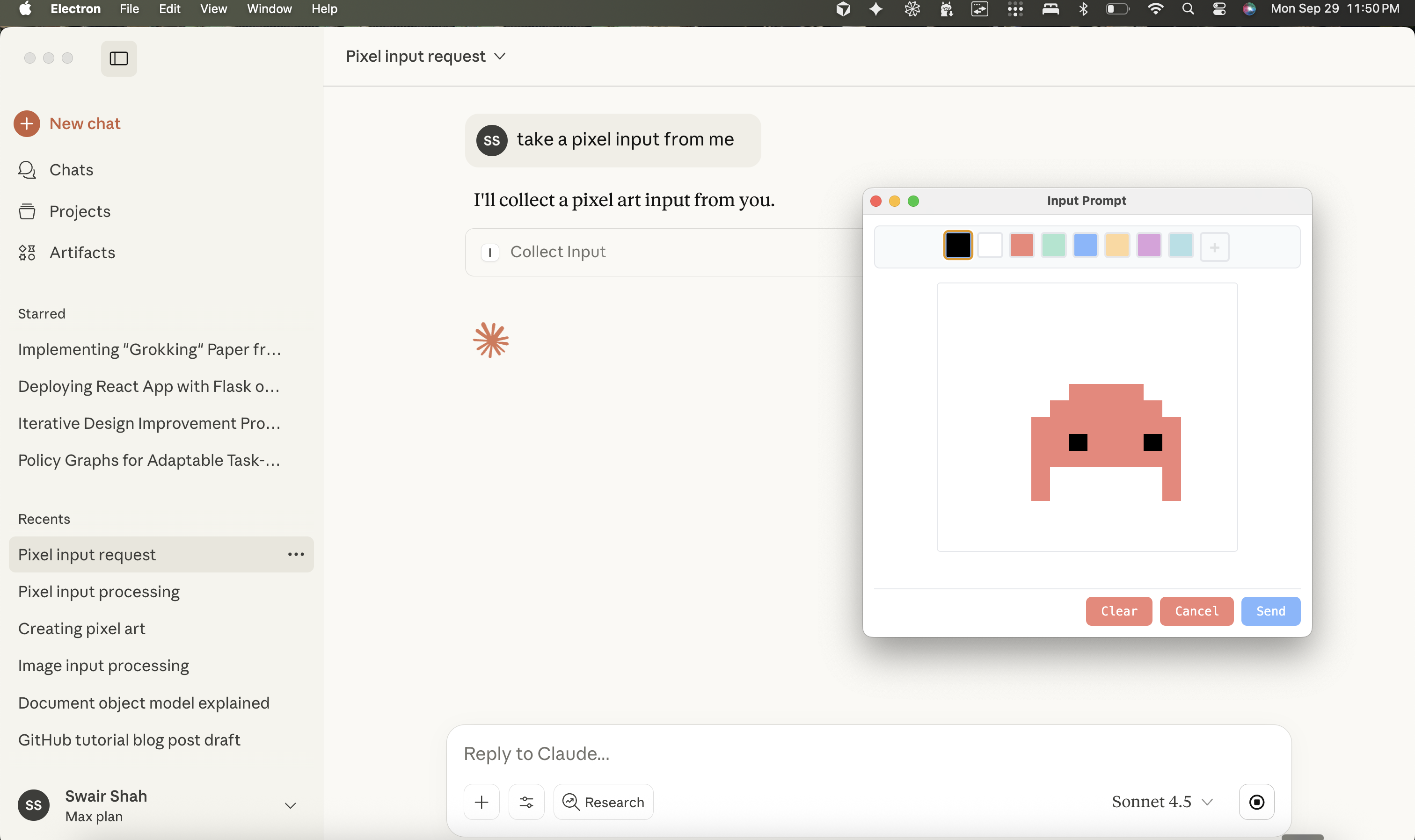
Pixel art - grid-based pixel art editor with color palette
When called, it launches an Electron window where the user can provide their input, then returns the result (as a file path for images) back to the MCP client.
npm install
npm run build
npx @modelcontextprotocol/inspector node dist/src/server.js
Note: This package is also published on npm as @swairshah/input-mcp and can be used directly with npx @swairshah/input-mcp.
This opens a web interface where you can test the tool. Try calling collect_input with different parameters:
{"kind": "text"} - opens a text input window
{"kind": "pixelart", "gridWidth": 16, "gridHeight": 16} - opens a pixel art editor
{"kind": "image", "initialImage": "/path/to/image.png"} - opens an image editor with a starting image
Related MCP server: AskMeMCP
bun install first. obviously.
Build the UI bundle (creates ui/dist/ assets used by Electron):
npm run build:ui
# or
bun run build:ui
Launch the Electron prompt helper directly (useful for smoke tests):
bun run createThis spawns the image/text prompt window with the default text spec.
Test script:
bunx tsx scripts/test-input.ts imagenpm run build
npx @modelcontextprotocol/inspector node dist/src/server.jsThe inspector provides a web UI to test the tool. Images are saved to ~/.cache/input-mcp/images/ and the tool returns the file path.
Add to your Claude config (~/Library/Application Support/Claude/claude_desktop_config.json):
Using npm package (recommended):
{
  "mcpServers": {
    "input-mcp": {
      "command": "npx",
      "args": ["-y", "@swairshah/input-mcp"]
    }
  }
}
Using local clone:
{
  "mcpServers": {
    "input-mcp": {
      "command": "node",
      "args": ["/absolute/path/to/input-mcp/dist/src/server.js"]
    }
  }
}
Then ask Claude things like:
"Let me draw something for you" (opens drawing canvas)
"I want to create pixel art" (opens pixel art editor)
shared/       → Zod schemas, shared types, and error helpers
ui/           → Electron renderer (HTML/CSS/JS) and prompt modules
create.ts     → Launches the Electron window and normalises specs
server.ts     → MCP server definition for the `collect_input` tool
scripts/ → Ad-hoc utilities (`test-input.ts` for manual runs)Modify the renderer in ui/renderer.ts and module files under ui/modules/.
Add new input kinds by extending shared/types.ts and branching inside mount*Module helpers.
When iterating on the UI, run bun run create (or npx tsx scripts/test-input.ts image) to open a live window with the current spec.
MIT
get image, text, or pixel art input from user. This is used to get contextual input from the user of different kinds.
| Name | Required | Description | Default |
|---|---|---|---|
| kind | No | ||
| initialImage | No | Initial image to load for editing (file path) | |
| gridWidth | No | Grid width for pixel art (default: 16) | |
| gridHeight | No | Grid height for pixel art (default: 16) | |
| width | No | Canvas width for image mode (default: 512) | |
| height | No | Canvas height for image mode (default: 512) | |
| message | No | Custom message to show to the user |
Does the description disclose side effects, auth requirements, rate limits, or destructive behavior?
No annotations are provided, so the description must fully disclose behavioral traits. It mentions 'get input from user' which implies interactive user prompting, but doesn't specify if this blocks execution, requires user authentication, has rate limits, or what happens on cancellation. The description is minimal and leaves key behavioral aspects undefined.
Agents need to know what a tool does to the world before calling it. Descriptions should go beyond structured annotations to explain consequences.
Is the description appropriately sized, front-loaded, and free of redundancy?
The description is two sentences, but the second sentence is redundant ('This is used to get contextual input from the user of different kinds') and adds no value. It could be more front-loaded and eliminate waste. However, it's not overly verbose, just inefficient.
Shorter descriptions cost fewer tokens and are easier for agents to parse. Every sentence should earn its place.
Given the tool's complexity, does the description cover enough for an agent to succeed on first attempt?
Given no annotations, no output schema, and 7 parameters with moderate complexity (including enums and defaults), the description is incomplete. It doesn't explain the return values, error conditions, or how parameters interact (e.g., 'gridWidth' only relevant for 'pixelart'). For a user-input tool with multiple modes, more context is needed.
Complex tools with many parameters or behaviors need more documentation. Simple tools need less. This dimension scales expectations accordingly.
Does the description clarify parameter syntax, constraints, interactions, or defaults beyond what the schema provides?
Schema description coverage is high at 86%, so the baseline is 3. The description adds no parameter-specific information beyond what's in the schema (e.g., it doesn't explain how 'kind' affects other parameters or the interaction flow). It mentions 'different kinds' which loosely relates to the 'kind' enum but provides no additional semantic context.
Input schemas describe structure but not intent. Descriptions should explain non-obvious parameter relationships and valid value ranges.
Does the description clearly state what the tool does and how it differs from similar tools?
The description states the tool 'get image, text, or pixel art input from user' which specifies the verb ('get') and resources ('image, text, or pixel art input'), but it's vague about the mechanism (e.g., UI prompt, file upload). The second sentence 'This is used to get contextual input from the user of different kinds' is redundant and adds no clarity. It doesn't distinguish from siblings, but none exist.
Agents choose between tools based on descriptions. A clear purpose with a specific verb and resource helps agents select the right tool.
Does the description explain when to use this tool, when not to, or what alternatives exist?
The description provides no guidance on when to use this tool versus alternatives, prerequisites, or constraints. It merely restates the purpose without indicating appropriate contexts or exclusions. Since there are no sibling tools, this is less critical, but still lacks any usage direction.
Agents often have multiple tools that could apply. Explicit usage guidance like "use X instead of Y when Z" prevents misuse.
Recent tool additions, removals, and schema changes observed during successful MCP inspections.
v1.0.0collect_input2 fields changedInput schema / $schemaAdded value: +"http://json-schema.org/draft-07/schema#"Input schema / additionalPropertiesAdded value: +falsecollect_inputScored across 1 tool
With only one tool, there is no possibility of ambiguity or overlap between tools. The tool's purpose is clearly defined and distinct by default.
A single tool inherently has consistent naming, as there are no other tools to compare it against. The name 'collect_input' follows a clear verb_noun pattern.
One tool is too few for most server purposes, as it severely limits functionality and scope. It feels thin and incomplete for handling user input in a robust way.
The server's purpose appears to be collecting user input, but with only one tool, there are significant gaps. For example, no tools for validating, processing, or managing different input types, making the surface severely incomplete.
Human-input bridge for AI agents with voice-first answer links, MCP tools, and HTTP APIs.
OCR, transcription, file extraction, and image generation for AI agents via MCP.
Use AI models for chat, image, and video generation from Claude Code and other MCP hosts.
Create forms, read submissions, and build invitations from Claude, ChatGPT, or any MCP client.